CertiHound
Linux 原生的 BloodHound CE AD CS 收集器



功能 •
安装 •
快速开始 •
用法 •
BloodHound •
API
**CertiHound** 通过 LDAP 枚举 Active Directory Certificate Services (AD CS),并导出与 BloodHound CE 兼容的数据以进行攻击路径可视化。识别 ESC1-ESC17 漏洞,并将基于证书的攻击路径可视化。
## 截图
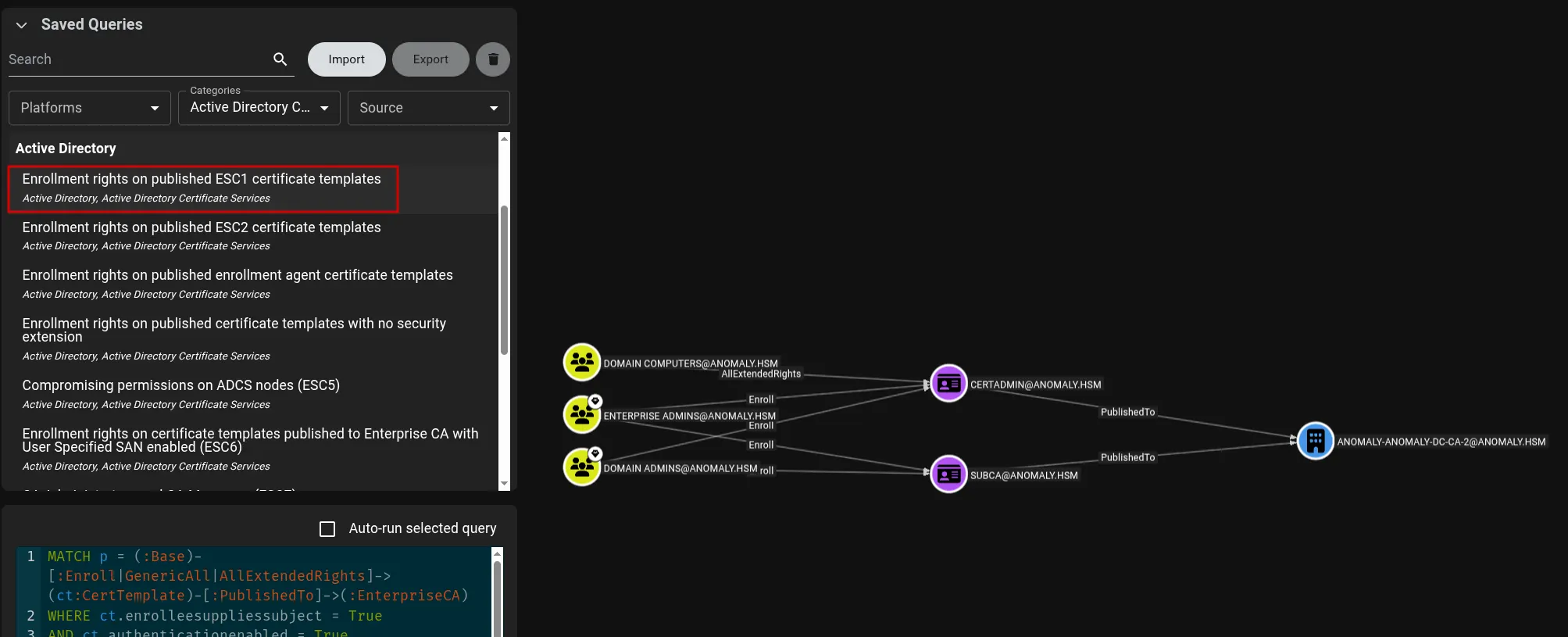
### ESC1 - Enrollee Supplies Subject 检测
*CertiHound 检测易受 ESC1 攻击的模板,并创建指向 Enterprise CA 的注册边缘(enrollment edges),从而能够在 BloodHound CE 中进行攻击路径分析。*
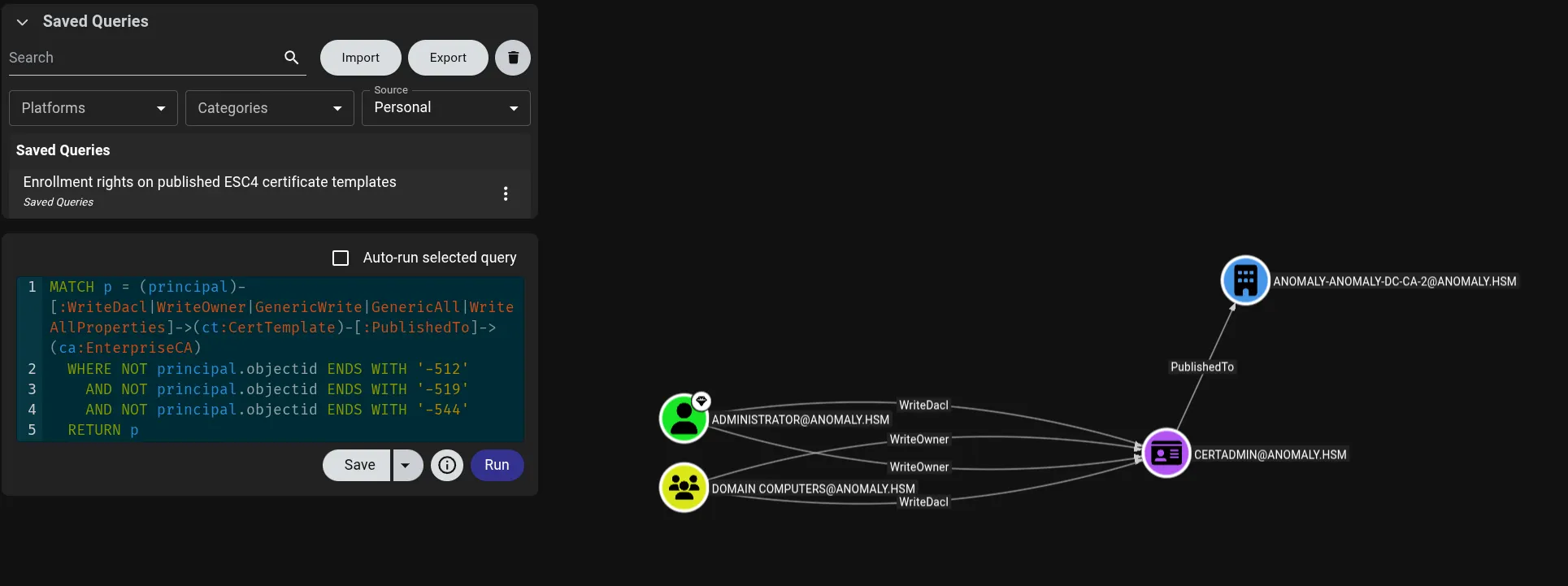
### ESC4 - 模板 ACL 滥用检测
*证书模板上的 WriteDacl、WriteOwner 及其他危险权限将被识别并映射为攻击边缘。*
## 功能
| 功能 | 描述 |
|---------|-------------|
| **Linux 原生** | 无需 Windows 依赖 - 纯 Python LDAP 枚举 |
| **BloodHound CE v6+** | 支持直接导入 JSON/ZIP,全面支持节点和边缘 |
| **漏洞检测** | ESC1-ESC11, ESC13-ESC17, GoldenCert |
| **多后端支持** | 适用于 ldap3、impacket 或任何兼容的 LDAP 适配器 |
| **NetExec 集成** | 与 NetExec 的 `--bloodhound` 选项无缝集成 |
| **全面覆盖** | 证书模板、Enterprise CA、Root CA、NTAuth、AIA CA |
### 支持的漏洞
| 漏洞 | 描述 |
|---------------|-------------|
| **ESC1** | 低权限注册且由注册者提供主体 (Enrollee Supplies Subject) |
| **ESC2** | Any Purpose EKU 或无 EKU 允许注册代理滥用 |
| **ESC3** | 注册代理模板 + 易受攻击的目标 |
| **ESC4** | 证书模板上的危险 ACL 权限 |
| **ESC5** | AD 容器上存在易受攻击的 PKI 对象访问控制 |
| **ESC6** | Enterprise CA 上的 EDITF_ATTRIBUTESUBJECTALTNAME2 |
| **ESC7** | 危险的 CA 权限 (ManageCA / ManageCertificates) |
| **ESC8** | NTLM 中继到 AD CS Web 注册 (HTTP) 端点 |
| **ESC9** | 无安全扩展 + 弱证书映射 |
| **ESC10** | 无强绑定的弱证书映射 |
| **ESC11** | NTLM 中继到 AD CS RPC 端点(无强制加密) |
| **ESC13** | 带有 OID 组链接滥用的颁发策略 |
| **ESC14** | 弱显式证书映射 (altSecurityIdentities) |
| **ESC15** | EKUwu - Schema V1 模板上的应用程序策略滥用 |
| **ESC16** | CA 上全局禁用安全扩展 |
| **ESC17** | Server Authentication EKU + 注册者提供主体 (TLS MITM) |
| **GoldenCert** | 从宿主计算机提取 CA 私钥 |
## 安装
### 从 PyPI 安装(推荐)
```
pipx install certihound
# 或者,如果您需要 Kerberos (-k) 认证:
pipx install 'certihound[kerberos]'
# 在现有安装上,注入 gssapi:
pipx inject certihound gssapi
```
### 从源码安装
```
git clone https://github.com/0x0Trace/certihound.git
cd certihound
pip install -e . # core
pip install -e '.[kerberos]' # with Kerberos support
```
### 验证安装
```
certihound --version
certihound --help
```
## 快速开始
### 命令行
```
# 使用密码认证的基本枚举
certihound -d corp.local -u 'user' -p 'password' --dc 10.10.10.10 -o output/
# Pass-the-Hash (仅限 NTHASH,或 LMHASH:NTHASH)
certihound -d corp.local -u 'user' -H :31d6cfe0d16ae931b73c59d7e0c089c0 --dc 10.10.10.10
# LDAPS (SSL/TLS) 连接
certihound -d corp.local -u 'user' -p 'password' --dc 10.10.10.10 --ldaps -o output/
# Kerberos 认证 (使用 ccache;需要 'kerberos' 额外依赖)
KRB5CCNAME=user.ccache certihound -d corp.local -k --dc dc01.corp.local -o output/
# 输出为 ZIP (默认) 或 JSON
certihound -d corp.local -u 'user' -p 'password' --dc 10.10.10.10 --format zip
certihound -d corp.local -u 'user' -p 'password' --dc 10.10.10.10 --format json
```
### Python 库
```
from certihound import ADCSCollector, BloodHoundCEExporter
from certihound.ldap.connection import LDAPConnection, LDAPConfig
# 配置连接
config = LDAPConfig(
domain="corp.local",
username="user",
password="password",
dc_ip="10.10.10.10",
use_ldaps=True,
)
# 收集并导出
with LDAPConnection(config) as conn:
collector = ADCSCollector(conn)
data = collector.collect_all()
exporter = BloodHoundCEExporter(data.domain, data.domain_sid)
result = exporter.export(data)
result.write_zip("bloodhound_adcs.zip")
```
## 用法
### CLI 选项
```
Usage: certihound [OPTIONS]
Options:
-d, --domain TEXT Target domain FQDN (e.g., corp.local) [required]
-u, --username TEXT Username for authentication
-p, --password TEXT Password for authentication
-H, --hashes TEXT NTLM hash for pass-the-hash (LMHASH:NTHASH or NTHASH)
--dc TEXT Domain Controller IP or hostname
-k, --kerberos Use Kerberos authentication (ccache)
--ldaps Use LDAPS (SSL/TLS)
--ca-cert PATH CA certificate file for LDAPS validation
--port INTEGER LDAP port (default: 389 or 636 for LDAPS)
-o, --output TEXT Output directory (default: ./output)
--format [json|zip|both] Output format (default: zip)
--enum-only Only enumerate, skip vulnerability detection
-v, --verbose Increase verbosity (-v, -vv)
--version Show the version and exit.
--help Show this message and exit.
```
### 输出文件
CertiHound 生成兼容 BloodHound CE v6 的文件:
| 文件 | 描述 |
|------|-------------|
| `certtemplates.json` | 包含属性和边缘的证书模板节点 |
| `enterprisecas.json` | 包含模板发布的 Enterprise CA 节点 |
| `rootcas.json` | Root CA 层次结构节点 |
| `ntauthstores.json` | NTAuth 存储配置 |
| `aiacas.json` | AIA CA 条目 |
## BloodHound 集成
### 导入数据
1. 运行 CertiHound 生成 ZIP 文件
2. 打开 BloodHound CE
3. 点击 **Import** → 选择生成的 ZIP 文件
4. 使用内置的 ADCS 查询或创建自定义查询
### Cypher 查询示例
**查找易受 ESC1 攻击的模板:**
```
MATCH p = (:Base)-[:Enroll|GenericAll|AllExtendedRights]->
(ct:CertTemplate)-[:PublishedTo]->(:EnterpriseCA)
WHERE ct.enrolleesuppliessubject = True
AND ct.authenticationenabled = True
RETURN p
```
**查找 ESC4 模板 ACL 滥用:**
```
MATCH p = (principal)-[:WriteDacl|WriteOwner|GenericWrite|GenericAll|WriteAllProperties]->
(ct:CertTemplate)-[:PublishedTo]->(ca:EnterpriseCA)
WHERE NOT principal.objectid ENDS WITH '-512'
AND NOT principal.objectid ENDS WITH '-519'
AND NOT principal.objectid ENDS WITH '-544'
RETURN p
```
## NetExec 集成
CertiHound 与 [NetExec](https://github.com/Pennyw0rth/NetExec) 集成以进行 ADCS 枚举。
```
# 仅 ADCS 收集
nxc ldap 10.10.10.10 -u user -p pass --bloodhound -c ADCS
# 包括 ADCS 的完整收集
nxc ldap 10.10.10.10 -u user -p pass --bloodhound -c All --dns-server 10.10.10.10
```
## API 参考
### 核心类
| 类 | 描述 |
|-------|-------------|
| `ADCSCollector` | 用于 ADCS 枚举的主收集器 |
| `BloodHoundCEExporter` | 将数据导出为 BloodHound CE 格式 |
| `ImpacketLDAPAdapter` | 用于基于 impacket 的 LDAP (NetExec) 适配器 |
| `LDAPConnection` | 独立 LDAP 连接包装器 |
| `LDAPConfig` | 用于 LDAP 连接的配置数据类 |
### 数据模型
| 类 | 描述 |
|-------|-------------|
| `ADCSData` | 所有收集到的 ADCS 数据的容器 |
| `CertTemplate` | 带有属性和 ACL 的证书模板 |
| `EnterpriseCA` | 带有启用模板的 Enterprise CA |
| `RootCA` | Root CA 节点 |
| `NTAuthStore` | NTAuth 证书存储 |
| `AIACA` | AIA CA 条目 |
| `ExportResult` | 具有 `write_zip()`, `write_json()`, `to_dict()` 的导出结果 |
### 检测函数
```
from certihound import (
detect_esc1,
detect_esc2,
detect_esc3_agent,
detect_esc3_target,
detect_esc4,
detect_esc5,
detect_esc6,
detect_esc7,
detect_esc8,
detect_esc9,
detect_esc10,
detect_esc11,
detect_esc13,
detect_esc14,
detect_esc15,
detect_esc16,
detect_esc17,
)
```
### 用法示例
```
from certihound import (
ADCSCollector,
BloodHoundCEExporter,
ADCSData,
ExportResult,
)
# 收集数据
collector = ADCSCollector.from_external(adapter, domain, domain_sid)
data: ADCSData = collector.collect_all()
# 访问收集到的对象
print(f"Templates: {len(data.templates)}")
print(f"Enterprise CAs: {len(data.enterprise_cas)}")
print(f"Root CAs: {len(data.root_cas)}")
# 导出到 BloodHound
exporter = BloodHoundCEExporter(data.domain, data.domain_sid)
result: ExportResult = exporter.export(data)
# 输出选项
result.write_zip("output.zip") # ZIP for BloodHound import
result.write_json("output/") # Individual JSON files
output_dict = result.to_dict() # Python dictionary
```
## 依赖项
| 包 | 用途 |
|---------|---------|
| `ldap3` | LDAP 操作(独立模式) |
| `impacket` | Kerberos 认证和 NetExec 集成 |
| `cryptography` | 证书解析和分析 |
| `pydantic` | 数据验证和模型 |
| `click` | CLI 框架 |
| `rich` | 终端输出格式化 |
## 许可证
该项目基于 MIT 许可证授权 - 详见 [LICENSE](LICENSE) 文件。
## 致谢与参考
- 灵感来自 Oliver Lyak 开发的 [Certipy](https://github.com/ly4k/Certipy)
- BloodHound CE 格式基于 SpecterOps 开发的 [BloodHound](https://github.com/SpecterOps/BloodHound)
- ADCS 漏洞研究:Will Schroeder 和 Lee Christensen 撰写的 [Certified Pre-Owned](https://posts.specterops.io/certified-pre-owned-d95910965cd2)