hanxi/cups-web
GitHub: hanxi/cups-web
基于CUPS的网页版打印管理工具,能将USB打印机变成支持多格式文件远程打印的网络服务。
Stars: 1107 | Forks: 133
# 🖨️ CUPS Web — 网页打印管理
## ✨ 功能特性
### 打印能力
- **多格式支持**:PDF、图片(JPG/PNG/GIF/HEIC)、Office 文档(doc/docx/xls/xlsx/ppt/pptx)、OFD、纯文本
- **自动转换**:Office 文档通过 LibreOffice 转 PDF;OFD 通过内置 Java 转换器(基于 ofdrw)转 PDF;文本/图片在服务端渲染为 PDF
- **多图片合并打印**:一次选择多张图片自动合并为一份 PDF
- **打印选项**:份数、单双面、彩色/黑白、纸张大小、纸张类型、页面方向、页码范围、缩放、镜像打印
- **实时预览**:支持 PDF 预览、纸张方向的可视化预览、页数估算
### 内置打印机驱动
`hanxi/cups` 镜像出厂即预装了一批常见品牌的打印机驱动,免去用户在容器里手动 `apt install` 或翻官网下载 `.deb` 的麻烦。除非另行说明,下面列出的驱动都同时覆盖 `linux/amd64` + `linux/arm64` + `linux/arm/v7`(少数厂商无 ARM 二进制的会标注)。
**通用驱动包**(apt 安装):
- `printer-driver-all`:Debian 维护的驱动 meta 包,包含 splix、c2050、m2300w、ptouch 等数十种小众驱动
- `printer-driver-cups-pdf`:虚拟 PDF 打印机,无实体打印机也可调试
- `printer-driver-escpr`:Epson ESC/P-R 标准款(覆盖大部分 Epson 喷墨老机型)
- `printer-driver-foo2zjs`:ZjStream / Hiperc / OAKT 协议机型(部分 HP / Konica / Minolta 老款激光机)
- `printer-driver-brlaser`:Brother 老款激光机(HL-L2300D、HL-1110、DCP-7055 等,[issue #32](https://github.com/hanxi/cups-web/issues/32))
- `printer-driver-gutenprint`:覆盖 Epson / Canon / HP / Lexmark 等大量老机型;**仅 amd64 / arm64**(trixie armhf 上游未提供 binary)
- `foomatic-db-compressed-ppds` + `openprinting-ppds`:Foomatic / OpenPrinting 海量 PPD 库
- `hplip` + `hpijs-ppds` + `hp-ppd`:HP 全系打印/扫描套件(LaserJet、OfficeJet、DeskJet、Envy 等)
- `ipp-usb` + CUPS 内置 driverless 模型:把 USB 直连的 IPP Everywhere / AirPrint / Mopria 打印机自动识别为网络打印机(新款 Brother DCP-T425W、HP Tango、Canon PIXMA TS 系列等大多走这条路)
**厂商专有驱动**(脚本另行下载/编译):
| 驱动 | 版本 | 架构覆盖 | 适用机型 |
| --- | --- | --- | --- |
| Epson ESC/P-R 2(源码编译) | 1.2.39 | amd64 / arm64 / armv7 | 新款 Epson 喷墨:ET-18100、L8050、L8160、WF-7840 等(含无边距打印,[issue #30](https://github.com/hanxi/cups-web/issues/30)) |
| Epson 国行专有驱动(`epson-inkjet-printer-201601w` + `epson-printer-utility`) | 1.0.1 / 1.2.2 | **仅 amd64** | Epson 中国区早期机型 L380、L455 等(原厂墨水检测/尺寸预设更完整) |
| Canon UFR II / UFRII LT 官方驱动(`cnrdrvcups-ufr2-uk`) | 6.30-1.07 | amd64 / arm64 | i-SENSYS LBP/MF、imageCLASS、imageRUNNER (iR)、imagePRESS (iPR) 等所有走 UFR II / UFRII LT 协议的 Canon 激光机([issue #34](https://github.com/hanxi/cups-web/issues/34)) |
| 柯尼卡美能达 bizhub 3000MF 黑白激光驱动(`bizhub3000mfpdrvchn`) | 1.0.0-1 | amd64 / arm64 | Konica Minolta bizhub 3000MF 多功能一体机([issue #35](https://github.com/hanxi/cups-web/issues/35)) |
### 用户与权限
- **多用户系统**:支持 `admin` / `user` 两种角色
- **默认管理员**:首次启动自动创建 `admin/admin`,`admin` 账号受保护无法被删除或重命名
- **打印记录**:完整保存每次打印的文件、页数、份数、双面/彩色选项、状态等
### 管理后台
- **用户管理**:创建、编辑、删除用户;修改角色与联系信息
- **打印记录查询**:可按用户名、时间范围过滤
- **数据保留策略**:按天数自动清理过期打印记录和对应文件(每小时巡检一次)
### 安全
- **Session 认证**:基于 Gorilla `securecookie`(加密 + 签名),密钥自动生成并持久化到数据库
- **CSRF 防护**:对所有非 GET/HEAD/OPTIONS 请求校验 `X-CSRF-Token`
- **密码安全**:bcrypt 加密存储
## 🛠️ 技术栈
- **后端**:Go 1.26 · Gorilla Mux · SQLite(`modernc.org/sqlite`,纯 Go 实现,无需 CGO)
- **打印协议**:[OpenPrinting/goipp](https://github.com/OpenPrinting/goipp)(IPP)
- **前端**:Vue 3 · Vite 7 · [Nuxt UI v4](https://ui.nuxt.com/) · Tailwind CSS v4 · Vue Router(hash 模式)
- **文档转换**:LibreOffice(Office → PDF)· [ofdrw](https://github.com/ofdrw/ofdrw)(OFD → PDF,Java 17)
- **打印服务**:[CUPS](https://www.cups.org/)
## 🚀 快速开始
提供两种部署方式:
- [Docker 部署](#docker-部署)(推荐,一键拉起 CUPS + Web)
- [二进制部署](#二进制部署)(适合已有 CUPS 服务的场景)
## Docker 部署
### 前置要求
- Docker 与 Docker Compose
- USB 打印机(若使用本地打印机)
### 1. 创建 `docker-compose.yml`
```
services:
cups:
image: hanxi/cups:latest
user: root
environment:
- CUPSADMIN=${CUPSADMIN}
- CUPSPASSWORD=${CUPSPASSWORD}
ports:
- "631:631"
devices:
- /dev/bus/usb:/dev/bus/usb
volumes:
- ./.etc:/etc/cups
restart: unless-stopped
web:
image: hanxi/cups-web:latest
user: root
environment:
- CUPS_HOST=cups:631
volumes:
- ./.data:/data
- ./.uploads:/uploads
ports:
- "1180:8080"
depends_on:
- cups
restart: unless-stopped
```
也可直接下载仓库内的 `docker-compose.yml`:
```
wget https://raw.githubusercontent.com/hanxi/cups-web/master/docker-compose.yml
```
### 2. 配置环境变量
在同目录创建 `.env`:
```
CUPSADMIN=admin
CUPSPASSWORD=your_cups_password
```
### 3. 启动服务
```
docker-compose up -d
```
### 4. 配置打印机
访问 CUPS 管理界面:,使用 `.env` 中的账号登录并添加打印机。
### 5. 访问 Web
浏览器打开 ,使用默认账号登录:
- 用户名:`admin`
- 密码:`admin`
## 二进制部署
适合已有 CUPS 服务的场景。
### 1. 下载二进制
从 [GitHub Releases](https://github.com/hanxi/cups-web/releases) 下载对应平台的二进制:
| 平台 | 架构 | 文件名 |
| --- | --- | --- |
| Linux | amd64 | `cups-web-linux-amd64` |
| Linux | arm64 | `cups-web-linux-arm64` |
| Linux | armv7 | `cups-web-linux-armv7` |
| Linux | loong64 | `cups-web-linux-loong64` |
| macOS | amd64 | `cups-web-darwin-amd64` |
| macOS | arm64 | `cups-web-darwin-arm64` |
| Windows | amd64 | `cups-web-windows-amd64.exe` |
```
wget https://github.com/hanxi/cups-web/releases/latest/download/cups-web-linux-amd64
chmod +x cups-web-linux-amd64
```
### 2. 配置并运行
```
export CUPS_HOST=localhost:631
export DB_PATH=./data/cups-web.db
export UPLOAD_DIR=./uploads
export LISTEN_ADDR=:8080
./cups-web-linux-amd64
```
或使用命令行参数(优先级高于环境变量):
```
./cups-web-linux-amd64 -addr :8080
```
### 3. 访问 Web
浏览器打开 ,使用 `admin/admin` 登录。
## ⚙️ 配置说明
### 环境变量
| 变量名 | 说明 | 默认值 |
| --- | --- | --- |
| `LISTEN_ADDR` | Web 服务监听地址 | `:8080` |
| `DB_PATH` | SQLite 数据库路径 | `data/cups-web.db` |
| `UPLOAD_DIR` | 上传文件目录 | `uploads` |
| `CUPS_HOST` | CUPS 服务地址(`host` 或 `host:port`) | `localhost` |
### 命令行参数
| 参数 | 说明 |
| --- | --- |
| `-addr` | 监听地址,优先级高于 `LISTEN_ADDR` |
### CUPS 容器环境变量
| 变量名 | 说明 |
| --- | --- |
| `CUPSADMIN` | CUPS 管理员用户名(**必填**) |
| `CUPSPASSWORD` | CUPS 管理员密码(**必填**) |
### 默认端口
- CUPS:`631`
- Web:容器内 `8080`,`docker-compose.yml` 默认映射到宿主机 `1180`
### 数据持久化目录
Docker 默认卷映射:
- `./.data` → 数据库
- `./.uploads` → 上传的原始文件与转换后 PDF
- `./.etc` → CUPS 配置
## 📖 使用指南
### 支持的文件格式
| 类型 | 扩展名 | 处理方式 |
| --- | --- | --- |
| PDF | `.pdf` | 直接打印 |
| 图片 | `.jpg` `.jpeg` `.png` `.gif` `.heic` | 转换为 PDF(支持多张合并) |
| Office | `.doc` `.docx` `.xls` `.xlsx` `.ppt` `.pptx` | 通过 LibreOffice 转换 |
| OFD | `.ofd` | 通过 ofdrw 转换 |
| 文本 | `.txt` `.md` `.html` | 服务端渲染为 PDF |
### 打印流程
1. 选择打印机
2. 上传文件(支持多图)
3. 预览转换后的 PDF、调整打印参数
4. 确认提交,系统自动落库并下发到 CUPS
### 管理员功能
- **用户管理**:创建、编辑、删除;默认 `admin` 账号不可删除、不可改名、角色固定
- **打印**:查看全站记录,按用户名/日期过滤,下载原始文件
- **系统设置**:数据保留天数(`0` 表示永久保留)
## 🔧 进阶配置
### 使用 HTTPS
通过反向代理(例如 Nginx)提供 HTTPS:
```
server {
listen 443 ssl;
server_name example.com;
ssl_certificate /path/to/cert.pem;
ssl_certificate_key /path/to/key.pem;
location / {
proxy_pass http://localhost:1180;
proxy_set_header Host $host;
proxy_set_header X-Real-IP $remote_addr;
proxy_set_header X-Forwarded-For $proxy_add_x_forwarded_for;
proxy_set_header X-Forwarded-Proto $scheme;
}
}
```
### 修改端口
编辑 `docker-compose.yml`:
```
services:
web:
ports:
- "你的端口:8080"
```
### 数据备份
```
cp ./.data/cups-web.db /backup/location/
tar -czf uploads-backup.tar.gz ./.uploads/
tar -czf cups-config-backup.tar.gz ./.etc/
```
## ❓ 常见问题
### 忘记管理员密码怎么办?
删除数据库文件后重启即可重置为默认 `admin/admin`(**会丢失全部数据**):
```
docker-compose down
rm ./.data/cups-web.db
docker-compose up -d
```
### Web 端看不到打印机?
1. 检查打印机是否在 CUPS 中正常列出()
2. 确认打印机设置为 **Shared**
3. 容器化部署时确认 `CUPS_HOST` 指向正确的 CUPS 服务地址
4. 重启 CUPS:`docker-compose restart cups`
### Office / OFD 转换失败?
- 转换有 **60 秒超时**,复杂文档可能超时
- 确认文档本身未损坏;可尝试本地先另存为 PDF 再上传
- 查看日志:`docker-compose logs -f web`
### 上传文件一直堆积占空间?
在「管理后台 → 系统设置」中设置「数据保留天数」为大于 0 的值,维护任务每小时巡检一次,自动清理过期记录与文件。
### 如何查看日志?
```
docker-compose logs -f web
docker-compose logs -f cups
```
## 🤝 贡献
欢迎提 Issue 和 Pull Request。开发者文档请参阅 [AGENTS.md](AGENTS.md)。
## 📈 Star 历史
[](https://github.com/hanxi/cups-web/releases)
[](https://hub.docker.com/r/hanxi/cups-web)
[](https://hub.docker.com/r/hanxi/cups-web)
[](https://github.com/hanxi/cups-web/stargazers)
[](https://github.com/hanxi/cups-web/network/members)
[](https://github.com/hanxi/cups-web/issues)
[](https://github.com/hanxi/cups-web/commits)
[](https://github.com/hanxi/cups-web/releases)
[](LICENSE)
[](https://golang.org)
[](https://vuejs.org)
[](https://vitejs.dev)
[](https://ui.nuxt.com)
[](https://tailwindcss.com)
[](https://www.cups.org)
[](https://www.sqlite.org)
🏠 [GitHub](https://github.com/hanxi/cups-web) • 🐳 [Docker Hub](https://hub.docker.com/r/hanxi/cups-web) • 📖 [开发文档](AGENTS.md) • 💬 [微信群](https://github.com/hanxi/cups-web/issues/36) • 💰 [赞赏支持](https://afdian.com/a/imhanxi)
基于 CUPS 的网页版打印管理工具。通过浏览器上传文件、远程提交打印任务,支持多用户管理与打印记录追踪,适合家庭和小型办公室使用。
## 📸 界面预览
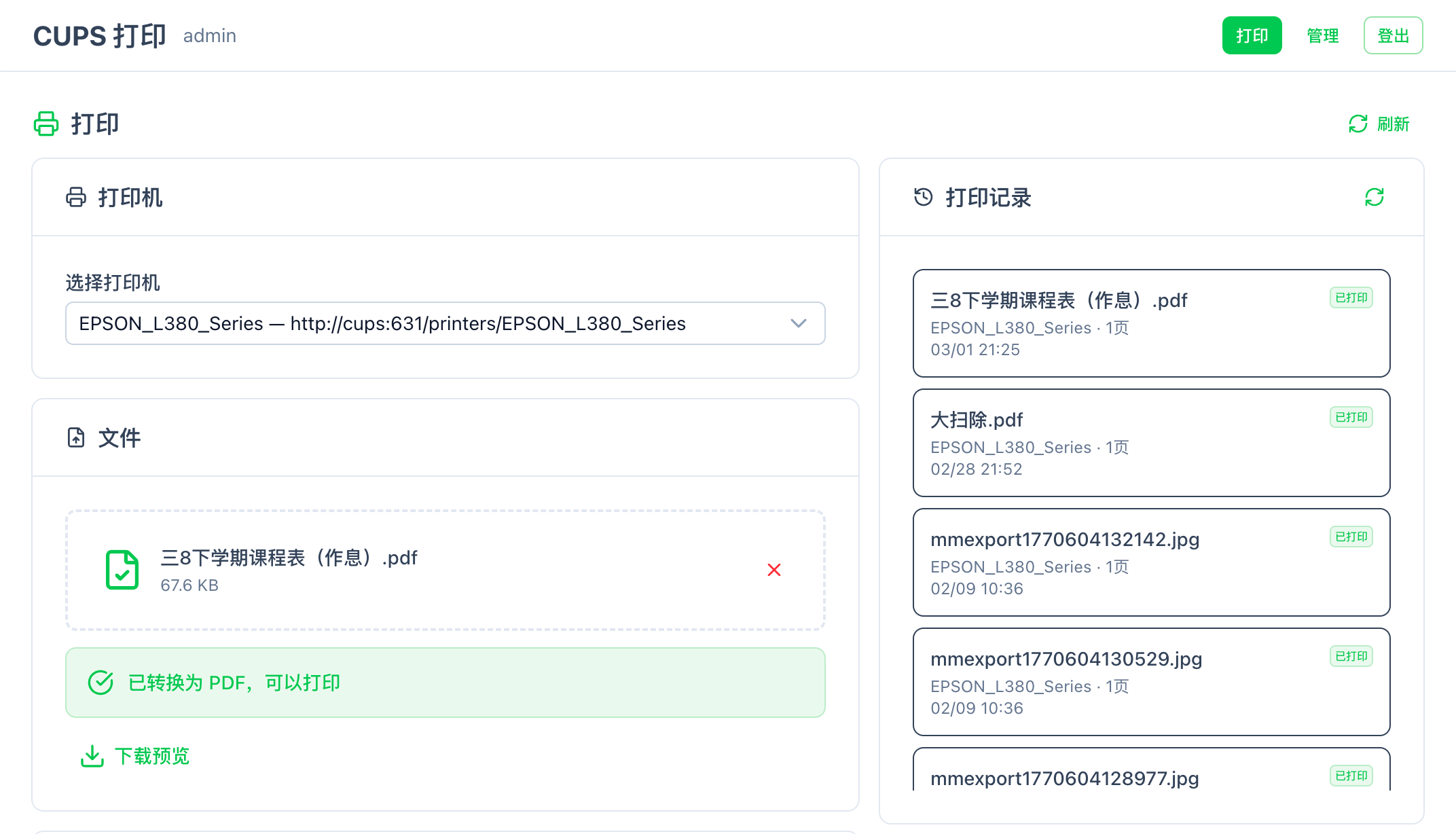 文件上传 |
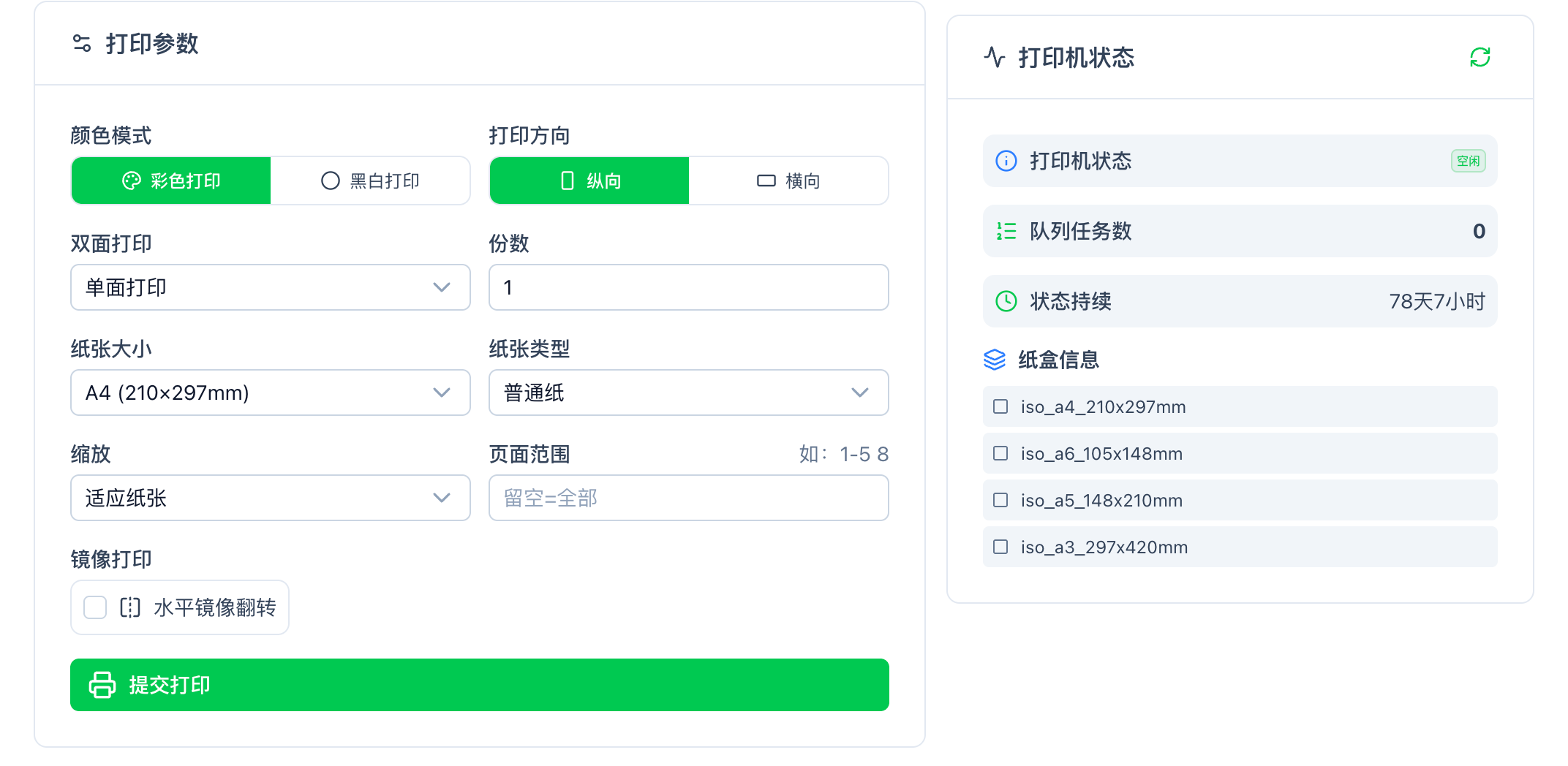 打印机选择 |
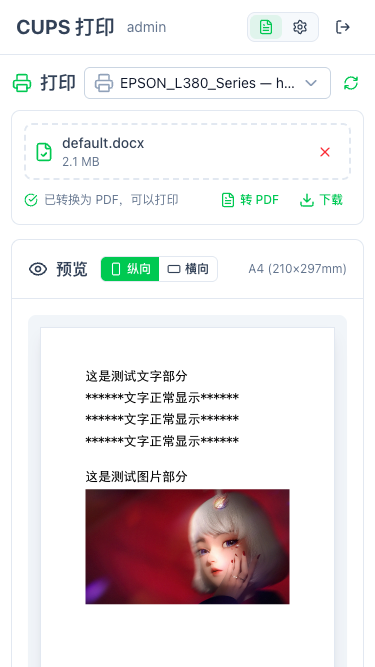 实时预览 |
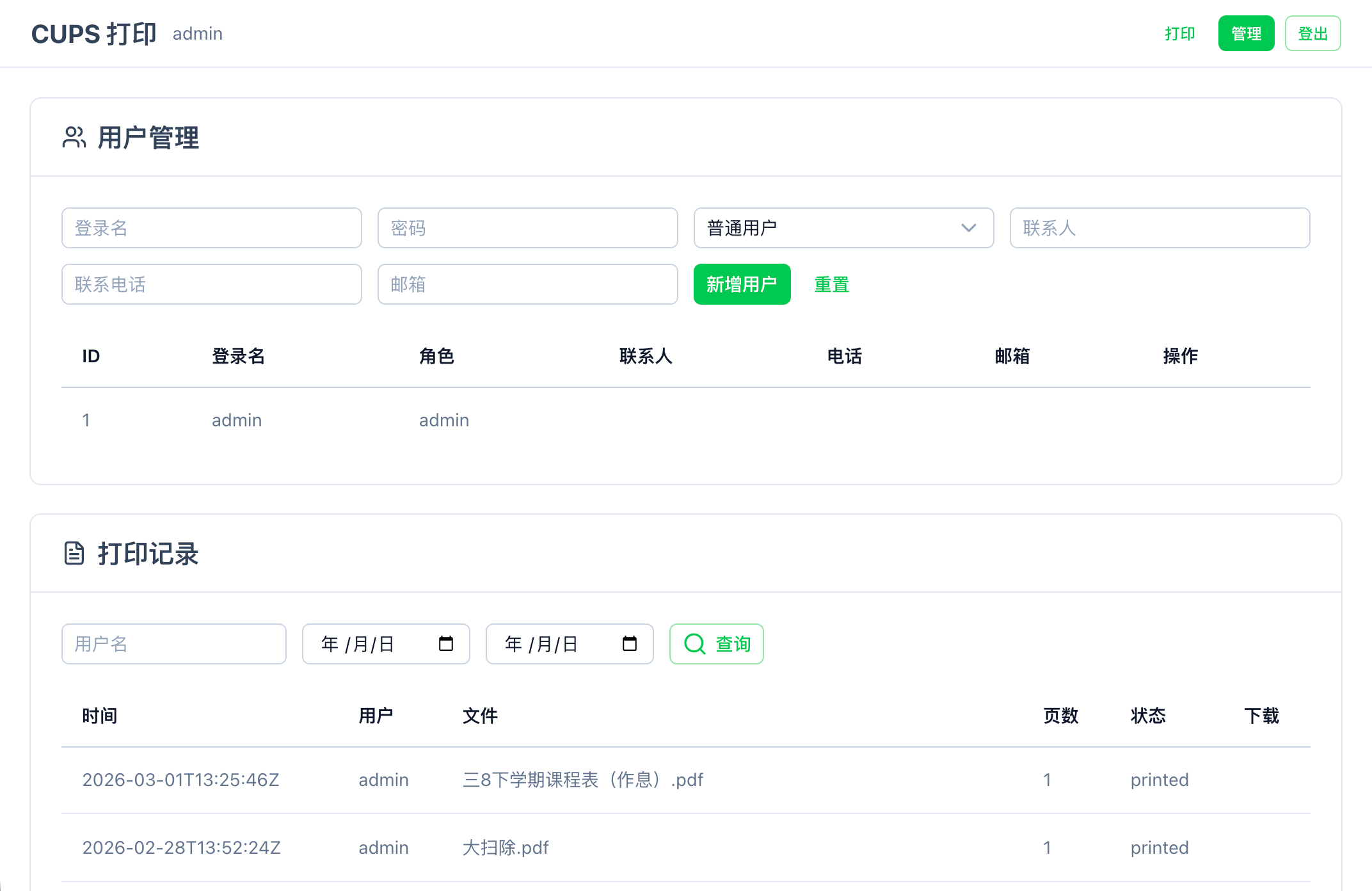 管理后台 |
[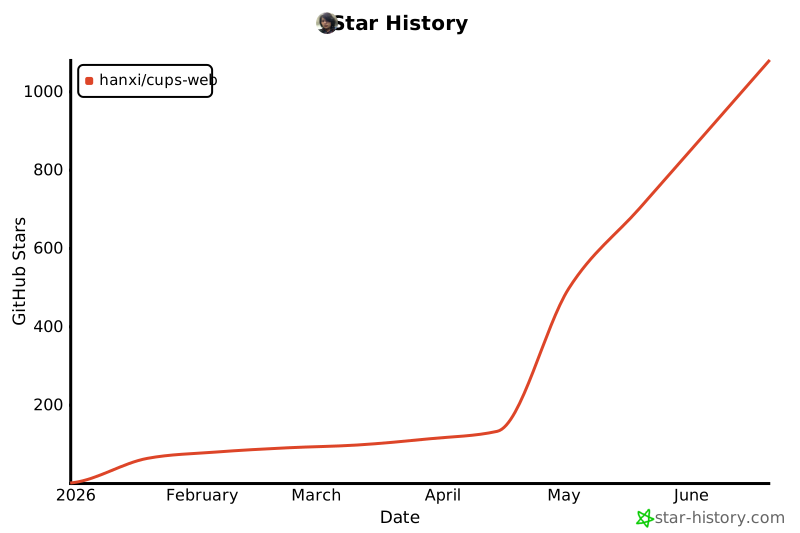](https://www.star-history.com/#hanxi/cups-web&Date)
如果这个项目对你有帮助,欢迎点击右上角的 ⭐ **Star** 让更多人发现它!
## 💖 支持项目
如果这个项目对你有帮助,欢迎通过以下方式支持:
### ⭐ Star 项目
点击右上角的 ⭐ Star 按钮,让更多人发现这个项目。
### 💰 赞赏支持
- [💝 爱发电](https://afdian.com/a/imhanxi) — 持续支持项目发展
- 扫码请作者喝杯奶茶 ☕

标签:CUPS, DNS解析, Docker, EVTX分析, Go, Nuxt UI, Ruby工具, Tailwind CSS, USB共享, Vite, Vue3, Web管理, 云打印, 安全防御评估, 家用打印机, 局域网共享, 开源项目, 打印机管理, 日志审计, 网络打印, 设备共享, 请求拦截