一个基于 FastAPI 和 React 构建的现代 C2 平台,通过 Cloudflare Tunnel 实现隐蔽通信,提供 WinRM/SSH 远程命令执行、远程桌面和模块化后渗透管理能力。
# ZeroPulse

**一个集成 Cloudflare Tunnel 的现代命令与控制 (C2) 平台**
[](https://www.python.org/)
[](https://fastapi.tiangolo.com/)
[](https://reactjs.org/)
[](LICENSE)
[](https://www.codefactor.io/repository/github/jxroot/zeropulse/overview/main)
##
## 📋 目录
- [概述](#overview)
- [功能](#features)
- [架构](#architecture)
- [前置条件](#prerequisites)
- [安装说明](#installation)
- [配置说明](#configuration)
- [使用说明](#usage)
- [API 文档](#api-documentation)
- [安全性](#security)
- [项目结构](#project-structure)
- [开发](#development)
- [贡献指南](#contributing)
- [许可证](#license)
- [致谢](#acknowledgments)
- [支持](#support)
## 🎯 概述
ZeroPulse 是一个全面的命令与控制 (C2) 平台,专为安全的远程管理和监控而设计。它利用 Cloudflare Tunnel 技术,在不将您的基础设施暴露于公共互联网的情况下,提供安全、加密的连接。
### 主要亮点
- **🔒 默认安全**:内置身份验证、会话管理和 API token 系统
- **🌐 Cloudflare 集成**:通过 Cloudflare API 实现无缝的 DNS 和 tunnel 管理
- **🖥️ 远程管理**:支持 WinRM 和 SSH,并集成 evil-winrm 以提供交互式 shell
- **📊 现代 UI**:美观且响应迅速的 React 界面,具备实时终端集成
- **🚀 性能优化**:非阻塞 I/O、优化的数据库查询以及内存泄漏防护
- **🖥️ 本地 Shell 访问**:通过 WebSocket 提供交互式本地 shell,并支持实时终端仿真
## ✨ 功能
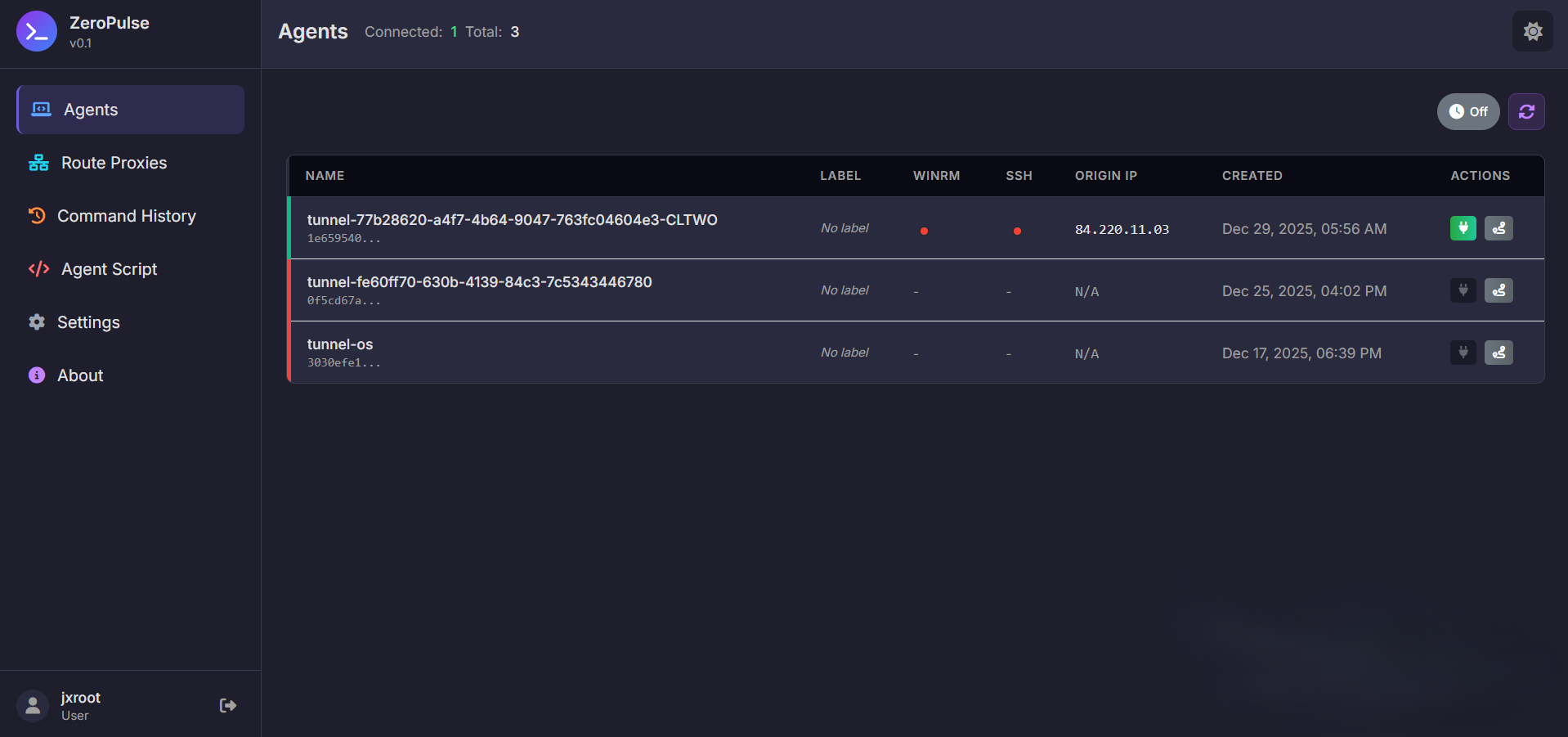
ZeroPulse Dashboard - Overview of all tunnels and system status
### 核心能力
- **Tunnel 管理**
- 创建和管理 Cloudflare Tunnel
- 配置 ingress 规则 (HTTP, HTTPS, TCP)
- 自动 DNS 记录管理
- 路由代理管理
- **远程命令执行**
- 通过 WinRM 在远程 Windows 系统上执行命令
- 交互式 shell,集成 evil-winrm(密码和 NTLM Hash 身份验证)
- SSH 命令执行和交互式会话
- PowerShell 脚本执行
- 命令历史跟踪
- 实时输出流
- 模块控制面板,支持动态模块执行
- **远程桌面**
- VNC 服务器检测和管理
- 基于 Web 的 noVNC 远程桌面客户端
- 支持 Windows 和 Linux 系统
- 基于安全 tunnel 的连接
- **会话与安全**
- 基于 JWT 的身份验证
- 活跃会话管理
- 具有细粒度权限的 API token 系统
- Token 黑名单和撤销
- 基于角色的访问控制 (RBAC)
- **DNS 管理**
- 自动 DNS 记录创建/更新
- 支持 CNAME、A、AAAA 记录
- Cloudflare 代理配置
- 冲突解决
- **本地 Shell 访问**
- 通过 WebSocket 访问交互式本地 shell
- 使用 xterm.js 进行实时终端仿真
- 独立窗口支持
- 非阻塞 I/O,实现最佳性能
- **模块控制系统**
- 从数据库动态加载模块
- 层级结构(类别 → 部分 → 项目)
- 带有变量替换的模板引擎
- 交互式终端集成
- 命令执行历史
## ⚙️ 技术栈
| 层级 | 技术 | 用途 |
|-------|-----------|---------|
| Frontend | React 19, Redux Toolkit, React Router, TailwindCSS, xterm.js | 用户界面 |
| Backend | FastAPI, Uvicorn | API 服务器 |
| Database | SQLite (带有优化的查询和索引) | 数据持久化 |
| Authentication | JWT, python-jose | 基于令牌的身份验证 |
| Remote Execution | pywinrm, paramiko, evil-winrm | WinRM 与 SSH 集成 |
| Terminal | xterm.js, WebSocket | 交互式终端 |
| External APIs | requests, cloudflare | 服务集成 |
| Process Management | subprocess, asyncio, threading | 后台任务 |
## 📦 前置条件
### 系统要求
- **操作系统**:Linux (Ubuntu 20.04+、Debian 11+ 或任何现代 Linux 发行版)
- **Python**:3.8 或更高版本
- **Node.js**:20.19.0+ 或 22.12.0+(参见 frontend 目录下的 `.nvmrc`)
- **npm**:随 Node.js 一同提供
- **Cloudflare 账户**:具有 API token 和 account ID
- **Ruby**(可选):用于 evil-winrm 支持(`gem install evil-winrm`)
### 所需软件
```
# Ubuntu/Debian
sudo apt update
sudo apt install -y python3 python3-pip python3-venv git curl
# 安装 Node.js 20+(推荐使用 nvm)
curl -o- https://raw.githubusercontent.com/nvm-sh/nvm/v0.39.0/install.sh | bash
source ~/.bashrc
nvm install 20.19.0
nvm use 20.19.0
# 可选:安装 Ruby 以使用 evil-winrm
sudo snap install ruby --classic
gem install evil-winrm
# 验证版本
python3 --version # Should be 3.8+
node --version # Should be 20.19.0+ or 22.12.0+
#### npm --version
## 🚀 安装
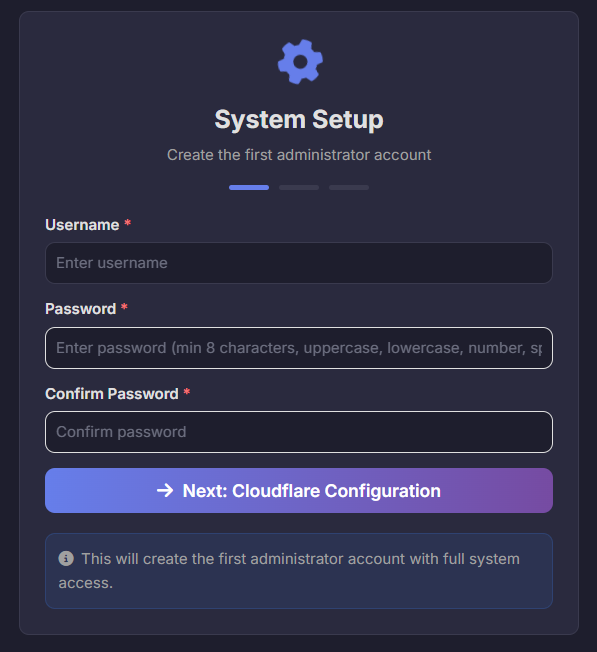
Installation Process - Setting up ZeroPulse on a new system
### 1. 克隆仓库
```bash
git clone https://github.com/yourusername/zeropulse.git
#### cd zeropulse
### 2. 后端设置
```bash
# 创建虚拟环境
python3 -m venv venv
# 激活虚拟环境
source venv/bin/activate
# 升级 pip
pip install --upgrade pip
# 安装依赖
#### pip install -r requirements.txt
### 3. 前端设置
```bash
cd frontend
# 检查 Node.js 版本(应为 20.19.0+ 或 22.12.0+)
node --version
# 如果使用 nvm,切换到所需版本
nvm use # Automatically uses version from .nvmrc
# 安装依赖
npm install
# 构建前端
npm run build
#### cd ..
### 4. 配置环境变量
Create a `.env` file in the project root:
```bash
cat > .env << EOF
# 认证设置
ADMIN_USERNAME=admin
ADMIN_PASSWORD=your-secure-password-here
JWT_SECRET_KEY=$(python3 -c "import secrets; print(secrets.token_urlsafe(32))")
JWT_ALGORITHM=HS256
JWT_EXPIRATION_HOURS=24
# Cloudflare 设置
CLOUDFLARE_API_TOKEN=your-cloudflare-api-token-here
CLOUDFLARE_ACCOUNT_ID=your-cloudflare-account-id-here
CLOUDFLARE_DOMAIN=your-domain.com
# WinRM 设置(可选)
WINRM_USERNAME=WinRMUser
WINRM_PASSWORD=your-secure-password-here
# SSH 设置(可选)
SSH_KEY_PATH=/path/to/ssh/key
SSH_USERNAME=ssh_user
# C2 服务器设置
C2_SERVER_HOST=0.0.0.0
C2_SERVER_PORT=8000
ENVIRONMENT=production
# 数据库设置
DATABASE_PATH=data/database.db
EOF
# 设置权限
#### chmod 600 .env
### 5. 启动服务器
```bash
# 确保虚拟环境已激活
source venv/bin/activate
# 启动服务器
#### python3 run_server.py
The server will be accessible at `http://localhost:8000`
## ⚙️ 配置
### 环境变量
| Variable | Description | Default |
|----------|-------------|---------|
| `ADMIN_USERNAME` | Admin username | `admin` |
| `ADMIN_PASSWORD` | Admin password | - |
| `JWT_SECRET_KEY` | JWT signing key | - |
| `JWT_EXPIRATION_HOURS` | Token expiration time | `24` |
| `CLOUDFLARE_API_TOKEN` | Cloudflare API token | - |
| `CLOUDFLARE_ACCOUNT_ID` | Cloudflare account ID | - |
| `CLOUDFLARE_DOMAIN` | Your domain | - |
| `WINRM_USERNAME` | WinRM username | `WinRMUser` |
| `WINRM_PASSWORD` | WinRM password | - |
| `SSH_KEY_PATH` | SSH private key path | - |
| `SSH_USERNAME` | SSH username | - |
| `C2_SERVER_HOST` | Server host | `0.0.0.0` |
| `C2_SERVER_PORT` | Server port | `8000` |
| `ENVIRONMENT` | Environment mode | `development` |
| `DATABASE_PATH` | Database file path | `data/database.db` |
### Cloudflare API Token 权限
Your Cloudflare API token needs the following permissions:
- **Zone**: `Zone:Read`, `DNS:Edit`
- **Account**: `Cloudflare Tunnel:Edit`
- **Zone Resources**: Include your domain zone
### 管理隧道
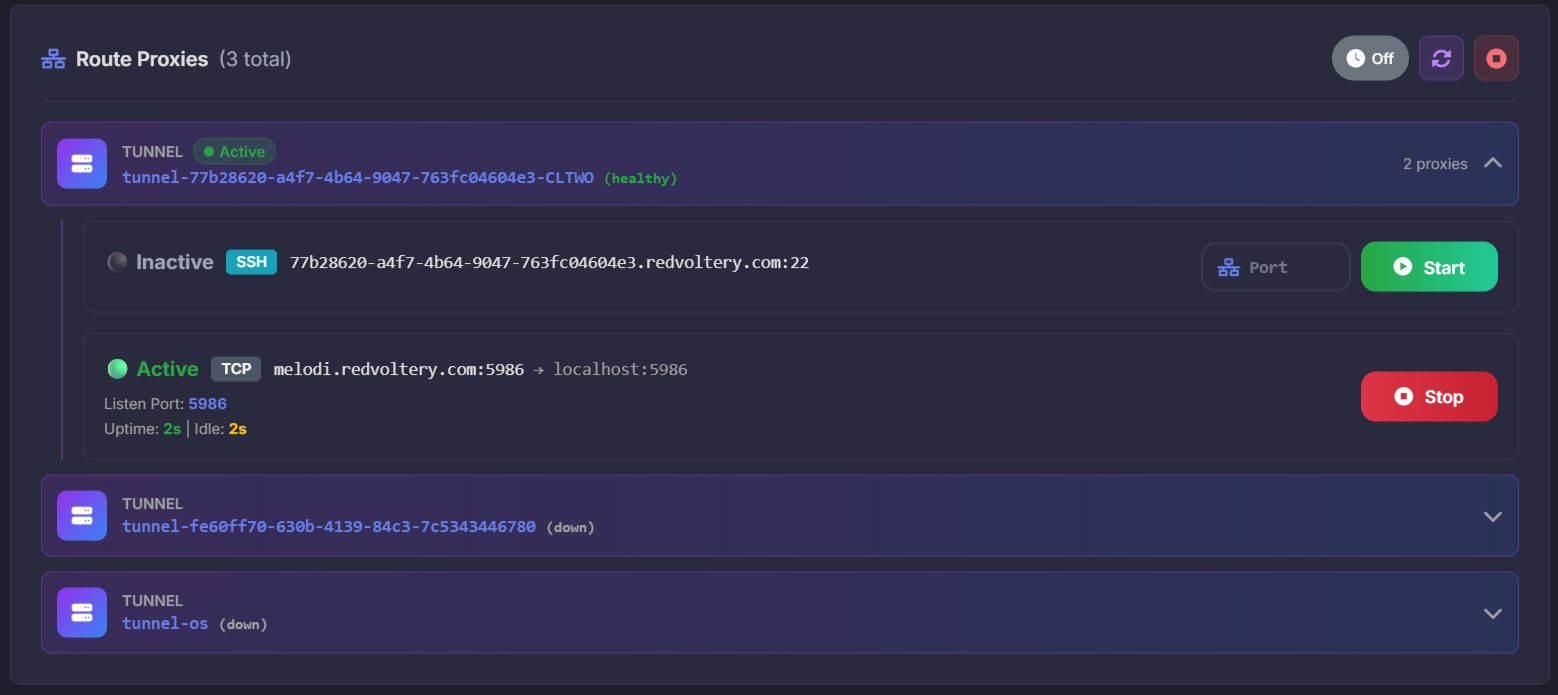
Tunnel List - View all tunnels with status, health indicators, and quick actions
#### 功能
- **Dynamic Port Mapping**: Map local ports to tunnel routes
- **Service Proxying**: Proxy HTTP, HTTPS, and TCP services
- **Automatic Management**: Start, stop, and monitor proxy processes
- **Port Discovery**: Automatically find available ports
- **Status Monitoring**: Real-time status of all active proxies
1. **Create a Tunnel**: Navigate to Dashboard → Create Tunnel
2. **Configure Routes**: Set ingress rules for HTTP, HTTPS, or TCP services
3. **Manage DNS**: Automatic DNS record creation/updates
4. **Monitor Status**: View tunnel health and connection status
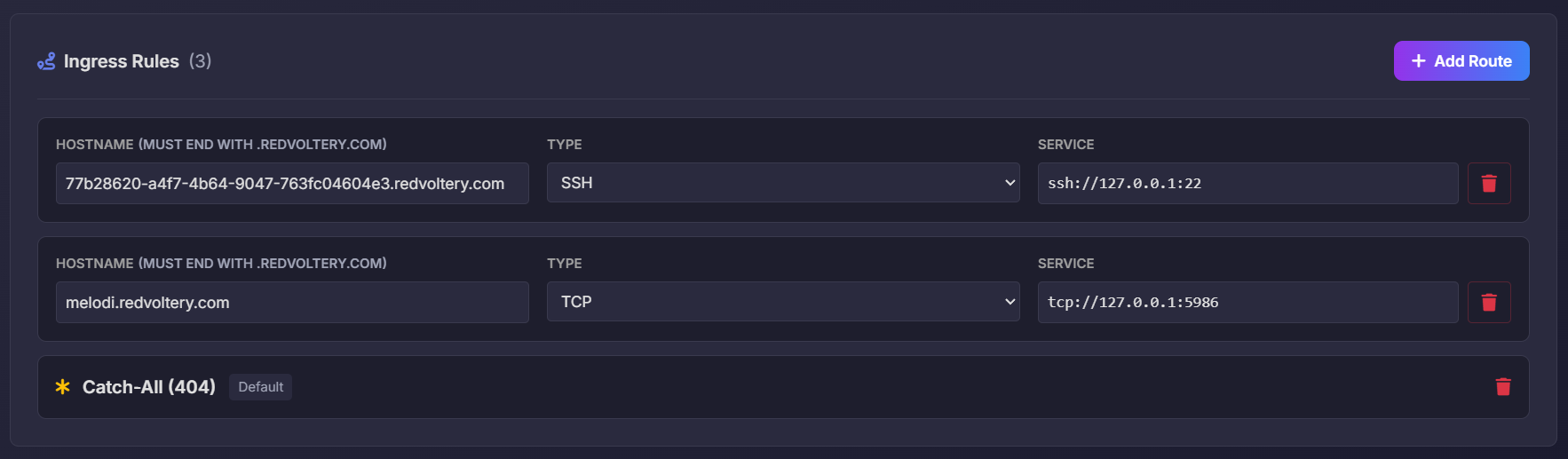
Tunnel Routes Configuration - Configure ingress rules and DNS records
### 远程命令执行
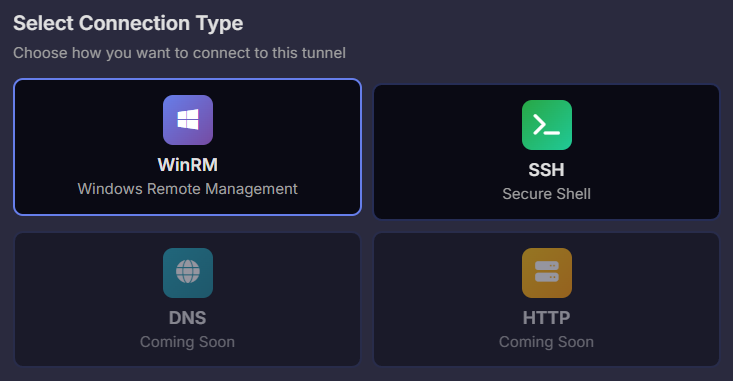
Command Execution Interface - Execute commands on remote Windows systems via WinRM And SSH
1. **Select a Tunnel**: Choose a tunnel with WinRM or SSH access
2. **Execute Commands**: Run PowerShell commands on remote Windows systems
3. **View History**: Check command execution history and outputs
### 命令历史
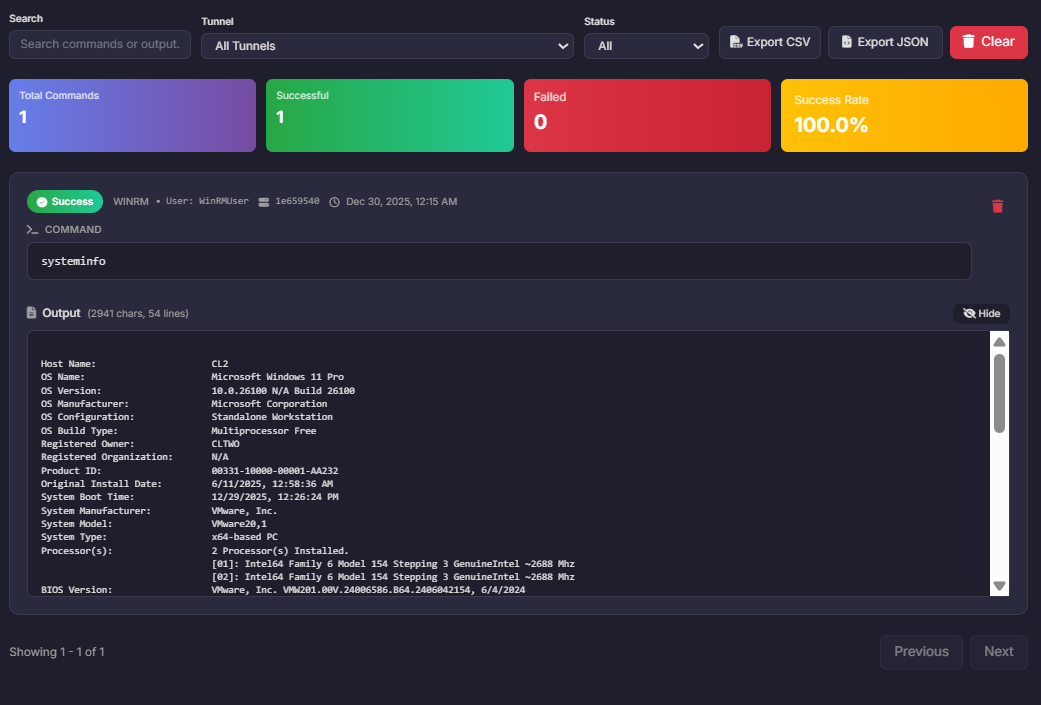
Command History - Comprehensive view of all executed commands with detailed information
The Command History feature provides a complete audit trail of all command executions:
- **Execution Log**: View all commands executed across all tunnels
- **Detailed Information**: See command, output, timestamp, tunnel ID, and execution status
- **Filter & Search**: Filter by tunnel, date range, or search by command content
- **Output Viewing**: View full command output for each execution
- **Export Capabilities**: Export history for analysis or compliance
#### 功能
1. **Comprehensive Logging**
- All commands are automatically logged with timestamps
- Includes tunnel information and execution context
- Status tracking (success/failure)
2. **Advanced Filtering**
- Filter by tunnel ID
- Filter by date range
- Search by command content or output
- Filter by execution status
3. **Detailed View**
- View full command output
- See execution time and duration
- Check tunnel and agent information
- Review error messages if execution failed
4. **History Management**
- Clear history for specific tunnels
- Export history to file
- Archive old entries
### 模块控制面板
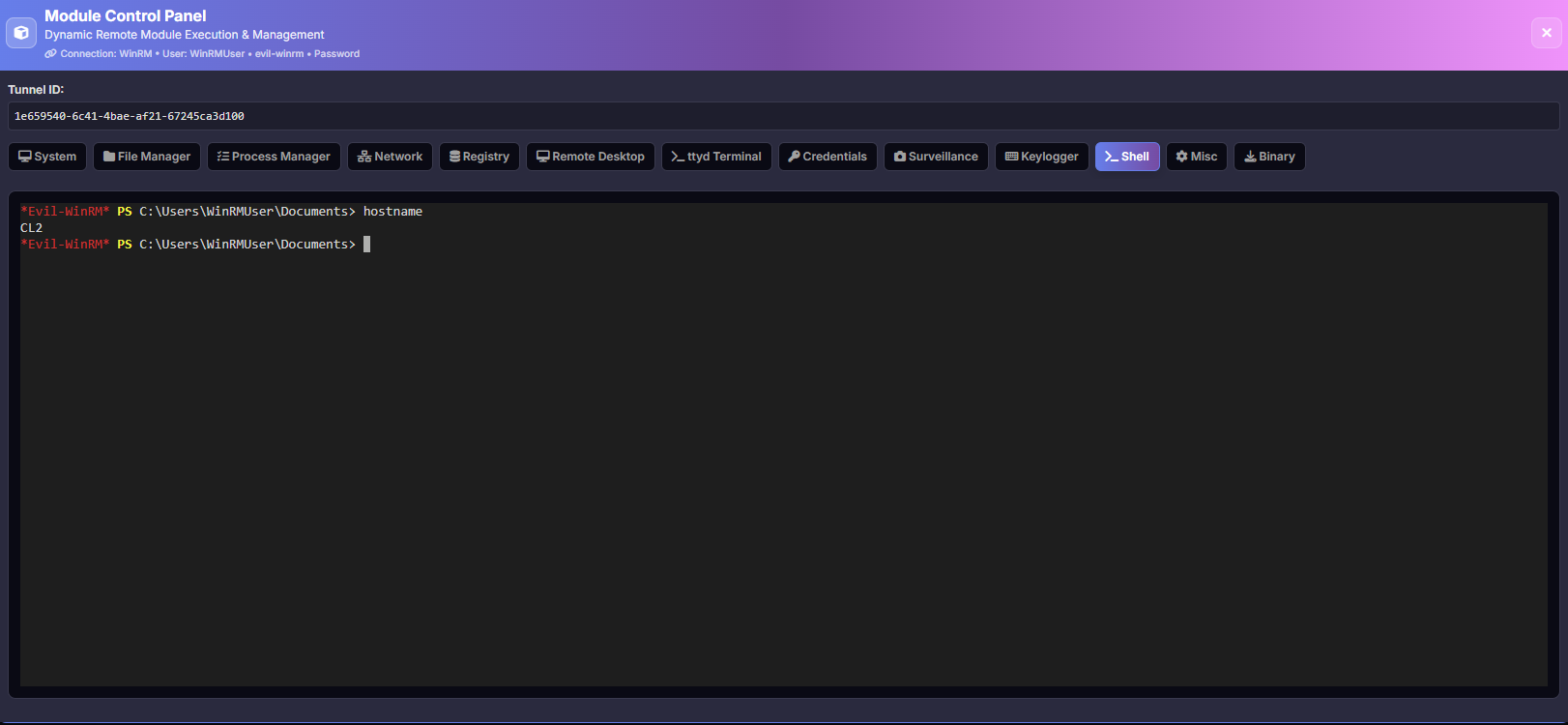
Module Control Panel - Centralized interface for managing all system modules and capabilities
The Module Control Panel provides a unified interface for accessing and managing various system modules:
- **Interactive Shell**: evil-winrm integration for Windows systems (Password & NTLM Hash authentication)
- **Remote Desktop**: VNC/noVNC remote desktop access
- **Shell Access**: Command execution interface
- **Module Management**: Install, configure, and manage system modules
- **Status Monitoring**: Real-time status of all modules
- **Terminal Integration**: Persistent terminal modal across all module tabs
# ### 设置
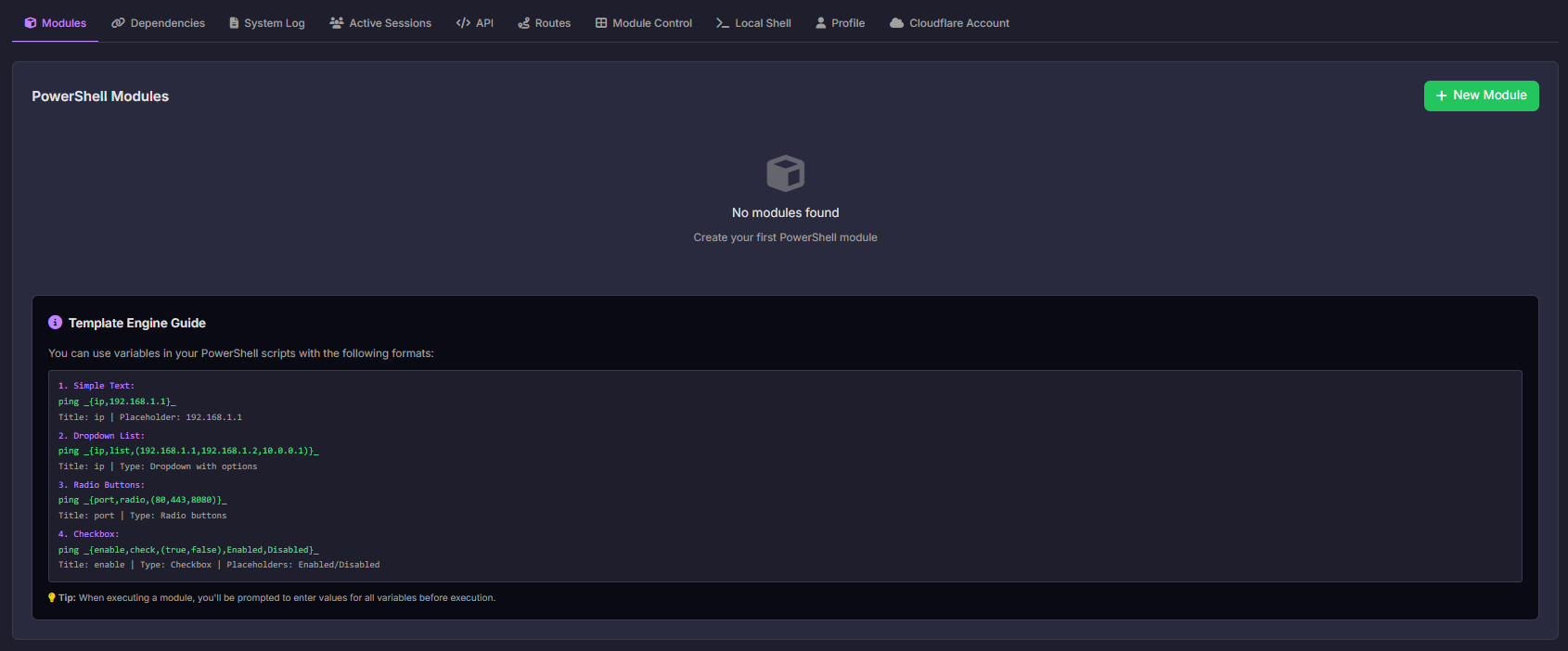
Settings Modal - Centralized configuration and management interface
The Settings modal provides comprehensive system configuration and management through multiple tabs:
- **Modules**: PowerShell module management
- **Dependencies**: System dependency management
- **System Log**: View and monitor system logs
- **Active Sessions**: Session management
- **API**: API token management
- **Routes**: Tunnel routes configuration
#### 模块管理
Manage PowerShell modules that can be executed on remote systems:
- **Create Modules**: Define new PowerShell modules with custom code
- **Edit Modules**: Modify existing module code and configuration
- **Delete Modules**: Remove unused modules
- **Module Execution**: Execute modules on target systems
- **Template Variables**: Use variables in module code for dynamic execution
**Module Features:**
- Syntax highlighting for PowerShell code
- Variable substitution support
- Code validation
- Execution history tracking
#### 模板引擎
The Template Engine allows you to create dynamic PowerShell modules with user-input variables. Variables are defined using the `_{...}_` syntax and are replaced with user-provided values before execution.
##### 变量类型
**1. Simple Text Input**
```powershell
#### ping _{ip,192.168.1.1}_
- **Format**: `_{name,placeholder}_`
- **Usage**: Text input field with placeholder
- **Example**: `ping _{target_ip,192.168.1.1}_` → User enters IP address
**2. Dropdown List**
```powershell
#### ping _{ip,list,(192.168.1.1,192.168.1.2,10.0.0.1)}_
- **Format**: `_{name,list,(option1,option2,option3)}_`
- **Usage**: Dropdown menu with predefined options
- **Example**: User selects from list of IP addresses
**3. Radio Buttons**
```powershell
#### netstat -an | findstr _{port,radio,(80,443,8080)}_
- **Format**: `_{name,radio,(option1,option2,option3)}_`
- **Usage**: Radio button group for single selection
- **Example**: User selects port number via radio buttons
**4. Checkbox**
```powershell
#### if (_{enable,check,(true,false),Enabled,Disabled}_) { Write-Host "Enabled" }
- **Format**: `_{name,check,(true_value,false_value),true_label,false_label}_`
- **Usage**: Checkbox for boolean values
- **Example**: Enable/disable feature with custom labels
##### 模板引擎工作流
1. **Module Creation**
- Write PowerShell script with template variables
- Use `_{variable}_` syntax for dynamic values
- Save module in the system
2. **Variable Extraction**
- System automatically extracts all variables from script
- Identifies variable types (text, list, radio, checkbox)
- Generates input form based on variables
3. **User Input**
- When executing module, user sees input form
- Form fields generated based on variable types
- User fills in values for all variables
4. **Variable Replacement**
- Template Engine replaces variables with user values
- Script is prepared for execution
- Original script remains unchanged
5. **Execution**
- Modified script is executed on target system
- Results are returned and displayed
- Execution is logged in history
##### 示例模块
**PowerShell Script:**
```powershell
# 网络扫描器模块
$target = "_{target_ip,192.168.1.1}_"
$port = "_{port,radio,(80,443,8080)}_"
$scan_type = "_{scan_type,list,(ping,tcp,udp)}_"
$verbose = "_{verbose,check,(true,false),Yes,No}_"
if ($scan_type -eq "ping") {
ping -n 4 $target
} elseif ($scan_type -eq "tcp") {
Test-NetConnection -ComputerName $target -Port $port
} else {
Write-Host "UDP scan for $target on port $port"
}
if ($verbose -eq "true") {
Write-Host "Scan completed with verbose output"
#### }
**Generated Form:**
- **target_ip**: Text input (placeholder: 192.168.1.1)
- **port**: Radio buttons (80, 443, 8080)
- **scan_type**: Dropdown (ping, tcp, udp)
- **verbose**: Checkbox (Yes/No)
##### 最佳实践
- **Use Descriptive Names**: Variable names should be clear and descriptive
- **Provide Placeholders**: Always include helpful placeholders for text inputs
- **Limit Options**: Keep dropdown/radio options manageable (5-10 items)
- **Validate Input**: Consider input validation in your PowerShell scripts
- **Document Variables**: Add comments explaining variable purpose
##### 高级用法
**Nested Variables:**
```powershell
$command = "ping _{ip}_ -n _{count,4}_"
#### Invoke-Expression $command
**Conditional Logic:**
```powershell
if (_{enable_feature,check,(true,false),Yes,No}_ -eq "true") {
# Feature code
#### }
**Multiple Variables:**
```powershell
$server = "_{server_name,localhost}_"
$port = "_{port,list,(80,443,8080,8443)}_"
$protocol = "_{protocol,radio,(http,https)}_"
#### $url = "$protocol://$server`:$port"
#### 依赖管理
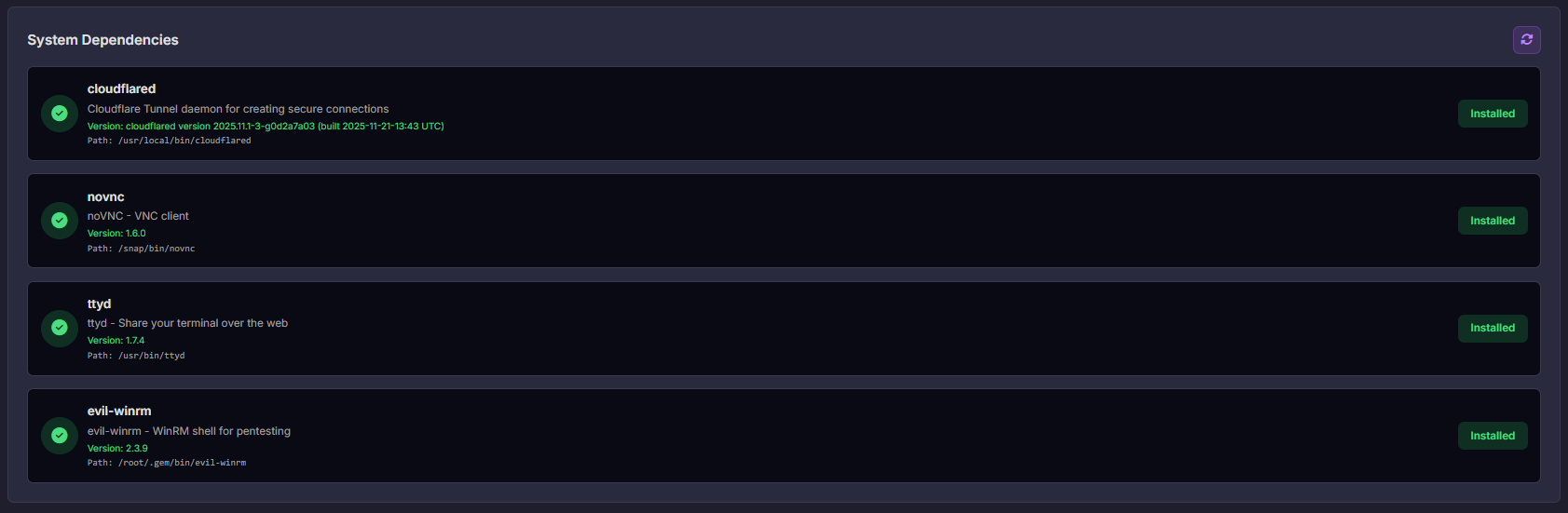
Dependencies Management - Manage system dependencies and requirements
Manage system dependencies and requirements:
- **View Dependencies**: See all system dependencies (cloudflared, noVNC, ttyd, evil-winrm)
- **Check Status**: Verify dependency installation status
- **Install Dependencies**: Install missing dependencies with provided commands
- **Update Dependencies**: Update existing dependencies
- **Remove Dependencies**: Uninstall dependencies
**Supported Dependencies:**
- **cloudflared**: Cloudflare Tunnel daemon
- **noVNC**: HTML5 VNC client
- **ttyd**: Share terminal over the web
- **evil-winrm**: WinRM shell for pentesting (requires Ruby)
#### 系统日志
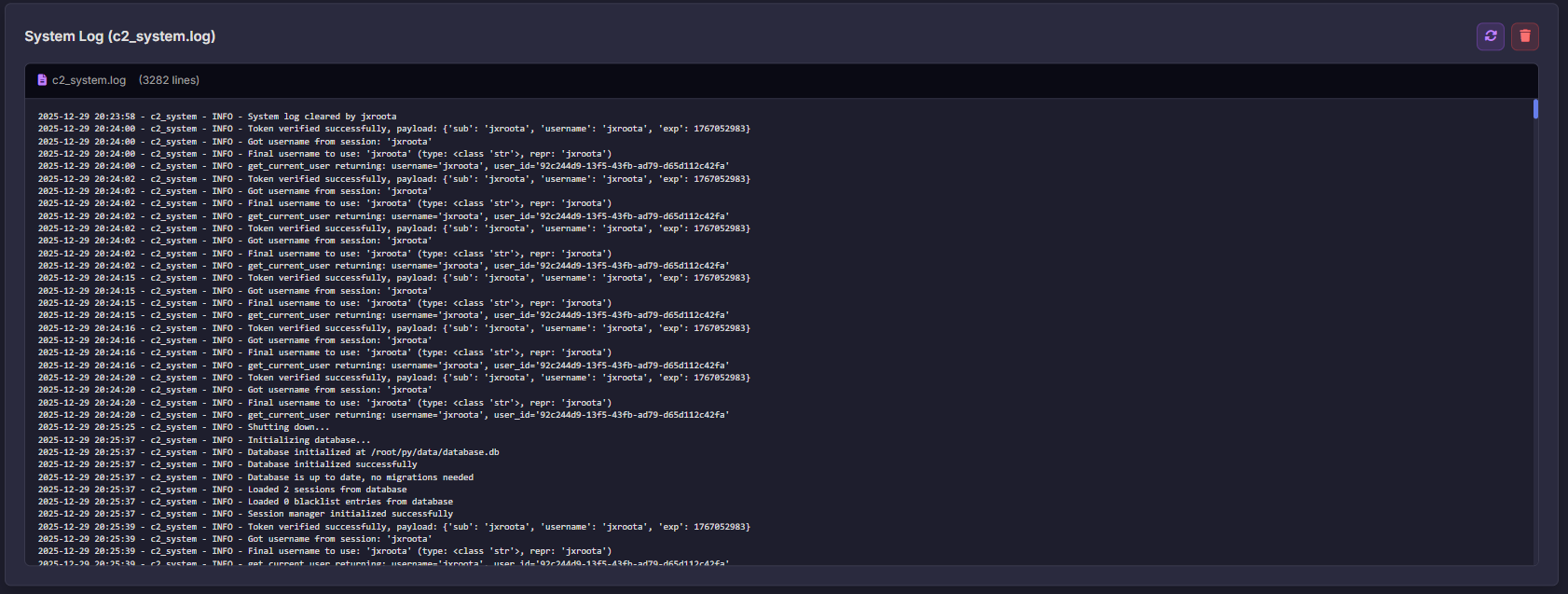
System Log - View and monitor system logs in real-time
Monitor system activity through comprehensive logging:
- **Real-time Logs**: View logs as they are generated
- **Log Filtering**: Filter by log level (DEBUG, INFO, WARNING, ERROR)
- **Search Functionality**: Search through log entries
- **Export Logs**: Export logs for analysis
- **Auto-refresh**: Automatic log updates
**Log Levels:**
- **DEBUG**: Detailed debugging information
- **INFO**: General informational messages
- **WARNING**: Warning messages
- **ERROR**: Error messages and exceptions
#### API Token 管理
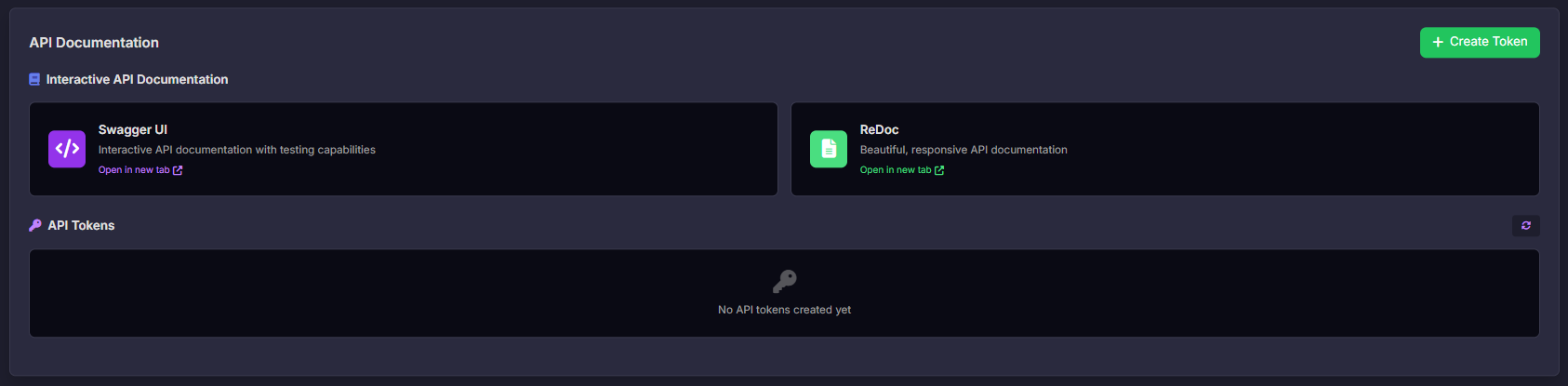
API Token Management - Create and manage API tokens with granular permissions
1. **Create Tokens**: Generate API tokens with specific permissions
2. **Manage Sessions**: View and terminate active sessions
3. **Monitor Activity**: Track token usage and expiration
#### 活动会话
Active Sessions Management - View and manage active user sessions
View and manage active user sessions:
- **View All Sessions**: See all active user sessions
- **Session Details**: View session information (IP, user agent, duration)
- **Terminate Session**: End specific sessions
- **Terminate All**: End all sessions except current
- **Session Monitoring**: Monitor session activity in real-time
#### 路由配置

Active Sessions Management - View and manage active user sessions
Configure routes for all tunnels:
- **View All Routes**: See routes for all tunnels
- **Tunnel Selection**: Expand/collapse tunnels to view routes
- **Route Management**: Add, edit, and delete routes
- **DNS Status**: View DNS record creation status
### Agent 管理
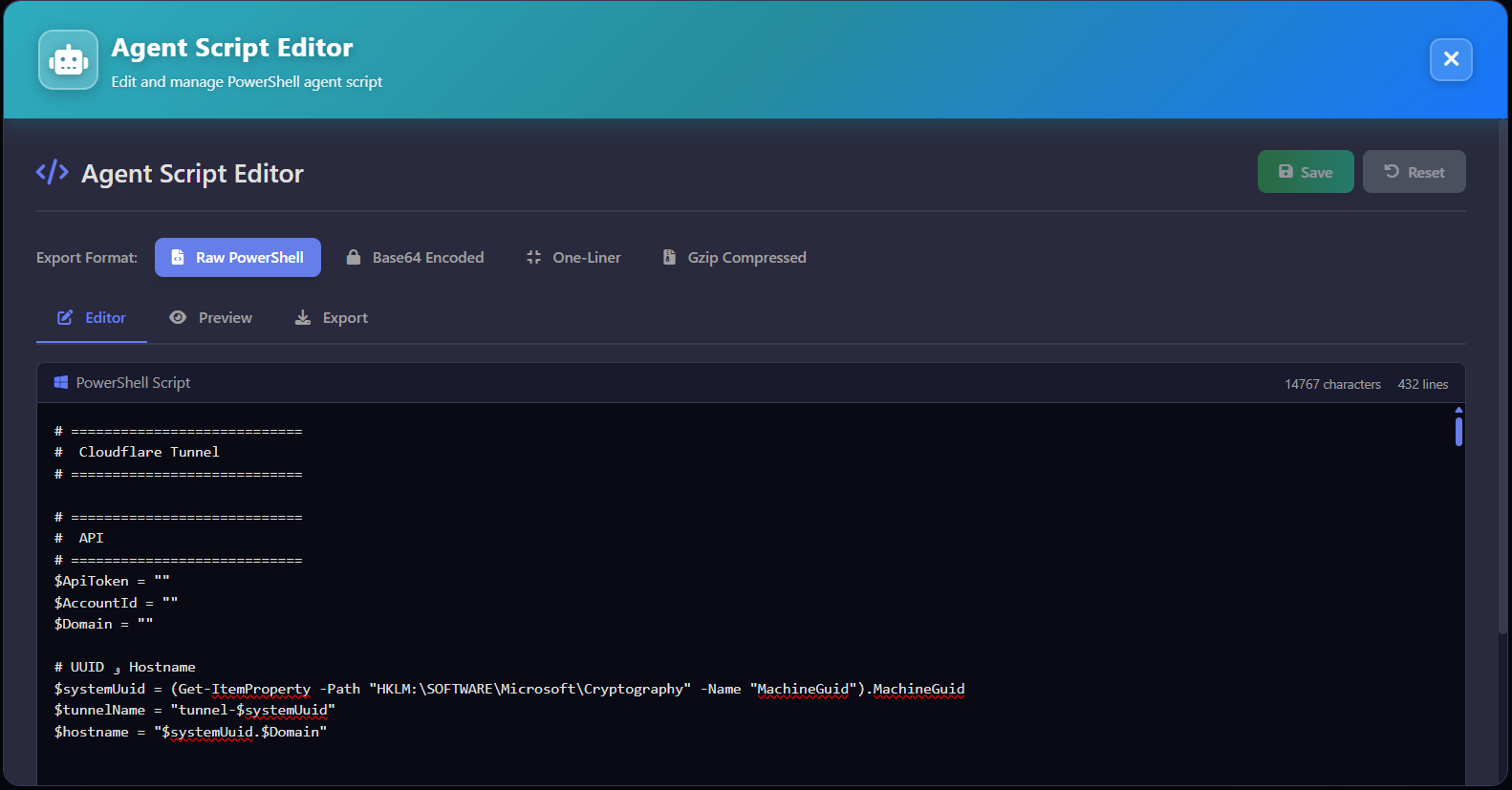
Agent Script Editor - Create, edit, and customize PowerShell agent scripts for Windows deployment
The Agent is a PowerShell script that automates the setup of Windows systems for remote management through ZeroPulse. It configures WinRM, creates Cloudflare Tunnels, and establishes secure connections.
#### Agent 功能
- **Automated Setup**: One-click deployment script for Windows systems
- **WinRM Configuration**: Secure WinRM setup with HTTPS and certificate management
- **Cloudflare Tunnel Creation**: Automatic tunnel creation and DNS configuration
- **Customizable Script**: Edit and customize agent script before deployment
- **Template Engine**: Variable substitution for dynamic configuration
## 📚 API 文档
API Token Management - Create and manage API tokens with granular permissions
### 交互式 API 文档
Once the server is running, access the interactive API documentation:
- **Swagger UI**: `http://localhost:8000/docs`
- **ReDoc**: `http://localhost:8000/redoc`
### 认证
All API endpoints (except `/api/auth/*`) require authentication:
```bash
# 在 Authorization 请求头中包含 token
curl -H "Authorization: Bearer YOUR_JWT_TOKEN" \
#### http://localhost:8000/api/tunnels
### 生产环境部署
For production deployment:
1. Set `ENVIRONMENT=production` in `.env`
2. Use a reverse proxy (nginx/traefik) with SSL
3. Configure firewall rules
4. Set up log rotation
5. Use systemd service for auto-restart


 ## ⚠️ 法律与道德免责声明
🚨 This tool is developed strictly for educational and authorized security testing purposes only.
🔬 It is intended to help cybersecurity professionals, researchers, and enthusiasts understand post-exploitation, red teaming, and detection techniques in lab or controlled environments.
❌ Do NOT use this tool on any system or network without explicit permission. Unauthorized use may be illegal and unethical.
## 🛡 作者对因滥用本项目造成的任何误用或损害概不负责。
## > 请始终负责任地进行黑客活动。💻🔐
## ⚠️ 法律与道德免责声明
🚨 This tool is developed strictly for educational and authorized security testing purposes only.
🔬 It is intended to help cybersecurity professionals, researchers, and enthusiasts understand post-exploitation, red teaming, and detection techniques in lab or controlled environments.
❌ Do NOT use this tool on any system or network without explicit permission. Unauthorized use may be illegal and unethical.
## 🛡 作者对因滥用本项目造成的任何误用或损害概不负责。
## > 请始终负责任地进行黑客活动。💻🔐
```