datawhalechina/easy-vibe
GitHub: datawhalechina/easy-vibe
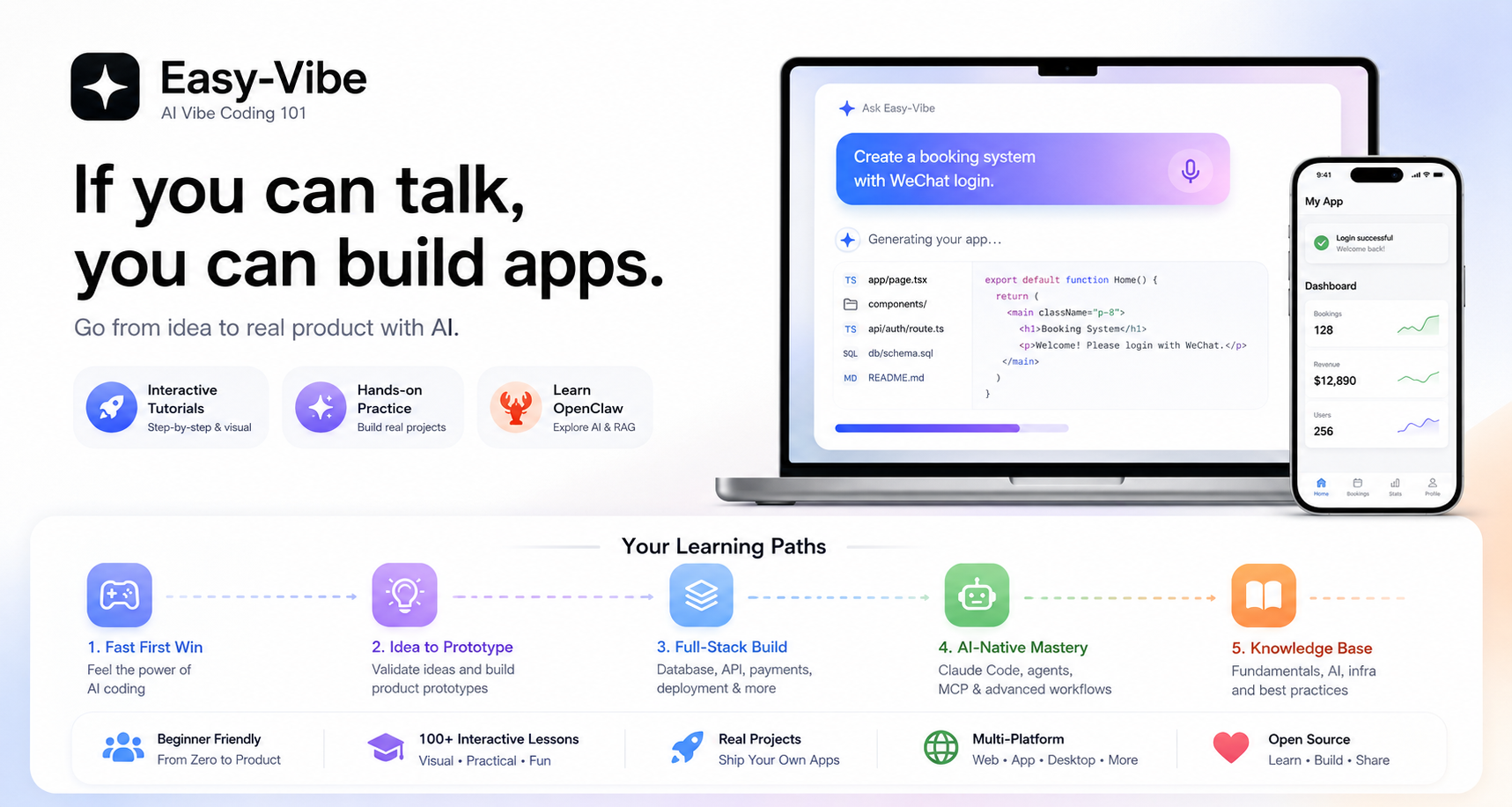
面向零基础到进阶用户的AI编程实战课程,教你利用自然语言和AI工具从零构建全栈应用。
Stars: 17381 | Forks: 1638
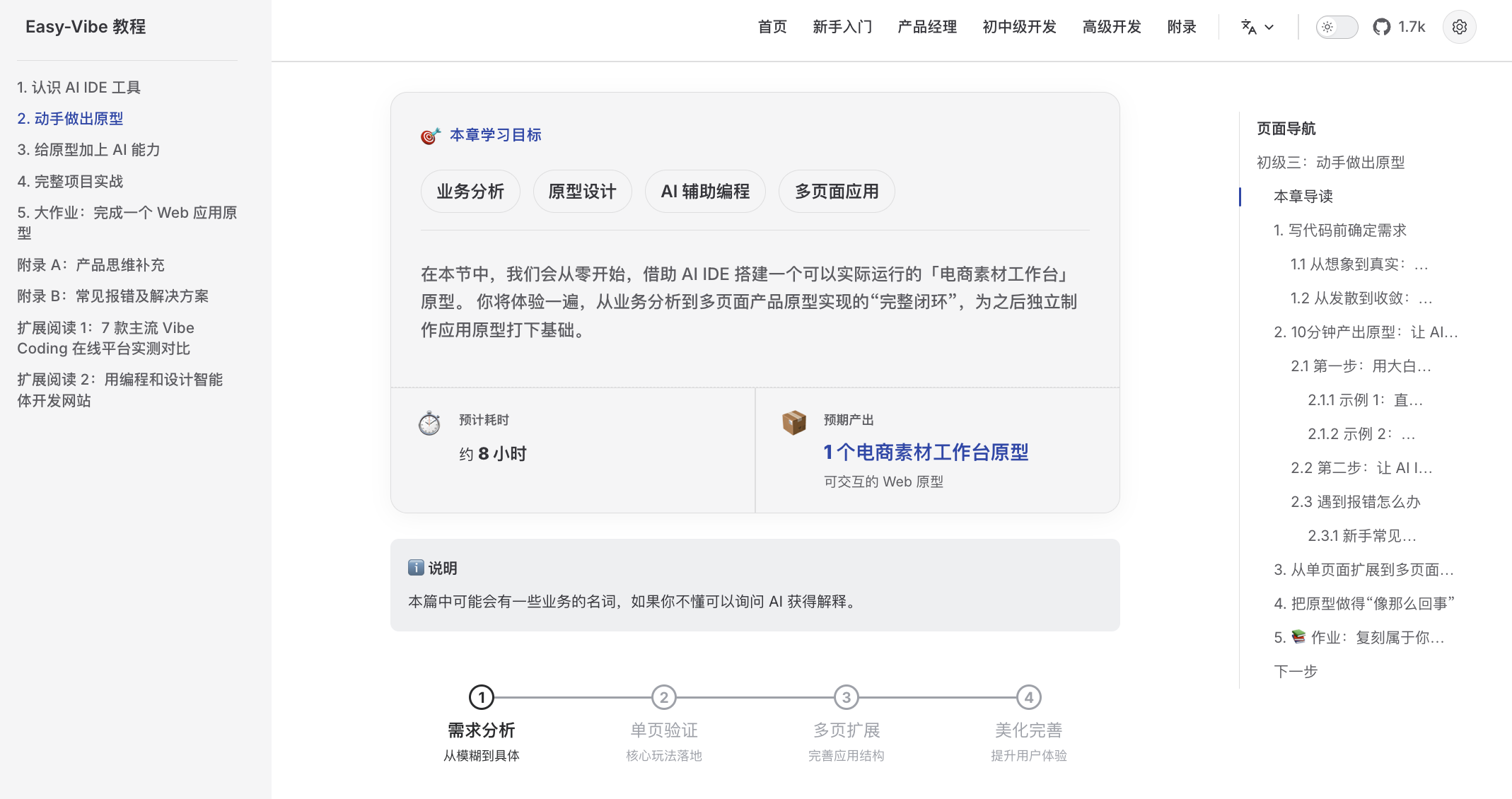
A beginner-friendly learning map
Clear guidance from zero, so you can stop "learning and forgetting"
|
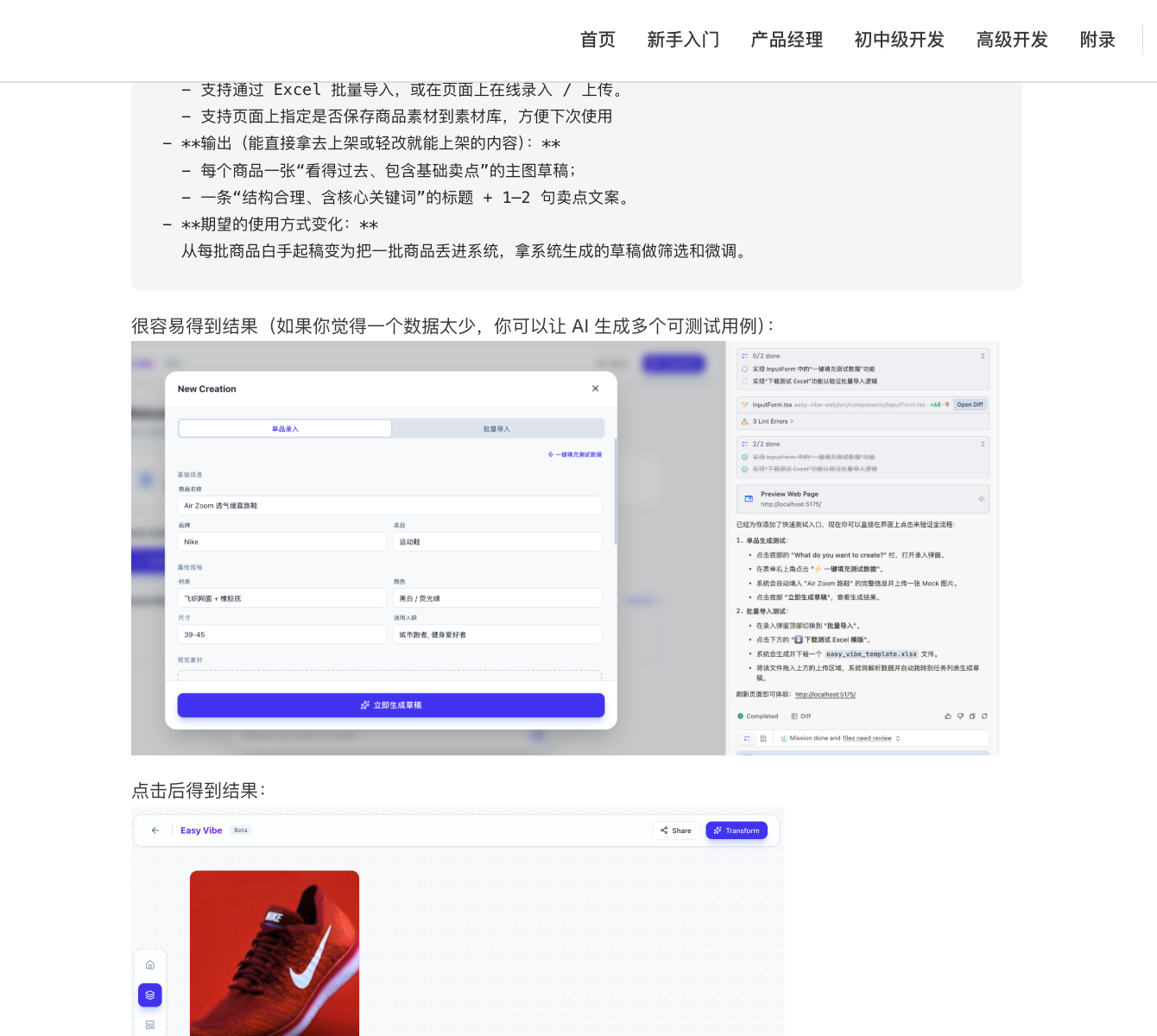
Step-by-step visual tutorials
Detailed walkthroughs that feel like learning with a private tutor
|
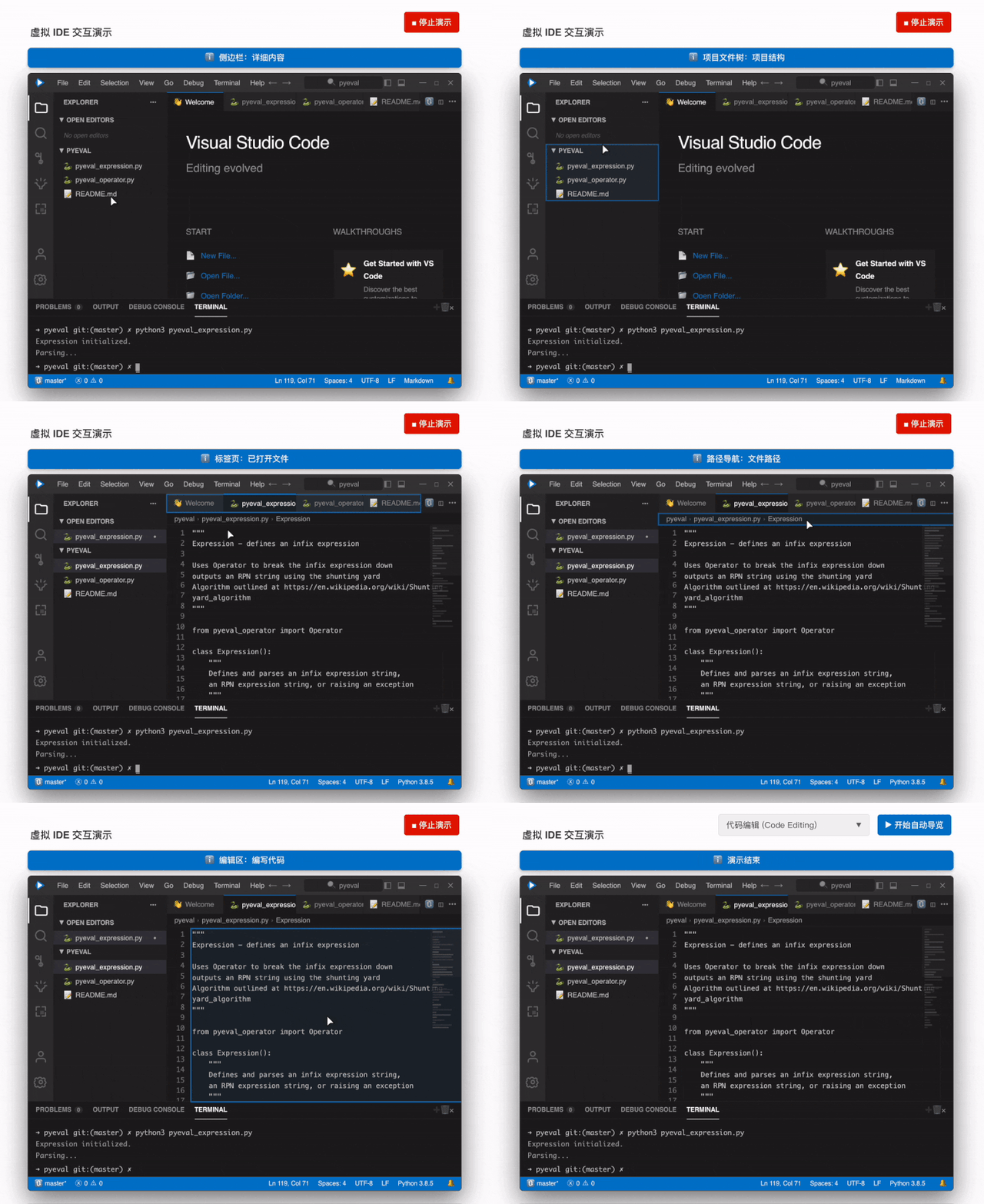
Immersive simulated coding
Virtual mouse guidance helps you quickly learn the core IDE workflow
|
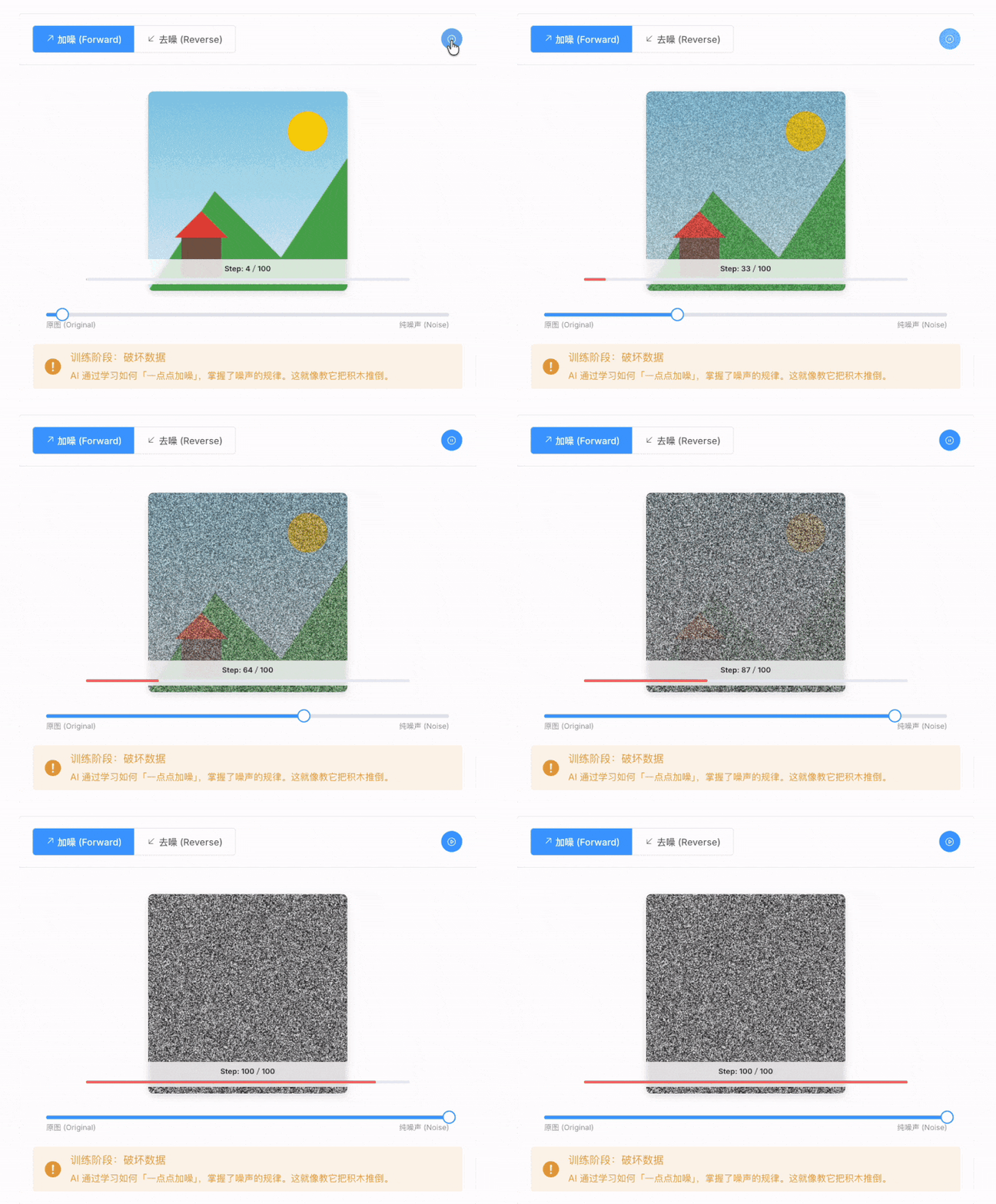
Visible AI principles
Animated explanations make it easy to see how AI generates images
|
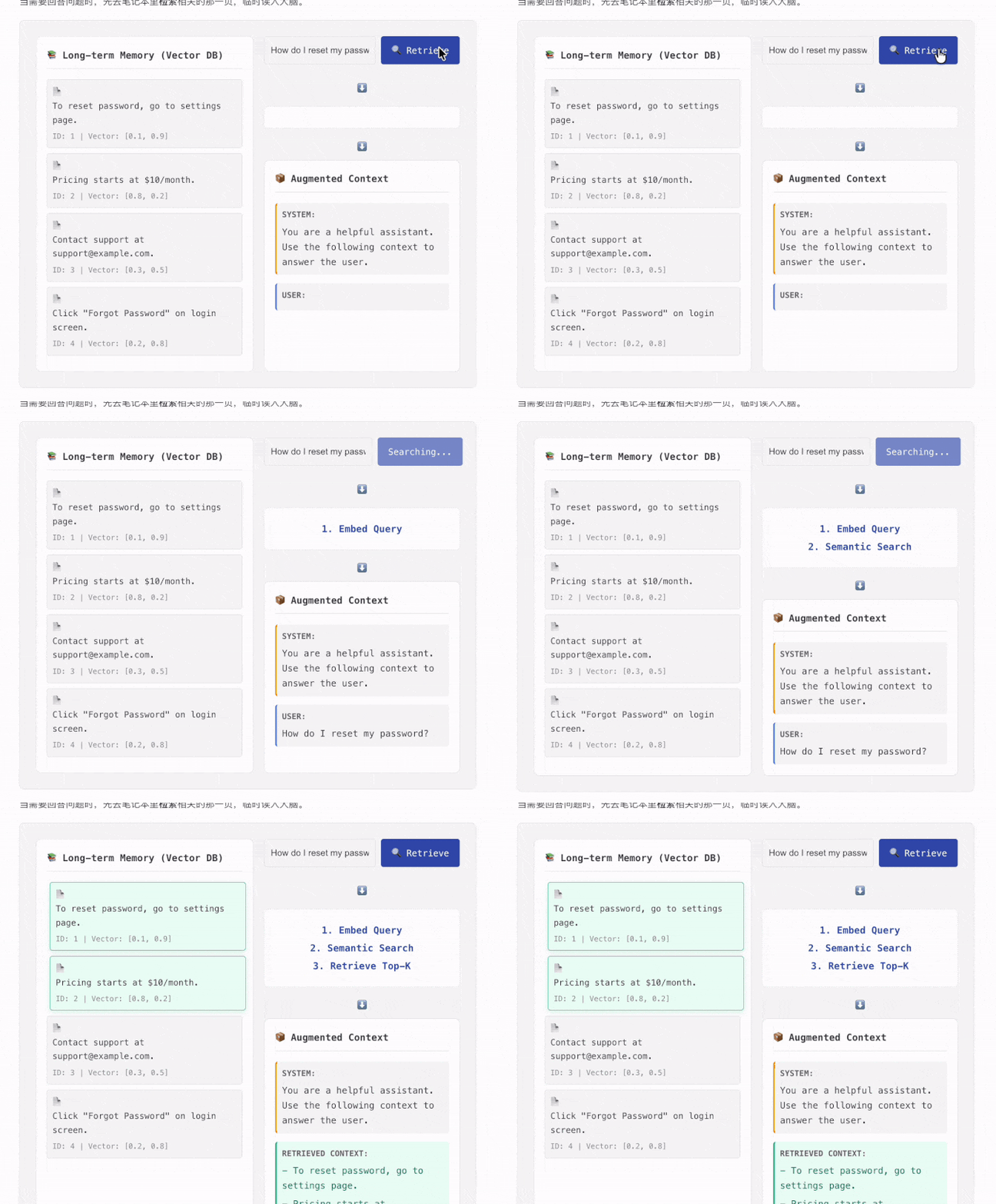
Learn RAG like a game
Interactive components let you click through the full RAG data flow
|
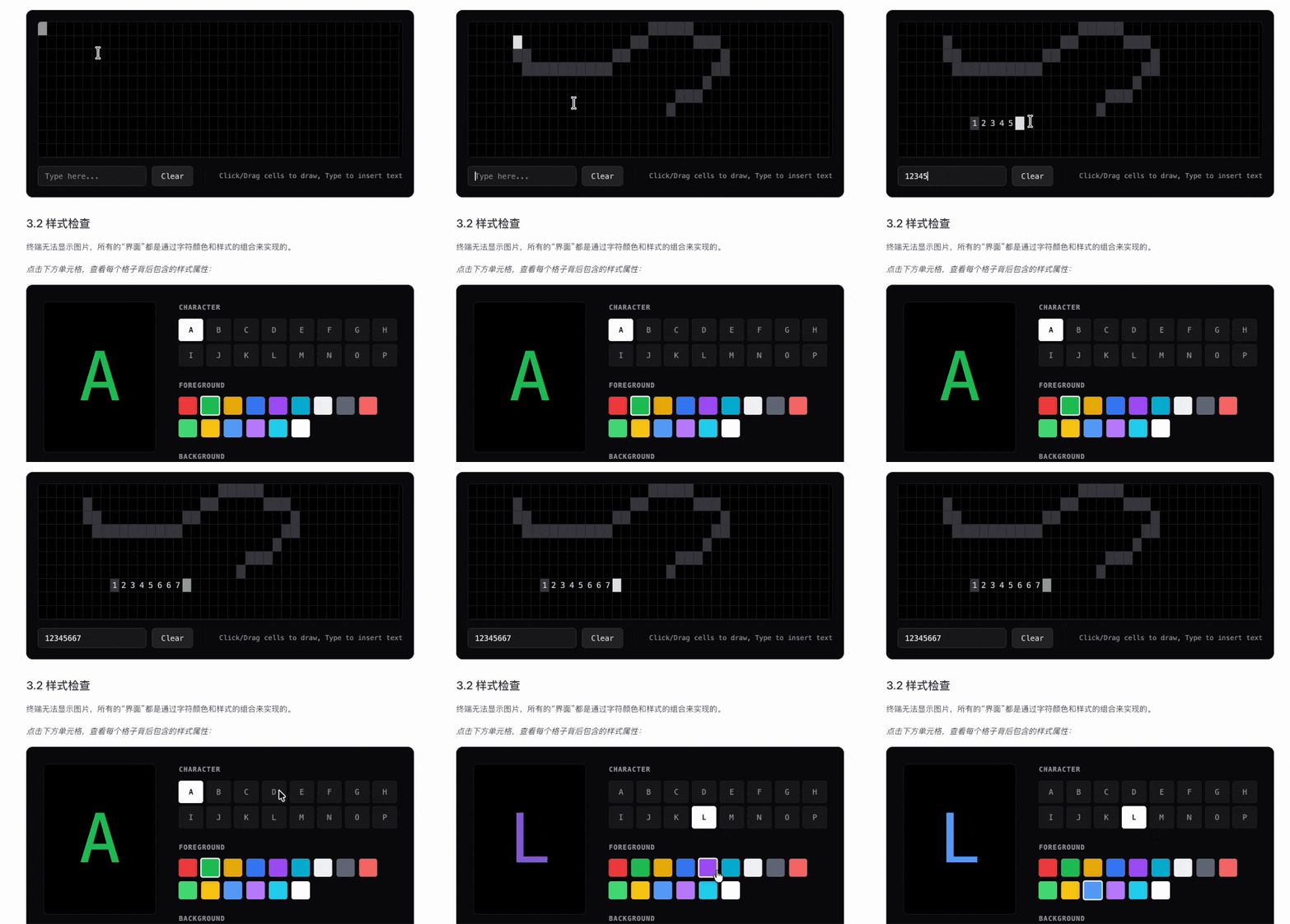
Visual terminal concepts
Command-line behavior becomes intuitive when the underlying logic is visualized
|
📝 Have your own vibe coding story?
Submit it here and inspire others!
## 目录
- [为什么选择 Easy-Vibe](#why-easy-vibe)
- [最新动态](#-news)
- [面向人群](#who-this-is-for)
- [学习路径](#your-learning-paths)
- [学习建议](#study-suggestions)
- [I. 零基础入门](#i-beginner-entry)
- [II. 初中级开发者](#ii-junior-and-mid-level-developers)
- [III. 高级开发者](#iii-advanced-developers)
- [附录知识库](#-appendix-knowledge-base)
- [如何学习](#️-how-to-learn)
- [本地运行](#-run-locally)
- [其他课程](#other-courses)
- [贡献与贡献者](#-contributing--contributors)
- [许可证](#-license)
## 为什么选择 Easy-Vibe
想要一个记账应用?说出来。
需要一个带微信登录的预约系统?说出来。
想要一个带评论功能的博客?说出来。
在 AI 时代,编程从描述你想要的东西开始。
Easy-Vibe 教你如何将它变成真正的产品。
## 🔥 最新动态
- **[2026-03-29]** ✨ **Vibe Stories 上线,并升级为真实用户故事**:在首页新增了 Vibe Stories 板块,配有交互式轮播图和专属故事页面,同时将占位内容替换为四位真实用户的故事——一位乡村小学教师、一名大学生、一位高中信息技术教师和一名卡车司机,他们都利用 AI 构建了真实的产品。[👉 查看故事](https://datawhalechina.github.io/easy-vibe/zh-cn/vibe-stories/story-1.html)
- **[2026-03-26]** 🚀 **第二阶段实践重大更新**:完成了 SaaS 毕业项目“[你的第一个 SaaS 全栈应用:文案生成网站](https://datawhalechina.github.io/easy-vibe/en/stage-2/assignments/fullstack-app/)”,并大幅扩充了“[如何集成 Stripe 和支付系统](https://datawhalechina.github.io/easy-vibe/en/stage-2/backend/stripe-payment/)”部分,以及关于多产品 UI 和微信小程序后端工作流的核心内容。
- **[2026-03-25]** 📚 **新增附录:用户研究与需求验证**:新增四篇文章,涵盖创意来源、双钻石模型、Jobs to Be Done 和 The Mom Test,帮助初学者发现并验证产品想法。[👉 阅读附录](https://datawhalechina.github.io/easy-vibe/en/appendix/)
- **[2026-03-25]** 📚 **英文文档全面更新**:第二阶段(全栈开发)和第三阶段(高级开发)现已全面提供英文版。[👉 开始学习](https://datawhalechina.github.io/easy-vibe/en/stage-2/)
历史动态
- **[2026-03-02]** 🦞 **OpenClaw 及 AI Agent 友好支持**:添加了 `llms.txt`,以便 OpenClaw、Claude、Cursor、Trae 和其他 AI Agent 能够快速了解仓库结构并找到合适的教程内容。
- **[2026-03-01]** [高级开发部分](https://datawhalechina.github.io/easy-vibe/en/stage-3/)已全面升级,包含 Claude Code 的深度指南,涵盖 MCP、Skills、Agent Teams 等,以及八个跨平台项目教程。
- **[2026-02-25]** 更新了[附录知识库](https://datawhalechina.github.io/easy-vibe/en/appendix/),现已涵盖 9 个知识领域和 80 多个交互式主题。
- **[2026-01-27]** 新增了 Android 和 iOS 应用开发教程。
- **[2026-01-19]** 发布了 Prompt 工程、AI 历史、身份验证设计和 Git 原理等交互式演示。
- **[2026-01-16]** 重组了项目结构,正式确立了零基础入门路径。
- **[2026-01-14]** 完成了第一阶段产品原型设计文档的大规模更新。
- **[2026-01-13]** 重构了文档架构,全面启用了多语言支持。
- **[2026-01-01]** 发布了项目的核心学习地图。
## 面向人群
- **零基础初学者**:先构建你的第一个项目,然后再了解它是如何运作的
- **产品经理 / 创始人**:快速验证想法,低成本构建 MVP
- **学生**:培养 AI 时代的实用技能
- **初级开发者**:学习从想法到上线的完整路径
- **中高级开发者**:为复杂项目升级你的 AI 协作工作流
## 学习路径
### 🎮 我想快速获得初次成就感
**最适合**:所有人
**你将学到什么**:通过一个简单、具体的动手示例,体验 AI 编程的真实感受
**你将获得什么**:对 vibe coding 以及如何通过对话与 AI 协作的清晰初印象
[从这里开始](https://datawhalechina.github.io/easy-vibe/en/stage-1/ai-capabilities-through-games/)
### 💡 我想把想法变成产品原型
**最适合**:初学者 / 产品经理 / 创始人
**你将学到什么**:学习路线图、AI IDE 工具、想法验证、原型设计、AI 能力集成和完整的 demo 迭代
**你将获得什么**:一个可演示的 AI 产品原型,你可以真正展示给用户或队友
[开始学习](https://datawhalechina.github.io/easy-vibe/en/stage-1/learning-map/)
### 🚀 我想端到端构建全栈产品
**最适合**:初级开发者 / 独立开发者 / 进阶学习者
**你将学到什么**:前端工作流、设计转代码、数据库、后端 API、部署、计费和大型项目实战
**你将获得什么**:独立交付现代 AI Web 应用的能力
[开始学习](https://datawhalechina.github.io/easy-vibe/en/stage-2/)
### AI-Native:我想要高级的 Claude Code 和 Agent 工作流
**最适合**:对 AI 原生工程感兴趣的开发者
**你将学到什么**:Claude Code、MCP、Skills、Agent Teams、长时间运行的任务、Spec Coding 和跨平台应用交付
**你将获得什么**:一个用于复杂 AI 辅助开发和自动化的更强大的工作流
[前往高级开发](https://datawhalechina.github.io/easy-vibe/en/stage-3/)
### 📚 我想要参考资料和基础知识
**最适合**:所有人
**你将学到什么**:计算机基础知识、前端/后端基础、基础设施、AI 原理和工程实践
**你将获得什么**:一个涵盖 9 大知识领域的长期参考知识库
[浏览知识库](https://datawhalechina.github.io/easy-vibe/en/appendix/)
## 学习建议
- 如果你是初学者、产品经理或创始人,请从[第一阶段](https://datawhalechina.github.io/easy-vibe/en/stage-1/learning-map/)开始
- 如果你想从原型迈向全栈交付,请从[第二阶段](https://datawhalechina.github.io/easy-vibe/en/stage-2/)开始
- 如果你想要高级的 Claude Code 工作流或跨平台项目,请前往[第三阶段](https://datawhalechina.github.io/easy-vibe/en/stage-3/)
- 如果你被概念或缺失的背景知识所阻碍,请查阅[附录知识库](https://datawhalechina.github.io/easy-vibe/en/appendix/)
### 📖 内容导航
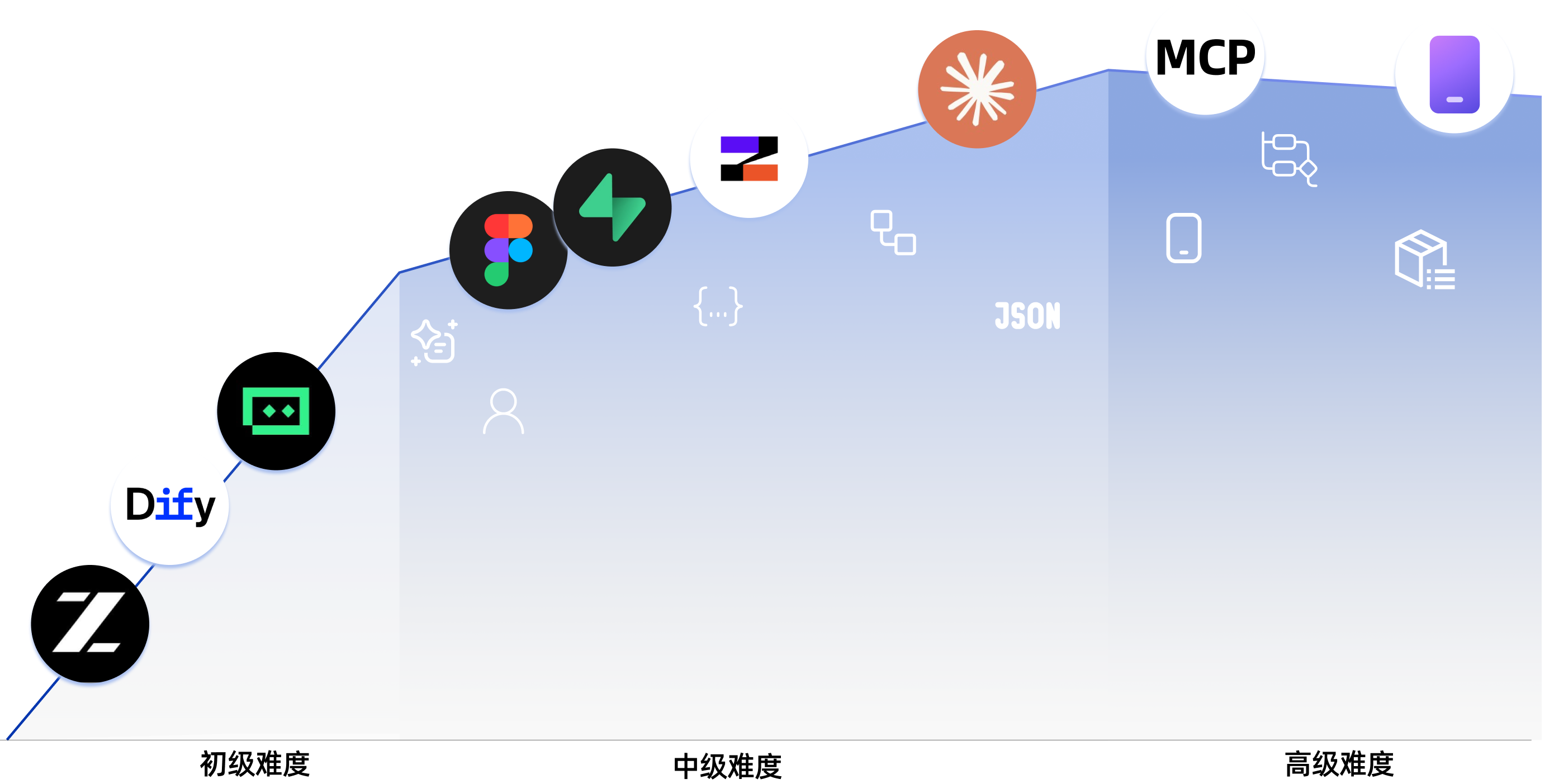
### I. 零基础入门
| 部分 | 核心内容 |
| :------ | :---------- |
| [学习地图](https://datawhalechina.github.io/easy-vibe/en/stage-1/learning-map/) | 完整学习旅程的引导式概览 |
| [AI 时代:只要会说话,就能写代码](https://datawhalechina.github.io/easy-vibe/en/stage-1/ai-capabilities-through-games/) | 通过贪吃蛇等示例,初步体验 AI 编程 |
| [掌握 AI 编程工具](https://datawhalechina.github.io/easy-vibe/en/stage-1/introduction-to-ai-ide/) | 了解 AI IDE 工具的工作原理,并用它们构建简单的本地项目 |
| [发现好想法](https://datawhalechina.github.io/easy-vibe/en/stage-1/finding-great-idea/) | 学习如何发现并验证值得构建的产品想法 |
| [构建产品原型](https://datawhalechina.github.io/easy-vibe/en/stage-1/building-prototype/) | 从需求走向单页和多页产品原型 |
| [集成 AI 能力](https://datawhalechina.github.io/easy-vibe/en/stage-1/integrating-ai-capabilities/) | 集成文本、图像和视频 AI 功能 |
| [完整项目实战](https://datawhalechina.github.io/easy-vibe/en/stage-1/complete-project-practice/) | 模拟真实场景,收集用户反馈,并迭代一个完整的项目 |
#### 附录:产品与商业思维
| 部分 | 核心内容 |
| :------ | :---------- |
| [产品思维与解决方案设计](https://datawhalechina.github.io/easy-vibe/en/stage-1/appendix-a-product-thinking/) | 从零到一构建产品的核心框架 |
| [AI 行业应用场景(B 端)](https://datawhalechina.github.io/easy-vibe/en/stage-1/appendix-industry-scenarios/) | 了解 AI 如何应用于各行各业 |
| [AI 消费级场景灵感(C 端)](https://datawhalechina.github.io/easy-vibe/en/stage-1/appendix-c-consumer-scenarios/) | 探索消费级 AI 中的产品机会 |
#### 附录:用户研究与需求验证
| 部分 | 核心内容 |
| :------ | :---------- |
| [去哪里寻找想法:最适合初学者的 3 个参考来源](https://datawhalechina.github.io/easy-vibe/en/stage-1/appendix-idea-sources/) | 建立寻找具体产品机会的可靠渠道 |
| [双钻石模型:先做对的事,再把事做对](https://datawhalechina.github.io/easy-vibe/en/stage-1/appendix-double-diamond/) | 使用结构化流程,将零散的灵感转化为可行的方向 |
| [使用 Jobs to Be Done 找出用户真正想要完成的事](https://datawhalechina.github.io/easy-vibe/en/stage-1/appendix-jobs-to-be-done/) | 通过真实任务而非表面功能需求来分析用户目标 |
| [The Mom Test:一种用于验证需求的用户访谈方法](https://datawhalechina.github.io/easy-vibe/en/stage-1/appendix-mom-test/) | 学习如何提出更好的问题并避免虚假正面反馈 |
#### 附录:技术方案
| 部分 | 核心内容 |
| :------ | :---------- |
| [遇到错误怎么办](https://datawhalechina.github.io/easy-vibe/en/stage-1/appendix-b-common-errors/) | 常见的 vibe coding 问题及其排查方法 |
| [七大 AI 编程工具对比](https://datawhalechina.github.io/easy-vibe/en/stage-1/appendix-articles/example0-1/vibe-coding-tools-snake-game-tutorial) | 通过动手测试比较主流 AI 编程平台 |
| [使用 Agent 设计网站](https://datawhalechina.github.io/easy-vibe/en/stage-1/appendix-articles/example0-2/vibe-coding-tools-build-website-with-ai-coding-and-design-agents) | 在实践中学习多 Agent 协作 |
### II. 初中级开发者
#### 前端
| 部分 | 核心内容 |
| :------ | :---------- |
| [前端 0:使用 Lovart 构建你自己的资产生产 Agent](https://datawhalechina.github.io/easy-vibe/en/stage-2/frontend/lovart-assets/) | 使用 Nanobanana 和 Lovart 批量生成视觉资产,并构建带有意图识别的绘图 Agent |
| [前端 1:Figma & MasterGo 基础](https://datawhalechina.github.io/easy-vibe/en/stage-2/frontend/figma-mastergo/) | 学习从设计稿到可实现的 UI 思维的工作流 |
| [前端 2:构建你的第一个现代应用 - UI 设计](https://datawhalechina.github.io/easy-vibe/en/stage-2/frontend/ui-design/) | 学习现代应用界面背后的 UI 设计基础 |
| [前端 3:UI 规范与多产品设计](https://datawhalechina.github.io/easy-vibe/en/stage-2/frontend/multi-product-ui/) | 通过共享的 UI 规则提升多个产品的一致性和美感 |
| [前端 4:使用 LLM 和 Skills 美化界面](https://datawhalechina.github.io/easy-vibe/en/stage-2/frontend/llm-skills-beautiful/) | 使用提示和插件让 AI 生成更精致、独特的界面 |
| [前端 4:让我们构建霍格沃茨肖像](https://datawhalechina.github.io/easy-vibe/en/stage-2/frontend/hogwarts-portraits/) | 从零开始构建一个交互式的 AI 图像前端项目 |
| [前端 6:从设计原型到项目代码](https://datawhalechina.github.io/easy-vibe/en/stage-2/frontend/design-to-code/) | 将设计原型转化为能在浏览器中真正运行的前端代码 |
| [前端 7:使用现代组件库升级你的 UI](https://datawhalechina.github.io/easy-vibe/en/stage-2/frontend/modern-component-library/) | 使用组件库更快地构建专业界面 |
#### 后端
| 部分 | 核心内容 |
| :------ | :---------- |
| [后端 1:学习 Git 和 GitHub](
) | 掌握 Git 的核心版本控制操作和协作工作流 |
| [后端 2:从数据库到 Supabase](https://datawhalechina.github.io/easy-vibe/en/stage-2/backend/database-supabase/) | 学习关系型数据库基础,并使用 Supabase 作为现代 BaaS 平台 |
| [后端 3:后端 API 设计与开发](https://datawhalechina.github.io/easy-vibe/en/stage-2/backend/ai-interface-code/) | 使用 AI 辅助 API 设计、后端代码生成和 API 文档编写 |
| [后端 4:交付你的产品原型](https://datawhalechina.github.io/easy-vibe/en/stage-2/backend/zeabur-deployment/) | 使用 Zeabur 快速将全栈应用部署到云端 |
| [后端 5:从 IDE 到 CLI AI 编码工具](https://datawhalechina.github.io/easy-vibe/en/stage-2/backend/modern-cli/) | 探索以终端优先的 AI 编码工作流,用于现代开发 |
| [后端 6:集成 Stripe 和其他计费系统](https://datawhalechina.github.io/easy-vibe/en/stage-2/backend/stripe-payment/) | 通过支付和计费功能实现变现 |
#### 大型项目
| 部分 | 核心内容 |
| :------ | :---------- |
| [大型项目 1:你的第一个 SaaS 全栈应用 - AI 文案网站](https://datawhalechina.github.io/easy-vibe/en/stage-2/assignments/fullstack-app/) | 构建一个包含登录、生成、计费和管理功能的 AI 营销文案工作区 |
| [大型项目 2:在线考试与管理系统](https://datawhalechina.github.io/easy-vibe/en/stage-2/assignments/modern-frontend-trae/) | 构建一个包含题目生成、考试流程和管理工具的在线考试系统 |
#### AI 能力附录
| 部分 | 核心内容 |
| :------ | :---------- |
| [AI 1:Dify 基础与知识库集成](https://datawhalechina.github.io/easy-vibe/en/stage-2/ai-capabilities/dify-knowledge-base/) | 学习使用 Dify 构建 AI 应用并集成私有知识库 |
### III. 高级开发者
#### Claude Code 核心技能
| 部分 | 核心内容 |
| :------ | :---------- |
| [Claude Code 入门](https://datawhalechina.github.io/easy-vibe/en/stage-3/core-skills/basics/) | 安装、设置、基础知识和实用命令 |
| [Claude Code MCP 指南](https://datawhalechina.github.io/easy-vibe/en/stage-3/core-skills/mcp/) | 通过 MCP 将 Claude Code 连接到 GitHub、数据库、API 和其他服务 |
| [Claude Code Skills 指南](https://datawhalechina.github.io/easy-vibe/en/stage-3/core-skills/skills/) | 将专业知识打包成可重复使用的 Skills |
| [如何让 Claude Code 持续处理长时间运行的任务](https://datawhalechina.github.io/easy-vibe/en/stage-3/core-skills/long-running-tasks/) | 设计长时间运行的任务,让编码工具能够持续工作直到完成 |
| [Claude Agent Teams 指南](https://datawhalechina.github.io/easy-vibe/en/stage-3/core-skills/agent-teams/) | 像真实的开发团队一样协调多个 AI 实例 |
| [用于工程级开发的 Claude Code 超能力](https://datawhalechina.github.io/easy-vibe/en/stage-3/core-skills/superpowers/) | 利用 TDD 和最佳实践帮助 AI 编写出工程级代码 |
| [Claude Code 工作流最佳实践](https://datawhalechina.github.io/easy-vibe/en/stage-3/core-skills/workflow/) | 重构、代码审查和日常开发的最佳实践 |
| [在移动端进行 Claude Code 远程开发](https://datawhalechina.github.io/easy-vibe/en/stage-3/core-skills/mobile-development/) | 超越桌面端使用 Claude Code,并在移动设备上构建高效的远程工作流 |
| [Claude Agent SDK 完全指南](https://datawhalechina.github.io/easy-vibe/en/stage-3/core-skills/claude-agent-sdk/) | 构建自定义 Agent 工作流,并使用 SDK 将 Claude 集成到你自己的工具中 |
| [从 vibe coding 到 spec coding](https://datawhalechina.github.io/easy-vibe/en/stage-3/core-skills/spec-coding/) | 从临时提示过渡到更结构化、规范驱动的 AI 开发工作流 |
#### 跨平台开发
| 部分 | 核心内容 |
| :------ | :---------- |
| [如何为你的应用选择合适的平台](https://datawhalechina.github.io/easy-vibe/en/stage-3/cross-platform/choose-platform/) | 比较应用形态,并根据用户、场景和交付目标选择合适的平台 |
| [构建微信小程序](https://datawhalechina.github.io/easy-vibe/en/stage-3/cross-platform/wechat-miniprogram/) | 了解生态系统,并从模板到上线交付一个前端小程序 |
| [构建带后端的微信小程序](https://datawhalechina.github.io/easy-vibe/en/stage-3/cross-platform/wechat-miniprogram-backend/) | 添加后端逻辑和数据库以完成完整的业务闭环 |
| [构建 Android 应用](https://datawhalechina.github.io/easy-vibe/en/stage-3/cross-platform/android-app/) | 学习使用现代原生工作流进行 Android 应用开发 |
| [构建 iOS 应用](https://datawhalechina.github.io/easy-vibe/en/stage-3/cross-platform/ios-app/) | 学习 iOS 应用开发及苹果生态系统的惯例 |
| [构建本地 PWA 应用](https://datawhalechina.github.io/easy-vibe/en/stage-3/cross-platform/pwa-local-app/) | 通过离线支持、推送通知和安装功能,将网站转变为真正的应用 |
| [构建浏览器 AI 助手扩展](https://datawhalechina.github.io/easy-vibe/en/stage-3/cross-platform/browser-ai-extension/) | 创建一个 Chrome 扩展,使用云端 API 或内置 AI 总结任何页面 |
| [构建 Electron 桌面应用](https://datawhalechina.github.io/easy-vibe/en/stage-3/cross-platform/electron-voice-to-text/) | 使用 Electron 构建一个支持三大平台的语音转文字桌面应用 |
| [快速构建并铸造 NFT](https://datawhalechina.github.io/easy-vibe/en/stage-3/cross-platform/nft-minting/) | 从零开始编写智能合约,进行部署并铸造你自己的 NFT |
| [构建 VS Code 扩展](https://datawhalechina.github.io/easy-vibe/en/stage-3/cross-platform/vscode-extension/) | 构建一个带有模板、代码聊天和多文件问答的 AI 项目助手 |
| [构建工业级 Qt 桌面应用](https://datawhalechina.github.io/easy-vibe/en/stage-3/cross-platform/qt-industrial-hmi/) | 创建一个带有趋势图、警报和监控功能的实时 Qt HMI 系统 |
#### AI 能力附录
| 部分 | 核心内容 |
| :------ | :---------- |
| [什么是 RAG 及其工作原理](https://datawhalechina.github.io/easy-vibe/en/stage-3/ai-advanced/rag-introduction/) | 系统性地建立对 RAG 原理和常见架构的理解 |
| [使用 LangGraph 的中高级 RAG 工作流](https://datawhalechina.github.io/easy-vibe/en/stage-3/ai-advanced/langgraph-advanced-rag/) | 设计多步骤工作流和更高级的 RAG 系统 |
### 📚 附录知识库
### 🎓 其他课程
- [动手实践现代 RL](#other-courses)
- [学习线束工程](#other-courses)
## 🛠️ 如何学习
- 阅读并实践与你当前水平相匹配的章节。如果遇到困难,请随时提交 issue。
## 💻 本地运行
### 现代方式
在如 VS Code、Cursor 或 Trae 等 AI IDE 的聊天窗口中,你只需说:
```
Please help me run this project locally.
```
### 传统方式
1. `npm install`
2. `npm run dev`
3. 在浏览器中打开 `http://localhost:3000`。
## 其他课程
我们的团队还创建了其他课程!快来看看吧:
[](https://github.com/walkinglabs/hands-on-modern-rl)
**动手实践现代 RL**:一个开源的实践课程,旨在弥合从基础 RL 概念到 LLM 对齐、RLVR 和高级 Agentic 系统之间的差距。
[](https://github.com/walkinglabs/learn-harness-engineering/tree/main)
**学习线束工程**:一份关于线束工程的综合指南。
## 📄 许可证
## Star 历史
[](https://www.star-history.com/#datawhalechina/easy-vibe&type=date&legend=top-left)
标签:AI编程, Datawhale, MITM代理, Syscall, vibe coding, Web开发, 交互式学习, 初学者教程, 在线教育, 应用开发, 开源教程, 技术学习, 教程, 现代编程, 编程课程, 自定义脚本, 自然语言编程, 零基础编程