loxy0devlp/RedTiger-Tools
GitHub: loxy0devlp/RedTiger-Tools
一款面向渗透测试和开源情报(OSINT)的多功能自动化工具,通过插件系统将多种安全侦察与信息收集能力整合为统一平台。
Stars: 514 | Forks: 24

 RedTiger-Tools (v2)
RedTiger-Tools 是一款专为渗透测试和 OSINT 打造的多功能自动化工具。该项目是开源的,旨在根据用户需求进行完全可配置的定制。它还包含一个插件系统,允许用户扩展或创建新功能,从而将多种工具集中到一个统一的平台中。
⚠️ 免责声明:
本版本仅供教育和合法用途。严禁并拒绝承担任何恶意使用的责任,此需遵守《法国刑法典》中关于攻击自动化数据处理系统的相关条款(第 323-1 至 323-7 条)。
📝 描述:
- ⚙️ 兼容 Windows 和 Linux。
- 🧠 合法、高级且经过优化的版本。
- 🔎 面向渗透测试和 OSINT 的工具。
- 🧩 允许用户添加或创建新功能的插件系统。
- 📁 通过 /Data 目录中的 JSON 文件进行集中配置。
- 💻 支持 CLI 模式和交互式界面。
📸 预览:
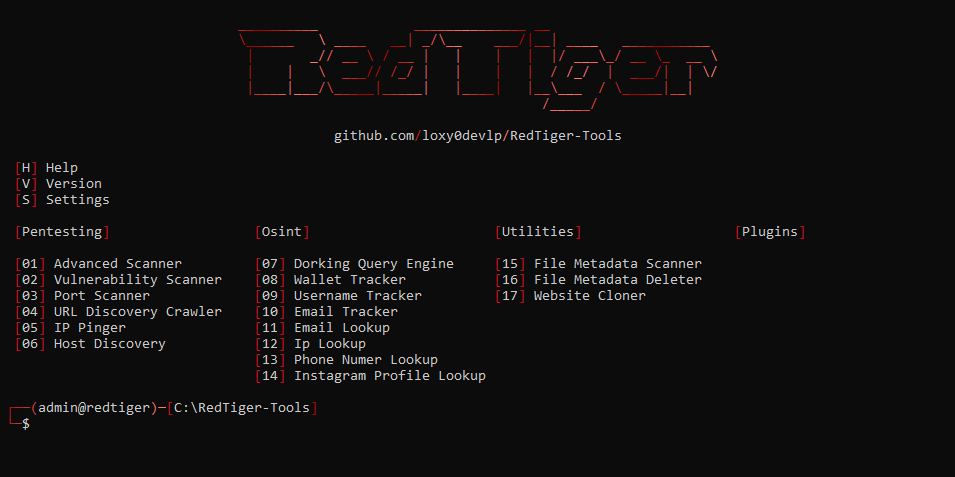
⚙️ 安装说明:
- 安装最新版本的 python (3.14):
- Windows:
在此下载 (安装时必须启用 "PATH" 选项)
- Linux:
sudo apt install python3 -y
- 克隆仓库:
git clone https://github.com/loxy0devlp/RedTiger-Tools.git
- 进入项目文件夹:
cd RedTiger-Tools
- 运行 setup:
- Windows:
python setup.py
- Linux:
python3 setup.py
- 启动工具:
- Windows:
python redtiger.py
- Linux:
python3 redtiger.py
🚀 功能:
```
Tools:
--help / -h : Shows all tools options.
--version / -v : Displays the version and information of the tool.
--settings-update / -su : Update the tools settings.
* --mode / -m : Mode: decorated / interface
* --status / -s : Status: enable / disable
Pentesting:
--advanced-scanner / -as : Advanced scanning performing all scans. (website, domain, IP, server)
* --target / -t : Service target:
/ / /
--output / -o : Creating additional JSON output.
--http-timeout / -HT : Set the maximum HTTP timeout in seconds:
--socket-timeout / -ST : Set the maximum socket timeout in seconds:
--http-proxy / -HP : Set an HTTP proxy:
--socket-proxy / -SP : Set a socket proxy:
--useragent / -u : Set a user-agent: random /
--cookie / -c : Set a cookie:
--vulnerability-scanner / -vs : Scan all vulnerabilities of a website.
* --target / -t : Website target: / / /
--output / -o : Creating additional JSON output.
--http-timeout / -HT : Set the maximum HTTP timeout in seconds:
--http-proxy / -HP : Set an HTTP proxy:
--useragent / -u : Set a user-agent: random /
--cookie / -c : Set a cookie:
--port-scanner / -ps : Scan the ports of an IP.
* --target / -t : IP target:
* --mode / -m : Scan mode: single / multiple / range / default / all
--port / -p : Port(s): single: / multiple: , / range: -
--protocol-scan / -PS : Protocol(s): TCP / UDP / TCP,UDP
--output / -o : Creating additional JSON output.
--socket-timeout / -ST : Set the maximum socket timeout in seconds:
--socket-proxy / -SP : Set a socket proxy:
--url-discovery-crawler / -udc : Scan all urls of a website.
* --target / -t : Website target: / / /
* --mode / -m : Scan mode: onlypage / allwebsite
--output / -o : Creating additional JSON output.
--http-timeout / -HT : Set the maximum HTTP timeout in seconds:
--http-proxy / -HP : Set an HTTP proxy:
--useragent / -u : Set a user-agent: random /
--cookie / -c : Set a cookie:
--ip-pinger / -ip : Continuously ping an IP.
* --target / -t : IP target:
* --mode / -m : Ping mode: ICMP / TCP
--bytes / -b : Set the number of bytes for an ICMP ping:
--port / -p : Set the port for a TCP ping:
--interval / -i : Set the interval between each ping in seconds:
--socket-timeout / -ST : Set the maximum socket timeout in seconds:
--socket-proxy / -SP : Set a socket proxy:
--host-discovery / -hd : Determines which hosts are online.
* --target / -t : CIDR target: /
--port / -p : Set the port for a TCP ping:
--output / -o : Creating additional JSON output.
--tcp-icmp-timeout / -TIT : Set the maximum TCP/ICMP timeout in seconds:
--socket-proxy / -SP : Set a socket proxy:
Osint:
--dorking-query-engine / -dqe : Query builder for Google, Bing and DuckDuckGo with advanced operators.
* --engine / -e : Search engine: google / bing / duckduckgo
--wallet-tracker / -wt : Track a crypto wallet's transactions with APIs.
* --address / -a : Wallet target address:
--output / -o : Creating additional JSON output.
--http-timeout / -HT : Set the maximum HTTP timeout for the API in seconds:
--http-proxy / -HP : Set an HTTP proxy for the API:
--useragent / -u : Set a user-agent for the API: random /
--username-tracker / -ut : Track a username across multiple platforms.
* --target / -t : The target username:
--output / -o : Creating additional JSON output.
--http-timeout / -HT : Set the maximum HTTP timeout in seconds:
--http-proxy / -HP : Set an HTTP proxy:
--useragent / -u : Set a user-agent: random /
--email-tracker / -et : track an email registered on several platforms.
* --email / -e : Email target:
--output / -o : Creating additional JSON output.
--http-timeout / -HT : Set the maximum HTTP timeout in seconds:
--http-proxy / -HP : Set an HTTP proxy:
--useragent / -u : Set a user-agent: random /
--email-lookup / -el : Retrieve public data from an email.
* --email / -e : Email target:
--output / -o : Creating additional JSON output.
--socket-timeout / -ST : Set the maximum socket timeout in seconds:
--socket-proxy / -SP : Set a socket proxy:
--ip-lookup / -il : Fetch public IP data using the "ip-api.com" API.
* --ip / -i : IP target:
--output / -o : Creating additional JSON output.
--http-timeout / -HT : Set the maximum HTTP timeout for the API in seconds:
--http-proxy / -HP : Set an HTTP proxy for the API:
--useragent / -u : Set a user-agent for the API: random /
--phone-numer-lookup / -pnl : Retrieve public data from a phone number.
* --phone / -p : Phone number target:
--output / -o : Creating additional JSON output.
--instagram-profile-lookup / -ipl : Retrieve public data from an instagram username.
* --target / -t : Username target:
* --sessionid / -s : Your instagram id session:
--output / -o : Creating additional JSON output.
--http-proxy / -HP : Set an HTTP proxy:
--useragent / -u : Set a user-agent: random /
Utilities:
--file-metadata-scanner / -fms : Scan all file metadata.
* --path / -p : The file path:
--output / -o : Creating additional JSON output.
--file-metadata-deleter / -fmd : Remove all file metadata.
* --path / -p : The file path:
--website-cloner / -wc : Clone the entire web page.
* --target / -t : Website target: / / /
--http-timeout / -HT : Set the maximum HTTP timeout in seconds:
--http-proxy / -HP : Set an HTTP proxy:
--useragent / -u : Set a user-agent: random /
--cookie / -c : Set a cookie:
Notations:
/ : Or
[] : Optional
<> : Value
* : Required
```
👨💻 贡献者:
标签:ESC4, Facebook API, Homebrew安装, JSON配置, OSINT, Python, RedTeam, 反取证, 多平台兼容, 安全教育, 安全评估, 实时处理, 密码管理, 开源安全工具, 插件化架构, 攻击路径可视化, 无后门, 无线安全, 网络安全, 逆向工具, 逆向工程平台, 隐私保护, 集中化管理, 黑客工具