pranshuparmar/witr
GitHub: pranshuparmar/witr
witr 是一款跨平台的进程溯源诊断工具,通过构建进程启动的因果链来回答「为什么这个进程在运行」这一核心问题。
Stars: 18262 | Forks: 570
# witr
### 为什么这个在运行?
*配合* [**交互式 TUI 模式**](#3-interactive-mode-tui) ✨
[](https://github.com/pranshuparmar/witr/blob/main/go.mod) [](https://goreportcard.com/report/github.com/pranshuparmar/witr) [](https://github.com/pranshuparmar/witr/actions/workflows/release.yml) [](#6-平台支持)
[](https://github.com/pranshuparmar/witr/releases/latest) [](https://repology.org/project/witr/versions) 📖 阅读 witr 背后的[故事](https://medium.com/@pranshu.parmar/witr-why-is-this-running-a9a97cbedd18)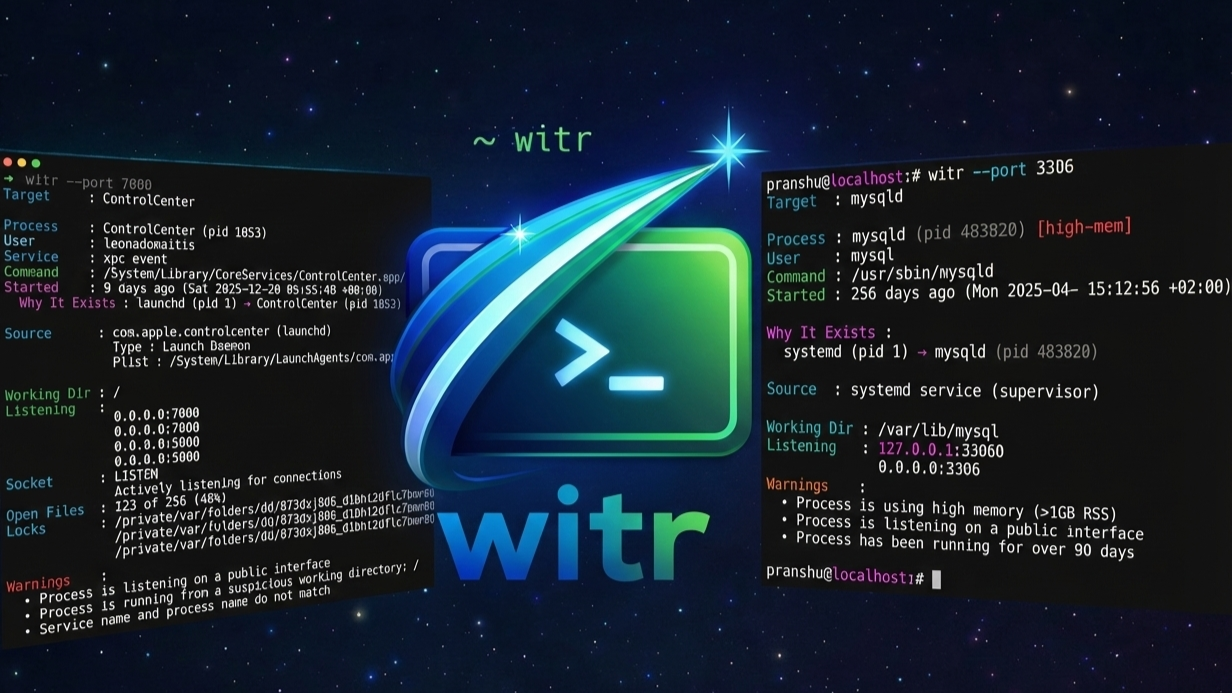
[](https://github.com/pranshuparmar/witr/releases/latest) [](https://repology.org/project/witr/versions) 📖 阅读 witr 背后的[故事](https://medium.com/@pranshu.parmar/witr-why-is-this-running-a9a97cbedd18)
[**目的**](#1-purpose) • [**安装**](#2-installation) • ✨ [**TUI**](#3-interactive-mode-tui) • [**参数**](#4-flags--options) • [**示例**](#5-example-outputs) • [**平台**](#6-platform-support)
[**目标**](#7-goals) • [**核心概念**](#8-core-concept) • [**输出行为**](#9-output-behavior) • [**成功标准**](#10-success-criteria) • [**赞助者**](#11-sponsors)
## 1. 目的
**witr** 的存在是为了回答一个单一的问题:
当某个事物在系统上运行时,无论它是一个进程、一个服务,还是绑定到某个端口的东西,总有其原因。这个原因通常是间接的、不明显的,或者分布在多个层级中,例如 supervisor、容器、服务或 shell。
现有的工具(`ps`、`top`、`lsof`、`ss`、`systemctl`、`docker ps`)公开了状态和元数据。它们展示了正在运行的是*什么*,但需要用户在不同工具的输出之间手动关联,以推断*为什么*运行。
**witr** 让这种因果关系变得明确。
它在单一的、人类可读的输出或**交互式 TUI 仪表板**中,解释了**运行中的事物从何而来**、**它是如何启动的**,以及**此刻是何种系统链在负责它的存在**。
## 2. 安装
witr 以单一静态二进制文件的形式分发,支持 Linux、macOS、FreeBSD 和 Windows。
witr 还在多种操作系统和生态系统中独立打包和维护。[Repology](https://repology.org/project/witr/versions) 上提供了最新的打包状态概览。请注意,由于独立的审查和验证过程,社区包可能会落后于 GitHub 发布版。
### 2.1 快速安装
#### Unix (Linux, macOS 和 FreeBSD)
```
curl -fsSL https://raw.githubusercontent.com/pranshuparmar/witr/main/install.sh | bash
```
[**目标**](#7-goals) • [**核心概念**](#8-core-concept) • [**输出行为**](#9-output-behavior) • [**成功标准**](#10-success-criteria) • [**赞助者**](#11-sponsors)
脚本详情
该脚本将: - 检测您的操作系统(`linux`、`darwin` 或 `freebsd`) - 检测您的 CPU 架构(`amd64` 或 `arm64`) - 下载最新发布的二进制文件和 man page - 将其安装到 `/usr/local/bin/witr` - 将 man page 安装到 `/usr/local/share/man/man1/witr.1` - 传递 INSTALL_PREFIX 以覆盖默认安装路径脚本详情
该脚本将: - 下载最新版本 并校验 checksum。 - 将 `witr.exe` 解压到 `%LocalAppData%\witr\bin`。 - 将 bin 目录添加到您的用户 `PATH` 中。Homebrew (macOS & Linux) 
您可以在 macOS 或 Linux 上使用 [Homebrew](https://brew.sh/) 安装 **witr**: ``` brew install witr ```
Conda (macOS, Linux & Windows) 
您可以在 macOS、Linux 和 Windows 上使用 [conda](https://docs.conda.io/en/latest/)、[mamba](https://mamba.readthedocs.io/en/latest/) 或 [pixi](https://pixi.prefix.dev/latest/) 安装 **witr**: ``` conda install -c conda-forge witr # 或者使用 mamba mamba install -c conda-forge witr # 或者使用 pixi pixi global install witr ```
Arch Linux (AUR) 
在 Arch Linux 及其衍生版上,可以通过 [AUR 包](https://aur.archlinux.org/packages/witr-bin) 安装: ``` yay -S witr-bin # 或者使用 paru paru -S witr-bin # 或者使用你偏好的 AUR helper ```
Winget (Windows) 
您可以通过 [winget](https://learn.microsoft.com/en-us/windows/package-manager/winget/) 安装 **witr**: ``` winget install -e --id PranshuParmar.witr ```
NPM (Cross-platform) 
您可以使用 [npm](https://www.npmjs.com/package/@pranshuparmar/witr) 安装 **witr**: ``` npm install -g @pranshuparmar/witr ```
FreeBSD Ports 
您可以在 FreeBSD 上通过 [FreshPorts port](https://www.freshports.org/sysutils/witr/) 安装 **witr**: ``` pkg install witr # 或 pkg install sysutils/witr ``` 或者从 Ports 构建: ``` cd /usr/ports/sysutils/witr/ make install clean ```
Chocolatey (Windows) 
您可以使用 [Chocolatey](https://community.chocolatey.org) 安装 **witr**: ``` choco install witr ```
Scoop (Windows) 
您可以使用 [Scoop](https://scoop.sh) 安装 **witr**: ``` scoop install main/witr ```
AOSC OS 
您可以从 [AOSC OS 仓库](https://packages.aosc.io/packages/witr) 安装 **witr**: ``` oma install witr ```
GNU Guix 
您可以从 [GNU Guix 仓库](https://packages.guix.gnu.org/packages/witr/) 安装 **witr**: ``` guix install witr ```
Uniget (Linux) 
您可以使用 [uniget](https://uniget.dev/) 安装 **witr**: ``` uniget install witr ```
Aqua (macOS, Linux & Windows) 
您可以使用 [aqua](https://aquaproj.github.io/) 安装 **witr**: ``` # 添加 package aqua g -i pranshuparmar/witr # 安装 package aqua i pranshuparmar/witr ```
Brioche (Linux) 
您可以使用 [brioche](https://brioche.dev/) 安装 **witr**: ``` brioche install -r witr ```
预构建包 (deb, rpm, apk)
**witr** 为主流 Linux 发行版提供原生包。您可以从 [GitHub 发布页面](https://github.com/pranshuparmar/witr/releases/latest) 下载最新的 `.deb`、`.rpm` 或 `.apk` 包。 - 使用 `curl` 的通用下载命令: # 请将
Go (跨平台)
您可以直接从源码安装最新版本: ``` go install github.com/pranshuparmar/witr/cmd/witr@latest ``` 这会将 `witr` 二进制文件放置在您的 `$GOPATH/bin` 或 `$HOME/go/bin` 目录中。请确保此目录在您的 `PATH` 中。
手动安装
如果您倾向于手动安装,请按照适用于您平台的以下简单步骤操作: **Unix (Linux, macOS, FreeBSD)** ``` # 1. 确定 OS 和 Architecture OS=$(uname -s | tr '[:upper:]' '[:lower:]') ARCH=$(uname -m) [ "$ARCH" = "x86_64" ] && ARCH="amd64" [ "$ARCH" = "aarch64" ] && ARCH="arm64" # 2. 下载 binary curl -fsSL "https://github.com/pranshuparmar/witr/releases/latest/download/witr-${OS}-${ARCH}" -o witr # 3. 验证 checksum(可选) curl -fsSL "https://github.com/pranshuparmar/witr/releases/latest/download/SHA256SUMS" -o SHA256SUMS grep "witr-${OS}-${ARCH}" SHA256SUMS | (sha256sum -c - 2>/dev/null || shasum -a 256 -c - 2>/dev/null) rm SHA256SUMS # 4. 重命名并安装 chmod +x witr sudo mkdir -p /usr/local/bin sudo mv witr /usr/local/bin/witr # 5. 安装 man page(可选) sudo mkdir -p /usr/local/share/man/man1 sudo curl -fsSL https://github.com/pranshuparmar/witr/releases/latest/download/witr.1 -o /usr/local/share/man/man1/witr.1 ``` **Windows (PowerShell)** ``` # 1. 确定 Architecture if ($env:PROCESSOR_ARCHITECTURE -eq "AMD64") { $ZipName = "witr-windows-amd64.zip" } elseif ($env:PROCESSOR_ARCHITECTURE -eq "ARM64") { $ZipName = "witr-windows-arm64.zip" } else { Write-Error "Unsupported architecture: $($env:PROCESSOR_ARCHITECTURE)" exit 1 } # 2. 下载 zip Invoke-WebRequest -Uri "https://github.com/pranshuparmar/witr/releases/latest/download/$ZipName" -OutFile "witr.zip" # 3. 解压 binary Expand-Archive -Path "witr.zip" -DestinationPath "." -Force # 4. 验证 checksum(可选) Invoke-WebRequest -Uri "https://github.com/pranshuparmar/witr/releases/latest/download/SHA256SUMS" -OutFile "SHA256SUMS" $hash = Get-FileHash -Algorithm SHA256 .\witr.zip $expected = Select-String -Path .\SHA256SUMS -Pattern $ZipName if ($expected -and $hash.Hash.ToLower() -eq $expected.Line.Split(' ')[0]) { Write-Host "Checksum OK" } else { Write-Host "Checksum Mismatch" } # 5. 安装到本地 bin 目录 $InstallDir = "$env:LocalAppData\witr\bin" New-Item -ItemType Directory -Path $InstallDir -Force | Out-Null Move-Item .\witr.exe $InstallDir\witr.exe -Force # 6. 添加到 User Path(永久生效) $UserPath = [Environment]::GetEnvironmentVariable("Path", "User") if ($UserPath -notlike "*$InstallDir*") { [Environment]::SetEnvironmentVariable("Path", "$UserPath;$InstallDir", "User") $env:Path += ";$InstallDir" Write-Host "Added to Path. You may need to restart PowerShell." } # 7. 清理 Remove-Item witr.zip Remove-Item SHA256SUMS ```
Nix Flake
如果您使用 Nix,可以从源码构建 **witr** 并在不安装的情况下运行: ``` nix run github:pranshuparmar/witr -- --help ```
Pixi
如果您使用 [pixi](https://pixi.prefix.dev/latest/),可以在 Linux 或 macOS 上免安装运行: ``` pixi exec witr --help ```
验证安装
``` witr --version man witr ```
Shell 自动补全
`witr` 支持所有参数的 Tab 补全。要启用它,请将相应的行添加到您的 shell 配置中: **Bash** ``` echo 'eval "$(witr completion bash)"' >> ~/.bashrc source ~/.bashrc ``` **Zsh** ``` echo 'eval "$(witr completion zsh)"' >> ~/.zshrc source ~/.zshrc ``` **Fish** ``` witr completion fish | source # 要使其永久生效: witr completion fish > ~/.config/fish/completions/witr.fish ``` **PowerShell** ``` witr completion powershell | Out-String | Invoke-Expression # 要使其永久生效,请将上述行添加到你的 $PROFILE 中 ```
卸载
如果您通过包管理器(Homebrew、Conda 等)安装,请使用相应的卸载命令(例如 `brew uninstall witr`)。 要彻底移除通过脚本/手动安装的 **witr**: **Unix (Linux, macOS, FreeBSD)** ``` sudo rm -f /usr/local/bin/witr sudo rm -f /usr/local/share/man/man1/witr.1 ``` **Windows** ``` Remove-Item -Recurse -Force "$env:LocalAppData\witr" ```

标签:Awesome, EVTX分析, FreeBSD, Go, Mr. Robot, Ruby工具, TUI, witr, 威胁情报, 开发者工具, 开源, 排查工具, 无线安全, 日志审计, 端口查询, 系统管理, 终端用户界面, 网络连接, 运维工具, 运行状态, 进程分析