iamsabbiralam/ghost-notes
GitHub: iamsabbiralam/ghost-notes
GhostNotes 是一个 Laravel 实用工具,能将代码库中散落的 @todo、@fixme 等隐藏标签扫描并编译为带有 Web Dashboard 的结构化开发者日记和技术债务报告。
Stars: 2 | Forks: 0
# 👻 GhostNotes - 将代码注释转化为开发者日记
[](https://packagist.org/packages/iamsabbiralam/ghost-notes)
[](https://packagist.org/packages/iamsabbiralam/ghost-notes)
[](https://packagist.org/packages/iamsabbiralam/ghost-notes)
**GhostNotes** 是一个强大的 Laravel 实用工具,它可以扫描你的代码库以查找隐藏标签,如 `@ghost`、`@todo` 或 `@fixme`,并将它们编译成一份美观、有条理的开发者日记、多格式报告以及现代化的 Web Dashboard。
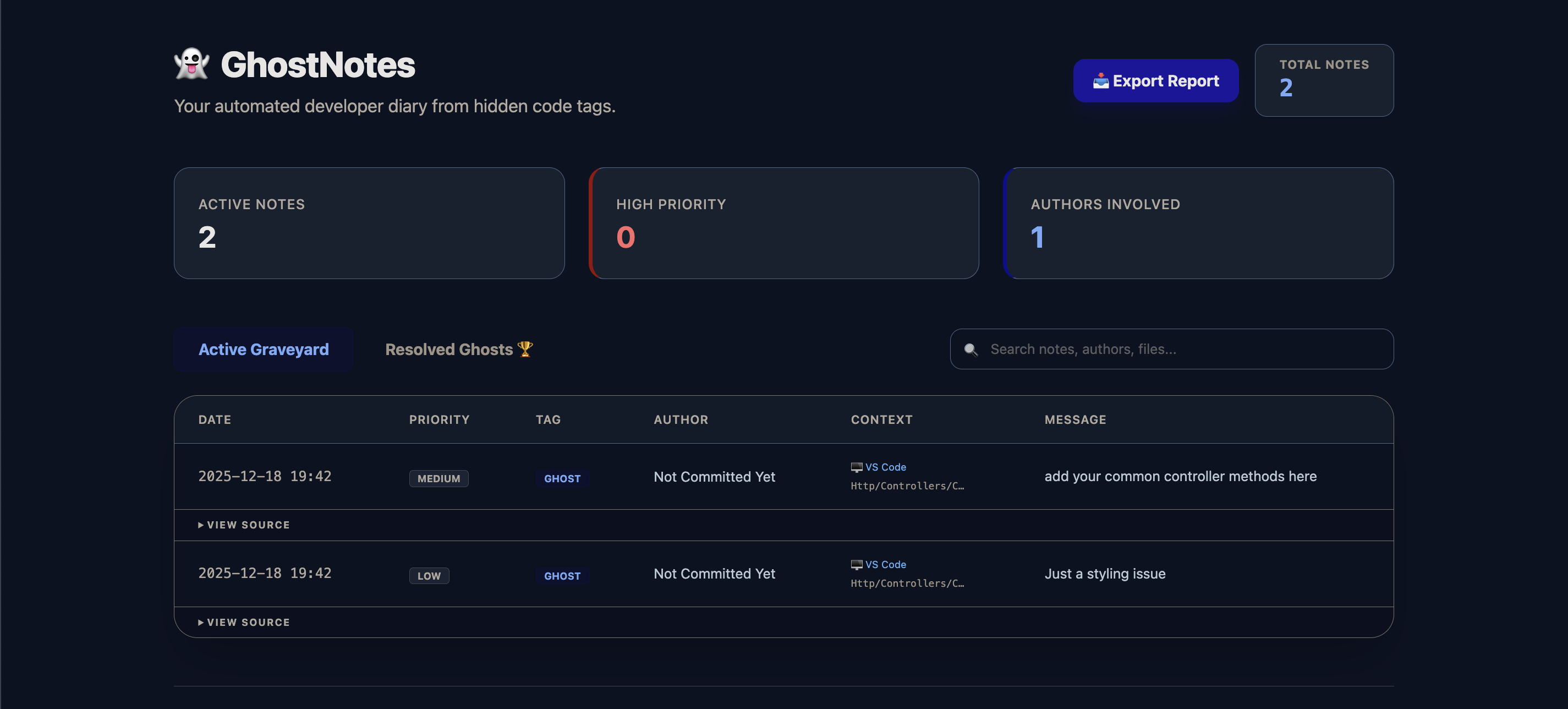
## ✨ 功能
- 🔍 **高级标签扫描:** 自动查找 `@ghost`、`@todo`、`@fixme` 和 `@note`,并支持可选的 **优先级** (high|medium|low)。
- 🎨 **现代化 Dashboard:** 一个由 Tailwind 驱动的时尚 Dashboard,具备 **搜索**、**优先级徽章** 和 **源代码片段** 功能。
- 📊 **多格式导出:** 将你的开发者日记导出为 **Markdown**、**JSON** 或 **CSV**(兼容 Excel)格式。
- 🏆 **已解决归档区:** 在从代码中清除已解决的注释后,于“Resolved Ghosts”历史记录中追踪它们。
- 🚀 **VS Code 与 GitHub 集成:** 直接从 Dashboard 在 VS Code 中打开文件,或通过特定行号的链接在 GitHub 上查看它们。
- 👤 **Git 上下文:** 使用 `git blame` 自动识别作者。
- 🧹 **代码清理:** 一旦标签被记录,使用 `--clear` 标志安全地从源代码中移除它们。
- 🔒 **对开发者安全:** Dashboard 和路由在生产环境中会自动禁用。
## 🚀 安装
通过 composer 安装此包:
```
composer require iamsabbiralam/ghost-notes
```
使用单个命令完成所有设置:
```
php artisan ghost:install
```
此命令会发布配置文件并准备好内部存储。
## 🛠 用法
1. 在代码中添加标签
现在你可以为标签添加优先级了:
```
// @ghost:high: Fix this critical security vulnerability
// @todo:medium: Implement the user profile update logic
// @fixme:low: Minor alignment issue on the footer
// @note: This is a general architectural note
```
2. 生成日记
运行命令以扫描文件并更新 Dashboard 缓存:
```
php artisan ghost:write
```
3. 导出报告
以你偏好的格式生成报告:
```
php artisan ghost:write --format=markdown
php artisan ghost:write --format=json
php artisan ghost:write --format=csv
```
4. 清除和归档
将注释记录到已解决历史记录中,并从代码中移除它们:
```
php artisan ghost:write --clear
```
## 🖥 Web Dashboard
访问交互式 Dashboard:http://your-app.test/ghost-notes
在 Dashboard 中,你可以:
* 🔍 按作者、消息或文件名搜索注释。
* 🖱️ 一键直接在 VS Code 中打开文件。
* 📦 将报告下载为 CSV、JSON 或 Markdown 格式。
* 🖨️ 打印一份整洁的技术债务 PDF 报告。
* 📜 查看所有已解决/已清除注释的历史记录。
## ⚙️ 配置
配置文件 ```(config/ghost-notes.php)``` 允许你进行自定义:
```
return [
'tags' => ['@ghost', '@todo', '@fixme', '@note'],
'filename' => 'GHOST_LOG.md',
'ignore_folders' => ['vendor', 'node_modules', 'storage', 'tests'],
'git_context' => true,
'repo_url' => env('GHOST_NOTES_REPO_URL', ''), // Auto-detected if empty
'default_branch' => 'main',
];
```
## 📄 许可证
The MIT License (MIT)。请查看 License File 了解更多信息。
由 [Sabbir Alam](https://github.com/iamsabbiralam) 开发
标签:ffuf, Laravel, OpenVAS, PHP, SOC Prime, 代码审查, 仪表盘, 任务管理, 开发工具