一款高性能 Python 网关,统一管理 ZigBee 与 Matter mesh 网络并通过 MQTT Discovery 桥接至 Home Assistant,提供实时 Web 界面、自动化引擎与 OTA 固件管理。
ZigBee & Matter Manager
A Python-powered ZigBee & Matter gateway with real-time web UI and Home Assistant integration







Quick Start ·
Features ·
Web Interface ·
Automations ·
Heating ·
OTA Updates ·
Upgrades ·
Device Onboarding ·
Configuration ·
Docs
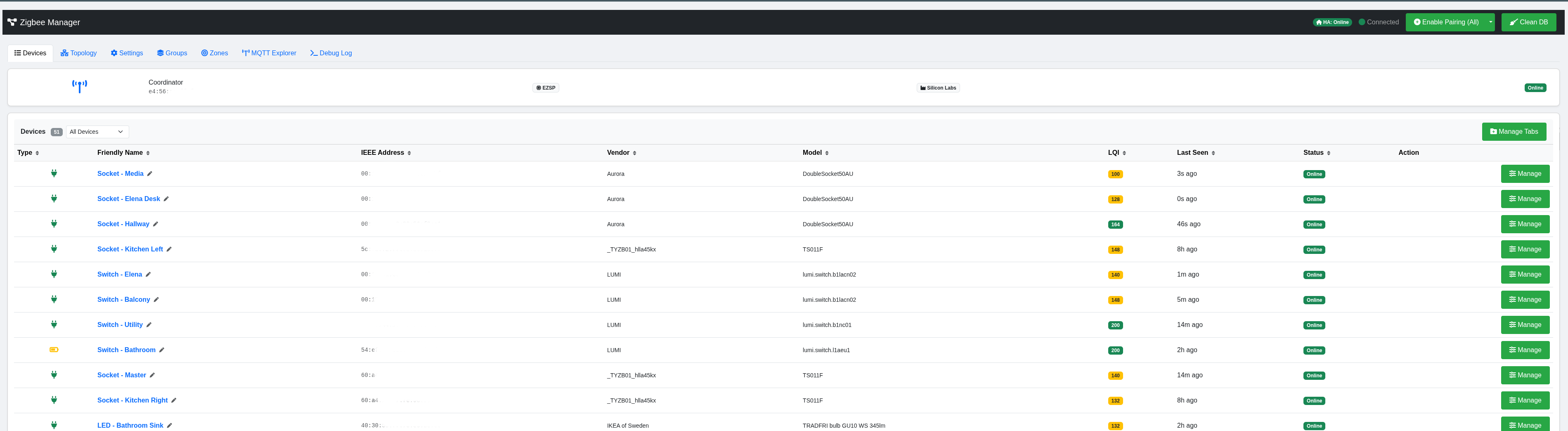
Device management dashboard — real-time status, LQI, OTA badges, protocol indicators, and per-device controls
## 📖 Overview
**ZigBee Matter Manager** is a self-hosted gateway application that manages Zigbee and Matter mesh networks and bridges devices to **Home Assistant** via MQTT Discovery. It supports **Matter** devices over WiFi (and Thread via OTBR), presenting a unified device list across both protocols. It has a modular Python backend built on [zigpy](https://github.com/zigpy/zigpy)/[bellows](https://github.com/zigpy/bellows) and [python-matter-server](https://github.com/home-assistant-libs/python-matter-server), with a real-time single-page web interface.
The system is designed for production-grade home automation — running 40+ devices in a container featuring automatic NCP failure recovery, exponential backoff retries, OTA firmware management, and a fast-path pipeline for latency-critical sensor events.
## ⚡ Quick Start
### Podman Container
# curl bash automated install
sudo curl -fsSL https://raw.githubusercontent.com/oneofthemany/ZigBee-Matter-Manager/main/build.sh | bash
# if you know the device
sudo curl -fsSL https://raw.githubusercontent.com/oneofthemany/ZigBee-Matter-Manager/main/build.sh | bash -s -- --usb /dev/ttyUSB0
# large/enterprise networks — bake the Rust telemetry appender into the image
# (adds ~3–5 min to the build for the Rust toolchain + maturin compile)
sudo curl -fsSL https://raw.githubusercontent.com/oneofthemany/ZigBee-Matter-Manager/main/build.sh | bash -s -- --with-appender --usb /dev/ttyUSB0
**Note**: You may see the following during boot - DO NOT PANIC THIS IS INTENTIONAL
+ echo ' *** WARNING: systemctl not found. otbr cannot start on boot.'
*** WARNING: systemctl not found. otbr cannot start on boot.
+ . /dev/null
Also be aware that the compile time will take about 15-25mins dependent on the device you are installing it on, as there is a lot going on - go have cup of something 😃
### Python VENV - soon to be deprecated
# Clone the repository
git clone https://github.com/oneofthemany/ZigBee-Matter-Manager/tree/venv.git
cd ZigBee-Matter-Manager
# Run the automated deployment (sets up venv, systemd service, user)
sudo bash deploy.sh
# Start the service
sudo systemctl start zigbee-matter-manager
Open **http://YOUR_IP:8000** in your browser.
On first boot, if `channel`, `pan_id`, `extended_pan_id`, or `network_key` are absent or placeholder values, the system will **auto-generate valid random credentials** and write them to `config.yaml` before starting the radio. No manual YAML editing required for initial setup.
The first install also sets up the **in-app upgrade watcher** (a small host-side systemd unit) so future updates can be installed from the **Settings → Upgrade** tab without re-running `build.sh`. See [In-App Upgrades](#-in-app-upgrades) for the full flow.
### Prerequisites
- Linux (Ubuntu/Debian recommended)
- Python 3.8+
- An MQTT broker (e.g. Mosquitto) - for Home Assistant support
- A supported Zigbee coordinator (EZSP, ZNP USB stick)
- **Optional for Matter:** `python-matter-server[server]` pip package, IPv6-enabled network
## 🚀 Features
### Network Management & Device Control
- **Real-time Web Interface** — Single-page app with WebSocket-driven live updates, Bootstrap 5 UI
- **Device Lifecycle** — Join, rename, remove, re-interview, ban/unban devices
- **Remote Control** — On/Off, brightness, color temp, color XY/HS, cover position, thermostat setpoints
- **Multi-Endpoint Routing** — Proper handling of devices with multiple endpoints (e.g., dual-gang switches)
- **Device Tabs** — Custom tab organization to group devices by room or function (e.g., "Heating", "Lighting")
- **Touchlink** — Scan, identify (blink), and factory reset Philips Hue bulbs directly from the web UI
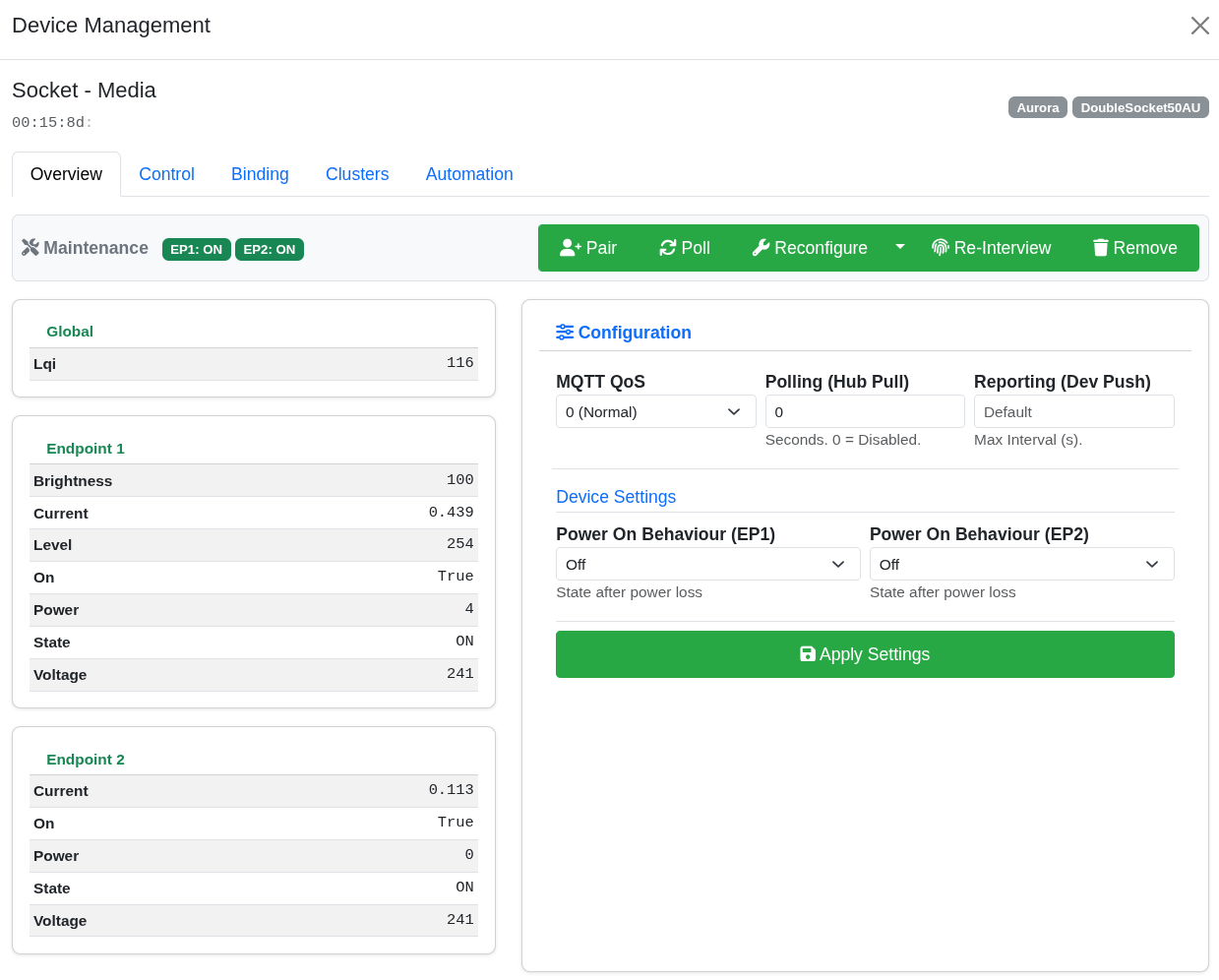
Device modal — control panel, cluster browser, bindings, per-device configuration, OTA firmware, and automation rules
### Zigbee Groups
- **Native Zigbee Groups** — Create groups at the coordinator level (not just software grouping)
- **Smart Compatibility** — Input/output cluster awareness ensures only actuators are groupable; sensor-only devices are excluded
- **Unified Control** — On/off, brightness, color temp, color, and cover controls for groups
- **Home Assistant Discovery** — Groups appear as native HA entities via MQTT
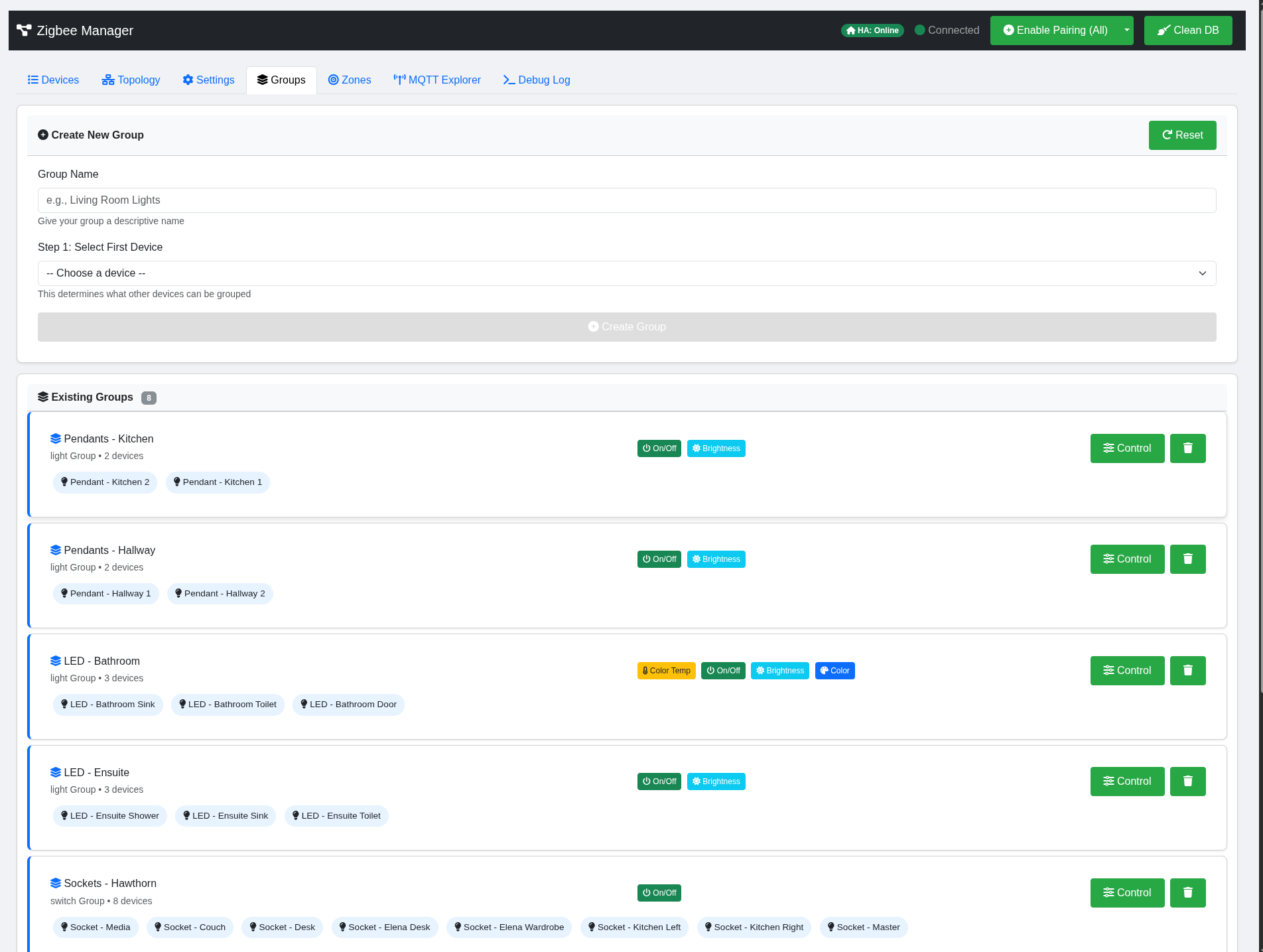
Groups — compatible device detection, group creation, and unified control panel
### Matter Integration (Optional)
Full **Matter** support alongside Zigbee — devices from both protocols appear in a single unified device list with protocol badges, and all the same features (automations, MQTT Discovery, OTA where applicable, WebSocket updates, control modals) work identically across both.
**How it works internally.** The application spawns [python-matter-server](https://github.com/home-assistant-libs/python-matter-server) (the Home Assistant team's CHIP SDK wrapper) as a managed Python subprocess — no Docker, no separate service. A `MatterBridge` module connects to its WebSocket API on `localhost:5580`, translates Matter nodes into the same internal device format as Zigbee devices, and feeds them through the same event pipeline. Handlers in `modules/handlers/matter_parsers.py` decode Matter cluster attributes (BasicInformation, OnOff, LevelControl, ColorControl, temperature/humidity/occupancy sensors, etc.) into the same normalised state shape the Zigbee side produces, so the frontend, automation engine, and MQTT publishing code don't need to know which protocol a device speaks.
**Two transport options:**
- **Matter-over-WiFi** — Commission any WiFi-based Matter device (Eve, Nanoleaf, Aqara Hub M3 accessories, TP-Link Tapo Matter, etc.) using the 11-digit setup code or the QR numeric pairing code. The device joins your WiFi and speaks Matter-over-IP directly to the embedded server.
- **Matter-over-Thread** — Uses the Sonoff MG24 dongle in **MultiPAN RCP** mode, which runs Zigbee *and* Thread simultaneously on the same radio. An embedded OpenThread Border Router (`otbr-agent`) provides the Thread network, and Matter devices like Thread-based TRVs (IKEA BILRESA, Eve Thermo) commission onto it the same way.
**Commissioning flow** — enter the device's setup code in the Devices tab, the application delegates to python-matter-server (for WiFi) or runs the combined Thread-dataset-push + Matter-commission sequence (for Thread), and on success the new device streams into the device list alongside your Zigbee devices. There's no separate Matter tab or mode toggle.
- **Unified device list** — Matter and Zigbee in the same table with protocol badges
- **Cross-protocol automations** — triggers and actions mix freely; a Zigbee motion sensor can turn on a Matter lamp and vice versa
- **MQTT Discovery** — Matter devices publish to Home Assistant using identical discovery patterns to Zigbee
- **Zero overhead when disabled** — if `matter.enabled` is false, no Matter code runs at all (no subprocess, no imports, no connections)
- **Auto-restart on crash** — the embedded server has health monitoring with exponential backoff (up to 5 retries)
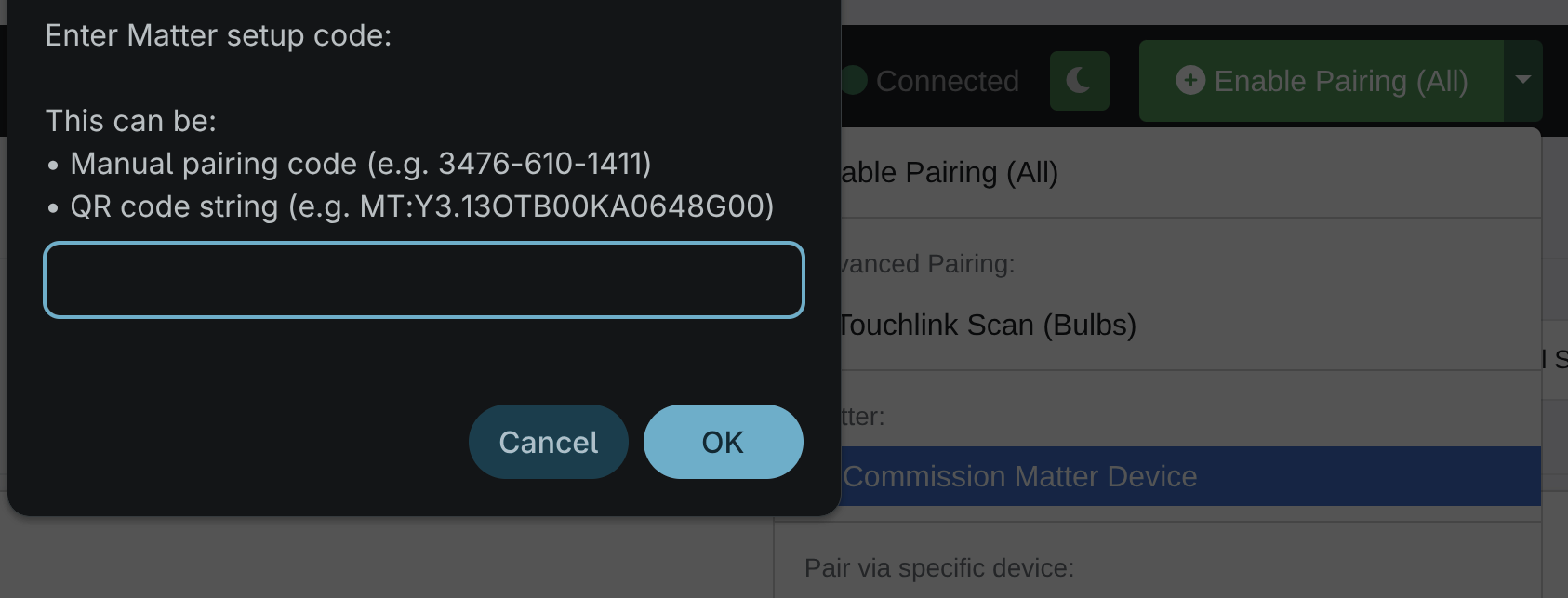
Matter integration — commission via setup code, unified device list with protocol badges
For the full reference — setup, supported clusters, commissioning internals, troubleshooting — see **[docs/matter.md](docs/matter.md)**. For how the MultiPAN dongle runs Zigbee and Thread concurrently, see **[docs/multipan.md](docs/multipan.md)**.
### MultiPAN (Zigbee + Thread on one radio)
The application supports the **Sonoff Zigbee Dongle Plus-E (MG24)** running MultiPAN RCP firmware, which lets one dongle serve both the Zigbee mesh and the Thread network concurrently — halving your USB port requirement for Matter-over-Thread households.
- **Single radio, two protocols** — MG24 acts as a Zigbee NCP for zigpy/bellows *and* as a Radio Co-Processor for OpenThread, multiplexed over the same serial link using CPC/HDLC framing
- **Rust framing module** — `modules/tdm/zmm_cpc/` (PyO3/maturin) implements the CPC/HDLC wire format (`FLAG EP LEN_LO LEN_HI CTRL HCS(2)`, CRC-16/XMODEM) for reliable communication with the MG24
- **Embedded OpenThread Border Router** — `otbr-agent` runs inside the container, bound to the MG24 via D-Bus, providing the Thread network that Matter-over-Thread devices join
- **Dongle Jedi setup wizard** — guided first-boot flow that detects the dongle, confirms firmware, forms or joins a Thread network, and writes the resulting dataset into `config.yaml`
- **Link-state handshake recovery** — stale CPC I-frames from a previous boot are drained and acknowledged before the stack issues SABM, preventing the "dongle unresponsive after restart" class of failure
If you're running separate Zigbee and Thread radios (e.g. an EFR32MG21 for Zigbee and a separate RCP for Thread), you don't need any of this — the Matter-over-Thread path still works via whatever OTBR you've configured. MultiPAN is the Sonoff MG24 convenience story.
See **[docs/multipan.md](docs/multipan.md)** for the MG24 firmware flashing, CPC wire-format reference, and troubleshooting.
### OTA Firmware Updates
Over-the-air firmware management for all Zigbee devices with OTA cluster support (0x0019).
- **Multi-Provider Support** — Automatic image matching via IKEA, LEDVANCE, Sonoff, Inovelli, and other zigpy OTA providers
- **Per-Device Check & Update** — Check availability, trigger updates, and monitor progress from the device modal OTA tab
- **Bulk Scan** — One-click "Check OTA" scans all devices for available firmware updates
- **Live Progress** — Real-time WebSocket-driven progress bar during firmware transfer
- **Local Firmware Upload** — Upload `.ota`, `.zigbee`, `.bin`, `.ota1`, `.sbl-ota` files for devices not covered by online providers
- **Background Checks** — Periodic automatic scans (every 6 hours) with notification when updates are found
- **Image Notify** — Send OTA Image Notify commands to prompt sleepy devices to check for updates
- **OTA Badge** — Devices with OTA cluster show an OTA badge in the device table for quick identification
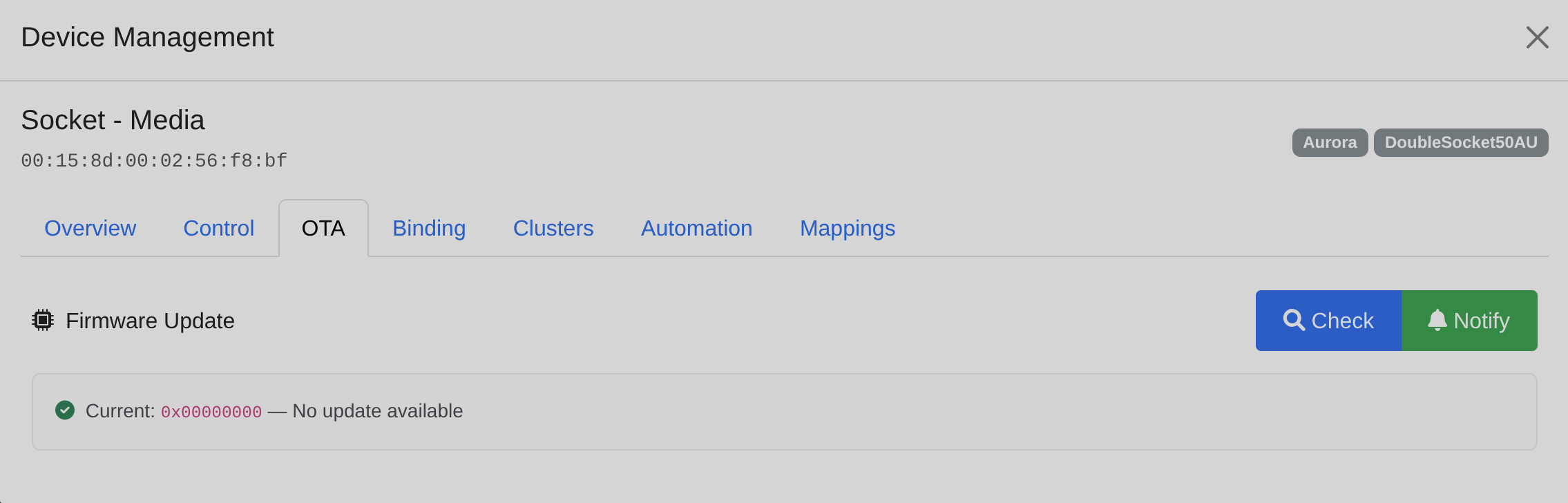
OTA firmware tab — check for updates, trigger install, and live progress tracking
### Automation Engine
A full state-machine automation system that executes directly at the Zigbee gateway level with **zero MQTT round-trip delay**.
- **State Machine Triggers** — Fire only on transitions (matched → unmatched), not on every matching update
- **Multi-Condition Rules** — Up to 5 AND conditions with sustain timers per source device
- **Prerequisites** — Check other device states before firing, with NOT negation and OR logic across multiple time windows
- **Recursive Action Sequences** — Command, Delay, Wait For, Gate, If/Then/Else branching, Parallel execution
- **Group Targets** — Command steps can target Zigbee groups as well as individual devices
- **Day-of-Week Filtering** — Restrict rules to specific days
- **Event-Type Auto-Reset** — Attributes like `action` are automatically reset to allow re-triggering
- **Time Boundary Scheduler** — 30-second polling loop fires rules at exact time boundaries, not just on device state changes
- **Global Automations Tab** — Dedicated top-level nav tab showing all rules across all devices with inline filtering, editing, and trace log
- **Trace Log** — Real-time colour-coded evaluation history for debugging automation behaviour
- **JSON Export** — Download/import rules for backup or sharing
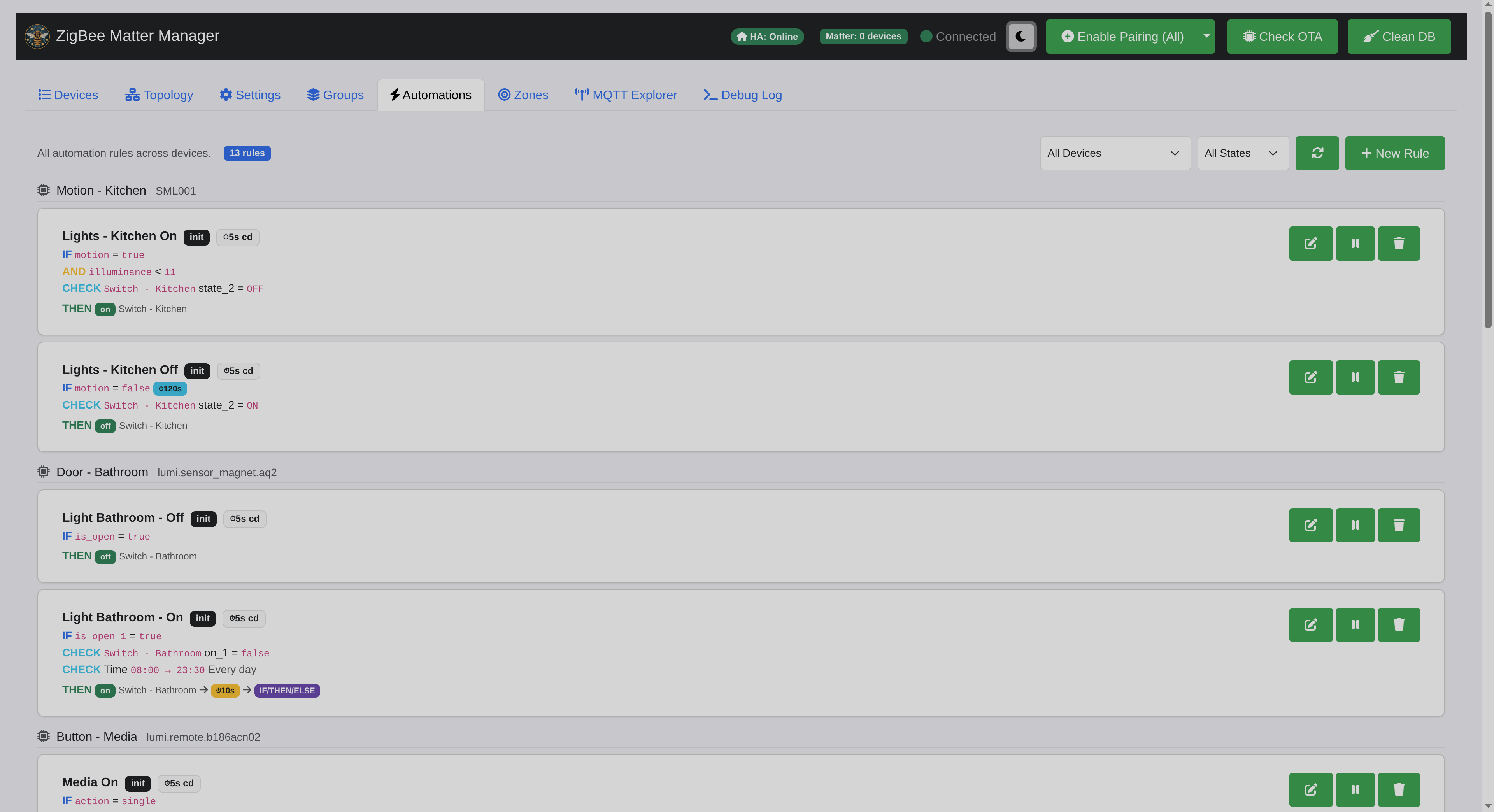
Global automations tab — all rules across all devices, filterable by device and state
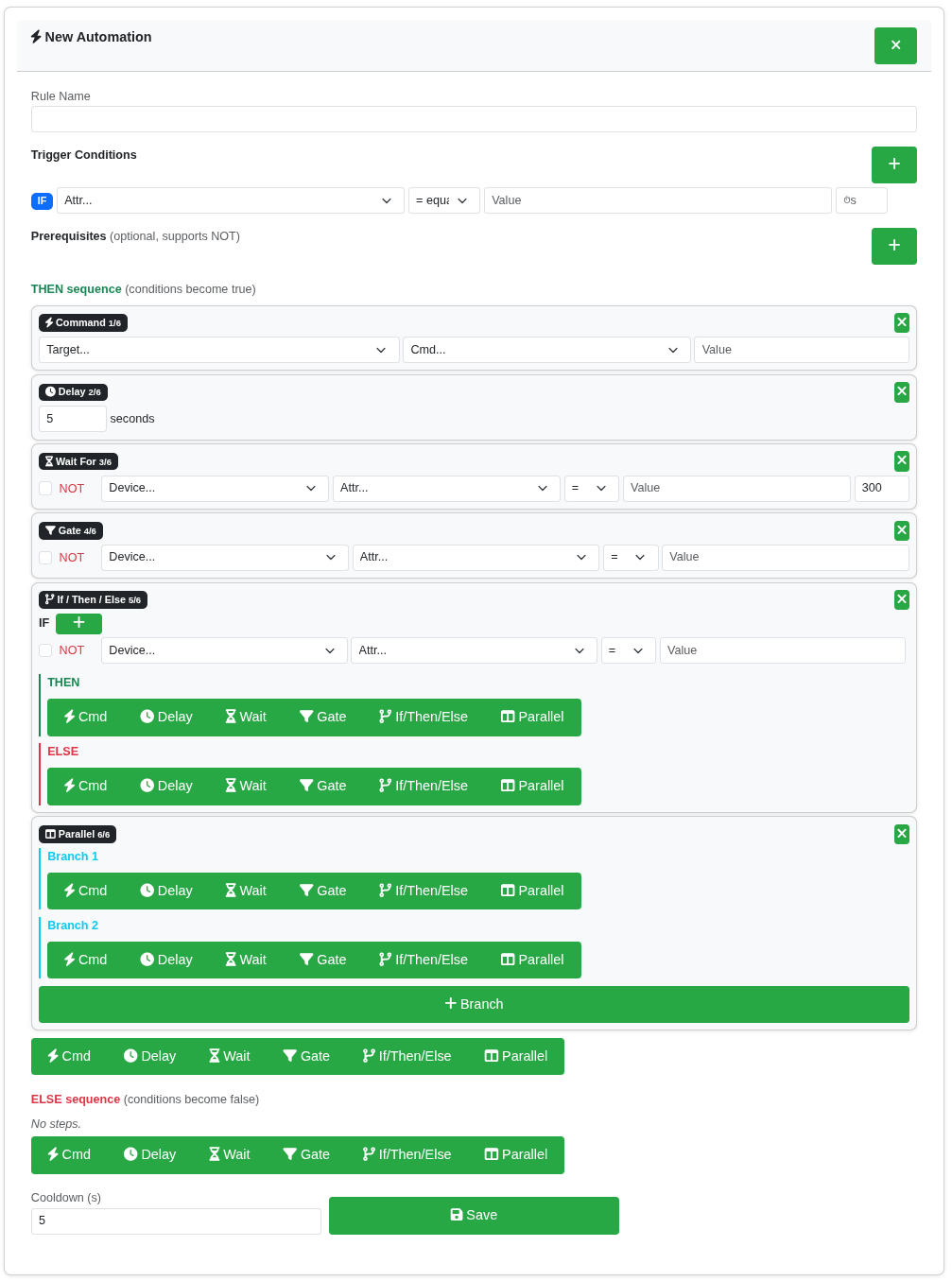
Automation rule builder — IF/AND conditions, CHECK prerequisites, THEN/ELSE action sequences
For full documentation see [docs/automations.md](docs/automations.md).
### Device Onboarding (Unsupported Devices)
A three-layer system for onboarding devices that don't have dedicated cluster handlers — no code changes or restarts required.
- **GenericClusterHandler** — Automatically attached to any cluster without a dedicated handler; captures all attribute reports and commands as raw keys
- **Device Override Manager** — JSON-driven definitions (`data/device_overrides.json`) that map raw keys to friendly names with scaling, units, and Home Assistant device classes
- **Visual Mappings UI** — A "Mappings" tab in the device modal for mapping attributes without touching code
- **Model-Level Promotion** — Map once per device, then promote to a model definition so all devices of the same type inherit the mappings automatically
- **Manufacturer-Aware Profiles** — Known manufacturer clusters (Aqara 0xFCC0, Tuya 0xEF00, Philips 0xFC00, IKEA 0xFC7C, etc.) get intelligent prefixing and manufacturer code handling
- **REST API** — Full CRUD for overrides via `/api/device_overrides` endpoints for scripting or bulk operations
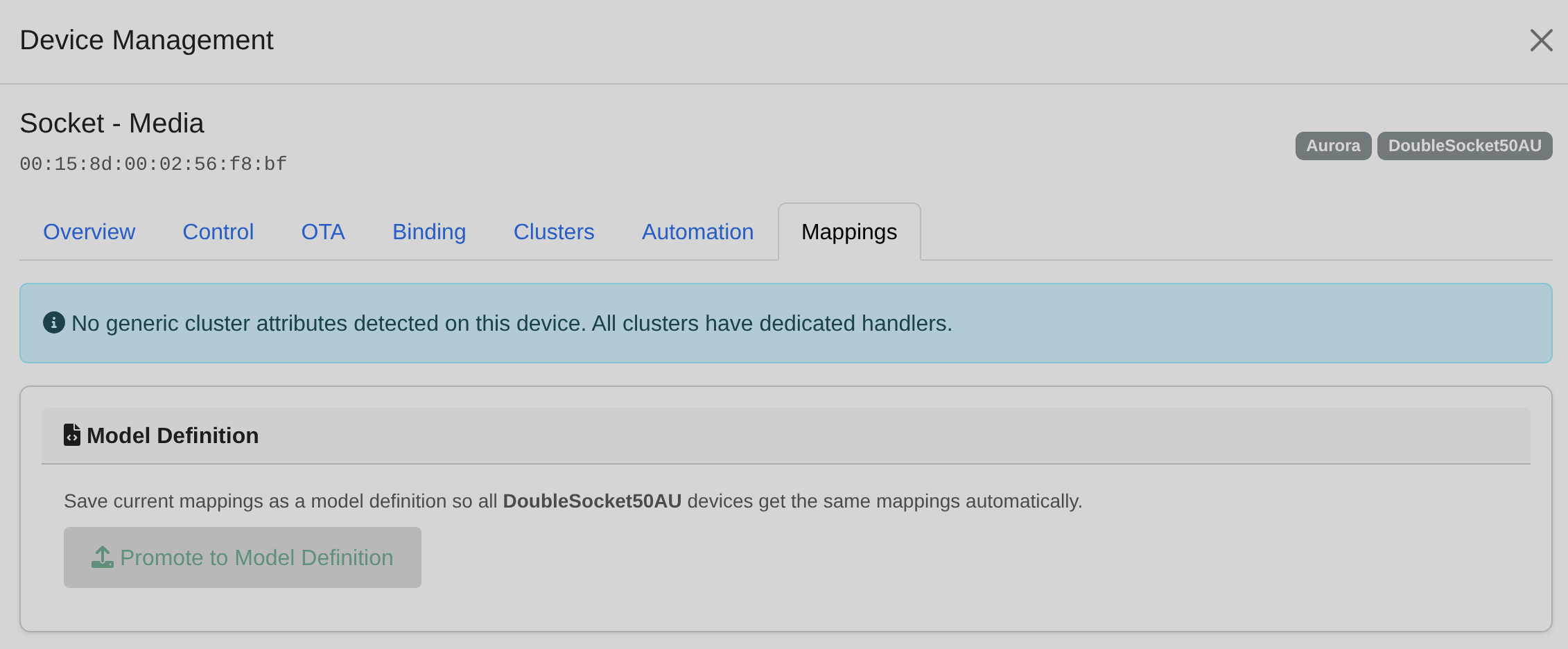
Mappings tab — visual attribute mapping for unsupported devices, with model-level promotion
For full documentation see [docs/onboarding_unsupported_devices.md](docs/onboarding_unsupported_devices.md).
### MQTT Explorer
An integrated MQTT debugging tool — monitor all broker traffic in real-time without leaving the gateway.
- **Live Traffic Monitor** — Subscribe to `#` wildcard with topic and payload filtering
- **Publish Tool** — Send test messages to any topic with configurable QoS
- **Wildcard Support** — `+` single-level and `#` multi-level pattern matching
- **Three-Level Debugging** — Correlate packet capture → debug log → MQTT output
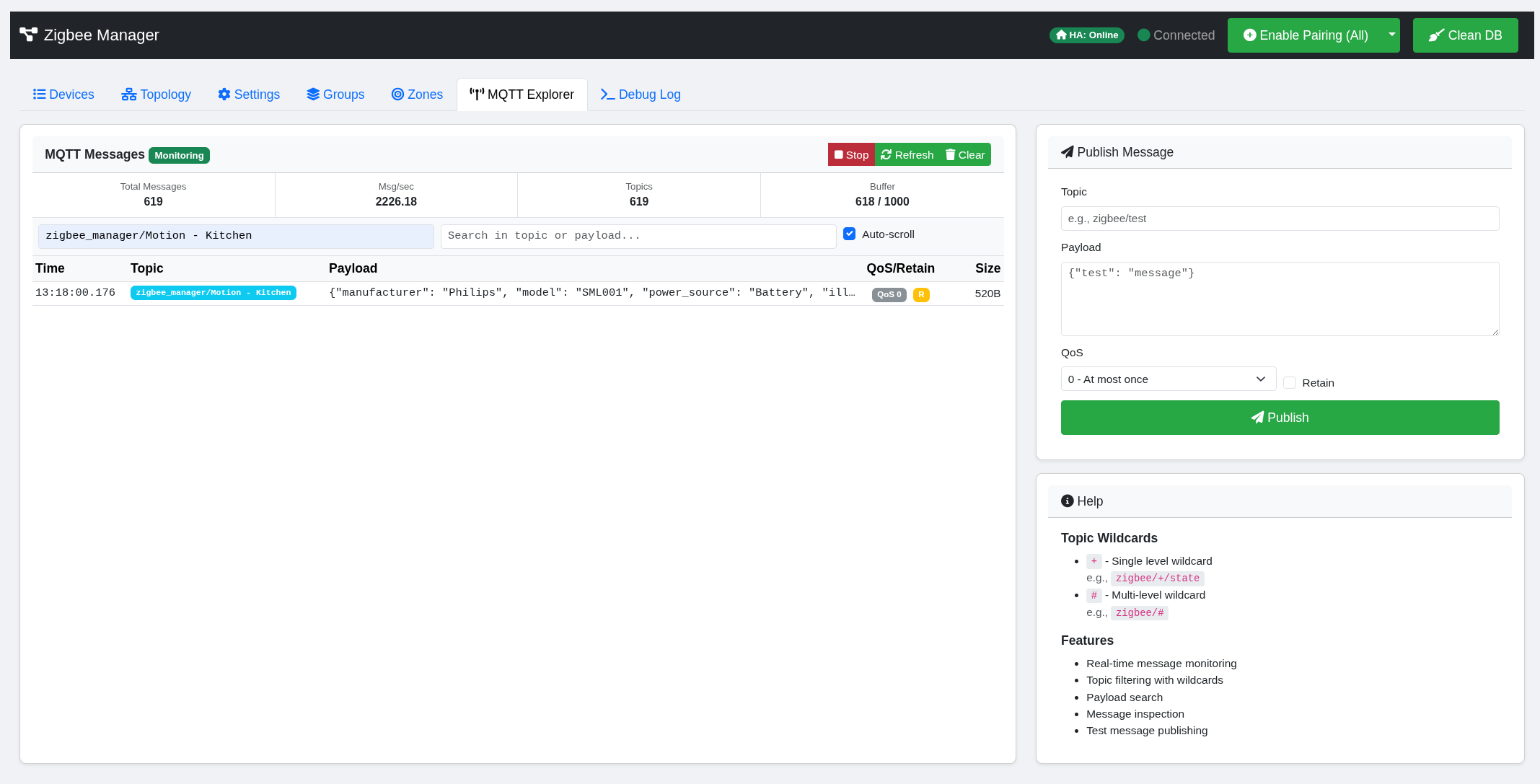
MQTT Explorer — real-time message stream, topic filtering, and publish tool
For full documentation see [docs/mqtt-explorer.md](docs/mqtt-explorer.md).
### Zone-Based Presence Detection
An experimental presence detection system using RSSI signal fluctuations from existing Zigbee devices — no dedicated presence sensors required.
- **RSSI Baseline Calibration** — Learns normal signal patterns per device link
- **Fluctuation Detection** — Triggers occupancy when multiple links show deviation
- **MQTT Publishing** — Zones appear as binary sensors in Home Assistant
- **Configurable Thresholds** — Deviation sensitivity, minimum triggered links, clear delay

Zone presence detection — RSSI-based occupancy without dedicated sensors
### 🔥 Weather-Aware Heating
A two-module heating system that brings thermal modelling and active multi-zone control to Zigbee/Matter TRVs and boiler receivers.
- **Heating Advisor** — read-only analytical engine. Produces an EPC-style rating, per-room thermal profiles (W/K heat loss) and pre-heat timing recommendations. Correlates outdoor weather with indoor temperatures and heating demand to surface efficiency tips (over-heating, mild-weather shutoff, cold-snap pre-heat, insulation/glazing upgrades, heat-pump candidacy, tariff optimisation).
- **Heating Controller** — active control. Classifies each room as `cold` / `ontarget` / `hot` with hysteresis (±0.3–0.5 °C bands), calls the boiler receiver only when any room is cold, and coordinates per-TRV setpoints so a hot room can't steal heat from a cold one on the same circuit. External-sensor modes (`advisory` / `push`) work around TRV hot-pipe temperature bias, including writing external temperatures into the Aqara 0xFCC0 cluster.
- **Thermal Profile** — per-room heat loss in W/K, computed both statically (SAP Appendix S U-values from dimensions + insulation) and measurably (fits Newton's law of cooling to telemetry cool-down windows), then blends the two weighted by fit quality.
- **Radiator Sizing** — MCS-style required watts at design outdoor temperature (−3 °C), with derating to your actual boiler flow temperature using the manufacturer exponent of 1.3. Flags each radiator as `undersized` / `adequate` / `oversized`.
- **Anomaly Watcher** — scans every 5 minutes for rooms cooling faster than their baseline `τ`. Catches open windows, broken seals and stuck TRVs without the user having to watch graphs.
- **Per-room efficiency tips** — rule-based feedback on radiator placement (under-window penalty, reflective panels, K2/P+ upgrades), glazing, external doors, suspended floors and more.
- **Dry-run mode** — the controller has a `dry_run` flag that runs the full decision tick and logs what it would do without actually commanding any TRV or receiver. Safe way to validate a new circuit/room config.
See **[docs/heating.md](docs/heating.md)** for the full reference — physics, config schema, all tip triggers, hysteresis constants, and the EPC/preheat formulas.

Heating tab — circuits, per-room status, thermal profiles and efficiency tips
### Stability & Resilience
- **NCP Failure Recovery** — Automatic watchdog with recovery logic for critical coordinator failures
- **EZSP Dynamic Tuning** — Coordinator stack settings auto-tuned based on network size (packet buffers, APS counts, source route tables)
- **Fast Path Processing** — Non-blocking pipeline for motion/presence sensors to minimise MQTT publication latency
- **MQTT Queue** — Background publish queue prevents event loop stalls during bursts
- **Exponential Backoff** — Automatic retry with configurable backoff for transient command failures
- **Multi-Radio Support** — Auto-detection of EZSP and ZNP coordinators
- **Orphaned Device Cleanup** — Detect and remove stale database entries for devices no longer on the network
### 🔄 In-App Upgrades
Upgrade the application directly from the web UI — no SSH, no `build.sh` re-run. The system pulls a tagged release from GitHub, builds a new container image in the background while the current app keeps running, then atomic-swaps when you choose. If the new container fails to start or fails health-check, it automatically rolls back. Designed for production-grade home automation where downtime is measured in seconds, not minutes.
- **Blue-green deployment** — New image builds in parallel while the running app serves traffic; only the final container swap causes a brief (~15s) interruption
- **Atomic swap with auto-rollback** — Health-check-gated swap; if the new container fails to bind ports or doesn't respond at `/api/status` within 60s, the previous container is automatically restored
- **One-click manual rollback** — The previous container and image are retained after every successful upgrade for instant rollback from the UI
- **GitHub tag polling** — Background check every 6 hours for new releases, with a toast notification when available; manual "Check now" button also available
- **Configurable auto-update** — Off by default. When enabled, updates only install during a configurable quiet window (default 03:00–05:00) so the system never restarts in the middle of a heating cycle or device pairing
- **Multi-arch aware** — Images are tagged per-architecture (`zigbee-matter-manager:1.3.2-arm64` vs `-amd64`) and the upgrade picks the right one automatically. Won't accidentally load an `amd64` image on a Rock 5B
- **Image retention policy** — Configurable how many old images to keep (default 2). Old images are pruned automatically; manual "Clean up" button also available
- **Stable / pre-release channel** — Choose between GitHub Releases (stable only) or all tags (including pre-releases) for early access
- **Cross-distro watcher** — Host-side trigger uses `systemd-path` units where available (event-driven, no CPU when idle), with a polling fallback for systems without systemd. Works under rootless Podman, root Podman, and Docker identically
- **SELinux-friendly** — Watcher scripts live under `/opt/zmm/` (FHS-standard add-on package location) so SELinux's `init_t → usr_t` policy lets systemd execute them without manual relabelling
- **Build log streaming** — Real-time view of `git clone` and `podman build` output in the UI during an upgrade, plus captured logs from the new container if it fails to start
**How it works internally.** The container is fully unprivileged and never touches the host's container runtime directly. Instead, the app writes a small JSON trigger file to a shared volume; a host-side `systemd-path` unit detects the new file and runs `/opt/zmm/upgrade.sh`, which clones the target tag, builds the new image, performs the stop/rename/run sequence, and writes status back to a file the app polls. This keeps the security model simple — no podman socket mounting, no privileged containers, no cross-runtime API differences.
For an existing install that pre-dates the upgrade infrastructure, the watcher can be installed once on the host:
curl -fsSL https://raw.githubusercontent.com/oneofthemany/ZigBee-Matter-Manager/main/scripts/install_watcher.sh | bash
After that, all future upgrades are one click in **Settings → Upgrade**.
### Diagnostics & Debugging
- **Live Debug Log** — Real-time filtered log streaming to the browser
- **Packet Capture** — Raw ZCL frame capture with human-readable decoding
- **Deep Packet Analysis** — IAS Zone (0x0500), Occupancy (0x0406), and Tuya (0xEF00) protocol decoders with Tuya DP decoder
- **Mesh Topology** — Interactive D3.js force-directed graph with LQI link quality overlay and online/offline device zones
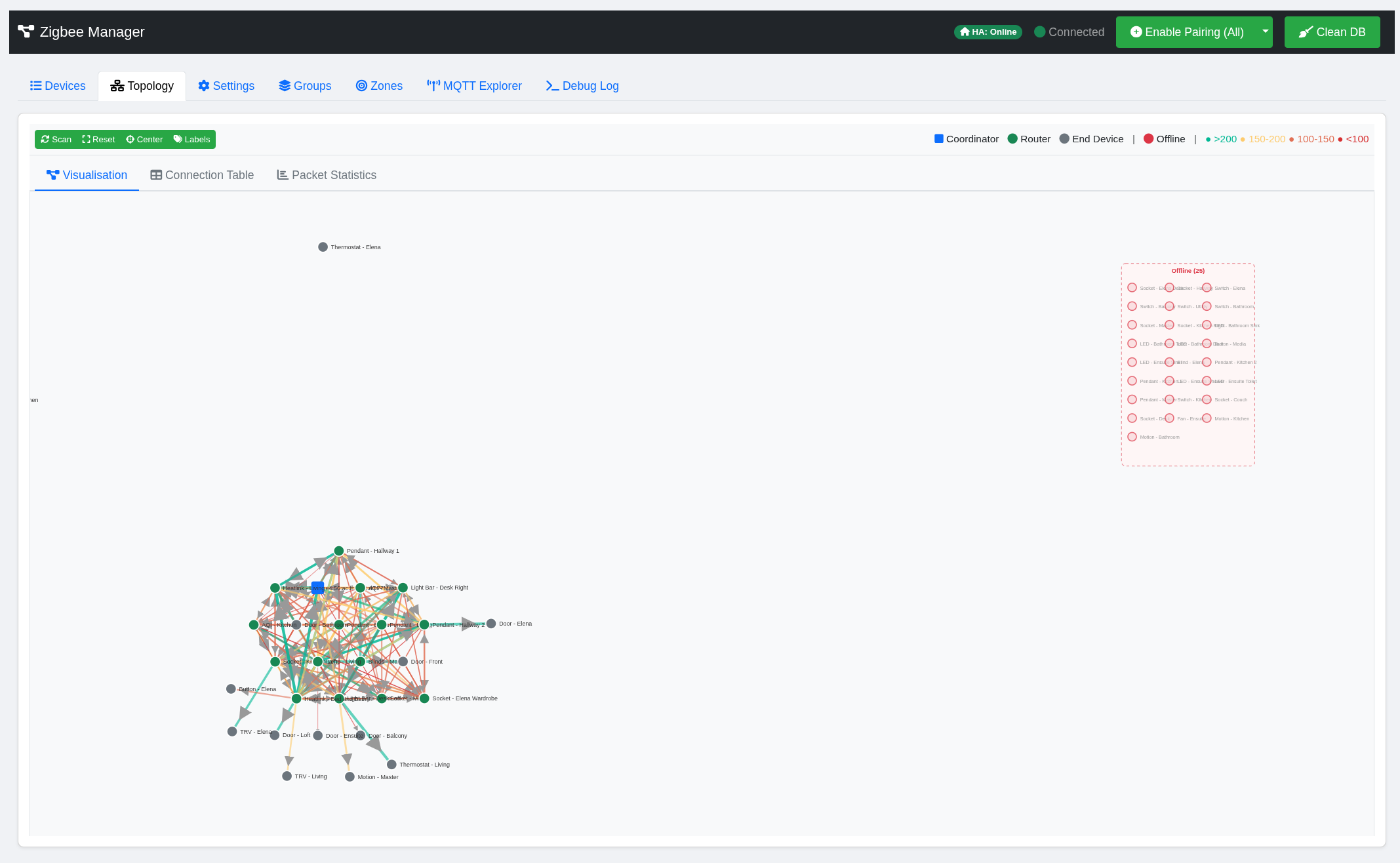
Mesh topology — force-directed graph showing device relationships and link quality
### Home Assistant Integration
- **MQTT Discovery** — All devices and groups auto-discovered with proper schemas (JSON, not legacy template)
- **Full Component Support** — light, switch, cover, climate, sensor, binary_sensor, number
- **Birth Message Handling** — Automatic republish on HA restart
- **Device Metadata** — Manufacturer, model, SW version passed through to HA device registry
- **Delta-Only Publishing** — Only changed attributes are published to avoid false HA automation triggers
### Supported Devices & Quirk Handling
Tested with 40+ devices across multiple manufacturers:
| Manufacturer | Devices | Notes |
|:-------------------|:-----------------------------------|:---------------------------------------------------|
| **IKEA** | Tradfri bulbs (E14, E27, GU10) | Brightness, color temp, OTA updates |
| **Philips** | Hue lights, motion sensors | `on_with_timed_off` motion detection on EP1 |
| **Aqara / Xiaomi** | TRVs, sensors, switches | Packed binary struct parsing (0xFF01, 0x00DF, 0x00F7), Aqara Opple cluster (0xFCC0) |
| **Hive** | SLT6 thermostat, SLR1c receiver | Proprietary EP9→EP5 handshake during pairing |
| **Aurora** | DoubleSocket50AU | Multi-endpoint socket with per-endpoint state |
| **Tuya** | Radar sensors, blinds, switches | Cluster 0xEF00 DP parsing with device-type filtering |
| **Generic** | Contact sensors, smart sockets | GenericClusterHandler with override mapping |
New devices can be onboarded via the [Device Onboarding](#device-onboarding-unsupported-devices) system without code changes, or by adding dedicated handlers in `handlers/`.
## 🌐 Web Interface
Access at **http://YOUR_IP:8000**. All tabs update in real-time via WebSocket.
| Tab | Description |
|:------------------|:-------------------------------------------------------------------------------------------------------------------------------------------------------------|
| **Devices** | Main device table — LQI, status, last seen, OTA badges, protocol badges. Click any device for a full modal |
| **Topology** | Interactive force-directed mesh graph with LQI link quality and online/offline zones |
| **Groups** | Create and control native Zigbee groups |
| **Automations** | Global automation rules across all devices with inline filtering, editing, and trace log |
| **Heating** | Weather-aware heating dashboard — EPC rating, per-room thermal profiles, radiator sizing, circuit/room controller view, efficiency tips. See [docs/heating.md](docs/heating.md) |
| **Zones** | RSSI-based presence detection zones |
| **MQTT Explorer** | Real-time MQTT traffic monitor and publish tool |
| **Settings** | Rich settings panel — see below |
| **Debug Log** | Live filtered log stream and raw packet analyser with Tuya DP decoder |
### Settings Panel
The settings tab is a seven-sub-tab panel:
| Sub-tab | Description |
|:----------------------|:-------------------------------------------------------------------------------------------------------------------------------------------------------------------------------------------------|
| **Upgrade** | In-app upgrades from GitHub tags. Shows current and latest versions with release notes, build/swap progress, build log viewer, manual rollback, auto-update toggle with configurable quiet window, release channel (stable/pre-release), and image retention. See [In-App Upgrades](#-in-app-upgrades). |
| **Configuration** | Form-based editor for Zigbee radio, MQTT broker, web interface, and logging settings. Writes to `config.yaml` with no manual YAML editing required. Includes HTTPS/SSL toggle. |
| **APIs** | External API integrations. Currently houses the **Weather (Open-Meteo)** integration — free, no account or API key required. Supplies outdoor temperature, humidity, wind and forecast to the Heating Advisor for EPC estimation, pre-heat timing and cold-snap alerts. Configurable latitude/longitude, poll interval, and optional MQTT publish for Home Assistant sensors. |
| **Security** | Manage PAN ID, Extended PAN ID, and Network Key with per-field regenerate buttons. Network key is hidden by default. |
| **Spectrum Analysis** | Live 2.4 GHz energy scan across all ZigBee channels (11–26) with colour-coded interference chart. Auto channel select writes the best channel to config. Manual channel override also available. |
| **Advanced (YAML)** | Raw `config.yaml` editor — preserved for advanced users who need direct access. |
| **Thread** | Thread Border Router status and network management — form a new Thread network, view active dataset, commissioning credentials, and border router state. Required for Matter-over-Thread commissioning via the MultiPAN RCP radio. See [docs/multipan.md](docs/multipan.md). |
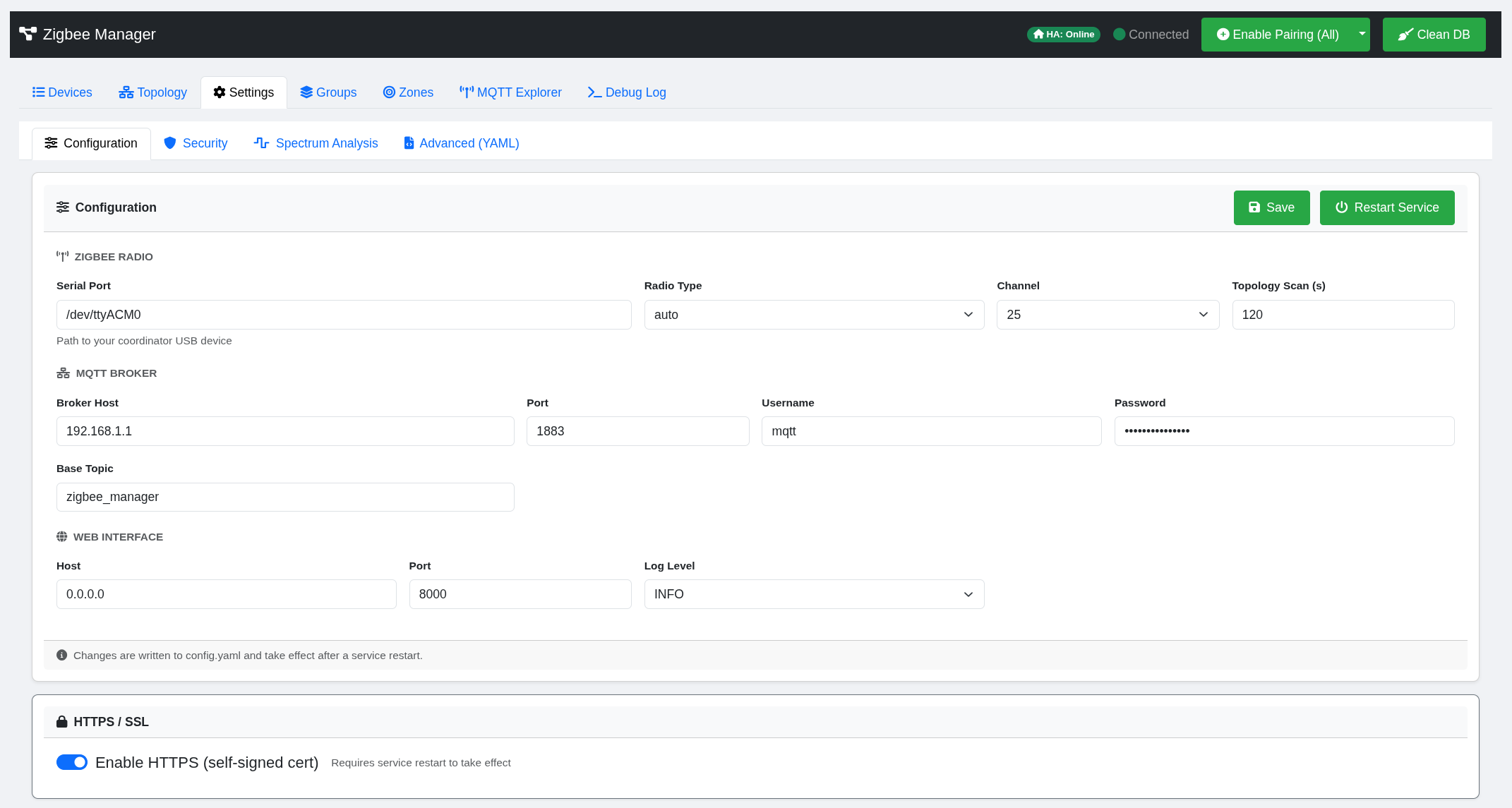
Settings panel — structured form UI, security credential management, and spectrum analysis
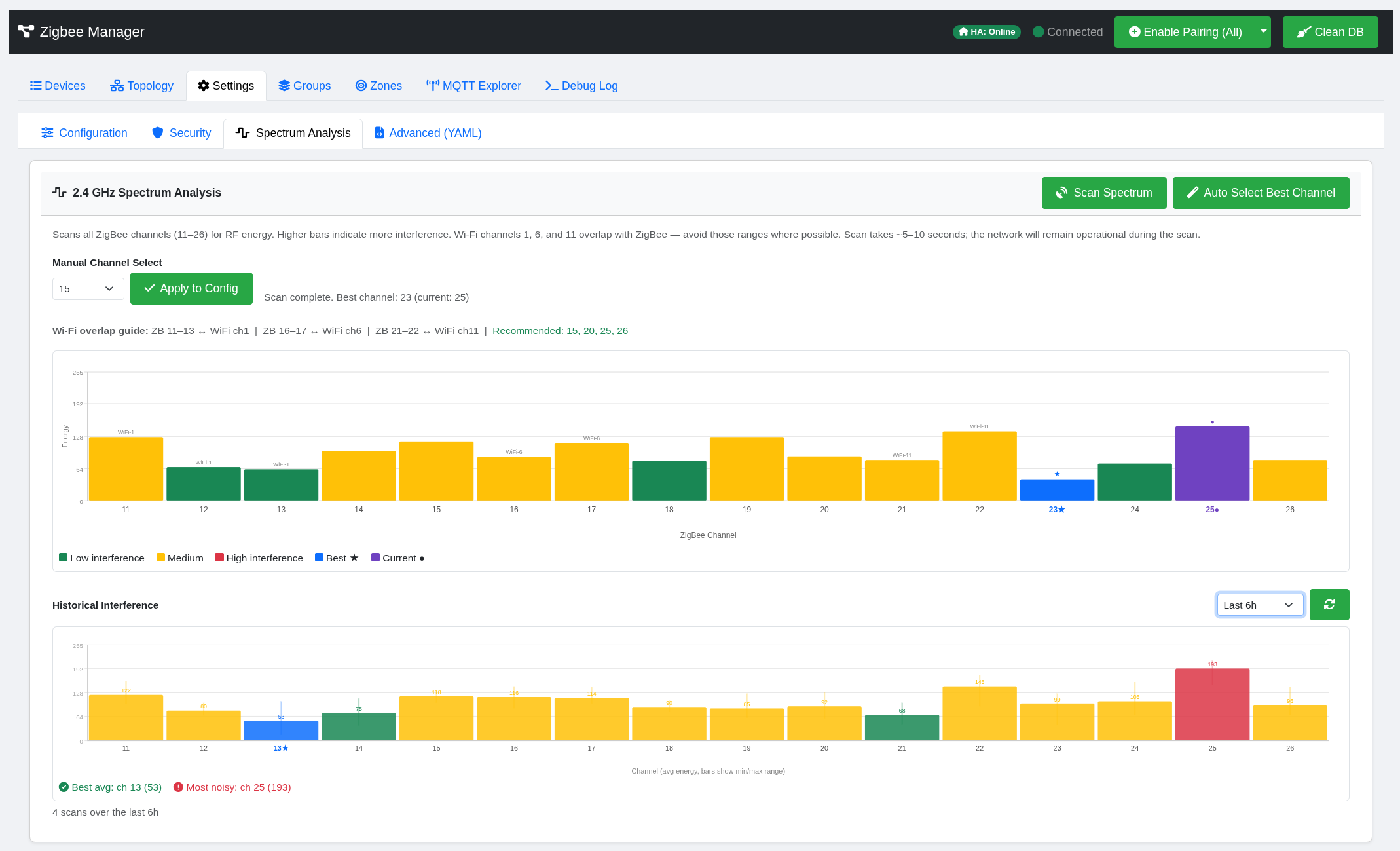
Settings panel — spectrum analysis
### Device Modal
Each device opens a tabbed modal with:
| Tab | What it does |
|:---------------|:----------------------------------------------------------------------------------------------------------------------------------------|
| **Overview** | Identity, maintenance actions (re-interview, poll, remove, ban), sensor readings, device-specific configuration (Aqara modes, Tuya DPs) |
| **Control** | Send commands — on/off, brightness sliders, color picker, thermostat setpoints, cover position |
| **Bindings** | View and manage ZCL bindings between devices |
| **Clusters** | Raw cluster browser — read attributes, explore endpoints |
| **OTA** | Firmware update management — check for updates, trigger install, live progress bar, image notify |
| **Mappings** | Visual attribute mapping for devices using GenericClusterHandler (appears when unmapped attributes exist) |
| **Automation** | Per-device rule builder for the automation engine |
## 🏗️ Architecture
| Component | Technology | Role |
|:------------------------|:--------------------------------------------|:-------------------------------------------------------------------|
| **Core** | Python (FastAPI, zigpy/bellows) | Zigbee radio, device lifecycle, resilience, state management |
| **Matter Server** | python-matter-server (managed subprocess) | CHIP SDK controller for Matter devices (optional) |
| **Matter Bridge** | aiohttp WebSocket client | Translates Matter nodes into unified device format |
| **MQTT Service** | aiomqtt | Broker connection, reconnection, HA MQTT Discovery |
| **Cluster Handlers** | handlers/ package | ZCL message decoding, normalised state, device-specific logic |
| **Generic Handler** | handlers/generic.py | Fallback for unsupported clusters with override manager integration |
| **Automation Engine** | modules/automation.py | State-machine rules, recursive sequences, direct zigpy execution |
| **OTA Manager** | modules/ota.py | Firmware update orchestration, provider config, progress tracking |
| **Group Manager** | modules/groups.py | Native Zigbee groups with input/output cluster awareness |
| **Device Overrides** | modules/device_overrides.py | JSON-driven attribute mappings for unsupported devices |
| **Network Init** | modules/network_init.py | Auto-generation of credentials and channel selection on first boot |
| **Upgrade Manager** | modules/upgrade_manager.py + /opt/zmm/ | GitHub tag polling, container build/swap orchestration via host watcher, atomic blue-green deployments with health-check rollback |
| **Frontend** | HTML, Bootstrap 5, D3.js | SPA connected via WebSocket for real-time updates |
For the full file structure see [docs/structure.md](docs/structure.md).
## ⚙️ Configuration
Configuration is managed through the **Settings tab** in the web UI, which provides a structured form interface backed by `config.yaml`. Direct file editing is also available via the Advanced sub-tab or on disk.
### Key Configuration Sections
zigbee:
port: /dev/ttyACM0 # Serial port for coordinator
baudrate: 115200
channel: 15 # Auto-selected via spectrum analysis or manual
pan_id: "0x1A2B" # Auto-generated on first boot
extended_pan_id: "..." # Auto-generated on first boot
network_key: [...] # Auto-generated on first boot (16 bytes)
mqtt:
host: 192.168.1.x
port: 1883
username: mqtt_user
password: mqtt_pass
base_topic: zigbee2mqtt # Base topic for HA discovery
discovery_prefix: homeassistant
matter:
enabled: false # Set true to enable Matter support
port: 5580 # python-matter-server WebSocket port
ota:
enabled: true # Enable OTA firmware update support
providers: # List of OTA image providers
- ikea
- ledvance
- sonoff
- inovelli
web:
host: 0.0.0.0
port: 8000
ssl: false
## 🔧 Troubleshooting
### Debugging Workflow
1. **Live Logs** — Real-time WebSocket log stream with category filtering
2. **Debug Packets Modal** — Raw ZCL frame capture with decoded summaries
3. **MQTT Explorer** — Monitor all MQTT traffic, publish test messages
4. **Trace Log** — Automation evaluation history with colour-coded results
5. **Mesh Topology** — Visual network graph with LQI overlay
6. **Spectrum Analysis** — Identify channel interference causing network instability
### Log Files
| File | Content |
|:------------------------|:----------------------------------------------------|
| `logs/zigbee.log` | Main application log |
| `logs/zigbee_debug.log` | Detailed packet/handler events (when debug enabled) |
### Service Commands
sudo systemctl status zigbee-matter-manager # Check service status
sudo systemctl kill -s SIGKILL zigbee-matter-manager # Kill the service
sudo systemctl start zigbee-matter-manager # Start the service
sudo journalctl -u zigbee-matter-manager -f # Follow system logs
sudo tail -f /opt/zigbee_matter_manager/logs/zigbee.log # Follow app logs
### Upgrade Issues
If an in-app upgrade gets stuck or shows a stale "Failed" banner:
# Check the upgrade watcher status
systemctl status zmm-upgrade.path zmm-upgrade.service
# View the build / swap log
tail -100 ~/.zigbee-matter-manager/data/upgrade/build.log
tail -100 ~/.zigbee-matter-manager/logs/upgrade_watcher.log
# Clear a stale lock if the UI shows "Another upgrade in progress" but nothing is running
ps aux | grep -E "podman build|upgrade.sh" | grep -v grep # Verify nothing is running
rm -f ~/.zigbee-matter-manager/data/upgrade/lock # Then clear
# Reset failed systemd state after repeated build attempts
sudo systemctl reset-failed zmm-upgrade.path zmm-upgrade.service
# Manually trigger a rollback if the UI is unreachable
sudo podman stop zigbee-matter-manager
sudo podman rm zigbee-matter-manager
sudo podman start zigbee-matter-manager-previous
sudo podman rename zigbee-matter-manager-previous zigbee-matter-manager
The UI also exposes a **Dismiss** button on failed-state banners and a **Force-clear lock** option when a 409 is returned, so most issues can be resolved without SSH.
## 📚 Documentation
| Document | Description |
|:----------------------------------------------------------------------------|:-------------------------------------------------------------------|
| [docs/upgrades.md](docs/upgrades.md) | In-app upgrades — architecture, watcher mechanics, rollback flow, troubleshooting |
| [docs/matter.md](docs/matter.md) | Matter integration — setup, supported features, architecture |
| [docs/multipan.md](docs/multipan.md) | MultiPAN (Zigbee + Thread on the Sonoff MG24) — firmware, CPC wire format, OTBR setup |
| [docs/heating.md](docs/heating.md) | Weather-aware heating — advisor, controller, thermal profile, radiator sizing, EPC/preheat maths, config reference |
| [docs/automations.md](docs/automations.md) | Automation engine — rule syntax, conditions, sequences, examples |
| [docs/mqtt-explorer.md](docs/mqtt-explorer.md) | MQTT Explorer — usage, filtering, architecture |
| [docs/onboarding.md](docs/onboarding.md) | Developer guide — handler architecture, adding new device support |
| [docs/onboarding_unsupported_devices.md](docs/onboarding_unsupported_devices.md) | User guide — visual attribute mapping for unsupported devices |
| [docs/aqara_cluster_guide.md](docs/aqara_cluster_guide.md) | Aqara 0xFCC0 cluster implementation reference |
| [docs/debugging.md](docs/debugging.md) | Debugging features — packet capture, log analysis, troubleshooting |
| [docs/structure.md](docs/structure.md) | Full project file structure |
## 🤝 Contributing
Contributions are welcome. The codebase follows a modular handler architecture — adding support for a new device typically means adding or extending a cluster handler in `handlers/`. For devices that don't need complex logic, the [Device Onboarding](#device-onboarding-unsupported-devices) system can get things working without any code changes. See [docs/onboarding.md](docs/onboarding.md) for a step-by-step developer guide.
## 📄 License
This project is licensed under the GNU General Public License v3.0. See [LICENSE](LICENSE) for details.