apisec-inc/mcp-audit
GitHub: apisec-inc/mcp-audit
一款用于审计 AI 代理 MCP 配置、识别密钥与 API 暴露并生成 AI-BOM 的扫描工具。
Stars: 152 | Forks: 41
# MCP 审计
[](https://opensource.org/licenses/MIT)
[](https://www.python.org/downloads/)
[](https://github.com/apisec-inc/mcp-audit/releases)
**在上线前查看您的 AI 代理可以访问什么。**
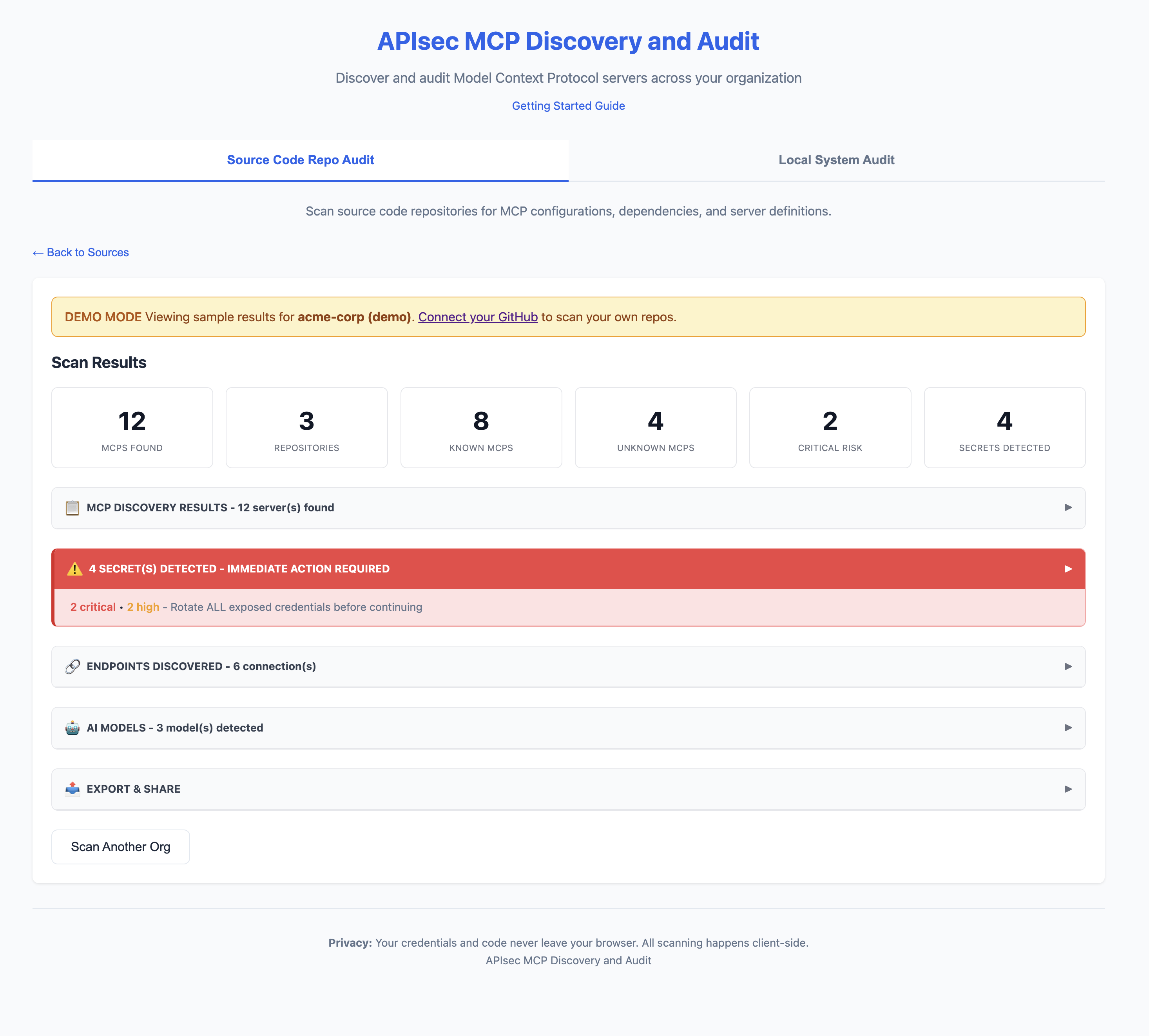
**Web 应用**
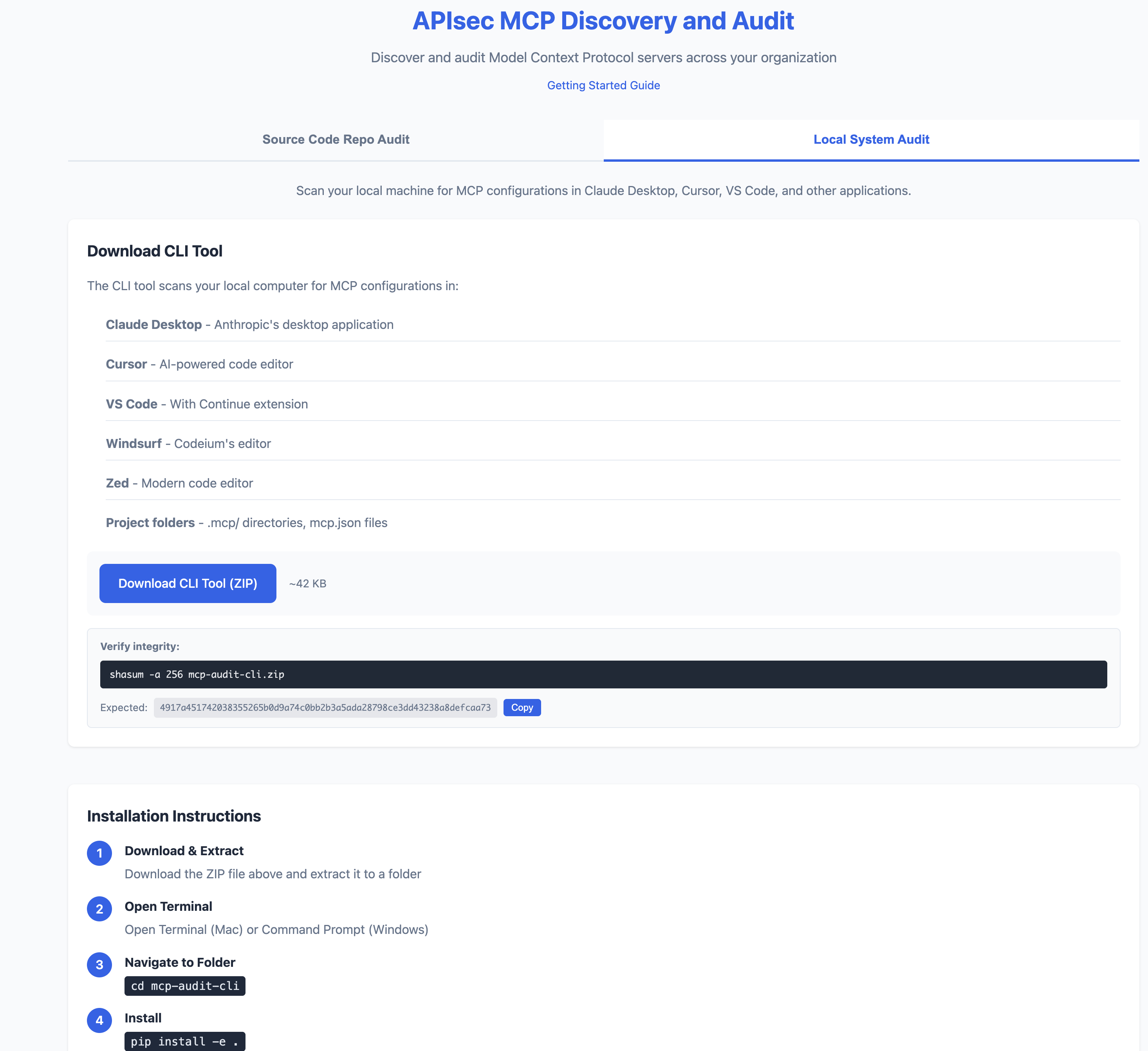
**CLI**
## 快速开始
```
# 安装
pip install -e .
# 扫描您的机器
mcp-audit scan
# 或者尝试使用网页应用(无需安装)
# https://apisec-inc.github.io/mcp-audit/?demo=true
```
## 它能做什么
MCP 审计会扫描您的 AI 开发工具(Claude Desktop、Cursor、VS Code),并揭示:
- **密钥** - 暴露的 API 密钥、令牌、数据库密码
- **API** - 您的 AI 代理连接的每个端点
- **AI 模型** - 配置了哪些大语言模型(GPT-4、Claude、Llama)
- **风险标记** - Shell 访问、文件系统访问、不可信来源
```
⚠️ 2 SECRET(S) DETECTED - IMMEDIATE ACTION REQUIRED
[CRITICAL] GitHub Personal Access Token
Location: github-tools → env.GITHUB_TOKEN
Remediation: https://github.com/settings/tokens → Delete → Recreate
[HIGH] Database Connection String
Location: postgres-mcp → env.DATABASE_URL
Remediation: Rotate credentials, use secrets manager
```
## 它能发现什么(以及不能发现什么)
### 它能发现
| 扫描类型 | 发现内容 |
|-----------|-------|
| **GitHub 扫描** | 提交到仓库的 MCP 配置(`mcp.json`、`.mcp/`、`claude_desktop_config.json` 等) |
| **本地扫描** | 本机上的 MCP 配置(Claude Desktop、Cursor、VS Code、Windsurf、Zed) |
### 它不会发现
| 盲点 | 原因 |
|------------|-----|
| **运行时的环境变量中的密钥** | 我们扫描配置文件,而非运行中的进程 |
| **从密钥管理器拉取的配置** | Vault、AWS Secrets Manager 等不会被扫描 |
| **动态生成的配置** | 运行时生成的配置不会存在于文件中 |
| **已安装但未配置的 MCP** | 没有配置文件 = 无可扫描内容 |
| **您无权限的私有仓库** | GitHub 扫描受限于您的 PAT 权限范围 |
| **加密或混淆的密钥** | 模式匹配无法识别编码后的值 |
| **非标准配置位置** | 已知位置之外的自定义路径 |
### 重要
**干净的扫描结果并不意味着零风险。**
- 开发者可能已在您未扫描的机器上配置了 MCP
- 配置可能存在于您未授权的仓库中
- 运行时行为可能与静态配置不同
MCP 审计提供可见性,而非保证。请将其与运行时监控和安全审查结合使用。
## CI/CD 集成
在出现关键风险时失败构建:
```
# .github/workflows/mcp-audit.yml
name: MCP Security Audit
on: [push, pull_request]
jobs:
audit:
runs-on: ubuntu-latest
steps:
- uses: actions/checkout@v4
- name: Install MCP Audit
run: pip install mcp-audit
- name: Run Security Scan
run: mcp-audit scan --path . --format json -o mcp-report.json
- name: Fail on Critical
run: |
CRITICAL=$(jq '[.mcps[] | select(.risk == "critical")] | length' mcp-report.json)
if [ "$CRITICAL" -gt 0 ]; then
echo "❌ Found $CRITICAL critical-risk MCPs"
exit 1
fi
- name: Upload AI-BOM
uses: actions/upload-artifact@v4
with:
name: ai-bom
path: mcp-report.json
```
## 导出格式
```
# JSON(用于 CI/CD)
mcp-audit scan --format json -o report.json
# AI-BOM(CyclopeDX 1.6)
mcp-audit scan --format cyclonedx -o ai-bom.json
# SARIF(GitHub Security 集成)
mcp-audit scan --format sarif -o results.sarif
# CSV / Markdown
mcp-audit scan --format csv -o report.csv
mcp-audit scan --format markdown -o report.md
# 通过电子邮件的 PDF 报告
mcp-audit scan --email security@company.com
```
## 关键特性
| 特性 | 描述 |
|---------|-------------|
| **MCP 发现** | 在 Claude Desktop、Cursor、VS Code、Windsurf、Zed 中查找 MCP |
| **密钥检测** | 25+ 种密钥模式及提供方特定的修复建议 |
| **API 清单** | 数据库、REST、SSE、SaaS、云端点 |
| **AI 模型检测** | OpenAI、Anthropic、Google、Meta、Mistral、Ollama |
| **OWASP LLM Top 10** | 将发现映射到 OWASP LLM Top 10(2025)框架 |
| **AI-BOM 导出** | 用于供应链合规的 CycloneDX 1.6 |
| **SARIF 输出** | 带有 OWASP 标签的 GitHub 安全集成 |
| **注册表** | 50+ 个已知 MCP 及风险分类 |
## 两种使用方式
| | **Web 应用** | **CLI 工具** |
|---|-------------|--------------|
| **扫描** | GitHub 仓库 | 本地机器 |
| **安装** | 无需安装(浏览器) | Python 3.9+ |
| **适用场景** | 组织范围的可视性 | 深度本地分析 |
| **隐私** | 令牌保留在浏览器中 | 100% 本地 |
**Web 应用:** [https://apisec-inc.github.io/mcp-audit/](https://apisec-inc.github.io/mcp-audit/)
## CLI 参考
### 扫描命令
```
mcp-audit scan # Full scan
mcp-audit scan --secrets-only # Only secrets
mcp-audit scan --apis-only # Only API endpoints
mcp-audit scan --models-only # Only AI models
mcp-audit scan --verbose # Detailed output
mcp-audit scan --path ./project # Specific directory
```
### 导出选项
```
mcp-audit scan --format json -o report.json # JSON output
mcp-audit scan --format csv -o report.csv # CSV output
mcp-audit scan --format markdown -o report.md # Markdown output
mcp-audit scan --format cyclonedx -o ai-bom.json # CycloneDX 1.6 AI-BOM
mcp-audit scan --format sarif -o results.sarif # SARIF for GitHub Security
mcp-audit scan --email security@company.com # PDF report via email
```
### 注册表命令
```
mcp-audit registry # List all known MCPs
mcp-audit registry --risk critical # Filter by risk
mcp-audit registry lookup "stripe" # Search registry
```
## 风险等级
| 等级 | 含义 | 示例 |
|-------|---------|----------|
| 🔴 **严重** | 完整系统访问 | 数据库管理员、Shell 访问、云 IAM |
| 🟠 **高** | 写入权限 | 文件系统写入、API 变更 |
| 🟡 **中** | 读取 + 有限写入 | SaaS 集成、只读数据库 |
| 🟢 **低** | 仅读取 | 公共 API、内存存储 |
## 检测到的密钥
| 严重性 | 类型 |
|----------|-------|
| 🔴 严重 | AWS 密钥、GitHub 个人访问令牌、Stripe 生产密钥、数据库凭据 |
| 🟠 高 | Slack 令牌、OpenAI 密钥、Anthropic 密钥、SendGrid |
| 🟡 中 | Webhook、通用 API 密钥 |
## 隐私
- **Web 应用**:GitHub 令牌永远不会离开您的浏览器
- **CLI**:100% 本地运行,无遥传
- **PDF 报告**:仅发送摘要数据(不包含密钥)
## 安装
### 选项 1:使用 Python(pip)
```
# 克隆并安装
git clone https://github.com/apisec-inc/mcp-audit.git
cd mcp-audit
pip install -e .
# 验证
mcp-audit --help
```
需要 Python 3.9+
### 选项 2:使用 Docker
```
# 构建镜像
docker build -t mcp-audit .
# 扫描当前目录
docker run -v $(pwd):/scan mcp-audit scan
# 使用 JSON 输出进行扫描
docker run -v $(pwd):/scan mcp-audit scan --format json -o /scan/report.json
```
## 验证下载完整性
所有 MCP Audit 发布版本均包含 SHA256 校验和。
### 验证 CLI 下载
```
# 下载校验文件
curl -O https://github.com/apisec-inc/mcp-audit/releases/latest/download/CHECKSUMS.txt
# 验证压缩包
shasum -a 256 -c CHECKSUMS.txt --ignore-missing
```
预期输出:
```
mcp-audit-cli.zip: OK
```
### 当前发布校验和
| 文件 | SHA256 |
|------|--------|
| `mcp-audit-cli.zip` | `4917a451742038355265b0d9a74c0bb2b3a5ada28798ce3dd43238a8defcaa73` |
完整校验和:[CHECKSUMS.txt](CHECKSUMS.txt)
## 文档
- **[风险评分](docs/RISK_SCORING.md)** - 风险等级和标记的分配方式
- **[贡献指南](CONTRIBUTING.md)** - 贡献者指南
## 许可证
MIT - 请参阅 [LICENSE](LICENSE)
由 [APIsec](https://apisec.ai) 构建
标签:AI 代理安全, AI 模型识别, BOM 生成, CI/CD 安全, DevSecOps, GitHub Token 泄露, LLM 安全, LNA, MCP 安全审计, MCP 配置扫描, 上游代理, 合规扫描, 图探索, 密钥泄露检测, 对称加密, 开源安全工具, 影子 API 检测, 数据库连接字符串, 数据投毒防御, 数据隔离, 文档结构分析, 机密检测, 环境变量扫描, 秘密管理, 自动化审计, 逆向工具, 逆向工程平台, 风险标记