AmirithaGuru/threat-hunting-sysmon-splunk
GitHub: AmirithaGuru/threat-hunting-sysmon-splunk
基于 Windows 11 + Sysmon + Splunk 的端点威胁狩猎实验环境,包含攻击模拟场景和对应的 SPL 检测规则。
Stars: 0 | Forks: 0
# 使用 Splunk 对 Windows Sysmon 日志进行威胁狩猎
本仓库包含一个小型的 Windows 11 实验环境,我在其中:
- 使用公开的 **SwiftOnSecurity** 配置文件安装了 **Sysmon**
- 将 Sysmon 日志摄入到 **Splunk Enterprise**
- 模拟了简单的攻击者行为:
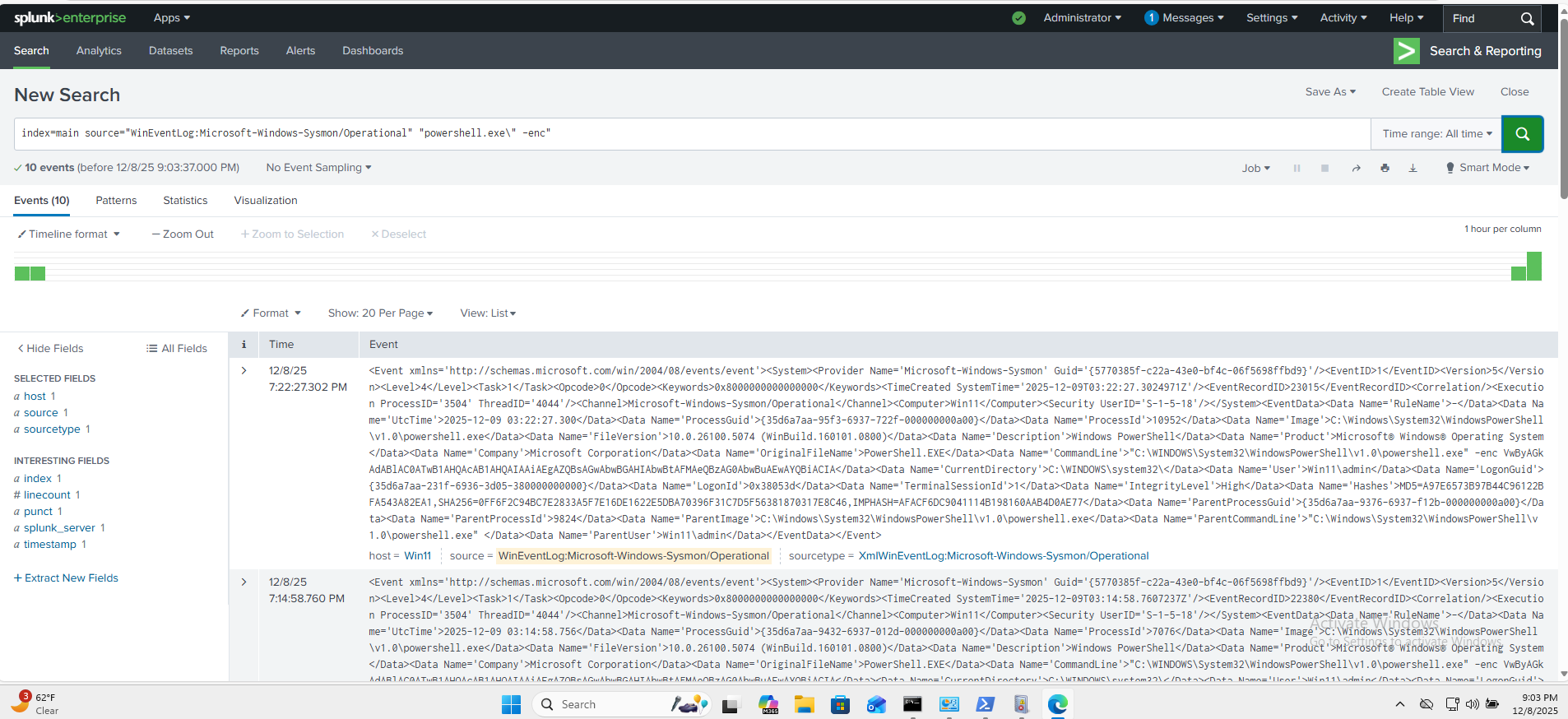
- 编码的 PowerShell 执行
- 来自 PowerShell 的出站 HTTP 连接
- 注册表 Run 键持久化
- 在 Splunk 中编写了 **SPL 检测规则** 并将其映射到 **MITRE ATT&CK**
这是一个侧重于 Windows 端点遥测数据的动手 **SIEM / 威胁狩猎实验环境**。
## 1. 实验架构
- **宿主机:** 使用 VirtualBox 运行的 Windows 10/11
- **客户虚拟机:** Windows 11(使用实验用户,非个人账户)
- **遥测数据:**
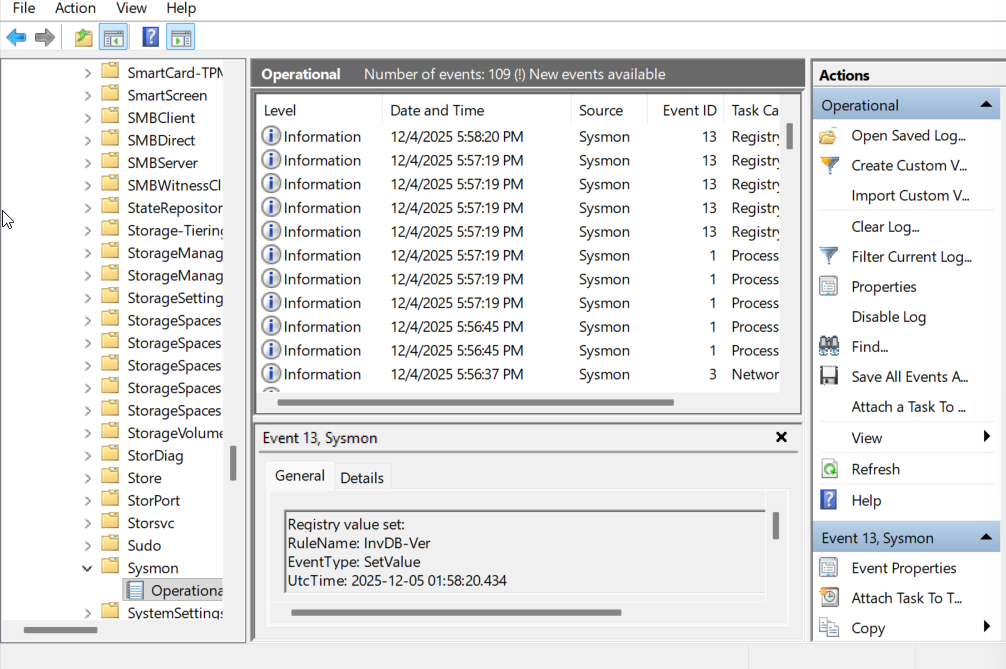
- **Sysmon** (Microsoft-Windows-Sysmon/Operational)
- 配置文件:[SwiftOnSecurity sysmon-config](https://github.com/SwiftOnSecurity/sysmon-config)
- **SIEM:** Splunk Enterprise(免费版,安装在虚拟机本地)
- **摄入路径:**
Windows 11 → Sysmon → Windows Event Log → Splunk (WinEventLog:Microsoft-Windows-Sysmon/Operational)
Splunk 配置了一个指向 Sysmon Operational 日志的 **Windows Event Log input**,并将其索引到 `index=main` 中。
## 2. 模拟的可疑活动
这些都是**安全、良性的命令**,用于模拟常见的攻击者技术,以便 Sysmon + Splunk 有有趣的数据可供分析。
### 2.1 编码的 PowerShell (T1059.001)
攻击者使用 Base64 对命令进行编码,以绕过那些扫描明文命令行中可疑关键词的安全工具。
```
# 构建简单命令
$p = 'Write-Output "HelloFromSysmonLab"'
# 编码为 UTF-16LE (Unicode) + Base64
$bytes = [System.Text.Encoding]::Unicode.GetBytes($p)
$encoded = [Convert]::ToBase64String($bytes)
# 模拟攻击者风格的编码 PowerShell
powershell.exe -enc $encoded
```
**Sysmon:**
- 事件 ID **1** (Process Create)
- `Image` = `C:\Windows\System32\WindowsPowerShell\v1.0\powershell.exe`
- `CommandLine` 包含 `-enc` 和 Base64 字符串
### 2.2 来自 PowerShell 的出站 HTTP 连接 (T1041 / T1071)
攻击者使用 HTTP 进行 C2 回调和数据窃取,因为它能混入正常的 Web 流量中,且很少在边界被阻止。
```
Invoke-WebRequest http://example.com -UseBasicParsing
```
**Sysmon:**
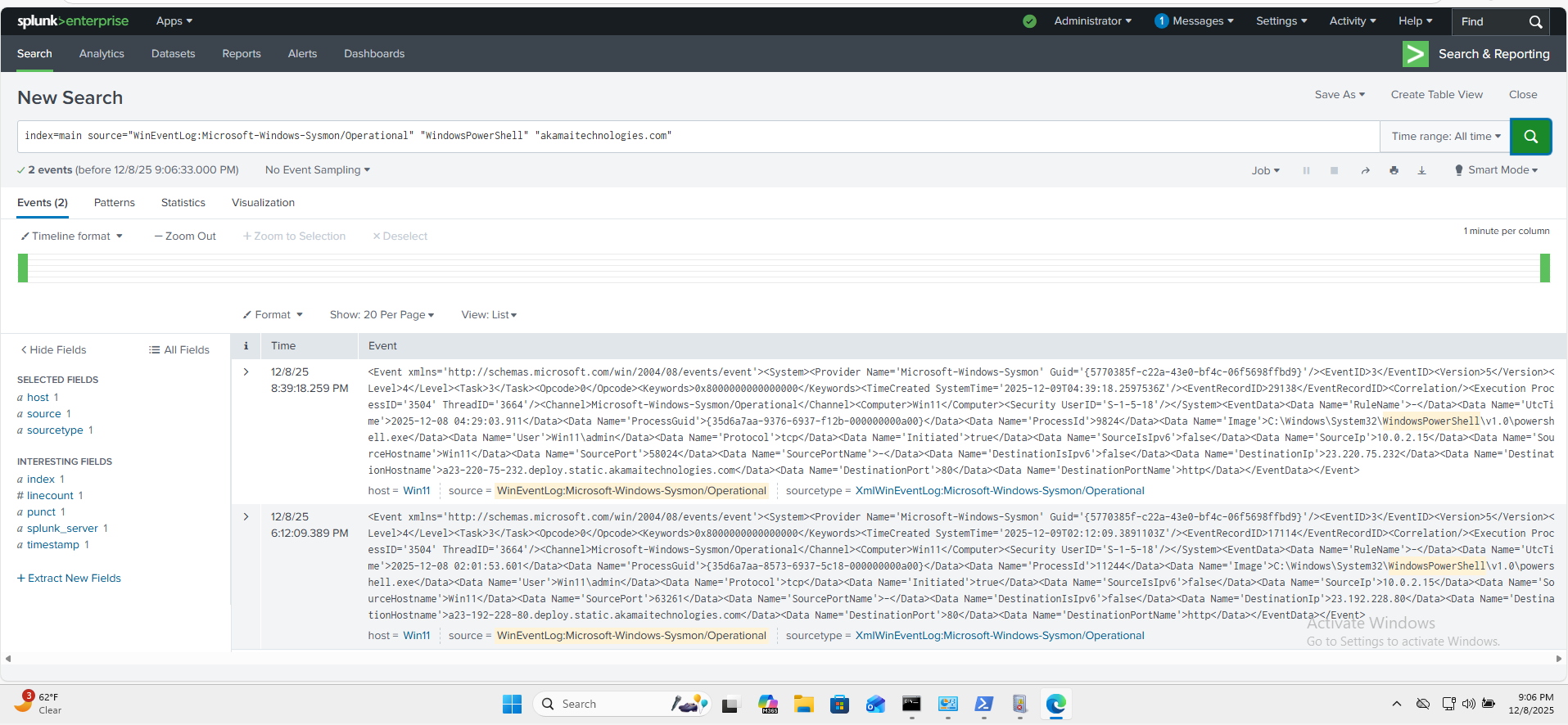
- 事件 ID **3** (Network connection detected)
- `Image` = `powershell.exe`
- 目标主机是 example.com 的 **Akamai** 边缘节点
- `DestinationPort` = 80, `DestinationPortName` = http
### 2.3 注册表 Run 键持久化 (T1547 / T1060)
写入 Run 键会导致 Payload 在每次用户登录时自动执行 —— 使用 HKCU 时无需管理员权限。
```
reg add HKCU\Software\Microsoft\Windows\CurrentVersion\Run ^
/v FakeApp ^
/t REG_SZ ^
/d "C:\FakePath\fake.exe" ^
/f
```
**Sysmon:**
- `reg.exe` 进程执行的事件 ID **1**
- 事件 ID **13** (Registry value set):
- `TargetObject` 包含 `HKU\...\Software\Microsoft\Windows\CurrentVersion\Run\FakeApp`
- `Details` = `C:\FakePath\fake.exe`
## 3. Splunk 检测 (SPL)
所有查询假设:
- 索引:`main`
- Sysmon 来源:`WinEventLog:Microsoft-Windows-Sysmon/Operational`
这些搜索也存储在 [`splunk_queries/`](./splunk_queries) 下。
### 3.1 编码的 PowerShell
检测使用 `-enc` 开关的 PowerShell 执行。限定为 `EventCode=1` (Process Create) 和 `Image` 字段,因此它只匹配实际的 PowerShell 进程启动 —— 而不是任何碰巧在其他地方提到这些字符串的日志行。
```
index=main source="WinEventLog:Microsoft-Windows-Sysmon/Operational"
EventCode=1
Image="*\\powershell.exe"
CommandLine="* -enc *"
| table _time, host, User, ParentImage, CommandLine
| sort -_time
```
### 3.2 注册表 Run 键持久化
查找 Run 键下的注册表修改。限定为 `EventCode=13` (Registry Value Set) 和 `TargetObject` 字段,因此它匹配确切的注册表路径 —— 而不是任何碰巧包含单词 "Run" 的日志条目。
```
index=main source="WinEventLog:Microsoft-Windows-Sysmon/Operational"
EventCode=13
TargetObject="*\\CurrentVersion\\Run*"
| table _time, host, User, Image, TargetObject, Details
| sort -_time
```
### 3.3 PowerShell HTTP 连接
查找由 PowerShell 发起到外部目标的网络连接。限定为 `EventCode=3` (Network Connection) 并排除私有 IP 范围,以仅显示外部出站流量。
```
index=main source="WinEventLog:Microsoft-Windows-Sysmon/Operational"
EventCode=3
Image="*\\powershell.exe"
NOT (DestinationIp="127.0.0.1" OR DestinationIp="::1")
NOT (DestinationIp="10.*" OR DestinationIp="192.168.*" OR DestinationIp="172.16.*")
| table _time, host, User, Image, DestinationIp, DestinationHostname, DestinationPort
| sort -_time
```
## 4. MITRE ATT&CK 映射
模拟的行为映射到以下 ATT&CK 技术:
- **编码的 PowerShell**
- T1059.001 – Command and Scripting Interpreter: PowerShell
- **注册表 Run 键持久化**
- T1547.001 – Boot or Logon Autostart Execution: Registry Run Keys
- **来自 PowerShell 的出站 HTTP**
- T1041 – Exfiltration Over C2 Channel
- T1071.001 – Application Layer Protocol: Web Protocols
## 5. 未来工作思路
- 扩展检测范围以覆盖:
- LOLBins,如 `certutil.exe`、`mshta.exe`、`rundll32.exe`
- 可疑的父/子进程链(例如 `winword.exe` → `powershell.exe`)
- 在 Splunk 中添加关联搜索和警报(例如,在同一主机上短时间内出现编码的 PS + 出站 HTTP 时发出警报)
- 将相同的 Sysmon 遥测数据转发到其他 SIEM(Elastic、Wazuh、Sentinel)进行比较
## 截图
### Sysmon 记录 Windows 事件
### Splunk 检测 – 编码的 PowerShell
### Splunk 检测 – PowerShell HTTP → Akamai
标签:ATT&CK 模拟, BurpSuite集成, HTTP 连接监控, IP 地址批量处理, OpenCanary, PowerShell 检测, RFI远程文件包含, SIEM 实验室, SwiftOnSecurity, Sysmon, Windows 11, Windows 安全, 注册表持久化, 漏洞靶场, 端点遥测, 编码命令检测, 网络安全实验, 防御检测