tobi/qmd
GitHub: tobi/qmd
一款完全本地化的 Markdown 混合搜索引擎,结合 BM25、向量检索与 LLM 重排序技术,专为个人知识库管理和 AI Agent 工作流设计。
Stars: 26584 | Forks: 1665
# QMD - 查询标记文档
一款本地搜索引擎,用于检索你需要记住的一切。索引你的 Markdown 笔记、会议记录、文档和知识库。支持关键词或自然语言搜索。非常适合你的 Agentic 工作流。
QMD 结合了 BM25 全文搜索、向量语义搜索和 LLM 重排序——所有功能均通过 node-llama-cpp 和 GGUF 模型在本地运行。
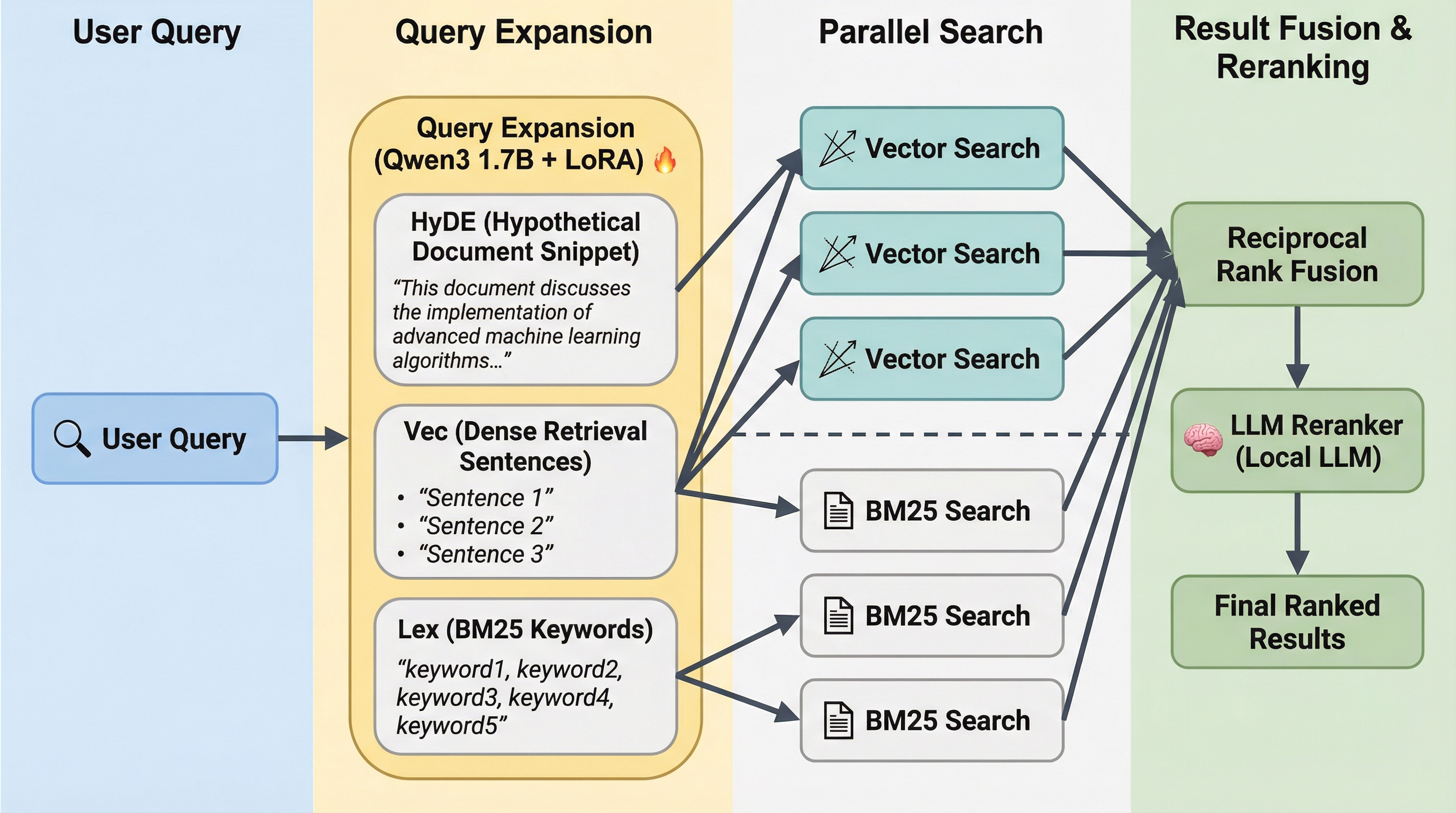
你可以在 [CHANGELOG](CHANGELOG.md) 中阅读更多关于 QMD 的进展。
## 快速开始
```
# 全局安装 (Node 或 Bun)
npm install -g @tobilu/qmd
# 或
bun install -g @tobilu/qmd
# 或者直接运行
npx @tobilu/qmd ...
bunx @tobilu/qmd ...
# 为您的笔记、文档和会议记录创建 collection
qmd collection add ~/notes --name notes
qmd collection add ~/Documents/meetings --name meetings
qmd collection add ~/work/docs --name docs
# 添加 context 以帮助改善搜索结果,当匹配到子文档时,每条 context 都会被返回。这以树状结构运作。这是 QMD 的关键特性,因为它允许 LLM 在选择文档时做出更好的上下文决策。不要忽视它!
qmd context add qmd://notes "Personal notes and ideas"
qmd context add qmd://meetings "Meeting transcripts and notes"
qmd context add qmd://docs "Work documentation"
# 生成用于语义搜索的 embedding
qmd embed
# 搜索所有内容
qmd search "project timeline" # Fast keyword search
qmd vsearch "how to deploy" # Semantic search
qmd query "quarterly planning process" # Hybrid + reranking (best quality)
# 获取特定文档
qmd get "meetings/2024-01-15.md"
# 通过 docid 获取文档(显示在搜索结果中)
qmd get "#abc123"
# 通过 glob 模式获取多个文档
qmd multi-get "journals/2025-05*.md"
# 在特定 collection 内搜索
qmd search "API" -c notes
# 导出所有匹配项以供 agent 使用
qmd search "API" --all --files --min-score 0.3
```
### 配合 AI Agents 使用
QMD 的 `--json` 和 `--files` 输出格式专为 Agentic 工作流设计:
```
# 获取用于 LLM 的结构化结果
qmd search "authentication" --json -n 10
# 列出所有高于阈值的相关文件
qmd query "error handling" --all --files --min-score 0.4
# 检索完整文档内容
qmd get "docs/api-reference.md" --full
```
### MCP Server
虽然直接让 Agent 在命令行中使用该工具也能正常工作,但它还提供了一个 MCP (Model Context Protocol) 服务器以实现更紧密的集成。
**暴露的工具:**
- `qmd_search` - 快速 BM25 关键词搜索(支持集合过滤)
- `qmd_vector_search` - 语义向量搜索(支持集合过滤)
- `qmd_deep_search` - 深度搜索,包含查询扩展和重排序(支持集合过滤)
- `qmd_get` - 通过路径或 docid 检索文档(附带模糊匹配建议)
- `qmd_multi_get` - 通过 glob 模式、列表或 docids 检索多个文档
- `qmd_status` - 索引健康状况和集合信息
**Claude Desktop 配置** (`~/Library/Application Support/Claude/claude_desktop_config.json`):
```
{
"mcpServers": {
"qmd": {
"command": "qmd",
"args": ["mcp"]
}
}
}
```
**Claude Code** — 安装插件(推荐):
```
claude marketplace add tobi/qmd
claude plugin add qmd@qmd
```
或者在 `~/.claude/settings.json` 中手动配置 MCP:
```
{
"mcpServers": {
"qmd": {
"command": "qmd",
"args": ["mcp"]
}
}
}
```
#### HTTP 传输
默认情况下,QMD 的 MCP 服务器使用 stdio(由每个客户端作为子进程启动)。对于一个共享的、长期运行的服务器,为了避免重复加载模型,请使用 HTTP 传输:
```
# 前台运行 (Ctrl-C 停止)
qmd mcp --http # localhost:8181
qmd mcp --http --port 8080 # custom port
# 后台守护进程
qmd mcp --http --daemon # start, writes PID to ~/.cache/qmd/mcp.pid
qmd mcp stop # stop via PID file
qmd status # shows "MCP: running (PID ...)" when active
```
HTTP 服务器暴露两个端点:
- `POST /mcp` — MCP Streamable HTTP(JSON 响应,无状态)
- `GET /health` — 存活检查,包含运行时间
LLM 模型在请求之间会保留在 VRAM 中。Embedding/重排序上下文在空闲 5 分钟后会被释放,并在下一次请求时透明地重建(约 1 秒的延迟,模型保持加载状态)。
将任何 MCP 客户端指向 `http://localhost:8181/mcp` 即可连接。
## 架构
```
┌─────────────────────────────────────────────────────────────────────────────┐
│ QMD Hybrid Search Pipeline │
└─────────────────────────────────────────────────────────────────────────────┘
┌─────────────────┐
│ User Query │
└────────┬────────┘
│
┌──────────────┴──────────────┐
▼ ▼
┌────────────────┐ ┌────────────────┐
│ Query Expansion│ │ Original Query│
│ (fine-tuned) │ │ (×2 weight) │
└───────┬────────┘ └───────┬────────┘
│ │
│ 2 alternative queries │
└──────────────┬──────────────┘
│
┌───────────────────────┼───────────────────────┐
▼ ▼ ▼
┌─────────────────┐ ┌─────────────────┐ ┌─────────────────┐
│ Original Query │ │ Expanded Query 1│ │ Expanded Query 2│
└────────┬────────┘ └────────┬────────┘ └────────┬────────┘
│ │ │
┌───────┴───────┐ ┌───────┴───────┐ ┌───────┴───────┐
▼ ▼ ▼ ▼ ▼ ▼
┌───────┐ ┌───────┐ ┌───────┐ ┌───────┐ ┌───────┐ ┌───────┐
│ BM25 │ │Vector │ │ BM25 │ │Vector │ │ BM25 │ │Vector │
│(FTS5) │ │Search │ │(FTS5) │ │Search │ │(FTS5) │ │Search │
└───┬───┘ └───┬───┘ └───┬───┘ └───┬───┘ └───┬───┘ └───┬───┘
│ │ │ │ │ │
└───────┬───────┘ └──────┬──────┘ └──────┬──────┘
│ │ │
└────────────────────────┼───────────────────────┘
│
▼
┌───────────────────────┐
│ RRF Fusion + Bonus │
│ Original query: ×2 │
│ Top-rank bonus: +0.05│
│ Top 30 Kept │
└───────────┬───────────┘
│
▼
┌───────────────────────┐
│ LLM Re-ranking │
│ (qwen3-reranker) │
│ Yes/No + logprobs │
└───────────┬───────────┘
│
▼
┌───────────────────────┐
│ Position-Aware Blend │
│ Top 1-3: 75% RRF │
│ Top 4-10: 60% RRF │
│ Top 11+: 40% RRF │
└───────────────────────┘
```
## 分数归一化与融合
### 搜索后端
| Backend | Raw Score | Conversion | Range |
|---------|-----------|------------|-------|
| **FTS (BM25)** | SQLite FTS5 BM25 | `Math.abs(score)` | 0 to ~25+ |
| **Vector** | Cosine distance | `1 / (1 + distance)` | 0.0 to 1.0 |
| **Reranker** | LLM 0-10 rating | `score / 10` | 0.0 to 1.0 |
### 融合策略
`query` 命令使用带有位置感知混合的 **Reciprocal Rank Fusion (RRF)**:
1. **查询扩展**:原始查询(权重 ×2)+ 1 个 LLM 变体
2. **并行检索**:每个查询同时搜索 FTS 和向量索引
3. **RRF 融合**:使用 `score = Σ(1/(k+rank+1))` (其中 k=60)合并所有结果列表
4. **Top-Rank 奖励**:在任何列表中排名第一的文档 +0.05,排名第 2-3 的 +0.02
5. **Top-K 选择**:选取前 30 个候选者进行重排序
6. **重排序**:LLM 为每个文档评分(yes/no 带有 logprobs 置信度)
7. **位置感知混合**:
- RRF 排名 1-3:75% 检索分数,25% 重排序分数(保留精确匹配)
- RRF 排名 4-10:60% 检索分数,40% 重排序分数
- RRF 排名 11+:40% 检索分数,60% 重排序分数(更信任重排序结果)
**为什么采用这种方法**:当扩展查询不匹配时,纯 RRF 可能会稀释精确匹配。Top-rank 奖励保留了在原始查询中排名第一的文档。位置感知混合防止重排序器破坏高置信度的检索结果。
### 分数解读
| Score | Meaning |
|-------|---------|
| 0.8 - 1.0 | Highly relevant |
| 0.5 - 0.8 | Moderately relevant |
| 0.2 - 0.5 | Somewhat relevant |
| 0.0 - 0.2 | Low relevance |
## 系统要求
### 系统要求
- **Node.js** >= 22
- **Bun** >= 1.0.0
- **macOS**: Homebrew SQLite(用于扩展支持)
brew install sqlite
### GGUF 模型 (通过 node-llama-cpp)
QMD 使用三个本地 GGUF 模型(首次使用时自动下载):
| Model | Purpose | Size |
|-------|---------|------|
| `embeddinggemma-300M-Q8_0` | Vector embeddings | ~300MB |
| `qwen3-reranker-0.6b-q8_0` | Re-ranking | ~640MB |
| `qmd-query-expansion-1.7B-q4_k_m` | Query expansion (fine-tuned) | ~1.1GB |
模型从 HuggingFace 下载并缓存在 `~/.cache/qmd/models/` 中。
## 安装
```
npm install -g @tobilu/qmd
# 或
bun install -g @tobilu/qmd
```
### 开发
```
git clone https://github.com/tobi/qmd
cd qmd
npm install
npm link
```
## 使用
### 集合管理
```
# 从当前目录创建 collection
qmd collection add . --name myproject
# 使用显式路径和自定义 glob 掩码创建 collection
qmd collection add ~/Documents/notes --name notes --mask "**/*.md"
# 列出所有 collection
qmd collection list
# 移除 collection
qmd collection remove myproject
# 重命名 collection
qmd collection rename myproject my-project
# 列出 collection 中的文件
qmd ls notes
qmd ls notes/subfolder
```
### 生成向量 Embeddings
```
# 为所有已索引文档生成 embedding(900 tokens/块,15% 重叠)
qmd embed
# 强制重新生成所有 embedding
qmd embed -f
```
### 上下文管理
上下文为集合和路径添加描述性元数据,帮助搜索理解你的内容。
```
# 向 collection 添加 context(使用 qmd:// 虚拟路径)
qmd context add qmd://notes "Personal notes and ideas"
qmd context add qmd://docs/api "API documentation"
# 从 collection 目录内部添加 context
cd ~/notes && qmd context add "Personal notes and ideas"
cd ~/notes/work && qmd context add "Work-related notes"
# 添加全局 context(应用于所有 collection)
qmd context add / "Knowledge base for my projects"
# 列出所有 context
qmd context list
# 移除 context
qmd context rm qmd://notes/old
```
### 搜索命令
```
┌──────────────────────────────────────────────────────────────────┐
│ Search Modes │
├──────────┬───────────────────────────────────────────────────────┤
│ search │ BM25 full-text search only │
│ vsearch │ Vector semantic search only │
│ query │ Hybrid: FTS + Vector + Query Expansion + Re-ranking │
└──────────┴───────────────────────────────────────────────────────┘
```
```
# 全文搜索(快速,基于关键词)
qmd search "authentication flow"
# 向量搜索(语义相似度)
qmd vsearch "how to login"
# 带重排序的混合搜索(最佳质量)
qmd query "user authentication"
```
### 选项
```
# 搜索选项
-n # Number of results (default: 5, or 20 for --files/--json)
-c, --collection # Restrict search to a specific collection
--all # Return all matches (use with --min-score to filter)
--min-score # Minimum score threshold (default: 0)
--full # Show full document content
--line-numbers # Add line numbers to output
--index # Use named index
# 输出格式(用于搜索和批量获取)
--files # Output: docid,score,filepath,context
--json # JSON output with snippets
--csv # CSV output
--md # Markdown output
--xml # XML output
# 获取选项
qmd get [:line] # Get document, optionally starting at line
-l # Maximum lines to return
--from # Start from line number
# 批量获取选项
-l # Maximum lines per file
--max-bytes # Skip files larger than N bytes (default: 10KB)
```
### 输出格式
默认输出为彩色 CLI 格式(遵循 `NO_COLOR` 环境变量):
```
docs/guide.md:42 #a1b2c3
Title: Software Craftsmanship
Context: Work documentation
Score: 93%
This section covers the **craftsmanship** of building
quality software with attention to detail.
See also: engineering principles
notes/meeting.md:15 #d4e5f6
Title: Q4 Planning
Context: Personal notes and ideas
Score: 67%
Discussion about code quality and craftsmanship
in the development process.
```
- **Path**:集合相对路径(例如:`docs/guide.md`)
- **Docid**:短哈希标识符(例如:`#a1b2c3`)- 使用 `qmd get #a1b2c3` 获取
- **Title**:从文档中提取(第一个标题或文件名)
- **Context**:如果通过 `qmd context add` 配置了路径上下文
- **Score**:颜色编码(绿色 >70%,黄色 >40%,其他情况暗淡)
- **Snippet**:匹配周围的上下文,查询词高亮显示
### 示例
```
# 获取 10 个得分最低为 0.3 的结果
qmd query -n 10 --min-score 0.3 "API design patterns"
# 输出为 markdown 用于 LLM 上下文
qmd search --md --full "error handling"
# 用于脚本处理的 JSON 输出
qmd query --json "quarterly reports"
# 为不同的知识库使用独立的 index
qmd --index work search "quarterly reports"
```
### 索引维护
```
# 显示 index 状态及带有 context 的 collection
qmd status
# 重新索引所有 collection
qmd update
# 先执行 git pull 再重新索引(用于远程仓库)
qmd update --pull
# 通过文件路径获取文档(附带模糊匹配建议)
qmd get notes/meeting.md
# 通过 docid 获取文档(来自搜索结果)
qmd get "#abc123"
# 获取从第 50 行开始、最多 100 行的文档
qmd get notes/meeting.md:50 -l 100
# 通过 glob 模式获取多个文档
qmd multi-get "journals/2025-05*.md"
# 通过逗号分隔列表获取多个文档(支持 docid)
qmd multi-get "doc1.md, doc2.md, #abc123"
# 将批量获取限制为 20KB 以下的文件
qmd multi-get "docs/*.md" --max-bytes 20480
# 将批量获取结果输出为 JSON 以供 agent 处理
qmd multi-get "docs/*.md" --json
# 清理缓存和孤立数据
qmd cleanup
```
## 数据存储
索引存储于:`~/.cache/qmd/index.sqlite`
### Schema
```
collections -- Indexed directories with name and glob patterns
path_contexts -- Context descriptions by virtual path (qmd://...)
documents -- Markdown content with metadata and docid (6-char hash)
documents_fts -- FTS5 full-text index
content_vectors -- Embedding chunks (hash, seq, pos, 900 tokens each)
vectors_vec -- sqlite-vec vector index (hash_seq key)
llm_cache -- Cached LLM responses (query expansion, rerank scores)
```
## 环境变量
| Variable | Default | Description |
|----------|---------|-------------|
| `XDG_CACHE_HOME` | `~/.cache` | Cache directory location |
## 工作原理
### 索引流程
```
Collection ──► Glob Pattern ──► Markdown Files ──► Parse Title ──► Hash Content
│ │ │
│ │ ▼
│ │ Generate docid
│ │ (6-char hash)
│ │ │
└──────────────────────────────────────────────────►└──► Store in SQLite
│
▼
FTS5 Index
```
### Embedding 流程
文档使用智能边界检测被切分为约 900 token 的块,并包含 15% 的重叠:
```
Document ──► Smart Chunk (~900 tokens) ──► Format each chunk ──► node-llama-cpp ──► Store Vectors
│ "title | text" embedBatch()
│
└─► Chunks stored with:
- hash: document hash
- seq: chunk sequence (0, 1, 2...)
- pos: character position in original
```
### 智能分块
QMD 不在硬性 token 边界处截断,而是使用评分算法找到自然的 Markdown 断点。这能保持语义单元(章节、段落、代码块)的完整性。
**断点分数:**
| Pattern | Score | Description |
|---------|-------|-------------|
| `# Heading` | 100 | H1 - major section |
| `## Heading` | 90 | H2 - subsection |
| `### Heading` | 80 | H3 |
| `#### Heading` | 70 | H4 |
| `##### Heading` | 60 | H5 |
| `###### Heading` | 50 | H6 |
| ` ``` ` | 80 | Code block boundary |
| `---` / `***` | 60 | Horizontal rule |
| Blank line | 20 | Paragraph boundary |
| `- item` / `1. item` | 5 | List item |
| Line break | 1 | Minimal break |
**算法:**
1. 扫描文档中所有带有分数的断点
2. 当接近 900 token 目标时,在截止点前搜索一个 200 token 的窗口
3. 对每个断点评分:`finalScore = baseScore × (1 - (distance/window)² × 0.7)`
4. 在得分最高的断点处截断
平方距离衰减意味着 200 token 之前的标题(分数约 30)仍然优于目标处的简单换行(分数 1),但距离较近的标题会胜过较远的标题。
**代码块保护:** 代码块内部的断点会被忽略——代码保持在一起。如果代码块超过块大小,则在可能的情况下保持完整。
### 查询流程(混合)
```
Query ──► LLM Expansion ──► [Original, Variant 1, Variant 2]
│
┌─────────┴─────────┐
▼ ▼
For each query: FTS (BM25)
│ │
▼ ▼
Vector Search Ranked List
│
▼
Ranked List
│
└─────────┬─────────┘
▼
RRF Fusion (k=60)
Original query ×2 weight
Top-rank bonus: +0.05/#1, +0.02/#2-3
│
▼
Top 30 candidates
│
▼
LLM Re-ranking
(yes/no + logprob confidence)
│
▼
Position-Aware Blend
Rank 1-3: 75% RRF / 25% reranker
Rank 4-10: 60% RRF / 40% reranker
Rank 11+: 40% RRF / 60% reranker
│
▼
Final Results
```
## 模型配置
模型在 `src/llm.ts` 中配置为 HuggingFace URIs:
```
const DEFAULT_EMBED_MODEL = "hf:ggml-org/embeddinggemma-300M-GGUF/embeddinggemma-300M-Q8_0.gguf";
const DEFAULT_RERANK_MODEL = "hf:ggml-org/Qwen3-Reranker-0.6B-Q8_0-GGUF/qwen3-reranker-0.6b-q8_0.gguf";
const DEFAULT_GENERATE_MODEL = "hf:tobil/qmd-query-expansion-1.7B-gguf/qmd-query-expansion-1.7B-q4_k_m.gguf";
```
### EmbeddingGemma 提示词格式
```
// For queries
"task: search result | query: {query}"
// For documents
"title: {title} | text: {content}"
```
### Qwen3-Reranker
使用 node-llama-cpp 的 `createRankingContext()` 和 `rankAndSort()` API 进行交叉编码器重排序。返回按相关性分数(0.0 - 1.0)排序的文档。
### Qwen3 (查询扩展)
用于通过 `LlamaChatSession` 生成查询变体。
## 许可证
MIT
标签:Agent工具, BM25, Embedding生成, GGUF, GNU通用公共许可证, MITM代理, Node.js, RAG, 个人知识管理, 人工智能, 会议记录分析, 全文检索, 向量数据库, 大模型重排序, 实时告警, 幻觉缓解, 文档索引, 本地搜索引擎, 混合检索, 用户模式Hook绕过, 知识库管理, 离线运行, 网络安全, 自动化攻击, 自动化攻击, 语义搜索, 隐私保护