Shweta-Mishra-ai/fraudshield
GitHub: Shweta-Mishra-ai/fraudshield
基于 Pathway 流处理与 ML 集成的实时欺诈检测平台,以亚毫秒级延迟评估交易风险并提供可视化指挥中心。
Stars: 6 | Forks: 0
# 🛡️ FraudShield — 实时亚毫秒级欺诈检测流水线
[](https://www.python.org/)
[](https://nextjs.org/)
[](https://fastapi.tiangolo.com/)
[](https://streamlit.io/)
[](https://pathway.com/)
[](LICENSE)
[]()
[](https://github.com/Shweta-Mishra-ai/fraudshield)
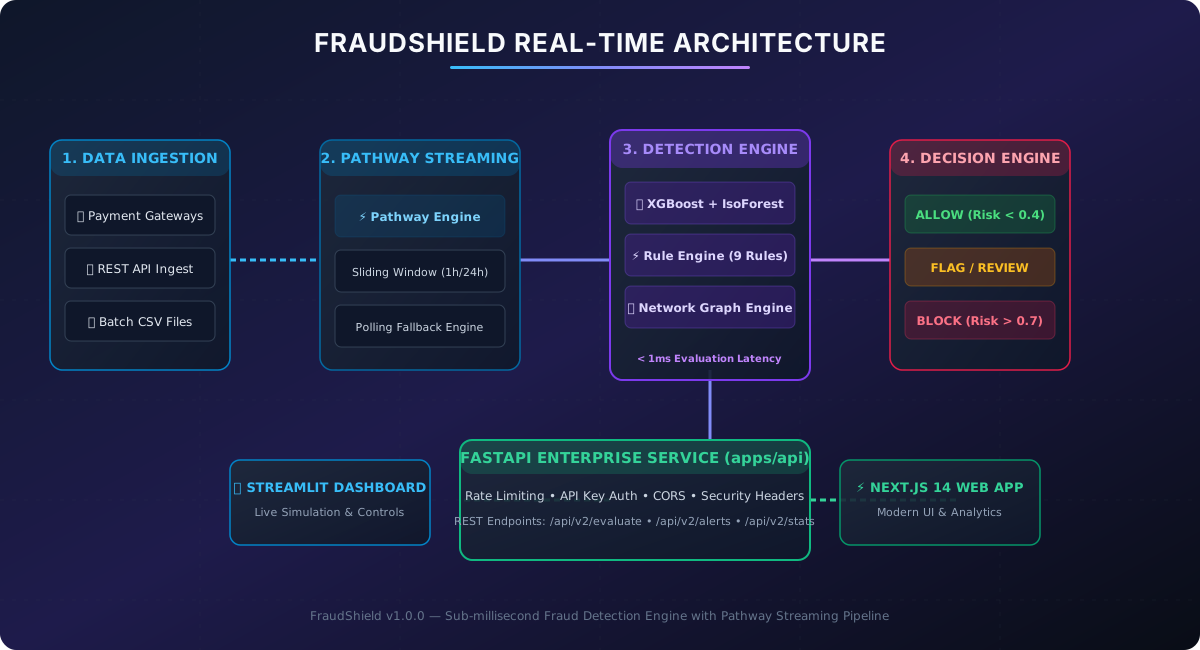
**FraudShield Real-Time** 是一个企业级、高吞吐量的欺诈检测平台,由 **Pathway** 实时流处理流水线、**ML Ensemble (XGBoost + Isolation Forest)**、**动态九重规则引擎**以及**用户-设备-IP 图环分析引擎**驱动。
该平台旨在以**亚毫秒级延迟(每笔交易评估耗时 <1ms)** 评估信用卡和数字交易流,并提供双重监控指挥中心:**Streamlit 实时控制中心**和现代化的 **Next.js 14 Web 应用程序**。
## 📚 快速文档链接
- 📘 **[系统概述与维护指南 (DOCUMENTATION.md)](DOCUMENTATION.md)** — FraudShield 是什么,计算机维护以及学校计算机规格。
- 📖 **[详细配置与安装指南 (SETUP_GUIDE.md)](SETUP_GUIDE.md)** — 分步的本地、Docker 及生产环境部署指南。
- 🤝 **[贡献指南 (CONTRIBUTING.md)](CONTRIBUTING.md)** — 代码规范、PR 核对清单以及开发工作流。
- 📊 **[实时基准测试报告 (DEMO_OUTPUT.md)](DEMO_OUTPUT.md)** — 实时执行延迟与欺诈检测指标。
- 📐 **[系统架构指南 (docs/ARCHITECTURE.md)](docs/ARCHITECTURE.md)** — 深入的技术架构蓝图。
## 📋 目录
1. [系统架构与数据流](#-system-architecture--dataflow)
2. [核心功能](#-core-features)
3. [仓库目录结构](#-repository-directory-structure)
4. [分步配置指南](#-step-by-step-setup-guide)
5. [分步贡献工作流](#-step-by-step-contribution-workflow)
6. [本地测试与验证](#-local-testing--verification)
7. [REST API 端点参考](#-rest-api-endpoint-reference)
8. [支持与点 Star](#-support--give-a-star)
9. [许可证与版本控制](#-license--versioning)
## 📐 系统架构与数据流
### 可视化系统架构图
### 🔄 端到端实时流处理序列
```
sequenceDiagram
autonumber
actor User as Payment Gateway / User
participant API as FastAPI Ingestion (apps/api)
participant Stream as Pathway Streaming Engine
participant ML as ML Ensemble (XGBoost + IsoForest)
participant Rules as Rule Engine (9 Rules)
participant Graph as Network Graph Ring Engine
participant Storage as FraudStorage (PostgreSQL / SQLite)
participant UI1 as Streamlit Dashboard
participant UI2 as Next.js Web App
User->>API: POST /api/v2/evaluate (Transaction Payload)
API->>API: Sanitize Inputs & Verify API Key Rate Limit
API->>Stream: Append Transaction Event Stream
par Parallel Sub-System Evaluation
Stream->>ML: Compute ML Anomaly & Fraud Probability
Stream->>Rules: Evaluate 9 Behavioral Fraud Rules
Stream->>Graph: Query Shared Device/IP Graph Ring Score
end
ML-->>API: ML Score (0.0 - 1.0)
Rules-->>API: Rule Score (0.0 - 1.0)
Graph-->>API: Graph Risk Score (0.0 - 1.0)
API->>API: Aggregate Weighted Fraud Score & Decision (ALLOW / FLAG / BLOCK)
API->>Storage: Persist Transaction & SHA-256 Hashed PII
par Real-Time Dashboard Updates
API-->>UI1: Live Streamlit Alert Feed & Metrics
API-->>UI2: Next.js WebSocket / REST Analytics Sync
end
API-->>User: FraudResult (< 1ms Latency Response)
```
### 🧩 组件依赖流程图
```
flowchart TD
subgraph INGESTION["1. Ingestion Layer"]
A1[Payment Gateway REST API]
A2[Streamlit Live Simulator]
A3[CSV Event Batches]
end
subgraph STREAMING["2. Real-Time Streaming"]
B1[Pathway Streaming Engine]
B2[1h / 24h Sliding Window Aggregators]
B3[Polling Fallback Engine for Windows/WSL]
end
subgraph ENGINE["3. Core Fraud Detection Engine (<1ms)"]
C1[XGBoost Classifier]
C2[Isolation Forest Anomaly Detector]
C3[9 Behavioral Fraud Rules]
C4[Graph Ring Detection Engine]
end
subgraph DECISION["4. Decision & Storage"]
D1{Weighted Score Threshold}
D2[ALLOW - Score < 0.4]
D3[FLAG - Score 0.4 - 0.7]
D4[BLOCK - Score > 0.7]
D5[(FraudStorage DB SHA-256 PII Hashed)]
end
subgraph DASHBOARDS["5. Dual Command Centers"]
E1[🛡️ Streamlit Dashboard - apps/api]
E2[⚡ Next.js 14 Dashboard - apps/web]
end
A1 --> B1
A2 --> B1
A3 --> B1
B1 --> B2 --> C1 & C2 & C3 & C4
B3 --> C1 & C2 & C3 & C4
C1 & C2 & C3 & C4 --> D1
D1 -->|Pass| D2
D1 -->|Review| D3
D1 -->|Deny| D4
D2 & D3 & D4 --> D5
D5 --> E1 & E2
```
## ✨ 核心功能
- **⚡ 亚毫秒级评估**:每笔交易的评估延迟基准测试达到 `<0.3ms`。
- **🌊 Pathway 流处理集成**:实时滑动窗口聚合(1小时/24小时交易计数、总和、速度),并在非 Linux 环境中提供自动轮询引擎兜底方案。
- **🤖 多层评分**:
- **XGBoost 分类器 + Isolation Forest** 异常检测。
- **9 项确定性欺诈规则**(高额交易、速度激增、夜间境外交易、新设备/IP 等)。
- **网络图谱引擎**,用于检测共享设备/IP 的欺诈团伙。
- **🔒 企业级安全**:
- 在存储前对 IP 地址和设备 ID 自动进行 **SHA-256 PII 哈希处理**。
- 内置**速率限制 (HTTP 429)**、API 密钥验证以及严格的安全标头(`X-Frame-Options`、`X-Content-Type-Options`、CSP)。
- **🖥️ 双重指挥中心仪表盘**:
- **Streamlit 实时模拟器与指挥中心** (`streamlit run app.py`)。
- 使用 Tailwind CSS 的 **Next.js 14 Web 应用程序** (`cd apps/web && npm run dev`)。
## 📂 仓库目录结构
```
fraudshield/
├── app.py # Top-level Streamlit entrypoint
├── generate_demo_output.py # Demo benchmark generator
├── requirements.txt # Master Python dependencies
├── SETUP_GUIDE.md # Complete step-by-step setup guide
├── CONTRIBUTING.md # Open-source contribution guidelines
├── Makefile # Automation commands (test, run, build)
├── render.yaml # Deployment blueprint for Render
├── vercel.json # Deployment configuration for Vercel
├── DEMO_OUTPUT.md # Real-time evaluation output report
├── apps/
│ ├── api/ # Core Python API & Detection Engine
│ │ ├── config/ # Environment & System Settings
│ │ ├── dashboard/ # Streamlit Command Center (app.py)
│ │ ├── data/ # SQLite DB & Models Storage
│ │ ├── src/
│ │ │ ├── api/ # FastAPI REST Service (main.py)
│ │ │ ├── core/ # Detector, Rules, Models, Graph Engine
│ │ │ ├── ml/ # XGBoost & IsoForest Ensemble
│ │ │ ├── security/ # Rate Limiter & Sanitization
│ │ │ └── streaming/ # Pathway Streaming Pipeline
│ │ └── tests/ # Unit & Integration Tests (178 Tests)
│ └── web/ # Next.js 14 Web Dashboard App
│ ├── app/ # React App Router pages & dashboards
│ ├── components/ # Modern UI Tailwind components
│ └── package.json # Frontend Node.js dependencies
└── docs/ # Architecture diagrams & API reference
└── assets/ # High-resolution SVG diagrams
```
## ⚙️ 分步配置指南
如需完整说明,请阅读专门的 **[SETUP_GUIDE.md](SETUP_GUIDE.md)**。
### 步骤 1:克隆仓库并创建虚拟环境
```
git clone https://github.com/Shweta-Mishra-ai/fraudshield.git
cd fraudshield
# 创建 Python virtual environment
python -m venv venv
# 激活 virtual environment
# 在 Linux/macOS 上:
source venv/bin/activate
# 在 Windows PowerShell 上:
.\venv\Scripts\Activate.ps1
```
### 步骤 2:安装 Python 与 Node 依赖
```
# 安装 backend 依赖
pip install --upgrade pip
pip install -r requirements.txt
# 安装 frontend 依赖
cd apps/web
npm install
cd ../..
```
### 步骤 3:启动服务
#### 启动选项 1:Streamlit 指挥中心
```
streamlit run app.py
```
*在浏览器中访问:**[http://localhost:8501](http://localhost:8501)** *
#### 启动选项 2:FastAPI 后端 API 服务器
```
python -m uvicorn apps.api.src.api.main:app --reload --port 8000
```
*Swagger API 文档:**[http://localhost:8000/docs](http://localhost:8000/docs)** *
#### 启动选项 3:Next.js 14 Web 应用程序
```
cd apps/web
npm run dev
```
*在浏览器中访问:**[http://localhost:3000](http://localhost:3000)** *
## 🧪 本地测试与验证
在本地执行所有测试套件:
```
# 运行 Master Test Runner
python apps/api/run_tests.py
# 运行 Pytest Integration & Security Tests
pytest apps/api/tests
# 生成 Benchmark Report
python generate_demo_output.py
```
## 📡 REST API 端点参考
| 方法 | 端点 | 描述 | 需要身份验证 |
| :--- | :--- | :--- | :---: |
| `POST` | `/api/v2/evaluate` | 实时评估交易 payload | 是 (`X-API-Key`) |
| `GET` | `/api/v2/alerts` | 获取最近的欺诈警报和标记的交易 | 是 (`X-API-Key`) |
| `POST` | `/api/v2/alerts/{id}/review` | 提交分析师审核(批准/拒绝) | 是 (`X-API-Key`) |
| `GET` | `/api/v2/stats` | 获取实时系统吞吐量和欺诈指标 | 是 (`X-API-Key`) |
| `GET` | `/api/v2/health` | 健康检查端点 | 否 |
## 📄 许可证与版本控制
- **版本**:`v1.0.0`
- **许可证**:MIT 许可证 — 免费用于开源和商业用途。
*为高吞吐量实时欺诈防御注入 ❤️ 构建。*
标签:AI欺诈检测, Apex, Kubernetes, Python, 反洗钱合规, 实时数据流, 实时风控, 无后门, 机器学习, 测试用例, 逆向工具