3dg1luk43/ha_washdata
GitHub: 3dg1luk43/ha_washdata
Home Assistant 本地集成,通过智能插座的功率数据自动检测家电工作周期、匹配程序类型并预估剩余时间。
Stars: 1100 | Forks: 35




[](https://ko-fi.com/3dg1luk43)
[](https://forms.gle/m6iGfP8QTasXWg5z7)
# WashData 集成
一个用于 Home Assistant 的自定义组件,可通过智能插座监控洗衣机,学习功耗曲线,并使用形状相关性匹配来预估完成时间。
## ✨ 功能特性
- **多设备支持**:跟踪洗衣机、烘干机、洗烘一体机、洗碗机、空气炸锅、面包机和泵/污水泵,每种设备都有特定的默认设置和阶段。提供了一个 **其他 (高级)** 分类,用于不适合所支持类别的电器;它内置了通用的默认设置,并期望用户自行调整阈值、超时和匹配参数。咖啡机、电动汽车、热泵和烤箱在 0.4.4.3 版本中作为弃用类型受支持(现有设置将继续工作),并计划在 0.4.6 版本中移除。
- **智能周期检测**:通过 **预测结束** 逻辑自动检测启动/停止。包含针对洗碗机的 **结束峰值保护**,以捕获最后的排水动作。
- **功率峰值过滤**:忽略短暂的启动峰值以防止错误启动。
- **形状相关性匹配**:使用 `numpy.corrcoef` 结合 **置信度提升** 来区分相似的洗涤周期。
- **手动训练**:您只需定义一次您的配置文件(例如“棉织物”、“快洗”),系统之后就能学会识别它们。集成 **不会** 自动创建配置文件。
- **智能时间预估**:“阶段感知”预测能检测到波动(例如加热阶段),并锁定倒计时以防止 erratic 跳动。
- **可更改的功率传感器**:更换插座而不丢失历史记录。
- **Tile 卡片**(极简状态卡片):可选的自定义 Lovelace 卡片。
- **手动程序覆盖**:如果检测不确定,可手动选择正确的程序;系统会从您的输入中学习。
- **手动创建配置文件**:即使没有历史周期记录,也可以通过指定基准持续时间(例如“节能模式 - 3h”)来创建配置文件。
- **统一阶段目录**:在一个目录视图中管理所有受支持设备类型的阶段词汇表。
- **作用域阶段分配**:阶段分配对话框仅显示与已配置设备类型相关的阶段。
- **幽灵周期抑制**:带有 **“可疑窗口”**(20 分钟)的智能过滤可防止结束峰值触发重复周期。**现已支持持久化**:在 HA 重启后仍会记住周期历史记录,以防止重启后产生幽灵检测。
- **强大的 vNext 状态机**:通过带有 `start_energy` 和 `end_energy` 闸门的高级过滤,防止错误的启动/停止。
- **多阶段匹配流水线**:使用 快速拒绝 -> 核心相似度 -> DTW-Lite 决胜 机制,实现卓越的准确性。
- **仅限本地**:不依赖云,没有外部服务。所有数据都保留在您的 Home Assistant 中。
- **通知**:针对周期开始、完成和 **即将完成**(例如完成前 5 分钟)的集成警报。
- **自学习**:根据您确认的历史数据,逐渐调整预期持续时间。
- **真实波动处理**:通过可配置的容差来处理自然周期持续时间的变化。
- **进度跟踪**:清晰的周期进度指示器,卸载后自动重置。
- **自动维护**:每晚清理——移除损坏的配置文件,合并碎片化的周期(**空/新的配置文件会被安全保留**)。
- **导出/导入**:通过 JSON 进行包含所有设置和配置文件的完整备份/恢复。导入也直接接受 HA 诊断下载文件。
- **用户触动的暂停/恢复**:通过按钮实体或 HA 服务暂停和恢复活动的周期。已用时间和剩余时间预估会自动排除暂停的时间。可选的 **暂停时切断电源** 开关,适用于断电后能保持当前位置的电器。
- **门传感器与清洁状态**:可选的 binary sensor 集成,当周期中途开门时设置已验证的暂停(支持添衣功能),并在周期结束后跟踪 **清洁** 状态直到门被打开,以提醒您衣物已就绪。
## 📘 基础用户指南
专为帮助新用户快速上手而设计。
## 1. 安装
### 选项 A:HACS(推荐)
此集成是 HACS 中的默认存储库。
1. 点击下方按钮在 HACS 中打开存储库:
[](https://my.home-assistant.io/redirect/hacs_repository/?owner=3dg1luk43&repository=ha_washdata&category=integration)
2. 点击 **Download**。
3. 重启 Home Assistant。
*或者,打开 HACS > 集成 > 探索与下载存储库 > 搜索 "WashData"。*
### 选项 B:手动安装
1. 从[最新发布版本](https://github.com/3dg1luk43/ha_washdata/releases)下载 `custom_components/ha_washdata` 文件夹。
2. 将其复制到您的 Home Assistant 的 `custom_components` 目录中。
3. 重启 Home Assistant。
## ⚡ 快速入门(“快乐路径”)
按照以下步骤快速获得准确的结果。
### 1. 初始设置
1. 转到 **设置 > 设备与服务** > **添加集成** > **WashData**。
2. **名称**:为您的电器命名(例如“洗衣机”)。
3. **设备类型**:选择类型(洗衣机、烘干机等)——这将为内部逻辑设置智能默认值。
4. **功率传感器**:选择您的智能插头的功率实体(瓦特)。*注意:系统现在已针对 30-60 秒的轮询间隔进行了优化(默认值已自动调整)。*
5. **初始配置文件(可选)**:如果您知道您的标准程序(例如“棉洗”),请现在创建它。
#### 💡 Zigbee2MQTT (Z2M) 用户的提示
如果您正在使用 Zigbee2MQTT 和智能插座,请确保您的设备报告足够灵敏,以实现准确的匹配:
- **报告间隔**:减少 Z2M 中的报告间隔(例如,最小:1s-10s,最大:1200s)。
- **功率阈值**:降低最小更新阈值(例如,从 5W 降至 1W 或 2W),以确保及时捕获微小的功率变化。
- *注意*:这些更改可能会略微增加 Zigbee 网络流量。
### 2. 黄金法则:“教”会集成
WashData **不**附带预构建的配置文件,因为每台机器的型号都是不同的。您必须教导它您的周期是什么样的。
#### 选项 A:手动“录制模式”(推荐)
这能为您提供最干净的数据。
1. 转到 **设置 > 设备与服务 > WashData > 配置**。
2. 打开 **Record Cycle (Manual)**,然后启动您的机器。
3. 完成后,转到 **Manage Cycles** 找到该记录。
4. 然后打开 **Manage Profiles** 并从该记录创建一个配置文件。
#### 选项 B:自然方式
如果您更喜欢直接使用并稍后标记:
1. **运行一个周期**:像往常一样使用您的机器。WashData 会将其作为“未知”周期进行跟踪。
2. **标记它**:在周期结束后:
- 转到 **Manage Cycles**(通过 Configure 按钮或 Tile 卡片)。
- 找到最近的“未知”周期。
- 打开 **Manage Profiles**,点击 **Create Profile**,为其命名(例如“Cotton 40”),然后保存。
3. **重复**:对您最常用的 2-3 个程序执行此操作。
### 3. 配置文件粒度 - 配置文件应该有多详细?
WashData 使用 **功耗形状、周期持续时间和总能耗** 来匹配周期——而不是直接使用温度或转速设置。这会影响您的配置文件库应该具备的粒度。
#### 哪些能被可靠地自动检测
具有明显不同持续时间或功率模式的程序通常能被很好地区分:
| 示例对 | 为什么有效 |
| :--- | :--- |
| 快洗(约 20 分钟) vs 棉洗(约 3 小时) | 持续时间差距巨大——没有歧义 |
| 仅洗涤 vs 洗+烘 | 烘干增加了 100-200 分钟和显著的额外能耗 |
| 棒洗 vs 轻柔洗 | 不同的搅动/加热模式,且通常持续时间不同 |
#### 温度和转速变体
**仅**在温度或转速上有所不同的程序(例如 Cotton 40°C vs Cotton 60°C)通常会产生相似的功耗形状和持续时间。匹配器会尝试使用相关性和能耗差异来区分它们,但是:
- 在首次运行时,系统可能会分配错误的变体——**使用 Learning Feedbacks 菜单进行纠正**。
- 经过几次确认的纠正后,系统会进行学习;通常每个变体对进行 3-5 次纠正就足够了。
- 如果您的机器在温度之间的功耗变化不大,则变体可能仍然难以自动区分。在这种情况下,通过 Program Selector 下拉菜单手动选择程序依然是可靠的。
#### 洗烘一体机的实用建议
为您经常使用的每种洗+烘组合创建 **单独的配置文件**(例如“Cotton 40°C Wash”、“Cotton 40°C + Cupboard Dry”)。烘干阶段增加了如此多的持续时间和能耗,以至于仅洗 vs 洗+烘 是匹配器最容易做出的区分之一。
从一小部分您最常用且差异最大的程序开始,然后随着您累积历史记录,逐渐添加温度/转速变体。
### 4. 验证与学习
一旦创建了配置文件,WashData 就会开始自动 **匹配** 新周期。
- **反馈**:如果找到匹配项但置信度一般,您可能会收到“Verify Cycle”(验证周期)通知。
- **细化**:转到 **Configure > Learning Feedbacks** 确认或纠正检测结果。
- **自我改进**:确认周期有助于系统细化其持续时间模型。
## 🔧 故障排除与调优
如果“自动检测”不能完美运行,请使用 **高级设置** 针对您的特定机器调整逻辑。
| 问题 | 可能原因 | 解决方案 |
| :--- | :--- | :--- |
| **周期开始得太早** | 智能插头在启动/待机期间会报告短暂的功率峰值。 | **增加 `Start Energy Threshold`**(例如增加到 `2 Wh`)。这会强制机器消耗实际能量后再报告“Running”。 |
| **周期结束得太早** | 机器暂停(浸泡)或有很长的低功率间隔。 | **增加 `Off Delay`**。给它更多时间(例如 5 分钟)等待,然后再决定周期是否确实已完成。 |
| **虚假的“幽灵”周期** | 最后阶段的高功率使用(例如防皱或排水)触发了新的开始。 | **增加 `Minimum Off Gap`**(例如增加到 `120s`)。强制要求周期之间有强制冷却期。 |
| **“未知”匹配** | 您的配置文件太严格或波动太大。 | **增加 `Duration Tolerance`**(例如 `0.25`)。允许在匹配时有 ±25% 的持续时间差异。 |
| **通知得太晚** | 您希望能在它完成 *之前* 知道。 | **设置 `Notify Before End Minutes`**(例如 `5`)。在预计完成时间前 5 分钟收到警报。 |
| **持续保持“Running”状态** | 在短周期出现偏差后,集成仍然锁定在较长的配置文件上。 | **在 `const.py` 中调整 Matching Stability Thresholds**。如果置信度降至峰值分数的 60% 以下,偏差检测现在会自动恢复为“Detecting...”。 |
### 建议设置传感器:该怎么做
WashData 公开了一个诊断传感器:`sensor._suggested_settings`。
- `0` 表示目前没有可操作的建议。
- `> 0` 表示有建议可供审查。
当此传感器大于 0 时:
1. 转到 **Settings > Devices & Services > WashData > Configure > Advanced Settings**。
2. 启用 **Apply Suggested Values**。
3. 查看更改摘要步骤。
4. 确认以暂存值,然后仅保存您同意的更改。
建议值是可选的,绝对不会自动强制应用。
### 🏷️ 阶段目录与分配阶段是周期内不同功率阶段的描述性标签(例如“预洗”、“加热”、“脱水”)。
- **管理阶段目录**:转到 **Configure > Manage Phase Catalog** 为每种设备类型添加、编辑或移除阶段标签。
- **将阶段分配给配置文件**:在 **Manage Profiles** 中,选择 **Assign Phase Ranges** 并使用阶段范围编辑器将时间区域映射到阶段标签。
- 阶段的作用域限制为您的设备类型——只有相关的阶段才会出现在分配对话框中。
## 📊 文档与参考
- 🔔 **[NOTIFICATIONS.md](NOTIFICATIONS.md)** - 解释了每个通知选项、发送通知的三种方式(基于事件目标、通知动作、事件)、周期通知生命周期、消息占位符、companion-app payload 键、完整的事件参考以及实体属性。
- 📗 **[IMPLEMENTATION.md](IMPLEMENTATION.md)** - 深入探讨 NumPy 匹配、状态机逻辑和学习算法。
- 🧪 **[TESTING.md](TESTING.md)** - 如何使用虚拟插座进行测试。
### 提供的实体
- **`sensor._state`**:当前状态(空闲 / 运行中 / 检测中... / 待清理)。
- **`sensor._program`**:最佳匹配的配置文件名称。
- **`sensor._time_remaining`**:智能倒计时(在高波动阶段锁定)。
- **`sensor._total_duration`**:总预估持续时间(已用时间 + 剩余时间)。非常适合用于 `timer-bar-card`。
- **`sensor._cycle_progress`**:0–100%(卸载超时后重置)。
- **`sensor._cycle_count`**:存储的已完成周期总数——可在自动化中使用,以按周期计数安排维护。
- **`sensor._current_phase`**:活动的周期阶段标签(例如“漂洗”、“脱水”)。
- **`sensor._pump_runs_today`**:*(仅限泵设备类型)* 在滚动的 24 小时窗口内已完成的泵周期。
- **`binary_sensor._running`**:简单的开启/关闭运行状态。
- **`button._pause_cycle`**:暂停活动的周期(在运行中/启动中/结束中且尚未暂停时可用)。
- **`button._resume_cycle`**:恢复用户暂停的周期。
- **`button._force_end_cycle`**:强制终止卡住的周期。
- **`switch._auto_maintenance`**:切换每晚的数据库清理。
### 服务
大多数管理都是通过 **交互式 UI**(Configure > Manage Data)完成的,但也提供了用于自动化的服务:
- **`ha_washdata.export_config`**:对所有设置、配置文件和周期历史进行完整的 JSON 备份。
- **`ha_washdata.import_config`**:从 JSON 备份恢复。接受常规的 WashData 导出文件 **和** HA 诊断下载文件。
- **`ha_washdata.pause_cycle`**:以编程方式暂停活动的周期(例如从电价自动化中触发)。
- **`ha_washdata.resume_cycle`**:恢复用户暂停的周期。
**`ha_washdata.record_start` / `record_stop`**:
手动启动/停止录制。适用于自动化(例如从物理按钮或单独的传感器触发)。
```
service: ha_washdata.record_start
data:
device_id: "washer_device_id"
```
- `ha_washdata.label_cycle`:以编程方式将配置文件分配给历史记录中的周期。
### 通知与事件
WashData 可以通过三种方式通知您:现成的推送到 **基于事件的目标**、完全自定义的 **Notification Action**,或者由 **总线事件**(`ha_washdata_cycle_started`、`ha_washdata_cycle_ended`、`ha_washdata_pump_stuck`)触发的您自己的自动化。
每个通知选项、周期通知生命周期、消息占位符、companion-app payload 键以及完整的事件 payload 参考均记录在 **[NOTIFICATIONS.md](NOTIFICATIONS.md)** 中。
### 🤝 贡献训练数据
WashData 拥有的真实周期数据越多,其检测在不同电器品牌、使用年限和程序中就会变得越聪明。
如果您愿意提供帮助,可以直接从 Home Assistant 提交诊断导出文件。只需不到 2 分钟,不需要任何技术知识。
**如何导出:**
1. 打开 Home Assistant 并转到 **Settings → Devices & Services**
2. 找到您的 **WashData** 集成并点击它
3. 打开您想要为其提交数据的设备
4. 向左导航至 **“Device info”** 部分
5. 选择 **“Download diagnostics”**
6. 一个 .json 文件将下载到您的设备上
➡️ **[在此提交您的数据](https://forms.gle/m6iGfP8QTasXWg5z7)**
所有贡献仅用于改进 WashData 集成。
### 支持的语言
🇬🇧 English • 🇨🇿 Čeština • 🇩🇰 Dansk • 🇩🇪 Deutsch • 🇬🇷 Ελληνικά • 🇪🇸 Español • 🇪🇪 Eesti • 🇫🇮 Suomi • 🇫🇷 Français • 🇭🇷 Hrvatski • 🇭🇺 Magyar • 🇮🇹 Italiano • 🇯🇵 日本語 • 🇱🇹 Lietuvių • 🇱🇻 Latviešu • 🇳🇴 Norsk • 🇳🇱 Nederlands • 🇧🇪 Nederlands (BE) • 🇵🇱 Polski • 🇵🇹 Português • 🇷🇴 Română • 🇸🇰 Slovenčina • 🇸🇮 Slovenščina • 🇷🇸 Srpski • 🇸🇪 Svenska • 🇺🇦 Українська • 🇨🇳 简体中文
## 许可证
仅供非商业用途。请参阅 [LICENSE](LICENSE) 文件。
📸 屏幕截图(点击展开)
#### 设备概览 您所有由 WashData 监控的电器都将显示为带有传感器和控制的设备。  #### 主菜单 管理电器的中心枢纽——可在此访问所有功能。  #### 基础设置 配置功率传感器、设备类型、关闭延迟和通知偏好。 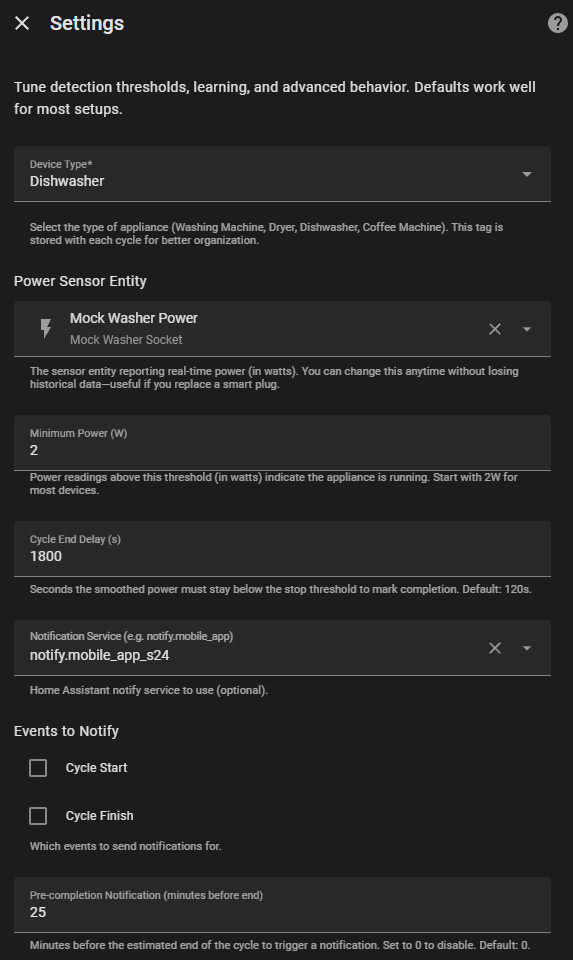 #### 高级设置 针对您的特定电器微调检测阈值、匹配参数和超时值。 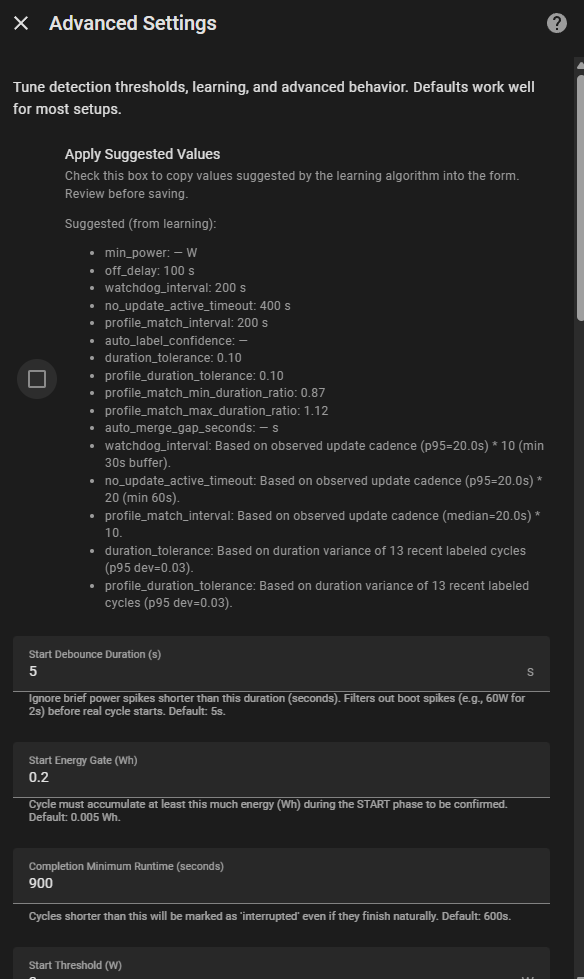 #### 管理配置文件 查看、创建、编辑或删除不同洗涤程序的学习到的功耗配置文件。 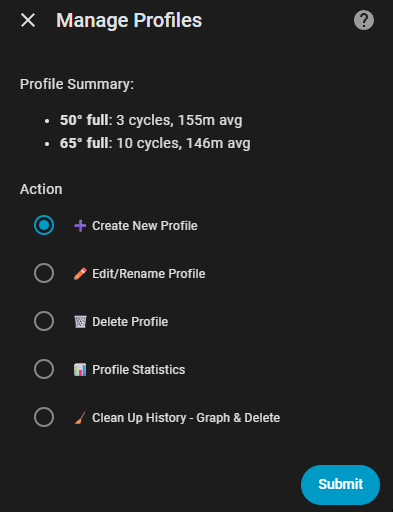 #### 管理周期 浏览周期历史、标记未知周期、合并碎片或删除不良数据。 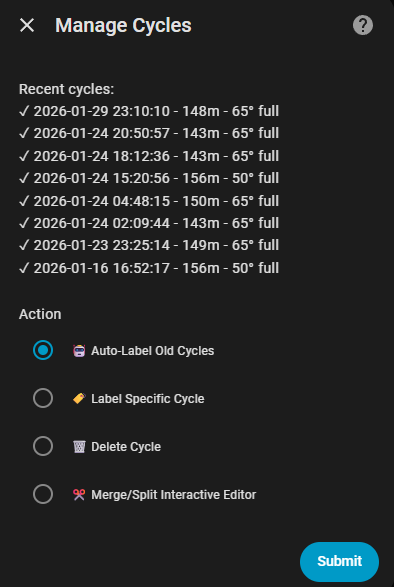 #### 审查反馈 确认或纠正系统的配置文件匹配,以提高学习准确度。 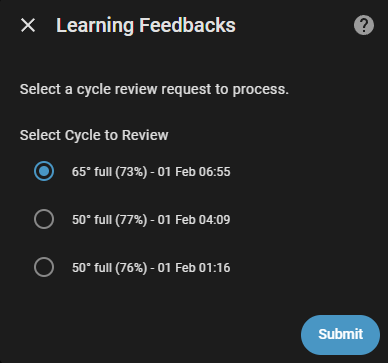 #### 诊断与维护 运行数据库清理、修复损坏的数据以及导出/导入配置。 标签:Home Assistant, 智能家居, 智能插座, 物联网, 用电分析, 网络侦察, 设备监控, 逆向工具