qr243vbi/nekobox
GitHub: qr243vbi/nekobox
一款基于 Qt 和 sing-box 的跨平台桌面 GUI 代理管理工具,支持多种代理协议和订阅格式。
Stars: 1160 | Forks: 56
# [NyameBox](https://github.com/qr243vbi/nekobox) / [NekoBox](https://github.com/qr243vbi/nekobox) PC 版
Sing-box 命令行模式现已可用!输入以下命令获取更多信息:
`nekobox_core sing-box --help`
基于 Qt 的跨平台桌面 GUI 代理工具,由 [Sing-box](https://github.com/SagerNet/sing-box) 提供支持
开箱即支持 Windows 11/10 (arm64, x86_64, x86) / Linux。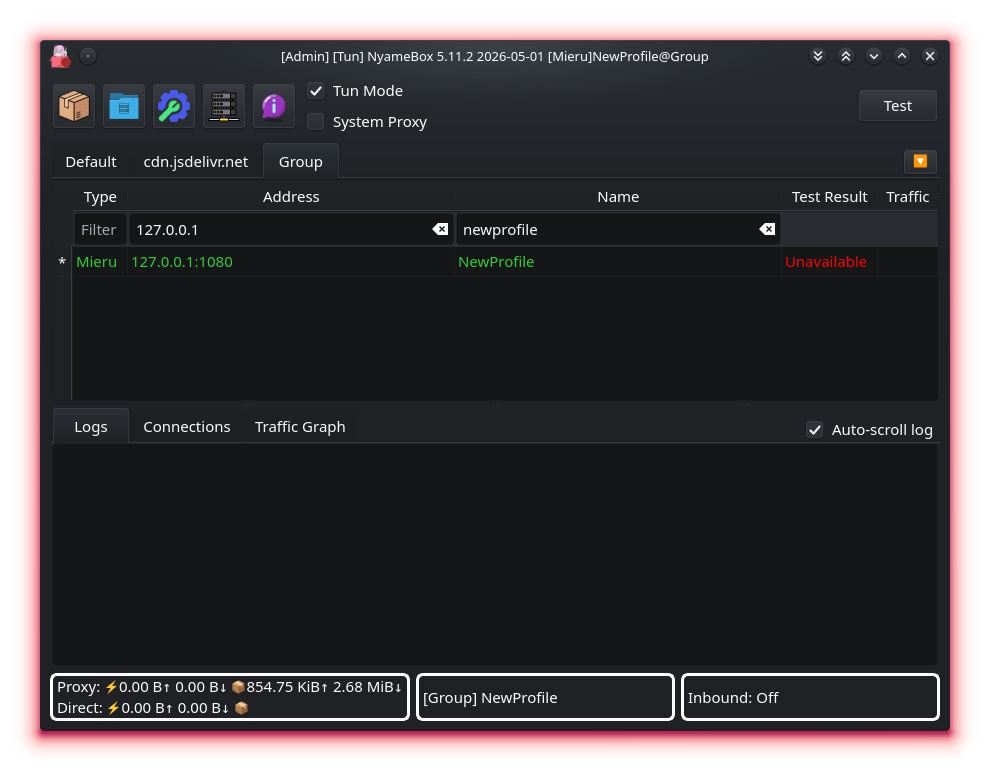 ### GitHub Releases(便携 ZIP、Windows 安装程序、AppImages)
[](https://github.com/qr243vbi/nekobox/releases)
[](https://github.com/qr243vbi/nekobox/releases)
### WinGet Package
[](https://winget.ragerworks.com/package/qr243vbi.NekoBox)
### Chocolatey Package
[](https://community.chocolatey.org/packages/nekobox)
[](https://community.chocolatey.org/packages/nekobox)
### Scoop Package
[](https://scoop.sh/#/apps?p=1&q=nekobox)
### GitHub Releases(便携 ZIP、Windows 安装程序、AppImages)
[](https://github.com/qr243vbi/nekobox/releases)
[](https://github.com/qr243vbi/nekobox/releases)
### WinGet Package
[](https://winget.ragerworks.com/package/qr243vbi.NekoBox)
### Chocolatey Package
[](https://community.chocolatey.org/packages/nekobox)
[](https://community.chocolatey.org/packages/nekobox)
### Scoop Package
[](https://scoop.sh/#/apps?p=1&q=nekobox)
``` scoop bucket add extras scoop install extras/nekobox ``` ### OBS repository [](https://build.opensuse.org/package/show/home:qr243vbi/nekobox)
- 面向各种 Linux 发行版([openSUSE](https://get.opensuse.org/)、[Mageia](https://www.mageia.org/)、[Debian](https://www.debian.org/)、[Raspbian](https://www.raspberrypi.com/software/)、[Ubuntu](https://ubuntu.com/)、[openEuler](https://www.openeuler.org/)、[Arch](https://archlinux.org/))的 [NekoBox repository](https://software.opensuse.org//download.html?project=home%3Aqr243vbi&package=nekobox)。 ### COPR repository - 面向各种 Linux 发行版([RedHat](https://www.redhat.com)、[Fedora](https://fedoraproject.org/)、[Centos](https://www.centos.org)、[Almalinux](https://almalinux.org/))的 [NekoBox repository](https://copr.fedorainfracloud.org/coprs/qr243vbi/NekoBox/)。 ### openSUSE package - [源码](https://build.opensuse.org/package/show/openSUSE:Factory/nekobox) ``` sudo zypper install -y nekobox ``` ### FreeBSD package - [freshport](https://www.freshports.org/net/nekobox) ``` sudo pkg install -y nekobox ``` ### ArchlinuxCN package - [构建日志](https://build.archlinuxcn.org/packages/#/nekobox) ``` # 1. 添加 archlinuxcn repo sudo tee -a /etc/pacman.conf >/dev/null <<'EOF' [archlinuxcn] Server = https://repo.archlinuxcn.org/$arch EOF # 2. 同步并安装 keyring sudo pacman -Syy archlinuxcn-keyring # 3. 安装 NekoBox sudo pacman -S nekobox ``` ### Ubuntu PPA - [nekobox](https://launchpad.net/~miamosagernaki/+archive/ubuntu/nekobox) ``` sudo add-apt-repository ppa:miamosagernaki/nekobox sudo apt update sudo apt-get install -y nekobox ``` ### Aur package - [nekobox](https://aur.archlinux.org/packages/nekobox) - [nekobox-git](https://aur.archlinux.org/packages/nekobox-git) ### 更新日志频道 [](https://matrix.to/#/#NyameBox:matrix.org) [](https://t.me/NyameBox) ## TODO - 命令行工具 - nekobox_core 的 [OpenRC](https://openrc.run/)/[runit](https://smarden.org/runit/)/[systemd](https://systemd.io/) 集成 - 终端 UI - 远程控制 - 支持 sing-box 和 Qt 支持的所有平台(macos 和 ios 除外) - 添加上游 sing-box 不支持的更多协议(目前已添加:mieru、juicity、trusttunnel、vless encryption、xhttp transport、kcp transport、amnezia、snell(位于 [core](https://github.com/qr243vbi/sing-box))) - 使用声明式 UI 替换静态 UI 来编辑代理 - 寻找世界上最好的数据库存储方案 ## 支持的协议 - SOCKS - HTTP(S) - Shadowsocks - Trojan - VMess - VLESS - Hysteria 1 - Hysteria 2 - TUIC - AnyTLS - ShadowTLS - Mieru - Juicity - TrustTunnel - Naive - Wireguard - AmneziaWG - Tailscale - SSH - Tor - Custom Outbound - Custom Config - Extra Core - Chaining outbounds ## 订阅格式 支持多种格式,包括分享链接、outbounds 的 JSON 数组和 v2rayN 链接格式,以及对 Shadowsocks 和 Clash 格式的有限支持。 ## 常见问题 **什么是 AppImage?**
AppImage 是一种在 Linux 计算机上运行应用程序的可靠且简单的方法,无需传统的安装过程。你
开箱即支持 Windows 11/10 (arm64, x86_64, x86) / Linux。
### GitHub Releases(便携 ZIP、Windows 安装程序、AppImages)
[](https://github.com/qr243vbi/nekobox/releases)
[](https://github.com/qr243vbi/nekobox/releases)
### WinGet Package
[](https://winget.ragerworks.com/package/qr243vbi.NekoBox)
### Chocolatey Package
[](https://community.chocolatey.org/packages/nekobox)
[](https://community.chocolatey.org/packages/nekobox)
### Scoop Package
[](https://scoop.sh/#/apps?p=1&q=nekobox) ``` scoop bucket add extras scoop install extras/nekobox ``` ### OBS repository [](https://build.opensuse.org/package/show/home:qr243vbi/nekobox)
- 面向各种 Linux 发行版([openSUSE](https://get.opensuse.org/)、[Mageia](https://www.mageia.org/)、[Debian](https://www.debian.org/)、[Raspbian](https://www.raspberrypi.com/software/)、[Ubuntu](https://ubuntu.com/)、[openEuler](https://www.openeuler.org/)、[Arch](https://archlinux.org/))的 [NekoBox repository](https://software.opensuse.org//download.html?project=home%3Aqr243vbi&package=nekobox)。 ### COPR repository - 面向各种 Linux 发行版([RedHat](https://www.redhat.com)、[Fedora](https://fedoraproject.org/)、[Centos](https://www.centos.org)、[Almalinux](https://almalinux.org/))的 [NekoBox repository](https://copr.fedorainfracloud.org/coprs/qr243vbi/NekoBox/)。 ### openSUSE package - [源码](https://build.opensuse.org/package/show/openSUSE:Factory/nekobox) ``` sudo zypper install -y nekobox ``` ### FreeBSD package - [freshport](https://www.freshports.org/net/nekobox) ``` sudo pkg install -y nekobox ``` ### ArchlinuxCN package - [构建日志](https://build.archlinuxcn.org/packages/#/nekobox) ``` # 1. 添加 archlinuxcn repo sudo tee -a /etc/pacman.conf >/dev/null <<'EOF' [archlinuxcn] Server = https://repo.archlinuxcn.org/$arch EOF # 2. 同步并安装 keyring sudo pacman -Syy archlinuxcn-keyring # 3. 安装 NekoBox sudo pacman -S nekobox ``` ### Ubuntu PPA - [nekobox](https://launchpad.net/~miamosagernaki/+archive/ubuntu/nekobox) ``` sudo add-apt-repository ppa:miamosagernaki/nekobox sudo apt update sudo apt-get install -y nekobox ``` ### Aur package - [nekobox](https://aur.archlinux.org/packages/nekobox) - [nekobox-git](https://aur.archlinux.org/packages/nekobox-git) ### 更新日志频道 [](https://matrix.to/#/#NyameBox:matrix.org) [](https://t.me/NyameBox) ## TODO - 命令行工具 - nekobox_core 的 [OpenRC](https://openrc.run/)/[runit](https://smarden.org/runit/)/[systemd](https://systemd.io/) 集成 - 终端 UI - 远程控制 - 支持 sing-box 和 Qt 支持的所有平台(macos 和 ios 除外) - 添加上游 sing-box 不支持的更多协议(目前已添加:mieru、juicity、trusttunnel、vless encryption、xhttp transport、kcp transport、amnezia、snell(位于 [core](https://github.com/qr243vbi/sing-box))) - 使用声明式 UI 替换静态 UI 来编辑代理 - 寻找世界上最好的数据库存储方案 ## 支持的协议 - SOCKS - HTTP(S) - Shadowsocks - Trojan - VMess - VLESS - Hysteria 1 - Hysteria 2 - TUIC - AnyTLS - ShadowTLS - Mieru - Juicity - TrustTunnel - Naive - Wireguard - AmneziaWG - Tailscale - SSH - Tor - Custom Outbound - Custom Config - Extra Core - Chaining outbounds ## 订阅格式 支持多种格式,包括分享链接、outbounds 的 JSON 数组和 v2rayN 链接格式,以及对 Shadowsocks 和 Clash 格式的有限支持。 ## 常见问题 **什么是 AppImage?**
AppImage 是一种在 Linux 计算机上运行应用程序的可靠且简单的方法,无需传统的安装过程。你
标签:GUI, sing-box, 代理工具, 安全合规, 日志审计, 科学上网, 网络代理