metallbrot/TunFrame
GitHub: metallbrot/TunFrame
用于评估 DNS 隧道检测方法对抗规避技术效果的基准测试框架。
Stars: 1 | Forks: 0
# TunFrame
TunFrame 是一个基准测试框架,用于评估 DNS tunneling 检测方法对抗规避技术的效果。它提供了一个标准化、可复现的环境,以便在可比较的条件下衡量检测有效性。
## 目录
- [前置条件](#prerequisites)
- [设置](#setup)
- [项目结构](#project-structure)
- [工作原理](#how-it-works)
- [添加检测方法](#adding-a-detection-method)
- [添加 Tunneling 工具](#adding-a-tunneling-tool)
- [配置框架](#configuring-the-framework)
- [运行框架](#running-the-framework)
- [输出](#output)
## 前置条件
在使用 TunFrame 之前,请确保已安装以下组件:
- **Python** ≥ 3.9
- **Docker** 和 **Docker Compose**
## 设置
### 1. 创建虚拟环境
```
python3 -m venv .venv
source .venv/bin/activate
```
### 2. 安装依赖
```
pip install -r requirements.txt
```
### 3. 配置框架
编辑 `config.yaml` 以指定您的测试运行参数。详情请参阅 [配置框架](#configuring-the-framework)。
## 项目结构
```
TunFrame/
├── main.py # Entry point
├── config.yaml # Main configuration file
├── requirements.txt
├── docker-compose.yaml # Docker setup for tunneling tools
├── detection/
├── detector_base/
│ └── detector_base.py # Abstract base class for detectors
└── detectors/ # One subdirectory per detection method
```
## 工作原理
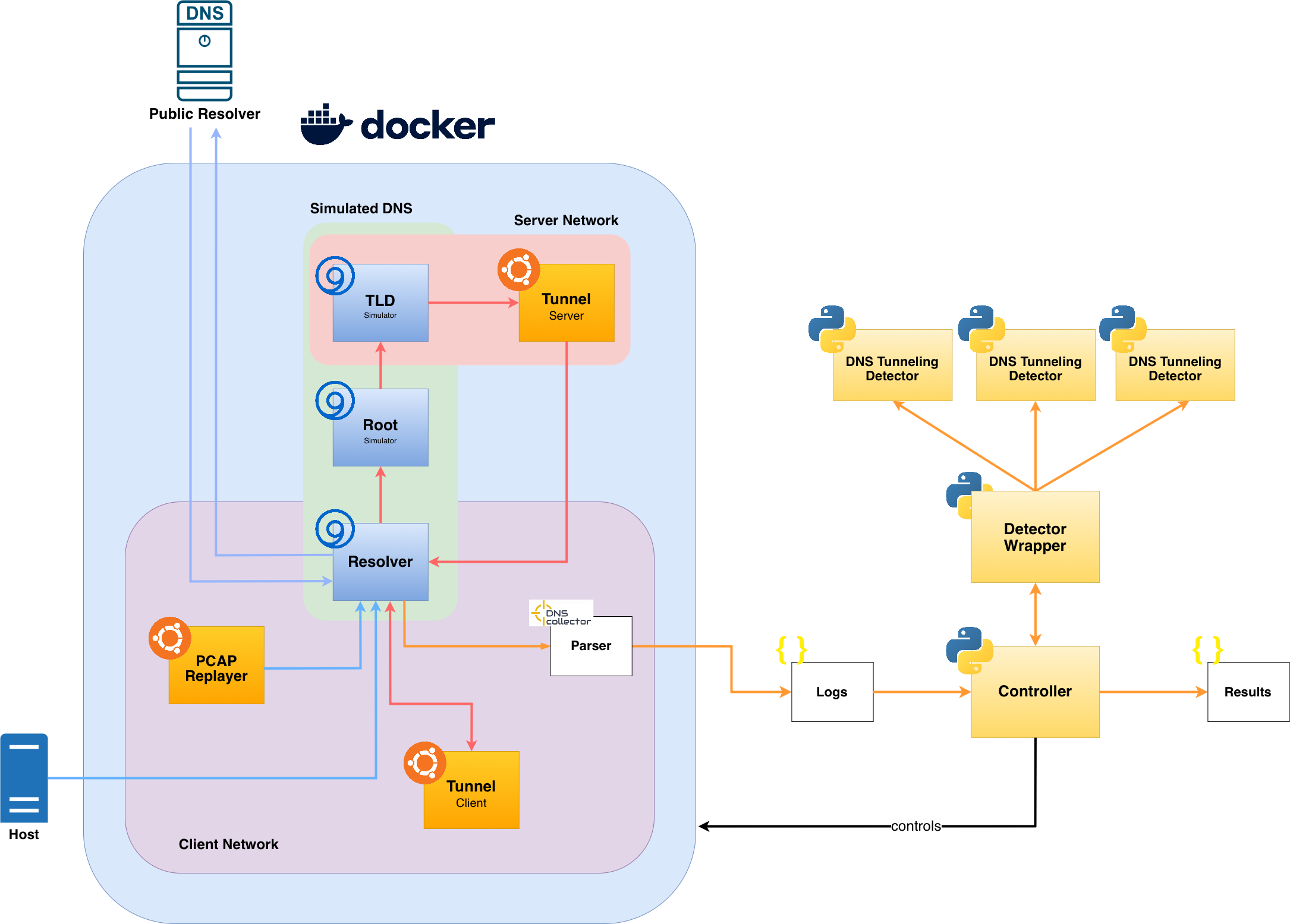
TunFrame 在隔离的 Docker 网络上同时协调三种流量来源:
1. **Benign 流量** – 从 PCAP 回放以模拟正常的 DNS 活动,或通过将主机的 DNS 流量注入到解析器容器中
2. **Wildcard 流量** – 回放 PCAP 以对 allowlist 覆盖范围进行压力测试
3. **Tunnel 流量** – 从 PCAP 回放或通过 Docker 化的 tunneling 工具实时生成
每个配置的 detector 实时监控 DNS 流量。在 tunneling 开始之前会运行一个 `peacetime` 阶段(可选),允许 detector 建立基线。结果将写入配置的 `output.logdir`。
**Replay 与 Docker 模式**:
| Mode | Config | Description |
|---|---|---|
| Replay | `tunnel.replay: true` | 通过 tcpreplay 注入预先录制的 tunneling 流量 |
| Docker (live) | `tunnel.docker: true` | 启动 client/server 容器以生成实时 tunneling 流量 |
## 添加检测方法
1. 在 `detection/detectors/` 下创建一个以您的方法命名的新目录。
2. 在该目录下的 Python 文件中实现您的 detector,需遵循 `detection/detector_base/detector_base.py` 中定义的接口。
## 添加 Tunneling 工具
1. 使用 Docker 将 tunneling 工具容器化 — 为 client 和 server 创建单独的镜像。
2. 将两个容器添加到 `docker-compose.yaml`,并将它们连接到相应的网络:
- Client → `client-network`
- Server → `server-network`
3. 在 `config.yaml` 中设置:
- `traffic.tunnel.tunneling_domains` – 工具使用的 domain(s)
- `traffic.tunnel.tunnel_server_ip` – Tunnel server 的 IP(必须在 `192.168.0.0/16` 范围内,并与第 2 步中 server 的 IP 匹配)
- `traffic.tunnel.toolname` – 用于日志记录的名称
## 配置框架
所有设置均在 `config.yaml` 中定义。标记为 **required** 的参数必须设置;其他所有参数均有可用的默认值。
### 全局设置
| Parameter | Type | Required | Description | Default |
|---|---|---|---|---|
| `global.name` | string | No | 测试运行的名称 | `TunFrame` |
| `global.description` | string | No | 测试运行的描述 | `No description.` |
| `global.public_resolver` | IP | **Yes** | 用于非 tunneled 查询的公共 DNS resolver 的 IP | `1.1.1.1` |
### 时间设置
| Parameter | Type | Required | Description | Default |
|---|---|---|---|---|
| `timing.duration` | int | **Yes** | 测试运行的总持续时间(秒) | `100` |
| `timing.peacetime_duration` | int | No | Tunneling 前基线阶段的持续时间(秒)(不发生 tunneling) | `0` |
### Allowlist 设置
| Parameter | Type | Required | Description | Default |
|---|---|---|---|---|
| `allowlist.global_allowlist_path` | path | **Yes** | 全局 allowlist 的路径(例如 Tranco top-1M domains)— 防止对合法域名产生 false positives | `./allowlists/tranco.txt` |
| `allowlist.local_allowlist_dir` | path | No | 包含每个 detector allowlist 文件的目录 | `./allowlists/local` |
### 流量设置
#### 通用
| Parameter | Type | Required | Description | Default |
|---|---|---|---|---|
| `traffic.pcap_path` | path | **Yes** | 包含所有 PCAP 文件的目录 | `./pcaps` |
#### Benign 流量
| Parameter | Type | Required | Description | Default |
|---|---|---|---|---|
| `traffic.benign.enabled` | bool | No | 在 tunneling 的同时注入 benign DNS 流量 | `false` |
| `traffic.benign.pcap` | string | If enabled | benign 流量 PCAP 的文件名 | `benign.pcap` |
| `traffic.benign.pps` | int | No | 重放速率(packets per second) | `10000` |
#### Wildcard 流量
| Parameter | Type | Required | Description | Default |
|---|---|---|---|---|
| `traffic.wildcard.enabled` | bool | No | 注入 wildcard DNS 流量 | `false` |
| `traffic.wildcard.pcap` | string | If enabled | wildcard DNS PCAP 的文件名 | `wildcard.pcap` |
| `traffic.wildcard.pps` | int | No | 重放速率(packets per second) | `1000` |
#### Tunnel 流量
| Parameter | Type | Required | Description | Default |
|---|---|---|---|---|
| `traffic.tunnel.replay` | bool | **Yes\*** | 从 PCAP 重放 tunnel 流量 | `false` |
| `traffic.tunnel.docker` | bool | **Yes\*** | 通过 Docker 容器生成实时 tunnel 流量 | `false` |
| `traffic.tunnel.pcap` | string | If replay | tunnel 流量 PCAP 的文件名 | `tunnel.pcap` |
| `traffic.tunnel.pps` | int | No | 重放速率(packets per second) | `10` |
| `traffic.tunnel.toolname` | string | No | Tunneling 工具的名称(用于结果中的标签) | `Tunnel` |
| `traffic.tunnel.tunneling_domains` | list[string] | **Yes** | Tunneling 工具使用的 domain(s) | `["tunnel.com"]` |
| `traffic.tunnel.tunnel_server_ip` | IP | If docker | Tunnel server 的 IP — 必须在 `192.168.0.0/16` 范围内(Docker 内部网络) | `192.168.3.3` |
| `traffic.tunnel.expansion_factor` | int | No | Tunneled payload 大小的倍数(例如,`3` 表示 1 字节的数据生成约 3 字节的 DNS 流量) | `1` |
### 输出设置
| Parameter | Type | Required | Description | Default |
|---|---|---|---|---|
| `output.logdir` | path | **Yes** | 用于存储基准测试结果和日志的目录 | `results` |
## 示例配置
### 最小配置 — Replay 模式(无 benign 重放流量)
```
global:
public_resolver: "1.1.1.1"
timing:
duration: 120
allowlist:
global_allowlist_path: "./allowlists/tranco.txt"
traffic:
pcap_path: "./pcaps"
tunnel:
replay: true
docker: false
pcap: "tunnel.pcap"
tunneling_domains: ["example.com"]
output:
logdir: "results"
```
### 完整配置 — Live Docker 模式(含 Benign 流量)
```
global:
name: "dnscat2-evasion-test"
description: "Live dnscat2 tunneling with benign background traffic"
public_resolver: "1.1.1.1"
timing:
duration: 300
peacetime_duration: 30
allowlist:
global_allowlist_path: "./allowlists/tranco.txt"
local_allowlist_dir: "./allowlists/local/"
traffic:
pcap_path: "./pcaps"
benign:
enabled: true
pcap: "benign.pcap"
pps: 500
wildcard:
enabled: false
tunnel:
replay: false
docker: true
toolname: "dnscat2"
tunneling_domains: ["example.com"]
tunnel_server_ip: "192.168.3.3"
expansion_factor: 1
output:
logdir: "results"
```
## 运行框架
```
(.venv) python3 main.py
```
## 输出
结果将写入 `output.logdir` 中指定的目录。每次运行都会生成:
- 每个 detector 的日志,包含被标记的 DNS 查询
- 每个 detector 的汇总基准测试指标(precision、recall、F1)
- 包含配置快照和时间戳的运行摘要
标签:DNS安全, DNS隧道检测, Docker, IP 地址批量处理, PCAP, Python, TunFrame, 反取证, 基准测试框架, 学士学位论文, 安全评估, 安全防御评估, 密钥泄露防护, 对抗性规避, 异常检测, 攻击模拟, 无后门, 机器学习安全, 版权保护, 网络安全, 请求拦截, 逃避技术, 逆向工具, 隐私保护, 驱动签名利用