mangod12/skydash
GitHub: mangod12/skydash
SkyDash 是一个开源空间智能仪表盘,集成了模拟无人机遥测、地理空间地图、OSINT 风格关联分析和任务汇报功能。
Stars: 5 | Forks: 1
# SkyDash
SkyDash 是一个用于模拟无人机集群操作、地理空间实体跟踪、OSINT 风格分析、任务汇报以及操作员 QA 工作流的空间智能 OS。
它已在 Azure 上线运行,同时也支持通过 Docker 或独立的前后端进程在本地运行。
- 在线应用:https://wonderful-cliff-0325f3800.7.azurestaticapps.net
- 在线 API:https://skydash-api-38666.azurewebsites.net
- API 文档:https://skydash-api-38666.azurewebsites.net/docs
- 当前发布状态:[docs/current-status.md](docs/current-status.md)
- 操作运行手册:[docs/skydash-operations-runbook.md](docs/skydash-operations-runbook.md)
- 安全边界:[docs/safety-and-scope.md](docs/safety-and-scope.md)
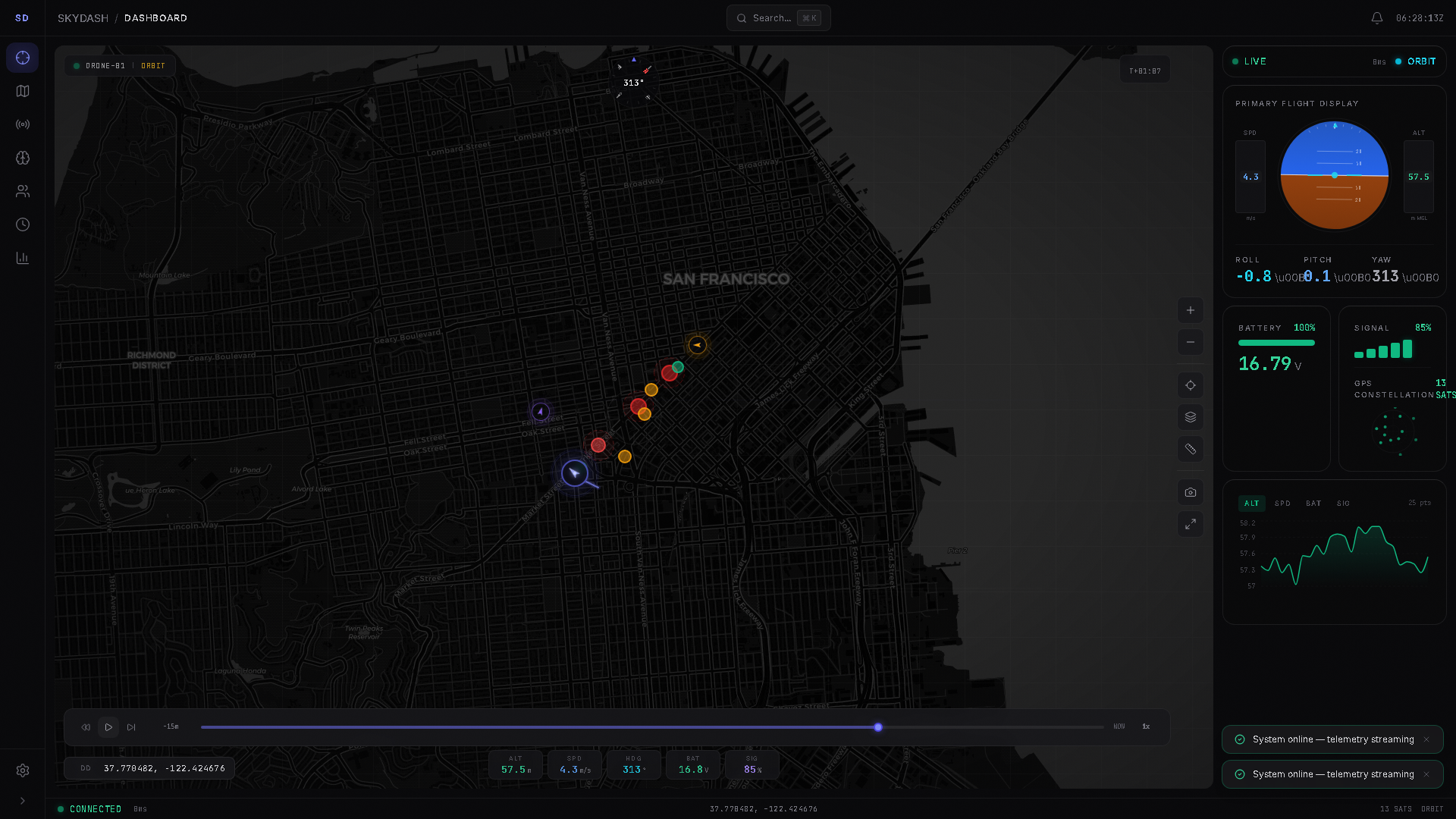
## 功能简介
SkyDash 结合了四个工作界面:
- 实时集群监控:三架模拟无人机通过 WebSocket 流式传输遥测数据,并带有 HTTP 回退和实时的命令确认路径。
- 空间智能:地图图层、实体标记、ADS-B/OpenSky 连接器数据、地理围栏、测量工具、热力图、叠加层和坐标格式。
- OSINT 风格分析:实体、关系、事件、来源视图、自然语言过滤器、关联分析、威胁矩阵、对比视图、导出以及 Shodan 连接器钩子。
- 任务工作流:任务工作区、笔记、实体关联、汇报标签页、可选的 RT-DETR 帧分析以及简报/报告导出。
该系统旨在提供可检查性。它不是真正的监控产品,不是生产级的调查系统,也不是真正的无人机地面控制站。公开演示使用的是模拟遥测数据。
## 生产环境演示状态
当前的公开部署情况为:
- 前端:Azure Static Web Apps,托管于
`wonderful-cliff-0325f3800.7.azurestaticapps.net`。
- 后端:Azure App Service for Linux,托管于
`skydash-api-38666.azurewebsites.net`。
- WebSocket:`wss://skydash-api-38666.azurewebsites.net/ws/telemetry`。
- CI 部署:GitHub Actions 工作流
`.github/workflows/skydash-azure-static-web-apps.yml` 会在相关代码推送到
`main` 分支后部署前端。
- 后端部署:目前直接从 `backend/` 源代码通过 Azure App Service zip 进行部署。
已知的在线限制:
- 无人机遥测数据为模拟数据。
- 在配置 `SHODAN_API_KEY` 之前,Shodan 将以模拟/不可用模式运行。
- RT-DETR 视觉功能为可选,除非安装了较大的视觉依赖项,否则在基础的 Azure API 上将被禁用。
- 后端存在身份验证,但公开演示被配置为开放演示。
## 技术栈
- 前端:React 18、Vite 8、Tailwind CSS、Zustand、Framer Motion、Leaflet、
Deck.gl、Recharts、cmdk、Lucide icons。
- 后端:FastAPI、Uvicorn、Pydantic、WebSockets、带有轻量级迁移的 SQLite。
- 连接器:带有数据摄取端点的 OpenSky/ADS-B 和 Shodan 路由。
- 可选的本地分析运行器:位于 `skydash_intel_crew/` 的 SkyDash Intel Crew。
它不属于生产环境 Azure 运行时的一部分。
- 测试:Vitest、Playwright、pytest 以及可选的 CrewAI 冒烟测试。
- 部署:Azure Static Web Apps、Azure App Service,以及用于本地运行的 Docker Compose。
## 仓库结构
```
backend/
main.py FastAPI entry point and middleware
deps.py shared config, stores, connectors, telemetry history
simulation.py simulated multi-drone fleet and command state
entities.py entity, relationship, and event store
missions.py missions, notes, linked entities, detections
routes/
telemetry.py REST telemetry, command ACK, reset, WebSocket stream
entities.py entity CRUD, graph, timeline, events
missions.py mission CRUD, links, notes
connectors.py ADS-B/OpenSky and Shodan search/ingest
export.py GeoJSON and CSV exports
vision.py optional RT-DETR status, feed, detection routes
auth_routes.py optional user/auth routes
skydash/frontend/src/
components/ dashboard, map, telemetry, intel, mission, common UI
hooks/ telemetry, keyboard, map/context, alerts, console
stores/ Zustand stores for app domains
utils/ coordinates, exports, NLQ, scenarios, runtime config
skydash_intel_crew/
src/skydash_intel_crew/ CrewAI orchestration and source snapshot tooling
tests/ CrewAI smoke tests
docs/
current-status.md live release status and verification baseline
skydash-operations-runbook.md
safety-and-scope.md
```
当前代码树详情:
- 前端 `src`:225 个 JS/JSX/CSS 文件,包含测试文件。
- 后端:22 个 Python 文件。
- Playwright:74 个 E2E 测试用例。
- 前端单元测试:141 个 Vitest 测试。
- 后端测试:4 个 pytest 测试。
- CrewAI 冒烟测试:10 个 pytest 测试。
## 本地运行
### Docker Compose
```
docker compose up --build -d
docker compose ps
Invoke-RestMethod http://localhost:8001/health
```
访问 http://localhost。
### 独立进程
后端:
```
cd backend
pip install -r requirements.txt
python main.py
```
前端:
```
cd skydash/frontend
npm install
$env:VITE_API_URL='http://localhost:8001'
npm run dev
```
访问 http://localhost:5173。
## CrewAI 技术栈
可选的 CrewAI 操作就绪运行器位于
[skydash_intel_crew](skydash_intel_crew/README.md)。它可以读取本地
SkyDash 文档/源码快照,并检查实时的就绪状态 URL。它不会在 Azure 的前端或后端中运行。
Docker profile:
```
docker compose --profile crew run --rm crewai
```
本地冒烟测试:
```
cd skydash_intel_crew
uv run pytest
```
仅当手动运行可选的 crew 时,才通过 `.env` 配置 LLM 提供商选项。
## API
本地文档位于 http://localhost:8001/docs。
在线文档位于 https://skydash-api-38666.azurewebsites.net/docs。
主要路由:
- `GET /health`
- `GET /telemetry`
- `GET /telemetry/{drone_id}`
- `POST /api/drone/{drone_id}/command`
- `WS /ws/telemetry`
- `GET /api/telemetry/history`
- `GET /api/telemetry/stats`
- `GET /api/entities`
- `POST /api/entities`
- `GET /api/entities/graph`
- `GET /api/timeline`
- `GET /api/missions`
- `POST /api/missions`
- `GET /api/connectors/adsb`
- `GET /api/connectors/shodan`
- `POST /api/connectors/adsb/ingest`
- `POST /api/connectors/shodan/ingest`
- `GET /api/vision/status`
- `POST /api/missions/{mission_id}/detections/analyze`
- `GET /api/export/telemetry/csv`
- `GET /api/export/entities/csv`
- `POST /api/export/geojson`
- `POST /reset`
## 验证
运行核心本地检查:
```
npm --prefix skydash/frontend run lint
npm --prefix skydash/frontend run test -- --run
npm --prefix skydash/frontend run build
python -m compileall backend
cd backend; python -m pytest tests; cd ..
cd skydash_intel_crew; uv run pytest; cd ..
```
生产环境冒烟测试:
```
$env:PLAYWRIGHT_BASE_URL='https://wonderful-cliff-0325f3800.7.azurestaticapps.net'
$env:PLAYWRIGHT_API_URL='https://skydash-api-38666.azurewebsites.net'
npx playwright test e2e/skydash.spec.js e2e/interactions.spec.js -g "app boots|backend API returns fleet telemetry|drone command panel uses backend ACK|OSINT ingest panel previews"
```
## 文档导航
- [docs/current-status.md](docs/current-status.md):当前的在线部署情况、
验证基准以及未解决的生产环境差距。
- [docs/skydash-operations-runbook.md](docs/skydash-operations-runbook.md):
本地、Azure、CI 以及发布相关的命令。
- [docs/safety-and-scope.md](docs/safety-and-scope.md):
滥用边界以及真实无人机的限制。
## License
MIT
标签:AV绕过, FastAPI, HTTP/HTTPS抓包, OSINT分析, WebSockets, 地理空间情报, 安全规则引擎, 态势感知, 无人机监控, 版权保护, 特征检测, 自定义脚本