flytohub/flyto-core
GitHub: flytohub/flyto-core
开源的 AI 代理执行引擎,提供 412 个可追溯、可重放的自动化模块,支持浏览器操作、数据处理和 DevOps 编排。
Stars: 274 | Forks: 48
# flyto-core
[](https://pypi.org/project/flyto-core/)
[](https://opensource.org/licenses/Apache-2.0)
[](https://www.python.org/downloads/)
### 30 秒快速体验
```
pip install flyto-core[browser] && playwright install chromium
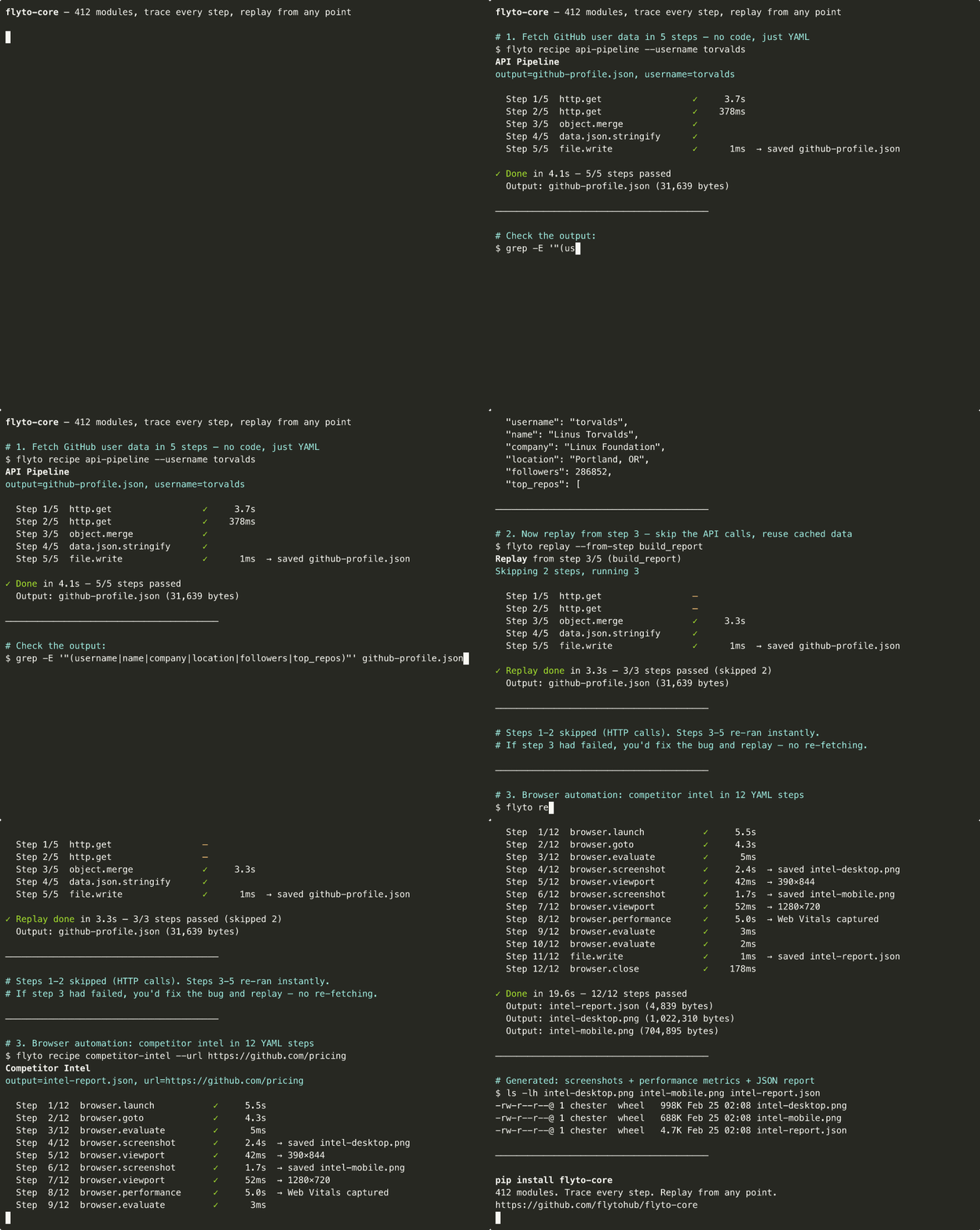
flyto recipe competitor-intel --url https://github.com/pricing
```
```
Step 1/12 browser.launch ✓ 420ms
Step 2/12 browser.goto ✓ 1,203ms
Step 3/12 browser.evaluate ✓ 89ms
Step 4/12 browser.screenshot ✓ 1,847ms → saved intel-desktop.png
Step 5/12 browser.viewport ✓ 12ms → 390×844
Step 6/12 browser.screenshot ✓ 1,621ms → saved intel-mobile.png
Step 7/12 browser.viewport ✓ 8ms → 1280×720
Step 8/12 browser.performance ✓ 5,012ms → Web Vitals captured
Step 9/12 browser.evaluate ✓ 45ms
Step 10/12 browser.evaluate ✓ 11ms
Step 11/12 file.write ✓ 3ms → saved intel-report.json
Step 12/12 browser.close ✓ 67ms
✓ Done in 10.3s — 12/12 steps passed
```
截图已捕获。性能指标已提取。JSON 报告已保存。**每一步均可追溯。**
## 引擎功能
- **执行追踪 (Execution Trace)** — 每一步的结构化记录:输入、输出、计时、状态
- **重放 (Replay)** — 使用原始(或修改后的)上下文从任意步骤重新执行
- **断点 (Breakpoints)** — 在任意步骤暂停执行,检查状态,恢复运行
- **证据快照 (Evidence Snapshots)** — 每个步骤边界前后的完整状态
- **数据血缘 (Data Lineage)** — 跟踪跨步骤的数据流,构建依赖图
- **超时保护 (Timeout Guard)** — 可配置的工作流级别和单步超时保护
## 412 个模块,78 个类别
| 类别 | 数量 | 示例 |
|----------|-------|----------|
| `browser.*` | 38 | launch, goto, click, extract, screenshot, fill forms, wait |
| `flow.*` | 24 | switch, loop, branch, parallel, retry, circuit breaker, rate limit |
| `array.*` | 15 | filter, sort, map, reduce, unique, chunk, flatten |
| `string.*` | 11 | reverse, uppercase, split, replace, trim, slugify, template |
| `api.*` | 11 | OpenAI, Anthropic, Gemini, Notion, Slack, Telegram |
| `object.*` | 10 | keys, values, merge, pick, omit, get, set, flatten |
| `image.*` | 9 | resize, convert, crop, rotate, watermark, OCR, compress |
| `data.*` | 8 | json/xml/yaml/csv parse and generate |
| `file.*` | 8 | read, write, copy, move, delete, exists, edit, diff |
| `stats.*` | 8 | mean, median, percentile, correlation, standard deviation |
| `validate.*` | 7 | email, url, json, phone, credit card |
| `docker.*` | 6 | run, ps, logs, stop, build, inspect |
| `archive.*` | 6 | zip create/extract, tar create/extract, gzip, gunzip |
| `math.*` | 6 | calculate, round, ceil, floor, power, abs |
| `k8s.*` | 5 | get_pods, apply, logs, scale, describe |
| `crypto.*` | 4 | AES encrypt/decrypt, JWT create/verify |
| `network.*` | 4 | ping, traceroute, whois, port scan |
| `pdf.*` | 4 | parse, extract text, merge, compress |
| `aws.s3.*` | 4 | upload, download, list, delete |
| `google.*` | 4 | Gmail send/search, Calendar create/list events |
| `cache.*` | 4 | get, set, delete, clear (memory + Redis) |
| `ssh.*` | 3 | remote exec, SFTP upload, SFTP download |
| `git.*` | 3 | clone, commit, diff |
| `sandbox.*` | 3 | execute Python, Shell, JavaScript |
| `dns.*` | 1 | DNS lookup (A, AAAA, MX, CNAME, TXT, NS) |
| `monitor.*` | 1 | HTTP health check with SSL cert verification |
请参阅 **[完整模块目录](docs/TOOL_CATALOG.md)** 以获取每个模块的参数和描述。
## 有何不同?
| | Playwright / Selenium | Shell 脚本 | flyto-core |
|-|----------------------|---------------|------------|
| 第 8 步失败 | 重新运行所有内容 | 重新运行所有内容 | `flyto replay --from-step 8` |
| 第 3 步发生了什么? | 添加 print(),重新运行 | 添加 echo,重新运行 | 完整追踪:输入、输出、计时 |
| 浏览器 + API + 文件 I/O | 编写胶水代码 | 3 种语言 | 全部内置 |
| 与团队分享 | "克隆我的仓库" | "克隆我的仓库" | `pip install flyto-core` |
| 在 CI 中运行 | 封装在 pytest/bash 中 | 脆弱 | `flyto run workflow.yaml` |
## 如何使用
## 30+ 内置配方
无需代码 — 每个配方都是一个 YAML 工作流模板:
```
flyto recipes # List all recipes
# 审计与测试
flyto recipe full-audit --url https://example.com
flyto recipe competitor-intel --url https://github.com/pricing
flyto recipe site-audit --url https://example.com
flyto recipe web-perf --url https://example.com
flyto recipe login-test --url https://myapp.com/login --username user --password pass --success_selector .dashboard
flyto recipe form-fill --url https://myapp.com/form --data '{"email":"test@example.com"}'
# 浏览器自动化
flyto recipe screenshot --url https://example.com
flyto recipe responsive-report --url https://example.com
flyto recipe page-to-pdf --url https://example.com
flyto recipe visual-snapshot --url https://example.com
flyto recipe webpage-archive --url https://example.com
flyto recipe scrape-page --url https://example.com --selector h1
flyto recipe scrape-links --url https://example.com
flyto recipe scrape-table --url https://en.wikipedia.org/wiki/YAML --selector .wikitable
flyto recipe stock-price --symbol AAPL
# 数据与图像
flyto recipe ocr --input scan.png
flyto recipe csv-to-json --input data.csv
flyto recipe image-resize --input photo.jpg --width 800
flyto recipe image-convert --input photo.png --format webp
# 网络与 DevOps
flyto recipe port-scan --host example.com
flyto recipe whois --domain example.com
flyto recipe monitor-site --url https://myapp.com
flyto recipe docker-ps
flyto recipe git-changelog
# 集成
flyto recipe scrape-to-slack --url https://example.com --selector h1 --webhook $SLACK_URL
flyto recipe github-issue --url https://example.com --owner me --repo my-app --title "Bug" --token $GITHUB_TOKEN
```
每个配方都是一个 YAML 工作流模板。运行 `flyto recipe --help` 查看完整选项。
请参阅 **[docs/RECIPES.md](docs/RECIPES.md)** 获取完整文档。
## 编写你自己的工作流
配方只是 YAML 文件。编写你自己的:
```
name: price-monitor
steps:
- id: open
module: browser.launch
params: { headless: true }
- id: page
module: browser.goto
params: { url: "https://competitor.com/pricing" }
- id: prices
module: browser.evaluate
params:
script: |
JSON.stringify([...document.querySelectorAll('.price')].map(e => e.textContent))
- id: save
module: file.write
params: { path: "prices.json", content: "${prices.result}" }
- id: close
module: browser.close
```
```
flyto run price-monitor.yaml
```
每次运行都会生成执行追踪和状态快照。如果第 3 步失败,从第 3 步重放 — 无需重新运行整个过程。
## 模块作者
```
from core.modules.registry import register_module
from core.modules.schema import compose, presets
@register_module(
module_id='string.reverse',
version='1.0.0',
category='string',
label='Reverse String',
description='Reverse the characters in a string',
params_schema=compose(presets.INPUT_TEXT(required=True)),
output_schema={'result': {'type': 'string', 'description': 'Reversed string'}},
)
async def string_reverse(context):
text = str(context['params']['text'])
return {'ok': True, 'data': {'result': text[::-1]}}
```
请参阅 **[模块规范](docs/MODULE_SPECIFICATION.md)** 获取完整指南。
## 安全
请通过 **[security@flyto.dev](mailto:security@flyto.dev)** 报告安全漏洞。
请参阅 **[SECURITY.md](SECURITY.md)** 了解我们的安全策略。
## 许可证
[Apache License 2.0](LICENSE) — 个人和商业用途免费。
桌面 GUI 可在 [flyto2.com](https://flyto2.com) 获取
| **Python** — 85 行 ``` import asyncio, json, time from playwright.async_api import async_playwright async def main(): async with async_playwright() as p: browser = await p.chromium.launch() page = await browser.new_page() await page.goto("https://competitor.com/pricing") # Extract pricing prices = await page.evaluate("""() => { const cards = document.querySelectorAll( '[class*="price"]' ); return Array.from(cards).map( c => c.textContent.trim() ); }""") # Desktop screenshot await page.screenshot( path="desktop.png", full_page=True ) # Mobile await page.set_viewport_size( {"width": 390, "height": 844} ) await page.screenshot( path="mobile.png", full_page=True ) # Performance perf = await page.evaluate("""() => { const nav = performance .getEntriesByType('navigation')[0]; return { ttfb: nav.responseStart, loaded: nav.loadEventEnd }; }""") # Save report report = { "prices": prices, "performance": perf, } with open("report.json", "w") as f: json.dump(report, f, indent=2) await browser.close() asyncio.run(main()) ``` | **flyto-core** — 12 步 ``` name: Competitor Intel steps: - id: launch module: browser.launch - id: navigate module: browser.goto params: { url: "{{url}}" } - id: prices module: browser.evaluate params: script: | JSON.stringify([ ...document.querySelectorAll( '[class*="price"]' ) ].map(e => e.textContent.trim())) - id: desktop_shot module: browser.screenshot params: { path: desktop.png, full_page: true } - id: mobile module: browser.viewport params: { width: 390, height: 844 } - id: mobile_shot module: browser.screenshot params: { path: mobile.png, full_page: true } - id: perf module: browser.performance - id: save module: file.write params: path: report.json content: "${prices.result}" - id: close module: browser.close ``` |
| 无法追溯。无法重放。无计时。如果第 5 步失败,需重新运行所有内容。 | 完全追溯。可从任意步骤重放。每步计时。每次运行均可调试。 |
CLI — 从终端运行工作流
``` # 运行内置 recipe flyto recipe site-audit --url https://example.com # 运行自定义 YAML 工作流 flyto run my-workflow.yaml # 列出所有 recipes flyto recipes ```MCP Server — 适用于 Claude Code, Cursor, Windsurf
``` pip install flyto-core claude mcp add flyto-core -- python -m core.mcp_server ``` 或添加到你的 MCP 配置中: ``` { "mcpServers": { "flyto-core": { "command": "python", "args": ["-m", "core.mcp_server"] } } } ``` 你的 AI 可以将所有模块作为工具使用。HTTP API — 用于集成和远程执行
``` pip install flyto-core[api] flyto serve # ✓ flyto-core 运行于 127.0.0.1:8333 ``` | 端点 | 用途 | |----------|---------| | `POST /v1/workflow/run` | 执行工作流并生成证据 + 追踪 | | `POST /v1/workflow/{id}/replay/{step}` | 从任意步骤重放 | | `POST /v1/execute` | 执行单个模块 | | `GET /v1/modules` | 发现所有模块 | | `POST /mcp` | MCP Streamable HTTP 传输 |Python API — 用于编程使用
``` import asyncio from core.modules.registry import ModuleRegistry async def main(): result = await ModuleRegistry.execute( "string.reverse", params={"text": "Hello"}, context={} ) print(result) # {"ok": True, "data": {"result": "olleH"}} asyncio.run(main()) ```标签:AI Agent 执行引擎, MCP, Playwright, Python, Python脚本, RPA, SEO 审计, Web Vitals, Web 抓取, 任务编排, 任务队列, 安全可观测性, 开源, 性能监控, 搜索引擎查询, 断点续跑, 无后门, 无头浏览器, 模型上下文协议, 浏览器自动化, 版本控制, 特征检测, 用量统计, 竞争情报分析, 逆向工具, 重试机制