code-yeongyu/oh-my-openagent
GitHub: code-yeongyu/oh-my-openagent
面向复杂代码库的多 agent 编码框架,为 Claude Code、Codex 等 AI 编程助手提供统一配置、编排与协作能力。
Stars: 63919 | Forks: 5224
 [](https://github.com/code-yeongyu/oh-my-openagent#oh-my-openagent)
[](https://github.com/code-yeongyu/oh-my-openagent#oh-my-openagent)
[](https://github.com/code-yeongyu/oh-my-openagent#oh-my-openagent)
[](https://github.com/code-yeongyu/oh-my-openagent#oh-my-openagent)
[](https://github.com/code-yeongyu/oh-my-openagent/releases)
[](https://www.npmjs.com/package/oh-my-opencode)
[](https://github.com/code-yeongyu/oh-my-openagent/graphs/contributors)
[](https://github.com/code-yeongyu/oh-my-openagent/network/members)
[](https://github.com/code-yeongyu/oh-my-openagent/stargazers)
[](https://github.com/code-yeongyu/oh-my-openagent/issues)
[](https://github.com/code-yeongyu/oh-my-openagent/blob/dev/LICENSE.md)
[](https://deepwiki.com/code-yeongyu/oh-my-openagent)
[](https://omo.vibetip.help/docs)
[English](README.md) | [한국어](README.ko.md) | [日本語](README.ja.md) | [简体中文](README.zh-cn.md)
## 评价
# Oh My OpenAgent
你正在同时应付 Claude Code、Codex 和各种随机 OSS 模型。配置工作流。调试 agent。
我们已经做好了这些工作。测试了一切。保留了真正能派上用场的东西。
安装 oh-my-openagent。输入 `ultrawork`。大功告成。
## 安装
oh-my-openagent 同一产品发布有两个版本:
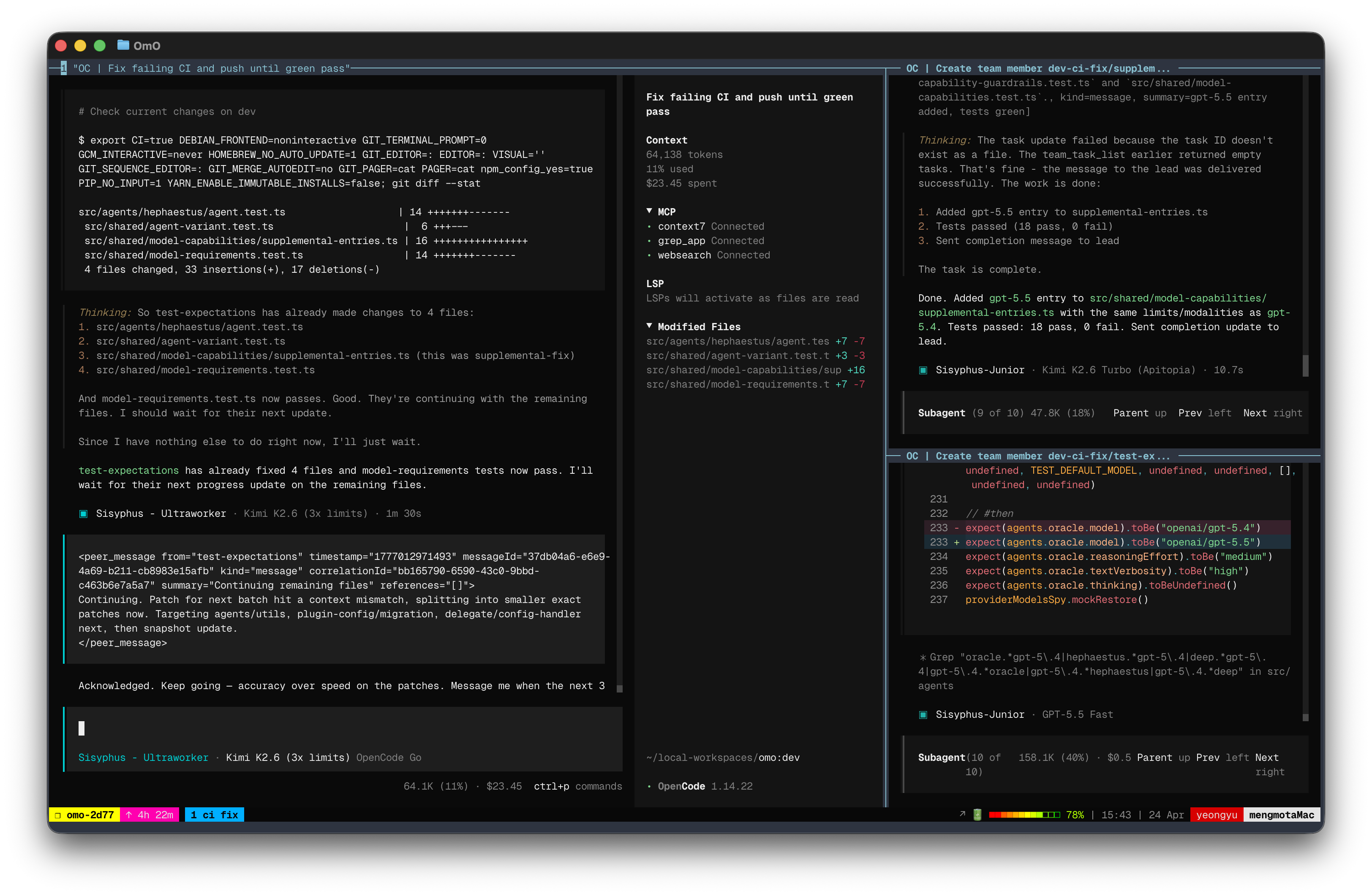
- **Ultimate 版 (omo for OpenCode)** — 完整的 omo。11 个 agent,54+ 个 lifecycle hook,5 个内置 MCP,所有 slash command,Team Mode,ulw-loop,ultrawork,hashline edits —— 应有尽有。
- **Light 版 (omo for Codex CLI)** — 适配 Codex 插件系统的可移植组件:`rules`、`comment-checker`、`git-bash`、`lsp`、`ultrawork`、`ulw-loop`、`start-work-continuation` 和 `telemetry`,以及用于 `ast_grep`、`grep_app`、`context7`、`git_bash` 和 `lsp` 的插件级 MCP。没有 agent orchestration,也没有 `team_*` 工具 —— Codex CLI 自身的界面负责完成这些工作。
选择你想要的版本。
### TL;DR
| 你想要 | 运行 | 落盘内容 |
| :--- | :--- | :--- |
| **Ultimate** (OpenCode) | `bunx oh-my-openagent install` (TUI 会引导你完成) | 在 `opencode.json` 中注册的插件 + agent/model 配置 + provider auth 提示 |
| **Light** (Codex CLI) | `npx lazycodex-ai install` | `~/.codex/plugins/cache/sisyphuslabs/omo/` + 本地 Codex marketplace cache + `~/.codex/config.toml` marketplace/plugin/agent 块 + 可选的自主权限 + 位于 `~/.local/bin` 的组件 CLI |
| **两者都要** | `bunx oh-my-openagent install --platform=both` | 包含以上两者 |
`lazycodex-ai` 默认为 Codex Light 安装程序,通过 Node/npm 运行。共享的 `omo` CLI 中的 `--platform` 依然默认为 `opencode` (Ultimate)。
### 给人类
**强烈建议:让 LLM agent 为你安装。** Ultimate 版的设置涉及订阅检测、11 个 agent 的模型选择以及各 provider 的身份验证 —— 人类在处理这些时很容易出错。而 LLM agent 会阅读完整指南并正确走完每一步。
将此 prompt 粘贴到 Claude Code、AmpCode、Cursor 或任何 agent 中:
```
Install and configure oh-my-openagent by following the instructions here:
https://raw.githubusercontent.com/code-yeongyu/oh-my-openagent/refs/heads/dev/docs/guide/installation.md
```
如果你只想要 **Light 版** (Codex CLI),安装程序会询问是否将 Codex 配置为完全权限的自主模式。你可以自己用一行命令运行它:
```
npx lazycodex-ai install
# 推荐的 non-interactive 模式:
npx lazycodex-ai install --no-tui --codex-autonomous
```
对于 Light 版,不需要 Bun。在 Node/npm 环境中使用 `npx lazycodex-ai install`。不正式支持全局安装;安装程序会将 Codex 插件直接写入 `~/.codex/`。
### 给 LLM Agent
获取完整指南并逐步执行:
```
curl -fsSL https://raw.githubusercontent.com/code-yeongyu/oh-my-openagent/refs/heads/dev/docs/guide/installation.md
```
该指南涵盖:平台选择、订阅访谈、provider 身份验证 (Anthropic / Gemini / Copilot / Z.ai / OpenCode Zen)、agent 与模型的匹配矩阵、模式 (`ultrawork`、`search`、`analyze`、`team`、`hyperplan`)、slash command、Light 版的 8 个 Codex 组件、Team Mode 和卸载。不要进行总结;请从头到尾仔细阅读。
### 关于包和命令名称的说明
已发布的 npm 包和 CLI 二进制文件仍然命名为 `oh-my-opencode`(在更名过渡期间,以 `oh-my-openagent` 作为双重发布名)。在 `opencode.json` 内部,兼容层会优先选择插件条目 `oh-my-openagent`,而旧版 `oh-my-opencode` 条目在加载时会显示警告。插件配置文件通常仍然使用 `oh-my-opencode.json[c]`;系统可识别旧版和更名后的基础文件名。
推荐的 `bunx`/`npx` 调用方式是 `oh-my-openagent install`(或原始的 `oh-my-opencode install`)。该包还将 `omo` 作为 bin alias 一起发布,但**请不要**使用 `bunx omo` 或 `npx omo` —— `omo` 是由另一位作者开发的完全不同的、毫不相干的 npm 包,包管理器可能会解析到错误的包。`lazycodex-ai` 是一个单一用途的 Node/npm 安装程序包:`npx lazycodex-ai install` 会直接路由到 Codex Light 安装程序。它不是 Codex marketplace 的名称(marketplace repository 是 `code-yeongyu/lazycodex`)。Codex 看到的将是 marketplace `sisyphuslabs` 和插件 `omo`,启用方式为 `omo@sisyphuslabs`。
### Telemetry
默认情况下会启用匿名 telemetry,以跟踪活跃安装数 (DAU/WAU/MAU)。对于这两个产品,每台机器**每天最多发送一次 (UTC 时间)** 单个事件,使用经过 SHA256 哈希处理的安装标识符(绝非原始主机名),并且不会创建 PostHog 人员画像。主插件会发出 `oh_my_openagent_daily_active`;Codex CLI Light 版会从两个来源(`install_completed` 和 `session_start`)发出 `omo_codex_daily_active`。
针对各个产品选择退出:
- 主插件:`OMO_DISABLE_POSTHOG=1` 或 `OMO_SEND_ANONYMOUS_TELEMETRY=0`
- Codex CLI Light 版:`OMO_CODEX_DISABLE_POSTHOG=1` 或 `OMO_CODEX_SEND_ANONYMOUS_TELEMETRY=0`(全局标志也会禁用 Codex)
请参阅 [Privacy Policy](docs/legal/privacy-policy.md) 和 [Terms of Service](docs/legal/terms-of-service.md)。
## 跳过此 README
我们已经过了读文档的时代。只需将以下内容粘贴到你的 agent 中:
```
Read this and tell me why it's not just another boilerplate: https://raw.githubusercontent.com/code-yeongyu/oh-my-openagent/refs/heads/dev/README.md
```
## ROADMAP
我们正在重构代码库,以支持多种 agent harness(OpenCode、Codex、Pi、Claude Code 等)。最紧迫的工作是包分层重构:将纯 TypeScript 核心逻辑、MCP server、skills 和 adapter shim 分离为不同的层,以便可以在各个 harness 之间重用相同的逻辑而无需重复。
## 核心亮点
### 🪄 `ultrawork`
你居然真的在读这个?不可思议。
安装。输入 `ultrawork`(或 `ulw`)。搞定。
下面的所有内容,每一项功能,每一次优化:你都不需要了解。它自己就能完美运行。
即使只有以下订阅,`ultrawork` 也能很好地工作(本项目与它们没有附属关系;这些属于个人推荐):
- [ChatGPT 订阅 ($20)](https://chatgpt.com/)
- [Kimi Code 订阅 ($19)](https://www.kimi.com/code)
- [GLM Coding Plan ($10)](https://z.ai/subscribe)
- 如果你有资格使用按量计费 (pay-per-token),使用 Kimi 和 Gemini 模型也不会花费太多。
| | 功能 | 版本 | 功能介绍 |
| :---: | :------------------------------------------------------- | :------: | :--------------------------------------------------------------------------------------------------------------------------------------------------------------------------------------------------------------- |
| 🤖 | **Discipline Agents** | Ultimate | Sisyphus 编排 Hephaestus、Oracle、Librarian 和 Explore。一支完整的 AI 开发团队并行工作。 |
| 🧩 | **Codex CLI Light 版** | Light | 运行在 OpenAI Codex CLI 内部的可移植 OMO 组件 (rules, comment-checker, git-bash, LSP, ultrawork, ulw-loop, start-work continuation, telemetry)。通过 `npx lazycodex-ai install` 安装。 |
| 👥 | **Team Mode** (v4.0, opt-in) | Ultimate | Lead agent + 最多 8 个并行成员,实时 tmux 可视化,专用的 `team_*` 工具。支持 `hyperplan`(5 个挑剔的批评者)和 `security-research`(3 个 hunter + 2 个 PoC 工程师)。[文档 →](docs/guide/team-mode.md) |
| ⚡ | **`ultrawork` / `ulw`** | Both | 一个词。激活所有 agent。直到完成才停止。 |
| 🚪 | **[IntentGate](https://factory.ai/news/terminal-bench)** | Ultimate | 在分类或行动之前分析用户的真实意图。不再有字面上的误解。(Light 版仅识别 `ultrawork`/`ulw` 关键词。) |
| 🔗 | **Hash-Anchored Edit Tool** | Ultimate | `LINE#ID` 内容哈希验证每一次更改。零过时行错误。灵感来源于 [oh-my-pi](https://github.com/can1357/oh-my-pi)。[Harness Problem 详解 →](https://blog.can.ac/2026/02/12/the-harness-problem/) |
| 🛠️ | **LSP 集成** | Both | 诊断、导航、符号、workspace rename。为 agent 提供 IDE 精度。两个版本使用相同的 LSP MCP server。 |
| 🔎 | **AST-Grep** | Ultimate | 支持模式感知的代码搜索,并支持跨 25 种语言重写。 |
| 🧠 | **Background Agents** | Ultimate | 并行触发 5 个以上的专家。保持精简的 context。结果随时就绪。 |
| 📚 | **内置 MCP** (web/docs/code search) | Ultimate | Exa (网络搜索)、Context7 (官方文档)、Grep.app (GitHub 搜索)。始终开启。 |
| 🔁 | **Ralph Loop / `/ulw-loop`** | Ultimate | 自引用循环。在 100% 完成之前不会停止。 |
| ✅ | **Todo Enforcer** | Ultimate | Agent 闲下来了?系统会把它拉回来。你的任务必定会被完成。 |
| 💬 | **Comment Checker** | Both | 注释里没有 AI 垃圾话。代码读起来就像资深开发者写的一样。 |
| 📐 | **Rules Injection** (`AGENTS.md` / `.omo/rules/**`) | Both | 项目规则和 AGENTS.md 会在每次 prompt 时自动加载到 agent 的 context 中。 |
| 🎯 | **Ulw Loop** | Both | 基于 `.omo/ulw-loop/` 的持久多目标编排,带有 evidence audit。 |
| 🖥️ | **Tmux 集成** | Ultimate | 完整的交互式终端。REPL、debugger、TUI。全部实时。 |
| 🔌 | **Claude Code 兼容** | Ultimate | 你的 hooks、commands、skills、MCP 和插件?全都能在这里运行。 |
| 🧬 | **Skill-Embedded MCP** | Ultimate | Skills 携带自己的 MCP server。无 context 膨胀。 |
| 📋 | **Prometheus Planner** | Ultimate | 在任何执行之前进行访谈模式的战略规划。 |
| 🔍 | **`/init-deep`** | Ultimate | 在整个项目中自动生成分层的 `AGENTS.md` 文件。极大地优化了 token 效率和 agent 性能。 |
### Discipline Agents
 |
 |
标签:AI编程助手, MITM代理, SOC Prime, 代码生成, 开发工具, 暗色界面, 渗透测试工具, 网络调试, 自动化, 自动化攻击