jjice/hxed
GitHub: jjice/hxed
hxed 是一款轻量级、无依赖的现代跨平台十六进制查看器,通过彩色输出、热力图和熵值分析让二进制文件检视更直观高效。
Stars: 12 | Forks: 1
# 📂 hxed — 现代跨平台十六进制查看器
[](https://github.com/jjice/hxed/actions)
[](https://github.com/jjice/hxed/actions)
[](https://github.com/jjice/hxed/actions)
[](https://github.com/jjice/hxed/actions)
[](LICENSE)
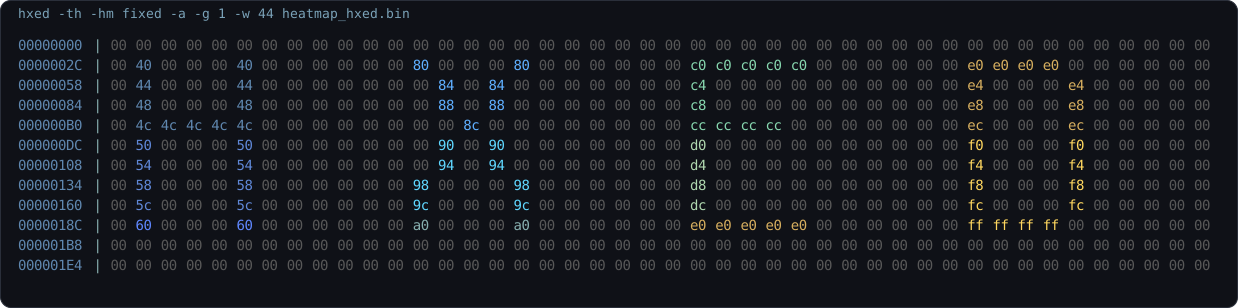 ###### 此演示使用了 `0x00` 背景和手工精心设计的 `HXED` 字节模式,因此固定热力图显示出清晰的每个字母的颜色,并具有从上到下的渐变效果。
## 目录
- [为什么选择 hxed](#why-hxed)
- [核心功能](#-key-features)
- [功能概览](#-feature-tour)
- [构建与安装](#-build--install)
- [用法](#-usage)
- [选项](#-options)
- [示例](#-examples)
- [贡献](#-contributing)
- [许可证](#-license)
## 为什么选择 hxed
`hexdump` 和 `xxd` 都是可靠的工具。`hxed` 适用于那些虽然普通的转储在技术上已经足够,但仍然会拖慢你速度的时刻。
- 它使结构更易于一目了然。
- 它在视觉上将字符串、空字节和嘈杂区域区分开来。
- 它为你提供了一个小巧的工具,用于处理常规转储、针对性搜索、熵值检查、原始输出和管道工作流。
- 直观的用法,支持 `fish`、`bash`、`zsh` 和 `Powershell` 的 bash 补全。没有晦涩/复杂的标志!
如果你经常检查二进制文件、调试奇怪的文件、逆向格式或比较未知的数据块,`hxed` 的设计初衷就是让这一过程更快、更赏心悦目。
## ✨ 核心功能
| | 功能 | 描述 |
|---|---|---|
| 📟 | **经典布局** | 完美对齐的十六进制字节、地址和 ASCII 预览 |
| 🧩 | **灵活分组** | 使用 `-g` 对字节进行分组,以便在密集的转储中更快地扫描模式 |
| 📦 | **原始输出模式** | 将原始输出写入文件或管道 |
| 🌈 | **自适应热力图** | 使用 16 色 `adaptiv` 或 `fixed` 模式可视化字节范围 |
| 🔍 | **语义着色** | 即时区分可打印文本、空字节和控制字符 |
| 🧵 | **字符串高亮** | 专门的模式,使嵌入的字符串更加醒目 |
| 📊 | **熵值仪表** | 每行实时的 Shannon 熵值条 —— 即时发现加密/压缩区域 |
| 🔎 | **模式搜索** | 通过 `-se` 以 `a:`、`x:`、`d:` 或 `b:` 格式匹配字节 |
| 🏷️ | **头部分析 + 尾部分析** | 使用 `-th` 切换文件元数据和魔数检测 |
| ⚡ | **极度灵活** | 自定义宽度、偏移量和限制,用于精细的二进制检查 |
| 🌊 | **管道就绪** | 无缝的 `stdin` 支持,内置分页器集成(`less`/`more`) |
| 📦 | **跨平台** | 在 Linux、macOS 和 Windows 上原生高性能运行 |
## 📸 功能概览
快速跳转:
- [头部 + 尾部分析](#header--footer-analysis--hxed--th-file)
- [普通转储](#normal-dump--hxed-file)
- [分组视图](#grouping-view--hxed--g-4-file)
- [热力图渐变](#heatmap-gradient--hxed--hm-fixed-heatmap_gradientbin)
- [固定热力图艺术](#fixed-heatmap-art--hxed--th--hm-fixed--a--g-1--w-44-heatmap_hxedbin)
- [熵值视图](#entropy-view--hxed--e--hm-fixed-file)
- [ASCII 搜索](#ascii-search--hxed--se-asciisecret-file)
- [字符串模式](#string-mode--hxed--s-file)
- [管道工作流](#pipe-workflow--cat-file--hxed--th)
### 普通转储 · `hxed
###### 此演示使用了 `0x00` 背景和手工精心设计的 `HXED` 字节模式,因此固定热力图显示出清晰的每个字母的颜色,并具有从上到下的渐变效果。
## 目录
- [为什么选择 hxed](#why-hxed)
- [核心功能](#-key-features)
- [功能概览](#-feature-tour)
- [构建与安装](#-build--install)
- [用法](#-usage)
- [选项](#-options)
- [示例](#-examples)
- [贡献](#-contributing)
- [许可证](#-license)
## 为什么选择 hxed
`hexdump` 和 `xxd` 都是可靠的工具。`hxed` 适用于那些虽然普通的转储在技术上已经足够,但仍然会拖慢你速度的时刻。
- 它使结构更易于一目了然。
- 它在视觉上将字符串、空字节和嘈杂区域区分开来。
- 它为你提供了一个小巧的工具,用于处理常规转储、针对性搜索、熵值检查、原始输出和管道工作流。
- 直观的用法,支持 `fish`、`bash`、`zsh` 和 `Powershell` 的 bash 补全。没有晦涩/复杂的标志!
如果你经常检查二进制文件、调试奇怪的文件、逆向格式或比较未知的数据块,`hxed` 的设计初衷就是让这一过程更快、更赏心悦目。
## ✨ 核心功能
| | 功能 | 描述 |
|---|---|---|
| 📟 | **经典布局** | 完美对齐的十六进制字节、地址和 ASCII 预览 |
| 🧩 | **灵活分组** | 使用 `-g` 对字节进行分组,以便在密集的转储中更快地扫描模式 |
| 📦 | **原始输出模式** | 将原始输出写入文件或管道 |
| 🌈 | **自适应热力图** | 使用 16 色 `adaptiv` 或 `fixed` 模式可视化字节范围 |
| 🔍 | **语义着色** | 即时区分可打印文本、空字节和控制字符 |
| 🧵 | **字符串高亮** | 专门的模式,使嵌入的字符串更加醒目 |
| 📊 | **熵值仪表** | 每行实时的 Shannon 熵值条 —— 即时发现加密/压缩区域 |
| 🔎 | **模式搜索** | 通过 `-se` 以 `a:`、`x:`、`d:` 或 `b:` 格式匹配字节 |
| 🏷️ | **头部分析 + 尾部分析** | 使用 `-th` 切换文件元数据和魔数检测 |
| ⚡ | **极度灵活** | 自定义宽度、偏移量和限制,用于精细的二进制检查 |
| 🌊 | **管道就绪** | 无缝的 `stdin` 支持,内置分页器集成(`less`/`more`) |
| 📦 | **跨平台** | 在 Linux、macOS 和 Windows 上原生高性能运行 |
## 📸 功能概览
快速跳转:
- [头部 + 尾部分析](#header--footer-analysis--hxed--th-file)
- [普通转储](#normal-dump--hxed-file)
- [分组视图](#grouping-view--hxed--g-4-file)
- [热力图渐变](#heatmap-gradient--hxed--hm-fixed-heatmap_gradientbin)
- [固定热力图艺术](#fixed-heatmap-art--hxed--th--hm-fixed--a--g-1--w-44-heatmap_hxedbin)
- [熵值视图](#entropy-view--hxed--e--hm-fixed-file)
- [ASCII 搜索](#ascii-search--hxed--se-asciisecret-file)
- [字符串模式](#string-mode--hxed--s-file)
- [管道工作流](#pipe-workflow--cat-file--hxed--th)
### 普通转储 · `hxed `
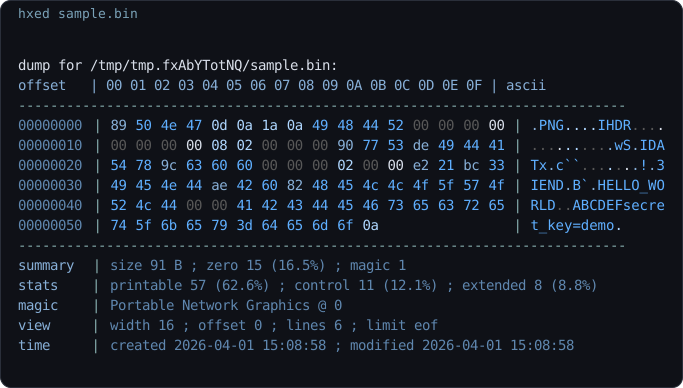 经典布局,可读的地址,彩色的字节,以及 ASCII 预览,同时保留了终端的感觉。
### 已停用的头部 · `hxed -th
经典布局,可读的地址,彩色的字节,以及 ASCII 预览,同时保留了终端的感觉。
### 已停用的头部 · `hxed -th `
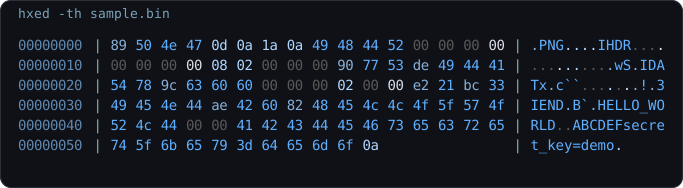 头部信息、尾部分析和魔数检测帮助你一目了然地理解文件,而无需手动拼凑信息。
### 分组视图 · `hxed -g 4
头部信息、尾部分析和魔数检测帮助你一目了然地理解文件,而无需手动拼凑信息。
### 分组视图 · `hxed -g 4 `
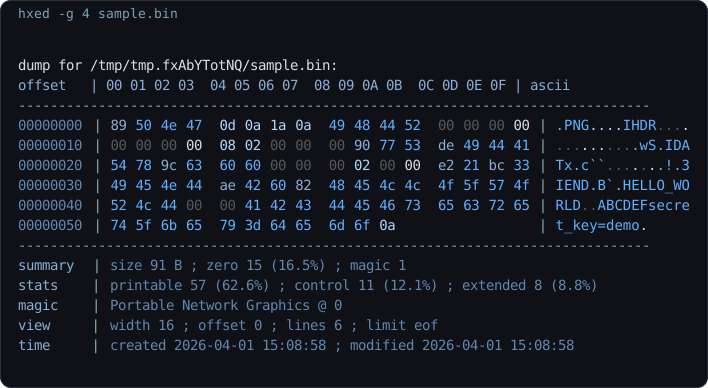 在扫描打包的二进制数据时,分组有助于快速分离结构化字段。
### 热力图渐变 · `hxed -hm fixed heatmap_gradient.bin`
在扫描打包的二进制数据时,分组有助于快速分离结构化字段。
### 热力图渐变 · `hxed -hm fixed heatmap_gradient.bin`
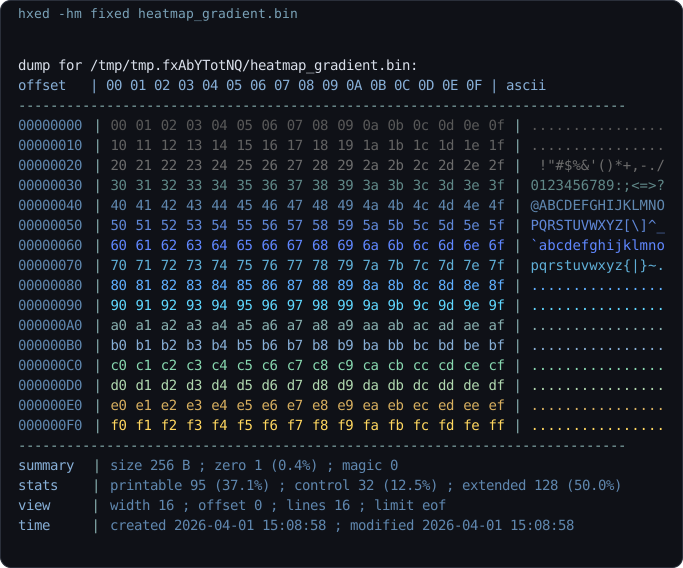 固定热力图模式在整个字节范围内为你提供稳定的 16 级调色板,而 `adaptiv` 则将同样的概念重新映射到文件中的实际最小/最大值。
### 熵值视图 · `hxed -e -hm fixed
固定热力图模式在整个字节范围内为你提供稳定的 16 级调色板,而 `adaptiv` 则将同样的概念重新映射到文件中的实际最小/最大值。
### 熵值视图 · `hxed -e -hm fixed `
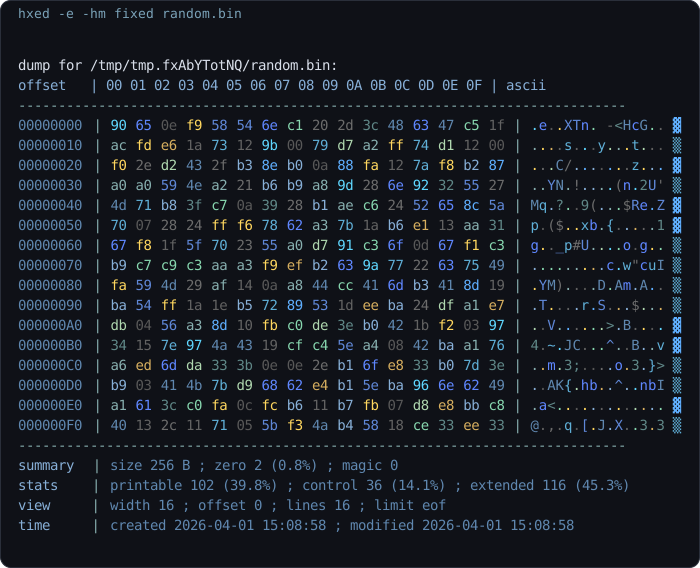 对于快速发现压缩、加密或异常均匀的区域非常有用。
### ASCII 搜索 · `hxed -se a:secret
对于快速发现压缩、加密或异常均匀的区域非常有用。
### ASCII 搜索 · `hxed -se a:secret `
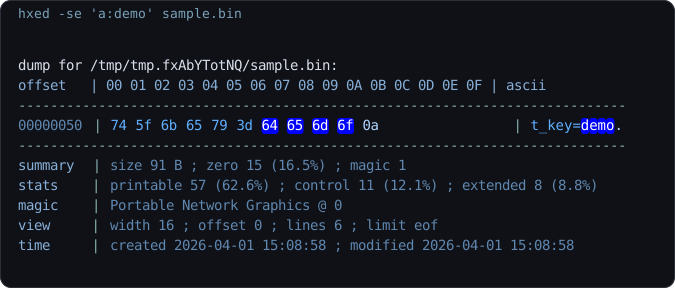 搜索模式将转储范围缩小到相关行,而不是让你在原始十六进制输出中到处使用 grep。
### 字符串模式 · `hxed -s
搜索模式将转储范围缩小到相关行,而不是让你在原始十六进制输出中到处使用 grep。
### 字符串模式 · `hxed -s `
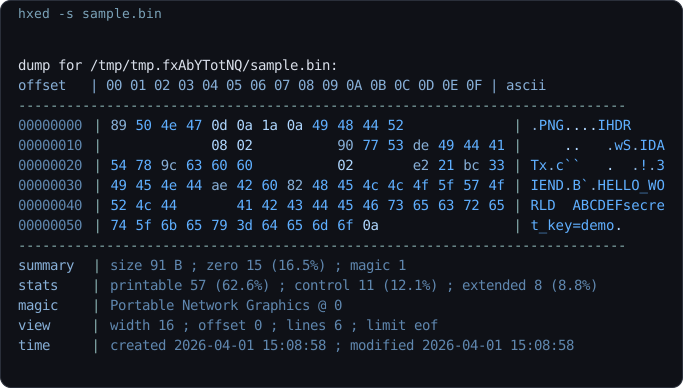 当嵌入的字符串、路径、配置片段或密钥比原始字节值更重要时非常有用。
### 管道工作流 · `cat
当嵌入的字符串、路径、配置片段或密钥比原始字节值更重要时非常有用。
### 管道工作流 · `cat | hxed -th`
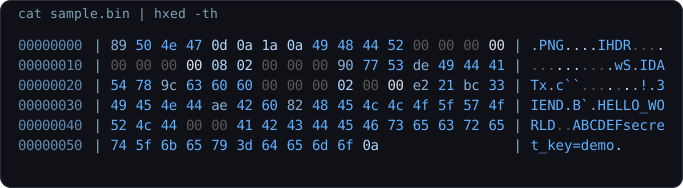 对管道友好的用法使其在 shell 工作流中非常实用,而在这些场景中 `hexdump` 和 `xxd` 通常最终会被包装在额外的命令中。
## 🏗️ 构建与安装
### 交互式安装脚本
Linux / macOS:
```
chmod +x scripts/install.sh
./scripts/install.sh
```
Windows PowerShell:
```
powershell -ExecutionPolicy Bypass -File .\scripts\install.ps1
```
注意:
- `scripts/install.sh` 为当前用户安装二进制文件,还可以复制 Bash、Zsh 和 Fish 的补全脚本。
- `scripts/install.ps1` 安装 `hxed.exe`,可以将安装目录添加到用户 `PATH` 中,并可以在你的 PowerShell 配置文件中注册 PowerShell 补全。
- 当前的 GitHub 发布工作流发布 `hxed-linux-x64`、`hxed-windows-x64.exe` 和 `hxed-macos-arm64`。在不支持的架构上,安装程序会回退到从源代码构建。
### 手动构建
**要求:** 一个 C 编译器(`gcc` 或 `clang`)和 `CMake`。
```
# 通过 Makefile 快速构建
make
# 或手动使用 CMake
cmake -S . -B build
cmake --build build
```
### 可选:系统范围安装
```
cmake --install build
```
### 手动补全安装
如果你更喜欢手动设置,补全文件位于 [`completions/`](./completions):
```
# Bash
mkdir -p ~/.local/share/bash-completion/completions
cp completions/hxed.bash ~/.local/share/bash-completion/completions/hxed
# Zsh
mkdir -p ~/.zsh/completions
cp completions/_hxed ~/.zsh/completions/_hxed
# 添加一次到 ~/.zshrc
fpath=(~/.zsh/completions $fpath)
autoload -Uz compinit && compinit
# Fish
mkdir -p ~/.config/fish/completions
cp completions/hxed.fish ~/.config/fish/completions/hxed.fish
```
PowerShell:
```
. "$PWD\completions\hxed.ps1"
```
### 卸载
```
# Linux / macOS
sudo xargs rm < build/install_manifest.txt
# Windows (PowerShell)
Get-Content build\install_manifest.txt | Remove-Item
```
## 🕹️ 用法
```
hxed [options] [filename]
cat file.bin | hxed [options]
```
## ⚙️ 选项
| 选项 | 描述 | 默认值 |
|--------|-------------|---------|
| `-f, --file
对管道友好的用法使其在 shell 工作流中非常实用,而在这些场景中 `hexdump` 和 `xxd` 通常最终会被包装在额外的命令中。
## 🏗️ 构建与安装
### 交互式安装脚本
Linux / macOS:
```
chmod +x scripts/install.sh
./scripts/install.sh
```
Windows PowerShell:
```
powershell -ExecutionPolicy Bypass -File .\scripts\install.ps1
```
注意:
- `scripts/install.sh` 为当前用户安装二进制文件,还可以复制 Bash、Zsh 和 Fish 的补全脚本。
- `scripts/install.ps1` 安装 `hxed.exe`,可以将安装目录添加到用户 `PATH` 中,并可以在你的 PowerShell 配置文件中注册 PowerShell 补全。
- 当前的 GitHub 发布工作流发布 `hxed-linux-x64`、`hxed-windows-x64.exe` 和 `hxed-macos-arm64`。在不支持的架构上,安装程序会回退到从源代码构建。
### 手动构建
**要求:** 一个 C 编译器(`gcc` 或 `clang`)和 `CMake`。
```
# 通过 Makefile 快速构建
make
# 或手动使用 CMake
cmake -S . -B build
cmake --build build
```
### 可选:系统范围安装
```
cmake --install build
```
### 手动补全安装
如果你更喜欢手动设置,补全文件位于 [`completions/`](./completions):
```
# Bash
mkdir -p ~/.local/share/bash-completion/completions
cp completions/hxed.bash ~/.local/share/bash-completion/completions/hxed
# Zsh
mkdir -p ~/.zsh/completions
cp completions/_hxed ~/.zsh/completions/_hxed
# 添加一次到 ~/.zshrc
fpath=(~/.zsh/completions $fpath)
autoload -Uz compinit && compinit
# Fish
mkdir -p ~/.config/fish/completions
cp completions/hxed.fish ~/.config/fish/completions/hxed.fish
```
PowerShell:
```
. "$PWD\completions\hxed.ps1"
```
### 卸载
```
# Linux / macOS
sudo xargs rm < build/install_manifest.txt
# Windows (PowerShell)
Get-Content build\install_manifest.txt | Remove-Item
```
## 🕹️ 用法
```
hxed [options] [filename]
cat file.bin | hxed [options]
```
## ⚙️ 选项
| 选项 | 描述 | 默认值 |
|--------|-------------|---------|
| `-f, --file ` | 输入文件(使用 stdin 时可选) | — |
| `-m, --mode ` | 输出模式 | `hex` |
| `-hm, --heatmap ` | 16 色热力图模式 | none |
| `-w, --width ` | 每行字节数 | `16` |
| `-g, --grouping ` | 视觉上分组字节(`0` = 无空格) | `1` |
| `-a, --ascii` | 切换 ASCII 列 | on |
| `-th, --toggle-header` | 停用头部、尾部和魔数检测 | on |
| `-o, --offset ` | 从此字节偏移处开始读取 | `0` |
| `-r, --read-size ` | 读取这么多字节后停止 | `0` |
| `-l, --limit ` | 在此字节地址处停止 | EOF |
| `-c, --color` | 切换语法着色 | on |
| `-s, --string` | 切换字符串高亮 | off |
| `-p, --pager` | 切换通过 `less`/`more` 进行分页输出 | off |
| `-e, --entropy` | 切换每行的 Shannon 熵值条 | off |
| `-sz, --skip-zero` | 跳过全零行 | off |
| `-se, --search ` | 搜索 `a:`、`x:`、`d:` 或 `b:` 模式 | — |
| `-ro, --raw` | 原始输出(无 ANSI,用于管道传输到文件),使用 `-w 0` 表示无换行| — |
| `-v, --version` | 显示版本并退出 | — |
| `-h, --help` | 显示帮助并退出 | — |
**注意:**
- 切换标志会翻转当前的默认状态。
- `-a` 禁用 ASCII,因为 ASCII 默认是开启的。
- `-c` 禁用颜色,因为颜色默认是开启的。
- `-th` 禁用头部/尾部块,因为它默认是开启的。
- `-se` 高亮匹配的字节,并且只打印匹配的行。
- `--limit` 不得小于 `--offset`。
- 当设置了 `--offset` 时,魔数检测将被禁用。
- 搜索目前仅适用于文件,不适用于 `stdin`。
- 从 stdin 读取时,不需要文件名。
- 如果同时提供了 stdin 和文件名,stdin 将被忽略。
## 🔎 示例
```
# 基本 hex dump
hxed example.txt
# 更窄的宽度
hxed -w 8 example.txt
# 将字节按 4 个分组
hxed -g 4 firmware.bin
# 每行 32 字节,关闭 ASCII 列
hxed -w 32 -a secret.bin
# 以十进制模式渲染
hxed -m dec -g 8 sample.bin
# 二进制文件上的自适应 heatmap
hxed -hm adaptiv image.png
# 固定 heatmap,关闭 ASCII
hxed -hm fixed -a sample.bin
# 跳过全零行
hxed -sz firmware.bin
# 检查文件切片(字节 1024–2048)
hxed -o 1k -l 2k sample.bin
# 字符串高亮
hxed -s image.png
# 搜索 ASCII 模式
hxed -se 'a:ABC' sample.bin
# 搜索 hex 模式
hxed -se 'x:FF D8 FF' photo.jpg
# 搜索十进制字节
hxed -se 'd:72,101,108,108,111' sample.bin
# 搜索二进制字节
hxed -se 'b:01001000,01101001' sample.bin
# 原始输出到文件(无换行,无 ANSI)
hxed -w 0 -ro binary > output.txt
# 从 stdin 管道传输
cat sample.bin | hxed -w 32
echo 'Hello World' | hxed
# 关闭颜色,然后管道传输至 less
hxed -c file | less -R
```
## 📄 许可证
MIT License © 2026 Joshua Jallow — 详见 [LICENSE](LICENSE)。
###### 此演示使用了 `0x00` 背景和手工精心设计的 `HXED` 字节模式,因此固定热力图显示出清晰的每个字母的颜色,并具有从上到下的渐变效果。
## 目录
- [为什么选择 hxed](#why-hxed)
- [核心功能](#-key-features)
- [功能概览](#-feature-tour)
- [构建与安装](#-build--install)
- [用法](#-usage)
- [选项](#-options)
- [示例](#-examples)
- [贡献](#-contributing)
- [许可证](#-license)
## 为什么选择 hxed
`hexdump` 和 `xxd` 都是可靠的工具。`hxed` 适用于那些虽然普通的转储在技术上已经足够,但仍然会拖慢你速度的时刻。
- 它使结构更易于一目了然。
- 它在视觉上将字符串、空字节和嘈杂区域区分开来。
- 它为你提供了一个小巧的工具,用于处理常规转储、针对性搜索、熵值检查、原始输出和管道工作流。
- 直观的用法,支持 `fish`、`bash`、`zsh` 和 `Powershell` 的 bash 补全。没有晦涩/复杂的标志!
如果你经常检查二进制文件、调试奇怪的文件、逆向格式或比较未知的数据块,`hxed` 的设计初衷就是让这一过程更快、更赏心悦目。
## ✨ 核心功能
| | 功能 | 描述 |
|---|---|---|
| 📟 | **经典布局** | 完美对齐的十六进制字节、地址和 ASCII 预览 |
| 🧩 | **灵活分组** | 使用 `-g` 对字节进行分组,以便在密集的转储中更快地扫描模式 |
| 📦 | **原始输出模式** | 将原始输出写入文件或管道 |
| 🌈 | **自适应热力图** | 使用 16 色 `adaptiv` 或 `fixed` 模式可视化字节范围 |
| 🔍 | **语义着色** | 即时区分可打印文本、空字节和控制字符 |
| 🧵 | **字符串高亮** | 专门的模式,使嵌入的字符串更加醒目 |
| 📊 | **熵值仪表** | 每行实时的 Shannon 熵值条 —— 即时发现加密/压缩区域 |
| 🔎 | **模式搜索** | 通过 `-se` 以 `a:`、`x:`、`d:` 或 `b:` 格式匹配字节 |
| 🏷️ | **头部分析 + 尾部分析** | 使用 `-th` 切换文件元数据和魔数检测 |
| ⚡ | **极度灵活** | 自定义宽度、偏移量和限制,用于精细的二进制检查 |
| 🌊 | **管道就绪** | 无缝的 `stdin` 支持,内置分页器集成(`less`/`more`) |
| 📦 | **跨平台** | 在 Linux、macOS 和 Windows 上原生高性能运行 |
## 📸 功能概览
快速跳转:
- [头部 + 尾部分析](#header--footer-analysis--hxed--th-file)
- [普通转储](#normal-dump--hxed-file)
- [分组视图](#grouping-view--hxed--g-4-file)
- [热力图渐变](#heatmap-gradient--hxed--hm-fixed-heatmap_gradientbin)
- [固定热力图艺术](#fixed-heatmap-art--hxed--th--hm-fixed--a--g-1--w-44-heatmap_hxedbin)
- [熵值视图](#entropy-view--hxed--e--hm-fixed-file)
- [ASCII 搜索](#ascii-search--hxed--se-asciisecret-file)
- [字符串模式](#string-mode--hxed--s-file)
- [管道工作流](#pipe-workflow--cat-file--hxed--th)
### 普通转储 · `hxed
经典布局,可读的地址,彩色的字节,以及 ASCII 预览,同时保留了终端的感觉。
### 已停用的头部 · `hxed -th
头部信息、尾部分析和魔数检测帮助你一目了然地理解文件,而无需手动拼凑信息。
### 分组视图 · `hxed -g 4
在扫描打包的二进制数据时,分组有助于快速分离结构化字段。
### 热力图渐变 · `hxed -hm fixed heatmap_gradient.bin`
固定热力图模式在整个字节范围内为你提供稳定的 16 级调色板,而 `adaptiv` 则将同样的概念重新映射到文件中的实际最小/最大值。
### 熵值视图 · `hxed -e -hm fixed
对于快速发现压缩、加密或异常均匀的区域非常有用。
### ASCII 搜索 · `hxed -se a:secret
搜索模式将转储范围缩小到相关行,而不是让你在原始十六进制输出中到处使用 grep。
### 字符串模式 · `hxed -s
当嵌入的字符串、路径、配置片段或密钥比原始字节值更重要时非常有用。
### 管道工作流 · `cat
对管道友好的用法使其在 shell 工作流中非常实用,而在这些场景中 `hexdump` 和 `xxd` 通常最终会被包装在额外的命令中。
## 🏗️ 构建与安装
### 交互式安装脚本
Linux / macOS:
```
chmod +x scripts/install.sh
./scripts/install.sh
```
Windows PowerShell:
```
powershell -ExecutionPolicy Bypass -File .\scripts\install.ps1
```
注意:
- `scripts/install.sh` 为当前用户安装二进制文件,还可以复制 Bash、Zsh 和 Fish 的补全脚本。
- `scripts/install.ps1` 安装 `hxed.exe`,可以将安装目录添加到用户 `PATH` 中,并可以在你的 PowerShell 配置文件中注册 PowerShell 补全。
- 当前的 GitHub 发布工作流发布 `hxed-linux-x64`、`hxed-windows-x64.exe` 和 `hxed-macos-arm64`。在不支持的架构上,安装程序会回退到从源代码构建。
### 手动构建
**要求:** 一个 C 编译器(`gcc` 或 `clang`)和 `CMake`。
```
# 通过 Makefile 快速构建
make
# 或手动使用 CMake
cmake -S . -B build
cmake --build build
```
### 可选:系统范围安装
```
cmake --install build
```
### 手动补全安装
如果你更喜欢手动设置,补全文件位于 [`completions/`](./completions):
```
# Bash
mkdir -p ~/.local/share/bash-completion/completions
cp completions/hxed.bash ~/.local/share/bash-completion/completions/hxed
# Zsh
mkdir -p ~/.zsh/completions
cp completions/_hxed ~/.zsh/completions/_hxed
# 添加一次到 ~/.zshrc
fpath=(~/.zsh/completions $fpath)
autoload -Uz compinit && compinit
# Fish
mkdir -p ~/.config/fish/completions
cp completions/hxed.fish ~/.config/fish/completions/hxed.fish
```
PowerShell:
```
. "$PWD\completions\hxed.ps1"
```
### 卸载
```
# Linux / macOS
sudo xargs rm < build/install_manifest.txt
# Windows (PowerShell)
Get-Content build\install_manifest.txt | Remove-Item
```
## 🕹️ 用法
```
hxed [options] [filename]
cat file.bin | hxed [options]
```
## ⚙️ 选项
| 选项 | 描述 | 默认值 |
|--------|-------------|---------|
| `-f, --file
"In binary we trust, in hex we dump." — hxed
标签:Bash脚本, CLI, Hex Viewer, LangChain, Linux 工具, macOS 工具, WiFi技术, Windows 工具, 二进制分析, 二进制文件, 云安全运维, 云资产清单, 十六进制查看器, 客户端加密, 文件分析, 文件转储, 热力图, 熵分析, 轻量级, 逆向工程, 零依赖