junhoyeo/tokscale
GitHub: junhoyeo/tokscale
一个跨平台 AI 编程助手 token 消耗追踪工具,聚合多源数据并可视化呈现成本与使用趋势。
Stars: 3740 | Forks: 242
[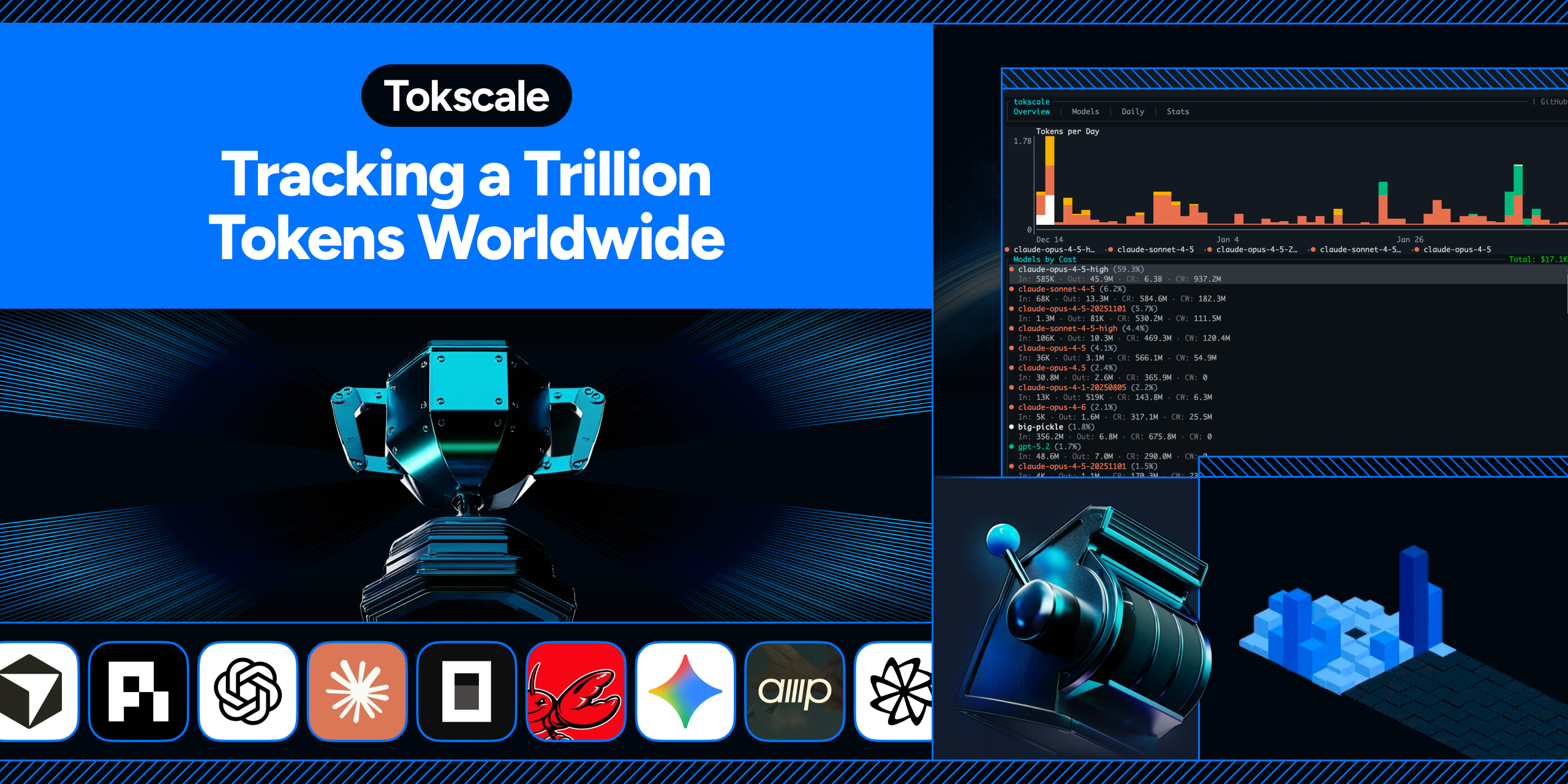](https://tokscale.ai)
[](https://github.com/junhoyeo/tokscale/releases)
[](https://www.npmjs.com/package/tokscale)
[](https://github.com/junhoyeo/tokscale/graphs/contributors)
[](https://github.com/junhoyeo/tokscale/network/members)
[](https://github.com/junhoyeo/tokscale/stargazers)
[](https://github.com/junhoyeo/tokscale/issues)
[](https://github.com/junhoyeo/tokscale/blob/master/LICENSE)
[🇺🇸 English](README.md) | [🇰🇷 한국어](README.ko.md) | [🇯🇵 日本語](README.ja.md) | [🇨🇳 简体中文](README.zh-cn.md)
| 概览 | 模型 |
|:---:|:---:|
| 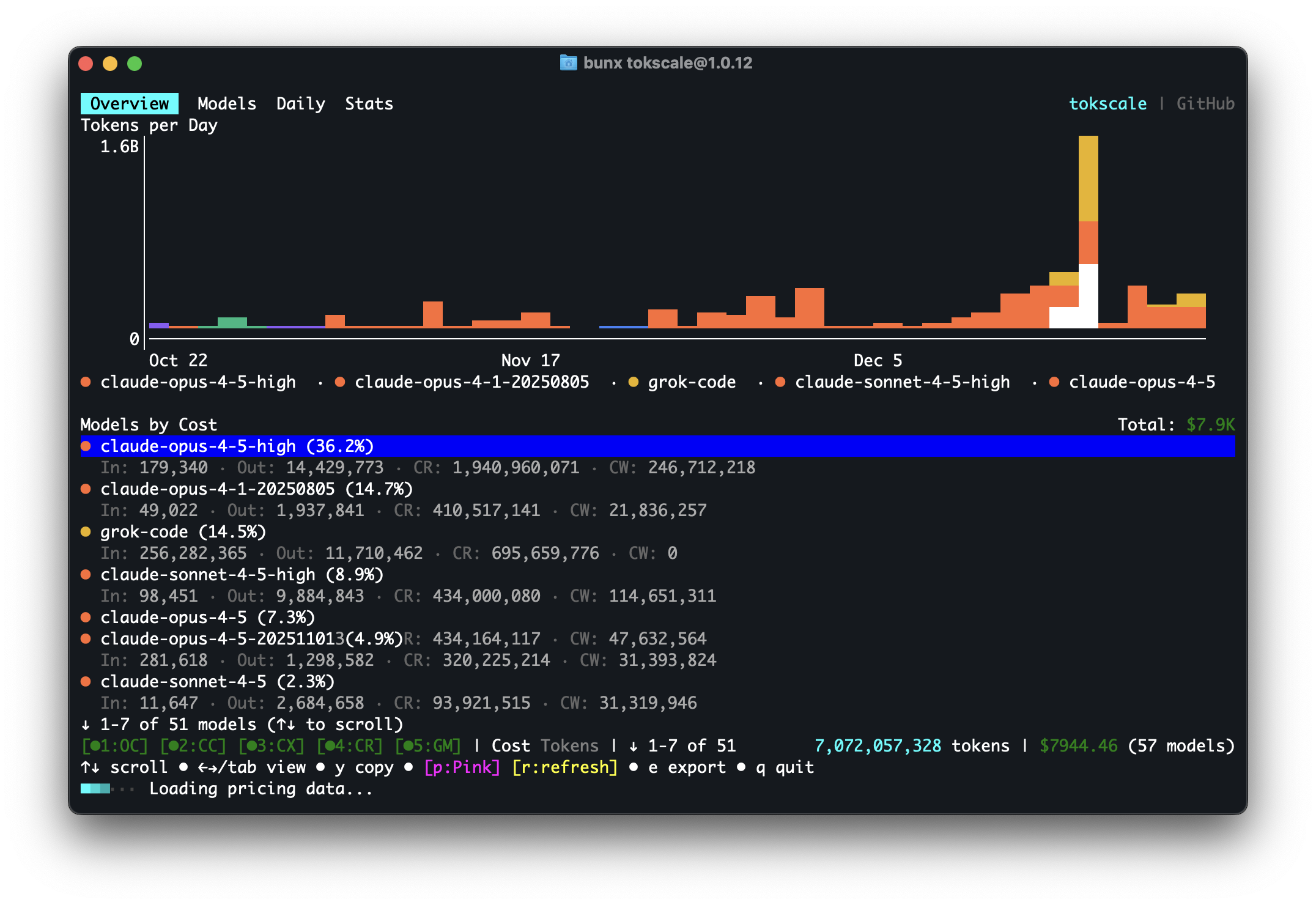 | 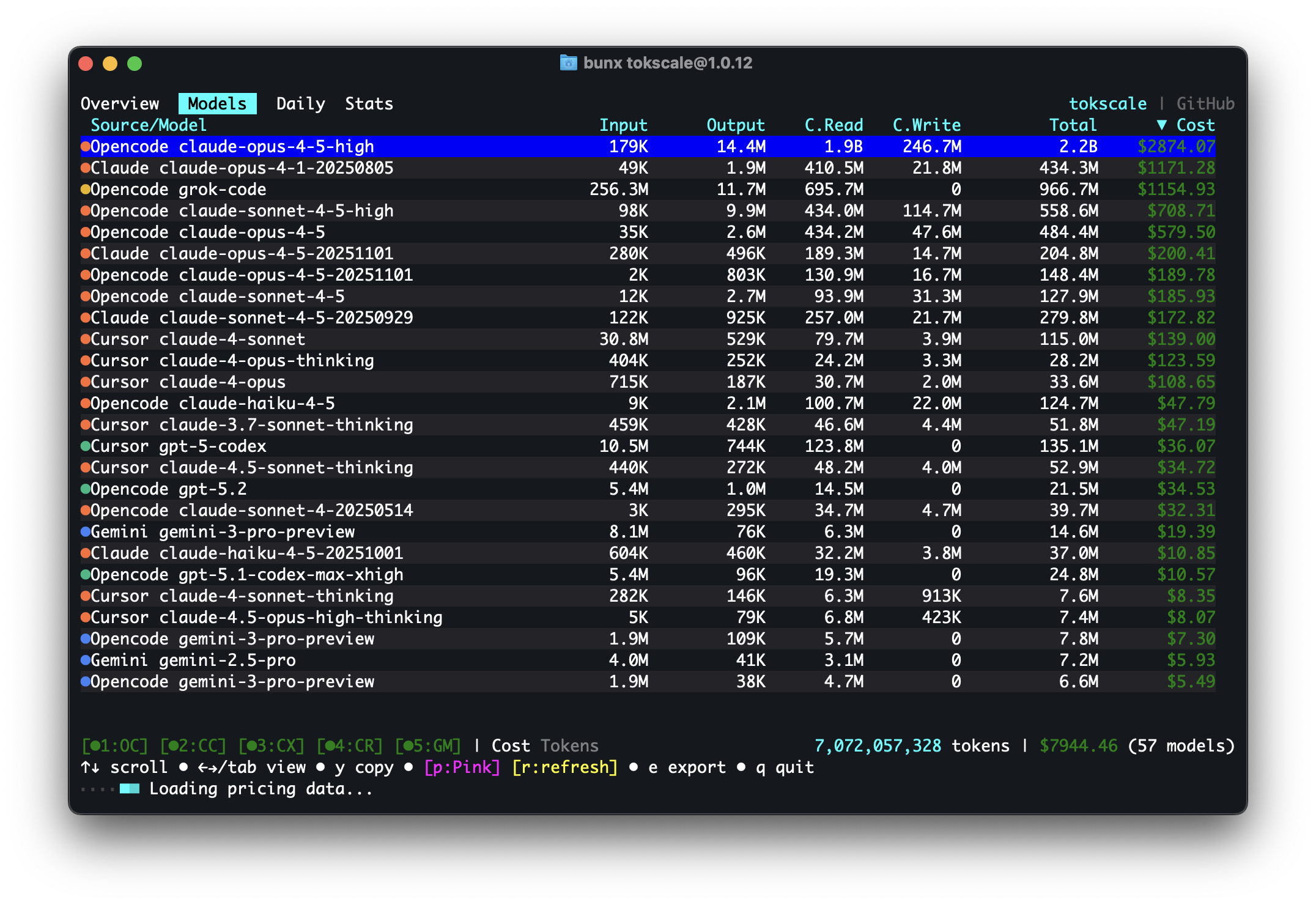 |
| 每日摘要 | 统计 |
|:---:|:---:|
| 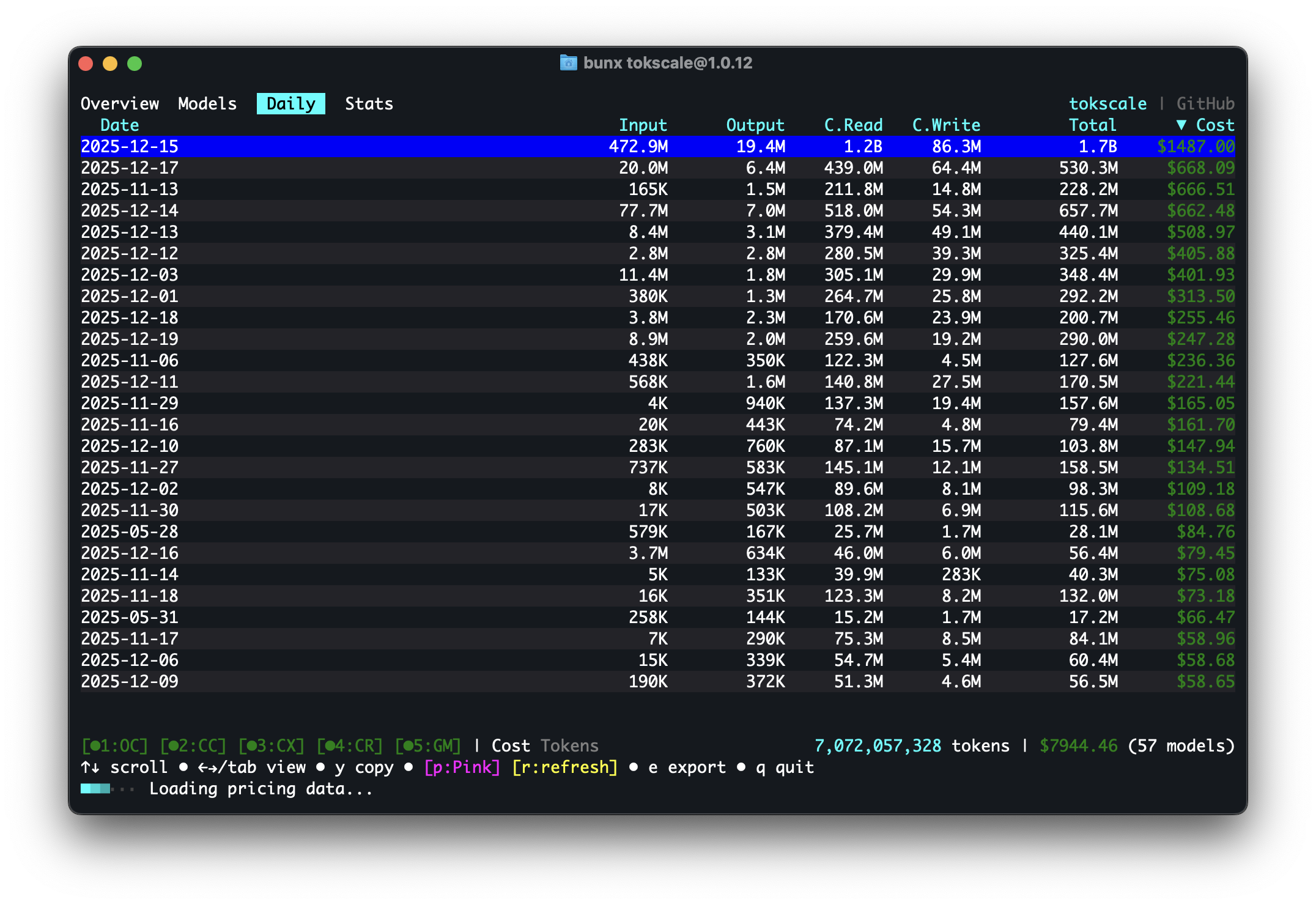 | 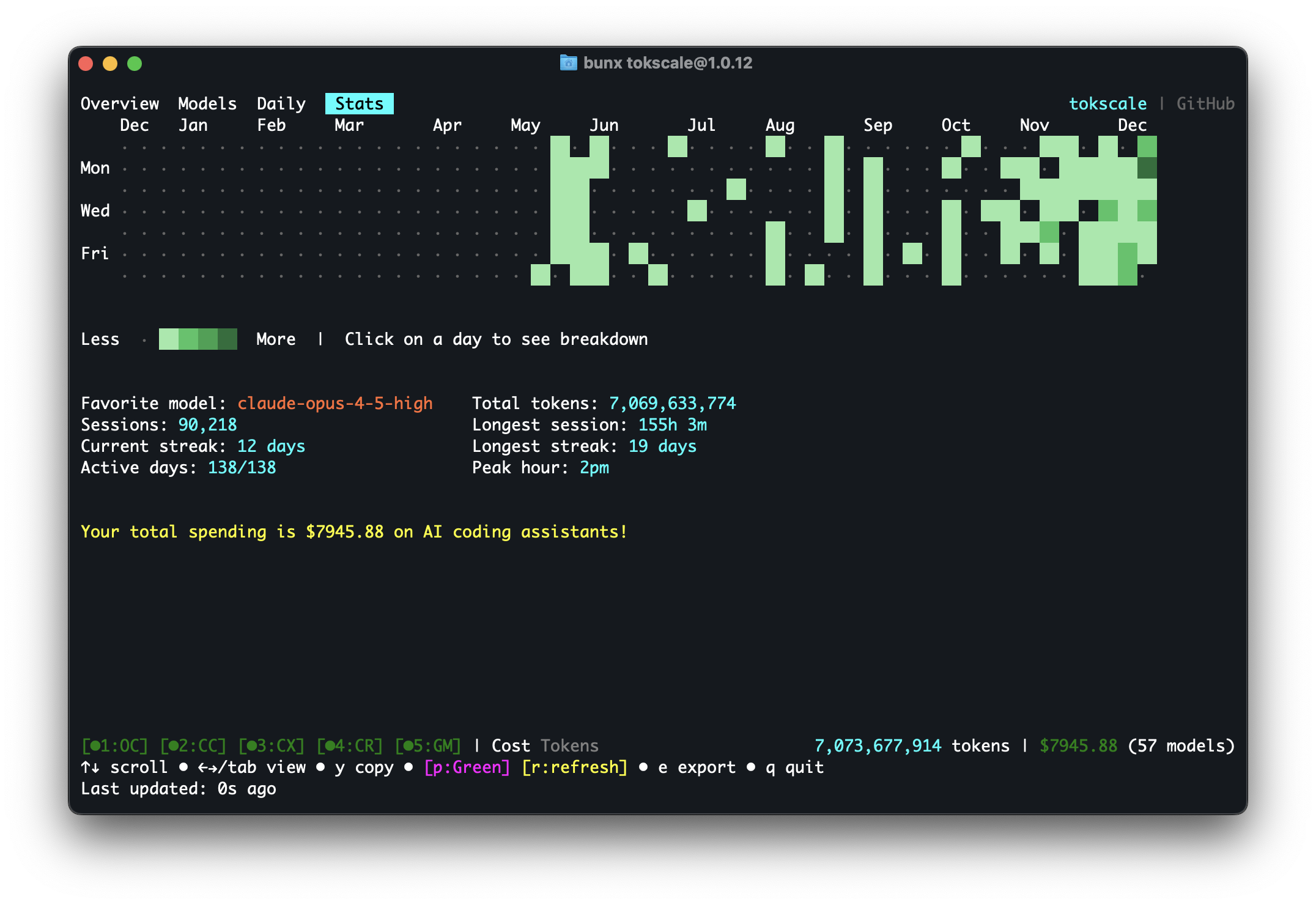 |
| 前端 (3D 贡献图) | 2025 年度回顾 |
|:---:|:---:|
| 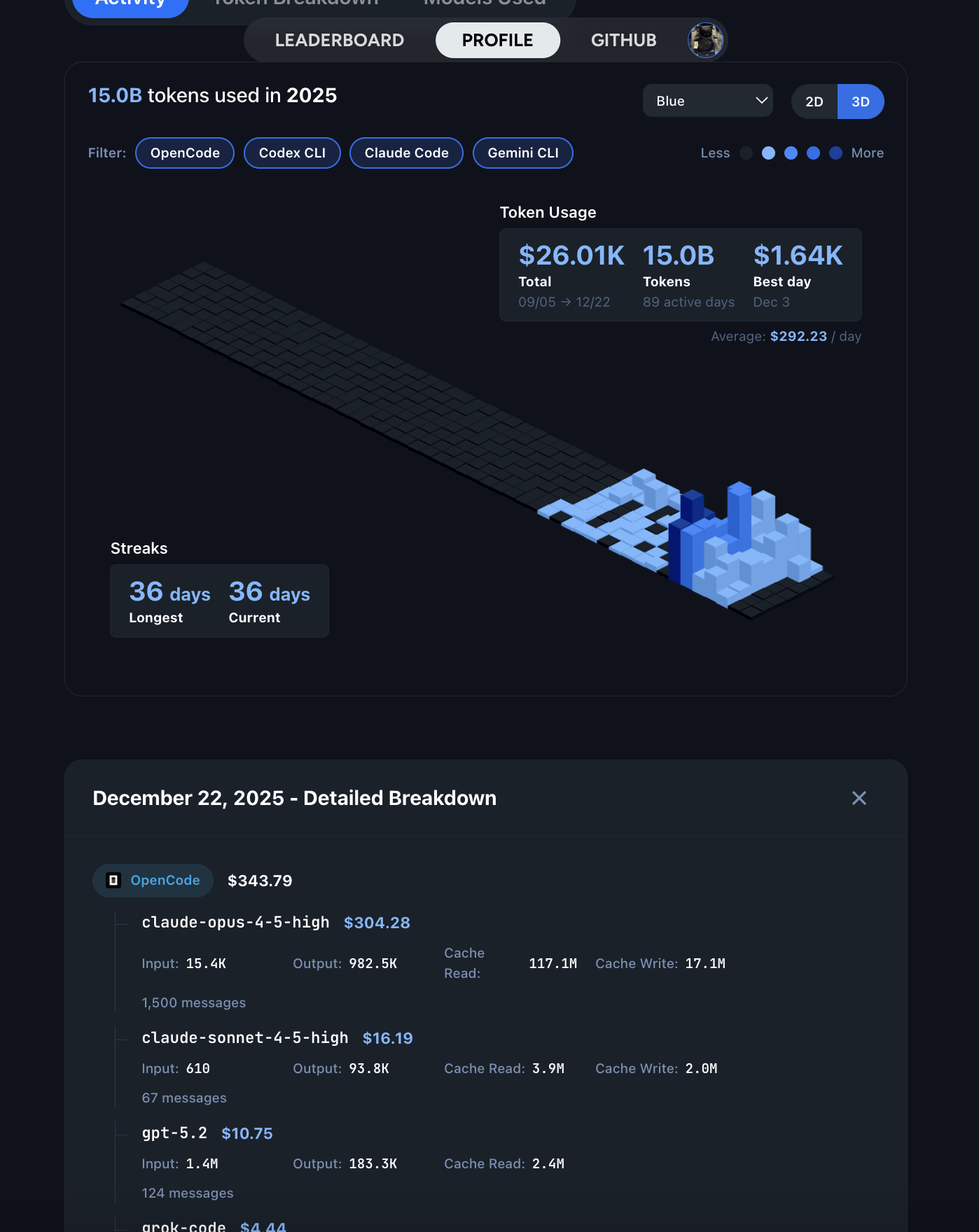 |
| 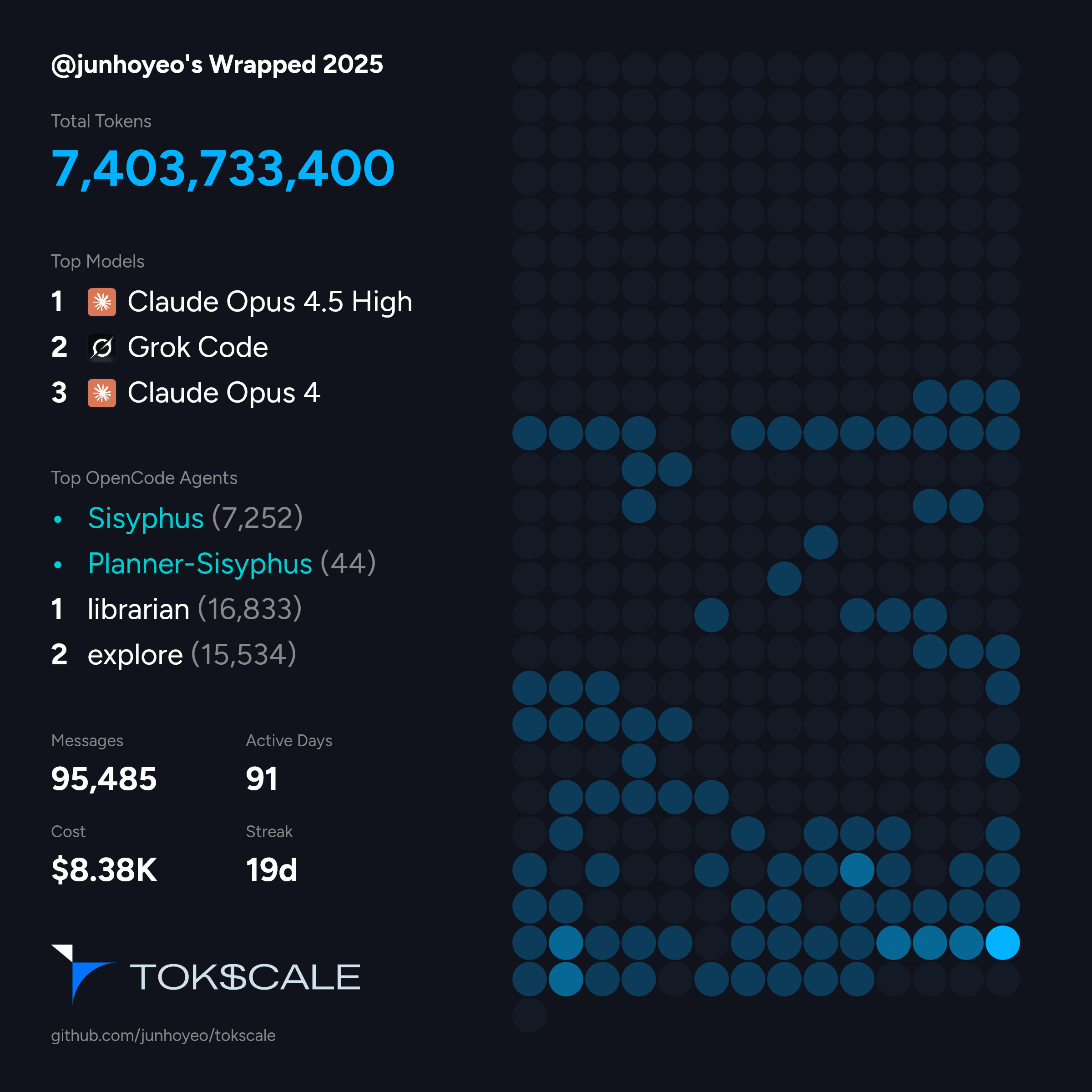 |
## 概览
**Tokscale** 帮助你监控和分析来自以下来源的 token 消耗:
| Logo | 客户端 | 数据位置 | 支持情况 |
|------|----------|---------------|-----------|
|
|
## 概览
**Tokscale** 帮助你监控和分析来自以下来源的 token 消耗:
| Logo | 客户端 | 数据位置 | 支持情况 |
|------|----------|---------------|-----------|
|  | [OpenCode](https://github.com/sst/opencode) | `~/.local/share/opencode/opencode.db` (1.2+) 或/和 `~/.local/share/opencode/storage/message/` (旧版/未迁移) | ✅ 是 |
|
| [OpenCode](https://github.com/sst/opencode) | `~/.local/share/opencode/opencode.db` (1.2+) 或/和 `~/.local/share/opencode/storage/message/` (旧版/未迁移) | ✅ 是 |
|  | [Claude Code](https://docs.anthropic.com/en/docs/claude-code) | `~/.claude/projects/` | ✅ 是 |
|
| [Claude Code](https://docs.anthropic.com/en/docs/claude-code) | `~/.claude/projects/` | ✅ 是 |
|  | [OpenClaw](https://openclaw.ai/) | `~/.openclaw/agents/` (+ 旧版: `.clawdbot`, `.moltbot`, `.moldbot`) | ✅ 是 |
|
| [OpenClaw](https://openclaw.ai/) | `~/.openclaw/agents/` (+ 旧版: `.clawdbot`, `.moltbot`, `.moldbot`) | ✅ 是 |
|  | [Codex CLI](https://github.com/openai/codex) | `~/.codex/sessions/` | ✅ 是 |
|
| [Codex CLI](https://github.com/openai/codex) | `~/.codex/sessions/` | ✅ 是 |
|  | [Gemini CLI](https://github.com/google-gemini/gemini-cli) | `~/.gemini/tmp/*/chats/*.json` | ✅ 是 |
|
| [Gemini CLI](https://github.com/google-gemini/gemini-cli) | `~/.gemini/tmp/*/chats/*.json` | ✅ 是 |
|  | [Cursor IDE](https://cursor.com/) | 通过 `~/.config/tokscale/cursor-cache/` 进行 API 同步 | ✅ 是 |
|
| [Cursor IDE](https://cursor.com/) | 通过 `~/.config/tokscale/cursor-cache/` 进行 API 同步 | ✅ 是 |
|  | [Amp (AmpCode)](https://ampcode.com/) | `~/.local/share/amp/threads/` | ✅ 是 |
|
| [Amp (AmpCode)](https://ampcode.com/) | `~/.local/share/amp/threads/` | ✅ 是 |
|  | [Droid (Factory Droid)](https://factory.ai/) | `~/.factory/sessions/` | ✅ 是 |
|
| [Droid (Factory Droid)](https://factory.ai/) | `~/.factory/sessions/` | ✅ 是 |
|  | [Pi](https://github.com/badlogic/pi-mono) | `~/.pi/agent/sessions/` | ✅ 是 |
|
| [Pi](https://github.com/badlogic/pi-mono) | `~/.pi/agent/sessions/` | ✅ 是 |
|  | [Kimi CLI](https://github.com/MoonshotAI/kimi-cli) | `~/.kimi/sessions/` | ✅ 是 |
|
| [Kimi CLI](https://github.com/MoonshotAI/kimi-cli) | `~/.kimi/sessions/` | ✅ 是 |
|  | [Qwen CLI](https://github.com/QwenLM/qwen-cli) | `~/.qwen/projects/` | ✅ 是 |
|
| [Qwen CLI](https://github.com/QwenLM/qwen-cli) | `~/.qwen/projects/` | ✅ 是 |
|  | [Roo Code](https://github.com/RooCodeInc/Roo-Code) | `~/.config/Code/User/globalStorage/rooveterinaryinc.roo-cline/tasks/` (+ 服务端: `~/.vscode-server/data/User/globalStorage/rooveterinaryinc.roo-cline/tasks/`) | ✅ 是 |
|
| [Roo Code](https://github.com/RooCodeInc/Roo-Code) | `~/.config/Code/User/globalStorage/rooveterinaryinc.roo-cline/tasks/` (+ 服务端: `~/.vscode-server/data/User/globalStorage/rooveterinaryinc.roo-cline/tasks/`) | ✅ 是 |
|  | [Kilo](https://github.com/Kilo-Org/kilocode) | `~/.config/Code/User/globalStorage/kilocode.kilo-code/tasks/` (+ 服务端: `~/.vscode-server/data/User/globalStorage/kilocode.kilo-code/tasks/`) | ✅ 是 |
|
| [Kilo](https://github.com/Kilo-Org/kilocode) | `~/.config/Code/User/globalStorage/kilocode.kilo-code/tasks/` (+ 服务端: `~/.vscode-server/data/User/globalStorage/kilocode.kilo-code/tasks/`) | ✅ 是 |
|  | [Mux](https://github.com/coder/mux) | `~/.mux/sessions/` | ✅ 是 |
|
| [Mux](https://github.com/coder/mux) | `~/.mux/sessions/` | ✅ 是 |
|  | [Synthetic](https://synthetic.new/) | 通过 `hf:` 模型前缀或 `synthetic` 提供商从其他来源重新归因 (+ [Octofriend](https://github.com/synthetic-lab/octofriend): `~/.local/share/octofriend/sqlite.db`) | ✅ 是 |
使用 [🚅 LiteLLM 的定价数据](https://github.com/BerriAI/litellm) 获取实时价格计算,支持阶梯定价模型和缓存 token 折扣。
### 为什么叫 "Tokscale"?
[](https://tokscale.ai)
本项目的灵感来源于 **[卡尔达肖夫指数](https://en.wikipedia.org/wiki/Kardashev_scale)**,这是天体物理学家尼古拉·卡尔达肖夫提出的一种方法,用于根据能源消耗量来衡量文明的科技发展水平。I 型文明利用其行星上所有可用的能量,II 型文明捕获其恒星的全部输出,III 型文明则掌控整个银河系的能量。
在 AI 辅助开发的时代,**token 就是新的能量**。它们为我们的推理提供动力,提升我们的生产力,并推动我们的创造性产出。正如卡尔达肖夫指数追踪宇宙尺度的能源消耗一样,Tokscale 衡量你的 token 消耗,助你在 AI 增强开发的阶梯上攀升。无论你是普通用户还是每天消耗数百万 token 的重度用户,Tokscale 都能帮助你可视化你的进阶之旅——从行星级开发者到银河系代码架构师。
## 目录
- [概览](#overview)
- [为什么叫 "Tokscale"?](#why-tokscale)
- [功能特性](#features)
- [安装](#installation)
- [快速开始](#quick-start)
- [前置条件](#prerequisites)
- [开发环境设置](#development-setup)
- [构建原生模块](#building-the-native-module)
- [使用方法](#usage)
- [基本命令](#basic-commands)
- [TUI 功能](#tui-features)
- [按平台筛选](#filtering-by-platform)
- [日期筛选](#date-filtering)
- [价格查询](#pricing-lookup)
- [社交](#social)
- [Cursor IDE 命令](#cursor-ide-commands)
- [示例输出](#example-output---light-version)
- [配置](#configuration)
- [环境变量](#environment-variables)
- [前端可视化](#frontend-visualization)
- [功能特性](#features-1)
- [运行前端](#running-the-frontend)
- [社交平台](#social-platform)
- [功能特性](#features-2)
- [入门指南](#getting-started)
- [数据验证](#data-validation)
- [2025 年度回顾](#wrapped-2025)
- [命令](#command)
- [包含内容](#whats-included)
- [开发](#development)
- [前置条件](#prerequisites-1)
- [如何运行](#how-to-run)
- [支持的平台](#supported-platforms)
- [原生模块目标](#native-module-targets)
- [Windows 支持](#windows-support)
- [会话数据保留](#session-data-retention)
- [数据来源](#data-sources)
- [定价](#pricing)
- [贡献](#contributing)
- [开发指南](#development-guidelines)
- [致谢](#acknowledgments)
- [许可证](#license)
## 功能特性
- **交互式 TUI 模式** - 由 Ratatui 驱动的精美终端 UI(默认模式)
- 4 个交互式视图:概览、模型、每日、统计
- 键盘和鼠标导航
- GitHub 风格的贡献图,提供 9 种颜色主题
- 实时筛选和排序
- 零闪烁渲染
- **多平台支持** - 追踪 OpenCode、Claude Code、Codex CLI、Cursor IDE、Gemini CLI、Amp、Droid、OpenClaw、Pi、Kimi CLI、Qwen CLI、Roo Code、Kilo、Mux 和 Synthetic 的使用情况
- **实时定价** - 从 LiteLLM 获取当前定价,磁盘缓存 1 小时;自动 OpenRouter 回退以及针对新发布模型的 Cursor 模型定价
- **详细分类** - 输入、输出、缓存读/写和推理 token 追踪
- **Rust 原生核心** - 所有解析和聚合均在 Rust 中完成,处理速度提升 10 倍
- **Web 可视化** - 具有 2D 和 3D 视图的交互式贡献图
- **灵活筛选** - 按平台、日期范围或年份筛选
- **导出为 JSON** - 为外部可视化工具生成数据
- **社交平台** - 分享你的使用情况,在排行榜上竞争,查看公开资料
## 安装
### 快速开始
```
# 直接使用 npx 运行
npx tokscale@latest
# 或使用 bunx
bunx tokscale@latest
# 浅色模式(仅表格渲染)
npx tokscale@latest --light
```
就是这样!这为你提供了完整的交互式 TUI 体验,零配置。
### 前置条件
- [Node.js](https://nodejs.org/) 或 [Bun](https://bun.sh/)
- (可选)Rust 工具链,用于从源码构建原生模块
### 开发环境设置
用于本地开发或从源码构建:
```
# 克隆仓库
git clone https://github.com/junhoyeo/tokscale.git
cd tokscale
# 安装 Bun(如果尚未安装)
curl -fsSL https://bun.sh/install | bash
# 安装依赖
bun install
# 在开发模式下运行 CLI
bun run cli
```
### 构建原生模块
原生 Rust 模块是 CLI 操作**必需**的。它通过并行文件扫描和 SIMD JSON 解析提供约 10 倍的处理速度:
```
# 构建原生核心(从仓库根目录运行)
bun run build:core
```
## 使用方法
### 基本命令
```
# 启动交互式 TUI(默认)
tokscale
# 启动 TUI 并指定标签页
tokscale models # Models tab
tokscale monthly # Daily view (shows daily breakdown)
# 使用旧版 CLI 表格输出
tokscale --light
tokscale models --light
# 显式启动 TUI
tokscale tui
# 将贡献图数据导出为 JSON
tokscale graph --output data.json
# 以 JSON 格式输出数据(用于脚本/自动化)
tokscale --json # Default models view as JSON
tokscale models --json # Models breakdown as JSON
tokscale monthly --json # Monthly breakdown as JSON
tokscale models --json > report.json # Save to file
```
### TUI 功能
交互式 TUI 模式提供:
- **4 个视图**:概览(图表 + 热门模型)、模型、每日、统计(贡献图)
- **键盘导航**:
- `1-4` 或 `←/→/Tab`:切换视图
- `↑/↓`:导航列表
- `c/d/t`:按成本/日期/token 排序
- `s`:打开来源选择对话框
- `g`:打开分组方式选择对话框(model, client+model, client+provider+model)
- `p`:循环切换 9 种颜色主题
- `r`:刷新数据
- `e`:导出为 JSON
- `q`:退出
- **鼠标支持**:点击选项卡、按钮和筛选器
- **主题**:绿色、万圣节、青色、蓝色、粉色、紫色、橙色、单色、黄绿蓝
- **设置持久化**:偏好设置保存至 `~/.config/tokscale/settings.json`(参见 [配置](#configuration))
### 分组策略
在 TUI 中 `g` 或在 `--light`/`--json` 模式下使用 `--group-by` 来控制模型行的聚合方式:
| 策略 | 标志 | TUI 默认 | 效果 |
|----------|------|-------------|--------|
| **模型** | `--group-by model` | ✅ | 每个模型一行 — 合并所有客户端和提供商 |
| **客户端 + 模型** | `--group-by client,model` | | 每个客户端-模型对一行 |
| **客户端 + 提供商 + 模型** | `--group-by client,provider,model` | | 最细粒度 — 不合并 |
**`--group-by model`**(最合并)
| 客户端 | 提供商 | 模型 | 成本 |
|---------|-----------|-------|------|
| OpenCode, Claude, Amp | github-copilot, anthropic | claude-opus-4-5 | $2,424 |
| OpenCode, Claude | anthropic, github-copilot | claude-sonnet-4-5 | $1,332 |
**`--group-by client,model`**(CLI 默认)
| 客户端 | 提供商 | 模型 | 成本 |
|--------|----------|-------|------|
| OpenCode | github-copilot, anthropic | claude-opus-4-5 | $1,368 |
| Claude | anthropic | claude-opus-4-5 | $970 |
**`--group-by client,provider,model`**(最细粒度)
| 客户端 | 提供商 | 模型 | 成本 |
|--------|----------|-------|------|
| OpenCode | github-copilot | claude-opus-4-5 | $1,200 |
| OpenCode | anthropic | claude-opus-4-5 | $168 |
| Claude | anthropic | claude-opus-4-5 | $970 |
### 按平台筛选
```
# 仅显示 OpenCode 使用情况
tokscale --opencode
# 仅显示 Claude Code 使用情况
tokscale --claude
# 仅显示 Codex CLI 使用情况
tokscale --codex
# 仅显示 Gemini CLI 使用情况
tokscale --gemini
# 仅显示 Cursor IDE 使用情况(需先运行 `tokscale cursor login`)
tokscale --cursor
# 仅显示 Amp 使用情况
tokscale --amp
# 仅显示 Droid 使用情况
tokscale --droid
# 仅显示 OpenClaw 使用情况
tokscale --openclaw
# 仅显示 Pi 使用情况
tokscale --pi
# 仅显示 Kimi CLI 使用情况
tokscale --kimi
# 仅显示 Qwen CLI 使用情况
tokscale --qwen
# 仅显示 Roo Code 使用情况
tokscale --roocode
# 仅显示 Kilo 使用情况
tokscale --kilocode
# 仅显示 Mux 使用情况
tokscale --mux
# 仅显示 Synthetic (synthetic.new) 使用情况
tokscale --synthetic
# 组合过滤器
tokscale --opencode --claude
```
### 日期筛选
日期筛选器适用于所有生成报告的命令(`tokscale`、`tokscale models`、`tokscale monthly`、`tokscale graph`):
```
# 快速日期快捷方式
tokscale --today # Today only
tokscale --week # Last 7 days
tokscale --month # Current calendar month
# 自定义日期范围(包含边界,本地时区)
tokscale --since 2024-01-01 --until 2024-12-31
# 按年份过滤
tokscale --year 2024
# 与其他选项组合
tokscale models --week --claude --json
tokscale monthly --month --benchmark
```
### 价格查询
查询任何模型的实时价格:
```
# 查询模型定价
tokscale pricing "claude-3-5-sonnet-20241022"
tokscale pricing "gpt-4o"
tokscale pricing "grok-code"
# 强制指定 Provider 来源
tokscale pricing "grok-code" --provider openrouter
tokscale pricing "claude-3-5-sonnet" --provider litellm
```
**查询策略:**
价格查询使用多步骤解析策略:
1. **精确匹配** - 在 LiteLLM/OpenRouter 数据库中直接查找
2. **别名解析** - 解析友好名称(例如 `big-pickle` → `glm-4.7`)
3. **层级后缀剥离** - 移除质量层级(`gpt-5.2-xhigh` → `gpt-5.2`)
4. **版本标准化** - 处理版本格式(`claude-3-5-sonnet` ↔ `claude-3.5-sonnet`)
5. **提供商前缀匹配** - 尝试常见前缀(`anthropic/`、`openai/` 等)
6. **Cursor 模型定价** - 针对 LiteLLM/OpenRouter 中尚不存在的模型(例如 `gpt-5.3-codex`)的硬编码定价
7. **模糊匹配** - 针对部分模型名称的词边界匹配
**提供商优先级:**
当存在多个匹配时,原始模型创建者优先于转售商:
| 优先(原始) | 降级(转售商) |
|---------------------|-------------------------|
| `xai/` (Grok) | `azure_ai/` |
| `anthropic/` (Claude) | `bedrock/` |
| `openai/` (GPT) | `vertex_ai/` |
| `google/` (Gemini) | `together_ai/` |
| `meta-llama/` | `fireworks_ai/` |
示例:`grok-code` 匹配 `xai/grok-code-fast-1` ($0.20/$1.50) 而非 `azure_ai/grok-code-fast-1` ($3.50/$17.50)。
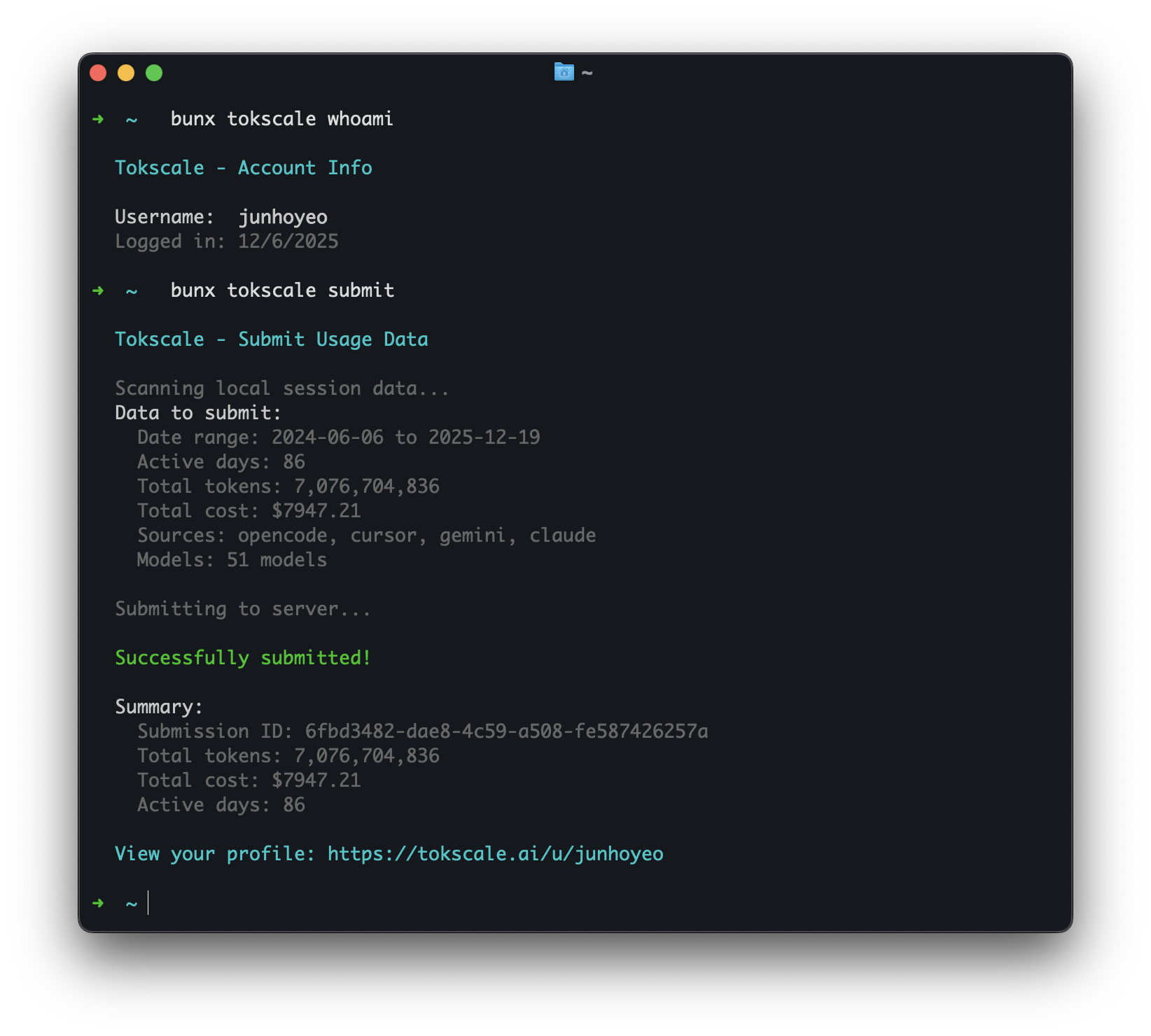
### 社交
```
# 登录 Tokscale(打开浏览器进行 GitHub 认证)
tokscale login
# 查看当前登录用户
tokscale whoami
# 提交使用数据到排行榜
tokscale submit
# 带过滤器提交
tokscale submit --opencode --claude --since 2024-01-01
# 预览提交内容(dry run)
tokscale submit --dry-run
# 登出
tokscale logout
```
| [Synthetic](https://synthetic.new/) | 通过 `hf:` 模型前缀或 `synthetic` 提供商从其他来源重新归因 (+ [Octofriend](https://github.com/synthetic-lab/octofriend): `~/.local/share/octofriend/sqlite.db`) | ✅ 是 |
使用 [🚅 LiteLLM 的定价数据](https://github.com/BerriAI/litellm) 获取实时价格计算,支持阶梯定价模型和缓存 token 折扣。
### 为什么叫 "Tokscale"?
[](https://tokscale.ai)
本项目的灵感来源于 **[卡尔达肖夫指数](https://en.wikipedia.org/wiki/Kardashev_scale)**,这是天体物理学家尼古拉·卡尔达肖夫提出的一种方法,用于根据能源消耗量来衡量文明的科技发展水平。I 型文明利用其行星上所有可用的能量,II 型文明捕获其恒星的全部输出,III 型文明则掌控整个银河系的能量。
在 AI 辅助开发的时代,**token 就是新的能量**。它们为我们的推理提供动力,提升我们的生产力,并推动我们的创造性产出。正如卡尔达肖夫指数追踪宇宙尺度的能源消耗一样,Tokscale 衡量你的 token 消耗,助你在 AI 增强开发的阶梯上攀升。无论你是普通用户还是每天消耗数百万 token 的重度用户,Tokscale 都能帮助你可视化你的进阶之旅——从行星级开发者到银河系代码架构师。
## 目录
- [概览](#overview)
- [为什么叫 "Tokscale"?](#why-tokscale)
- [功能特性](#features)
- [安装](#installation)
- [快速开始](#quick-start)
- [前置条件](#prerequisites)
- [开发环境设置](#development-setup)
- [构建原生模块](#building-the-native-module)
- [使用方法](#usage)
- [基本命令](#basic-commands)
- [TUI 功能](#tui-features)
- [按平台筛选](#filtering-by-platform)
- [日期筛选](#date-filtering)
- [价格查询](#pricing-lookup)
- [社交](#social)
- [Cursor IDE 命令](#cursor-ide-commands)
- [示例输出](#example-output---light-version)
- [配置](#configuration)
- [环境变量](#environment-variables)
- [前端可视化](#frontend-visualization)
- [功能特性](#features-1)
- [运行前端](#running-the-frontend)
- [社交平台](#social-platform)
- [功能特性](#features-2)
- [入门指南](#getting-started)
- [数据验证](#data-validation)
- [2025 年度回顾](#wrapped-2025)
- [命令](#command)
- [包含内容](#whats-included)
- [开发](#development)
- [前置条件](#prerequisites-1)
- [如何运行](#how-to-run)
- [支持的平台](#supported-platforms)
- [原生模块目标](#native-module-targets)
- [Windows 支持](#windows-support)
- [会话数据保留](#session-data-retention)
- [数据来源](#data-sources)
- [定价](#pricing)
- [贡献](#contributing)
- [开发指南](#development-guidelines)
- [致谢](#acknowledgments)
- [许可证](#license)
## 功能特性
- **交互式 TUI 模式** - 由 Ratatui 驱动的精美终端 UI(默认模式)
- 4 个交互式视图:概览、模型、每日、统计
- 键盘和鼠标导航
- GitHub 风格的贡献图,提供 9 种颜色主题
- 实时筛选和排序
- 零闪烁渲染
- **多平台支持** - 追踪 OpenCode、Claude Code、Codex CLI、Cursor IDE、Gemini CLI、Amp、Droid、OpenClaw、Pi、Kimi CLI、Qwen CLI、Roo Code、Kilo、Mux 和 Synthetic 的使用情况
- **实时定价** - 从 LiteLLM 获取当前定价,磁盘缓存 1 小时;自动 OpenRouter 回退以及针对新发布模型的 Cursor 模型定价
- **详细分类** - 输入、输出、缓存读/写和推理 token 追踪
- **Rust 原生核心** - 所有解析和聚合均在 Rust 中完成,处理速度提升 10 倍
- **Web 可视化** - 具有 2D 和 3D 视图的交互式贡献图
- **灵活筛选** - 按平台、日期范围或年份筛选
- **导出为 JSON** - 为外部可视化工具生成数据
- **社交平台** - 分享你的使用情况,在排行榜上竞争,查看公开资料
## 安装
### 快速开始
```
# 直接使用 npx 运行
npx tokscale@latest
# 或使用 bunx
bunx tokscale@latest
# 浅色模式(仅表格渲染)
npx tokscale@latest --light
```
就是这样!这为你提供了完整的交互式 TUI 体验,零配置。
### 前置条件
- [Node.js](https://nodejs.org/) 或 [Bun](https://bun.sh/)
- (可选)Rust 工具链,用于从源码构建原生模块
### 开发环境设置
用于本地开发或从源码构建:
```
# 克隆仓库
git clone https://github.com/junhoyeo/tokscale.git
cd tokscale
# 安装 Bun(如果尚未安装)
curl -fsSL https://bun.sh/install | bash
# 安装依赖
bun install
# 在开发模式下运行 CLI
bun run cli
```
### 构建原生模块
原生 Rust 模块是 CLI 操作**必需**的。它通过并行文件扫描和 SIMD JSON 解析提供约 10 倍的处理速度:
```
# 构建原生核心(从仓库根目录运行)
bun run build:core
```
## 使用方法
### 基本命令
```
# 启动交互式 TUI(默认)
tokscale
# 启动 TUI 并指定标签页
tokscale models # Models tab
tokscale monthly # Daily view (shows daily breakdown)
# 使用旧版 CLI 表格输出
tokscale --light
tokscale models --light
# 显式启动 TUI
tokscale tui
# 将贡献图数据导出为 JSON
tokscale graph --output data.json
# 以 JSON 格式输出数据(用于脚本/自动化)
tokscale --json # Default models view as JSON
tokscale models --json # Models breakdown as JSON
tokscale monthly --json # Monthly breakdown as JSON
tokscale models --json > report.json # Save to file
```
### TUI 功能
交互式 TUI 模式提供:
- **4 个视图**:概览(图表 + 热门模型)、模型、每日、统计(贡献图)
- **键盘导航**:
- `1-4` 或 `←/→/Tab`:切换视图
- `↑/↓`:导航列表
- `c/d/t`:按成本/日期/token 排序
- `s`:打开来源选择对话框
- `g`:打开分组方式选择对话框(model, client+model, client+provider+model)
- `p`:循环切换 9 种颜色主题
- `r`:刷新数据
- `e`:导出为 JSON
- `q`:退出
- **鼠标支持**:点击选项卡、按钮和筛选器
- **主题**:绿色、万圣节、青色、蓝色、粉色、紫色、橙色、单色、黄绿蓝
- **设置持久化**:偏好设置保存至 `~/.config/tokscale/settings.json`(参见 [配置](#configuration))
### 分组策略
在 TUI 中 `g` 或在 `--light`/`--json` 模式下使用 `--group-by` 来控制模型行的聚合方式:
| 策略 | 标志 | TUI 默认 | 效果 |
|----------|------|-------------|--------|
| **模型** | `--group-by model` | ✅ | 每个模型一行 — 合并所有客户端和提供商 |
| **客户端 + 模型** | `--group-by client,model` | | 每个客户端-模型对一行 |
| **客户端 + 提供商 + 模型** | `--group-by client,provider,model` | | 最细粒度 — 不合并 |
**`--group-by model`**(最合并)
| 客户端 | 提供商 | 模型 | 成本 |
|---------|-----------|-------|------|
| OpenCode, Claude, Amp | github-copilot, anthropic | claude-opus-4-5 | $2,424 |
| OpenCode, Claude | anthropic, github-copilot | claude-sonnet-4-5 | $1,332 |
**`--group-by client,model`**(CLI 默认)
| 客户端 | 提供商 | 模型 | 成本 |
|--------|----------|-------|------|
| OpenCode | github-copilot, anthropic | claude-opus-4-5 | $1,368 |
| Claude | anthropic | claude-opus-4-5 | $970 |
**`--group-by client,provider,model`**(最细粒度)
| 客户端 | 提供商 | 模型 | 成本 |
|--------|----------|-------|------|
| OpenCode | github-copilot | claude-opus-4-5 | $1,200 |
| OpenCode | anthropic | claude-opus-4-5 | $168 |
| Claude | anthropic | claude-opus-4-5 | $970 |
### 按平台筛选
```
# 仅显示 OpenCode 使用情况
tokscale --opencode
# 仅显示 Claude Code 使用情况
tokscale --claude
# 仅显示 Codex CLI 使用情况
tokscale --codex
# 仅显示 Gemini CLI 使用情况
tokscale --gemini
# 仅显示 Cursor IDE 使用情况(需先运行 `tokscale cursor login`)
tokscale --cursor
# 仅显示 Amp 使用情况
tokscale --amp
# 仅显示 Droid 使用情况
tokscale --droid
# 仅显示 OpenClaw 使用情况
tokscale --openclaw
# 仅显示 Pi 使用情况
tokscale --pi
# 仅显示 Kimi CLI 使用情况
tokscale --kimi
# 仅显示 Qwen CLI 使用情况
tokscale --qwen
# 仅显示 Roo Code 使用情况
tokscale --roocode
# 仅显示 Kilo 使用情况
tokscale --kilocode
# 仅显示 Mux 使用情况
tokscale --mux
# 仅显示 Synthetic (synthetic.new) 使用情况
tokscale --synthetic
# 组合过滤器
tokscale --opencode --claude
```
### 日期筛选
日期筛选器适用于所有生成报告的命令(`tokscale`、`tokscale models`、`tokscale monthly`、`tokscale graph`):
```
# 快速日期快捷方式
tokscale --today # Today only
tokscale --week # Last 7 days
tokscale --month # Current calendar month
# 自定义日期范围(包含边界,本地时区)
tokscale --since 2024-01-01 --until 2024-12-31
# 按年份过滤
tokscale --year 2024
# 与其他选项组合
tokscale models --week --claude --json
tokscale monthly --month --benchmark
```
### 价格查询
查询任何模型的实时价格:
```
# 查询模型定价
tokscale pricing "claude-3-5-sonnet-20241022"
tokscale pricing "gpt-4o"
tokscale pricing "grok-code"
# 强制指定 Provider 来源
tokscale pricing "grok-code" --provider openrouter
tokscale pricing "claude-3-5-sonnet" --provider litellm
```
**查询策略:**
价格查询使用多步骤解析策略:
1. **精确匹配** - 在 LiteLLM/OpenRouter 数据库中直接查找
2. **别名解析** - 解析友好名称(例如 `big-pickle` → `glm-4.7`)
3. **层级后缀剥离** - 移除质量层级(`gpt-5.2-xhigh` → `gpt-5.2`)
4. **版本标准化** - 处理版本格式(`claude-3-5-sonnet` ↔ `claude-3.5-sonnet`)
5. **提供商前缀匹配** - 尝试常见前缀(`anthropic/`、`openai/` 等)
6. **Cursor 模型定价** - 针对 LiteLLM/OpenRouter 中尚不存在的模型(例如 `gpt-5.3-codex`)的硬编码定价
7. **模糊匹配** - 针对部分模型名称的词边界匹配
**提供商优先级:**
当存在多个匹配时,原始模型创建者优先于转售商:
| 优先(原始) | 降级(转售商) |
|---------------------|-------------------------|
| `xai/` (Grok) | `azure_ai/` |
| `anthropic/` (Claude) | `bedrock/` |
| `openai/` (GPT) | `vertex_ai/` |
| `google/` (Gemini) | `together_ai/` |
| `meta-llama/` | `fireworks_ai/` |
示例:`grok-code` 匹配 `xai/grok-code-fast-1` ($0.20/$1.50) 而非 `azure_ai/grok-code-fast-1` ($3.50/$17.50)。
### 社交
```
# 登录 Tokscale(打开浏览器进行 GitHub 认证)
tokscale login
# 查看当前登录用户
tokscale whoami
# 提交使用数据到排行榜
tokscale submit
# 带过滤器提交
tokscale submit --opencode --claude --since 2024-01-01
# 预览提交内容(dry run)
tokscale submit --dry-run
# 登出
tokscale logout
```
 ### Cursor IDE 命令
Cursor IDE 需要通过会话 token 单独进行身份验证(不同于社交平台登录):
```
# 登录 Cursor(需要来自浏览器的会话令牌)
# --name 是可选的;它仅用于稍后识别账户
tokscale cursor login --name work
# 检查 Cursor 认证状态和会话有效性
tokscale cursor status
# 列出已保存的 Cursor 账户
tokscale cursor accounts
# 切换活动账户(控制哪个账户同步到 cursor-cache/usage.csv)
tokscale cursor switch work
# 登出特定账户(保留历史记录;将其排除在聚合之外)
tokscale cursor logout --name work
# 登出并删除该账户的缓存使用量
tokscale cursor logout --name work --purge-cache
# 登出所有 Cursor 账户(保留历史记录;排除在聚合之外)
tokscale cursor logout --all
# 登出所有账户并删除缓存使用量
tokscale cursor logout --all --purge-cache
```
默认情况下,tokscale **汇总所有已保存 Cursor 账户的使用情况**(所有 `cursor-cache/usage*.csv`)。
当你登出时,tokscale 会将缓存的使用历史移动到 `cursor-cache/archive/` 来保留它(因此不会被汇总)。如果你想删除缓存的使用数据,请使用 `--purge-cache`。
**凭据存储**:Cursor 账户存储在 `~/.config/tokscale/cursor-credentials.json` 中。使用数据缓存在 `~/.config/tokscale/cursor-cache/`(活跃账户使用 `usage.csv`,额外账户使用 `usage.
### Cursor IDE 命令
Cursor IDE 需要通过会话 token 单独进行身份验证(不同于社交平台登录):
```
# 登录 Cursor(需要来自浏览器的会话令牌)
# --name 是可选的;它仅用于稍后识别账户
tokscale cursor login --name work
# 检查 Cursor 认证状态和会话有效性
tokscale cursor status
# 列出已保存的 Cursor 账户
tokscale cursor accounts
# 切换活动账户(控制哪个账户同步到 cursor-cache/usage.csv)
tokscale cursor switch work
# 登出特定账户(保留历史记录;将其排除在聚合之外)
tokscale cursor logout --name work
# 登出并删除该账户的缓存使用量
tokscale cursor logout --name work --purge-cache
# 登出所有 Cursor 账户(保留历史记录;排除在聚合之外)
tokscale cursor logout --all
# 登出所有账户并删除缓存使用量
tokscale cursor logout --all --purge-cache
```
默认情况下,tokscale **汇总所有已保存 Cursor 账户的使用情况**(所有 `cursor-cache/usage*.csv`)。
当你登出时,tokscale 会将缓存的使用历史移动到 `cursor-cache/archive/` 来保留它(因此不会被汇总)。如果你想删除缓存的使用数据,请使用 `--purge-cache`。
**凭据存储**:Cursor 账户存储在 `~/.config/tokscale/cursor-credentials.json` 中。使用数据缓存在 `~/.config/tokscale/cursor-cache/`(活跃账户使用 `usage.csv`,额外账户使用 `usage.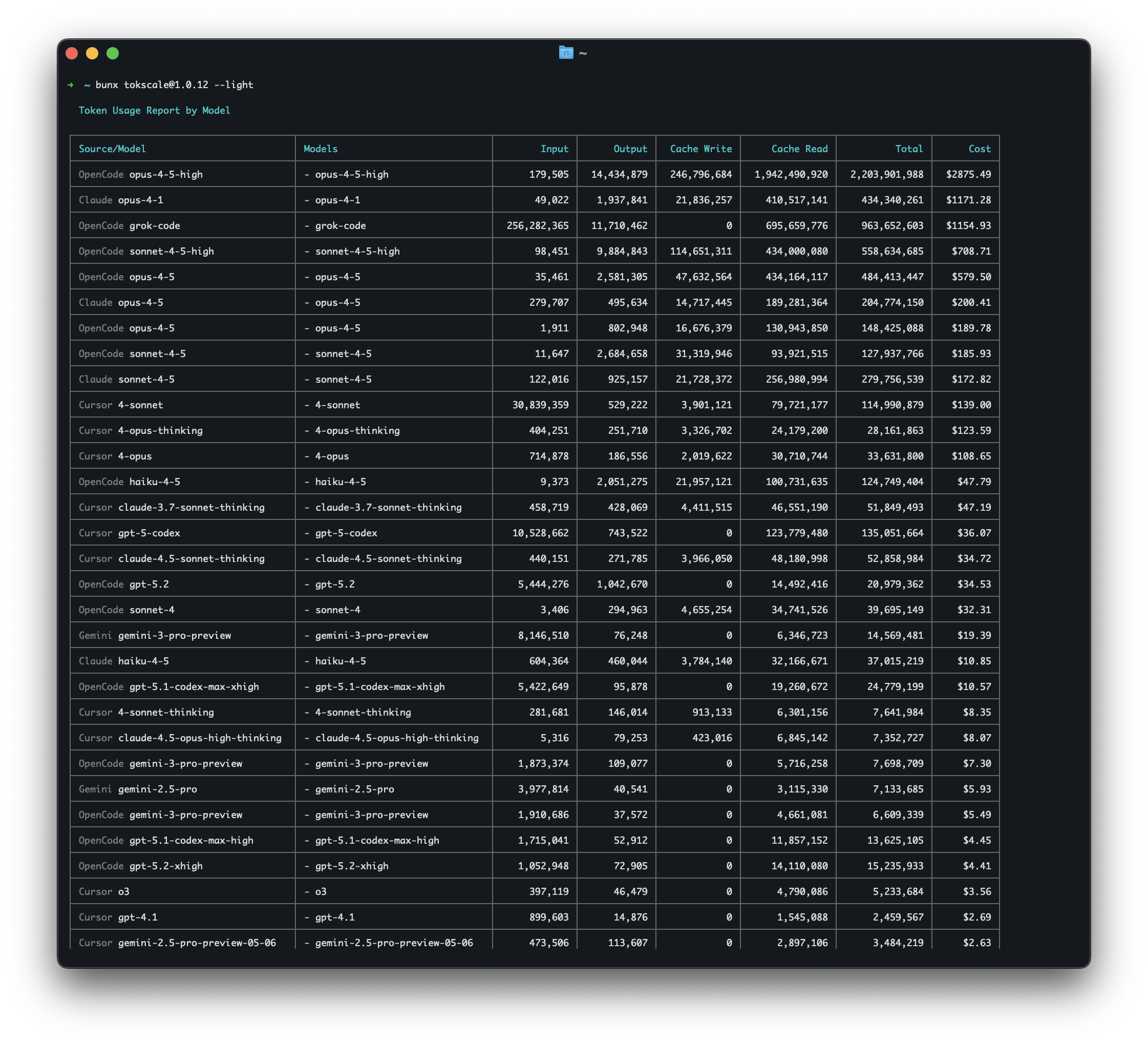 ### 配置
Tokscale 将设置存储在 `~/.config/tokscale/settings.json` 中:
```
{
"colorPalette": "blue",
"includeUnusedModels": false
}
```
| 设置 | 类型 | 默认值 | 描述 |
|---------|------|---------|-------------|
| `colorPalette` | string | `"blue"` | TUI 颜色主题 (green, halloween, teal, blue, pink, purple, orange, monochrome, ylgnbu) |
| `includeUnusedModels` | boolean | `false` | 在报告中显示零 token 的模型 |
| `autoRefreshEnabled` | boolean | `false` | 在 TUI 中启用自动刷新 |
| `autoRefreshMs` | number | `60000` | 自动刷新间隔 (30000-3600000ms) |
| `nativeTimeoutMs` | number | `300000` | 原生子进程处理的最长时间 (5000-3600000ms) |
### 环境变量
环境变量覆盖配置文件值。适用于 CI/CD 或一次性使用:
| 变量 | 默认值 | 描述 |
|----------|---------|-------------|
| `TOKSCALE_NATIVE_TIMEOUT_MS` | `300000` (5 分钟) | 覆盖 `nativeTimeoutMs` 配置 |
```
# 示例:为超大数据集增加超时时间
TOKSCALE_NATIVE_TIMEOUT_MS=600000 tokscale graph --output data.json
```
### 无头模式
Tokscale 可以从 **Codex CLI 无头输出** 中汇总 token 使用情况,用于自动化、CI/CD 流水线和批处理。
**什么是无头模式?**
当你使用 JSON 输出标志(例如 `codex exec --json`)运行 Codex CLI 时,它会将使用数据输出到 stdout,而不是存储在常规会话目录中。无头模式允许你捕获和追踪这种使用情况。
**存储位置:** `~/.config/tokscale/headless/`
在 macOS 上,当未设置 `TOKSCALE_HEADLESS_DIR` 时,Tokscale 还会扫描 `~/Library/Application Support/tokscale/headless/`。
Tokscale 自动扫描此目录结构:
```
~/.config/tokscale/headless/
└── codex/ # Codex CLI JSONL outputs
```
**环境变量:** 设置 `TOKSCALE_HEADLESS_DIR` 以自定义无头日志目录:
```
export TOKSCALE_HEADLESS_DIR="$HOME/my-custom-logs"
```
**推荐(自动捕获):**
| 工具 | 命令示例 |
|------|-----------------|
| **Codex CLI** | `tokscale headless codex exec -m gpt-5 "implement feature"` |
**手动重定向(可选):**
| 工具 | 命令示例 |
|------|-----------------|
| **Codex CLI** | `codex exec --json "implement feature" > ~/.config/tokscale/headless/codex/ci-run.jsonl` |
**诊断:**
```
# 显示扫描位置和 Headless 计数
tokscale sources
tokscale sources --json
```
**CI/CD 集成示例:**
```
# 在你的 GitHub Actions 工作流中
- name: Run AI automation
run: |
mkdir -p ~/.config/tokscale/headless/codex
codex exec --json "review code changes" \
> ~/.config/tokscale/headless/codex/pr-${{ github.event.pull_request.number }}.jsonl
# 稍后,追踪使用情况
- name: Report token usage
run: tokscale --json
```
## 前端可视化
前端提供 GitHub 风格的贡献图可视化:
### 功能特性
- **2D 视图**:经典 GitHub 贡献日历
- **3D 视图**:基于 token 使用高度的等距 3D 贡献图
- **多种调色板**:GitHub、GitLab、万圣节、冬季等
- **三向主题切换**:浅色 / 深色 / 系统(跟随 OS 偏好)
- **GitHub Primer 设计**:使用 GitHub 的官方颜色系统
- **交互式提示框**:悬停查看详细的每日分类
- **每日分类面板**:点击查看按来源和模型的详细信息
- **年份筛选**:在不同年份之间导航
- **来源筛选**:按平台筛选(OpenCode、Claude、Codex、Cursor、Gemini、Amp、Droid、OpenClaw、Pi、Kimi、Qwen、Roo Code、Kilo、Mux、Synthetic)
- **统计面板**:总成本、token 数、活跃天数、连续天数
- **FOUC 防护**:主题在 React 注水前应用(无闪烁)
### 运行前端
```
cd packages/frontend
bun install
bun run dev
```
打开 [http://localhost:3000](http://localhost:3000) 访问社交平台。
## 社交平台
Tokscale 包含一个社交平台,你可以在其中分享使用数据并与其他开发者竞争。
### 功能特性
- **排行榜** - 查看所有平台上 token 使用量最多的用户
- **用户资料** - 带有贡献图和统计数据的公开资料
- **周期筛选** - 查看所有时间、本月或本周的统计数据
- **GitHub 集成** - 使用 GitHub 账户登录
- **本地查看器** - 私下查看数据而无需提交
### GitHub 资料嵌入小部件
你可以直接在 GitHub 资料 README 中嵌入你的公开 Tokscale 统计数据:
```
[ |
| `includeUnusedModels` | boolean | `false` | 在报告中显示零 token 的模型 |
| `autoRefreshEnabled` | boolean | `false` | 在 TUI 中启用自动刷新 |
| `autoRefreshMs` | number | `60000` | 自动刷新间隔 (30000-3600000ms) |
| `nativeTimeoutMs` | number | `300000` | 原生子进程处理的最长时间 (5000-3600000ms) |
### 环境变量
环境变量覆盖配置文件值。适用于 CI/CD 或一次性使用:
| 变量 | 默认值 | 描述 |
|----------|---------|-------------|
| `TOKSCALE_NATIVE_TIMEOUT_MS` | `300000` (5 分钟) | 覆盖 `nativeTimeoutMs` 配置 |
```
# 示例:为超大数据集增加超时时间
TOKSCALE_NATIVE_TIMEOUT_MS=600000 tokscale graph --output data.json
```
### 无头模式
Tokscale 可以从 **Codex CLI 无头输出** 中汇总 token 使用情况,用于自动化、CI/CD 流水线和批处理。
**什么是无头模式?**
当你使用 JSON 输出标志(例如 `codex exec --json`)运行 Codex CLI 时,它会将使用数据输出到 stdout,而不是存储在常规会话目录中。无头模式允许你捕获和追踪这种使用情况。
**存储位置:** `~/.config/tokscale/headless/`
在 macOS 上,当未设置 `TOKSCALE_HEADLESS_DIR` 时,Tokscale 还会扫描 `~/Library/Application Support/tokscale/headless/`。
Tokscale 自动扫描此目录结构:
```
~/.config/tokscale/headless/
└── codex/ # Codex CLI JSONL outputs
```
**环境变量:** 设置 `TOKSCALE_HEADLESS_DIR` 以自定义无头日志目录:
```
export TOKSCALE_HEADLESS_DIR="$HOME/my-custom-logs"
```
**推荐(自动捕获):**
| 工具 | 命令示例 |
|------|-----------------|
| **Codex CLI** | `tokscale headless codex exec -m gpt-5 "implement feature"` |
**手动重定向(可选):**
| 工具 | 命令示例 |
|------|-----------------|
| **Codex CLI** | `codex exec --json "implement feature" > ~/.config/tokscale/headless/codex/ci-run.jsonl` |
**诊断:**
```
# 显示扫描位置和 Headless 计数
tokscale sources
tokscale sources --json
```
**CI/CD 集成示例:**
```
# 在你的 GitHub Actions 工作流中
- name: Run AI automation
run: |
mkdir -p ~/.config/tokscale/headless/codex
codex exec --json "review code changes" \
> ~/.config/tokscale/headless/codex/pr-${{ github.event.pull_request.number }}.jsonl
# 稍后,追踪使用情况
- name: Report token usage
run: tokscale --json
```
## 前端可视化
前端提供 GitHub 风格的贡献图可视化:
### 功能特性
- **2D 视图**:经典 GitHub 贡献日历
- **3D 视图**:基于 token 使用高度的等距 3D 贡献图
- **多种调色板**:GitHub、GitLab、万圣节、冬季等
- **三向主题切换**:浅色 / 深色 / 系统(跟随 OS 偏好)
- **GitHub Primer 设计**:使用 GitHub 的官方颜色系统
- **交互式提示框**:悬停查看详细的每日分类
- **每日分类面板**:点击查看按来源和模型的详细信息
- **年份筛选**:在不同年份之间导航
- **来源筛选**:按平台筛选(OpenCode、Claude、Codex、Cursor、Gemini、Amp、Droid、OpenClaw、Pi、Kimi、Qwen、Roo Code、Kilo、Mux、Synthetic)
- **统计面板**:总成本、token 数、活跃天数、连续天数
- **FOUC 防护**:主题在 React 注水前应用(无闪烁)
### 运行前端
```
cd packages/frontend
bun install
bun run dev
```
打开 [http://localhost:3000](http://localhost:3000) 访问社交平台。
## 社交平台
Tokscale 包含一个社交平台,你可以在其中分享使用数据并与其他开发者竞争。
### 功能特性
- **排行榜** - 查看所有平台上 token 使用量最多的用户
- **用户资料** - 带有贡献图和统计数据的公开资料
- **周期筛选** - 查看所有时间、本月或本周的统计数据
- **GitHub 集成** - 使用 GitHub 账户登录
- **本地查看器** - 私下查看数据而无需提交
### GitHub 资料嵌入小部件
你可以直接在 GitHub 资料 README 中嵌入你的公开 Tokscale 统计数据:
```
[ | | `bun run build:core` | 构建原生 Rust 块(release) | | `bun run build:cli` | 构建 CLI TypeScript 到 dist/ | | `bun run build` | 同时构建核心和 CLI | | `bun run dev:frontend` | 运行前端开发服务器 | **特定包脚本**(在包目录内): - `packages/cli`:`bun run dev`、`bun run tui` - `packages/core`:`bun run build:debug`、`bun run test`、`bun run bench` **注意**:本项目使用 **Bun** 作为开发的包管理器。 ### 测试 ``` # 测试原生模块(Rust) cd packages/core bun run test:rust # Cargo tests bun run test # Node.js integration tests bun run test:all # Both ``` ### 原生模块开发 ``` cd packages/core # 以 Debug 模式构建(编译更快) bun run build:debug # 以 Release 模式构建(已优化) bun run build # 运行 Rust 基准测试 bun run bench ``` ### Graph 命令选项 ``` # 导出图表数据到文件 tokscale graph --output usage-data.json # 日期过滤(所有快捷方式均可用) tokscale graph --today tokscale graph --week tokscale graph --since 2024-01-01 --until 2024-12-31 tokscale graph --year 2024 # 按平台过滤 tokscale graph --opencode --claude # 显示处理时间基准测试 tokscale graph --output data.json --benchmark ``` ### Benchmark 标志 显示处理时间以进行性能分析: ``` tokscale --benchmark # Show processing time with default view tokscale models --benchmark # Benchmark models report tokscale monthly --benchmark # Benchmark monthly report tokscale graph --benchmark # Benchmark graph generation ``` ### 为前端生成数据 ``` # 导出数据以供可视化 tokscale graph --output packages/frontend/public/my-data.json ``` ### 性能 原生 Rust 模块提供了显著的性能提升: | 操作 | TypeScript | Rust Native | 提升倍数 | |-----------|------------|-------------|---------| | 文件发现 | ~500ms | ~50ms | **10x** | | JSON 解析 | ~800ms | ~100ms | **8x** | | 聚合 | ~200ms | ~25ms | **8x** | | **总计** | **~1.5s** | **~175ms** | **~8.5x** | *基于约 1000 个会话文件、100k 条消息的基准测试* #### 内存优化 原生模块还通过以下方式减少了约 45% 的内存使用: - 流式 JSON 解析(无全文件缓冲) - 零拷贝字符串处理 - 使用 map-reduce 的高效并行聚合 #### 运行基准测试 ``` # 生成合成数据 cd packages/benchmarks && bun run generate # 运行 Rust 基准测试 cd packages/core && bun run bench ```

MIT © Junho Yeo
如果你觉得这个项目有趣,**请考虑给它点个 Star ⭐** 或 [在 GitHub 上关注我](https://github.com/junhoyeo) 并加入这段旅程(已有 1.1k+ 人参与)。我日夜不停地编码,定期发布令人惊叹的东西——你的支持不会被浪费。标签:3D图表, AI编程助手, ChatGPT, Claude, Cursor, CVE检测, DLL 劫持, DNS解析, Gemini, Kimi, LLM, NPM包, OpenAI, OSV-Scalibr, Promptflow, Token统计, TypeScript, Unmanaged PE, 代码示例, 使用量监控, 全球排行榜, 内存规避, 可视化界面, 命令行界面, 大语言模型, 威胁情报, 安全插件, 开发者工具, 开源项目, 数据分析, 生产力工具, 通知系统