Tanishquppal220/Secure-File-Management-System
GitHub: Tanishquppal220/Secure-File-Management-System
一个集成了 AES-256 加密、病毒扫描、细粒度权限控制和审计日志的 Streamlit 安全文件管理 Web 应用。
Stars: 1 | Forks: 0
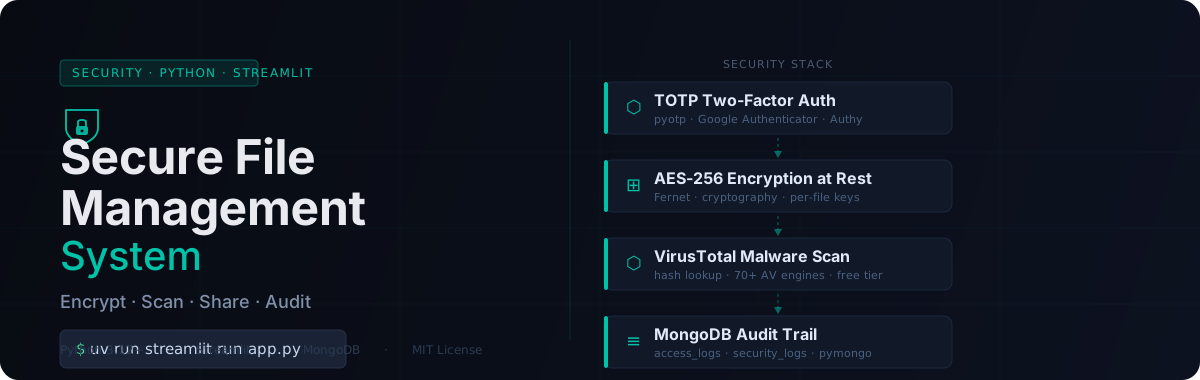


上传文件后,该文件会被 70 多个反病毒引擎扫描是否存在恶意软件,使用 AES-256(单文件密钥)进行加密并存储。你可以通过细粒度权限与团队成员共享。所有操作均会被记录。这一切只需一条命令即可在浏览器中运行。
## 快速开始
**前置条件:** Python 3.12+,MongoDB URI,VirusTotal API key。
```
# 克隆并进入项目
git clone https://github.com/Tanishquppal220/Secure-File-Managment-System.git
cd Secure-File-Managment-System
# 使用 uv 设置环境
uv venv && source .venv/bin/activate # Windows: .venv\Scripts\Activate.ps1
uv sync
# 创建 secrets 文件
mkdir -p .streamlit
cat > .streamlit/secrets.toml << 'EOF'
[mongodb]
MONGODB_URI = "mongodb+srv://
:@/?retryWrites=true&w=majority"
DATABASE_NAME = "secure_file_mgmt"
[api]
VIRUSTOTAL_API_KEY = "your_virustotal_api_key_here"
[app]
MAX_FILE_SIZE_MB = 50
ALLOWED_FILE_TYPES = "pdf,txt,docx,xlsx,jpg,png,zip"
[email]
SMTP_SERVER = "smtp.gmail.com"
SMTP_PORT = 587
SENDER_EMAIL = "your.email@gmail.com"
SENDER_PASSWORD = "your_16_char_app_password"
EOF
# 运行
uv run streamlit run app.py
```
在浏览器中打开 `http://localhost:8501`。
## 工作原理
每个文件都会依次经过四个安全层:
| 层级 | 机制 | 实现 |
|---|---|---|
| **身份认证** | TOTP 双重认证 | `pyotp`,bcrypt 密码哈希 |
| **加密** | 静态 AES-256 (Fernet) 加密,单文件密钥 | `cryptography` 库 |
| **威胁检测** | VirusTotal 哈希查询 + 文件扫描 | 通过 REST API 接入 70 多个 AV 引擎 |
| **审计** | 不可变的访问和安全事件日志 | MongoDB `access_logs` + `security_logs` |
文件共享使用明确的单用户权限(`read`、`download`、`write`、`share`)。多次登录失败后账户将被锁定。
## 前置条件
| 需求 | 获取途径 |
|---|---|
| Python 3.12+ | [python.org](https://www.python.org/downloads/) |
| `uv` 包管理器 | `curl -LsSf https://astral.sh/uv/install.sh \| sh` |
| MongoDB Atlas URI | [mongodb.com/atlas](https://www.mongodb.com/atlas)(免费版即可) |
| VirusTotal API key | [virustotal.com](https://www.virustotal.com/) → 个人资料 → API key |
| Gmail 应用密码 | Google 账号 → 安全 → 应用密码(16 个字符) |
## 配置参考
所有密钥都存放在 `.streamlit/secrets.toml` 中(已被 gitignored,切勿提交)。
```
[mongodb]
MONGODB_URI = "mongodb+srv://..." # Atlas connection string
DATABASE_NAME = "secure_file_mgmt"
[api]
VIRUSTOTAL_API_KEY = "..." # Free tier: 4 req/min, 500 req/day
[app]
MAX_FILE_SIZE_MB = 50
ALLOWED_FILE_TYPES = "pdf,txt,docx,xlsx,jpg,png,zip"
[email]
SMTP_SERVER = "smtp.gmail.com"
SMTP_PORT = 587
SENDER_EMAIL = "..." # Gmail address
SENDER_PASSWORD = "..." # 16-char App Password (not your login password)
```
### 获取 Gmail 应用密码
1. 在你的 Google 账号中启用**双重验证**。
2. 前往 [myaccount.google.com/apppasswords](https://myaccount.google.com/apppasswords)。
3. 为 **Mail → 其他**创建密码(例如,“Secure File Mgmt”)。
4. 将生成的 16 个字符的结果复制到 `SENDER_PASSWORD` 中。
## 项目结构
```
Secure-File-Managment-System/
├── app.py # Streamlit entry point
├── pages/
│ ├── auth.py # Login, register, 2FA setup
│ ├── dashboard.py # File management view
│ ├── upload.py # Upload → scan → encrypt flow
│ ├── shared.py # Files shared with you
│ └── settings.py # Password and 2FA settings
├── src/
│ ├── auth/
│ │ ├── auth_manager.py # Auth logic, account locking
│ │ ├── password_manager.py # bcrypt hashing
│ │ └── two_factor.py # TOTP (pyotp)
│ ├── database/
│ │ ├── connection.py # MongoDB connection pool
│ │ └── models.py # Document schemas
│ ├── file_ops/
│ │ └── file_manager.py # Encrypt, upload, download, share
│ ├── threat_detection/
│ │ ├── malware_scanner.py # Base scanner interface
│ │ └── virustotal_scanner.py # VirusTotal REST integration
│ └── utils/
│ ├── encryption.py # AES helpers
│ ├── logger.py # Rotating daily logs
│ └── validators.py # Input validation
├── .streamlit/secrets.toml # Secrets (gitignored)
├── encrypted_files/ # Encrypted storage (gitignored)
├── logs/ # Application logs (gitignored)
└── pyproject.toml # Dependencies (managed with uv)
```
## 数据库 Schema
users — 账户信息和认证状态
```
{
"username": "String (unique)",
"email": "String (unique)",
"password_hash": "String (bcrypt)",
"role": "'user' | 'admin'",
"two_fa_enabled": "Boolean",
"two_fa_secret": "String (Base32 TOTP secret)",
"created_at": "DateTime",
"last_login": "DateTime",
"is_active": "Boolean",
"failed_login_attempts": "Integer",
"account_locked_until": "DateTime"
}
```
files — 元数据、加密密钥、共享权限
```
{
"file_id": "String (UUID)",
"filename": "String",
"owner": "String (username)",
"encrypted_path": "String",
"encryption_key": "String (Base64 Fernet key)",
"file_size": "Integer (bytes)",
"mime_type": "String",
"uploaded_at": "DateTime",
"is_shared": "Boolean",
"shared_with": [{ "username": "String", "permissions": ["read","download","write","share"], "shared_at": "DateTime" }],
"tags": ["String"],
"is_deleted": "Boolean",
"threat_scan_status":"'clean' | 'infected' | 'pending'",
"threat_scan_result":"Object (VirusTotal response)"
}
```
access_logs 和 security_logs — 完整审计追踪
```
// access_logs — every login, upload, download, share
{
"timestamp": "DateTime",
"user": "String",
"action": "String",
"file_id": "String (optional)",
"details": "String",
"status": "'success' | 'failed'"
}
// security_logs — malware detections and suspicious events
{
"timestamp": "DateTime",
"event_type": "String",
"threat_level": "'low' | 'medium' | 'high' | 'critical'",
"user": "String (optional)",
"file_id": "String (optional)",
"details": "String",
"resolved": "Boolean"
}
```
## 故障排除
| 问题 | 解决方案 |
|---|---|
| **VirusTotal 连接错误** | 检查 `secrets.toml` 中的 `VIRUSTOTAL_API_KEY`。确认网络连接正常。 |
| **`cannot import name 'PBKDF2'`** | 运行 `uv sync` 更新 `cryptography`。 |
| **共享文件不可见** | 共享功能使用精确的用户名匹配。请确认输入了正确的用户名。 |
| **MongoDB 连接失败** | 验证 `MONGODB_URI`,并在 Atlas → Network Access 中将你的 IP 加入白名单。 |
| **Gmail SMTP 认证失败** | 请使用 16 个字符的应用密码,而不是你的账户密码。必须开启双重验证。 |
## 安全说明
- **密钥** — `.streamlit/secrets.toml`、`encrypted_files/` 和 `logs/` 均已被 gitignored。切勿提交 API keys。
- **加密** — 文件在静态存储时使用单文件 AES-256 (Fernet) 密钥加密,密钥保存在 MongoDB 中。
- **速率限制** — VirusTotal 免费版:每分钟 4 次请求,每天 500 次请求。应用会妥善处理此限制。
- **账户保护** — 多次登录尝试失败后,账户将被锁定。
## License
MIT — 详情请参阅 [LICENSE](LICENSE)。标签:Kubernetes, MongoDB, Streamlit, 审计日志, 数据加密, 文件管理, 访问控制, 逆向工具