GVCLab/PersonaLive
GitHub: GVCLab/PersonaLive
面向直播场景的实时人像动画生成框架,支持无限时长的流式扩散推理。
Stars: 3326 | Forks: 466

面向直播的富有表现力的人像图像动画
#### Zhiyuan Li1,2,3 · Chi-Man Pun1,📪 · Chen Fang2 · Jue Wang2 · Xiaodong Cun3,📪 1 澳门大学 2 [Dzine.ai](https://www.dzine.ai/) 3 [大湾区大学 GVC Lab](https://gvclab.github.io/)

 [](https://github.com/GVCLab/PersonaLive)
[](https://github.com/GVCLab/PersonaLive)

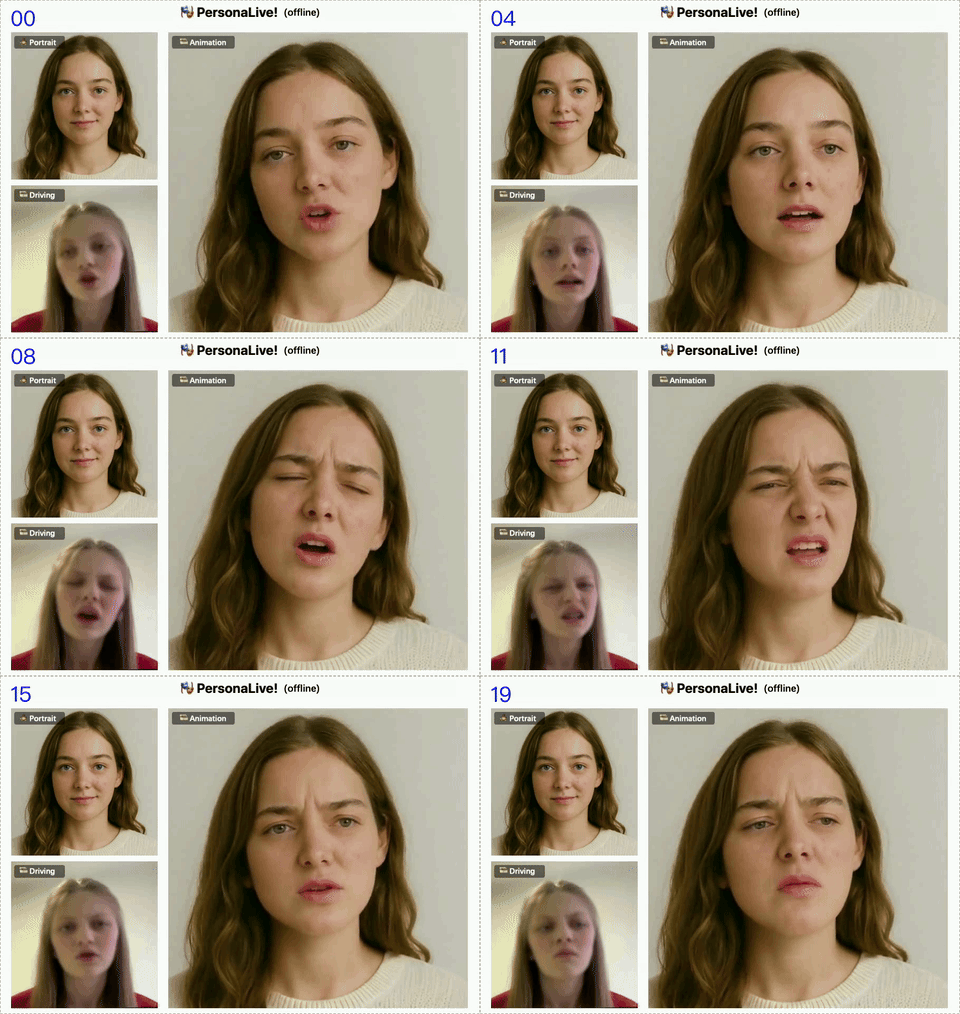
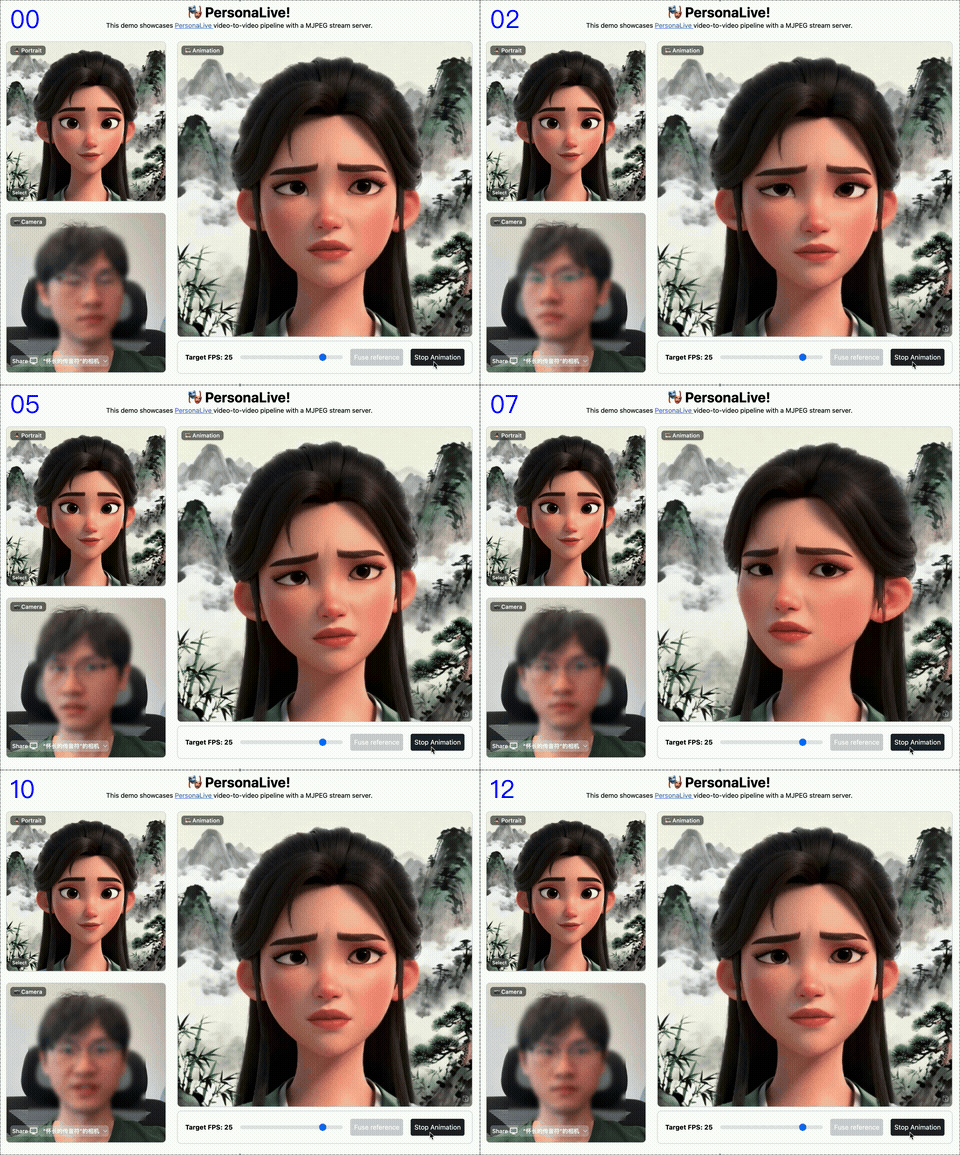
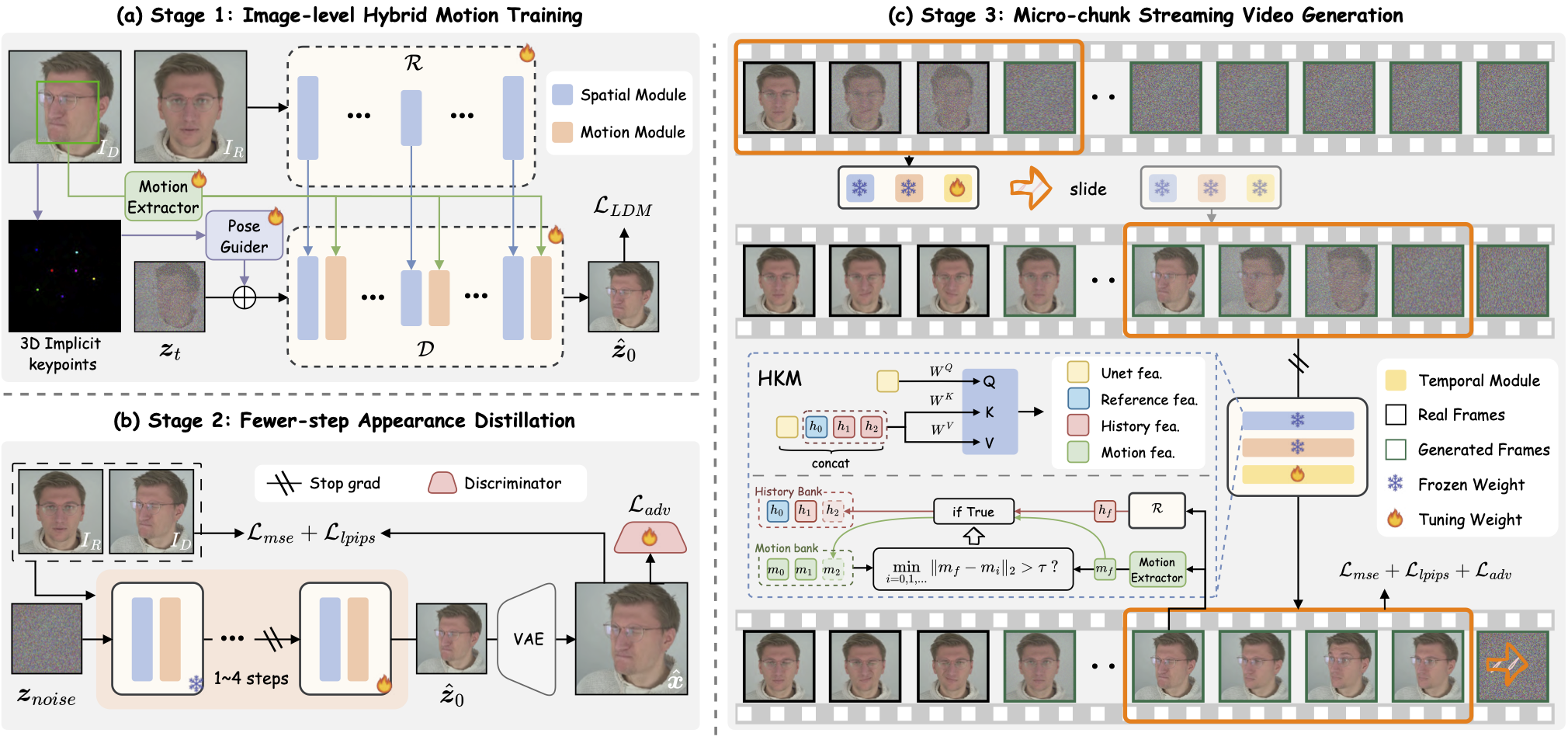 我们推出了 PersonaLive,这是一个能够生成`无限长度`人像动画的`实时`且`可流式传输`的 diffusion 框架。
## 🚀 快速开始
### 🛠 安装
```
# 克隆此 repo
git clone https://github.com/GVCLab/PersonaLive
cd PersonaLive
# 创建 conda 环境
conda create -n personalive python=3.10
conda activate personalive
# 使用 pip 安装包
pip install -r requirements_base.txt
```
### ⏬ 下载权重
选项 1:下载基础模型和其他组件的预训练权重([sd-image-variations-diffusers](https://huggingface.co/lambdalabs/sd-image-variations-diffusers) 和 [sd-vae-ft-mse](https://huggingface.co/stabilityai/sd-vae-ft-mse))。您可以运行以下命令自动下载权重:
```
python tools/download_weights.py
```
选项 2:从以下任一 URL 将预训练权重下载到 `./pretrained_weights` 文件夹中:
我们推出了 PersonaLive,这是一个能够生成`无限长度`人像动画的`实时`且`可流式传输`的 diffusion 框架。
## 🚀 快速开始
### 🛠 安装
```
# 克隆此 repo
git clone https://github.com/GVCLab/PersonaLive
cd PersonaLive
# 创建 conda 环境
conda create -n personalive python=3.10
conda activate personalive
# 使用 pip 安装包
pip install -r requirements_base.txt
```
### ⏬ 下载权重
选项 1:下载基础模型和其他组件的预训练权重([sd-image-variations-diffusers](https://huggingface.co/lambdalabs/sd-image-variations-diffusers) 和 [sd-vae-ft-mse](https://huggingface.co/stabilityai/sd-vae-ft-mse))。您可以运行以下命令自动下载权重:
```
python tools/download_weights.py
```
选项 2:从以下任一 URL 将预训练权重下载到 `./pretrained_weights` 文件夹中:



 最后,这些权重应按如下方式组织:
```
pretrained_weights
├── onnx
│ ├── unet_opt
│ │ ├── unet_opt.onnx
│ │ └── unet_opt.onnx.data
│ └── unet
├── personalive
│ ├── denoising_unet.pth
│ ├── motion_encoder.pth
│ ├── motion_extractor.pth
│ ├── pose_guider.pth
│ ├── reference_unet.pth
│ └── temporal_module.pth
├── sd-vae-ft-mse
│ ├── diffusion_pytorch_model.bin
│ └── config.json
├── sd-image-variations-diffusers
│ ├── image_encoder
│ │ ├── pytorch_model.bin
│ │ └── config.json
│ ├── unet
│ │ ├── diffusion_pytorch_model.bin
│ │ └── config.json
│ └── model_index.json
└── tensorrt
└── unet_work.engine
```
### 🎞️ 离线推理
使用默认配置运行离线推理:
```
python inference_offline.py
```
* `-L`:生成的最大帧数。(默认值:100)
* `--use_xformers`:启用 xFormers 显存高效注意力机制。(默认值:True)
* `--stream_gen`:启用流式生成策略。(默认值:True)
* `--reference_image`:特定参考图像的路径。覆盖配置中的设置。
* `--driving_video`:特定驱动视频的路径。覆盖配置中的设置。
⚠️ RTX 50 系列 用户请注意:xformers 尚未完全兼容新架构。为避免崩溃,请运行以下命令将其禁用:
```
python inference_offline.py --use_xformers False
```
### 📸 在线推理
#### 📦 设置 Web UI
```
# 安装 Node.js 18+
curl -o- https://raw.githubusercontent.com/nvm-sh/nvm/v0.39.1/install.sh | bash
nvm install 18
source web_start.sh
```
#### 🏎️ 加速(可选)
将模型转换为 TensorRT 可以显著加快推理速度(约 2 倍 ⚡️)。根据您的设备,构建引擎可能需要大约 `20 分钟`。请注意,TensorRT 优化可能会导致细微的差异或输出质量的轻微下降。
```
# 使用 pip 安装包
pip install -r requirements_trt.txt
# 将模型转换为 TensorRT
python torch2trt.py
```
💡 **PyCUDA 安装问题**:如果在上述安装过程中遇到“Failed to build wheel for pycuda”错误,请按照以下步骤操作:
```
# 使用 Conda 手动安装 PyCUDA(避免编译问题):
conda install -c conda-forge pycuda "numpy<2.0"
# 打开 requirements_trt.txt 并注释掉或删除 “pycuda==2024.1.2” 行
# 使用 pip 安装其他包
pip install -r requirements_trt.txt
# 将模型转换为 TensorRT
python torch2trt.py
```
⚠️ 提供的 TensorRT 模型来自 `H100`。我们建议`所有用户`(包括 H100 用户)在本地重新运行 `python torch2trt.py`,以确保最佳的兼容性。
#### ▶️ 开始推流
```
python inference_online.py --acceleration none (for RTX 50-Series) or xformers or tensorrt
```
然后在浏览器中打开 `http://0.0.0.0:7860`。(*如果 `http://0.0.0.0:7860` 无法正常工作,请尝试 `http://localhost:7860`*)
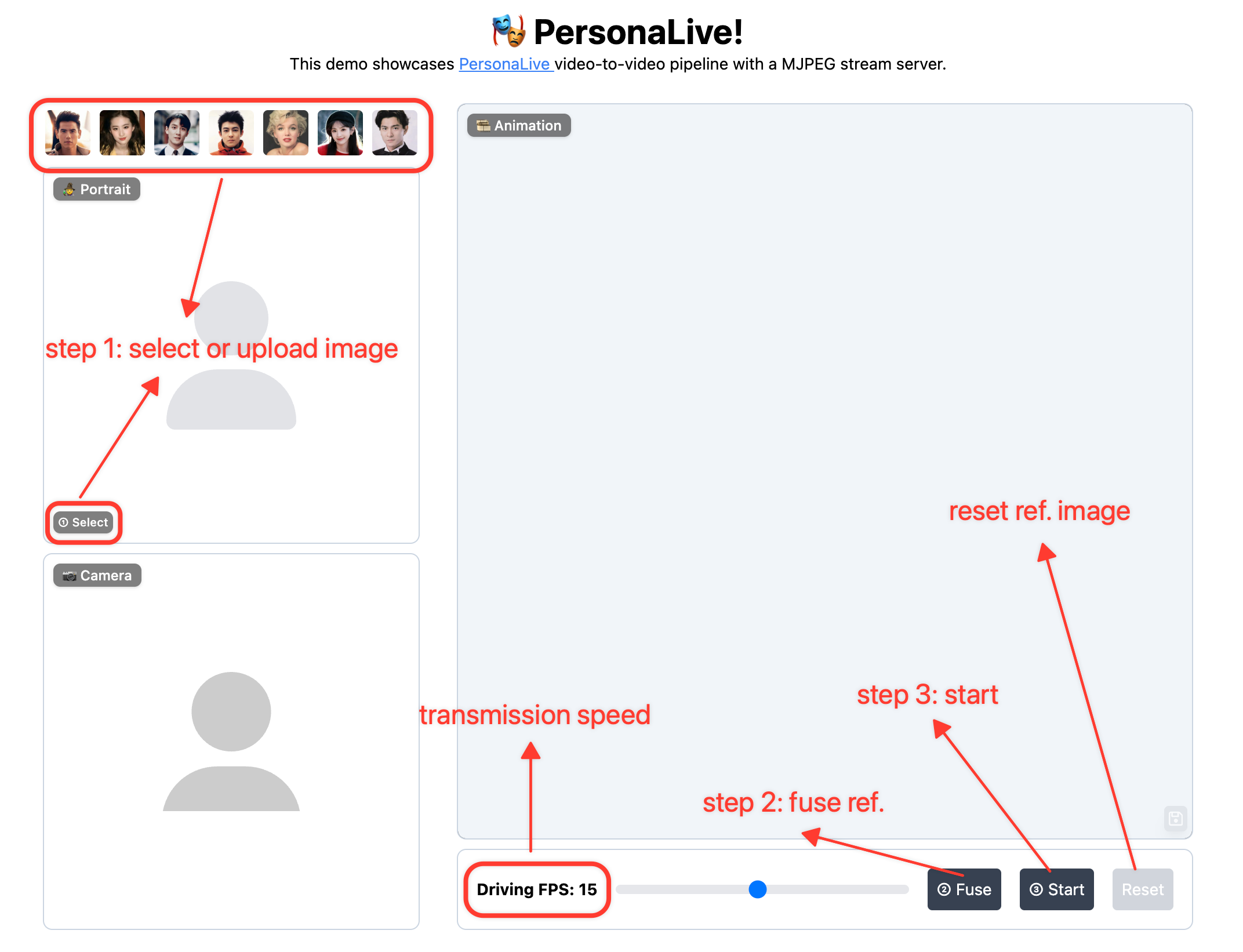
**使用方法**:上传图像 ➡️ 融合参考 ➡️ 开始动画 ➡️ 尽情享受! 🎉
最后,这些权重应按如下方式组织:
```
pretrained_weights
├── onnx
│ ├── unet_opt
│ │ ├── unet_opt.onnx
│ │ └── unet_opt.onnx.data
│ └── unet
├── personalive
│ ├── denoising_unet.pth
│ ├── motion_encoder.pth
│ ├── motion_extractor.pth
│ ├── pose_guider.pth
│ ├── reference_unet.pth
│ └── temporal_module.pth
├── sd-vae-ft-mse
│ ├── diffusion_pytorch_model.bin
│ └── config.json
├── sd-image-variations-diffusers
│ ├── image_encoder
│ │ ├── pytorch_model.bin
│ │ └── config.json
│ ├── unet
│ │ ├── diffusion_pytorch_model.bin
│ │ └── config.json
│ └── model_index.json
└── tensorrt
└── unet_work.engine
```
### 🎞️ 离线推理
使用默认配置运行离线推理:
```
python inference_offline.py
```
* `-L`:生成的最大帧数。(默认值:100)
* `--use_xformers`:启用 xFormers 显存高效注意力机制。(默认值:True)
* `--stream_gen`:启用流式生成策略。(默认值:True)
* `--reference_image`:特定参考图像的路径。覆盖配置中的设置。
* `--driving_video`:特定驱动视频的路径。覆盖配置中的设置。
⚠️ RTX 50 系列 用户请注意:xformers 尚未完全兼容新架构。为避免崩溃,请运行以下命令将其禁用:
```
python inference_offline.py --use_xformers False
```
### 📸 在线推理
#### 📦 设置 Web UI
```
# 安装 Node.js 18+
curl -o- https://raw.githubusercontent.com/nvm-sh/nvm/v0.39.1/install.sh | bash
nvm install 18
source web_start.sh
```
#### 🏎️ 加速(可选)
将模型转换为 TensorRT 可以显著加快推理速度(约 2 倍 ⚡️)。根据您的设备,构建引擎可能需要大约 `20 分钟`。请注意,TensorRT 优化可能会导致细微的差异或输出质量的轻微下降。
```
# 使用 pip 安装包
pip install -r requirements_trt.txt
# 将模型转换为 TensorRT
python torch2trt.py
```
💡 **PyCUDA 安装问题**:如果在上述安装过程中遇到“Failed to build wheel for pycuda”错误,请按照以下步骤操作:
```
# 使用 Conda 手动安装 PyCUDA(避免编译问题):
conda install -c conda-forge pycuda "numpy<2.0"
# 打开 requirements_trt.txt 并注释掉或删除 “pycuda==2024.1.2” 行
# 使用 pip 安装其他包
pip install -r requirements_trt.txt
# 将模型转换为 TensorRT
python torch2trt.py
```
⚠️ 提供的 TensorRT 模型来自 `H100`。我们建议`所有用户`(包括 H100 用户)在本地重新运行 `python torch2trt.py`,以确保最佳的兼容性。
#### ▶️ 开始推流
```
python inference_online.py --acceleration none (for RTX 50-Series) or xformers or tensorrt
```
然后在浏览器中打开 `http://0.0.0.0:7860`。(*如果 `http://0.0.0.0:7860` 无法正常工作,请尝试 `http://localhost:7860`*)
**使用方法**:上传图像 ➡️ 融合参考 ➡️ 开始动画 ➡️ 尽情享受! 🎉
标签:AIGC, CNCF毕业项目, CVPR 2026, infinitely-long generation, MITM代理, Portrait Image Animation, Streaming Diffusion, 人脸驱动, 凭据扫描, 图像动画, 头像生成, 实时推理, 实时流媒体, 扩散模型, 数字人, 深度伪造, 生成式AI, 直播技术, 索引, 肖像动画, 虚拟主播, 表情迁移, 计算机视觉, 逆向工具