ram-prasad-sahoo/astrava
GitHub: ram-prasad-sahoo/astrava
一款基于本地 Ollama 驱动的 AI Web 漏洞扫描器,帮助安全团队在离线隐私环境下自动化发现与修复漏洞。
Stars: 13 | Forks: 3
 # 🛡️ Astrava AI 安全扫描器
### *高级 AI 驱动的 Web 漏洞扫描器*
[](https://www.python.org/)
[](https://owasp.org/)
[](https://ollama.ai/)
[](LICENSE)
[](https://github.com/ram-prasad-sahoo/astrava)
**面向渗透测试人员和安全研究人员的专业级安全测试工具**
[🚀 快速开始](#-quick-start) • [📖 文档](#-documentation) • [🤝 贡献指南](#-contributing) • [⭐ 星标我们](https://github.com/ram-prasad-sahoo/astrava)
# 🛡️ Astrava AI 安全扫描器
### *高级 AI 驱动的 Web 漏洞扫描器*
[](https://www.python.org/)
[](https://owasp.org/)
[](https://ollama.ai/)
[](LICENSE)
[](https://github.com/ram-prasad-sahoo/astrava)
**面向渗透测试人员和安全研究人员的专业级安全测试工具**
[🚀 快速开始](#-quick-start) • [📖 文档](#-documentation) • [🤝 贡献指南](#-contributing) • [⭐ 星标我们](https://github.com/ram-prasad-sahoo/astrava)
| #### 🤖 **AI 驱动分析** - 本地 Ollama 集成 - 注重隐私的处理 - 无云端依赖 - 多模型支持 #### 🛡️ **OWASP Top 10 2021** - 完整覆盖 - A01 至 A10 类别 - 真实世界攻击场景 - 专业报告 | #### 🌐 **现代化 Web 界面** - 实时漏洞推送 - 实时扫描统计 - 直观仪表盘 - 深色主题 UI #### ⚡ **智能且快速** - 智能载荷缓存 - 多线程扫描 - 优化性能 - 快速扫描模式 |
🪟 Windows
``` git clone https://github.com/ram-prasad-sahoo/astrava.git cd astrava install.bat ``` **注意**:安装程序会自动创建 Python 虚拟环境并安装所有依赖项。🐧 Linux
``` git clone https://github.com/ram-prasad-sahoo/astrava.git cd astrava chmod +x install.sh ./install.sh ``` **注意**:安装程序会自动创建 Python 虚拟环境并安装所有依赖项。🍎 macOS
``` git clone https://github.com/ram-prasad-sahoo/astrava.git cd astrava chmod +x install.sh ./install.sh ``` **注意**:安装程序会自动创建 Python 虚拟环境并安装所有依赖项。| #### 🖥️ **硬件** - **CPU**:双核处理器(2 GHz+) - **内存**:至少 4 GB - 2 GB 用于 Astrava - 2 GB 用于 AI 模型(若使用 Ollama) - **存储**:5 GB 可用空间 - 500 MB 用于 Astrava - 2-4 GB 用于 AI 模型 - **网络**:需要互联网连接 | #### 💿 **软件** - **操作系统**:Windows 10+、Linux、macOS 10.15+ - **Python**:3.8 或更高版本 - **浏览器**:现代浏览器(Chrome、Firefox、Edge) - **Ollama**:可选(用于 AI 功能) - **Git**:用于从源码安装 |
| #### 🚀 **最佳性能** - **CPU**:四核处理器(3 GHz+) - **内存**:8 GB 或更多 - **存储**:10 GB 可用空间 - **网络**:宽带连接 | #### 🤖 **AI 功能** - **内存**: - 2 GB:llama3.2:1b(轻量级) - 4 GB:llama3.2:3b(均衡) - 8 GB:mistral:7b(高性能) - **Ollama**:最新版本 - **GPU**:可选(可加速 AI) |
点击展开 AI 设置说明
#### 步骤 1:安装 Ollama - **Windows**:从 [ollama.ai](https://ollama.ai) 下载 - **Linux**:`curl -fsSL https://ollama.ai/install.sh | sh` - **macOS**:`brew install ollama` #### 步骤 2:下载 AI 模型 根据系统资源选择: ``` # 🎯 推荐(专注于安全) ollama pull xploiter/pentester # 💡 替代方案 ollama pull llama3.2:1b # 1GB RAM - Lightweight ollama pull llama3.2:3b # 2GB RAM - Balanced ollama pull qwen2.5:3b # 2GB RAM - Alternative ollama pull mistral:7b # 4GB RAM - Powerful ``` #### 步骤 3:在 Astrava 中配置 1. 启动:`python astrava.py` 2. 导航至 **AI 模型设置** 3. 选择已下载的模型 4. 点击 **保存设置** ✅ 完成!现在 AI 驱动的扫描已激活。| 模式 | 描述 | 时长 | 适用场景 |
|---|---|---|---|
| ⚡ 基础 | 快速扫描,核心漏洞 | 1-3 分钟 | 快速安全评估 |
| 🎯 标准 | OWASP Top 10 + 漏洞扫描 | 5-15 分钟 | 常规安全测试 |
| 🔥 激进 | 全量扫描 + 链式攻击 + 深度 AI | 15-45 分钟 | 全面安全审计 |
| # |类别 | 包含测试 | 状态 |
|:-:|----------|----------------|:------:|
| **A01** | 🔓 失效的访问控制 | IDOR、路径遍历、强制浏览 | ✅ |
| **A02** | 🔐 加密故障 | SSL/TLS、弱密码、敏感数据 | ✅ |
| **A03** | 💉 注入 | SQL、NoSQL、LDAP、命令、XSS | ✅ |
| **A04** | 🎨 不安全设计 | 调试信息、业务逻辑缺陷 | ✅ |
| **A05** | ⚙️ 安全配置错误 | 头部、默认凭证、错误处理 | ✅ |
| **A06** | 📦 易受攻击的组件 | 版本检测、CVE 匹配 | ✅ |
| **A07** | 🔑 认证失败 | Cookie 安全性、会话管理 | ✅ |
| **A08** | 🔗 软件与数据完整性 | 反序列化、供应链 | ✅ |
| **A09** | 📊 日志与监控 | 日志缺口评估 | ✅ |
| **A10** | 🌐 服务器端请求伪造 | 云元数据、内部服务 | ✅ |
## 🔧 高级用法
### 📝 命令行选项
```
python astrava.py --help
```
查看所有可用选项
#### 🎯 基础选项 - **无参数** → 启动 Web GUI(默认) - `-u, --url URL` → 目标 URL(CLI 扫描模式) - `--version` → 显示版本信息 - `--help` → 显示帮助信息 #### 🔍 扫描选项 - `--owasp-all` → 测试所有 OWASP Top 10 类别 - `--chain-attacks` → 启用多步骤攻击检测 - `--passive-only` → 仅被动侦察 - `--active-only` → 仅主动扫描 #### ⚙️ 配置 - `--model MODEL` → 使用的 AI 模型(默认:xploiter/pentester) - `--threads N` → 并发线程数(默认:10) - `--timeout SEC` → 请求超时(默认:30) - `--custom-payloads FILE` → 自定义载荷文件 #### 📊 输出选项 - `-o, --output DIR` → 报告输出目录 - `--format FORMAT` → 报告格式(html、json、pdf) - `-v, --verbose` → 启用详细日志| ### 📈 **报告内容** - ✅ 执行摘要 - ✅ 风险评分(0-100) - ✅ 漏洞分类 - ✅ 详细发现 - ✅ AI 生成分析 - ✅ 修复建议 | ### 🎨 **报告特性** - 🌐 专业 HTML 格式 - 📊 视觉化图表与图形 - 🎯 严重等级分类 - 🔗 CWE 参考 - 📝 OWASP 映射 - 💡 修复建议 |
| 平台 | 状态 | 测试版本 |
|:--------:|:------:|:----------------|
| 🪟 **Windows** | ✅ 完全支持 | 10、11、Server 2019+ |
| 🐧 **Linux** | ✅ 完全支持 | Ubuntu 20.04+、Debian 10+、Fedora 35+、Arch、Kali |
| 🍎 **macOS** | ✅ 完全支持 | 10.15+(Intel 与 Apple Silicon) |
## 🚀 性能
⚡ 快速多线程扫描智能载荷缓存 优化算法 |
🎯 精确低误报率AI 验证 真实世界攻击场景 |
🔒 安全本地 AI 处理无数据泄漏 注重隐私的设计 |
### 🚨 **重要:使用前请阅读** 🚨
#### ✅ 允许使用
- ✓ 测试你**拥有**的系统
- ✓ 在**明确书面授权**下测试
- ✓ 教育用途(在受控环境中)
- ✓ 安全研究(获得适当授权)
#### ❌ 禁止使用
- ✗ 未经授权扫描第三方系统
- ✗ 恶意活动或攻击
- ✗ 违反计算机犯罪法律(CFAA、GDPR 等)
- ✗ 任何非法或不道德行为
#### 📜 你的责任
- 在扫描前获取适当授权
- 遵守所有适用法律和法规
- 以道德和负责任的方式使用工具
- 尊重隐私和数据保护法律
**使用本工具即表示你同意以负责任和合法的方式使用。作者对误用或损害不承担任何责任。**
## 🤝 贡献
我们欢迎社区贡献!以下是你可以帮助的方式:
🐛报告 Bug发现 Bug? 提交问题 |
💡建议功能有想法? 分享给我们 |
🔧提交 PR想编码? 创建 Pull Request |
⭐星标仓库喜欢这个项目? 给我们一颗星! |
**MIT 许可证** - 免费且开源
[](LICENSE)
本项目根据 MIT 许可证授权 - 参见 [LICENSE](LICENSE) 文件详情。
## 👤 作者
### **RAM (Ram Prasad Sahoo)**
[](https://github.com/ram-prasad-sahoo)
[](mailto:ramprasadsahoo42@gmail.com)
[](https://linkedin.com/in/ram-prasad-sahoo)
## 🙏 感谢
特别感谢:
🛡️ **OWASP 基金会** - 提供安全测试指南
🤖 **Ollama 团队** - 提供本地 AI 基础设施
🌟 **开源社区** - 提供灵感与支持
💻 **贡献者** - 让本项目变得更好
## 📊 项目统计


### 🌟 **如果你发现 Astrava 有用,请考虑给它一个星标!** ⭐
[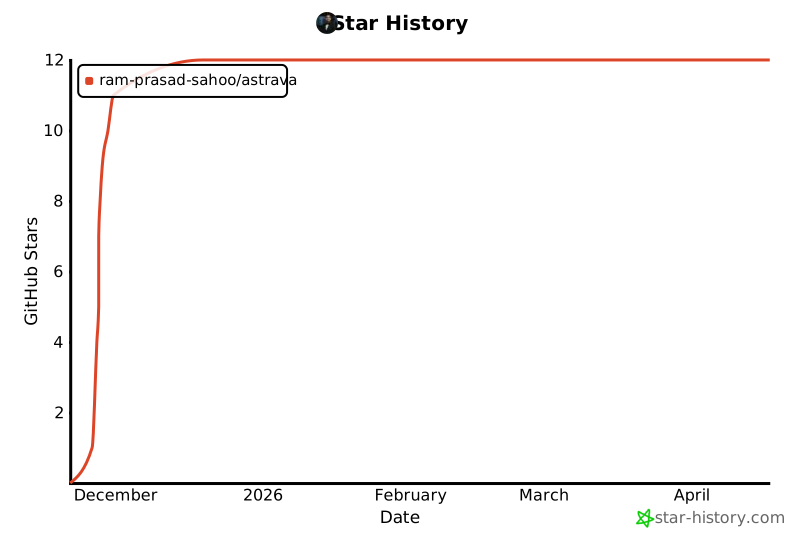](https://star-history.com/#ram-prasad-sahoo/astrava&Date)
**由 [Ram Prasad Sahoo](https://github.com/ram-prasad-sahoo)** 用 ❤️ 制作
**快乐进行道德黑客测试!🛡️**
标签:A01, A02, A03, A04, A05, A06, A07, A08, A09, A10, AI安全扫描, AI风险缓解, Linux安全工具, LLM评估, macOS安全工具, Ollama, OWASP Top 10, Python安全工具, SOC工具, Web漏洞扫描, Windows安全工具, 专业安全测试, 代码生成, 仪表盘, 多模型支持, 多线程扫描, 安全研究员, 开源安全工具, 快速启动, 无云依赖, 智能缓存, 暗色主题, 本地AI模型, 渗透测试工具, 漏洞发现, 逆向工具, 逆向工程平台, 隐私安全扫描