🇬🇧 English |
🇵🇱 Polski |
🇩🇪 Deutsch |
🇫🇷 Français |
🇪🇸 Español |
🇧🇷 Português |
🇳🇱 Nederlands
🇨🇳 中文 |
🇯🇵 日本語 |
🇰🇷 한국어 |
🇮🇹 Italiano |
🇹🇷 Türkçe |
🇸🇦 العربية |
🇮🇳 हिन्दी |
🇷🇺 Русский
# 📡 **Universal Intel Wi-Fi and Bluetooth Drivers Updater**
[](https://github.com/FirstEverTech/Universal-Intel-WiFi-BT-Updater/releases)[](https://www.microsoft.com/windows)[](https://learn.microsoft.com/en-us/powershell/scripting/install/install-powershell-on-windows?view=powershell-7.5)[](https://dotnet.microsoft.com/en-us/download/dotnet-framework)[](https://github.com/FirstEverTech/Universal-Intel-WiFi-BT-Updater/releases)[](https://github.com/FirstEverTech/Universal-Intel-WiFi-BT-Updater)
[](LICENSE)[](https://www.powershellgallery.com/packages/universal-intel-wifi-bt-driver-updater)[](https://github.com/FirstEverTech/Universal-Intel-WiFi-BT-Updater/blob/main/AI_AUDITS.md)[](https://www.virustotal.com/gui/url/e6d1c31b18eea15e1b9a72ffbf3170522357972fed0fefe5425c86d9f4c64594?nocache=1)[](https://github.com/FirstEverTech/Universal-Intel-WiFi-BT-Updater/issues)
## 🔧 Automate Your Intel Wi-Fi and Bluetooth Updates
**Universal Intel Wi-Fi and Bluetooth Drivers Updater** is an advanced, security-focused tool that automatically detects your Intel wireless hardware and installs the latest official **Wi-Fi and Bluetooth drivers** with enterprise-grade safety measures.
This project was built through a pragmatic collaboration between human expertise and AI-assisted tooling.
### Why This Tool Exists
Intel distributes Wi-Fi and Bluetooth drivers as large CAB packages — but your system only needs the version that matches your specific adapter. This tool automatically identifies your hardware, fetches the correct driver package from official sources, verifies its integrity, and installs it cleanly — nothing more, nothing less.
[](https://www.intel.com/content/www/us/en/search.html#q=wi-fi)[](https://github.com/FirstEverTech/Universal-Intel-Chipset-Updater/blob/main/data/intel-chipset-infs-latest.md)[](https://www.intel.com/content/www/us/en/search.html#q=bluetooth)[](https://github.com/FirstEverTech/Universal-Intel-Chipset-Updater/blob/main/data/intel-chipset-infs-latest.md)
For detailed documentation and guides, see:
→ **[Deploying Universal Intel Wi-Fi and BT Drivers Updater via MDM](https://github.com/FirstEverTech/Universal-Intel-WiFi-BT-Updater/blob/main/docs/MDM-DEPLOYMENT-GUIDE_EN_2026.md)**
→ **[How to verify the latest drivers yourself](https://github.com/FirstEverTech/Universal-Intel-WiFi-BT-Updater/blob/main/docs/HOW-TO-VERIFY-DRIVERS_EN_2026.md)**
→ **[Intel Driver Versioning](https://github.com/FirstEverTech/Universal-Intel-WiFi-BT-Updater/blob/main/docs/INTEL-DRIVER-VERSIONING_EN_2026.md)**
👉 [Share your feedback!](https://github.com/FirstEverTech/Universal-Intel-WiFi-BT-Updater/discussions)
## 🌐 Community & Distribution
- Official threads on forums: **[Win-Raid](https://winraid.level1techs.com/t/tool-universal-intel-wifi-bluetooth-drivers-updater/112495)**, **[Station-Drivers](https://www.station-drivers.com/index.php/en/forum/intel-wireless-bluetooth-drivers/971-universal-intel-wi-fi-and-bluetooth-drivers-updater)**, **[TechPowerUp](https://www.techpowerup.com/forums/threads/tool-universal-intel-wi-fi-and-bluetooth-drivers-updater.342724/#post-5671700)**, **[Guru3D](https://forums.guru3d.com/threads/universal-intel-wi-fi-and-bluetooth-drivers-updater-open-source.460883/)**, **[ElevenForum](https://www.elevenforum.com/t/universal-intel-chipset-device-updater.41790/)** and **[WinClub](https://winclub.pl/topic/50298-universal-intel-wi-fi-and-bluetooth-drivers-updater/)**.
- For transparency and additional verification, the project is listed on: **[MajorGeeks](https://www.majorgeeks.com/files/details/intel_wi_fi_bluetooth_driver_updater.html)** and **[Instalki](https://www.instalki.pl/download/programy/sterowniki/karty-sieciowe/intel-karty-sieciowe/universal-intel-wi-fi-and-bluetooth-drivers-updater/)**.
## 💼 Career Opportunity
## 📑 **1. Table of Contents**
1. [**Table of Contents**](#table_of_contents)
2. [**Release Highlights**](#release-highlights)
2.1 [Latest Version](#latest-version)
2.2 [Previous Release](#previous-releases)
2.3 [Older Releases](#older-releases)
3. [**AI Audit Reports**](#ai-audit-reports)
4. [**Application Overview**](#application-overview)
5. [**Key Features**](#key-features)
5.1 [Smart Hardware Detection](#smart-hardware-detection)
5.2 [Multi-Layer Security](#multi-layer-security)
5.3 [Seamless Operation](#seamless-operation)
5.4 [Comprehensive Coverage](#comprehensive-coverage)
6. [**System Requirements**](#system-requirements)
6.1 [System Requirements Table](#system-requirements-table)
6.2 [Windows Version Support](#windows-version-support)
6.3 [Legacy System Notes](#legacy-system-notes)
7. [**Quick Comparison**](#quick-comparison)
8. [**Quick Start**](#quick-start)
8.1 [Method 1: One-Click Execution](#method-1-one-click-execution)
8.2 [Method 2: PowerShell Direct](#method-2-powershell-direct)
8.3 [Method 3: Hardware ID Scanner Only](#method-3-hardware-id-scanner-only)
8.4 [Method 4: PowerShell Gallery](#method-4-powershell-gallery)
8.5 [Command-Line Options](#command-line-options)
9. [**How It Works**](#how-it-works)
9.1 [Self-Verification & Update Check](#self-verification-update-check)
9.2 [Hardware Detection](#hardware-detection)
9.3 [Database Query & Matching](#database-query-matching)
9.4 [Security Verification](#security-verification)
9.5 [Installation & Cleanup](#installation-cleanup)
10. [**Security First Approach**](#security-first-approach)
10.1 [Verified Security Layers](#verified-security-layers)
11. [**Usage Scenarios**](#usage-scenarios)
11.1 [Home Users](#home-users)
11.2 [IT Professionals & Technicians](#it-professionals-technicians)
11.3 [System Builders](#system-builders)
12. [**Download Options**](#download-options)
12.1 [Option 1: SFX Executable (Recommended)](#option-1-sfx-executable-recommended)
12.2 [Option 2: Script Direct](#option-2-script-direct)
12.3 [Option 3: Source Code](#option-3-source-code)
13. [**Project Structure**](#project-structure)
14. [**Release Structure**](#release-structure)
14.1 [Primary Files](#primary-files)
14.2 [Verification Files](#verification-files)
14.3 [Documentation](#documentation)
15. [**Frequently Asked Questions (FAQ)**](#frequently-asked-questions-faq)
15.1 [Is this tool safe to use?](#is-this-tool-safe-to-use)
15.2 [Will this update all my Intel drivers?](#will-this-update-all-my-intel-drivers)
15.3 [What are the risks?](#what-are-the-risks)
15.4 [Where are files downloaded?](#where-are-files-downloaded)
15.5 [What if something goes wrong?](#what-if-something-goes-wrong)
15.6 [How does the automatic update check work?](#how-does-the-automatic-update-check-work)
15.7 [What does self-hash verification do?](#what-does-self-hash-verification-do)
15.8 [How are updates notified?](#how-are-updates-notified)
15.9 [Why is the certificate "not trusted"?](#why-is-the-certificate-not-trusted)
15.10 [Why does VirusTotal show detections for the SFX executable?](#why-does-virustotal-show-detections)
16. [**Intel Wi-Fi and Bluetooth Platform Support**](#intel-platform-support)
17. [**Performance Metrics**](#performance-metrics)
17.1 [Typical Execution Time Breakdown](#typical-execution-times)
17.2 [Disk Space Usage](#disk-space-usage)
17.3 [Memory (RAM) Usage](#memory-ram-usage)
17.4 [Resource Usage Summary](#resource-usage-summary)
18. [**Known Issues**](#known-issues)
19. [**Ready to Update?**](#ready-to-update)
19.1 [Quick Start Guide](#quick-start-guide)
19.2 [Verification Steps (Optional)](#verification-steps-optional)
19.3 [Need Help?](#need-help)
20. [**Contributing**](#contributing)
21. [**License**](#license)
22. [**Acknowledgments**](#acknowledgments)
23. [**Important Links**](#important-links)
24. [**Author & Contact**](#author-and-contact)
[↑ Back to top](#top)
## 🎉 **2. Release Highlights**
### 2.1 Latest Version
**v2026.06.0007** → [Release Notes](https://github.com/FirstEverTech/Universal-Intel-WiFi-BT-Updater/releases/tag/v2026.06.0007)
### 🆕 **Highlights**
- **PSGallery Self‑Update** — When the script is installed from the PowerShell Gallery (`Install-Script`), it now updates itself automatically via `Update-Script` instead of downloading an EXE. This brings the same seamless experience as the Chipset Updater.
- **Installation Order Changed** — Bluetooth driver is now installed **before** Wi-Fi. This prevents the download failure that occurred when Wi-Fi installation disconnected the network before Bluetooth could be downloaded.
### 🐛 **Bug Fixes**
- **Network loss during dual‑driver update** — Previously, if both Wi-Fi and Bluetooth needed updates, the Wi-Fi driver was installed first, often disconnecting the internet. The subsequent attempt to download the Bluetooth driver would fail. Fixed by swapping the installation order.
### 🔧 **Compatibility**
- Fully backward compatible with all existing databases and CAB files.
- No changes to detection logic, hash verification, or digital signature checks.
[↑ Back to top](#top)
### 2.2 Previous Releases
**v2026.06.0006** → [Release Notes](https://github.com/FirstEverTech/Universal-Intel-WiFi-BT-Updater/releases/tag/v2026.06.0006)
### 🆕 **Highlights**
- **New Hardware Support** — Added full support for Intel Bluetooth PCI Enumerator devices (`PCI\VEN_8086&DEV_A876`, `4D76`, `E476`, `E376`), also known as Intel(R) Bluetooth(R) PCI Enumerator
- **Unified Driver Management** — The updater now detects both USB Bluetooth (via `VID_8087&PID_xxxx`) and PCI Bluetooth (via `VEN_8086&DEV_xxxx`) and fetches the appropriate CAB package
- **Shared PCI CAB** — All PCI devices share a single CAB file (`intel-bt-
_pci.cab`), greatly reducing download size and simplifying maintenance
- **Updated Banner** — New tool version, revised author line, removed redundant GitHub link, improved layout
- **Code Cleanup** — All comments are now in English, version bumped to `2026.06.0006`
### 🐛 **Bug Fixes**
- **Missing PID `0043`** — Intel AX211 USB Bluetooth (PID `0043`) was absent from the supported device list; affected users received no update offer despite the driver being present in the database
- **False Legacy flag for PCI Bluetooth** — PCI devices such as `DEV_A876/4D76/E476/E376` were incorrectly shown as `[LEGACY]` when the USB Bluetooth version was newer; PCI and USB now use independent version tracks
- **Scanner dead code (v4.5)** — PCI legacy fallback in `BT-Platform-Scanner` was unreachable; known PCI DEVs absent from the current leak file now correctly fall back to the last known version from the previous MD
### 🔧 **Compatibility**
- Fully backward compatible with older `intel-bt-driver-latest.md` that only contains USB devices
- Existing USB Bluetooth devices continue to work without any changes
[↑ Back to top](#top)
### 2.3 Older Releases
**v2026.03.0003** → [Release Notes](https://github.com/FirstEverTech/Universal-Intel-WiFi-BT-Updater/releases/tag/v2026.03.0003)
**v2026.03.0002** → [Release Notes](https://github.com/FirstEverTech/Universal-Intel-WiFi-BT-Updater/releases/tag/v2026.03.0002)
**v2025.11.0001 (old v2025.11)** → [Release Notes](https://github.com/FirstEverTech/Universal-Intel-WiFi-BT-Updater/releases/tag/v24.0-2025.11)
[↑ Back to top](#top)
## 🔍 **3. AI Audit Reports**
This project has been reviewed by multiple AI systems using structured security frameworks (OWASP, CWE, CVSS v3.1). These are code and architecture reviews, not formal penetration tests. The script's core security architecture is directly inherited from Universal Intel Chipset Device Updater — which has been through three independent audit cycles with an average score of 9.69/10.
## Score History at a Glance
| Auditor | 2026-03-19 | 2026-03-23 | Trend | Notes |
|---------|-----------|-----------|-------|-------|
| ChatGPT | 9.5 | **9.7** | ↑ | Added WHCP signature verification, proper pnputil exit‑code handling, per‑device driver mapping, and expanded HWID coverage. Enterprise‑grade improvements drove the increase. |
| Claude | 8.9 | **9.4** | ↑ | Most rigorous reviewer. Previously flagged missing DEV IDs and temp‑path hardening; both are now addressed. pnputil exit‑code handling fixed. Score rose significantly as the only remaining findings are minor (coverage gap, ACLs). |
| Copilot | 9.4 | **9.5** | ↑ | Noted WHCP validation, per‑DEV Wi‑Fi blocks, expanded hardware support, and improved installation reliability. The jump is small because the tool was already strong (9.4), and this release polished already‑solid areas. |
| DeepSeek | 9.4 | **9.6** | ↑ | Emphasised WHCP digital signature verification, per‑device version/date tracking, and the refactored Wi‑Fi parser. Security rating rose from 9.5 to 9.8 in their methodology, reflected in the overall score increase. |
| Gemini | 10.0 | **10.0** | → | Already awarded a perfect score in the previous cycle. The new WHCP layer and legacy device support were considered masterful additions that maintain the tool’s flawless status. |
| Grok | 9.9 | **9.95** | ↑ | WHCP verification, per‑DEV blocks, and the hotfix for the auto‑update bug brought the tool to parity with the chipset updater’s security level. The minuscule deduction remains only for project youth, not any technical issue. |
| **Average** | **9.52** | **9.69** | ↑ | The average rose by 0.17, reflecting consistent improvement across all evaluators, with Claude showing the largest absolute gain (+0.5). |
*For full audit reports, methodology and detailed findings, see [AI_AUDITS.md](AI_AUDITS.md).*
[↑ Back to top](#top)
## 🖼️ **4. Application Overview**
| Phase 1 | Phase 2 | Phase 3 | Phase 4 |
|:---------------:|:--------------:|:-------------------:|:-------------------:|
| 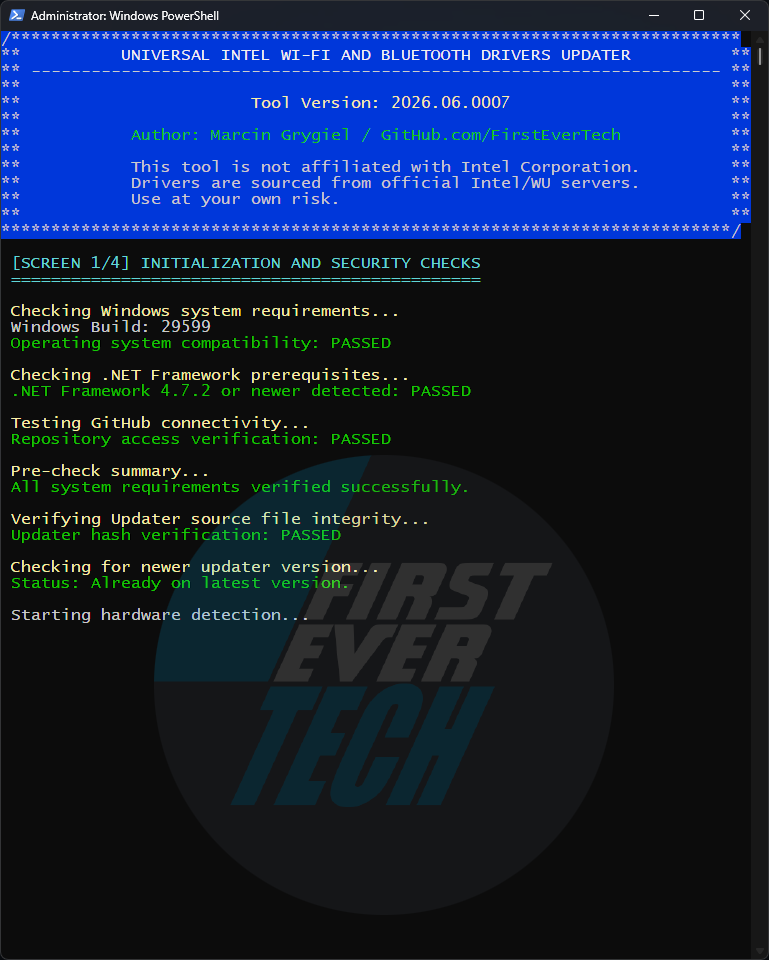 | 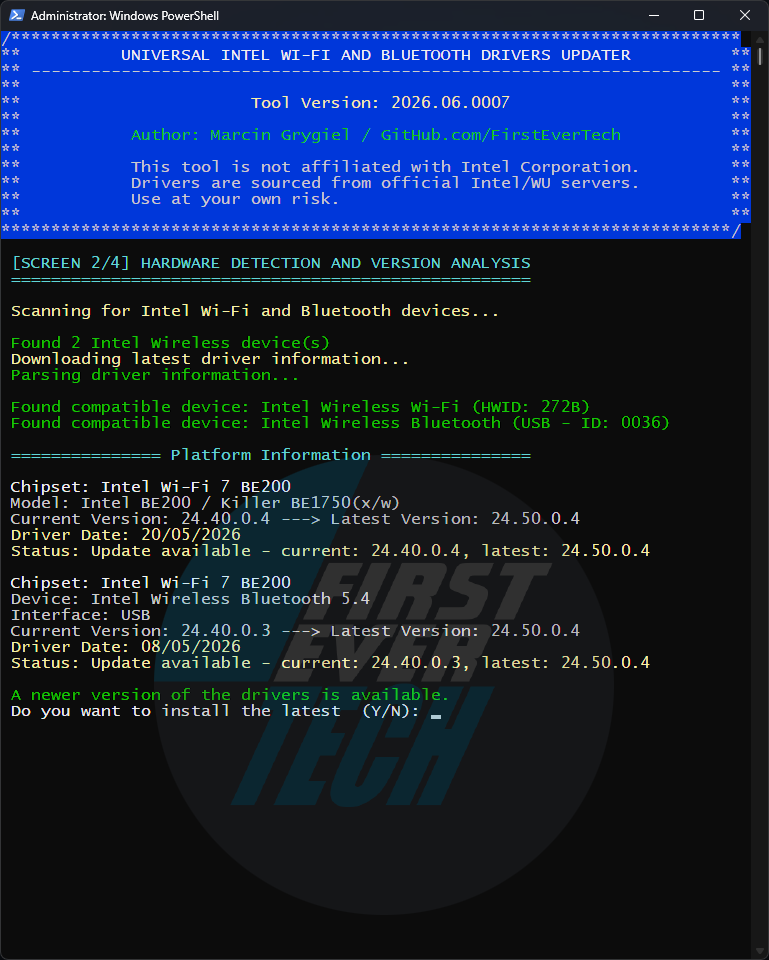 | 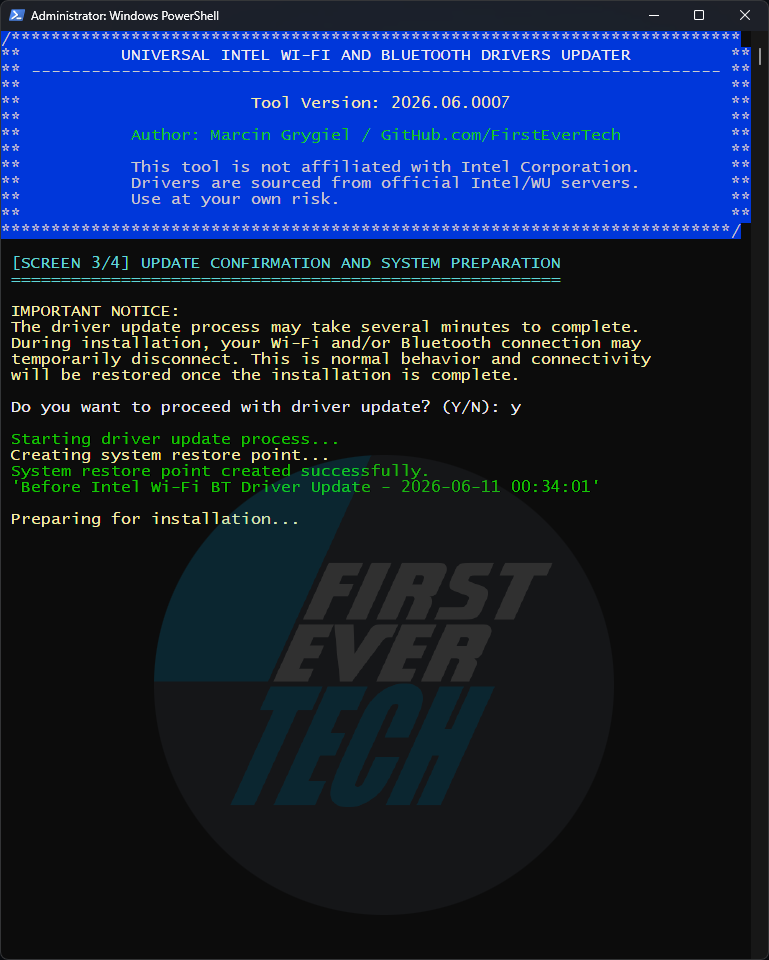 | 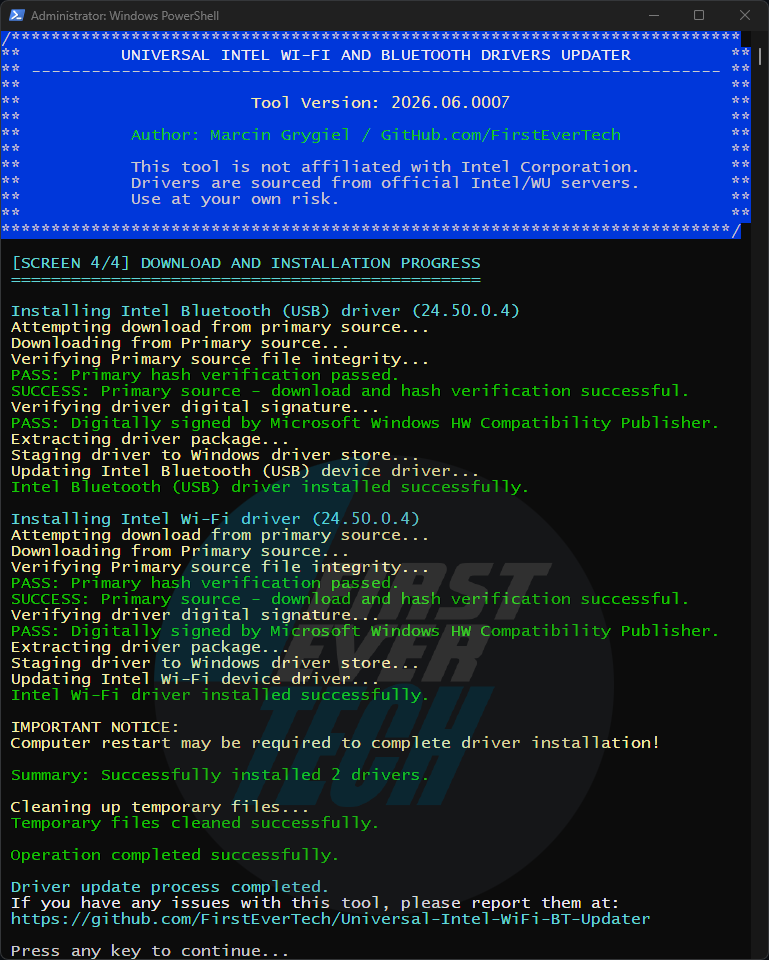 |
| *Security check and update check* | *Hardware detection and version analysis* | *Creating a system restore point* | *Download, verify and install* |
[↑ Back to top](#top)
## ✨ **5. Key Features**
### 🔍 5.1 Smart Hardware Detection
- Automatically scans for Intel Wi-Fi and Bluetooth adapters
- Identifies specific Hardware IDs (HWIDs) via PCI and USB bus enumeration
- Supports adapters from Wi-Fi 5 (AC) through Wi-Fi 7 (BE)
- Detects both Wi-Fi and Bluetooth components independently
- Compares installed driver version against latest available release
### 🛡 5.2 Multi-Layer Security
- **SHA-256 Hash Verification** for all downloaded CAB packages
- **Digital Signature Validation** (Intel Corporation Authenticode certificates)
- **Automated System Restore Points** before installation
- **Dual-Source Download** with backup fallback
- **Administrator Privilege Enforcement** with auto-elevation
### ⚡ 5.3 Seamless Operation
- No installation required — fully portable single-script design
- Automatic version checking and self-update notifications
- Clean, intuitive console interface
- Detailed logging to `%ProgramData%\wifi_bt_update.log`
- Silent/unattended mode for MDM and enterprise deployment
### 🔄 5.4 Comprehensive Coverage
- Wi-Fi 5 / Wi-Fi 6 / Wi-Fi 6E / Wi-Fi 7 adapters
- Bluetooth 5.x and newer (integrated BT adapters)
- Separate driver channels: stable, beta, and dev
- Independent Wi-Fi and Bluetooth installation paths
[↑ Back to top](#top)
## 📋 **6. System Requirements**
### 6.1 System Requirements Table
| Component | Minimum | Recommended | Notes |
|-----------|---------|-------------|-------|
| Windows Version | 10 1809 (17763) | 11 22H2+ | 1809 requires .NET 4.7.2+ |
| .NET Framework | 4.7.2 | 4.8+ | Required for TLS 1.2 support |
| PowerShell | 5.1 | 5.1+ | Windows PowerShell 5.1 included |
| Administrator | Required | Required | For driver installation |
| Internet | Required | Required | For hash verification and updates |
| RAM | 2 GB | 4 GB+ | For CAB extraction and installation |
| Disk Space | 500 MB | 1 GB+ | Temporary files during installation |
| System Restore | Optional | Enabled | Automatic restore point creation |
### 6.2 Windows Version Support
| Version | Build | Status | Notes |
|---------|-------|--------|-------|
| Windows 11 | All builds | ✅ Full | Optimized support |
| Windows 10 | 22H2+ | ✅ Full | Recommended |
| Windows 10 | 21H2 | ✅ Full | Stable |
| Windows 10 | 21H1 (19043) | ✅ Full | Legacy |
| Windows 10 | 20H2 (19042) | ✅ Full | Legacy |
| Windows 10 | 2004 (19041) | ✅ Full | Legacy |
| Windows 10 | 1909 (18363) | ✅ Full | Legacy |
| Windows 10 | 1903 (18362) | ✅ Full | Legacy |
| Windows 10 | 1809 (17763) | ✅ Limited | Requires .NET 4.7.2+ for TLS 1.2 support |
| Windows 10 | LTSB 2016 (1607) | ⚠️ Limited | Manual updates required for TLS 1.2 |
| Windows 10 | LTSB 2015 (1507) | ⚠️ Limited | Manual updates required for TLS 1.2 |
### 6.3 Legacy System Notes
- **Windows 10 1809 (17763) and newer**: Full TLS 1.2 support out-of-the-box
- **Windows 10 LTSB 2015/2016**: May require manual installation of:
- [.NET Framework 4.8](https://go.microsoft.com/fwlink/?linkid=2088631)
- [KB4474419](https://catalog.update.microsoft.com/Search.aspx?q=KB4474419) (SHA-2 update)
- **The tool automatically**:
- Detects Windows version limitations
- Warns about potential connectivity issues
- Provides fallback options for offline operation
- **Basic HWID detection** works even without internet connectivity
[↑ Back to top](#top)
## ⚡ **7. Quick Comparison**
| Feature | This Tool | Intel DSA | Manual Installation |
|---------|-----------|-----------|---------------------|
| **Automatic Detection** | ✅ Full | ✅ Partial | ❌ Manual |
| **Security Verification** | ✅ Multi-layer | ✅ Basic | ❌ None |
| **System Restore Points** | ✅ Automatic | ❌ None | ❌ Manual |
| **Update Notifications** | ✅ Built-in | ✅ Yes | ❌ None |
| **Self-updating** | ✅ Yes | ❌ No | ❌ No |
| **Silent/MDM Mode** | ✅ `-quiet` flag | ❌ No | ❌ No |
| **Portable** | ✅ No install | ❌ Requires install | ✅/❌ Varies |
| **Free** | ✅ 100% | ✅ Yes | ✅ Yes |
[↑ Back to top](#top)
## 🚦 **8. Quick Start**
### 8.1 Method 1: One-Click Execution
# Download and run executable file as Administrator:
WiFi-BT-Updater-2026.03.0003-Win10-Win11.exe (or later version)
### 8.2 Method 2: PowerShell Direct
# Run PowerShell as Administrator, then:
.\universal-intel-wifi-bt-driver-updater.ps1
### 8.3 Method 3: Hardware ID Scanner Only
# For diagnostic purposes only:
.\get-intel-hwids.ps1
### 8.4 Method 4: PowerShell Gallery
Install from PowerShell Gallery (Run PowerShell as Administrator):
Install-Script universal-intel-wifi-bt-driver-updater
Manual update from PowerShell Gallery for v24.0-2025.11.0 (Run PowerShell as Administrator):
Update-Script -Name universal-intel-wifi-bt-driver-updater
Run from PowerShell Gallery (Run PowerShell as Administrator):
universal-intel-wifi-bt-driver-updater
### 8.5 Command-Line Options
| Option | Description |
|--------|-------------|
| `-help`, `-?` | Display help and exit. |
| `-version`, `-v` | Display the tool version and exit. |
| `-auto`, `-a` | Automatically answer all prompts with Yes — no user interaction required. |
| `-quiet`, `-q` | Run in completely silent mode (no console window). Implies `-auto` and hides the PowerShell window. |
| `-beta` | Use beta database for new hardware testing. |
| `-debug`, `-d` | Enable debug output. |
| `-skipverify`, `-s` | Skip the script self-hash verification. **Use only for testing!** |
**Notes:**
- These options work when the script is executed directly via PowerShell or via the SFX package.
- For fully unattended deployments (e.g., Intune, SCCM), combine `-quiet` with administrator privileges.
**Examples:**
.\universal-intel-wifi-bt-driver-updater.ps1 -auto
.\universal-intel-wifi-bt-driver-updater.ps1 -quiet
.\universal-intel-wifi-bt-driver-updater.ps1 -debug -skipverify
[↑ Back to top](#top)
## 🔧 **9. How It Works**
### 🔒 9.1 Self-Verification & Update Check
- **Integrity Verification** — Validates script hash against published GitHub release hash
- **Update Detection** — Compares current version with latest available
- **Security First** — Ensures tool hasn't been modified or corrupted before execution
### 🔍 9.2 Hardware Detection
- Scans PCI and USB buses for Intel Wi-Fi and Bluetooth adapters (Vendor ID 8086)
- Identifies the exact adapter model via Hardware IDs
- Reads currently installed driver version from the system
- Detects Wi-Fi and Bluetooth components independently
### 📊 9.3 Database Query & Matching
- Downloads latest Wi-Fi and Bluetooth driver database from GitHub
- Matches detected HWIDs with compatible CAB packages
- Compares current vs latest driver versions for both components
- Supports stable, beta, and dev release channels
### 🛡 9.4 Security Verification
- Creates system restore point automatically before any changes
- Downloads CAB packages from primary/backup sources
- Verifies SHA-256 hashes of all downloaded files
- Validates Intel Authenticode digital signatures
### ⚡ 9.5 Installation & Cleanup
- Extracts and applies driver CAB packages using official Windows tools
- Provides real-time progress feedback to the console
- Automatic cleanup of all temporary files after completion
- All actions logged to `%ProgramData%\wifi_bt_update.log`
[↑ Back to top](#top)
## 🛡 **10. Security First Approach**
### 🔒 10.1 Verified Security Layers
1. Self-Integrity → Script Hash Verification
2. File Integrity → SHA-256 Hash Verification
3. Authenticity → Intel Authenticode Digital Signatures
4. Project Origin → SFX signed with self-signed certificate (commercial Code Signing cert planned — community funding welcome)
5. System Safety → Automated Restore Points
6. Source Reliability → Dual Download Sources
7. Privilege Control → Admin Rights Enforcement (with auto-elevation)
8. Update Safety → Version Verification
[↑ Back to top](#top)
## 🎯 **11. Usage Scenarios**
### 🏠 11.1 Home Users
- **Keep wireless drivers updated** without technical knowledge
- **Automatic safety checks** prevent installation issues
- **One-click operation** with clear on-screen prompts
### 💼 11.2 IT Professionals & Technicians
- **Silent deployment** across multiple systems via `-quiet` flag
- **Comprehensive logging** for audit trails and troubleshooting
- **Security verification** meets corporate environment requirements
- Compatible with **Intune, SCCM, and other MDM solutions**
### 🛠 11.3 System Builders
- **Pre-installation preparation** — ensure latest drivers before handoff
- **Driver consistency** across multiple identical builds
- **Time-saving automation** vs manual Intel DSA or manual download
[↑ Back to top](#top)
## 📥 **12. Download Options**
### 12.1 Option 1: SFX Executable (Recommended)
- **File**: `WiFi-BT-Updater-2026.03.0003-Win10-Win11.exe`
- **Features**: Digital signature, one-click execution, automatic extraction and elevation
- **For**: Most users — easiest method, no separate PowerShell step required
### 12.2 Option 2: Script Direct
- **File**: `universal-intel-wifi-bt-driver-updater.ps1`
- **Features**: Full control, transparent source code, modifiable for custom environments
- **For**: Advanced users, administrators, MDM/Intune scripting
### 12.3 Option 3: Source Code
- **Method**: `git clone` the repository
- **Features**: Latest development version, full customization
- **For**: Developers, contributors
[↑ Back to top](#top)
## 📁 **13. Project Structure**
**Key Files and Directories:**
`src/` - Main scripts directory
- [get-intel-hwids.bat](src/get-intel-hwids.bat) - Intel Wi-Fi & BT HWIDs Detection Tool Batch launcher
- [get-intel-hwids.ps1](src/get-intel-hwids.ps1) - Intel Wi-Fi & BT HWIDs Detection Tool PowerShell script
- [universal-intel-wifi-bt-driver-updater.ps1](src/universal-intel-wifi-bt-driver-updater.ps1) - Main PowerShell script
- [universal-intel-wifi-bt-driver-updater.ver](src/universal-intel-wifi-bt-driver-updater.ver) - Main version file
`data/` - Data files
- [intel-wifi-driver-beta.md](data/intel-wifi-driver-beta.md) - Wi-Fi beta driver database
- [intel-wifi-driver-dev.md](data/intel-wifi-driver-dev.md) - Wi-Fi development driver database
- [intel-wifi-driver-latest.md](data/intel-wifi-driver-latest.md) - Wi-Fi latest stable driver database
- [intel-bt-drivers-download.txt](data/intel-bt-drivers-download.txt) - Legacy Wi-Fi download links (v2026.03.0003)
- [intel-chipset-infs-message.txt](data/intel-wifi-bt-message.txt) - Dynamic support message displayed at the end of the script (loaded from GitHub at runtime)
- [intel-bt-driver-beta.md](data/intel-bt-driver-beta.md) - Bluetooth beta driver database
- [intel-bt-driver-dev.md](data/intel-bt-driver-dev.md) - Bluetooth development driver database
- [intel-bt-driver-latest.md](data/intel-bt-driver-latest.md) - Bluetooth latest stable driver database
- [intel-bt-drivers-download.txt](data/intel-bt-drivers-download.txt) - Legacy Bluetooth download links (v2026.03.0003)
`docs/` - Documentation
- [HOW-TO-VERIFY-DRIVERS_EN_2026.md](docs/HOW-TO-VERIFY-DRIVERS_EN_2026.md) - Manual Driver version verification guide (English)
- [HOW-TO-VERIFY-DRIVERS_PL_2026.md](docs/HOW-TO-VERIFY-DRIVERS_PL_2026.md) - Manual Driver version verification guide (Polish)
- [INTEL-DRIVER-VERSIONING_EN_2026.md](docs/INTEL-DRIVER-VERSIONING_EN_2026.md) - Intel Driver Versioning (English)
- [INTEL-DRIVER-VERSIONING_PL_2026.md](docs/INTEL-DRIVER-VERSIONING_PL_2026.md) - Intel Driver Versioning (Polish)
- [MDM-DEPLOYMENT-GUIDE_EN_2026.md](docs/MDM-DEPLOYMENT-GUIDE_EN_2026.md) - Deploying the Tool via MDM (English)
- [MDM-DEPLOYMENT-GUIDE_PL_2026.md](docs/MDM-DEPLOYMENT-GUIDE_PL_2026.md) - Deploying the Tool via MDM (Polish)
- [NEW-RELEASE-GUIDE_EN_2026.md](docs/NEW-RELEASE-GUIDE_EN_2026.md) - New Release Guide (English)
- [NEW-RELEASE-GUIDE_PL_2026.md](docs/NEW-RELEASE-GUIDE_PL_2026.md) - New Release Guide (Polish)
- [POWERSHELL-GALLERY-PUBLISHING_EN_2026.md](docs/POWERSHELL-GALLERY-PUBLISHING_EN_2026.md) - PowerShell Gallery Publishing Guide (English)
- [POWERSHELL-GALLERY-PUBLISHING_PL_2026.md](docs/POWERSHELL-GALLERY-PUBLISHING_PL_2026.md) - PowerShell Gallery Publishing Guide (Polish)
`docs/audit-reports/2026-03-23/` - AI audit reports
- [2026-03-23-CHATGPT-AUDIT.md](docs/audit-reports-2026-03-23/2026-03-23-CHATGPT-AUDIT.md)
- [2026-03-23-CLAUDE-AUDIT.md](docs/audit-reports-2026-03-23/2026-03-23-CLAUDE-AUDIT.md)
- [2026-03-23-COPILOT-AUDIT.md](docs/audit-reports-2026-03-23/2026-03-23-COPILOT-AUDIT.md)
- [2026-03-23-DEEPSEEK-AUDIT.md](docs/audit-reports-2026-03-23/2026-03-23-DEEPSEEK-AUDIT.md)
- [2026-03-23-GEMINI-AUDIT.md](docs/audit-reports-2026-03-23/2026-03-23-GEMINI-AUDIT.md)
- [2026-03-23-GROK-AUDIT.md](docs/audit-reports-2026-03-23/2026-03-23-GROK-AUDIT.md)
`docs/audit-reports/2026-03-19/` - AI audit reports (archive)
- [2026-03-19-CHATGPT-AUDIT.md](docs/audit-reports-2026-03-19/2026-03-19-CHATGPT-AUDIT.md)
- [2026-03-19-CLAUDE-AUDIT.md](docs/audit-reports-2026-03-19/2026-03-19-CLAUDE-AUDIT.md)
- [2026-03-19-COPILOT-AUDIT.md](docs/audit-reports-2026-03-19/2026-03-19-COPILOT-AUDIT.md)
- [2026-03-19-DEEPSEEK-AUDIT.md](docs/audit-reports-2026-03-19/2026-03-19-DEEPSEEK-AUDIT.md)
- [2026-03-19-GEMINI-AUDIT.md](docs/audit-reports-2026-03-19/2026-03-19-GEMINI-AUDIT.md)
- [2026-03-19-GROK-AUDIT.md](docs/audit-reports-2026-03-19/2026-03-19-GROK-AUDIT.md)
`assets/` - Screenshots
- [1-security.png](assets/1-security.png) - Security screen (1 of 4)
- [2-detection.png](assets/2-detection.png) - Detection screen (2 of 4)
- [3-backup.png](assets/3-backup.png) - Backup screen (3 of 4)
- [4-install.png](assets/4-install.png) - Installation screen (4 of 4)
- [FirstEverTech-animation.gif](assets/FirstEverTech-animation.gif) - FirstEverTech animation
- [FirstEverTech-logo.png](assets/FirstEverTech-logo.png) - FirstEverTech logo
`ISSUE_TEMPLATE/` - Issue templates
- [bug_report.md](ISSUE_TEMPLATE/bug_report.md) - Bug report template
- [config.yml](ISSUE_TEMPLATE/config.yml) - Issue templates configuration file
`/` - Root directory files
- [AI_AUDITS.md](AI_AUDITS.md) - Comprehensive AI audit reports summary
- [CHANGELOG.md](CHANGELOG.md) - Project changelog
- [CONTRIBUTING.md](CONTRIBUTING.md) - Contribution guidelines
- [KNOWN_ISSUES.md](KNOWN_ISSUES.md) - Known issues and workarounds
- [LICENSE](LICENSE) - MIT License
- [PULL_REQUEST_TEMPLATE.md](PULL_REQUEST_TEMPLATE.md) - Pull request template
- [README.md](README.md) - Main project documentation
- [SECURITY.md](SECURITY.md) - Security policy
[↑ Back to top](#top)
## 📦 **14. Release Structure**
Each version (v202x.xx.xxxx) includes:
### 14.1 Primary Files
- `WiFi-BT-Updater-2026.03.0003-Win10-Win11.exe` — Main executable (digitally signed SFX)
- `universal-intel-wifi-bt-driver-updater.ps1` — PowerShell script
### 14.2 Verification Files
` — EXE hash
- `universal-intel-wifi-bt-driver-updater-202x.xx.xxxx-ps1.sha256` — PS1 script hash
### 14.3 Documentation
- `CHANGELOG.md` — Version history
- `AI_AUDITS.md` — AI audit reports
[↑ Back to top](#top)
## ❓ **15. Frequently Asked Questions (FAQ)**
### 🤔 15.1 Is this tool safe to use?
Yes! This tool has undergone comprehensive audits by multiple AI models with an average score of 9.6/10. Audits consistently confirm it is safe, stable, and suitable for daily use, corporate deployment, and technician toolkits.
Security measures include:
- Hash verification of all downloads
- Automatic system restore points before installation
- Official Intel drivers only, from trusted sources
- Comprehensive pre-installation checks
### 🔄 15.2 Will this update all my Intel drivers?
This tool specifically updates Intel Wi-Fi and Bluetooth drivers. It does not update GPU, chipset INF, or other device drivers. For chipset INF updates, see [Universal Intel Chipset Device Updater](https://github.com/FirstEverTech/Universal-Intel-Chipset-Updater).
### ⚠️ 15.3 What are the risks?
As with any driver update, there is a small risk of temporary connectivity interruption. The automated restore point minimizes this risk significantly, allowing a full rollback if needed.
### 💾 15.4 Where are files downloaded?
Files are temporarily stored in `%SystemRoot%\Temp\IntelWiFiBT\` and automatically cleaned up after installation. All actions are logged to `%ProgramData%\wifi_bt_update.log`.
### 🔧 15.5 What if something goes wrong?
The tool creates a system restore point before making any changes. You can restore your previous driver state via Windows System Restore at any time. Detailed logs are available in `%ProgramData%\wifi_bt_update.log`.
### 🔄 15.6 How does the automatic update check work?
The tool compares your current version with the latest version published on GitHub. If a newer version is available, it offers to download it directly to your Downloads folder with full SHA-256 verification.
### 🔒 15.7 What does self-hash verification do?
Before execution, the tool calculates its own SHA-256 hash and compares it with the official hash published on GitHub. This ensures the script hasn't been modified, corrupted, or tampered with since release.
### 📧 15.8 How are updates notified?
The tool automatically checks for updates on each run and clearly notifies you if a newer version is available, with options to continue with the current version or update first.
### 🏷️ 15.9 Why is the certificate "not trusted"?
The FirstEver.tech certificate is self-signed. A commercial Code Signing certificate would eliminate the SmartScreen warning, but it isn't necessary here — the PowerShell script (`universal-intel-wifi-bt-driver-updater.ps1`) is the authoritative source of the tool. Its SHA-256 hash is published on GitHub and verified automatically on every run, providing the same level of integrity assurance as a paid certificate. The SFX executable is a convenience wrapper for end users; its contents are the same verified PS1 script.
### 🛡️ 15.10 Why does VirusTotal show detections for the SFX executable?
The SFX package (`WiFi-BT-Updater-202x.xx.xxxx-Win10-Win11.exe`) may show a small number of detections on VirusTotal. These are **known false positives** caused by the combination of a self-extracting archive and PowerShell execution, which some generic heuristic engines flag without analyzing the actual content.
Common flagging engines include:
- **Bkav Pro** — flags virtually all SFX packages that launch PowerShell; known for high false positive rate
- **CrowdStrike Falcon** — reports low-confidence detections below their own confirmed-detection threshold
- **Rising** — uses a generic `Trojan.PSRunner/SFX` signature that triggers on any SFX+PS1 combination regardless of content
All major security vendors including **Microsoft, Kaspersky, ESET, Bitdefender, Sophos, Malwarebytes, Avast, Symantec** and 60+ others report **clean**.
The PowerShell script itself scores **0/56** on VirusTotal. You can verify both independently via the VirusTotal links provided in each release.
[↑ Back to top](#top)
## 💻 **16. Intel Wi-Fi and Bluetooth Platform Support**
| Adapter Family | Generation | Protocol | Status | Notes |
|----------------|------------|----------|--------|-------|
| BE200, BE202 | Wi-Fi 7 | 802.11be (6 GHz / 5 GHz / 2.4 GHz) | ✅ Full | Latest support |
| AX210, AX211 | Wi-Fi 6E | 802.11ax (6 GHz / 5 GHz / 2.4 GHz) | ✅ Full | Complete support |
| AX200, AX201, AX203 | Wi-Fi 6 | 802.11ax (5 GHz / 2.4 GHz) | ✅ Full | Stable support |
| 9260, 9461, 9462, 9560 | Wi-Fi 5 | 802.11ac | ✅ Full | Mature support |
| 8260, 8265 | Wi-Fi 5 | 802.11ac | ✅ Full | Legacy support |
| Integrated BT (all above) | Bluetooth 5.x+ | BT Classic + BLE | ✅ Full | Installed as companion to Wi-Fi driver |
[↑ Back to top](#top)
## 📊 **17. Performance Metrics**
### 17.1 Typical Execution Time Breakdown
| **Phase** | **Time** | **Description** |
|----------|----------|-----------------|
| Compatibility Pre-Check | 5–10 seconds | OS build, .NET Framework, TLS 1.2 availability, administrator privileges and GitHub connectivity verification |
| Verification & Update Check | 5–10 seconds | Self-integrity hash verification and updater version check |
| Hardware Detection | 5–15 seconds | Wi-Fi and Bluetooth adapter identification (HWID enumeration via PCI/USB) |
| System Restore Point Creation | 30–60 seconds | Automatic creation of a Windows System Restore Point before applying any changes |
| Package Download & Verification | 10–30 seconds | Download and SHA-256 verification of Wi-Fi and/or BT CAB driver package(s) |
| Installation | 30–90 seconds | CAB extraction, driver installation and device reconfiguration |
### 17.2 Disk Space Usage
| **Stage** | **Estimated Usage** | **Notes** |
|----------|---------------------|-----------|
| SFX archive (download) | ~0.7 MB | Self-extracting EXE |
| Extracted script (PS1) | ~100 KB | Temporary working file |
| System Restore Point | 100–300 MB | Managed by Windows (shadow copy storage) |
| Wi-Fi CAB driver package | 15–30 MB | Platform-dependent |
| BT CAB driver package | 5–15 MB | Platform-dependent |
| Extracted package contents | 10–50 MB | Temporary extraction |
| **Peak temporary disk usage** | **~150–400 MB** | During restore point creation and extraction |
| **Persistent disk usage after completion** | **< 5 MB** | Scripts and logs only |
**Important notes:**
- System Restore Point size is the dominant factor and depends on Windows configuration.
- All extracted driver files are automatically removed after completion.
- No driver binaries remain in the temp directory after installation.
### 17.3 Memory (RAM) Usage
| **Component** | **Estimated Usage** | **Notes** |
|--------------|---------------------|-----------|
| PowerShell runtime | 40–80 MB | Script execution, parsing and hashing |
| HWID scan & driver version check | 10–30 MB | Temporary in-memory data structures |
| CAB extraction | 30–100 MB | Short peak during unpacking |
| **Peak RAM usage** | **~100–200 MB** | Worst-case during package extraction |
**Memory characteristics:**
- RAM usage is short-lived and released immediately after each phase.
- No background services or resident processes.
- Safe even for systems with 2 GB RAM.
### 17.4 Resource Usage Summary
- **Required free disk space:** ~400 MB (safe upper bound)
- **Typical disk usage:** ~150–300 MB
- **Peak RAM usage:** ~100–200 MB
- **Persistent footprint after exit:** negligible
[↑ Back to top](#top)
## 🐛 **18. Known Issues**
For current limitations and workarounds, please see: [KNOWN_ISSUES.md](KNOWN_ISSUES.md)
[↑ Back to top](#top)
## 🚀 **19. Ready to Update?**
### 19.1 Quick Start Guide
1. **Download** the latest release from the [Releases page](https://github.com/FirstEverTech/Universal-Intel-WiFi-BT-Updater/releases)
2. **Verify** digital signature and hashes (optional but recommended)
3. **Run as Administrator** for full system access
4. **Follow prompts** — the tool handles everything automatically
5. **Restart if prompted** to complete driver installation
### 19.2 Verification Steps (Optional)
- Check file hashes match published SHA256 files
- Verify digital signature with included certificate
- Review AI audit reports for confidence
### 19.3 Need Help?
- 📚 [Full Documentation](https://github.com/FirstEverTech/Universal-Intel-WiFi-BT-Updater/tree/main/docs)
- 🐛 [Report Issues](https://github.com/FirstEverTech/Universal-Intel-WiFi-BT-Updater/issues)
- 💬 [Community Discussions](https://github.com/FirstEverTech/Universal-Intel-WiFi-BT-Updater/discussions)
- 🔧 [Troubleshooting Guide](KNOWN_ISSUES.md)
- 🔒 [AI Audit Reports](AI_AUDITS.md)
[↑ Back to top](#top)
## 🤝 **20. Contributing**
We welcome contributions! Please feel free to submit pull requests, report bugs, or suggest new features.
**Areas for Contribution:**
- Additional hardware platform support (new Wi-Fi adapter families)
- Translation improvements
- Documentation enhancements
- Testing on various Windows versions and adapter models
[↑ Back to top](#top)
## 📄 **21. License**
This project is licensed under the MIT License - see the [LICENSE](LICENSE) file for details.
[↑ Back to top](#top)
## 🙏 **22. Acknowledgments**
- Intel Corporation for providing official driver packages
- AI audit systems for security review
- Open source community for continuous improvement
- Beta testers for real-world validation
[↑ Back to top](#top)
## 🔗 **23. Important Links**
- [Releases](https://github.com/FirstEverTech/Universal-Intel-WiFi-BT-Updater/releases) — Download latest version
- [AI Audits](AI_AUDITS.md) — Full AI audit reports
- [Issue Tracker](https://github.com/FirstEverTech/Universal-Intel-WiFi-BT-Updater/issues) — Report problems
- [Universal Intel Chipset Device Updater](https://github.com/FirstEverTech/Universal-Intel-Chipset-Updater) — Companion tool
[↑ Back to top](#top)
## 🧑💻 **24. Author & Contact**

 ### **Marcin Grygiel** aka FirstEver
- 🌐 **Website**: [www.firstever.tech](https://www.firstever.tech)
- 💼 **LinkedIn**: [Marcin Grygiel](https://www.linkedin.com/in/marcin-grygiel/)
- 🔧 **GitHub**: [FirstEverTech](https://github.com/FirstEverTech)
- 📧 **Contact**: [Contact Form](https://www.firstever.tech/contact)
**Note**: This tool is provided as-is for educational and convenience purposes. While we strive for accuracy, always verify critical INF updates through official channels. The complete HWID database is available for transparency and community contributions.
[↑ Back to top](#top)
### **Marcin Grygiel** aka FirstEver
- 🌐 **Website**: [www.firstever.tech](https://www.firstever.tech)
- 💼 **LinkedIn**: [Marcin Grygiel](https://www.linkedin.com/in/marcin-grygiel/)
- 🔧 **GitHub**: [FirstEverTech](https://github.com/FirstEverTech)
- 📧 **Contact**: [Contact Form](https://www.firstever.tech/contact)
**Note**: This tool is provided as-is for educational and convenience purposes. While we strive for accuracy, always verify critical INF updates through official channels. The complete HWID database is available for transparency and community contributions.
[↑ Back to top](#top)