0xSHAK1B/Messenger-SSL-Pinning-Bypass
GitHub: 0xSHAK1B/Messenger-SSL-Pinning-Bypass
该项目提供了绕过 Android 版 Facebook Messenger SSL/TLS 证书绑定的两种方法,使安全研究人员能够使用标准 MITM 代理工具拦截并分析 Messenger 的加密 HTTPS 流量。
Stars: 10 | Forks: 3
# Android 版 Messenger SSL Pinning 绕过(2026)——拦截并抓取 HTTPS 流量
## 📖 概述
本项目提供了两种绕过 Android 版 Messenger SSL/TLS 证书绑定 (SSL Pinning) 的方法,使安全研究人员和开发者能够使用标准的 MITM 代理工具抓取并分析 Messenger 的 HTTPS 流量。
## 🎥 概念验证
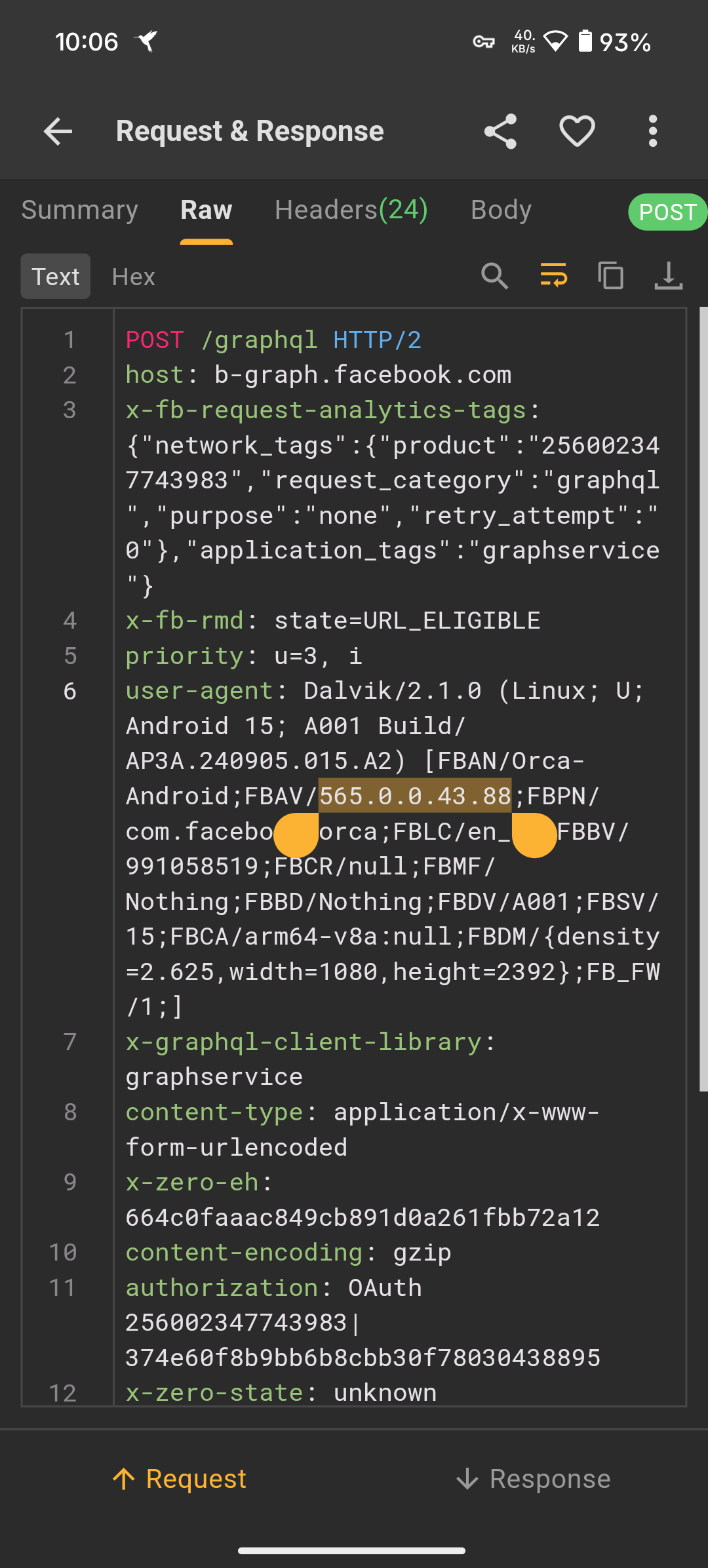 ## 📋 支持的 Messenger 版本
| 应用 | 包名 | 版本 | 状态 |
|-----|---------|---------|--------|
| Messenger | `com.facebook.orca` | **565.0.0.43.88** | ✅ 已绕过 |
## ⚙️ 支持的架构与方法
| 架构 | 方法 | 最适合 |
|---|---|---|
| `arm64-v8a` | ✅ 修改版 APK | 物理设备与 ARM64 模拟器 |
| `x86_64` | ✅ 修改版 `libcoldstart.so` | x86_64 模拟器 (Nox, LDPlayer, BlueStacks) |
## 📱 环境要求
### 选项 A:Android 物理设备 (ARM64)
- Android 手机或平板电脑(**已 root 或未 root**)
- 以下任一流量抓包工具:
- [Proxypin](https://proxypin.com) — 免费、轻量级
- [Reqable](https://reqable.com) — 功能丰富、现代化 UI
### 选项 B:Android 模拟器 (x86_64)
- 安装了以下任一模拟器的 Windows PC:
- [Nox Player](https://www.bignox.com/) — 已开启 root 权限
- [LDPlayer](https://www.ldplayer.net/) — 已开启 root 权限
- [BlueStacks](https://www.bluestacks.com/) — 已开启 root 权限
- 桌面端 MITM 代理工具:
- [Burp Suite](https://portswigger.net/burp) — 行业标准
- [Mitmproxy](https://mitmproxy.org/) — 开源
- [Reqable](https://reqable.com)
- [Proxypin](https://proxypin.com)
## 🚀 绕过步骤
### 方法 1 — 修改版 APK (ARM64-v8a)
最适合**Android 物理设备**与 ARM64 模拟器。无需 root。
1. 从您的设备中**卸载**官方 Messenger 应用(如果已安装)。
2. 从 [Telegram](https://t.me/MUH4MM4DSH4KIB) **获取**绕过 SSL pinning 的 Messenger APK。
3. 将修改后的 APK **安装**到您的 Android 设备或模拟器上。
4. **配置**您选择的代理工具(Proxypin、Reqable、Burp Suite 或 Mitmproxy)以抓取流量。
5. **启动 Messenger** 并开始抓取 HTTPS 请求和响应。
### 方法 2 — 替换库文件 (x86_64)
最适合 **x86_64 模拟器**(Nox、LDPlayer、BlueStacks)。需要在模拟器中具有 root 权限。
#### 步骤 1 — 推送修改后的库文件
使用 ADB 将原始的 `libcoldstart.so` 替换为修改后的版本:
```
adb push D:\patched\libcoldstart.so /data/data/com.facebook.orca/lib-compressed/libcoldstart.so
```
#### 步骤 2 — 设置正确的权限(如有需要)
```
adb shell chmod 755 /data/data/com.facebook.orca/lib-compressed/libcoldstart.so
```
#### 步骤 3 — 配置代理
设置您首选的 MITM 代理工具(Proxypin、Reqable、Burp Suite 或 Mitmproxy),并在模拟器上安装/信任其 CA 证书。
#### 步骤 4 — 启动并抓取
打开 Messenger 应用,并开始在您的代理工具中拦截 HTTPS 请求和响应。
## 📬 联系方式与最新版本
如需**最新**绕过 SSL pinning 的 Messenger APK 或修改版的 `libcoldstart.so`,请直接联系:
[](https://t.me/MUH4MM4DSH4KIB)
## 🏷️ 标签
`messenger ssl pinning bypass` · `facebook messenger certificate pinning` · `messenger mitm` · `messenger traffic interception` · `messenger burp suite` · `messenger proxy android` · `messenger https decrypt` · `meta messenger security` · `android ssl bypass no root` · `messenger ssl bypass 2025` · `messenger apk patched` · `libcoldstart.so patch` · `messenger api reverse engineering` · `messenger network analysis` · `messenger mqtt interception` · `facebook messenger private api` · `messenger graphql api` · `com.facebook.orca` · `messenger voip interception` · `messenger e2ee analysis`
## 📋 支持的 Messenger 版本
| 应用 | 包名 | 版本 | 状态 |
|-----|---------|---------|--------|
| Messenger | `com.facebook.orca` | **565.0.0.43.88** | ✅ 已绕过 |
## ⚙️ 支持的架构与方法
| 架构 | 方法 | 最适合 |
|---|---|---|
| `arm64-v8a` | ✅ 修改版 APK | 物理设备与 ARM64 模拟器 |
| `x86_64` | ✅ 修改版 `libcoldstart.so` | x86_64 模拟器 (Nox, LDPlayer, BlueStacks) |
## 📱 环境要求
### 选项 A:Android 物理设备 (ARM64)
- Android 手机或平板电脑(**已 root 或未 root**)
- 以下任一流量抓包工具:
- [Proxypin](https://proxypin.com) — 免费、轻量级
- [Reqable](https://reqable.com) — 功能丰富、现代化 UI
### 选项 B:Android 模拟器 (x86_64)
- 安装了以下任一模拟器的 Windows PC:
- [Nox Player](https://www.bignox.com/) — 已开启 root 权限
- [LDPlayer](https://www.ldplayer.net/) — 已开启 root 权限
- [BlueStacks](https://www.bluestacks.com/) — 已开启 root 权限
- 桌面端 MITM 代理工具:
- [Burp Suite](https://portswigger.net/burp) — 行业标准
- [Mitmproxy](https://mitmproxy.org/) — 开源
- [Reqable](https://reqable.com)
- [Proxypin](https://proxypin.com)
## 🚀 绕过步骤
### 方法 1 — 修改版 APK (ARM64-v8a)
最适合**Android 物理设备**与 ARM64 模拟器。无需 root。
1. 从您的设备中**卸载**官方 Messenger 应用(如果已安装)。
2. 从 [Telegram](https://t.me/MUH4MM4DSH4KIB) **获取**绕过 SSL pinning 的 Messenger APK。
3. 将修改后的 APK **安装**到您的 Android 设备或模拟器上。
4. **配置**您选择的代理工具(Proxypin、Reqable、Burp Suite 或 Mitmproxy)以抓取流量。
5. **启动 Messenger** 并开始抓取 HTTPS 请求和响应。
### 方法 2 — 替换库文件 (x86_64)
最适合 **x86_64 模拟器**(Nox、LDPlayer、BlueStacks)。需要在模拟器中具有 root 权限。
#### 步骤 1 — 推送修改后的库文件
使用 ADB 将原始的 `libcoldstart.so` 替换为修改后的版本:
```
adb push D:\patched\libcoldstart.so /data/data/com.facebook.orca/lib-compressed/libcoldstart.so
```
#### 步骤 2 — 设置正确的权限(如有需要)
```
adb shell chmod 755 /data/data/com.facebook.orca/lib-compressed/libcoldstart.so
```
#### 步骤 3 — 配置代理
设置您首选的 MITM 代理工具(Proxypin、Reqable、Burp Suite 或 Mitmproxy),并在模拟器上安装/信任其 CA 证书。
#### 步骤 4 — 启动并抓取
打开 Messenger 应用,并开始在您的代理工具中拦截 HTTPS 请求和响应。
## 📬 联系方式与最新版本
如需**最新**绕过 SSL pinning 的 Messenger APK 或修改版的 `libcoldstart.so`,请直接联系:
[](https://t.me/MUH4MM4DSH4KIB)
## 🏷️ 标签
`messenger ssl pinning bypass` · `facebook messenger certificate pinning` · `messenger mitm` · `messenger traffic interception` · `messenger burp suite` · `messenger proxy android` · `messenger https decrypt` · `meta messenger security` · `android ssl bypass no root` · `messenger ssl bypass 2025` · `messenger apk patched` · `libcoldstart.so patch` · `messenger api reverse engineering` · `messenger network analysis` · `messenger mqtt interception` · `facebook messenger private api` · `messenger graphql api` · `com.facebook.orca` · `messenger voip interception` · `messenger e2ee analysis`
## 📋 支持的 Messenger 版本
| 应用 | 包名 | 版本 | 状态 |
|-----|---------|---------|--------|
| Messenger | `com.facebook.orca` | **565.0.0.43.88** | ✅ 已绕过 |
## ⚙️ 支持的架构与方法
| 架构 | 方法 | 最适合 |
|---|---|---|
| `arm64-v8a` | ✅ 修改版 APK | 物理设备与 ARM64 模拟器 |
| `x86_64` | ✅ 修改版 `libcoldstart.so` | x86_64 模拟器 (Nox, LDPlayer, BlueStacks) |
## 📱 环境要求
### 选项 A:Android 物理设备 (ARM64)
- Android 手机或平板电脑(**已 root 或未 root**)
- 以下任一流量抓包工具:
- [Proxypin](https://proxypin.com) — 免费、轻量级
- [Reqable](https://reqable.com) — 功能丰富、现代化 UI
### 选项 B:Android 模拟器 (x86_64)
- 安装了以下任一模拟器的 Windows PC:
- [Nox Player](https://www.bignox.com/) — 已开启 root 权限
- [LDPlayer](https://www.ldplayer.net/) — 已开启 root 权限
- [BlueStacks](https://www.bluestacks.com/) — 已开启 root 权限
- 桌面端 MITM 代理工具:
- [Burp Suite](https://portswigger.net/burp) — 行业标准
- [Mitmproxy](https://mitmproxy.org/) — 开源
- [Reqable](https://reqable.com)
- [Proxypin](https://proxypin.com)
## 🚀 绕过步骤
### 方法 1 — 修改版 APK (ARM64-v8a)
最适合**Android 物理设备**与 ARM64 模拟器。无需 root。
1. 从您的设备中**卸载**官方 Messenger 应用(如果已安装)。
2. 从 [Telegram](https://t.me/MUH4MM4DSH4KIB) **获取**绕过 SSL pinning 的 Messenger APK。
3. 将修改后的 APK **安装**到您的 Android 设备或模拟器上。
4. **配置**您选择的代理工具(Proxypin、Reqable、Burp Suite 或 Mitmproxy)以抓取流量。
5. **启动 Messenger** 并开始抓取 HTTPS 请求和响应。
### 方法 2 — 替换库文件 (x86_64)
最适合 **x86_64 模拟器**(Nox、LDPlayer、BlueStacks)。需要在模拟器中具有 root 权限。
#### 步骤 1 — 推送修改后的库文件
使用 ADB 将原始的 `libcoldstart.so` 替换为修改后的版本:
```
adb push D:\patched\libcoldstart.so /data/data/com.facebook.orca/lib-compressed/libcoldstart.so
```
#### 步骤 2 — 设置正确的权限(如有需要)
```
adb shell chmod 755 /data/data/com.facebook.orca/lib-compressed/libcoldstart.so
```
#### 步骤 3 — 配置代理
设置您首选的 MITM 代理工具(Proxypin、Reqable、Burp Suite 或 Mitmproxy),并在模拟器上安装/信任其 CA 证书。
#### 步骤 4 — 启动并抓取
打开 Messenger 应用,并开始在您的代理工具中拦截 HTTPS 请求和响应。
## 📬 联系方式与最新版本
如需**最新**绕过 SSL pinning 的 Messenger APK 或修改版的 `libcoldstart.so`,请直接联系:
[](https://t.me/MUH4MM4DSH4KIB)
## 🏷️ 标签
`messenger ssl pinning bypass` · `facebook messenger certificate pinning` · `messenger mitm` · `messenger traffic interception` · `messenger burp suite` · `messenger proxy android` · `messenger https decrypt` · `meta messenger security` · `android ssl bypass no root` · `messenger ssl bypass 2025` · `messenger apk patched` · `libcoldstart.so patch` · `messenger api reverse engineering` · `messenger network analysis` · `messenger mqtt interception` · `facebook messenger private api` · `messenger graphql api` · `com.facebook.orca` · `messenger voip interception` · `messenger e2ee analysis`标签:Android, DSL, SSL Pinning Bypass, 中间人攻击, 云资产清单, 目录枚举, 移动安全, 逆向工程