LargeModGames/spotatui
GitHub: LargeModGames/spotatui
一款完全独立的终端 Spotify 客户端及通用音乐播放器,无需守护进程即可原生流式播放音乐。
Stars: 872 | Forks: 48
# spotatui
[](https://crates.io/crates/spotatui)
[](https://github.com/Rigellute/spotify-tui)
[](https://twitter.com/LargeModGames)
[](https://github.com/LargeModGames/spotatui)
[](#spotatui-contributors)
[](#upstream-contributors-spotify-tui)

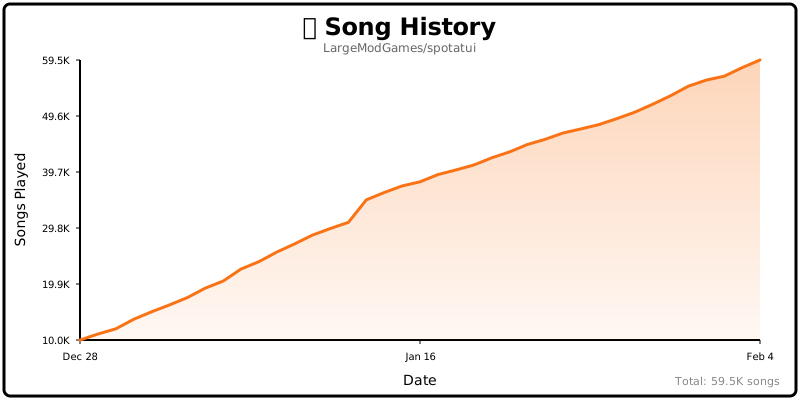
## Song History
## Table of Contents
- [Help Wanted](#help-wanted)
- [Performance](#performance)
- [Privacy Notice](#privacy-notice)
- [Migrating from spotify-tui](#migrating-from-spotify-tui)
- [Installation](#installation)
- [First-time setup](#first-time-setup)
- [Adding Spotify later](#adding-spotify-later)
- [Usage](#usage)
- [Native Streaming](#native-streaming)
- [Music Sources (Beyond Spotify)](#music-sources-beyond-spotify)
- [Local Files](#local-files)
- [Subsonic / Navidrome](#subsonic--navidrome)
- [Internet Radio](#internet-radio)
- [YouTube](#youtube)
- [Configuration](#configuration)
- [Discord Rich Presence](#discord-rich-presence)
- [Plugins](#plugins)
- [Limitations](#limitations)
- [Deprecated Spotify API Features](#deprecated-spotify-api-features)
- [Using with spotifyd](#using-with-spotifyd)
- [Libraries used](#libraries-used)
- [Development](#development)
- [Windows Subsystem for Linux](#windows-subsystem-for-linux)
- [Maintainer](#maintainer)
- [spotatui Contributors](#spotatui-contributors)
- [Upstream Contributors (spotify-tui)](#upstream-contributors-spotify-tui)
- [Star History](#star-history)
- [Roadmap](#roadmap)
## Help Wanted
## Performance
spotatui is extremely lightweight compared to the official Electron client.
| Mode | RAM Usage |
| :------------------------------ | :-------- |
| **Native Streaming (Base)** | ~78 MB |
| **With Synced Lyrics** | ~78 MB |
| **With System-Wide Visualizer** | ~80 MB |
*Tested on Arch Linux (Hyprland).*
## Privacy Notice
**Anonymous Global Counter**: spotatui includes an opt-in feature that contributes to a global counter showing how many songs have been played by all users worldwide. This feature:
- **Is completely anonymous** - no personal information, song names, artists, or listening history is collected
- **Only sends a simple increment** when a new song starts playing
- **Is enabled by default** but can be opted out at any time
- **Can be disabled** by setting `enable_global_song_count: false` in `~/.config/spotatui/config.yml`
We respect your privacy. This is purely a fun community metric with zero tracking of individual users.
## Migrating from spotify-tui
If you used the original `spotify-tui` before:
- The binary name changed from `spt` to `spotatui`.
- Config paths changed:
- Old: `~/.config/spotify-tui/`
- New: `~/.config/spotatui/`
You can copy your existing config:
mkdir -p ~/.config/spotatui
cp -r ~/.config/spotify-tui/* ~/.config/spotatui/
You may be asked to re-authenticate with Spotify the first time.
## Installation
# Homebrew (macOS only)
brew tap LargeModGames/spotatui
brew install spotatui
# Winget (Windows)
winget install spotatui
# Cargo
cargo install spotatui
# Arch Linux (AUR) - pre-built binary (faster)
yay -S spotatui-bin
# Arch Linux (AUR) - build from source
yay -S spotatui
# Void Linux (Unoffical Repo)
echo repository=https://raw.githubusercontent.com/Event-Horizon-VL/blackhole-vl/repository-x86_64 | sudo tee /etc/xbps.d/20-repository-extra.conf
sudo xbps-install -S spotatui
# NixOS (Flake)
# Add spotatui to your flake inputs:
inputs = {
spotatui = {
url = "github:LargeModGames/spotatui";
inputs.nixpkgs.follows = "nixpkgs";
};
}
# Add the spotatui package from your inputs to your config:
{ inputs, ...}:{
# Your other configurations
environment.systemPackages = with pkgs; [
inputs.spotatui.packages.${pkgs.stdenv.hostPlatform.system}.default
];
}
Or download pre-built binaries from [GitHub Releases](https://github.com/LargeModGames/spotatui/releases/latest).
See the [Installation Wiki](https://github.com/LargeModGames/spotatui/wiki/Installation) for platform-specific requirements and building from source.
## First-time setup
Run `spotatui`. On the first launch it asks which source you want to set up:
Welcome to spotatui! Choose your music source:
1) Spotify (needs login)
2) YouTube (free, needs the yt-dlp binary)
3) Subsonic (free, needs a Subsonic/Navidrome server)
4) Internet Radio (free)
5) Local Files (free)
- Pick a **free source** to skip Spotify entirely. Subsonic prompts for your server URL and credentials (and verifies the connection); YouTube checks that `yt-dlp` is on your `PATH`. Only sources compiled into your build are listed.
- Pick **Spotify** to run the Spotify auth wizard. You'll need to create a Spotify Developer app at the [Spotify Dashboard](https://developer.spotify.com/dashboard/applications). See the [Installation Wiki](https://github.com/LargeModGames/spotatui/wiki/Installation#connecting-to-spotify) for step-by-step setup.
### Adding Spotify later
Started with a free source and want Spotify too? Press `d` to open the Source & Device menu and select **Spotify** — spotatui opens your browser to log in without restarting. This enables Spotify's Web API (browsing, playlists, controlling external devices) right away; **native (librespot) streaming still requires a restart**, since it initializes at startup.
## Usage
The binary is named `spotatui`.
Running `spotatui` with no arguments will bring up the UI. Press `?` to bring up a help menu that shows currently implemented key events and their actions.
There is also a CLI that is able to do most of the stuff the UI does. Use `spotatui --help` to learn more.
See [Keybindings Wiki](https://github.com/LargeModGames/spotatui/wiki/Keybindings) for the full list of keyboard shortcuts.
Here are some example to get you excited.
spotatui --completions zsh # Prints shell completions for zsh to stdout (bash, power-shell and more are supported)
spotatui play --name "Your Playlist" --playlist --random # Plays a random song from "Your Playlist"
spotatui play --name "A cool song" --track # Plays 'A cool song'
spotatui playback --like --shuffle # Likes the current song and toggles shuffle mode
spotatui playback --toggle # Plays/pauses the current playback
spotatui list --liked --limit 50 # See your liked songs (50 is the max limit)
# Looks for 'An even cooler song' and gives you the '{name} from {album}' of up to 30 matches
spotatui search "An even cooler song" --tracks --format "%t from %b" --limit 30
# Generate a shareable HTML recap from spotatui's local listening history
spotatui history recap --period 30d --output ./spotatui-recap.html
## Native Streaming
spotatui can play audio directly without needing spotifyd or the official Spotify app. Just run `spotatui` and it will appear as a Spotify Connect device.
- Works with media keys, MPRIS (Linux), and macOS Now Playing
- Premium account required
- Context-backed native playback prefers Spotify-visible playback starts when it is safe to do so, while raw URI-list playback stays on the stable direct native path
- Runs on our maintained [librespot fork](https://github.com/LargeModGames/spotatui-librespot), which backports upstream fixes for Spotify's evolving audio delivery (e.g. the HTTP 530 CDN issue that silenced native playback)
See the [Native Streaming Wiki](https://github.com/LargeModGames/spotatui/wiki/Native-Streaming) for setup details.
## Music Sources (Beyond Spotify)
spotatui is growing into a general music player. Press `d` to open the **Source & Device**
picker and switch between sources; the sidebar and search re-scope to the active source.
Playback for these sources runs through spotatui's own audio engine, so volume control and
the audio visualizer work exactly like they do for Spotify.
| Source | What it does | Needs |
|---|---|---|
| **Local Files** | Browse and play a folder of audio files (FLAC, MP3, OGG, WAV, …) | Nothing; set `local_music_path` or use the OS music dir |
| **Subsonic** | Browse playlists, search, and stream from any Subsonic-compatible server (Navidrome, Gonic, Airsonic, Funkwhale, …) | A server account |
| **Internet Radio** | Play icecast/shoutcast streams with live now-playing metadata; search the [radio-browser.info](https://www.radio-browser.info) directory (30k+ stations) | Nothing |
| **YouTube** | Search YouTube and play audio; build **local playlists** stored in a plain file | [`yt-dlp`](https://github.com/yt-dlp/yt-dlp) on your `PATH` (ffmpeg recommended) |
These sources need no Spotify Premium. Combined with YouTube's local playlists, spotatui is
fully usable without any paid account.
**Resuming your last session:** quit while playing from a non-Spotify source and spotatui
remembers that track and its position, bringing it back on the next launch. This follows the
`startup_behavior` setting: the default `continue` resumes it exactly as it was (playing if it
was playing when you closed), `play` always resumes it, and `pause` cues it paused.
Availability: included in the Linux and Windows release binaries. Not yet available on macOS
(the shared audio output path is disabled there pending a fix; contributions welcome). When
building from source, enable them with cargo features:
cargo install spotatui --features local-files,subsonic,internet-radio,youtube
### Local Files
behavior:
local_music_path: "/home/you/Music" # defaults to the OS music directory
Pick **Local Files** in the `d` picker; the sidebar lists your folders. Selecting a track
queues the folder with next/previous and auto-advance.
### Subsonic / Navidrome
behavior:
subsonic_url: "https://music.example.com"
subsonic_username: "you"
subsonic_password: "secret" # prefer the env var below
Prefer setting the password via the `SPOTATUI_SUBSONIC_PASSWORD` environment variable so it
never sits in the config file in plaintext.
### Internet Radio
Stations come from your config list and from searching the radio-browser.info directory
in-app (the search box searches stations while Radio is the active source; Enter plays one
directly). Press the save/like key (`F` by default) on a highlighted station, or while
a radio stream is playing, to save it to `behavior.radio_stations` and show it in the
Radio Stations sidebar. Highlight a saved sidebar station and press `D` to remove it.
behavior:
radio_stations:
- name: "SomaFM Groove Salad"
url: "https://ice1.somafm.com/groovesalad-128-mp3"
The playbar shows a `LIVE` badge with the stream's now-playing title as it updates.
### YouTube
Requires the [`yt-dlp`](https://github.com/yt-dlp/yt-dlp) binary (install it from your
package manager; `ffmpeg` is recommended for cleaner audio containers). No Google account,
no API key, no cookies: search and playback are anonymous. If yt-dlp is somewhere unusual:
behavior:
ytdlp_path: "/opt/yt-dlp/yt-dlp" # optional; defaults to `yt-dlp` on PATH
Search for anything and press Enter on a result to play it (the first play takes a few
seconds while the audio downloads). When YouTube extraction changes and playback breaks,
updating yt-dlp (`yt-dlp -U` or your package manager) is the fix; no spotatui update needed.
**Local YouTube playlists**: since there is no usable YouTube login API, playlists live in
`~/.config/spotatui/youtube_playlists.yml`, a plain human-editable file you can back up or
share:
- Sidebar → `+ New Playlist` creates one
- `w` on a search result adds it to a playlist (same picker dialog as Spotify)
- Enter on a playlist opens it; Enter on a track plays the playlist as a queue
- `x` removes a track, `D` deletes a playlist (both with confirmation)
## Configuration
A configuration file is located at `${HOME}/.config/spotatui/config.yml`.
spotatui also stores local listening history at `${HOME}/.config/spotatui/history/listens.jsonl`. This powers the `spotatui history recap` CLI and starts collecting from rollout onward; short or skipped plays are stored but excluded from recap totals.
See the [Configuration Wiki](https://github.com/LargeModGames/spotatui/wiki/Configuration) for the full config file reference.
You can also configure spotatui in-app by pressing `Alt-,` to open Settings.
See [Themes Wiki](https://github.com/LargeModGames/spotatui/wiki/Themes) for built-in presets (Spotify, Dracula, Nord, etc.).
### Discord Rich Presence
Discord Rich Presence is enabled by default and uses the built-in spotatui application ID, so no extra setup is required.
Overrides (optional):
behavior:
enable_discord_rpc: true
discord_rpc_client_id: "your_client_id"
You can also override via `SPOTATUI_DISCORD_APP_ID` or disable in the setting or by setting `behavior.enable_discord_rpc: false` in ~/.config/spotatui/config.yml.
## Plugins
spotatui runs user-written Lua plugins. They react to playback events, add commands and key
bindings, draw popups and playbar segments, restyle the theme, and make async HTTP requests.
Install a plugin published as a git repository (requires `git`):
spotatui plugin add owner/repo
spotatui plugin list
spotatui plugin update
spotatui plugin remove
See [`PLUGINS.md`](PLUGINS.md) for the ecosystem overview, [`examples/plugins/`](examples/plugins)
for runnable examples, and [`docs/scripting.md`](docs/scripting.md) for the full API reference.
## Limitations
This app uses the [Web API](https://developer.spotify.com/documentation/web-api/) from Spotify, which doesn't handle streaming itself. You have three options for audio playback:
1. **Native Streaming (NEW!)** - spotatui can now play audio directly using its built-in streaming feature. See [Native Streaming](#native-streaming) below.
2. **Official Spotify Client** - Have the official Spotify app open on your computer
3. **Spotifyd** - Use a lightweight alternative like [spotifyd](https://github.com/Spotifyd/spotifyd)
If you want to play tracks, Spotify requires that you have a Premium account.
With a free account, spotatui can still authenticate and browse your library/search results, but playback actions (play/pause/seek/transfer) will not work in either:
- Native Streaming (librespot)
- Web API playback control mode
### Deprecated Spotify API Features
**Note:** As of November 2024, Spotify deprecated and removed access to certain API endpoints for new applications. The following features are included in this app but **will only work if your Spotify Developer application was created before November 27, 2024**:
- **Audio Visualization** (press `v`): Now uses **local real-time FFT analysis** of your system audio. The visualization no longer depends on Spotify's deprecated Audio Analysis API.
**Platform Support:**
| Platform | Status | Notes |
| ----------- | -------------------- | ---------------------------------------- |
| **Windows** | Works out of the box | Uses WASAPI loopback |
| **Linux** | Works out of the box | Uses PipeWire/PulseAudio monitor devices |
| **macOS** | Requires setup | Needs a virtual audio device (see below) |
- **Related Artists**: When viewing an artist page, the "Related Artists" section shows similar artists based on Spotify's recommendation algorithm. This feature **only works if your Spotify Developer application was created before November 27, 2024**.
For more information, see [Spotify's announcement about API changes](https://developer.spotify.com/blog/2024-11-27-changes-to-the-web-api).
## Using with [spotifyd](https://github.com/Spotifyd/spotifyd)
Follow the spotifyd documentation to get set up.
After that there is not much to it.
1. Start running the spotifyd daemon.
2. Start up `spotatui`
3. Press `d` to go to the device selection menu and the spotifyd "device" should be there - if not check [these docs](https://github.com/Spotifyd/spotifyd#logging)
## Libraries used
- [ratatui](https://github.com/ratatui-org/ratatui) - Terminal UI framework
- [rspotify](https://github.com/ramsayleung/rspotify) - Spotify Web API client
- [librespot](https://github.com/librespot-org/librespot) - Spotify Connect streaming (via our maintained fork [spotatui-librespot](https://github.com/LargeModGames/spotatui-librespot), which backports fixes for Spotify's CDN changes)
- [tokio](https://github.com/tokio-rs/tokio) - Async runtime
- [crossterm](https://github.com/crossterm-rs/crossterm) - Terminal manipulation
- [clap](https://github.com/clap-rs/clap) - CLI argument parsing
## Development
1. [Install OpenSSL](https://docs.rs/openssl/0.10.25/openssl/#automatic)
2. [Install Rust](https://www.rust-lang.org/tools/install)
3. [Install `xorg-dev`](https://github.com/aweinstock314/rust-clipboard#prerequisites) (required for clipboard support)
4. **Linux only:** Install PipeWire development libraries (required for audio visualization)
# Debian/Ubuntu
sudo apt-get install libpipewire-0.3-dev libspa-0.2-dev
# Arch Linux
sudo pacman -S pipewire
# Fedora
sudo dnf install pipewire-devel
# NixOS
nix develop github:LargeModGames/spotatui
5. Clone or fork this repo and `cd` to it
6. And then `cargo run`
See [CONTRIBUTING.md](CONTRIBUTING.md) for pull request guidelines.
### Windows Subsystem for Linux
You might get a linking error. If so, you'll probably need to install additional dependencies required by the clipboard package
sudo apt-get install -y -qq pkg-config libssl-dev libxcb1-dev libxcb-render0-dev libxcb-shape0-dev libxcb-xfixes0-dev
## Maintainer
Maintained by **[LargeModGames](https://github.com/LargeModGames)** ([@LargeModGames](https://twitter.com/LargeModGames) on Twitter).
Originally forked from [spotify-tui](https://github.com/Rigellute/spotify-tui) by [Alexander Keliris](https://github.com/Rigellute).
## spotatui Contributors
**Looking for contributors!** spotatui is actively maintained but could use your help. Whether it's bug fixes, new features, documentation, or testing - all contributions are welcome!














































标签:Rust, Spotify, TUI, 可视化界面, 媒体播放器, 终端应用, 网络流量审计, 通知系统, 音乐客户端