Bert-JanP/KustoHawk
GitHub: Bert-JanP/KustoHawk
一款基于 PowerShell 和 Graph API 的轻量级事件分诊工具,通过自动化 KQL 查询编排帮助安全分析师快速收集 Microsoft Defender XDR 与 Sentinel 环境中设备和身份的入侵指标并生成调查报告。
Stars: 157 | Forks: 24
# KustoHawk 🦅
KustoHawk 是一款专为 Microsoft Defender XDR 和 Microsoft Sentinel 环境设计的事件分诊与响应工具。该脚本会收集常见的入侵指标,并返回有关设备或账户所执行活动的完整图景。此工具利用 Graph API 在您统一的 XDR 环境中运行搜寻查询。基于[分层权限](#authentication-tiers-and-permissions)模型,可以通过 Graph API 调用收集更多数据。已执行的查询列表在 [Resources](./Resources/) 文件夹中。

## 架构
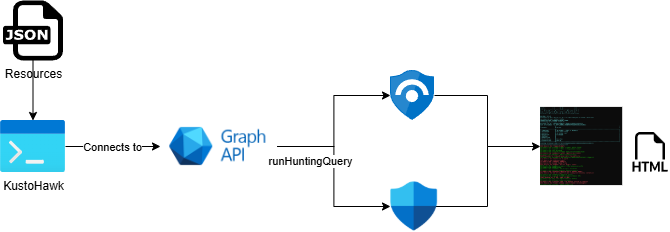
KustoHawk 基于 [KustoHawk.ps1](./KustoHawk.ps1) PowerShell 脚本,该脚本连接到 Graph API 以运行搜寻查询并收集相关数据。输出结果会在命令行中共享,并以 HTML 报告的形式呈现。
## 用法
该脚本支持多种身份验证选项来将其连接到 Graph API。在 *AuthenticationMethod* 参数中设置以下选项之一;如果使用 ServicePrincipal 登录,则必须在脚本中添加应用程序配置。
- User
- ServicePrincipalSecret
- ServicePrincipalCertificate
默认情况下,会收集过去 7 天的数据,可以使用 *[-TimeFrame] * 参数进行调整。
### 身份验证层级与权限
层级在 [Resources/AuthenticationTiers.yaml](./Resources/AuthenticationTiers.yaml) 中定义。
| 层级 | 权限 |
| --- | --- |
| Tier1 | `ThreatHunting.Read.All` |
| Tier2 | `ThreatHunting.Read.All`, `UserAuthenticationMethod.Read.All` |
| Tier3 | `ThreatHunting.Read.All`, `UserAuthenticationMethod.Read.All` |
- 所需的最低权限为 `ThreatHunting.Read.All`。
- 如果无法满足所请求的层级,KustoHawk 会自动尝试降至较低的层级。
### 前置条件
KustoHawk 需要 Microsoft Graph Security PowerShell 模块:
```
Install-Module Microsoft.Graph.Security
```
### 参数
```
KustoHawk.ps1 [[-DeviceId] ] [[-UserPrincipalName] ] [-VerboseOutput] [-Export]
[-IncludeSampleSet] [[-TimeFrame] ] [[-CertificateThumbprint] ]
[[-AuthenticationTier] ] [-AuthenticationMethod] []
```
关键参数:
- `-DeviceId`:40 个字符的十六进制 DeviceId。
- `-UserPrincipalName` 或 `-upn`:要调查的用户账户。
- `-TimeFrame` 或 `-t`:查询时间范围(默认为 `7d`)。
- `-IncludeSampleSet` 或 `-s`:在 HTML 报告中包含每个查询最多 10 个样本行。
- `-VerboseOutput` 或 `-v`:在终端中打印完整的查询结果。
- `-Export` 或 `-e`:将查询结果表导出为 CSV。
- `-AuthenticationMethod`:`User`、`ServicePrincipalSecret` 或 `ServicePrincipalCertificate`。
- `-AuthenticationTier`:`Tier1`、`Tier2` 或 `Tier3`。
- `-CertificateThumbprint`:用于证书身份验证的可选指纹。
要查看帮助和示例:
```
Get-Help .\KustoHawk.ps1
```
### 示例
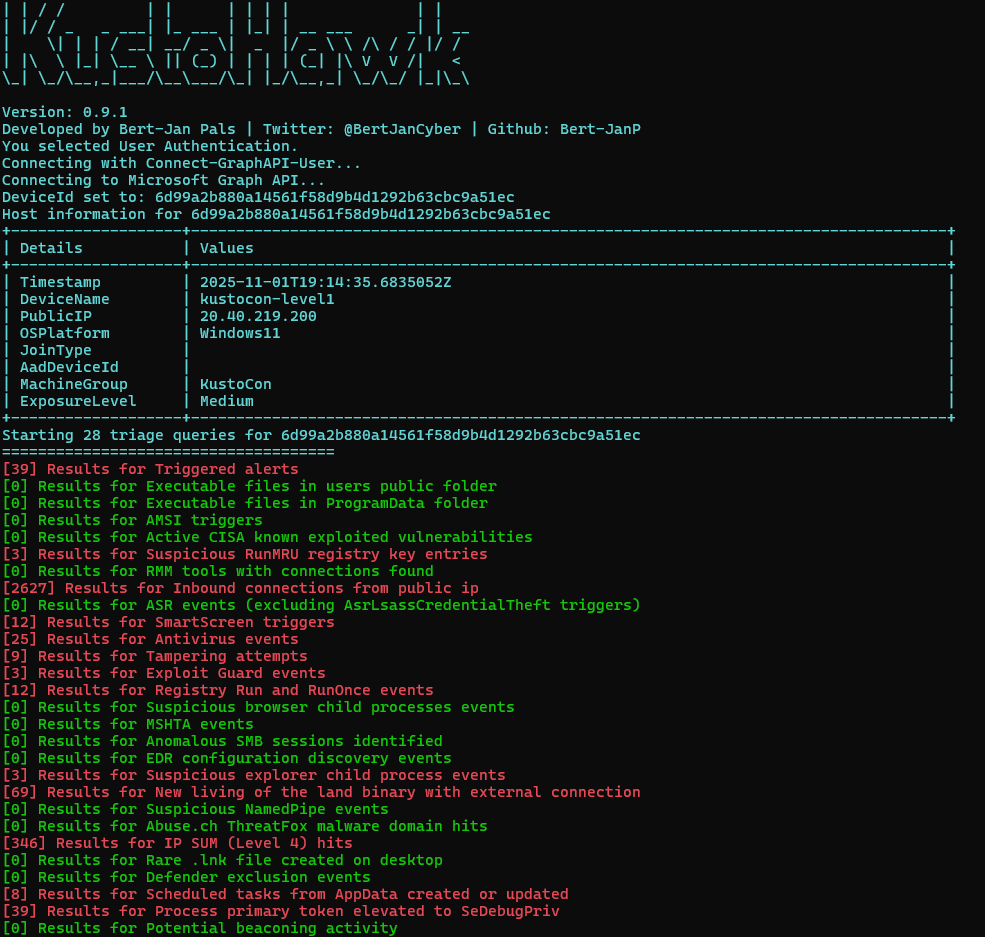
**示例 1:通过用户身份验证收集设备和身份信息**
```
.\KustoHawk.ps1 -DeviceId 2694a7cc2225f3b66f7cf8b6388a78b1857fadca -upn user@contonso.com -AuthenticationMethod User -AuthenticationTier Tier1
```
**示例 2:启用 CSV 导出并设定时间范围为 14 天来收集设备信息**
```
.\KustoHawk.ps1 -DeviceId 2694a7cc2225f3b66f7cf8b6388a78b1857fadca -AuthenticationMethod User -TimeFrame 14d -e -AuthenticationTier Tier1
```
**示例 3:设定时间范围为 14 天,收集带有样本结果和身份验证方法(Tier2)的身份信息**
```
.\KustoHawk.ps1 -upn bert-jan@kqlquery.com -AuthenticationTier Tier2 -TimeFrame 14d -IncludeSampleSet -AuthenticationMethod User
```
## 表要求
缺少表并不会导致 KustoHawk 崩溃,但返回的检测结果会相应减少。
### 设备分诊
- 统一安全平台警报 (AlertEvidence, AlertInfo)
- Defender For Endpoint (DeviceFileEvents, DeviceEvents, DeviceTvmSoftwareVulnerabilities, DeviceRegistryEvents, DeviceNetworkEvents, DeviceProcessEvents, DeviceInfo)
### 身份分诊
- 统一安全平台警报 (AlertEvidence, AlertInfo)
- Sentinel UEABA (Anomalies)
- Entra ID 日志 (AADUserRiskEvents, SigninLogs, AuditLogs, AADSignInEventsBeta)
- AzureActivity
- Defender For Identity (IdentityInfo)
- GraphAPIAuditEvents
- Defender For Cloud Apps (CloudAppEvents, BehaviorEntities, BehaviorInfo)
## 贡献
非常感谢您的贡献!您可以通过向 [Resources](./Resources/) 文件夹中的 JSON 文件添加新查询来进行贡献。请为新查询创建一个拉取请求 (Pull Request)。
JSON 包含三个必填字段:
- "Name":查询的名称。
- "Query":要执行的查询。PowerShell 脚本会将 KQL 中的变量 *{DeviceId}*、*{TimeFrame}* 和 *{UserPrincipalName}* 替换为脚本的输入值。
- "Source":查询的来源,应给予应有的署名。
- "ResultCount":上次运行时的命中数量
```
{
"Name": "Triage query one",
"Query": "let Device = '{DeviceId}';\r\nAlertEvidence\r\n| where DeviceId =~ Device\r\n| where Timestamp > ago({TimeFrame})\r\n| where EntityType == 'Machine'\r\n| summarize arg_max(Timestamp, *) by AlertId\r\n| project AlertId\r\n| join kind=inner AlertInfo on AlertId\r\n| extend AlertLink = strcat('https://security.microsoft.com/alerts/', AlertId)\r\n| project-reorder Timestamp, Title, Category, Severity, DetectionSource, AlertLink\r\n| sort by Timestamp desc",
"Source": "https://github.com/Bert-JanP/Hunting-Queries-Detection-Rules/blob/main/DFIR/XDR%20-%20DeviceAlerts.md",
"ResultCount": 22
}
```
**将 KQL 查询转换为单行字符串**
JSON 中的查询字段应为单行字符串,可以使用下面的 PowerShell 脚本将查询转换为正确的格式。
```
$Query = "let Upn = '{UserPrincipalName}';
let TimeFrame = {TimeFrame};
AADUserRiskEvents
| where TimeGenerated > ago(TimeFrame)
| where UserPrincipalName =~ Upn
| summarize arg_max(TimeGenerated, *) by UserPrincipalName
| project TimeGenerated, UserPrincipalName, RiskState, RiskLevel, RiskDetail, RiskEventType"
$Output = $Query -replace '\r','\r' -replace '\n','\n'
Write-Output $Output
```
# 致谢
KustoHawk 使用了以下作者的查询。
| 名称 | 来源 |
| --- | --- |
| @reprise99 | [Sentinel-Queries](https://github.com/reprise99/Sentinel-Queries) |
| Kijo Girardi | [AiTM & BEC Threat Hunting with KQL](https://techcommunity.microsoft.com/blog/azuredataexplorer/aitm--bec-threat-hunting-with-kql/3885166) |
标签:AI合规, EDR, IoC, IPv6, KQL, Kusto, Libemu, Microsoft Defender XDR, Microsoft Graph API, Microsoft Sentinel, OpenCanary, PowerShell, 企业安全, 分类与分级, 妥协指标, 威胁情报, 安全脚本, 安全运营, 库, 应急响应, 应急溯源, 开发者工具, 扫描框架, 无线安全, 网络安全审计, 网络资产管理, 脆弱性评估, 自动化分析, 跨站脚本