Amal-David/keyleak-detector
GitHub: Amal-David/keyleak-detector
面向现代 Web 应用的运行时密钥泄漏检测工具,通过主动验证而非静态匹配来发现并证明 API 密钥泄漏与 BaaS 配置漏洞。
Stars: 264 | Forks: 30
# KeyLeak 检测器
[](https://pypi.org/project/keyleak-detector/)
[](https://github.com/Amal-David/keyleak-detector)
[](LICENSE)
[](docs/github-action.md)
[](extension/)
[](https://www.python.org/)
面向现代 Web 应用的运行时泄漏检测器。查找暴露的 API 密钥,**验证 BaaS 配置不当**(Supabase RLS,Firebase Security Rules),并捕获 JavaScript bundle 中的机密信息 —— 同时提供用于实时检测的 Chrome 扩展。
## 与众不同之处
静态扫描器用于查找源代码中的硬编码机密。KeyLeak 专门查找那些只在运行时才会出现的机密 —— 并**证明它们是可以被利用的**。
- **BaaS 漏洞扫描器**:检测压缩 JS bundle 中的 Supabase/Firebase/Appwrite 配置,提取表名,并主动探测是否强制执行了行级安全(Row-Level Security)。如果 RLS 正常工作,Supabase 的 anon key 是无害的。KeyLeak 会测试 RLS 是否确实生效。
- **Chrome 扩展**:在你浏览时实时检测泄漏的密钥。TEST 按钮可验证找到的密钥是否仍然有效(支持 14 家提供商)。JWT 解码器可以揭示可疑的 claims(service_role、admin 标志、过宽的 scope)。
- **全站扫描**:枚举子域名(crt.sh 证书透明度 + DNS,深度扫描会自动安装 **subfinder** —— 版本锁定、可选择关闭 —— 以实现更丰富的发现;如果环境中存在,也会使用 **amass**),抓取该域名的每一个页面并全部进行扫描,报告每个泄漏出现的具体子域名/页面,以及按来源划分的发现明细。只需一条命令(或在 Web UI 中点击一次)即可完成完整的域名审计。仅限授权目标。
- **200+ 第一方域名抑制**:在浏览 Google、AWS、Azure、GitHub、Stripe 等网站时不会出现误报。
## 安装
### PyPI(推荐)
```
pip install keyleak-detector
keyleak browser-scan https://your-app.vercel.app --html > report.html
```
或者使用 **uv**(速度更快):
```
uv pip install keyleak-detector
# 或者无需安装直接运行:
uvx keyleak-detector browser-scan https://your-app.vercel.app --html > report.html
```
### GitHub Action (CI/CD)
添加到任何仓库以自动扫描预览部署:
```
# .github/workflows/keyleak.yml
name: KeyLeak Security Scan
on: [deployment_status]
jobs:
keyleak:
if: github.event.deployment_status.state == 'success'
runs-on: ubuntu-latest
steps:
- uses: actions/checkout@v4
- uses: Amal-David/keyleak-detector@v0.5.0
id: scan
with:
mode: browser
url: ${{ github.event.deployment_status.target_url }}
baas-validate: true
fail-on: high
```
适用于 **Vercel**、**Netlify**、**Render**、**Railway** —— 任何生成预览 URL 的地方。有关所有选项、SARIF 上传和仅本地扫描的信息,请参阅 [完整的 GitHub Action 文档](docs/github-action.md)。
### Chrome 扩展
```
1. Open chrome://extensions
2. Enable "Developer mode"
3. Click "Load unpacked" → select the extension/ folder
```
浏览任何网站。扩展图标会显示发现结果的徽章计数。点击可查看详细信息、实时 TEST 密钥以及查看修复建议。
### 从源码安装
```
git clone https://github.com/Amal-David/keyleak-detector.git
cd keyleak-detector
# 使用 poetry
poetry install && poetry run playwright install chromium
# 或者使用 uv
uv sync && uv run playwright install chromium
```
## 用法
```
# 扫描单个页面
keyleak browser-scan https://your-app.vercel.app --html > report.html
# 使用 BaaS validation 进行扫描(测试 Supabase RLS、Firebase rules)
keyleak browser-scan https://your-app.vercel.app --baas-validate --html > report.html
# 全站扫描 — subdomain enumeration(如果已安装则使用 subfinder/amass + crt.sh + DNS)+ 多页面爬取
keyleak site-scan example.com --depth 3 --max-pages 100 --max-subdomains 50 --baas-validate --html > report.html
# 深度扫描会在缺少 subfinder 时自动安装它(通过 brew → 指定版本的 `go install`),然后使用它;
# 传入 --no-auto-install(或设置 KEYLEAK_NO_AUTO_INSTALL=1)以仅保持在 crt.sh + DNS 模式。
# 如果存在 amass,也会被自动使用。`keyleak doctor` 会报告哪些 enumerators 处于活动状态。
# 扫描本地文件以查找 secrets
keyleak local . --fail-on high
# 输出格式:--json、--sarif、--markdown、--html
```
### 通过代理进行私密扫描
使用全局 `--proxy` 标志将扫描的出站流量通过代理路由
(默认关闭)。它覆盖扫描的每一个出站路径 —— crt.sh 子域名查询、Playwright 抓取以及 BaaS 验证探测:
```
# Cloudflare WARP(推荐):一个免费的本地 SOCKS5 代理。
# warp-cli set-mode proxy && warp-cli connect
keyleak --proxy warp site-scan example.com
# Tor (socks5://127.0.0.1:9050)
keyleak --proxy tor site-scan example.com
# 任何显式的 proxy URL — http://、https:// 或 socks5://
keyleak --proxy socks5://127.0.0.1:1080 browser-scan https://your-app.vercel.app
```
注意事项:
- `--proxy` 是一个**全局**标志,因此它必须放在子命令**之前**
(就像 `--offline` 一样)。
- `socks5://` 代理需要 PySocks (`pip install requests[socks]`);`warp`
和 `tor` 别名使用 SOCKS5。
- **隐私警告:**代理运营者可以查看(并记录)你通过其路由的流量
—— 包括扫描发现的机密信息。建议优先使用可信的本地代理,
例如 Cloudflare WARP 或 Tor,而不是随机的免费公共代理,因为后者构成了
活跃的中间人攻击(Man-in-the-Middle)风险。
- WARP/Tor 是环回代理,因此 `--proxy warp` 可以与 `--offline` 共存。
在 `--offline` 下会拒绝非环回代理。本地的 KeyLeak Web 网桥
永远不会被代理。
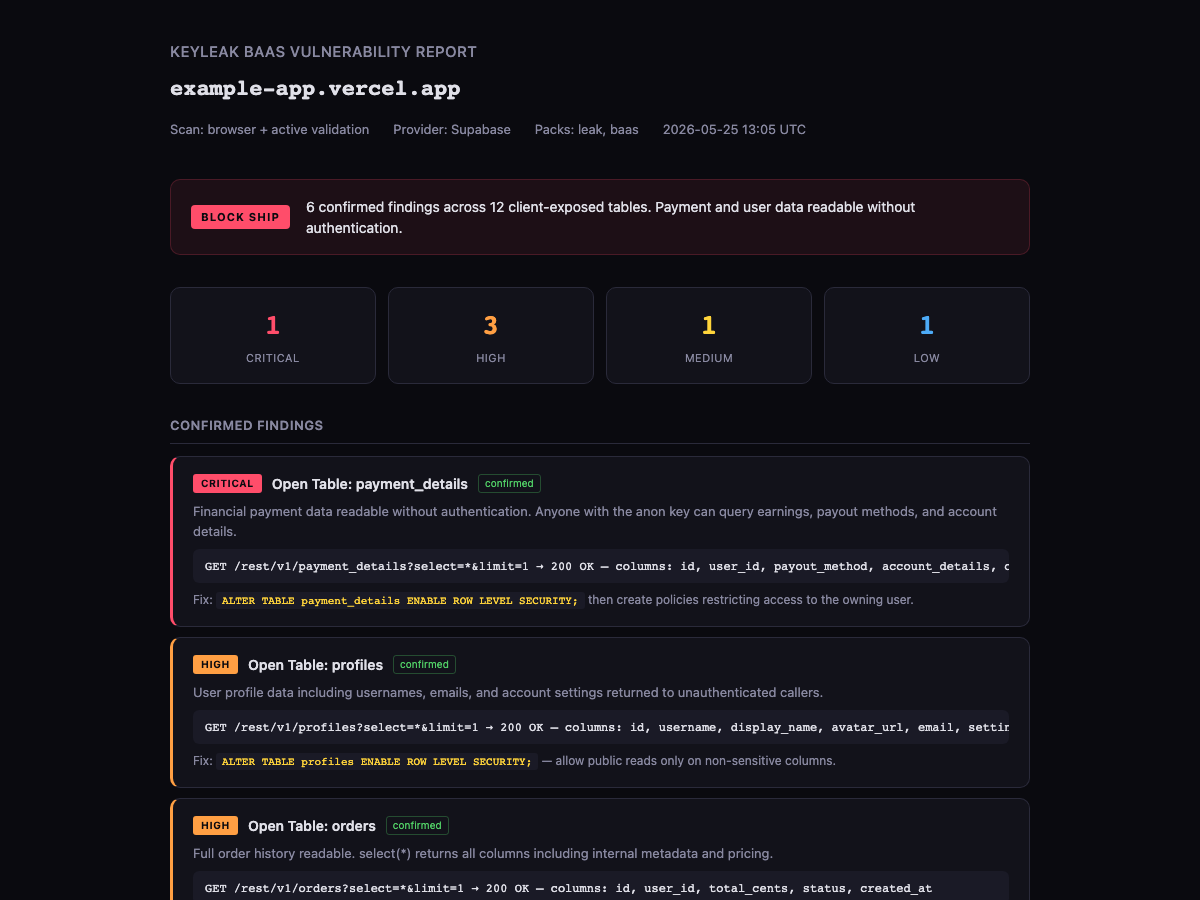
### HTML 报告
`--html` 标志会生成一个自带深色主题的独立漏洞报告:
## 检测内容
| 类别 | 内容 | 方式 |
|---|---|---|
| **BaaS 配置不当** | 开放的 Supabase 表、缺少 RLS、公开的存储桶、可调用的 RPC | 主动验证 —— 仅使用 anon key 探测 REST API |
| **BaaS 提供商** | Supabase, Firebase, Appwrite, PocketBase | 从压缩的 JS bundle 中提取配置 |
| **API 密钥** | OpenAI, Anthropic, Gemini, Stripe, GitHub, AWS 等 20 多种 | 正则表达式检测 + 实时 TEST 验证 |
| **JWT 分析** | service_role 暴露、admin 标志、过宽的 scope、过长过期时间 | 解码 + claims 分析(无需验证) |
| **客户端身份验证** | 浏览器 JS 中的 `isAdmin === true` 检查 | bundle 中的模式检测 |
| **写入权限** | 无需身份验证即可接受 INSERT/UPDATE 的表 | `Prefer: tx=rollback` 探测(绝不创建数据) |
| **身份验证配置** | 缺少电子邮件确认、暴露的身份验证设置 | Supabase 身份验证 endpoint 探测 |
| **供应链** | 恶意 npm 生命周期钩子(下载并执行、base64/PowerShell/Bun stagers),Git-ref/tarball 依赖 —— 包括 `node_modules` 内部 | 结构化清单扫描(Shai-Hulud / Miasma 类) |
| **攻击链** | 将各个发现结果关联成真实的攻击路径(例如 anon key + 无 RLS 的表 = 未经身份验证的数据提取) | 基于合并发现结果的关联引擎 |
| **CI/CD 加固** | 未锁定的 GitHub Actions / 可复用工作流 / `docker://` 标签,`permissions: write-all`,在 `run:` 中回显的机密 | 工作流文件检测器 |
| **本地文件** | `.env`、MCP 配置、CI 工作流、Docker 文件、source map | `keyleak local` 扫描器 |
## Chrome 扩展功能
- **实时 BaaS 检测**:拦截 Supabase/Firebase API 请求并实时探测 RLS
- **TEST 按钮**:针对 14 家提供商验证密钥(Gemini, OpenAI, Anthropic, GitHub, Stripe, Groq 等)
- **JWT 解码器**:在任何 JWT 上点击 TEST 即可查看带有严重性标志的解码 claims
- **发现分组**:多个脚本中的相同密钥 = 一张带有可点击源 URL 的卡片
- **AIza 分类**:区分 Google Maps 密钥(预期内)和 Gemini AI 密钥(已泄漏)
- **87 个供应商 CDN 抑制**:不会对 Google Analytics, PostHog, Segment 等产生误报
- **200+ 第一方域名**:Google, Microsoft, AWS, Apple, Meta, Anthropic, Stripe —— 它们自己网站上的自有密钥永远不会被标记
## v0.6.0 —— 新功能
这是一个专注于安全性和实用性的版本。完整说明请参见 [CHANGELOG.md](CHANGELOG.md)。
- **攻击链关联** —— KeyLeak 现在可以像攻击者一样将发现结果串联起来:
一个已发布的 anon key **+** 一个无需 RLS 即可读取的表将被报告为一条
未经身份验证的数据提取路径,并体现在 JSON/Markdown/HTML 报告中。
- **扫描 bundle** —— `keyleak bundles` 和 `--bundle ` 运行命名的检查组
(secrets、baas、authz、recon、deep 等),而不是非此即彼的“全部扫描”。
- **依赖项生命周期钩子扫描器** —— 可捕获 `node_modules` **内部**的恶意 `preinstall`/
`postinstall`/`prepare` 脚本和 git-ref 依赖项(正则表达式包会跳过的
Shai-Hulud / Miasma / Bitwarden-CLI 供应链类别)。
- **GitHub Actions 加固检测器** —— 未锁定的 actions、`write-all`、机密回显。
- **安全加固** —— 修复了主动 BaaS 探测器中的 SSRF 漏洞(页面控制的
URL 可能会到达内部/云元数据主机);重实验证的出口
防护;PII 脱敏现已覆盖**每一个**扫描表面;感知置信度的发布判定。
- **CI** —— 由 `pull_request` 触发、SHA 锁定的工作流,运行测试套件 +
启动门禁。
- **Chrome 扩展 v1.2.0** —— PII 脱敏、JS 库 CVE 检测以及
受 SSRF 防护的远程获取(参见 [CHANGELOG.md](CHANGELOG.md#chrome-extension))。
## v0.5.0 —— 新功能
- 带有主动验证的 **BaaS 漏洞扫描器**(Supabase, Firebase, Appwrite, PocketBase)
- 带有实时检测、TEST 按钮和 JWT 分析的 **Chrome 扩展**
- **全站扫描**(`keyleak site-scan` + Web UI 按钮),利用 crt.sh + DNS 子域名枚举、多级抓取以及每个发现结果的页面来源记录
- **HTML 报告**输出(`--html`)
- **20 个新的 `baas` 包检测器**
- **全面的误报抑制**(200+ 第一方域名、87 个供应商 CDN、云存储 URL、基础设施标头)
## 误报
Chrome 扩展会抑制来自 200+ 第一方域名(Google、AWS、Azure、GitHub、Stripe 等)、87 个供应商 CDN 脚本、云存储签名 URL 和基础设施标头的发现结果。尽管如此,在我们尚未见过的网站上,你可能仍会遇到误报。
**如果你发现误报,请报告。** 请提交一个 issue 并附带:
- 发现类型(例如,“GEMINI API KEY”、“SQL INJECTION”)
- 来源(例如,“External Script: cdn.example.com/lib.js”)
- 为什么是误报(例如,“这是其 CDN 脚本中供应商自有的密钥”)
我们会积极审查报告的误报并添加抑制规则。你使用该扩展浏览的网站越多,抑制效果就越好。
## The Delta Four 结果
每一次严肃的扫描都应得出四项结论:
- `Verdict`:`SAFE TO SHIP`、`REVIEW` 或 `BLOCK SHIP`。
- `Proof`:脱敏的证据、来源、检测器和置信度。
- `Fix`:确切的修复和轮换指南。
- `Re-test`:修复后要运行的命令或配置。
CLI 结果示例:
```
keyleak scan https://preview.example.com
BLOCK SHIP: 1 critical, 0 high, 2 medium, 3 low
Critical or high-confidence exposures need fixing before release.
Re-test: keyleak scan https://preview.example.com
```
## 检查范围
| 领域 | 状态 | 备注 |
|---|---:|---|
| 运行时 JS/API 响应机密 | 强 | 浏览器 + 代理捕获可扫描脚本、标头、URL 和响应。 |
| AI/LLM 提供商密钥 | 强 | OpenAI, Anthropic, Gemini, OpenRouter, Groq, Hugging Face 等。 |
| 云端/SaaS/PAT/Webhook | 强 | AWS, GitHub, Stripe, Slack, SendGrid, PyPI, 数据库 URL, 私钥。 |
| 仅授权泄露 | 部分 | 存在已验证的 bearer/cookie 扫描支持;在提供明确的第二用户凭据时可进行双用户对比。 |
| SQLi/XSS/身份验证绕过线索 | 可选 | `appsec` 包将这些标记为线索,直到存在漏洞利用验证。 |
| IDOR/BOLA 提示 | 已改进 | 标记直接对象引用,并可在两个明确的用户上下文中进行验证。 |
| 攻击面 | 部分 | 安全标头、TLS、暴露的文件、管理路径、子域名枚举。 |
| 本地配置泄露 | 新增 | `keyleak local` 扫描 `.env`、MCP、CI、Docker、source map 和日志。 |
| 正确性/内部整理 | 可选 | `correctness` 和 `housekeeping` 包捕获 N+1、回归测试、off-by-one/日期/配置线索、缺失测试、死代码和过期文档。 |
| Source map/调试 bundle | 新增 | 本地扫描器检测 source map 内容和提供商密钥。 |
| GraphQL/LLM/代理提示 | 早期 | 本地检测器捕获 GraphQL 内省和提示词注入(prompt-injection)式文本。 |
KeyLeak 不是完整的 DAST,不是漏洞利用自动化工具,也不能替代 GitLeaks、TruffleHog、GitHub secret scanning 或 GitGuardian。它是作为它们补充的运行时/浏览器/本地配置层。
立即开始使用
请选择与你工作流匹配的操作界面。
### 1. 使用 Docker 运行 Web UI
这是在本地无需安装 Python 依赖项即可试用浏览器扫描器的最快方法。
```
git clone https://github.com/Amal-David/keyleak-detector.git
cd keyleak-detector
docker compose up -d
```
打开 `http://localhost:5002`。
使用页面输入框进行基本的运行时扫描。仅在提供一次性测试凭据时才使用已验证扫描弹窗。
### 2. 在本地运行 Web UI
当你要开发 Flask 应用、扫描器、模板、CSS 或 JavaScript 时,请使用此路径。
```
poetry install
poetry run playwright install chromium
poetry run python app.py
```
打开 `http://localhost:5002`。
如果你不使用 Poetry,请创建一个虚拟环境并在本地安装该包:
```
python3.12 -m venv .venv
source .venv/bin/activate
pip install -r requirements.txt
pip install -e .
python -m playwright install chromium
python app.py
```
### 3. 扫描本地文件和配置
在推送或发布前使用 `keyleak local`。它在不启动 Web 应用的情况下扫描本地文件。
```
poetry install
poetry run keyleak local fixtures/vulnerable-demo
poetry run keyleak local . --json
poetry run keyleak local . --sarif --fail-on high
```
默认情况下,本地模式包含 `env,mcp,ci,docker,sourcemaps,logs`。
将扫描限制为特定的文件类别:
```
poetry run keyleak local . --include env,mcp,sourcemaps
```
检测器包控制要查找的故障模式类型。CLI/Web 默认使用 `leak`;扩展默认使用 `leak,appsec,access-control`。
```
poetry run keyleak local . --packs leak,appsec,access-control --json
poetry run keyleak local . --launch-profile full --markdown
poetry run keyleak local . --launch-profile ci --fail-on high
```
退出代码专为自动化设计:`0` 表示通过了选定的阈值,`1` 表示命令失败,`2` 表示发现结果满足了 `--fail-on`。
### 4. 从 CLI 扫描运行中的 Web 应用
当你有预览 URL、预发布 URL 或本地应用 URL 时,请使用 `keyleak scan`。
CLI 会与本地 KeyLeak Web 扫描器 API 通信,因此请先启动 Web 应用:
```
poetry run python app.py
poetry run keyleak scan https://preview.example.com --json
poetry run keyleak scan https://preview.example.com --bearer "$TOKEN" --fail-on medium
```
你也可以将 CLI 指向 Docker Web 扫描器:
```
docker compose up -d
poetry run keyleak scan http://host.docker.internal:3000 --server http://127.0.0.1:5002
```
### 5. 运行已验证扫描
仅对你拥有或拥有测试权限的系统使用已验证模式。
```
poetry run keyleak scan https://preview.example.com \
--profile authenticated \
--bearer "$THROWAWAY_TOKEN"
```
使用 cookie 代替 bearer token:
```
poetry run keyleak scan https://preview.example.com \
--profile authenticated \
--cookie "session=throwaway-session"
```
当应用同时需要两者时请同时使用:
```
poetry run keyleak scan https://preview.example.com \
--profile authenticated \
--bearer "$THROWAWAY_TOKEN" \
--cookie "session=throwaway-session"
```
为了进行访问控制检查,请明确提供第二个一次性用户。KeyLeak 会将类似对象的 URL 分别作为用户 A 和用户 B 进行比较,并将相同访问权限的证据标记为已验证:
```
poetry run keyleak scan https://preview.example.com/users/123456 \
--profile authenticated \
--launch-profile bug-bounty \
--packs access-control \
--bearer "$USER_A_TOKEN" \
--bearer-b "$USER_B_TOKEN"
```
### 6. 为 CI 或审查生成报告
使用 JSON 作为基线,使用 SARIF 用于代码扫描系统,使用 Markdown 用于人工审查。
```
poetry run keyleak local . --json > keyleak-report.json
poetry run keyleak local . --sarif > keyleak.sarif
poetry run keyleak local . --markdown > keyleak-report.md
```
遇到高危或严重发现时失败:
```
poetry run keyleak local . --fail-on high
poetry run keyleak scan https://preview.example.com --fail-on critical
```
使用先前的 JSON 报告或允许列表来抑制已知发现:
```
poetry run keyleak local . --baseline keyleak-report.json
poetry run keyleak local . --allowlist keyleak-allowlist.txt
```
默认的启动配置是 `launch-gate`,它会在遇到高危和严重发现时阻断执行,同时保持较低严重性的加固建议可见以供审查:
```
poetry run keyleak local . --launch-profile launch-gate --fail-on high --json > keyleak-report.json
```
该仓库包含一个位于 `.github/workflows/keyleak-launch-gate.yml` 的 GitHub Actions 启动门禁,它会运行本地扫描器并上传 JSON 报告 artifact。
### 7. 与 Claude Code / Codex 配合使用
该仓库附带了一个位于 `.claude/skills/keyleak-verify/SKILL.md` 的智能体技能。在此仓库内的任何 Claude Code 会话中,类似以下的提示词:
```
Is this build safe to ship?
Run a launch-gate check on the preview URL https://preview.example.com.
Scan the current branch for leaked secrets before I deploy.
```
会触发该技能。然后,智能体会在 `keyleak local` 和 `keyleak scan` 之间进行选择,挑选正确的 `--launch-profile` 和 `--fail-on` 阈值,解释判定结果 JSON,并回报 `BLOCK SHIP` / `REVIEW` / `SAFE TO SHIP` 以及首要阻断发现和重新测试命令。该技能遵守本地优先的信任模型:它仅扫描你拥有的系统,绝不自动抑制发现,也绝不回显原始的机密值。
## 安全演示
该仓库包含一个有意留下漏洞的本地测试用例:
```
poetry run keyleak local fixtures/vulnerable-demo --markdown
```
这为贡献者和 Hacker News 读者提供了一种安全的方式来查看 `BLOCK SHIP` 结果,而无需扫描随机系统。
## Web 扫描器
基本扫描:
1. 通过 mitmproxy 在无头 Chromium 中加载目标。
2. 捕获 URL、标头、响应、内联脚本和 DOM 配置数据。
3. 应用自定义和衍生自 GitLeaks 的机密模式。
4. 对暴露的文件、安全标头、管理路径、TLS 和子域名运行攻击面检查。
5. 返回判定结果、摘要、发现、证据、修复指南和重新测试命令。
已验证扫描:
1. 向浏览器上下文添加一次性 bearer token 和/或 cookie。
2. 扫描已验证的页面和流量。
3. 对直接对象引用应用尽力而为的访问控制启发式方法。
请仅使用一次性凭据。
## Chrome 扩展
`extension/` 文件夹包含一个实验性的本地 Chrome 扩展,它会在你浏览时被动监控页面。
它会扫描:
- 请求和响应标头
- URL 和查询参数
- fetch/XHR 响应体
- 内联脚本
- 数据属性和页面配置
### 在 Chrome 中加载
该扩展尚未发布到 Chrome 网上应用店。请从该仓库加载:
1. 克隆或拉取最新的 `main` 分支。
2. 在 Chrome 中打开 `chrome://extensions`。
3. 启用 `Developer mode`。
4. 点击 `Load unpacked`。
5. 选择 `extension/` 文件夹,而不是仓库根目录。
6. 从 Chrome 工具栏扩展菜单中固定 `KeyLeak Detector`。
7. 浏览你拥有或拥有测试权限的应用。
8. 点击 KeyLeak 工具栏图标以查看当前标签页的发现结果。
需要选择的确切文件夹是:
```
keyleak-detector/extension
```
### 使用弹窗
弹窗显示:
- 当前标签页上发现结果的徽章计数
- 启动判定:`SAFE TO SHIP`、`REVIEW` 或 `BLOCK SHIP`
- `CRIT`、`HIGH`、`MED` 和 `LOW` 的严重性过滤器
- 标头、fetch/XHR 正文、外部脚本、source map、存储、WebSocket/SSE 消息、数据属性和 meta 标签的扫描活动统计
- 脱敏的证据、检测器 ID、置信度、验证状态和修复指南
- 用于脱敏 JSON 和 Markdown 的报告复制操作
- 通过稳定的发现 ID 对已知的启动门禁噪声进行逐项抑制
- 一个 `RUN FULL SCAN` 操作,该操作会调用位于 `http://127.0.0.1:5002` 的本地 KeyLeak Web 扫描器,且不会转发浏览器 cookie 或 bearer token
- 一个 `CLEAR` 按钮用于重置当前标签页的发现结果
### 使用 DevTools 面板
在页面上打开 Chrome DevTools,然后选择 `Secrets` 面板。它会显示更宽泛的启动门禁表格,并在面板打开时启用 DevTools 网络正文捕获,从而提高了对解析器加载的 bundle 和 source map 的覆盖率。
### Learn 和 Reference 选项卡
弹窗和 DevTools 面板都包含 `Findings` 选项卡和 `Reference` 选项卡:
- 在任何发现结果上点击 `LEARN` 会内联展开一个面板,解释检测器是什么、为什么重要、典型的攻击场景、修复方法以及外部参考资料(OWASP、CWE、供应商文档)。
- 切换到 `Reference` 可按包(`leak`、`appsec`、`access-control`、`correctness`、`housekeeping`)分组浏览每个检测器。搜索框可按检测器 ID、描述、修复方法或类别进行过滤。即使没有任何发现,也可将其作为词汇表使用。
检测器教育内容源自 `keyleak/detectors.py`(`description`、`remediation`、`references`、可选的 `attack_scenario`),并由 `scripts/generate_extension_patterns.py` 重新生成到 `extension/lib/detector-info.js` 中。要添加或改进说明,请编辑检测器并重新运行该脚本。
### 扩展权限
该扩展请求 `webRequest`、`storage`、`activeTab`、`tabs` 和 `` 权限,因为它需要在本地观察请求、标头、页面内容和 fetch/XHR 响应。
将其用于开发、预发布、漏洞赏金范围或自有系统。在浏览不相关的敏感网站时将其禁用。在敏感浏览会话中使用之前,请参见 [docs/SECURITY_MODEL.md](docs/SECURITY_MODEL.md)。
## 报告
CLI 输出格式:
```
poetry run keyleak local . --json
poetry run keyleak local . --markdown
poetry run keyleak local . --sarif
poetry run keyleak scan https://preview.example.com --baseline keyleak-baseline.json --fail-on high
```
每个标准化发现包括:
- `id`
- `type`
- `severity`
- `confidence`
- `detector_id`
- `category`
- `source`
- `evidence`
- `redacted_value`
- `risk_reason`
- `remediation`
- `references`
- `validation_status`
报告还包括 `packs` 和 `pack_summary`,以便 Web、CLI、CI 和扩展导出可以按热力图类别对发现进行分组。
基线和允许列表被刻意设计得很简单。基线可以是先前的 KeyLeak JSON 报告;这些发现的 ID/签名会被抑制,以便 CI 仅在出现新发现时失败。允许列表可以是 JSON(`ids`、`detector_ids`、`types`、`source_contains`),也可以是一个行文件,使用诸如 `id:finding_...`、`detector:local:openai_api_key`、`type:source_map_reference` 或 `source:fixtures/vulnerable-demo` 等条目。
## 安全模型
- 本地优先:扫描在你自己的机器或自托管的 Docker 容器中运行。
- 不需要上传托管的凭据。
- 默认情况下,在标准化报告中对值进行脱敏。
- 已验证的扫描应使用一次性测试凭据。
- 仅扫描你拥有或拥有明确测试权限的系统。
详情和限制请阅读 [docs/SECURITY_MODEL.md](docs/SECURITY_MODEL.md)。
## 贡献
非常欢迎有价值的 PR。最佳贡献方向是:
- 添加带有测试用例的提供商模式
- 添加安全且带有漏洞的测试用例
- 改进误报处理
- 添加修复手册
- 改进 Chrome 扩展的 UX 或测试
- 添加报告导出器
- 改进 CLI 配置和 CI 行为
- 添加 MCP/agent/LLM 泄漏检测器
- 为正确性和日常维护线索添加检测器包测试用例和低噪声验证器
从 [CONTRIBUTING.md](CONTRIBUTING.md) 和 [docs/DETECTOR_AUTHORING.md](docs/DETECTOR_AUTHORING.md) 开始。有关运行扫描(设置、选择命令和筛选输出)的端到端操作手册,请参见 [docs/AGENT_SCAN_HOWTO.md](docs/AGENT_SCAN_HOWTO.md)。
## 路线图
- 用于 Web UI、CLI 和扩展的共享扫描器核心。
- 更多检测器测试用例和报告测试。
- 除了线索检测之外,更多经过验证的 appsec 检查。
- GraphQL、OAuth/OIDC、CORS、source map 和代理 Web 安全检测器。
## 负责任的使用
仅扫描你拥有或拥有书面测试权限的系统。未经授权的扫描可能是非法的。请安全处理发现结果,立即轮换暴露的凭据,并通过负责任的披露途径报告漏洞。
## 致谢
- [GitLeaks](https://github.com/gitleaks/gitleaks) 提供了 KeyLeak 导入的行业标准机密扫描规则。
- [Keyleaksecret](https://github.com/0xSojalSec/Keyleaksecret) 提供了额外的模式灵感。
## 许可证
MIT。详见 [LICENSE](LICENSE)。
标签:LNA, Python, StruQ, Web安全, 文档结构分析, 无后门, 特征检测, 蓝队分析, 逆向工具