# Fara-7B:面向计算机使用的高效智能体模型
[](https://aka.ms/msaif/fara)
[](https://huggingface.co/microsoft/Fara-7b)
[](https://aka.ms/foundry-fara-7b)
[](https://huggingface.co/datasets/microsoft/WebTailBench)
[](https://huggingface.co/datasets/microsoft/CUAVerifierBench)
[](https://arxiv.org/abs/2511.19663)
## 更新
* **2026-05-21** - Fara1.5 agent harness 即将推出!
* **2026-05-12** — 刷新了 **WebTailBench (V2)** 的任务和评分标准。
许多 V1 任务中包含受日历限制且已过期(2025 年 11 月)的日期;V2 将这些日期向后顺延,并修改了完整的 609 任务套件的预计算评分标准。现已作为 `test_v2` 分支提供于 [`microsoft/WebTailBench`](https://huggingface.co/datasets/microsoft/WebTailBench)。
并排的 V1↔V2 差异对比(任务字符串和评分标准 JSON)托管在[这里](https://microsoft.github.io/fara/docs/webtailbench_v1_v2_diff.html)。
* **2026-04-19** — 发布了 **[CUAVerifierBench](https://huggingface.co/datasets/microsoft/CUAVerifierBench)**,这是一个用于评估 CUA 验证器(即对 agent 轨迹进行评分的评判器)的人工标注基准。包含两个数据集切分 —— `fara7b_om2w_browserbase`(106 条 Fara-7B Online-Mind2Web/Browserbase 轨迹,每条约 2 名审核者)和 `internal`(来自保留的 aurora-v2 任务套件的 154 条轨迹)—— 它们提供了每位评判者的 UV-blind / UV-informed 标签、Universal Verifier 输出以及旧版验证器输出的并排对比。生成该数据集的构建脚本与数据一起托管在 HuggingFace 上。
* **2026-04-18** — 从 `webeval` 中移除了 `autogen-core` / `autogen-ext` 依赖;chat completion 客户端现在自包含于 `webeval/src/webeval/oai_clients/` 下。不再需要安装 autogen 子模块的步骤;只需 `pip install -e .[vllm]` 然后 `cd webeval; pip install -e .`。
* **2026-04-18** — 将 WebTailBench(初始 / 目前已过时的版本)直接作为一等基准整合到仓库中。加载器会从 [`microsoft/WebTailBench`](https://huggingface.co/datasets/microsoft/WebTailBench) 自动下载 `WebTailBench-v1-rubrics.tsv`,并将每个任务发布的 `precomputed_rubric` 传递给验证器。可复现性 CLI 位于 `webeval/scripts/webtailbench.py`。
* **2026-04-18** — 发布了 **Universal Verifier** (`MMRubricAgent`) 作为 WebTailBench 的官方验证器。这是一个多模态、基于评分标准、由双模型(`gpt-5.2` + `o4-mini`)组成的集成系统,支持按标准评分、结果验证和首次失败点分析。一个独立的并行运行器位于 `webeval/scripts/verify_trajectories.py`,用于在不触碰求解器的情况下对任何 webeval 轨迹目录进行重新评分。
## 概述
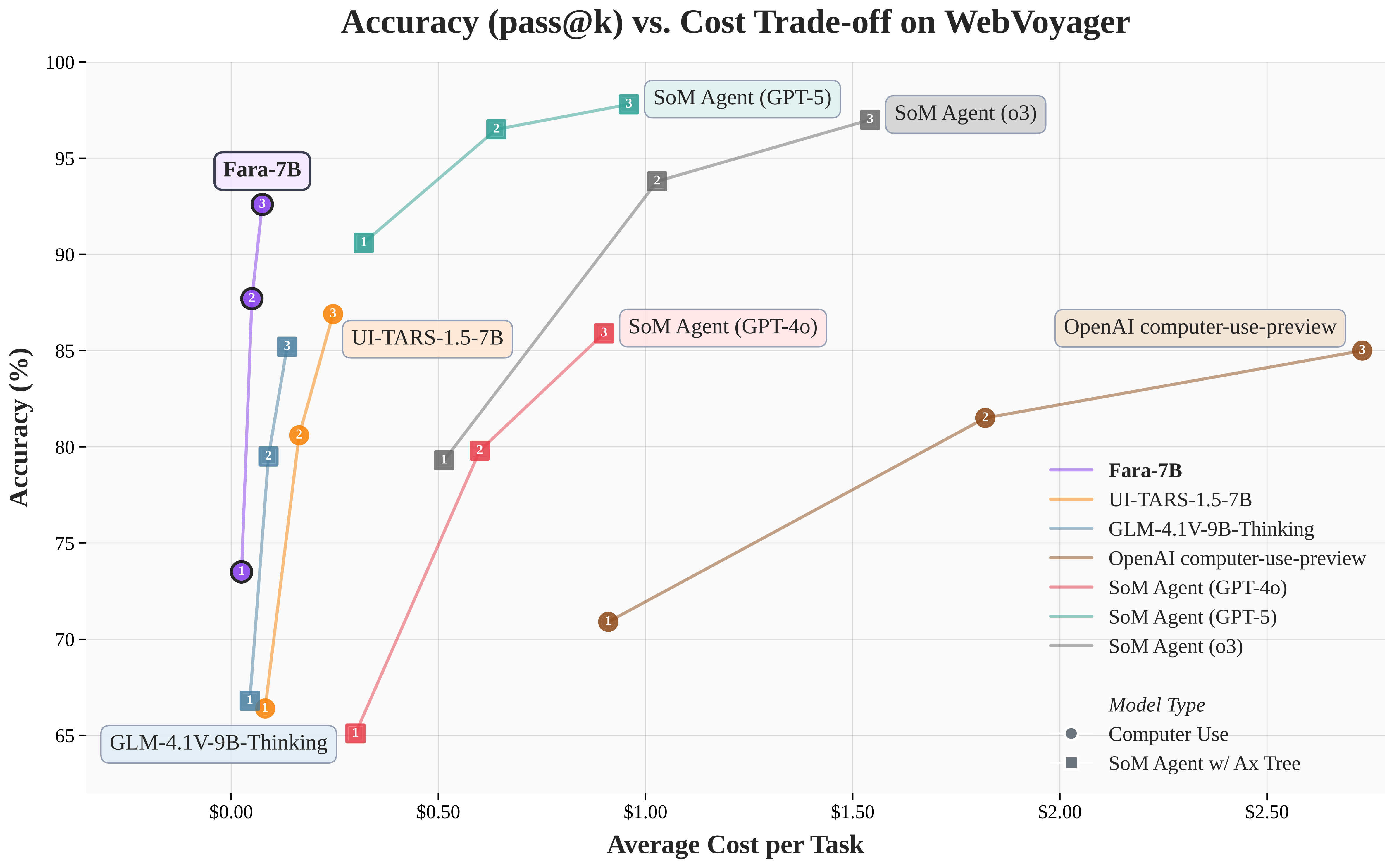
**Fara-7B** 是 Microsoft 首款专为计算机使用设计的**智能体小语言模型 (SLM)**。仅拥有 70 亿参数的 Fara-7B 是一款超紧凑的计算机使用智能体 (CUA),它在其参数量级中实现了最先进的性能,并可与更大、更消耗资源的智能体系统相媲美。
按如下方式在本地尝试 Fara-7B(有关 Windows 上的详细说明,请参阅[安装说明](#Installation)),或通过 Magentic-UI 使用:
```
# 1. Clone repository
git clone https://github.com/microsoft/fara.git
cd fara
# 2. Setup environment
python3 -m venv .venv
source .venv/bin/activate
pip install -e .
playwright install
```
然后在同一个进程中托管该模型:
```
vllm serve "microsoft/Fara-7B" --port 5000 --dtype auto
```
然后你可以通过以下方式迭代查询它:
```
fara-cli --task "whats the weather in new york now"
```
要在 Magentic-UI 中尝试 Fara-7B,请按照这里的说明操作 [Magentic-UI + Fara-7B](https://github.com/microsoft/magentic-ui/blob/main/README.md#fara-7b)。你需要像以前一样提供模型服务,但你可以使用具有精美 UI 的 Magentic-UI 来代替 fara-cli(请参阅下面的视频演示)。
注意事项:
- 如果你使用的是 Windows,我们强烈建议使用 WSL2(Windows Subsystem for Linux)。请参阅[安装说明](#Installation)部分中的 Windows 指南。
- 如果内存不足,你可能需要在 vllm 命令中添加 `--tensor-parallel-size 2`
|
**购物**
|
**GitHub Issues**
|
**带奶酪的导航**
|
### Fara-7B 的独特之处
与生成基于文本响应的传统聊天模型不同,Fara-7B 利用计算机界面(鼠标和键盘)代表用户执行多步骤任务。该模型:
- **视觉化操作**,通过感知网页并执行滚动、输入和点击直接预测的坐标,无需使用 accessibility tree 或单独的解析模型
- **支持端侧部署**,得益于其紧凑的 7B 参数量,由于用户数据保留在本地,从而降低了延迟并提高了隐私性
- **高效完成任务**,平均每个任务仅需约 16 步,而同类模型则需要约 41 步
Fara-7B 使用基于 [Magentic-One](https://www.microsoft.com/en-us/research/articles/magentic-one-a-generalist-multi-agent-system-for-solving-complex-tasks/) 多智能体框架构建的新型合成数据生成 pipeline 进行训练,包含 145K 条涵盖各种网站、任务类型和难度级别的轨迹。该模型基于 [Qwen2.5-VL-7B](https://arxiv.org/abs/2502.13923) 并通过监督微调进行训练。
### 核心能力
Fara-7B 可以自动化执行日常 Web 任务,包括:
- 搜索信息并总结结果
- 填写表单和管理账户
- 预订旅行、电影票和餐厅
- 购物并比较不同零售商的价格
- 查找招聘信息和房地产列表
### 性能亮点
Fara-7B 在多个 Web agent 基准测试中取得了最先进的结果,其表现优于同等规模的模型以及更大的系统:
| 模型 | 参数量 | WebVoyager | Online-M2W | DeepShop | WebTailBench |
|-------|--------|------------|------------|----------|--------------|
| **SoM Agents** | | | | | |
| SoM Agent (GPT-4o-0513) | - | 90.6 | 57.7 | 49.1 | 60.4 |
| SoM Agent (o3-mini) | - | 79.3 | 55.4 | 49.7 | 52.7 |
| SoM Agent (GPT-4o) | - | 65.1 | 34.6 | 16.0 | 30.8 |
| GLM-4.1V-9B-Thinking | 9B | 66.8 | 33.9 | 32.0 | 22.4 |
| **计算机使用模型** | | | | | |
| OpenAI computer-use-preview | - | 70.9 | 42.9 | 24.7 | 25.7 |
| UI-TARS-1.5-7B | 7B | 66.4 | 31.3 | 11.6 | 19.5 |
| **Fara-7B** | **7B** | **73.5** | **34.1** | **26.2** | **38.4** |
*表:在线 agent 评估结果,展示了四个 Web 基准测试的成功率 (%)。结果为 3 次运行的平均值。*
### WebTailBench:面向真实世界 Web 任务的新基准
我们正在发布 **[WebTailBench](https://huggingface.co/datasets/microsoft/WebTailBench)**,这是一个新的评估基准,主要关注在现有基准测试中代表性不足或缺失的 11 种真实世界任务类型。该基准包含涵盖不同类别的 609 个任务,前 8 个部分测试单一技能或目标(通常在单个网站上),其余 3 个部分则评估更困难的多步骤或跨站点任务。
#### WebTailBench 详细结果
| 任务分段 | 任务数 | SoM GPT-4o-0513 | SoM o3-mini | SoM GPT-4o | GLM-4.1V-9B | OAI Comp-Use | UI-TARS-1.5 | **Fara-7B** |
|--------------|-------|-----------------|-------------|------------|-------------|--------------|-------------|-------------|
| **单站点任务** |
| 购物 | 56 | 62.5 | 71.4 | 38.1 | 31.0 | 42.3 | 41.1 | **52.4** |
| 航班 | 51 | 60.1 | 39.2 | 11.1 | 10.5 | 17.6 | 10.5 | **37.9** |
| 酒店 | 52 | 68.6 | 56.4 | 31.4 | 19.9 | 26.9 | 35.3 | **53.8** |
| 餐厅 | 52 | 67.9 | 59.6 | 47.4 | 32.1 | 35.9 | 22.4 | **47.4** |
| 活动 | 80 | 70.4 | 62.9 | 41.7 | 26.3 | 30.4 | 9.6 | **36.3** |
| 购票 | 57 | 58.5 | 56.7 | 37.4 | 35.7 | 49.7 | 30.4 | **38.6** |
| 房地产 | 48 | 34.0 | 17.4 | 20.1 | 16.0 | 9.0 | 9.7 | **23.6** |
| 工作/职业 | 50 | 49.3 | 44.0 | 32.7 | 22.7 | 20.7 | 20.7 | **28.0** |
| **多步骤任务** |
| 购物清单(2 项) | 51 | 66.0 | 62.7 | 17.0 | 7.8 | 34.0 | 20.9 | **49.0** |
| 比价购物 | 57 | 67.3 | 59.1 | 27.5 | 22.8 | 1.2 | 8.8 | **32.7** |
| 组合任务 | 55 | 51.5 | 39.4 | 26.7 | 17.0 | 10.3 | 9.1 | **23.0** |
| **总体** |
| 宏观平均 | 609 | 59.7 | 51.7 | 30.1 | 22.0 | 25.3 | 19.9 | **38.4** |
| 微观平均 | 609 | 60.4 | 52.7 | 30.8 | 22.4 | 25.7 | 19.5 | **38.4** |
*表:WebTailBench 所有 11 个任务分段的结果细分。成功率 (%) 为 3 次独立运行的平均值。Fara-7B 在所有任务类别的计算机使用模型中取得了最高的性能。*
**即将推出:**
- 用于 LLM-as-a-judge 评估的任务验证 pipeline
- WebTailBench 的官方人工标注(与 BrowserBase 合作)
### CUAVerifierBench:评估验证器本身
WebTailBench 衡量的是 *agent*,而 **[CUAVerifierBench](
)** 衡量的是*对这些 agent 进行评分的评判器*。每一行将一条 Fara-7B agent 轨迹(指令、截图、web_surfer 日志、最终答案)与一名人类审核者的判定结果配对,加上 **Universal Verifier (`MMRubricAgent`)** 和几个旧版验证器生成的判定结果 —— 这样研究人员就可以在固定的语料库上计算验证器与人类的一致性(Cohen's κ、准确率、F1),并基于固定的真值集迭代新的评判器 prompt / 架构。
该数据集以两个 HuggingFace 配置的形式公开,可以通过 `task_id` 进行连接:
| 配置 | 粒度 | 内容 |
|---|---|---|
| `trajectories` | 每个任务一行 | 指令、截图、web_surfer 日志、验证器输出、任务级人类汇总判定 |
| `annotations` | 每个(任务,评判器)一行 | 每位审核者的结果 / 过程标签和自由文本的理由说明 |
目前已发布两个切分:
| 切分 | 来源 | 轨迹数 | 标注行数 |
|---|---|---|---|
| `fara7b_om2w_browserbase` | 通过 Browserbase 执行的 Online-Mind2Web 任务上的 Fara-7B 轨迹 | 106 | 215(每个任务约 2 名审核者;包含 UV-blind **和** UV-informed 阶段) |
| `internal` | 使用相同 WebSurfer + 验证器栈评分的保留 aurora-v2 任务套件 | 154 | 154(每个任务 1 名审核者;仅包含 UV-blind) |
审核者身份被匿名化为 `Judge1` … `JudgeN`,在两个切分中使用同一个共享映射。生成该数据集的构建脚本(包含完整的 schema 和来源信息)与数据一起托管在 HuggingFace 上的 [`microsoft/CUAVerifierBench`](https://huggingface.co/datasets/microsoft/CUAVerifierBench) 中;有关完整的列列表,请参见[数据集 README](https://huggingface.co/datasets/microsoft/CUAVerifierBench/blob/main/README.md)。
```
from datasets import load_dataset
trajs = load_dataset("microsoft/CUAVerifierBench", "trajectories",
split="fara7b_om2w_browserbase")
anns = load_dataset("microsoft/CUAVerifierBench", "annotations",
split="fara7b_om2w_browserbase")
```
### 评估基础设施
我们的评估设置利用了:
1. **Playwright** - 一个跨浏览器自动化框架,可复制浏览器环境
2. **抽象 Web Agent 接口** - 允许将来自任何来源的任何模型集成到评估环境中
3. **Fara-Agent 类** - 运行 Fara 模型的参考实现
# 安装说明
## Linux
以下说明适用于 Linux 系统,有关 Windows 说明,请参阅下文的 Windows 部分。
使用 pip 安装该软件包并设置 Playwright 环境:
```
# 1. Clone repository
git clone https://github.com/microsoft/fara.git
cd fara
# 2. Setup environment
python3 -m venv .venv
source .venv/bin/activate
pip install -e .[vllm]
playwright install
```
注意:如果你打算仅使用 Azure Foundry 托管,则可以跳过 `[vllm]`,直接执行 `pip install -e .`
## Windows
对于 Windows,我们强烈建议使用 WSL2(Windows Subsystem for Linux)来提供类似 Linux 的环境。但是,如果你更喜欢在 Windows 上原生运行,请按照以下步骤操作:
```
# 1. Clone repository
git clone https://github.com/microsoft/fara.git
cd fara
# 2. Setup environment
python3 -m venv .venv
.venv\Scripts\activate
pip install -e .
python3 -m playwright install
```
## 托管模型
**推荐:** 最简单的入门方法是使用 Azure Foundry 托管,它不需要 GPU 硬件或下载模型。或者,如果你有可用的 GPU 资源,你可以使用 vLLM 进行自托管。
### Azure Foundry 托管(推荐)
在 [Azure Foundry](https://ai.azure.com/explore/models/Fara-7B/version/2/registry/azureml-msr) 上部署 Fara-7B,无需下载权重或管理 GPU 基础设施。
**设置:**
1. 在 Azure Foundry 上部署 Fara-7B 模型并获取你的 endpoint URL 和 API key
然后创建一个 endpoint 配置 JSON 文件(例如 `azure_foundry_config.json`):
```
{
"model": "Fara-7B",
"base_url": "https://your-endpoint.inference.ml.azure.com/",
"api_key": "YOUR_API_KEY_HERE"
}
```
然后你可以使用此 endpoint 配置运行 Fara-7B。
2. 运行 Fara agent:
```
fara-cli --task "how many pages does wikipedia have" --endpoint_config azure_foundry_config.json [--headful]
```
注意:你也可以使用参数 `--base_url [your_base_url] --api_key [your_api_key] --model [your_model_name]` 来指定 endpoint 配置,而无需使用配置 JSON 文件。
注意:如果你看到找不到 `fara-cli` 命令的错误,请尝试:
```
python -m fara.run_fara --task "what is the weather in new york now"
```
就是这样!不需要 GPU 或下载模型。
### 使用 vLLM 或 LM Studio / Ollama 自托管
如果你有 GPU 资源,你可以使用 vLLM 自托管 Fara-7B。这需要一台具有足够 VRAM(例如 24GB 或更多)的 GPU 机器。
仅在 Linux 上:只需运行以下命令即可启动 vLLM 服务器:
```
vllm serve "microsoft/Fara-7B" --port 5000 --dtype auto
```
对于量化模型或较低 VRAM 的 GPU,请查看 [HuggingFace 上的 Fara-7B GGUF](https://huggingface.co/bartowski/microsoft_Fara-7B-GGUF)。
对于 Windows/Mac,原生不支持 vLLM。你可以在 Windows 上使用 WSL2 来运行上述命令,或者按照下文所述使用 LM Studio / Ollama。
另外,你可以使用 [LM Studio](https://lmstudio.ai/) 或 [Ollama](https://ollama.com/) 在本地托管模型。我们目前推荐使用我们模型的以下 GGUF 版本 [HuggingFace 上的 Fara-7B GGUF](https://huggingface.co/bartowski/microsoft_Fara-7B-GGUF) 搭配 LM Studio 或 Ollama。请选择适合你 GPU 的最大模型。为了获得最佳效果,请确保上下文长度设置为至少 15000 个 token,temperature 设置为 0。
然后你可以运行 Fara-7B 并指向你的本地服务器:
运行测试脚本以查看 Fara 的实际运行情况:
```
fara-cli --task "what is the weather in new york now"
```
如果你没有使用 vLLM 进行托管,请指定正确的 `--base_url [your_base_url] --api_key [your_api_key] --model [your_model_name]`
如果你看到找不到 `fara-cli` 命令的错误,请尝试:
```
python -m fara.run_fara --task "what is the weather in new york now"
```
# 可复现性
我们在 `webeval/` 中提供了一个框架,以复现我们在 WebVoyager 和 OnlineMind2Web 上的结果。
在实时网站上进行智能体评估由于日常变化而面临独特的挑战。我们采取了几项措施来确保评估的可靠性和可比性:
**BrowserBase 集成**
我们采用 BrowserBase 来管理浏览器会话托管,从而实现可靠的浏览器实例管理。
**时间敏感型任务更新**
像 WebVoyager 这类基准测试中的任务可能会变得陈旧或无法完成。我们:
- 从原始的 WebVoyager 基准测试中移除了约 48 个不可能完成的任务
- 更新了约 50 个任务,将其日期更改为未来时间以保持其可完成性
- 示例:*"搜索一家巴厘岛的酒店,时间从 2024 年 1 月 1 日到 1 月 4 日"* → *"搜索一家巴厘岛的酒店,时间从 2026 年 1 月 1 日到 1 月 4 日"*
- 我们更新后的 WebVoyager 基准测试可在 `webeval/data/webvoyager/WebVoyager_data_08312025.jsonl` 中获取
**环境错误处理**
浏览器错误(连接断开、页面超时)得到了稳健的处理:
- 发生环境错误时,轨迹最多重试 5 次
- 完整但不正确的轨迹从不重试
- 每次重试都从一个全新的浏览器会话开始,不保留任何状态
**步骤预算**
在所有在线基准测试中,每条轨迹最多限制为 100 个操作。超过此预算且未选择停止的轨迹将被视为不正确。
## WebEval 包安装
```
conda create --name fara_webeval python=3.12
conda activate fara_webeval
# Install fara package (with vllm extras for GPU hosting)
pip install -e .[vllm]
# Install webeval
cd webeval
pip install -e .
# Install playwright
playwright install
```
webeval 包不再依赖于 `autogen-core` / `autogen-ext` —
所有的 chat completion 客户端都已内置在 `webeval/src/webeval/oai_clients/` 目录下
(参见 `GracefulRetryClient`、`OpenAIClientWrapper`、`AzureOpenAIClientWrapper`
等)。你不再需要克隆或安装 autogen 子模块。
## 运行评估
导航到 scripts 目录:
```
cd webeval/scripts
```
确保在 `endpoint_configs_gpt4o/dev` 中设置了有效的 OpenAI GPT-4o endpoint,以便运行 WebVoyager LLM-as-a-judge!
**选项 1:自托管 vLLM**
```
python webvoyager.py --model_url /path/where/you/want/to/download/model/ --model_port 5000 --eval_oai_config ../endpoint_configs_gpt4o/dev/ --out_url /path/to/save/eval/files --device_id 0,1 --processes 1 --run_id 1 --max_rounds 100
python om2w.py --model_url /path/where/you/want/to/download/model/ --model_port 5000 --eval_oai_config ../endpoint_configs_o4/dev/ --eval_model o4-mini --out_url /path/to/save/eval/files --device_id 0,1 --processes 1 --run_id 1 --max_rounds 100
# WebTailBench almost always needs --browserbase: a meaningful share of
# the benchmark's task websites (airlines, retailers, ticketing, …)
# block bot traffic from a vanilla playwright browser. Without
# --browserbase you'll see a high rate of trajectories that abort on
# Page.goto / navigation / captcha errors. Set BROWSERBASE_API_KEY and
# BROWSERBASE_PROJECT_ID in the environment first.
export BROWSERBASE_API_KEY=
export BROWSERBASE_PROJECT_ID=
# --success controls which Universal Verifier signal counts as the
# top-line score: ``outcome`` (default; binary outcome_success — what the
# Fara-7B numbers in the README above are reported against), ``process``
# (rubric_is_success := rubric_score >= --rubric_score_threshold; a more
# lenient gate, expect slightly higher numbers), or ``both``.
python webtailbench.py \
--model_url /path/to/Fara/model_checkpoints \
--model_port 5000 \
--device_id 0,1 \
--eval_oai_config ../../endpoint_configs/judge_active/prod \
--judge_eval_model gpt-5.2 \
--judge_o4_eval_model o4-mini \
--rubric_score_threshold 0.8 \
--success outcome \
--out_url /path/to/Fara/eval \
--processes 4 \
--run_id 1 \
--max_rounds 100 \
--browserbase
python verify_trajectories.py \
--input /path/to/Fara/eval/runs/...///traj \
--task-data ../path/to/om2w/Online_Mind2Web_06042025.json \
--task-data-format om2w \
--eval-config ../../endpoint_configs/judge_active/prod \
--judge-model gpt-5.2 --o4mini-model o4-mini \
--processes 8
```
**选项 2:Azure Foundry 部署**
部署 [Foundry endpoint 上的 Fara-7B](https://ai.azure.com/explore/models/Fara-7B/version/2/registry/azureml-msr),然后将 endpoint URL 和密钥放入 `endpoint_configs/` 下的 JSON 文件中:
```
python webvoyager.py --model_endpoint ../../endpoint_configs/ --eval_oai_config ../endpoint_configs_gpt4o/dev/ --out_url /path/to/save/eval/files --processes 1 --run_id 1_endpoint --max_rounds 100
python om2w.py --model_endpoint ../../endpoint_configs/ --eval_oai_config ../endpoint_configs_o4/dev/ --eval_model o4-mini --out_url /path/to/save/eval/files --processes 1 --run_id 1_endpoint --max_rounds 100
python webtailbench.py --model_endpoint ../../endpoint_configs/ --eval_oai_config ../../endpoint_configs/judge_active/prod --judge_eval_model gpt-5.2 --judge_o4_eval_model o4-mini --out_url /path/to/Fara/eval --processes 1 --run_id 1_endpoint --max_rounds 100
```
### 注意事项
- 我们使用与 WebVoyager 相同的 LLM-as-a-judge prompt 和模型 (GPT-4o),因此需要 `--eval_oai_config` 参数
- 设置 `--browserbase` 以进行浏览器会话管理(需要导出 API key 和项目 ID 环境变量)
- 由于已知问题,请避免让单个 vLLM 部署承载超过约 10 个并发进程
- 请在 `fara/webeval/scripts/stdout.txt` 中查看调试输出
## 分析评估结果
### 评估输出结构
评估结果存储在 `--out_url` 下,按以下方式组织的文件夹中:
- 模型名称
- 数据集
- 用户名
- 运行 ID
示例路径:
```
/runs/WebSurfer-fara-100-max_n_images-3/fara-7b//WebVoyager_WebVoyager_data_08312025.jsonl/
```
每个评估文件夹包含:
- `gpt_eval/` - LLM-as-a-judge 评估结果
- `traj/` - 包含以下内容的每个任务的轨迹子目录:
- `*-final_answer.json`(例如,`Amazon--1_final_answer.json`)- `` 表示中止或超出步骤预算
- `scores/*_eval.json` - LLM 评判器分数(WebVoyager 对应 `gpt_eval.json`,Online-Mind2Web 对应 `WebJudge_Online_Mind2Web_eval-3.json`)
- `web_surfer.log` - 操作历史和错误
- `screenshot_X.png` - 在每次操作 X 之前捕获的屏幕截图
- `times.json` - 包含任务的开始和结束时间
- `core.log` - 包含高级别日志,例如轨迹是否需要开始或已经缓存/完成、评估分数、持续时间以及遇到的错误
### 运行分析
使用分析 notebook 计算指标:
```
cd webeval/scripts/analyze_eval_results/
jupyter notebook analyze.ipynb
```
该脚本:
- 识别在中途终止的轨迹及诊断原因
- 计算未中止轨迹的平均分数
- 区分中止轨迹(采样期间出错)和已完成轨迹(带有 terminate() 调用或超出了步骤预算)
要重新运行失败的任务,请使用相同的 `run_id` 和 `username` 再次执行评估脚本 - 它会跳过未中止的任务。
WebVoyager GPT 评估结果示例
```
{
"score": 1.0,
"gpt_response_text": "To evaluate the task, we need to verify if the criteria have been met:\n\n1. **Recipe Requirement**: A vegetarian lasagna recipe with zucchini and at least a four-star rating.\n\n2. **Search and Results**:\n - The screenshots show that the search term used was \"vegetarian lasagna zucchini.\"\n - Among the search results, \"Debbie's Vegetable Lasagna\" is prominently featured.\n \n3. **Evaluation of the Recipe**:\n - Rating: \"Debbie's Vegetable Lasagna\" has a rating of 4.7, which satisfies the requirement of being at least four stars.\n - The presence of zucchini in the recipe is implied through the search conducted, though the screenshots do not explicitly show the ingredients list. However, the result response confirms the match to the criteria.\n\nGiven the information provided, the task seems to have fulfilled the requirement of finding a vegetarian lasagna recipe with zucchini and a four-star rating or higher. \n\n**Verdict: SUCCESS**"
}
```
web_surfer.log(操作历史)示例
```
{"message": "\nThought #1: To begin locating the closest GameStop store, I will click on the 'Trade-In' button, which typically leads to a store locator feature on retail websites.\nAction #1: executing tool 'left_click' with arguments {\"action\": \"left_click\", \"coordinate\": [1074, 37]}", "timestamp": "2025-11-25T22:23:42.788320", "type": "OtherEvent"}
{"message": "Observation#1: I clicked at coordinates (1083.0252100840337, 37.16517857142858).", "timestamp": "2025-11-25T22:23:47.616613", "type": "OtherEvent"}
{"message": "\nThought #2: Since access to Gamestop's website has been blocked, I will search for alternative sources of store location and hours for GameStop locations near zip code 90028. This could include cached or third-party website information.\nAction #2: executing tool 'web_search' with arguments {\"action\": \"web_search\", \"query\": \"GameStop store locator zip code 90028\"}", "timestamp": "2025-11-25T22:23:50.579702", "type": "OtherEvent"}
{"message": "Observation#2: I typed 'GameStop store locator zip code 90028' into the browser search bar.", "timestamp": "2025-11-25T22:23:55.119495", "type": "OtherEvent"}
{"message": "\nThought #3: The closest GameStop store to zip code 90028 is located at 5533 W Sunset Blvd, Los Angeles, CA 90028. It is currently closed and will open tomorrow at 11 AM. The contact number is (323) 466-3714.\nAction #3: executing tool 'terminate' with arguments {\"action\": \"terminate\", \"status\": \"success\"}", "timestamp": "2025-11-25T22:23:58.729038", "type": "OtherEvent"}
{"message": "Observation#3: The closest GameStop store to zip code 90028 is located at 5533 W Sunset Blvd, Los Angeles, CA 90028. It is currently closed and will open tomorrow at 11 AM. The contact number is (323) 466-3714.", "timestamp": "2025-11-25T22:24:02.379069", "type": "OtherEvent"}
```
## 引用
如果你在研究中使用了 Fara-7B,请使用以下 BibTeX 条目。
```
@article{fara7b2025,
title={Fara-7B: An Efficient Agentic Model for Computer Use},
author={Awadallah, Ahmed and Lara, Yash and Magazine, Raghav and Mozannar, Hussein and Nambi, Akshay and Pandya, Yash and Rajeswaran, Aravind and Rosset, Corby and Taymanov, Alexey and Vineet, Vibhav and Whitehead, Spencer and Zhao, Andrew},
journal={arXiv:2511.19663},
year={2025}
}
```