BetaHydri/RC4-ADAssessment
GitHub: BetaHydri/RC4-ADAssessment
一款用于评估Active Directory环境中DES/RC4 Kerberos弱加密使用情况的PowerShell工具包,帮助管理员为2026年微软移除RC4的截止期限做好准备。
Stars: 28 | Forks: 2
# RC4-ADAssessment — DES/RC4 Kerberos Encryption Assessment




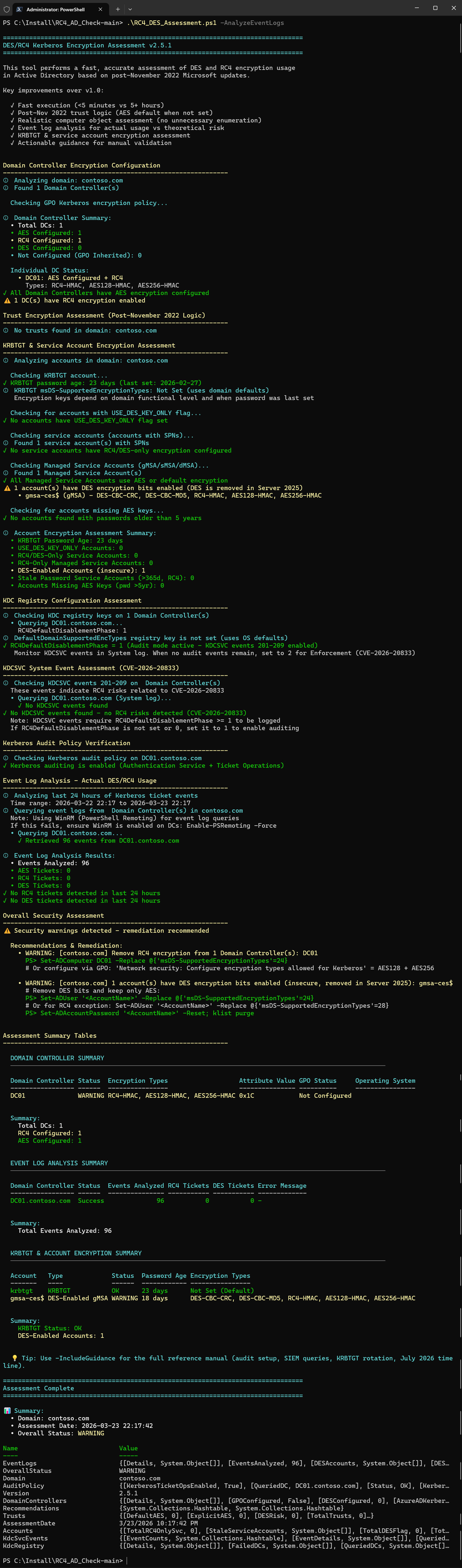
A PowerShell module for assessing DES and RC4 Kerberos encryption usage in Active Directory. Scans DC encryption, trusts, KRBTGT, service accounts (SPN/gMSA/sMSA/dMSA), KDC registry keys, KDCSVC events 201–209 (CVE-2026-20833), and Security event logs (4768/4769) for actual RC4/DES ticket usage — with AES/RC4 correlation to detect accounts needing password reset, inline remediation commands, forest-wide scanning, assessment comparison, and a full reference manual. Built for the **July 2026 RC4 removal deadline**.
## Why This Toolkit?
Microsoft will **completely remove RC4 from the Kerberos KDC path in July 2026**. After that date, only accounts with _explicit_ RC4 in `msDS-SupportedEncryptionTypes` will work with RC4. Everything else gets blocked.
This toolkit helps you:
- **Discover** all RC4/DES usage across your forest in minutes (not hours)
- **Get fix commands** shown inline with every finding — copy-paste ready
- **Track progress** by comparing assessments over time
- **Prepare** for the January 2026 and July 2026 milestones
## Key Features
| Feature | Description |
|---------|-------------|
| **DC Encryption Check** | Scans all DCs for `msDS-SupportedEncryptionTypes` and GPO Kerberos policy |
| **Trust Assessment** | Post-Nov 2022 logic: trusts default to AES when attribute is not set |
| **KDC Registry Check** | Reads `DefaultDomainSupportedEncTypes`, `RC4DefaultDisablementPhase`, and GPO `SupportedEncryptionTypes` from all DCs |
| **GPO-vs-AD Etype Drift** | Compares the GPO-written `SupportedEncryptionTypes` registry value against each DC's `msDS-SupportedEncryptionTypes` AD attribute to detect pending Kerberos service restarts or manual overrides |
| **KDCSVC Event Scan** | Queries System log events 201-209 for RC4 risks (CVE-2026-20833) |
| **Audit Policy Verification** | Checks if Kerberos auditing (4768/4769) is enabled before event log analysis |
| **Event Log Analysis** | Queries events 4768/4769 from all DCs to find actual RC4/DES ticket usage |
| **AES/RC4 Correlation** | Cross-references event log RC4 accounts with AD encryption config to detect accounts needing password reset |
| **KRBTGT Assessment** | Password age, encryption types, rotation guidance |
| **Service Account Scan** | SPN accounts, gMSA/sMSA, and delegated Managed Service Accounts (dMSA) with RC4/DES-only encryption |
| **USE_DES_KEY_ONLY Detection** | Accounts with the UserAccountControl flag forcing DES |
| **Missing AES Keys** | Two-path detection: (A) accounts with explicit non-AES encryption, (B) accounts with unset attribute and password predating the domain's AES threshold (DFL 2008 upgrade date, auto-detected via RODC group) |
| **AzureADKerberos Detection** | Entra Kerberos proxy object excluded from DC counts (Cloud Kerberos Trust) |
| **Stale Password Detection** | Service accounts with passwords >365 days old and RC4 enabled |
| **Inline Fix Commands** | Every finding includes copy-paste PowerShell remediation commands |
| **Forest-Wide Scanning** | Assess all domains in a forest with parallel processing (PS 7+) |
| **Compare Over Time** | Track remediation progress between two assessment exports |
| **Full Reference Manual** | `-IncludeGuidance` shows audit setup, SIEM queries, KRBTGT rotation, July 2026 timeline |
## Quick Start
# Prerequisites
Add-WindowsCapability -Online -Name Rsat.ActiveDirectory.DS-LDS.Tools~~~~0.0.1.0
Add-WindowsCapability -Online -Name Rsat.GroupPolicy.Management.Tools~~~~0.0.1.0
# Install the module from PowerShell Gallery
Install-Module -Name RC4-ADAssessment
# Import the module
Import-Module RC4-ADAssessment
# Quick scan (config only, ~30 seconds)
Invoke-RC4Assessment
# Deep scan — also checks all user and computer accounts (~1-2 minutes)
Invoke-RC4Assessment -DeepScan
# Full scan with event logs (~3-5 minutes)
Invoke-RC4Assessment -AnalyzeEventLogs -EventLogHours 168
# Maximum coverage — deep scan + event logs + export + reference manual
Invoke-RC4Assessment -DeepScan -AnalyzeEventLogs -ExportResults -IncludeGuidance
# Full scan for a specific domain + export + reference manual
Invoke-RC4Assessment -Domain contoso.com -AnalyzeEventLogs -ExportResults -IncludeGuidance
# Entire forest (parallel, PS 7+)
Invoke-RC4ForestAssessment -AnalyzeEventLogs -ExportResults -Parallel -MaxParallelDomains 5
# Compare two runs
Invoke-RC4AssessmentComparison -BaselineFile before.json -CurrentFile after.json -ShowDetails
## Prerequisites
- **PowerShell:** 5.1+ (7+ for parallel forest assessment)
- **Modules:** `ActiveDirectory`, `GroupPolicy`
- **Permissions:** Domain Admin or equivalent (Event Log Readers for event analysis)
- **Network:** WinRM (5985) or RPC (135) to DCs for event log and registry queries
- **Firewall (if WinRM is not configured):** Enable the following inbound rules on DCs to allow RPC fallback for event log queries:
- `Remote Event Log Management (RPC)`
- `Remote Event Log Management (RPC-EPMAP)`
- Via `wf.msc` (local), GPO (Computer Configuration → Windows Settings → Security Settings → Windows Firewall), or PowerShell:
Enable-NetFirewallRule -DisplayGroup 'Remote Event Log Management'
## Module Commands
The module exports three commands:
| Command | Purpose |
|---------|---------|
| `Invoke-RC4Assessment` | Main assessment for a single domain (replaces `RC4_DES_Assessment.ps1`) |
| `Invoke-RC4ForestAssessment` | Forest-wide assessment across all domains (replaces `Assess-ADForest.ps1`) |
| `Invoke-RC4AssessmentComparison` | Compare two JSON exports to track progress (replaces `Compare-Assessments.ps1`) |
## Parameters
### Invoke-RC4Assessment
| Parameter | Description | Default |
|-----------|-------------|---------|
| `-Domain` | Target domain | Current domain |
| `-Server` | Specific DC to query | Auto-discovered |
| `-AnalyzeEventLogs` | Enable remote DC analysis: KDC registry, KDCSVC events, audit policy, and Security event logs (4768/4769) | Off |
| `-EventLogHours` | Hours of events to analyze (1-168) | 24 |
| `-ExportResults` | Export to JSON + CSV (+ guidance .txt with `-IncludeGuidance`) in `.\Exports\` | Off |
| `-IncludeGuidance` | Show full reference manual (audit setup, SIEM queries, KRBTGT rotation, July 2026 timeline) | Off |
| `-DeepScan` | Extend scan to all enabled user accounts (RC4-exception and DES-enabled without SPNs) and all computer accounts (excl. DCs). Standard scan already detects RC4-only and DES-only accounts via Path A — DeepScan adds hybrid configs and computers | Off |
### Invoke-RC4ForestAssessment
| Parameter | Description | Default |
|-----------|-------------|---------|
| `-ForestName` | Target forest | Current forest |
| `-AnalyzeEventLogs` | Include event log analysis per domain | Off |
| `-EventLogHours` | Hours of events (1-168) | 24 |
| `-ExportResults` | Export per-domain + forest summary | Off |
| `-IncludeGuidance` | Include reference manual per domain | Off |
| `-DeepScan` | Extended user/computer account scan per domain | Off |
| `-Parallel` | Process domains concurrently (PS 7+) | Off |
| `-MaxParallelDomains` | Max concurrent domains (1-10) | 3 |
## Sample Output
### Quick Scan — Warnings with Inline Fixes
================================================================================
DES/RC4 Kerberos Encryption Assessment v4.4.0
================================================================================
Domain Controller Encryption Configuration
────────────────────────────────────────────────────────────────
ⓘ Found 1 Domain Controller(s)
✓ All Domain Controllers have AES encryption configured
⚠ 1 DC(s) have RC4 encryption enabled
KRBTGT & Service Account Encryption Assessment
────────────────────────────────────────────────────────────────
✓ KRBTGT password age: 25 days (last set: 2026-02-27)
✓ No accounts with USE_DES_KEY_ONLY flag
✓ No service accounts with RC4/DES-only encryption
⚠ 1 account(s) have explicit RC4 exception (RC4 + AES) - review and remove RC4 when possible
• gmsa-ces$ (gMSA) - RC4-HMAC, AES128-HMAC, AES256-HMAC, Last logon: 2026-03-05
✓ No accounts found with potentially missing AES keys
KDC Registry Configuration Assessment
────────────────────────────────────────────────────────────────
ⓘ DefaultDomainSupportedEncTypes: Not set (uses OS defaults)
✓ RC4DefaultDisablementPhase = 1 (Audit mode active)
✓ No GPO-vs-AD etype drift detected -- all DCs consistent
KRBTGT & ACCOUNT ENCRYPTION SUMMARY
────────────────────────────────────────────────────────────────
Account Type Status Password Age Last Logon Encryption Types
------- ---- ------ ------------ ---------- ----------------
krbtgt KRBTGT OK 25 days N/A Not Set (Default)
gmsa-ces$ RC4 Exception gMSA WARNING 20 days 2026-03-05 (19d) RC4-HMAC, AES128-HMAC, AES256-HMAC
Overall Security Assessment
────────────────────────────────────────────────────────────────
⚠ Security warnings detected - remediation recommended
Recommendations & Remediation:
• WARNING: [contoso.com] 1 account(s) have explicit RC4 exception (0x1C)
# To harden: remove RC4 and set AES-only:
PS> Set-ADUser '' -Replace @{'msDS-SupportedEncryptionTypes'=0x18}
# For gMSA/sMSA/dMSA use Set-ADServiceAccount instead of Set-ADUser
PS> Set-ADAccountPassword '' -Reset; klist purge
# Test application access - if it breaks, re-add RC4 exception
• WARNING: [contoso.com] Remove RC4 encryption from 1 Domain Controller(s): DC01
PS> Set-ADComputer DC01 -Replace @{'msDS-SupportedEncryptionTypes'=0x18}
💡 Tip: Use -IncludeGuidance for the full reference manual
(audit setup, SIEM queries, KRBTGT rotation, July 2026 timeline).
📊 Summary:
• Domain: contoso.com
• Overall Status: WARNING
### Full Scan — RC4 Detected in Event Logs
Kerberos Audit Policy Verification
────────────────────────────────────────────────────────────────
✓ Kerberos auditing is enabled (Authentication Service + Ticket Operations)
Event Log Analysis - Actual DES/RC4 Usage
────────────────────────────────────────────────────────────────
ⓘ Querying event logs from 3 Domain Controller(s)...
• DC01... ✓ 12,543 events
• DC02... ✓ 11,892 events
• DC03... ✗ RPC server unavailable
✗ RC4 tickets detected in active use!
RC4 accounts: LEGACY-APP$, SQL2008-SRV$
⚠ 1 account(s) have AES configured but are still using RC4 tickets (password reset needed)
• SQL2008-SRV$ (AES128-HMAC, AES256-HMAC, RC4-HMAC, pwd: 1200d)
→ Reset passwords to ensure AES keys exist (migrated/pre-DFL-2008 accounts): Set-ADAccountPassword '' -Reset
Recommendations & Remediation:
• CRITICAL: [contoso.com] RC4 tickets detected (8 tickets,
accounts: LEGACY-APP$, SQL2008-SRV$)
# For each account using RC4, try AES first:
PS> Set-ADUser '' -Replace @{
'msDS-SupportedEncryptionTypes'=0x18}
# For gMSA/sMSA/dMSA use Set-ADServiceAccount instead of Set-ADUser
PS> Set-ADAccountPassword '' -Reset; klist purge
# If AES fails, add explicit RC4 exception:
# -Replace @{'msDS-SupportedEncryptionTypes'=0x1C}
• WARNING: [contoso.com] 1 account(s) have AES configured but are
using RC4 tickets - password reset needed: SQL2008-SRV$
### Comparison — Etype Drift Detected
================================================================================
RC4/DES Assessment Comparison v4.17.0
================================================================================
Loading baseline: .\assessment_before.json
Loading current: .\assessment_after.json
Assessment Information
------------------------------------------------------------
Domain: forest1.net
Baseline Date: 04/28/2026 01:00:01
Current Date: 04/28/2026 02:28:18
Overall Status Change
------------------------------------------------------------
Baseline: WARNING
Current: WARNING
Domain Controller Changes
------------------------------------------------------------
Total DCs: 1 → 1
AES Configured: 1 → 1
RC4 Configured: 1 → 1
DES Configured: 0 → 0
Trust Changes
------------------------------------------------------------
Total Trusts: 1 → 1
RC4 Risk: 0 → 0
DES Risk: 0 → 0
Account Changes
------------------------------------------------------------
KRBTGT Status: OK → OK
KRBTGT Pwd Age: 17d → 17d
DES Flag Accts: 0 → 0
RC4-Only SvcAcc: 0 → 0
Stale Svc(RC4): 0 → 0
Missing AES: 0 → 0
DES-Enabled: 0 → 0
RC4 Exceptions: 0 → 0
KDC Registry Changes
------------------------------------------------------------
RC4Disablement: Not Set → Not Set
DefaultEncTypes: Not Set → Not Set
Etype Drift DCs: 0 ↑ 1
Change Summary
------------------------------------------------------------
✓ Improvements: 0
⚠ Degradations: 1
⚠ Overall DEGRADATION in security posture!
## Recommended Workflow
flowchart TD
Start(["Start Assessment"])
Start --> P1
P1["Phase 1: Discovery\n(DCs, trusts, service accounts, logs)"]
P1 --> Decision{"Results?"}
Decision -- "All OK" --> Monitor(["Monitor periodically"])
Decision -- "Issues found" --> P2
P2["Phase 2: Remediate\n(high-risk items first)"]
P2 --> P2a["Set-ADComputer for DCs"]
P2 --> P2b["Set RC4DefaultDisablementPhase"]
P2 --> P2c["Reset service account passwords"]
P2 --> P2d["klist purge after changes"]
P2a & P2b & P2c & P2d --> P3
P3["Phase 3: Validate"]
P3 --> Compare1["Compare assessments"]
Compare1 --> Check1{"Critical items clean?"}
Check1 -- "No" --> P2
Check1 -- "Yes" --> P4
P4["Phase 4: Deep Sweep\n(all users + computers)"]
P4 --> P5
P5["Phase 5: Final Remediate\n(password resets for remaining accounts)"]
P5 --> P6
P6["Phase 6: Final Validate"]
P6 --> Compare2["Compare assessments"]
Compare2 --> Check2{"All clean?"}
Check2 -- "No" --> P5
Check2 -- "Yes" --> Done(["Ready for July 2026"])
| Phase | Command | Focus |
|-------|---------|-------|
| **1 — Discovery** | `Invoke-RC4Assessment -AnalyzeEventLogs -ExportResults` | DCs, trusts, KRBTGT, service accounts, KDC registry, KDCSVC events, event logs |
| **2 — Remediate** | Follow inline fix commands | Fix DCs, service accounts, trusts, registry — highest-risk items first |
| **3 — Validate** | `Invoke-RC4AssessmentComparison -BaselineFile before.json -CurrentFile after.json -ShowDetails` | Confirm critical items are resolved |
| **4 — Deep Sweep** | `Invoke-RC4Assessment -DeepScan -AnalyzeEventLogs -ExportResults` | RC4-exception/DES-enabled users without SPNs + computer accounts (RC4-only/DES-only already found in Phase 1) |
| **5 — Final Remediate** | Password resets for remaining missing-AES accounts | Bulk cleanup of normal accounts |
| **6 — Final Validate** | `Invoke-RC4AssessmentComparison -BaselineFile before.json -CurrentFile after.json -ShowDetails` | Confirm everything is clean |
## July 2026 RC4 Removal Timeline
| Date | Milestone | Action |
|------|-----------|--------|
| **Nov 2022** | Post-OOB updates change trust/computer defaults to AES | Trusts with unset `msDS-SupportedEncryptionTypes` now default to AES |
| **Jan 2026** | Security updates add `RC4DefaultDisablementPhase` registry key (CVE-2026-20833) | Set to `1` to enable KDCSVC audit events 201-209, monitor, then set to `2` for Enforcement |
| **Apr 2026** | Enforcement phase — `DefaultDomainSupportedEncTypes` defaults to AES-only (0x18) | Manual rollback still possible; `RC4DefaultDisablementPhase` can be set back to `1` for Audit |
| **Jul 2026** | Full enforcement — `RC4DefaultDisablementPhase` registry key removed | Only accounts with _explicit_ RC4 in `msDS-SupportedEncryptionTypes` will work |
### The Three Criteria for Impact (Emergency Triage)
A service ticket request will **only** break if **all three** criteria are met simultaneously:
1. **Enforcement mode is active** — April 2026+ update installed, DC not set to Audit mode
2. **Target account has no explicit `msDS-SupportedEncryptionTypes`** — attribute is `0` or undefined
3. **`DefaultDomainSupportedEncTypes` not defined on the KDC** — no admin override in place
If **any one** is not met, the request is unaffected. **To restore service in an emergency: break one of the three.**
### `RC4DefaultDisablementPhase` Registry Reference
**Registry path (on each DC):**
HKEY_LOCAL_MACHINE\SOFTWARE\Microsoft\Windows\CurrentVersion\Policies\System\Kerberos\Parameters
Value: RC4DefaultDisablementPhase (REG_DWORD)
| Value | Mode | Behaviour |
|:-----:|------|-----------|
| **0** | Rollback (silent) | RC4 allowed for all accounts. No KDCSVC events. Use for emergency rollback without event-log volume. |
| **1** | Rollback (audit) | RC4 allowed. KDCSVC events 201/202 and 206/207 logged per RC4 request. Same ticket-issuance behaviour as `0`, but with per-request audit events. |
| **2** | Enforcement | `DefaultDomainSupportedEncTypes` internally defaults to `0x18` (AES-only), RC4 blocked for accounts without explicit `msDS-SupportedEncryptionTypes` |
| Not set | Enforcement (implicit) | After KB5078763 (April 2026), `not set` equals enforcement — operationally identical to `2` |
# Enable Audit mode on a DC (recommended before April 2026):
$path = 'HKLM:\SOFTWARE\Microsoft\Windows\CurrentVersion\Policies\System\Kerberos\Parameters'
if (-not (Test-Path $path)) { New-Item -Path $path -Force }
Set-ItemProperty -Path $path -Name 'RC4DefaultDisablementPhase' -Value 1 -Type DWord
# Verify:
Get-ItemProperty -Path $path -Name 'RC4DefaultDisablementPhase'
### How `DefaultDomainSupportedEncTypes` Works
`DefaultDomainSupportedEncTypes` is the KDC's fallback encryption type for accounts that do **not** have `msDS-SupportedEncryptionTypes` set in AD. It determines what encryption the KDC offers when the account has no explicit preference.
**Decision logic:**
Account has msDS-SupportedEncryptionTypes set?
├── YES → KDC uses account value (e.g. 0x1C = RC4+AES exception)
└── NO → KDC uses DefaultDomainSupportedEncTypes
├── Before April 2026: 0x27 (DES+RC4+AES256-SK) → RC4 allowed
├── After April 2026: 0x18 (AES-only) → RC4 blocked
└── RC4DefaultDisablementPhase=2: 0x18 (same as April)
| Phase | `DefaultDomainSupportedEncTypes` | `msDS-SupportedEncryptionTypes = 0x1C` |
|-------|--------------------------------|---------------------------------------|
| Before April 2026 | `0x27` (incl. RC4) | Account uses `0x1C` (RC4+AES) |
| After April 2026 | `0x18` (AES-only) | Account **still uses `0x1C`** — per-account value always takes precedence |
| After July 2026 | `0x18` (permanent) | Account **still uses `0x1C`** — exceptions continue to work |
### Production vs. Test/QA Deployment Guide
**Production (before April 2026):**
# Audit-only — RC4 continues to work, KDCSVC events 201-209 are logged
$path = 'HKLM:\SOFTWARE\Microsoft\Windows\CurrentVersion\Policies\System\Kerberos\Parameters'
if (-not (Test-Path $path)) { New-Item -Path $path -Force }
Set-ItemProperty -Path $path -Name 'RC4DefaultDisablementPhase' -Value 1 -Type DWord
**Test/QA (enforce AES-only now, without waiting for April patch):**
# Enforcement — RC4 blocked for accounts without explicit 0x1C exception
$path = 'HKLM:\SOFTWARE\Microsoft\Windows\CurrentVersion\Policies\System\Kerberos\Parameters'
if (-not (Test-Path $path)) { New-Item -Path $path -Force }
Set-ItemProperty -Path $path -Name 'RC4DefaultDisablementPhase' -Value 2 -Type DWord
### GPO: Kerberos Encryption Types
The GPO **"Network security: Configure encryption types allowed for Kerberos"** configures which encryption types a computer offers and accepts:
| Checkbox | Bit | Decimal | Recommendation |
|----------|-----|---------|----------------|
| DES_CBC_CRC | `0x01` | 1 | **Do not enable** |
| DES_CBC_MD5 | `0x02` | 2 | **Do not enable** |
| RC4_HMAC_MD5 | `0x04` | 4 | **Do not enable** — RC4 blocked by default after April 2026 (per-account `0x1C` exceptions still work) |
| AES128_HMAC_SHA1 | `0x08` | 8 | ✅ Enable |
| AES256_HMAC_SHA1 | `0x10` | 16 | ✅ Enable |
| Future encryption types | `0x80000000` | 2147483648 | ✅ Enable (CIS Benchmark) |
**Recommended:** AES128 + AES256 + Future = `0x80000018` (CIS Benchmark value).
This GPO **writes** `msDS-SupportedEncryptionTypes` to each computer object in AD when Group Policy applies. It is separate from `DefaultDomainSupportedEncTypes` (KDC registry), which only affects accounts _without_ the attribute set.
### What Happens After July 2026
- Accounts **without** `msDS-SupportedEncryptionTypes` set → use AES (secure, no action needed)
- Accounts with AES in `msDS-SupportedEncryptionTypes` → use AES (secure)
- Accounts with **explicit RC4** (`0x4` bit) in `msDS-SupportedEncryptionTypes` → still allowed (exception)
- Accounts relying on default/legacy RC4 fallback → **blocked**
### `msDS-SupportedEncryptionTypes` Reference
| Hex | Decimal | Encryption Types | Use Case |
|------|---------|------------------|----------|
| 0x0 | 0 | Not set — defaults to RC4 (pre-Nov 2022) or AES (post-Nov 2022) | Default behaviour |
| 0x1 | 1 | DES-CBC-CRC | **Insecure — do not use** |
| 0x2 | 2 | DES-CBC-MD5 | **Insecure — do not use** |
| 0x3 | 3 | DES-CBC-CRC, DES-CBC-MD5 | **Insecure — do not use** |
| 0x4 | 4 | RC4-HMAC | RC4 only (no AES — avoid) |
| 0x8 | 8 | AES128-CTS-HMAC-SHA1-96 | AES128 only |
| 0x10 | 16 | AES256-CTS-HMAC-SHA1-96 | AES256 only |
| 0x18 | 24 | AES128 + AES256 | **Recommended (AES-only)** |
| 0x1C | 28 | RC4 + AES128 + AES256 | **RC4 exception with AES** |
| 0x1F | 31 | DES-CBC-CRC, DES-CBC-MD5, RC4, AES128, AES256 | All types (insecure — includes DES) |
| 0x27 | 39 | DES + RC4 + AES256-SK | Old default (pre-Nov 2022) — insecure |
| 0x3C | 60 | RC4 + AES128 + AES256 + AES256-SK | Historical recommended — replace with `0x18` |
| 0x80000018 | 2147483672 | AES128 + AES256 + Future encryption types | **CIS Benchmark recommended GPO value** |
### Explicit RC4 Exception (Last Resort)
If a service absolutely cannot use AES after April/July 2026 (per [CVE-2026-20833 guidance](https://support.microsoft.com/topic/1ebcda33-720a-4da8-93c1-b0496e1910dc)):
# Per-account exception (recommended):
Set-ADUser 'svc_LegacyApp' -Replace @{'msDS-SupportedEncryptionTypes'=0x1C}
# For gMSA/sMSA/dMSA use Set-ADServiceAccount instead of Set-ADUser
# 0x1C = RC4 (0x4) + AES128 (0x8) + AES256 (0x10)
Set-ADAccountPassword 'svc_LegacyApp' -Reset; klist purge
# MSA passwords are managed by AD - no manual reset needed
# Computer account (rare):
Set-ADComputer 'LEGACYHOST' -Replace @{'msDS-SupportedEncryptionTypes'=0x1C}
klist purge
# Domain-wide fallback (INSECURE - leaves all accounts vulnerable to CVE-2026-20833):
# Only as last resort if per-account exceptions are not feasible:
# $path = 'HKLM:\SOFTWARE\Microsoft\Windows\CurrentVersion\Policies\System\Kerberos\Parameters'
# Set-ItemProperty -Path $path -Name 'DefaultDomainSupportedEncTypes' -Value 0x1C -Type DWord
Document all exceptions and plan vendor upgrades.
### CVE-2026-20833 Toolkit Coverage
This toolkit implements the full [CVE-2026-20833 deployment guidance](https://support.microsoft.com/topic/1ebcda33-720a-4da8-93c1-b0496e1910dc):
| KB Article Requirement | Toolkit Coverage |
|---|---|
| **KDCSVC events 201-209** (System log) | `Get-KdcSvcEventAssessment` scans all DCs, reports per-event breakdown with descriptions |
| **RC4DefaultDisablementPhase = 0** (not active) | Detected as WARNING with phased remediation steps |
| **RC4DefaultDisablementPhase = 1** (Audit mode) | Detected as OK — correct intermediate step, no false alarm |
| **RC4DefaultDisablementPhase = 2** (Enforcement) | Detected as OK — fully protected |
| **RC4DefaultDisablementPhase not set** | WARNING with Step 1–4 phased workflow |
| **January 2026 Initial Deployment** | Timeline in guidance + recommendations |
| **April 2026 Enforcement Phase** | Timeline + `DefaultDomainSupportedEncTypes` defaults to AES-only (0x18) |
| **July 2026 Full Enforcement** | Timeline + `RC4DefaultDisablementPhase` removed |
| **Explicit RC4 exception (`0x1C`)** | Default fix commands use `0x18` (AES-only); `0x1C` only as documented fallback for legacy apps |
| **RC4 exception accounts detected** | Accounts with explicit RC4+AES (`0x1C`) flagged as WARNING with recommendation to remove RC4 |
| **Domain-wide fallback (`0x1C` on DCs)** | Documented as last resort with CVE-2026-20833 vulnerability warning |
| **Event 205** (insecure `DefaultDomainSupportedEncTypes`) | Registry check detects RC4 in `DefaultDomainSupportedEncTypes` |
| **Events 206-208** (Enforcement blocking) | Detected with recommendation to migrate to AES (0x18) or add per-account `0x1C` exception as last resort |
| **GPO-vs-AD etype drift** | GPO `SupportedEncryptionTypes` registry value compared against `msDS-SupportedEncryptionTypes` AD attribute per DC — detects pending KDC restarts or manual overrides |
| **Installing updates alone doesn't fix CVE** | Recommendations explicitly guide to enable Enforcement (value 2) |
### KDCSVC Event Reference (System Log, Provider: KDCSVC)
These events are logged on Windows Server 2012+ domain controllers after installing the January 2026+ security updates. They are logged regardless of `RC4DefaultDisablementPhase` — the phase controls enforcement behaviour, not event logging.
| Event ID | RC4 Relation | Description | Phase |
|----------|-------------|-------------|-------|
| **201** | Direct | KDC **rejects the request** — client only offers RC4, which is not allowed | Audit |
| **202** | Direct | Client requests an **unsupported encryption type** (typically RC4 after it has been disabled) | Audit |
| **203** | Direct | Account (user/computer/gMSA) **supports RC4 but not AES**, while the KDC requires AES | Audit |
| **204** | Indirect | **SPN cannot use the requested encryption type** (RC4 is often the root cause) | Audit |
| **205** | Direct | `DefaultDomainSupportedEncTypes` **registry is configured insecurely** (includes RC4) | Audit |
| **206** | Direct | Ticket generation **failed because RC4 is disabled** on the KDC | Enforcement |
| **207** | Contextual | **Internal KDC error** (often appears together with 201–206 events) | Both |
| **208** | Direct | Client **explicitly requested RC4**, and it was rejected | Enforcement |
| **209** | Direct | Ticket **cannot be issued** because RC4 is **no longer allowed by policy** | Enforcement |
### Important: KDCSVC Events Are Not an RC4 Scanner
A common misconception is that the absence of KDCSVC events 201–209 proves that RC4 is no longer in use. **This is incorrect.**
KDCSVC events are a **CVE-specific warning mechanism**, not a general-purpose RC4 detection tool. Microsoft states in [KB5073381 (Step 2: MONITOR)](https://support.microsoft.com/topic/1ebcda33-720a-4da8-93c1-b0496e1910dc):
For broader RC4 detection beyond the CVE scope, Microsoft explicitly recommends a separate approach:
**RC4 scenarios that produce NO KDCSVC events include:**
- Accounts without `msDS-SupportedEncryptionTypes` set that implicitly fall back to RC4 (pre-Nov 2022 behaviour)
- RC4 session keys visible in Security event logs (4768/4769) that do not trigger KDC fallback logic
- Legacy service accounts whose configuration is formally valid but cryptographically weak
#### Ticket Encryption vs. Session Key Encryption
Kerberos uses two independent cryptographic layers, and each can use a different encryption type:
- **Ticket encryption:** The TGT (Ticket Granting Ticket) is encrypted with the KRBTGT account's key. Service tickets (TGS) are encrypted with the target service account's key. The encryption type depends on the target account's `msDS-SupportedEncryptionTypes` and the KDC configuration. This is what the `TicketEncryptionType` field in Security events 4768/4769 reports.
- **Session key encryption:** A temporary symmetric key generated by the KDC and embedded inside the ticket. The session key encrypts the ongoing communication between client and service. Its encryption type is negotiated separately and **can differ** from the ticket encryption type.
A service ticket can be AES-encrypted while the session key inside it uses RC4 — or vice versa. KDCSVC events 201–209 fire only when the KDC **cannot issue AES** for either tickets or session keys based on the account's configuration. Microsoft states in [KB5073381](https://support.microsoft.com/topic/1ebcda33-720a-4da8-93c1-b0496e1910dc): _"Audit events related to this change are only generated when Active Directory is unable to issue AES-SHA1 service tickets **or session keys**."_ However, when AES **is** configured but RC4 is still **actually negotiated** — for example because the client requests RC4, or because the account was migrated (ADMT) without a subsequent password change — **no KDCSVC event is produced**. These silent RC4 usages are only visible in the `TicketEncryptionType` and `SessionEncryptionType` fields of Security events 4768/4769, which is why RC4-ADAssessment includes event log correlation as a critical detection layer. Microsoft's own [`Get-KerbEncryptionUsage.ps1`](https://github.com/microsoft/Kerberos-Crypto) script tracks `Ticket` and `SessionKey` encryption types separately for the same reason.
**This is why RC4-ADAssessment correlates multiple data sources** — AD attributes, KDC registry configuration, KDCSVC events, _and_ Security event logs (4768/4769) — rather than relying on any single signal.
## AzureADKerberos (Entra Kerberos Proxy)
If your environment uses **Microsoft Entra ID** (formerly Azure AD) features such as **Windows Hello for Business Cloud Kerberos Trust** or **FIDO2 security key sign-in**, you will have a computer object named `AzureADKerberos` in your Domain Controllers OU.
This object is **not a real Domain Controller**. It is a read-only proxy object created and fully managed by the Entra ID cloud service to issue Kerberos TGTs for cloud authentication scenarios.
### Why it is excluded from DC counts
| Aspect | Detail |
|--------|--------|
| **What it does** | Enables Entra ID to issue partial TGTs so users can access on-premises resources via Cloud Kerberos Trust |
| **Encryption settings** | Managed by Entra ID — `msDS-SupportedEncryptionTypes` is typically not set (shows "Not Set (Default)") |
| **Should you change it?** | **No.** Do not manually set encryption types on this object. Its `krbtgt` keys must be rotated regularly using `Set-AzureADKerberosServer -RotateServerKey` (keys are **not** auto-rotated) |
| **Impact on assessment** | If counted as a DC, it inflates the "Not Configured" count and can trigger false positive warnings |
Starting in **v2.5.0** (refined in **v2.5.1**), the assessment automatically detects this object, excludes it from all DC metrics (Total DCs, AES Configured, etc.), and displays it separately in the summary as an informational note.
If you need to manage the AzureADKerberos object (e.g., key rotation), use:
# First, ensure TLS 1.2 for PowerShell gallery access
[Net.ServicePointManager]::SecurityProtocol = [Net.ServicePointManager]::SecurityProtocol -bor [Net.SecurityProtocolType]::Tls12
# Install the Azure AD Kerberos PowerShell module (one-time)
Install-Module -Name AzureADHybridAuthenticationManagement -AllowClobber
Import-Module -Name AzureADHybridAuthenticationManagement
# Authenticate
$cloudCred = Get-Credential -Message 'UPN of Hybrid Identity Administrator'
$domainCred = Get-Credential -Message 'Domain\User of Domain Admins group'
# Check current status
Get-AzureADKerberosServer -Domain contoso.com -CloudCredential $cloudCred -DomainCredential $domainCred
# Set up (if not yet configured)
Set-AzureADKerberosServer -Domain contoso.com -CloudCredential $cloudCred -DomainCredential $domainCred
# Rotate keys (recommended periodically)
Set-AzureADKerberosServer -Domain contoso.com -CloudCredential $cloudCred -DomainCredential $domainCred -RotateServerKey
For more information, see:
- [Windows Hello for Business cloud Kerberos trust deployment guide](https://learn.microsoft.com/en-us/windows/security/identity-protection/hello-for-business/deploy/hybrid-cloud-kerberos-trust)
- [Passwordless security key sign-in to on-premises resources](https://learn.microsoft.com/en-us/entra/identity/authentication/howto-authentication-passwordless-security-key-on-premises) (includes key rotation steps)
## Creating Managed Service Accounts with AES-Only Encryption
When creating new Managed Service Accounts, always specify `-KerberosEncryptionType AES128,AES256` to avoid RC4 dependencies from the start.
### Group Managed Service Account (gMSA)
gMSAs are the recommended approach — password rotation is handled automatically by AD, and multiple servers can share the same account.
**Create gMSA with a security group for authorized servers:**
# Step 1: Create a security group containing the servers allowed to use this gMSA
New-ADGroup -Name 'GR-gMSA-AppServers' -GroupScope Global -GroupCategory Security `
-Description 'Servers authorized to retrieve gMSA-App password'
Add-ADGroupMember -Identity 'GR-gMSA-AppServers' -Members 'SRV01$','SRV02$'
# Step 2: Create the gMSA (group-based authorization)
New-ADServiceAccount `
-Name 'gMSA-App' `
-DNSHostName 'gMSA-App.contoso.com' `
-PrincipalsAllowedToRetrieveManagedPassword 'GR-gMSA-AppServers' `
-Description 'gMSA for application services' `
-ManagedPasswordIntervalInDays 30 `
-KerberosEncryptionType AES128,AES256 `
-Enabled $true
**Create gMSA with individual computer accounts (no group):**
New-ADServiceAccount `
-Name 'gMSA-App' `
-DNSHostName 'gMSA-App.contoso.com' `
-PrincipalsAllowedToRetrieveManagedPassword @('SRV01$','SRV02$') `
-Description 'gMSA for application services' `
-ManagedPasswordIntervalInDays 30 `
-KerberosEncryptionType AES128,AES256 `
-Enabled $true
### Standalone Managed Service Account (sMSA)
sMSAs are restricted to a single computer. Use these when only one server needs the account.
# Create the sMSA
New-ADServiceAccount -Name 'msa-AppSrv01' `
-RestrictToSingleComputer `
-Description 'sMSA dedicated to SRV01' `
-KerberosEncryptionType AES128,AES256 `
-PassThru
# On the target server: install the sMSA (requires ActiveDirectory module)
Install-ADServiceAccount -Identity 'msa-AppSrv01'
# Verify it works
Test-ADServiceAccount 'msa-AppSrv01'
# Returns True if the server can retrieve the managed password
### Verify Managed Service Account Configuration
# Check gMSA: authorized principals, encryption types, password age
Get-ADServiceAccount -Identity 'gMSA-App' -Properties `
PrincipalsAllowedToRetrieveManagedPassword, KerberosEncryptionType, PasswordLastSet
# Check sMSA: host binding, encryption types, password age
Get-ADServiceAccount -Identity 'msa-AppSrv01' -Properties `
msDS-HostServiceAccountBL, KerberosEncryptionType, PasswordLastSet
# Test on the target server (must be run locally)
Test-ADServiceAccount 'gMSA-App'
### Refresh Kerberos Tickets After Changes
After creating or modifying a managed service account, refresh tickets on the target server without restarting:
# Purge cached Kerberos tickets for the SYSTEM account
klist -li 0x3e7 purge
# Force Group Policy update to apply any policy-based changes
gpupdate /force
### Unlock a Service for Managed Account Changes
If a Windows service is already configured with a managed account and you need to modify it:
# Release the service from managed account control
sc.exe managedaccount false
# After making changes, re-enable managed account
sc.exe managedaccount true
## Post-November 2022 Logic
### Computer Objects
RC4 fallback only occurs when **both** conditions are true:
1. `msDS-SupportedEncryptionTypes` on the client is set to a non-zero value
2. `msDS-SupportedEncryptionTypes` on the DC does NOT include AES
**Impact:** You do NOT need to set this attribute on 100,000+ computers if DCs have AES configured via GPO.
### DC Summary Counters Explained
The Domain Controller summary shows five counters:
| Counter | What it reads | Example |
|---------|---------------|---------|
| **AES Configured** | DCs where `msDS-SupportedEncryptionTypes` includes AES bits (0x8 or 0x10) | GPO applied → attribute stamped to `0x18` |
| **RC4 Configured** | DCs where attribute includes RC4 (0x4) alongside AES | Attribute = `0x1C` |
| **DES Configured** | DCs where attribute includes DES bits (0x1 or 0x2) | Attribute = `0x1F` |
| **Not Configured (GPO Inherited)** | DCs where attribute is null/0 — they inherit encryption settings from the GPO at the protocol level | Brand new DC before first `gpupdate` |
| **GPO Status** | Separate check: does a GPO exist on the DC OU that configures Kerberos encryption? | `OK` if GPO sets AES |
The GPO "Network security: Configure encryption types allowed for Kerberos" works by **writing** `msDS-SupportedEncryptionTypes` to each DC's computer object when Group Policy applies. After application, the attribute IS set — so the DC moves from "Not Configured" to "AES Configured".
### Trusts
When `msDS-SupportedEncryptionTypes` is 0 or empty on trusts, they **default to AES**. No action needed for these trusts.
## Missing AES Keys Detection
The "Missing AES Keys" check identifies accounts that lack AES Kerberos keys. It uses two detection paths in the standard scan (no `-DeepScan` required):
### Path A — Explicit Non-AES Encryption
Accounts where `msDS-SupportedEncryptionTypes` is **explicitly set to a non-zero value without AES bits** (bit `0x18`). These accounts are configured for RC4-only or DES-only **ticket negotiation**. Note: `msDS-SupportedEncryptionTypes` controls which encryption types are negotiated for Kerberos tickets, not which keys exist in the database. AES keys are generated automatically during any password set/change when DFL ≥ 2008. However, Path A also considers password age — accounts whose password predates the DFL 2008 upgrade genuinely lack AES keys.
**Examples:** `0x4` (RC4-only), `0x3` (DES-only), `0x7` (DES + RC4, no AES). Verify actual stored keys with `DSInternals Get-ADReplAccount` or Event 4768 v2 `AccountAvailableKeys`.
### Path B — Attribute Not Set + Password Predating AES Threshold
Accounts where `msDS-SupportedEncryptionTypes` is **not set (null) or equals 0** AND `PasswordLastSet` **predates the domain's AES threshold**. The tool dynamically determines this date by querying the `Created` date of the built-in "Read-only Domain Controllers" group — a reliable proxy for when the DFL was raised to 2008 and AES key generation became available (AES keys are generated automatically on any password set/change when DFL ≥ 2008). This group exists in every domain at DFL 2008+, even without RODCs deployed. If the group is not found, the tool falls back to the Windows Server 2008 GA date (2008-02-27). Accounts with old passwords may be migrated (e.g., ADMT) or simply never had their password changed after the DFL upgrade.
### When an Account is NOT Flagged
- **Path A skips** accounts that have AES bits set (e.g., `0x18`, `0x1C`, `0x27`) — they already support AES
- **Path B skips** accounts whose password was set after the AES threshold date — they had AES keys generated
If `msDS-SupportedEncryptionTypes` has a non-zero value that includes AES (e.g., `0x27`, `0x18`, `0x1C`), the account is handled by other checks (RC4-exception, DES-enabled) rather than Missing AES Keys.
## Standard Scan vs DeepScan
The standard scan (without `-DeepScan`) already covers most account types. Here is what each mode detects:
| Check | Standard Scan | DeepScan Only |
|-------|:---:|:---:|
| DC encryption types | ✓ | — |
| Trusts | ✓ | — |
| KRBTGT password age | ✓ | — |
| Service accounts (SPN) — RC4/DES-only | ✓ | — |
| Managed Service Accounts (gMSA/sMSA/dMSA) | ✓ | — |
| USE_DES_KEY_ONLY flag | ✓ | — |
| RC4-exception accounts (RC4 + AES) with SPNs | ✓ | — |
| DES-enabled accounts with SPNs | ✓ | — |
| Stale password service accounts | ✓ | — |
| **Explicit non-AES accounts (all, Path A)** | **✓** | — |
| **Missing AES Keys — old password (Path B)** | **✓** | — |
| RC4-exception users **without** SPNs | — | ✓ |
| DES-enabled users **without** SPNs | — | ✓ |
| Computer accounts (OS-default 0x1C detection) | — | ✓ |
| Computer accounts (non-default RC4/DES) | — | ✓ |
**Key insight:** Since v4.4.0, RC4-only and DES-only accounts are detected by the standard scan (Path A) regardless of whether they have SPNs. DeepScan adds value primarily for:
1. **RC4-exception users without SPNs** — accounts with `0x1C` (RC4 + AES) that are not service accounts
2. **DES-enabled users without SPNs** — accounts with DES bits alongside AES
3. **Computer account scanning** — not covered by any standard check
### Real-World Example: Standard Scan Detects RC4-Only Account
A normal user account `tim` had its `msDS-SupportedEncryptionTypes` set to `0x4` (RC4-only). Running the standard scan **without** `-DeepScan` produces:
Overall Security Assessment
────────────────────────────────────────────────────────────────
⚠ Security warnings detected — remediation recommended
Recommendations & Remediation:
• WARNING: [contoso.com] 1 account(s) have explicit RC4 exception (0x1C) —
review and remove RC4 when possible: gmsa-ces$
# These accounts explicitly allow RC4 (msDS-SupportedEncryptionTypes includes 0x4 + AES)
# To harden: remove RC4 and set AES-only:
PS> Set-ADUser '' -Replace @{'msDS-SupportedEncryptionTypes'=0x18}
# For gMSA/sMSA/dMSA use Set-ADServiceAccount instead of Set-ADUser
PS> Set-ADAccountPassword '' -Reset; klist purge
• WARNING: [contoso.com] 1 account(s) may be missing AES keys: tim (last logon: 2026-03-30)
# Option 1: Reset password (ensures AES keys exist for migrated/pre-DFL-2008 accounts):
PS> Set-ADAccountPassword '' -Reset; klist purge
# If AES is still not used after password reset, explicitly set AES:
PS> Set-ADUser '' -Replace @{'msDS-SupportedEncryptionTypes'=0x18}
# For gMSA/sMSA/dMSA use Set-ADServiceAccount instead of Set-ADUser
PS> Set-ADAccountPassword '' -Reset; klist purge
The account `tim` was detected by **Path A** (explicit non-AES encryption) — no `-DeepScan` needed. The `gmsa-ces$` account with `0x1C` (RC4 + AES) is a separate RC4-exception finding.
### Example: Old Password but Explicit Encryption Types
| Attribute | Value |
|-----------|-------|
| `PasswordLastSet` | 2300 days ago |
| `msDS-SupportedEncryptionTypes` | `0x27` (DES-CBC-CRC + DES-CBC-MD5 + RC4 + AES256) |
| Event 4768 Available Keys | AES-SHA1, RC4 |
| **Flagged as Missing AES Keys?** | **No** — `0x27` is non-zero, so the Missing AES Keys check is skipped |
| **Flagged as DES-Enabled?** | **Yes** — DES bits (`0x3`) are set alongside AES (DES is removed in Server 2025) |
| **Flagged as RC4 Exception?** | **Yes** — RC4 bit (`0x4`) is set alongside AES |
This account has AES keys available (confirmed by the event log). It is not flagged as "Missing AES Keys", but it **is** flagged by the DES-enabled and RC4-exception checks because it still has insecure encryption types configured.
### When to Investigate
Accounts that **are** flagged (attribute not set + password predating AES threshold) likely lack AES keys because their password was never changed after the DFL was raised to 2008. These are often migrated accounts (e.g., ADMT) or dormant accounts. Reset the password once to generate AES keys:
# A single password reset generates AES keys on DFL ≥ 2008:
Set-ADAccountPassword '' -Reset; klist purge
AES keys are generated automatically during any password set/change when DFL ≥ 2008. You can verify with `DSInternals Get-ADReplAccount` or Event 4768 v2 `AccountAvailableKeys`.
## Event Log Encryption Type Reference
Security events 4768 (TGT request) and 4769 (service ticket request) contain `TicketEncryptionType` and `SessionKeyEncryptionType` fields that indicate the actual encryption used. These values differ from the `msDS-SupportedEncryptionTypes` bitmask — they represent the single encryption algorithm selected for a specific ticket or session key.
| Hex | Decimal | Algorithm | Status |
|-----|---------|-----------|--------|
| `0x1` | 1 | DES-CBC-CRC | **Insecure** — disabled since Win 7 / Server 2008 R2 |
| `0x3` | 3 | DES-CBC-MD5 | **Insecure** — disabled since Win 7 / Server 2008 R2 |
| `0x11` | 17 | AES128-CTS-HMAC-SHA1-96 | Secure (since Server 2008 / Vista) |
| `0x12` | 18 | AES256-CTS-HMAC-SHA1-96 | **Recommended** — strongest standard type |
| `0x17` | 23 | RC4-HMAC | **Weak** — blocked after July 2026 (without explicit exception) |
| `0x18` | 24 | RC4-HMAC-EXP | **Insecure** — export-grade RC4 |
| `0xFFFFFFFF` | — | (none) | Failure event — no ticket issued |
## AES-Configured but RC4-Used Correlation
When event log analysis is enabled (`-AnalyzeEventLogs`), the tool cross-references accounts found using RC4 tickets (Event IDs 4768/4769) with their `msDS-SupportedEncryptionTypes` in AD. This detects a common gap: accounts that have AES **configured** for ticket negotiation but are still obtaining RC4 tickets. Possible causes include: migrated accounts (ADMT) that never had their password set on the current domain, accounts whose password predates the DFL 2008 upgrade (only RC4 keys exist in the DB), or client-side/application RC4 preference overriding AES negotiation.
### How It Works
1. Event logs identify accounts receiving RC4 tickets (`TicketEncryptionType = 0x17`)
2. Accounts already flagged as RC4-only, DES-only, or USE_DES_KEY_ONLY are excluded (those are expected)
3. Remaining RC4 accounts are looked up in AD via `Get-ADUser` / `Get-ADComputer`
4. If the account has AES bits set (0x8 or 0x10) or inherits AES default (attribute not set/zero), it is flagged as **Password Reset Needed**
### Example
| Attribute | Value |
|-----------|-------|
| Account | `sccmservice` |
| `msDS-SupportedEncryptionTypes` | `0x27` (DES, RC4, AES-Sk) |
| Event 4768 TicketEncryptionType | `0x17` (RC4) |
| **Diagnosis** | AES is configured for ticket negotiation but account still receives RC4 tickets — likely a migrated account or password predating DFL 2008 (only RC4 keys in DB). Verify with `DSInternals Get-ADReplAccount` or Event 4768 v2 `AccountAvailableKeys` |
| **Fix** | `Set-ADAccountPassword 'sccmservice' -Reset; klist purge` |
### Why Not Parse "Available Keys" from Event 4768?
The correlation approach used by RC4-ADAssessment remains the better choice:
- **Works on all DCs** — patched and unpatched (old event format has only 15 fields, new format has 21+)
- **Shows actual usage, not just capability** — `AccountAvailableKeys` shows what keys _exist_ on the account, not what encryption is _actually being used_ in ticket requests. The `TicketEncryptionType` and `SessionKeyEncryptionType` fields show the real negotiation result.
- **Locale-independent** — on unpatched DCs, "Available Keys" only appears in the rendered `Message` text (locale-dependent: "Verfügbare Schlüssel" in German, etc.)
- **Remote-reliable** — `Message` property may be `$null` on deserialized remote events; named XML fields work reliably via both WinRM and RPC
## Last Logon Timestamp
All flagged accounts include `lastLogonTimestamp` data to help determine if the account is still actively in use. This appears in the console summary table (`Last Logon` column), CSV export (`LastLogon`, `LastLogonDaysAgo` columns), and JSON export.
### Why `lastLogonTimestamp` and not `lastLogon`?
| Attribute | Replicated | Accuracy | Query cost |
|-----------|-----------|----------|------------|
| `lastLogonTimestamp` | Yes (all DCs) | ~9-14 day lag | Single DC query |
| `lastLogon` | No (per-DC only) | Exact | Must query **every** DC |
The assessment identifies accounts with passwords predating the AES threshold or >365 days stale — a 9-14 day lag is negligible for that purpose. Querying all DCs for `lastLogon` would significantly slow down the script, especially in large environments with many DCs.
## Compare Assessments
Track remediation progress by comparing two exported JSON files:
Invoke-RC4AssessmentComparison -BaselineFile week1.json -CurrentFile week2.json -ShowDetails
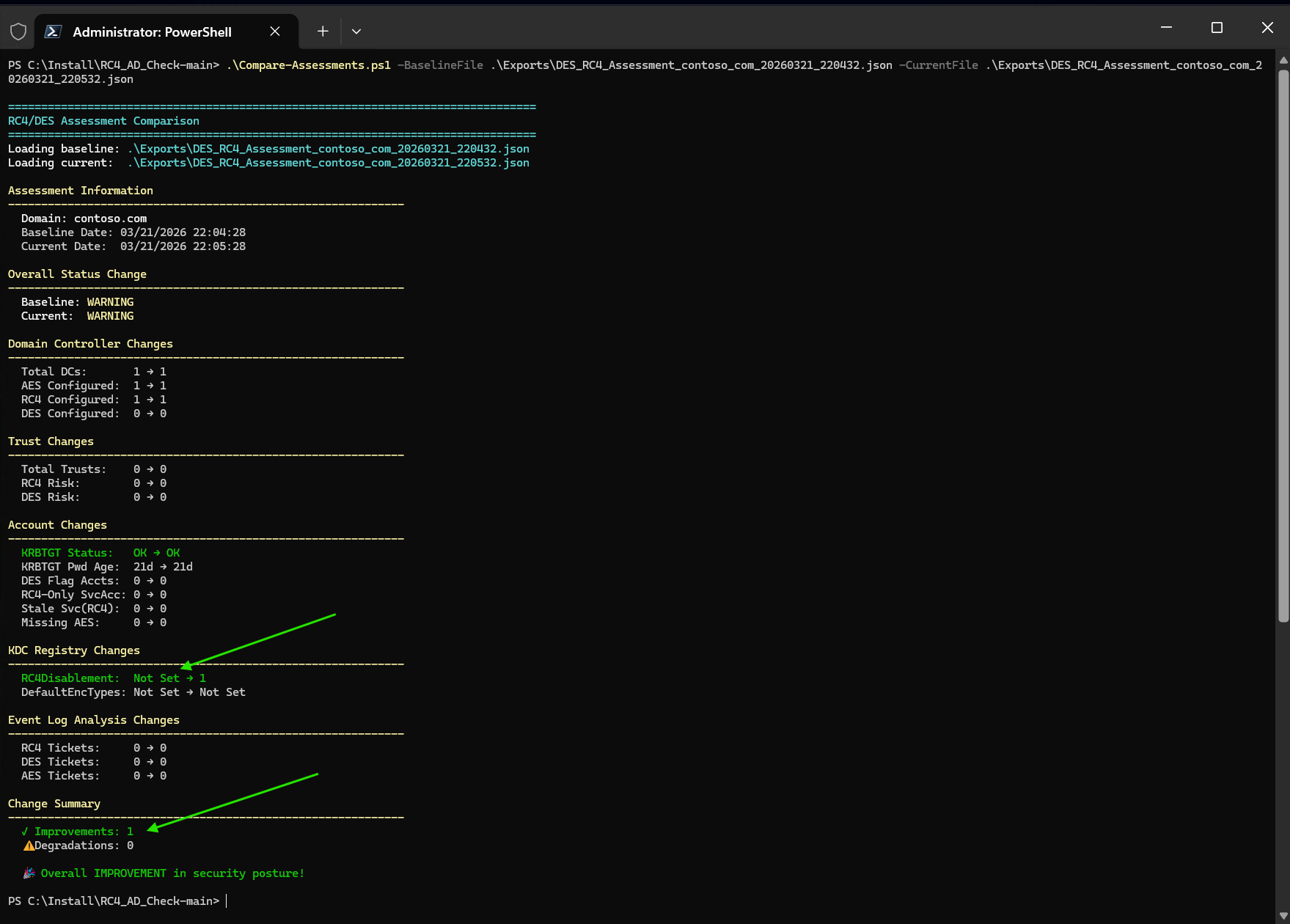
**Example: Before and after setting `RC4DefaultDisablementPhase = 1`:**
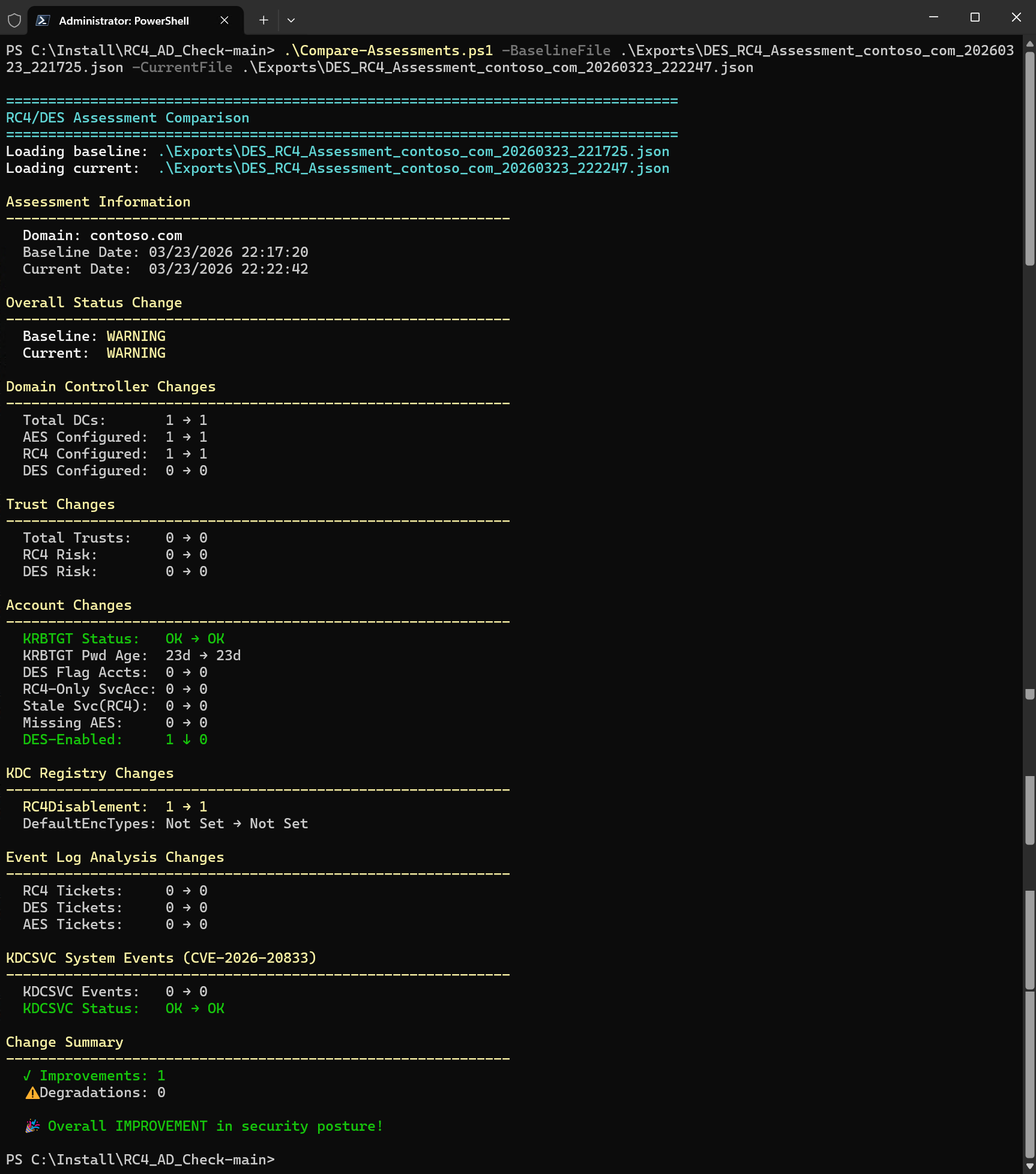
**Example: Before and after remediating DES encryption on a gMSA:**
Compares:
- DC encryption changes (AES/RC4/DES counts)
- Trust risk changes
- Account changes (KRBTGT status, DES flags, RC4-only service accounts, DES-enabled accounts, missing AES keys)
- KDC registry changes (`RC4DefaultDisablementPhase` value)
- KDCSVC System event changes (CVE-2026-20833, events 201-209)
- Event log ticket changes (RC4/DES ticket counts)
## Export Format
Results are exported to `.\Exports\` as JSON (full data) and CSV (summary table).
Invoke-RC4Assessment -AnalyzeEventLogs -ExportResults
# Creates:
# Exports\DES_RC4_Assessment_contoso_com_20260321_143015.json
# Exports\DES_RC4_Assessment_contoso_com_20260321_143015.csv
The JSON export includes all assessment data: DCs, trusts, accounts (KRBTGT, service accounts, DES flags, missing AES keys), KDC registry, KDCSVC events (CVE-2026-20833), event logs, and recommendations with fix commands.
## Troubleshooting
### Event Log Access
When event log queries fail, the script shows detailed troubleshooting:
- **WinRM not available:** `Enable-PSRemoting -Force` on each DC
- **RPC blocked:** Enable firewall rule `Remote Event Log Management`
- **Access denied:** Add account to `Event Log Readers` group
- **Network unreachable:** Use `-Server` parameter or run script locally on DC
### Child Domain Access
# If auto-discovery fails, specify a DC directly:
Invoke-RC4Assessment -Server DC01.child.contoso.com -AnalyzeEventLogs
### No Events Found
Verify Kerberos auditing is enabled (the script checks this automatically with `-AnalyzeEventLogs`):
auditpol /get /subcategory:"Kerberos Authentication Service"
auditpol /get /subcategory:"Kerberos Service Ticket Operations"
## Migrating from v2.x (Standalone Scripts)
v3.0 replaces the standalone `.ps1` scripts with the **RC4-ADAssessment** PowerShell module. All parameters are preserved — only the invocation changes.
### Script → Command Mapping
| v2.x (Standalone Script) | v3.0 (Module Command) | Notes |
|---|---|---|
| `.\RC4_DES_Assessment.ps1` | `Invoke-RC4Assessment` | All parameters identical |
| `.\Assess-ADForest.ps1` | `Invoke-RC4ForestAssessment` | Added `-IncludeGuidance` parameter |
| `.\Compare-Assessments.ps1` | `Invoke-RC4AssessmentComparison` | All parameters identical |
| `.\Test-EventLogFailureHandling.ps1` | *(removed)* | Replaced by Pester unit tests |
### Usage Examples — Before and After
# v2.x: Quick scan
.\RC4_DES_Assessment.ps1
# v3.0: Quick scan
Import-Module RC4-ADAssessment
Invoke-RC4Assessment
# v2.x: Full assessment with export
.\RC4_DES_Assessment.ps1 -Domain contoso.com -AnalyzeEventLogs -EventLogHours 48 -ExportResults
# v3.0: Identical parameters
Invoke-RC4Assessment -Domain contoso.com -AnalyzeEventLogs -EventLogHours 48 -ExportResults
# v2.x: Forest-wide parallel assessment
.\Assess-ADForest.ps1 -AnalyzeEventLogs -Parallel -MaxParallelDomains 5
# v3.0: Same parameters
Invoke-RC4ForestAssessment -AnalyzeEventLogs -Parallel -MaxParallelDomains 5
# v2.x: Compare assessments
.\Compare-Assessments.ps1 -BaselineFile before.json -CurrentFile after.json -ShowDetails
# v3.0: Same parameters
Invoke-RC4AssessmentComparison -BaselineFile before.json -CurrentFile after.json -ShowDetails
### Internal Function Mapping
Functions that were embedded inside the standalone scripts are now individual files in the module:
| v2.x Location | v3.0 Module Function | Visibility |
|---|---|---|
| `RC4_DES_Assessment.ps1` → `Get-DomainControllerEncryption` | `Get-DomainControllerEncryption` | Private |
| `RC4_DES_Assessment.ps1` → `Get-TrustEncryptionAssessment` | `Get-TrustEncryptionAssessment` | Private |
| `RC4_DES_Assessment.ps1` → `Get-KdcRegistryAssessment` | `Get-KdcRegistryAssessment` | Private |
| `RC4_DES_Assessment.ps1` → `Get-KdcSvcEventAssessment` | `Get-KdcSvcEventAssessment` | Private |
| `RC4_DES_Assessment.ps1` → `Get-AuditPolicyCheck` | `Get-AuditPolicyCheck` | Private |
| `RC4_DES_Assessment.ps1` → `Get-EventLogEncryptionAnalysis` | `Get-EventLogEncryptionAnalysis` | Private |
| `RC4_DES_Assessment.ps1` → `Get-AccountEncryptionAssessment` | `Get-AccountEncryptionAssessment` | Private |
| `RC4_DES_Assessment.ps1` → `Show-AssessmentSummary` | `Show-AssessmentSummary` | Private |
| `RC4_DES_Assessment.ps1` → `Show-ManualValidationGuidance` | `Show-ManualValidationGuidance` | Private |
| `RC4_DES_Assessment.ps1` → `Get-GuidancePlainText` | `Get-GuidancePlainText` | Private |
| `RC4_DES_Assessment.ps1` → main execution block (~800 lines) | `Invoke-RC4Assessment` | Public |
| `Assess-ADForest.ps1` → `Show-ForestSummary` | `Show-ForestSummary` | Private |
| `Assess-ADForest.ps1` → main execution block | `Invoke-RC4ForestAssessment` | Public |
| `Compare-Assessments.ps1` → `Write-ComparisonHeader` | `Write-ComparisonHeader` | Private |
| `Compare-Assessments.ps1` → `Write-ComparisonSection` | `Write-ComparisonSection` | Private |
| `Compare-Assessments.ps1` → `Get-ChangeIndicator` | `Get-ChangeIndicator` | Private |
| `Compare-Assessments.ps1` → main execution block | `Invoke-RC4AssessmentComparison` | Public |
| `RC4_DES_Assessment.ps1` → `Write-Header` | `Write-Header` | Private |
| `RC4_DES_Assessment.ps1` → `Write-Section` | `Write-Section` | Private |
| `RC4_DES_Assessment.ps1` → `Write-Finding` | `Write-Finding` | Private |
| `RC4_DES_Assessment.ps1` → `Get-EncryptionTypeString` | `Get-EncryptionTypeString` | Private |
| `RC4_DES_Assessment.ps1` → `Get-TicketEncryptionType` | `Get-TicketEncryptionType` | Private |
| `RC4_DES_Assessment.ps1` → `ConvertFrom-LastLogonTimestamp` | `ConvertFrom-LastLogonTimestamp` | Private |
### Project Structure Change
v2.x (Standalone) v3.0 (Sampler Module)
───────────────── ────────────────────
RC4_DES_Assessment.ps1 (4006 lines) source/
Assess-ADForest.ps1 (749 lines) Public/ (3 files)
Compare-Assessments.ps1 (353 lines) Private/ (20 files)
Tests/ (4 files, 204 tests) RC4-ADAssessment.psd1
RC4-ADAssessment.psm1
Tests/
Unit/ (27 files)
QA/ (module quality)
build.ps1
build.yaml
GitVersion.yml
### What Changed
- **Installation**: `Install-Module RC4-ADAssessment` instead of downloading scripts
- **Invocation**: `Import-Module RC4-ADAssessment; Invoke-RC4Assessment` instead of `.\RC4_DES_Assessment.ps1`
- **Versioning**: Managed by GitVersion (SemVer) instead of manual version strings
- **Testing**: 344 tests across 28 files (up from 204 across 4 files)
- **Build**: Sampler pipeline (`build.ps1`) for automated build, test, and package
- **All parameters preserved**: Every parameter from v2.x works identically in v3.0
## Reference Documentation
- [KB5021131: Managing Kerberos protocol changes](https://support.microsoft.com/kb/5021131)
- [CVE-2026-20833: RC4 KDC service ticket issuance (KB5073381)](https://support.microsoft.com/topic/1ebcda33-720a-4da8-93c1-b0496e1910dc)
- [What happened to Kerberos after November 2022 updates](https://techcommunity.microsoft.com/blog/askds/what-happened-to-kerberos-authentication-after-installing-the-november-2022oob-u/3696351)
- [Decrypting Kerberos Encryption Types Selection](https://techcommunity.microsoft.com/blog/coreinfrastructureandsecurityblog/decrypting-the-selection-of-supported-kerberos-encryption-types/1628797)
- [Detect and Remediate RC4 Usage in Kerberos](https://learn.microsoft.com/en-us/windows-server/security/kerberos/detect-rc4)
- [RC4 deprecation in Windows Server — Deprecated Features](https://learn.microsoft.com/en-us/windows-server/get-started/removed-deprecated-features-windows-server)
- [Microsoft Kerberos-Crypto Scripts](https://github.com/microsoft/Kerberos-Crypto) (Get-KerbEncryptionUsage.ps1, List-AccountKeys.ps1)
### Key Storage vs. Ticket Negotiation (v5.0.0 Finding)
The `msDS-SupportedEncryptionTypes` attribute controls Kerberos **ticket negotiation**
only — it does **not** control which credential keys (hashes) are stored in the AD
database. On any DC with DFL >= 2008, AES keys are always generated during password
set/change regardless of this attribute. Accounts that only have RC4 keys in the DB
are typically migrated accounts (ADMT) or accounts whose password was never changed
after the DFL was raised to 2008.
- [DSInternals PowerShell Module](https://github.com/MichaelGrafnetter/DSInternals)
— `Get-ADReplAccount` reveals actual `SupplementalCredentials` (Kerberos keys)
stored in the AD database
- [DSInternals KerberosCredentialNew.cs](https://github.com/MichaelGrafnetter/DSInternals/blob/master/Src/DSInternals.Common/Data/Principals/KerberosCredentialNew.cs)
— Source code showing AES key derivation is unconditional on DFL >= 2008
- [Event 4768 documentation (updated Jan 2025+)](https://learn.microsoft.com/en-us/previous-versions/windows/it-pro/windows-10/security/threat-protection/auditing/event-4768)
— `AccountAvailableKeys` shows actual DB keys, separate from
`AccountSupportedEncryptionTypes` (ticket negotiation config)
- [MS-KILE Section 2.2.7 — Supported Encryption Types Bit Flags](https://learn.microsoft.com/en-us/openspecs/windows_protocols/ms-kile/6cfc7b50-11ed-4b4d-846d-6f08f0812919)
— Protocol specification for the `msDS-SupportedEncryptionTypes` bitmask
### Linux / Kerberos Keytab Impact
When rotating the KRBTGT password or resetting service account passwords, **any Kerberos keytab files generated from the previous password become invalid**. Linux services using AD-based Kerberos AES256 authentication (Apache, Nginx, SSSD, Samba, PostgreSQL, IBM WebSphere, etc.) will fail to authenticate until their keytabs are regenerated.
After password rotation, regenerate keytabs using `ktpass` (Windows) or `ktutil` (Linux):
# From Windows — generate AES256 keytab for a Linux service:
ktpass -princ HTTP/linux.domain.com@DOMAIN.COM `
-mapuser DOMAIN\svc_linux -pass `
-crypto AES256-SHA1 -ptype KRB5_NT_PRINCIPAL `
-out c:\temp\linux.keytab
# From Linux — verify the new keytab works:
kinit -kt /etc/krb5.keytab HTTP/linux.domain.com@DOMAIN.COM
klist
References:
- [Active Directory Hardening Series Part 4 — Enforcing AES for Kerberos](https://techcommunity.microsoft.com/blog/yourwindowsserverpodcast/active-directory-hardening-series---part-4---enforcing-aes-for-kerberos/4260477)
- [ktpass command reference](https://learn.microsoft.com/en-us/windows-server/administration/windows-commands/ktpass)
- [Kerberos SSO with Apache on Linux](https://docs.active-directory-wp.com/Networking/Single_Sign_On/Kerberos_SSO_with_Apache_on_Linux.html)
- [Tutorial: Configure AD authentication with SQL Server on Linux (keytab creation)](https://learn.microsoft.com/en-us/sql/linux/sql-server-linux-ad-auth-adutil-tutorial)
- [Detect and Remediate RC4 Usage in Kerberos](https://learn.microsoft.com/en-us/windows-server/security/kerberos/detect-rc4)
## Version History
See [CHANGELOG.md](CHANGELOG.md) for the full version history.
## License
MIT — See [LICENSE](LICENSE) file.
## Credits
- Author: Jan Tiedemann
- Critical finding: `msDS-SupportedEncryptionTypes` controls ticket negotiation only, not
key storage in the AD database — independent testing, reproduction, and intensive research
(Thanks to Friedrich Weinmann and Tobias Barnstorf-Brandes)
- Customer feedback and real-world testing (Thanks to Simon Arnreiter)
- Bug fixes and feedback to improve the tool (Thanks to Aleix Porta Torns and Yari Campagna)
- AzureADKerberos key rotation guidance and link fixes (Thanks to Alan La Pietra)
- [DSInternals](https://github.com/MichaelGrafnetter/DSInternals) by Michael Grafnetter —
key verification tooling that confirmed the AES key derivation behavior
- Microsoft Kerberos security documentation team
Click to expand assessment output screenshot
Click to expand comparison screenshot
Click to expand comparison screenshot
标签:Active Directory, AI合规, IPv6, Libemu, Plaso, PowerShell, Terraform 安全, 安全基线评估, 系统运维