frankheat/frida-jdwp-loader
GitHub: frankheat/frida-jdwp-loader
一款通过 JDWP 协议在非 Root 环境下将 Frida 动态注入 Android 应用的 Python 工具,无需重打包即可实现运行时插桩。
Stars: 160 | Forks: 17
# frida-jdwp-loader
**一个 Python 脚本,通过 JDWP 将 Frida 动态附加到任何可调试的 Android 进程,无需 Root 权限或重打包 APK 即可实现运行时插桩。**
[](https://opensource.org/licenses/MIT)
[](https://www.python.org/)
[frida-jdwp-loader](https://github.com/frankheat/frida-jdwp-loader) 是一个 Python 脚本,提供了一种在非 Root Android 设备上使用 Frida 的方法。它利用 Java Debug Wire Protocol (JDWP) 将原生共享库(如 frida-gadget.so)动态注入到运行中的应用程序中。
## 灵感与起源
这个脚本的灵感源自 Frida 创建者 Ole André Vadla Ravnås 的一条[评论](https://www.linkedin.com/feed/update/urn:li:activity:7373729315080974336/?commentUrn=urn%3Ali%3Acomment%3A%28activity%3A7373729315080974336%2C7374082257801777153%29&dashCommentUrn=urn%3Ali%3Afsd_comment%3A%287374082257801777153%2Curn%3Ali%3Aactivity%3A7373729315080974336%29)。他提到,Frida 不再需要 Root 权限或应用程序重打包。相反,可以使用 Java Debug Wire Protocol (JDWP) 和 ADB 将其动态注入到任何可调试应用程序的进程中。
这项技术由 Yiannis Kozyrakis (ikoz) 在他的博文 [Library injection for debuggable Android apps](https://koz.io/library-injection-for-debuggable-android-apps/) 中进行了专家级的演示。他的工作为本项目提供了基础性的[概念验证](https://github.com/ikoz/jdwp-lib-injector)。
## 为什么开发这个新工具?
在使用原始脚本时,我看到了增强其灵活性和自动化整个工作流程的机会。这个项目就是为了满足这些需求而诞生的,它最初是 hugsy 的 [jdwp-shellifier](https://github.com/hugsy/jdwp-shellifier) 一个分支的 Python 3 重写版本,并由此发展而来。
## 增强功能
- 现代且健壮:完全使用 Python 3 重写。
- 早期插桩:实现了标准早期插桩的替代方案,允许你在应用程序代码甚至开始运行之前对其进行 Hook。
- 增加了对多种 frida 交互类型的支持。这允许你更改监听的地址/端口,并以完全自主的方式运行脚本(绕过 INTERNET 权限要求)等。
- 自动化:
- 自动管理的 frida gadget:脚本会自动检测目标设备的架构(ARM, ARM64, x86, x86_64)并为你下载正确版本的 Frida gadget。
- 多设备管理:如果你连接了多个设备,可以轻松选择并在它们之间切换。
- 零接触操作:所有操作均通过编程方式执行。你不需要在注入过程中手动在设备上启用或禁用设置。
- 其他小功能。
# 背景
通常,在 Android 上使用 Frida 涉及两种主要方法,每种方法都有显著的权衡:
| Method | How it Works | Pros | Cons |
| --- | --- | --- | --- |
| Frida-Server | 一个服务端二进制文件以 Root 权限在设备上运行,注入到任何目标进程中。 | 功能强大,可以附加到任何进程。 | 需要已 Root 的设备。 |
| Frida-Gadget | 将 frida-gadget.so 库添加到 APK 中,然后重新签名并重新安装。 | 适用于非 Root 设备。 | 需要重打包 APK,这很复杂、容易出错,且常被防篡改控件检测到。 |
创建 [frida-jdwp-loader](https://github.com/frankheat/frida-jdwp-loader) 是为了克服这些限制,提供 Frida-Gadget 方法的优点(无需 Root)而没有其最大的缺点(重打包)。
# 前置条件
这整个过程只有在目标应用程序可调试(`AndroidManifest.xml` 中的 `android:debuggable="true"`)时才可能实现。
如果应用程序不可调试,你可以:
- 在设置了 `ro.debuggable` 属性为 `1` 的模拟器中运行应用程序。
- 使用已 Root 的手机,以便修改 `ro.debuggable`。通常此值是只读的。但是使用 magisk 你可以使用 `resetprop`。
- 重打包应用程序并在 `AndroidManifest.xml` 中设置 `android:debuggable="true"`。
# 入门指南
## 系统要求
- Python 3
- ADB (Android Debug Bridge) 已添加到 PATH
- 已开启 USB/无线调试的 Android 设备
## 安装
```
# 克隆仓库
git clone https://github.com/frankheat/frida-jdwp-loader.git
cd frida-jdwp-loader
```
## 快速开始
```
# 自动下载并注入 frida-gadget.so
python frida-jdwp-loader.py frida -n com.example.myapplication
# 使用特定版本的 frida-gadget.so
python frida-jdwp-loader.py frida -n com.example.myapplication -g 16.1.2
# 在 Spawn 应用后保持命中断点的线程处于挂起状态
python frida-jdwp-loader.py frida -n com.example.myapplication -s
# Spawn 特定 Activity 模式
python frida-jdwp-loader.py frida -n com.example.myapplication -a .MainActivity
# 更改监听地址/端口
python frida-jdwp-loader.py frida -n com.example.myapplication -i listen -L 0.0.0.0 -P 27043
# 以完全自主的方式运行脚本
python frida-jdwp-loader.py frida -n com.example.myapplication -i script -l script.js
# 注入目录中的所有文件
python frida-jdwp-loader.py custom -n com.example.myapplication -l /path/to/lib_directory/
```
# 用法示例
## 在 Listen 交互模式下运行 Frida Gadget
在此示例中,我们暴露了一个兼容 frida-server 的接口,以便你可以远程附加到进程。确保目标应用程序声明了 `INTERNET` 权限;没有它,远程连接将失败。
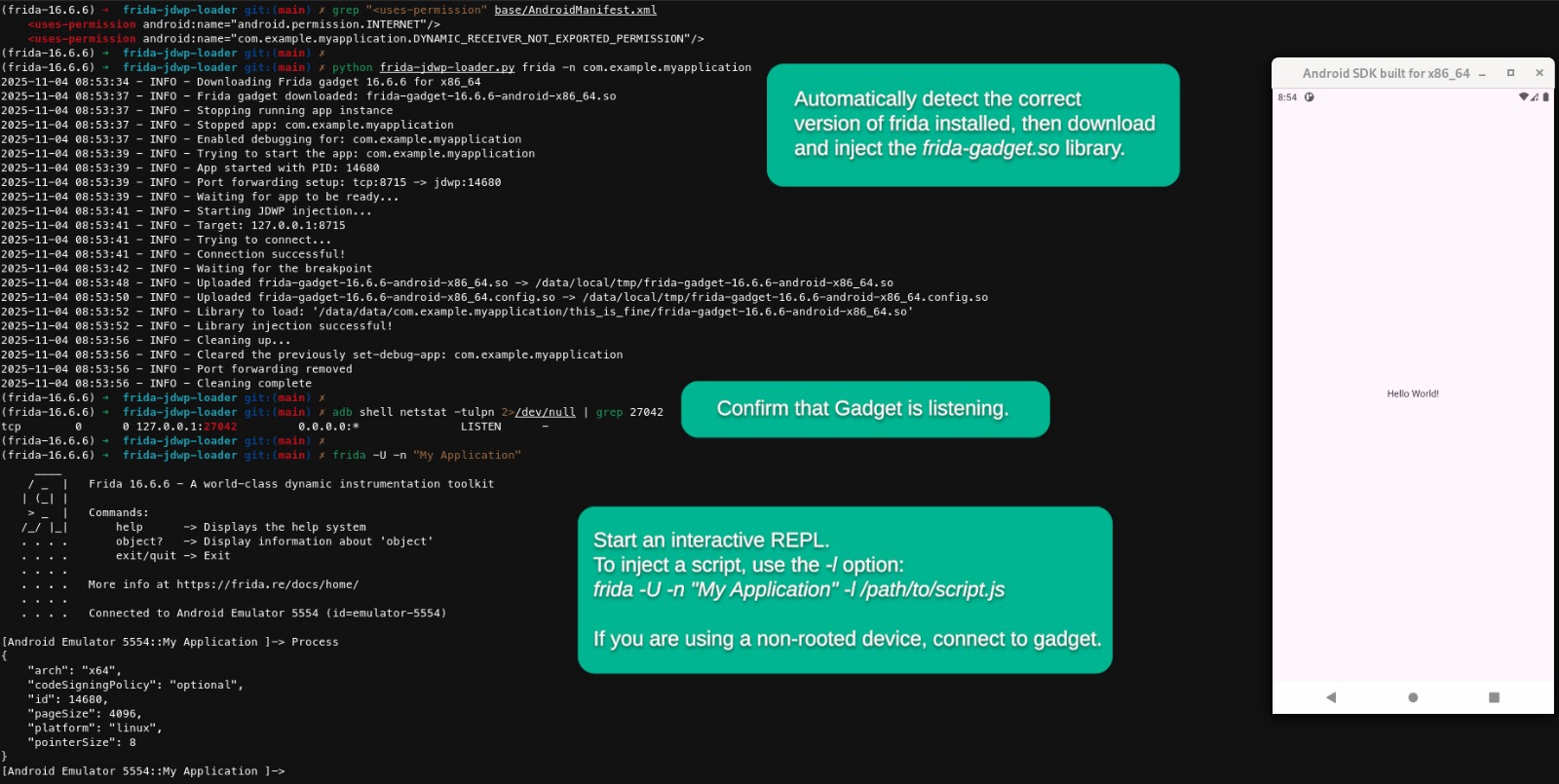
## 完全自主运行脚本
在此示例中,我们将插桩脚本直接注入并在目标进程内运行,使其独立运行。如果你需要在这种方式下运行时收集运行时输出,请从你的 frida 代码中调用 Android 的原生日志函数。这些日志将出现在 Logcat 中。
https://github.com/user-attachments/assets/1639a833-76fc-4a8d-9750-9a8467689c4d
**视频中使用的脚本**
```
var android_log_write = new NativeFunction(
Module.getExportByName(null, '__android_log_write'),
'int',
['int', 'pointer', 'pointer']
);
var tag = Memory.allocUtf8String('frida-script');
android_log_write(3, tag, Memory.allocUtf8String('hello world'));
```
# 命令行选项
## frida-mode 选项
```
usage: frida-jdwp-loader.py frida [-h] [-g GADGET] [-i {listen,script,custom}] [-L ADDRESS] [-P PORT] [-l SCRIPT] [-f CONFIG] -n PACKAGE_NAME [-a ACTIVITY_NAME] [-m MODE] [-b JAVA_METHOD] [-p JDWP_PORT] [-nc] [-d DELAY] [-s] [-v]
options:
-h, --help show this help message and exit
-g GADGET, --gadget GADGET
Could be one of the following:
Path to the frida gadget library file
Frida version (e.g., '16.6.6')
auto, to automatically detect (Default)
-i {listen,script,custom}, --interaction {listen,script,custom}
Interaction mode (Default: listen)
-L ADDRESS, --listen ADDRESS
Listen on ADDRESS (used with --interaction listener)
(Default: 127.0.0.1)
-P PORT, --frida-port PORT
Listen on PORT (used with --interaction listener)
(Default: 27042)
-l SCRIPT, --load SCRIPT
load SCRIPT (Required with --interaction script)
-f CONFIG, --config-file CONFIG
load CONFIG-FILE (Required with --interaction custom)
-n PACKAGE_NAME, --package PACKAGE_NAME
Target Android package name (e.g., com.example.app)
-a ACTIVITY_NAME, --activity ACTIVITY_NAME
Target activity name (Default: launcher activity)
-m MODE, --mode MODE Select mode:
spawn (Default)
attach
-b JAVA_METHOD, --break-on JAVA_METHOD
Java method to break on for injection (full path required)
Default depends on mode:
spawn -> android.app.Application.onCreate
attach -> android.app.Activity.onStart
-p JDWP_PORT, --port JDWP_PORT
Local port number for JDWP forwarding (Default: 8715)
-nc, --no-clear Don't clear after injection
-d DELAY, --delay DELAY
Delay between operations (Default: 2)
-s, -suspended Keep the thread that hits the breakpoint suspended after spawning the app
-k, --keep-files Keep uploaded files after execution (default: files are removed)
-v, --verbose Enable verbose logging output
```
## custom-mode 选项
```
usage: frida-jdwp-loader.py custom [-h] -l LIB_PATH -n PACKAGE_NAME [-a ACTIVITY_NAME] [-m MODE] [-b JAVA_METHOD] [-p JDWP_PORT] [-nc] [-d DELAY] [-s] [-v]
options:
-h, --help show this help message and exit
-l LIB_PATH, --lib-path LIB_PATH
Path to the custom library file/directory to inject
-n PACKAGE_NAME, --package PACKAGE_NAME
Target Android package name (e.g., com.example.app)
-a ACTIVITY_NAME, --activity ACTIVITY_NAME
Target activity name (Default: launcher activity)
-m MODE, --mode MODE Select mode:
spawn (Default)
attach
-b JAVA_METHOD, --break-on JAVA_METHOD
Java method to break on for injection (full path required)
Default depends on mode:
spawn -> android.app.Application.onCreate
attach -> android.app.Activity.onStart
-p JDWP_PORT, --port JDWP_PORT
Local port number for JDWP forwarding (Default: 8715)
-nc, --no-clear Don't clear after injection
-d DELAY, --delay DELAY
Delay between operations (Default: 2)
-s, -suspended Keep the thread that hits the breakpoint suspended after spawning the app
-k, --keep-files Keep uploaded files after execution (default: files are removed)
-v, --verbose Enable verbose logging output
```
# 许可证
本项目根据 MIT 许可证授权 - 有关详细信息,请参阅 [LICENSE](LICENSE) 文件。
# 致谢
- [ikoz](https://github.com/ikoz) - [jdwp-lib-injector](https://github.com/ikoz/jdwp-lib-injector), [Library injection for debuggable Android apps](https://koz.io/library-injection-for-debuggable-android-apps/)
- [hugsy](https://github.com/hugsy) - [jdwp-shellifier](https://github.com/hugsy/jdwp-shellifier)
- [oleavr](https://github.com/oleavr) - [Frida](https://frida.re/)标签:Android安全, Docker支持, Frida, JDWP, Python, 云资产清单, 免Root, 安全测试, 攻击性安全, 无Root检测, 无后门, 注入工具, 漏洞分析, 目录枚举, 移动安全, 调试技术, 路径探测, 运行时插桩, 逆向工程, 黑盒测试