francescopace/espectre
GitHub: francescopace/espectre
ESPectre 是一个利用 ESP32 采集 Wi-Fi CSI 进行无隐私侵入式运动检测的开源项目,通过 ESPHome 无缝集成 Home Assistant 实现智能家居自动化。
Stars: 8839 | Forks: 667
[](https://github.com/francescopace/espectre/blob/main/LICENSE)
[](https://esphome.io/)
[](https://www.espressif.com/en/products/socs)
[](https://github.com/francescopace/espectre/releases/latest)
[](https://github.com/francescopace/espectre/actions/workflows/ci.yml?query=branch%3Amain)
[](https://codecov.io/gh/francescopace/espectre)
# 🛜 ESPectre 👻
**基于 Wi-Fi 频谱分析 (CSI) 的运动检测系统,通过 ESPHome 原生集成 Home Assistant。**
## 目录
- [3 点概述](#in-3-points)
- [准备工作](#what-you-need)
- [快速开始](#quick-start)
- [工作原理](#how-it-works-simple-version)
- [应用场景](#what-you-can-do-with-it)
- [传感器放置指南](#where-to-place-the-sensor)
- [系统架构](#system-architecture)
- [常见问题](#faq-for-beginners)
- [安全与隐私](#security-and-privacy)
- [技术深入解析](#technical-deep-dive)
- [双平台策略](#two-platform-strategy)
- [未来演进](#future-evolution)
- [文档](#documentation)
- [媒体](#media)
- [相关项目](#related-projects)
- [致谢](#acknowledgments)
- [许可证](#license)
- [作者](#author)
## 3 点概述
1. **功能**:利用 Wi-Fi 检测移动(无需摄像头,无需麦克风)
2. **所需条件**:一个约 10 欧元的 ESP32 设备(推荐 S3 和 C6,也支持其他型号)
3. **设置时间**:10-15 分钟
## 准备工作
### 硬件
- **2.4GHz Wi-Fi 路由器** - 你家里现有的就可以
- **支持 CSI 的 ESP32** - ESP32-C6、ESP32-S3、ESP32-C3、ESP32(原版)或其他型号。完整的平台对比表请参见 [SETUP.md](SETUP.md)。
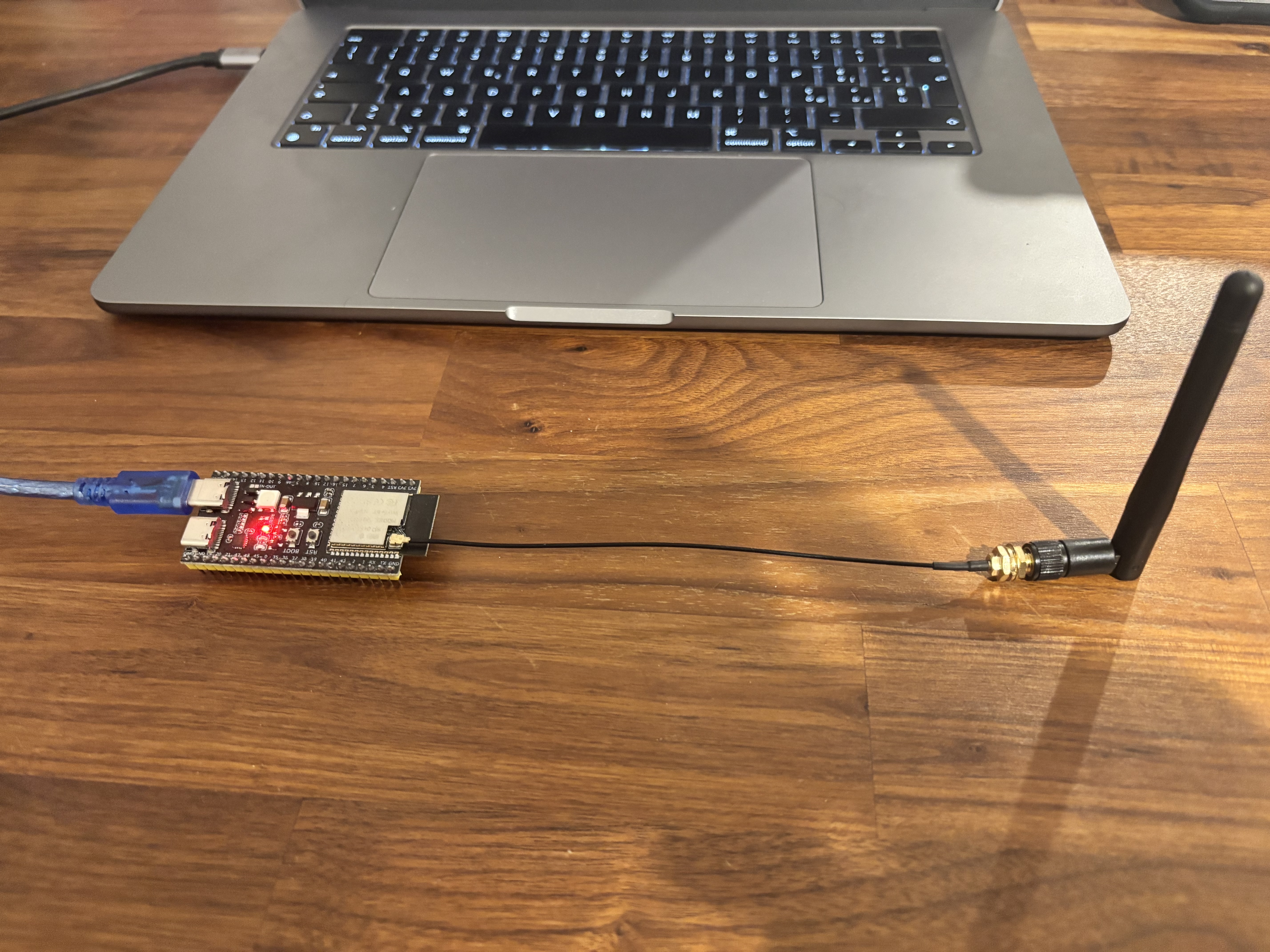
*带有外接天线的 ESP32-S3 DevKit*
### 软件(全部免费)
- **Home Assistant**(运行在 Raspberry Pi、PC、NAS 或云端)
- **ESPHome**(集成在 Home Assistant 中或独立运行)
### 所需技能
- **基础的 YAML 知识**用于配置
- **熟悉 Home Assistant**(可选,但推荐)
- **无需**编程基础
- **无需**配置路由器
## 快速开始
**设置时间**:约 10-15 分钟
**难度**:简单(仅需配置 YAML)
1. **设置与安装**:请按照 [SETUP.md](SETUP.md) 中的完整指南操作
2. **调试调优**:根据你的环境使用 [TUNING.md](TUNING.md) 进行优化
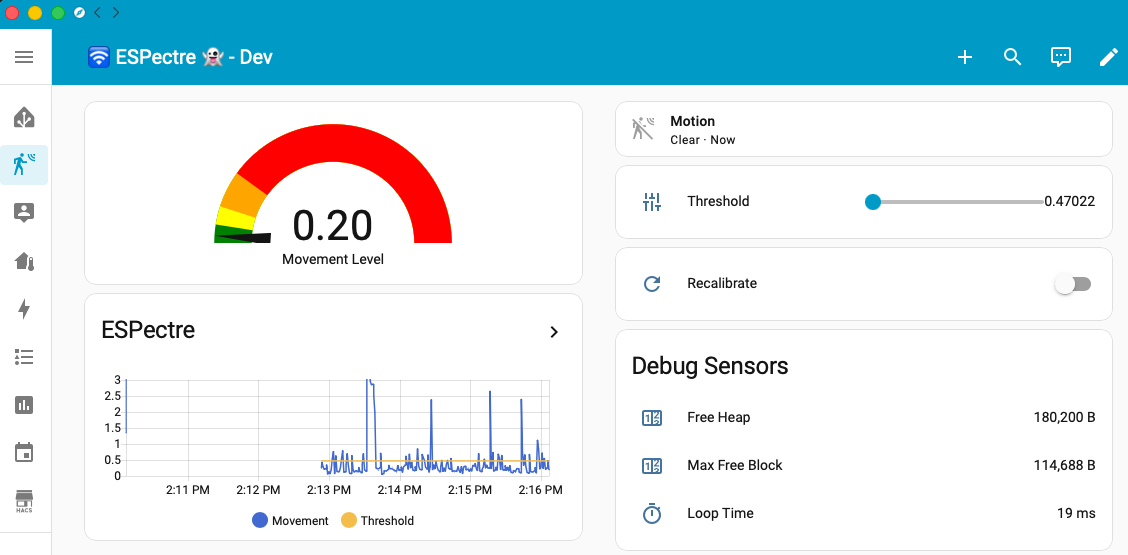
*包含实时运动检测、阈值控制和调试传感器的 Home Assistant 仪表盘*
## 工作原理
当有人在房间里移动时,他们会“干扰”在路由器和传感器之间传播的 Wi-Fi 波。这就像你在手电筒前挥动手并看到阴影变化一样。
ESP32 设备会“监听”这些变化,并判断是否有移动发生。
### 优势
- **无摄像头**(完全保护隐私)
- **无需穿戴设备**(不需要佩戴手环或传感器)
- **可穿墙工作**(Wi-Fi 可以穿透墙壁)
- **非常便宜**(总计约 10 欧元)
想了解技术细节吗?请参阅 [ALGORITHMS.md](micro-espectre/ALGORITHMS.md) 获取 CSI 说明和信号处理文档。
## 应用场景
### 实际示例
- **家庭安防**:当你不在家时,如果有人进入则发出警报
- **老人护理**:监控活动以检测跌倒或长时间静止
- **智能自动化**:仅有人时才打开灯光/暖气
- **节能**:在空房间自动关闭设备
- **儿童监控**:夜间如果他们离开房间则发出警报
- **气候控制**:仅对有人区域进行加热/制冷
## 传感器放置位置
可靠的移动检测离不开最佳的传感器放置位置。
### 距离路由器的推荐距离
**最佳范围:3-8 米**
| 距离 | 信号 | 多径 | 灵敏度 | 噪声 | 建议 |
|----------|--------|-----------|-------------|-------|----------------|
| < 2m | 太强 | 极小 | 低 | 低 | ❌ 太近 |
| 3-8m | 强 | 良好 | 高 | 低 | ✅ **最佳** |
| > 10-15m | 弱 | 可变 | 低 | 高 | ❌ 太远 |
### 放置提示
**推荐操作:**
- 将传感器放置在需要监控的区域(不一定非要与路由器直线相对)
- 高度:距离地面 1-1.5 米(桌面/台面高度)
- 外接天线:使用 IPEX 连接器以获得更好的接收效果
**避免操作:**
- 避免在路由器和传感器之间有金属障碍物(冰箱、金属柜)
- 避免放置在角落或封闭空间(会减少多径分集)
## 系统架构
### 处理 Pipeline
ESPectre 使用专注于运动检测的处理 pipeline:
```
┌─────────────┐
│ CSI Data │ Raw Wi-Fi Channel State Information
└──────┬──────┘
│
▼
┌─────────────┐
│ Gain Lock │ AGC/FFT stabilization (~3 seconds)
│ │ Locks hardware gain for stable measurements
└──────┬──────┘
│
▼
┌─────────────┐
│ Auto │ Automatic subcarrier selection (once at boot)
│ Calibration │ Selects optimal 12 subcarriers (NBVI)
└──────┬──────┘
│
▼
┌─────────────┐
│ Adaptive │ auto: P95 × 1.1 | min: P100
│ Threshold │ or fixed manual value
└──────┬──────┘
│
▼
┌─────────────┐
│ Hampel │ Turbulence outlier removal
│ Filter │ (enabled by default)
└──────┬──────┘
│
▼
┌─────────────┐
│ Low-pass │ Noise reduction (smoothing)
│ Filter │ (optional, disabled by default)
└──────┬──────┘
│
▼
┌─────────────┐
│ Detection │ MVS or ML score
│ Evaluation │ every evaluation_interval packets
└──────┬──────┘
│
▼
┌─────────────┐
│ Hit Filter │ motion_on_hits / motion_off_hits
│ │ edge-driven IDLE ↔ MOTION
└──────┬──────┘
│
▼
┌─────────────┐
│ Home │ Edge-driven motion binary +
│ Assistant │ periodic Movement Score / Threshold
└─────────────┘
```
### 单个或多个传感器
```
┌─────────┐ ┌─────────┐ ┌─────────┐
│ ESP32 │ │ ESP32 │ │ ESP32 │
│ Room 1 │ │ Room 2 │ │ Room 3 │
└────┬────┘ └────┬────┘ └────┬────┘
│ │ │
└────────────┴────────────┘
│
│ ESPHome Native API
▼
┌────────────────────┐
│ Home Assistant │
│ (Auto-discovery) │
└────────────────────┘
```
每个传感器都会被 Home Assistant 自动发现,并包含:
- 运动检测的 binary sensor,在状态边缘变化时立即发布
- 移动评分传感器,按周期性频率发布
- 可调节阈值(数字实体)
### 自动子载波选择
ESPectre 实现了 **NBVI**(归一化频带方差指数)用于自动子载波选择,在**零手动配置**的情况下实现了接近最佳的性能(F1>96%)。该算法基于稳定性指标和频谱分集选择 12 个非连续子载波。
有关算法详情,请参见 [ALGORITHMS.md](micro-espectre/ALGORITHMS.md#subcarrier-selection-nbvi)。
## 初学者常见问题
## 安全与隐私
## 技术深入解析
有关算法详情(MVS、NBVI 校准、Hampel 滤波器),请参见 [ALGORITHMS.md](micro-espectre/ALGORITHMS.md)。
有关性能指标(混淆矩阵、F1-score、基准测试),请参见 [PERFORMANCE.md](PERFORMANCE.md)。
## 双平台策略
该项目遵循**双平台策略**,以平衡创新速度与生产环境的稳定性:
### ESPectre(此代码库)- 生产平台
**目标**:最终用户、智能家居爱好者、Home Assistant 用户
- **ESPHome 组件**,原生集成 Home Assistant
- **YAML 配置** - 无需编程
- **自动发现** - 设备会自动显示在 Home Assistant 中
- **生产就绪** - 稳定、经过测试、易于部署
- **演示性** - 以用户友好的方式展示研究结果
### [Micro-ESPectre](micro-espectre/) - 研发平台
**目标**:研究人员、开发者、学术/工业应用
- **Python/MicroPython** 实现,用于快速原型设计
- **基于 MQTT** - 灵活集成(不局限于 Home Assistant)
- **快速迭代** - 几秒钟内测试新算法,而不是几分钟
- **分析工具** - 用于 CSI 数据分析的综合套件
- **用例**:学术研究、工业传感、算法开发
Micro-ESPectre 为你提供以下方面的基础:
- **人数统计**
- **活动识别**(走动、跌倒、坐下、睡觉)
- **定位与追踪**
- **手势识别**
### 开发流程
```
┌─────────────────────┐ Validated ┌──────────────────────┐
│ Micro-ESPectre │ ─────────────────► │ ESPectre │
│ (R&D Platform) │ algorithms │ (Production Platform)│
│ │ │ │
│ • Fast prototyping │ │ • ESPHome component │
│ • Algorithm testing │ │ • Home Assistant │
│ • Data analysis │ │ • End-user ready │
│ • MQTT flexibility │ │ • Native API │
└─────────────────────┘ └──────────────────────┘
```
**创新周期**:新功能和算法首先在 Micro-ESPectre (Python) 中进行开发和验证,一旦证明有效,便会被移植到 ESPectre (C++) 中。
## 未来演进
虽然 ESPectre v2.x 专注于**运动检测**(MVS + 自动子载波选择),但该项目正在探索用于高级应用的机器学习功能:
| 功能 | 状态 | 描述 |
|------------|--------|-------------|
| **ML 检测器** | 实验性 | 神经网络 (MLP 9→32→16→1)|
| **手势识别** | 计中 | 检测手势(滑动、推、画圈)用于智能家居控制 |
| **人体活动识别** | 计划中 | 识别活动(坐下、走动、跌倒) |
| **人数统计** | 计划中 | 估计房间内的人数 |
| **3D 定位** | 研究中 | 通过相位相干天线阵列进行室内定位(精度 30-50cm) |
ML 检测器已可用,只需在你的 YAML 配置中设置 `detection_algorithm: ml`。有关算法详情,请参见 [ALGORITHMS.md](micro-espectre/ALGORITHMS.md#ml-neural-network-detector),当前指标请参见 `PERFORMANCE.md`
ML 数据收集和训练基础设施记录在 [ML_DATA_COLLECTION.md](micro-espectre/ML_DATA_COLLECTION.md) 中。
有关详细的计划、时间表以及如何做出贡献,请参见 [ROADMAP.md](ROADMAP.md)。
## 文档
### ESPectre(生产环境)
| 文档 | 描述 |
|----------|-------------|
| [简介](README.md) | (本文件)项目概述、快速开始、常见问题 |
| [设置指南](SETUP.md) | 使用 ESPHome 进行安装和配置 |
| [调优指南](TUNING.md) | 用于实现最佳检测的参数调优 |
| [性能](PERFORMANCE.md) | 基准测试、混淆矩阵、F1-score |
| [游戏](docs/game/README.md) | 浏览器游戏、USB 流式 API、交互式阈值调优 |
| [测试套件](test/README.md) | PlatformIO Unity 测试文档 |
### Micro-ESPectre(研发)
| 文档 | 描述 |
|----------|-------------|
| [简介](micro-espectre/README.md) | 研发平台概述、CLI、MQTT、Web 监视器 |
| [算法](micro-espectre/ALGORITHMS.md) | MVS、NBVI 校准、Hampel 滤波器的科学文档 |
| [分析工具](micro-espectre/tools/README.md) | CSI 分析和优化脚本 |
| [ML 数据收集](micro-espectre/ML_DATA_COLLECTION.md) | 为机器学习构建标注数据集 |
| [参考资料](micro-espectre/README.md#references) | 学术论文和研究资源 |
### 项目
| 文档 | 描述 |
|----------|-------------|
| [路线图](ROADMAP.md) | 项目愿景和 ML 计划 |
| [贡献指南](CONTRIBUTING.md) | 如何贡献(代码、数据、文档) |
| [更新日志](CHANGELOG.md) | 版本历史和发布说明 |
| [安全](SECURITY.md) | 安全策略和漏洞报告 |
| [行为准则](CODE_OF_CONDUCT.md) | 社区准则 |
## 媒体
| 文章 | 标题 |
|-------------|-------|
| Medium | [我如何将我的 Wi-Fi 变成运动传感器 - 第 1 部分](https://medium.com/@francesco.pace/how-i-turned-my-wi-fi-into-a-motion-sensor-61a631a9b4ec?sk=c7f79130d78b0545fce4a228a6a79af3&utm_source=github&utm_medium=readme&utm_campaign=espectre) |
| Medium | [我如何将我的 Wi-Fi 变成运动传感器 - 第 2 部分](https://medium.com/@francesco.pace/how-i-turned-my-wi-fi-into-a-motion-sensor-part-2-62038130e530?sk=7c8b6f11cf3fcb8d279648016ebff72a&utm_source=github&utm_medium=readme&utm_campaign=espectre) |
| IoT For All | [我如何将我的 Wi-Fi 变成运动传感器](https://www.iotforall.com/wifi-motion-sensor-iot) |
| Hackaday | [制作你自己的基于 ESP32 的人员传感器,无需特殊硬件](https://hackaday.com/2026/01/28/make-your-own-esp32-based-person-sensor-no-special-hardware-needed/) |
| Adafruit Learn | [适用于 Feather 的 ESPectre 人体检测器](https://learn.adafruit.com/espectre-human-detector-for-feather) |
| Seeed Studio Wiki | [使用 ESPHome 在 Seeed Studio XIAO ESP32 系列上部署 Espectre](https://wiki.seeedstudio.com/xiao-esp32--series-espresense/) |
| 博客 | 讨论 |
|----------|------------|
| Home Assistant | [ESPectre - 适用于 Home Assistant 的 Wi-Fi 运动检测](https://community.home-assistant.io/t/espectre-wi-fi-motion-detection-for-home-assistant/961251) |
| 视频 | 视频 |
|---------|-------|
| @GithubAwesome | [ESPectre](https://www.youtube.com/shorts/iQ_DPHLn8ms) |
| 播客 | 剧集 |
|-------------|---------|
| Hackaday | [播客第 355 期:人员检测器、对讲机、开源智能手机...](https://hackaday.com/2026/01/30/hackaday-podcast-episode-355-person-detectors-walkie-talkies-open-smartphones-and-a-wifi-traffic-light/) |
## 相关项目
- [radio-presence-scanner](https://github.com/francescopace/radio-presence-scanner):互补的存在感知项目,专注于来自主机设备的 BLE 无线电观测,带有可选的 HTTP 仪表盘。
- [micropython-esp32-csi](https://github.com/francescopace/micropython-esp32-csi):定制的 MicroPython 分支,暴露了 ESP32 CSI API,在 Micro-ESPectre 工作流程中用作快速 CSI 原型设计的固件基础。
## 致谢
ESPectre 利用了 ESP32 芯片原生的 Wi-Fi CSI 功能。感谢 [Espressif](https://www.espressif.com/) 在 ESP-IDF 框架中让 CSI 变得易于使用,并感谢他们在 [esp-csi](https://github.com/espressif/esp-csi) 代码库中将 ESPectre 评选为[社区项目](https://github.com/espressif/esp-csi#6-related-resources)。
## 许可证
该项目基于 **GNU General Public License v3.0 (GPLv3)** 发布。
GPLv3 确保:
- 软件保持免费和开源
- 任何人都可以使用、研究、修改和分发它
- 修改内容必须在相同的许可证下共享
- 保护最终用户的权利和软件自由
有关完整的许可证文本,请参见 [LICENSE](LICENSE)。
代码贡献根据 GPLv3 提交,并且必须在每次提交时包含 DCO
`Signed-off-by` 尾部记录(`git commit -s`)。
## 作者
**Francesco Pace**
邮箱:[francesco.pace@espectre.dev](mailto:francesco.pace@espectre.dev)
LinkedIn:[linkedin.com/in/francescopace](https://www.linkedin.com/in/francescopace/)
如果你觉得 ESPectre 有用并希望支持它的开发,你可以请我喝杯咖啡。这完全是自愿的。
我从事这个项目是出于我的热爱。你的贡献能帮助我购买新的硬件,从而扩大经过测试和支持的设备列表,并让我有更多时间投入到新功能的开发中。

点击展开常见问题
**问:我需要编程知识才能使用吗?** 答:不需要!ESPectre 使用 YAML 配置文件。只需下载示例、刷入固件,并通过 ESPHome 应用或 Web 界面配置 Wi-Fi 即可。 **问:它能在我的路由器上使用吗?** 答:可以,只要你的路由器支持 2.4GHz Wi-Fi(几乎所有现代路由器都支持)。 **问:总共需要多少钱?** 答:硬件:一个 ESP32 设备约 10 欧元(推荐 S3/C6,其他型号也可以)。软件:全部免费且开源。你还需要在某处运行 Home Assistant(Raspberry Pi 约 35-50 欧元,或任何现有的 PC/NAS)。 **问:我需要修改路由器上的任何设置吗?** 答:不需要!路由器正常工作即可。传感器只是“监听” Wi-Fi 信号,不会修改任何东西。 **问:它能穿墙工作吗?** 答:可以,2.4GHz Wi-Fi 信号可以穿透干墙。钢筋混凝土墙会降低灵敏度,但在缩短的距离下仍然可以进行检测。 **问:一套房子需要多少个传感器?** 答:取决于房屋大小。一个传感器可以监控约 50 平方米。对于较大的房屋,请使用多个传感器(每 50-70 平方米放置一个传感器以获得最佳覆盖)。 **问:它能区分人和宠物吗?** 答:系统使用 2 状态分割模型(IDLE/MOTION)来识别一般的移动,无法区分人、宠物或其他移动物体。如果需要更复杂的分类(区分人与宠物、活动识别、手势检测),则需要经过训练的 AI/ML 模型(参见[未来演进](#future-evolution)部分)。 **问:它能在 mesh Wi-Fi 网络下工作吗?** 答:可以,它能正常工作。请确保 ESP32 连接到 2.4 GHz 频段。 **问:检测的准确度如何?** 答:检测精度高度依赖环境,需要进行适当的调优。影响性能的因素包括:房间布局、墙体材质、家具摆放、距离路由器的距离(最佳:3-8 米)以及干扰水平。在经过适当调优的最佳条件下,该系统能够提供可靠的运动检测。调整 `segmentation_threshold` 参数即可针对你的特定环境调整灵敏度。 **问:功耗是多少?** 答:连续运行时的典型功耗约为 500mW。该固件支持功耗优化,并且可以为电池供电的部署方式实现深度睡眠模式,尽管这需要对代码进行自定义修改。 **问:如果它不工作,我能获得帮助吗?** 答:可以,请在 [GitHub 上提 Issue](https://github.com/francescopace/espectre/issues) 或通过电子邮件联系我。隐私、安全和伦理考量(点击展开)
### 收集数据的性质 系统收集与 Wi-Fi 无线电信道物理特性相关的**匿名数据**: - OFDM 子载波的振幅和相位 - 统计信号方差 - **不收集**:个人身份、通信内容、图像、音频 CSI 数据仅代表传输介质的属性,不包含直接的身份识别信息。 ### 隐私优势 - **无摄像头**:尊重视觉隐私 - **无麦克风**:不录制音频 - **无需穿戴设备**:不需要穿戴式设备 - **聚合数据**:仅包含统计指标,而非原始识别数据 ### ⚠️ 免责声明与伦理考量 **警告**:尽管 CSI 数据本身具有匿名性,但该系统可能被用于: - **未经同意的监控**:未经他人明确同意检测其存在/移动 - **行为画像**:借助高级 AI 模型推断日常生活习惯 - **侵犯家庭隐私**:追踪私人住宅内的活动 ### 使用责任 **用户对使用此系统负全责,并且必须:** 1. **获得所有被监控人员的明确同意** 2. **遵守当地法规**(欧盟的 GDPR、当地的隐私法) 3. **明确告知**感知系统的存在 4. **限制用途**于合法目的(家庭安防、个人家庭自动化) 5. **保护数据**,使用加密和受控的访问权限 6. **严禁**用于非法监视、跟踪或侵犯他人隐私标签:ESP32, ESPHome, Home Assistant, Wi-Fi CSI, 动作检测, 智能家居, 物联网