tursodatabase/agentfs
GitHub: tursodatabase/agentfs
专为 AI Agent 设计的基于 SQLite 的文件系统,提供文件存储、键值状态和工具调用审计三大接口,实现 Agent 状态的可审计、可快照和可移植管理。
Stars: 3190 | Forks: 174
AgentFS
专为 Agent 设计的文件系统。




## 🎯 什么是 AgentFS?
AgentFS 是一个专门为 AI agent 设计的文件系统。正如传统文件系统为应用程序提供文件和目录抽象一样,AgentFS 提供了 AI agent 所需的存储抽象。
AgentFS 仓库包含以下内容:
* **SDK** - 用于编程访问文件系统的 [TypeScript](sdk/typescript)、[Python](sdk/python) 和 [Rust](sdk/rust) 库。
* **[CLI](MANUAL.md)** - 用于管理 agent 文件系统的命令行界面:
- 在 Linux 上通过 FUSE,在 macOS 上通过 NFS 将 AgentFS 挂载到主机文件系统。
- 通过命令行工具访问 AgentFS 文件。
* **[AgentFS 规范](SPEC.md)** - 基于 SQLite 的 agent 文件系统规范。
## 💡 为什么选择 AgentFS?
AgentFS 为 agent 状态管理提供以下优势:
* **可审计性**:每一次文件操作、工具调用和状态变更都记录在 SQLite 数据库文件中。使用 SQL 查询 agent 的完整历史记录,以调试问题、分析行为或满足合规性要求。
* **可复现性**:随时使用 `cp agent.db snapshot.db` 快照 agent 的状态。稍后恢复它以复现精确的执行状态、测试假设场景或回滚错误。
* **可移植性**:整个 agent 运行时——文件、状态、历史——存储在单个 SQLite 文件中。可以在机器之间移动它、将其纳入版本控制,或部署到任何运行 Turso 的系统。
在公告 [博客文章](https://turso.tech/blog/agentfs) 中阅读更多关于 AgentFS 的动机。
## 🧑💻 快速开始
### 使用 CLI
安装 AgentFS CLI:
```
curl -fsSL https://agentfs.ai/install | bash
```
初始化一个 agent 文件系统:
```
$ agentfs init my-agent
Created agent filesystem: .agentfs/my-agent.db
Agent ID: my-agent
```
检查 agent 文件系统:
```
$ agentfs fs ls my-agent
Using agent: my-agent
f hello.txt
$ agentfs fs cat my-agent hello.txt
hello from agent
```
你也可以直接使用数据库路径:
```
$ agentfs fs cat .agentfs/my-agent.db hello.txt
hello from agent
```
查看 agent 的操作时间线:
```
$ agentfs timeline my-agent
ID TOOL STATUS DURATION STARTED
4 execute_code pending -- 2024-01-05 09:44:20
3 api_call error 300ms 2024-01-05 09:44:15
2 read_file success 50ms 2024-01-05 09:44:10
1 web_search success 1200ms 2024-01-05 09:43:45
```
你可以使用 FUSE (Linux) 或 NFS (macOS) 挂载 agent 文件系统:
```
$ agentfs mount my-agent ./mnt
$ echo "hello" > ./mnt/hello.txt
$ cat ./mnt/hello.txt
hello
```
你也可以在一个实验性沙箱中运行程序,并将 agent 文件系统挂载到 `/agent`:
```
$ agentfs run /bin/bash
Welcome to AgentFS!
$ echo "hello from agent" > /agent/hello.txt
$ cat /agent/hello.txt
hello from agent
$ exit
```
阅读 **[用户手册](MANUAL.md)** 获取完整文档。
### 使用 SDK
在你的项目中安装 SDK:
```
npm install agentfs-sdk
```
在你的 agent 代码中使用它:
```
import { AgentFS } from 'agentfs-sdk';
// Persistent storage with identifier
const agent = await AgentFS.open({ id: 'my-agent' });
// Creates: .agentfs/my-agent.db
// Or use ephemeral in-memory database
const ephemeralAgent = await AgentFS.open();
// Key-value operations
await agent.kv.set('user:preferences', { theme: 'dark' });
const prefs = await agent.kv.get('user:preferences');
// Filesystem operations
await agent.fs.writeFile('/output/report.pdf', pdfBuffer);
const files = await agent.fs.readdir('/output');
// Tool call tracking
await agent.tools.record(
'web_search',
Date.now() / 1000,
Date.now() / 1000 + 1.5,
{ query: 'AI' },
{ results: [...] }
);
```
### 示例
此源代码仓库还包含演示如何将 AgentFS 与一些流行的 AI 框架集成的示例:
- **[Mastra](examples/mastra/research-assistant)** - 使用 Mastra AI 框架的研究助手
- **[Claude Agent SDK](examples/claude-agent/research-assistant)** - 使用 Anthropic Claude Agent SDK 的研究助手
- **[OpenAI Agents](examples/openai-agents/research-assistant)** - 使用 OpenAI Agents SDK 的研究助手
- **[Firecracker](examples/firecracker)** - 通过 NFSv3 挂载 AgentFS 的最小化 Firecracker VM
- **[AI SDK + just-bash](examples/ai-sdk-just-bash)** - 使用 Vercel AI SDK 和 just-bash 进行命令执行的交互式 AI agent
- **[Cloudflare Workers](examples/cloudflare)** - 在 Cloudflare Workers 上使用 AI SDK + just-bash 并结合 Durable Objects 存储的 AI agent
有关更多详细信息,请参阅 **[examples](examples)** 目录。
## 🔧 AgentFS 如何工作?
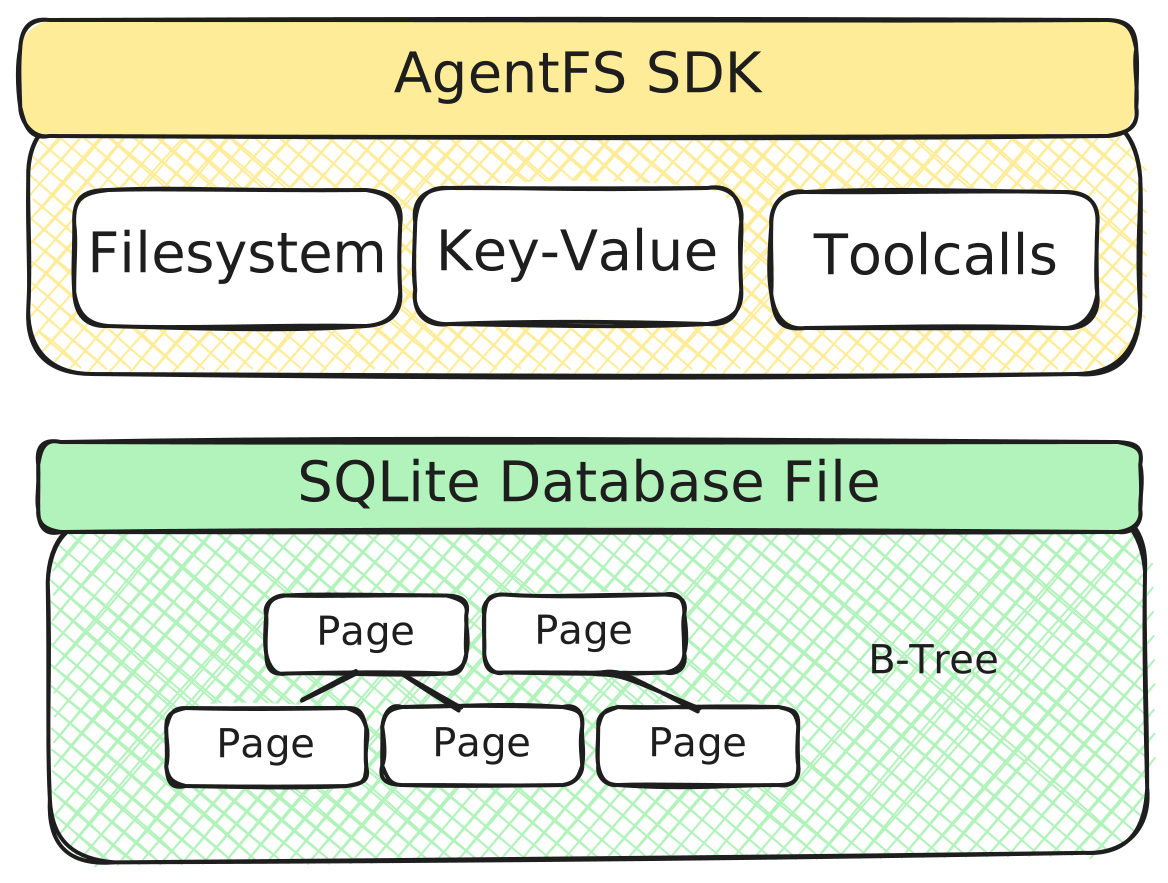
AgentFS 是一个可通过 SDK 访问的 agent 文件系统,它为 agent 状态管理提供三个基本接口:
* **Filesystem:** 用于文件和目录的类 POSIX 文件系统
* **Key-Value:** 用于 agent 状态和上下文的键值存储
* **Toolcall:** 用于调试和分析的工具调用审计追踪
AgentFS 的核心是 [agent 文件系统](SPEC.md),这是一个完整的基于 SQLite 的存储系统,使用 [Turso](https://github.com/tursodatabase/turso) 实现。agent 所做的一切——它创建的每个文件、存储的每段状态、调用的每个工具——都存在于一个 SQLite 数据库文件中。
## 🤔 常见问题
### AgentFS 与 _X_ 有何不同?
[Bubblewrap](https://github.com/containers/bubblewrap) 使用 Linux 命名空间和 overlay 提供文件系统隔离。虽然你可以通过调用 `bwrap` 将 `/` 挂载为只读并在工作目录上使用 `--tmp-overlay` 来实现类似的隔离,但关键区别在于持久性和可查询性:使用 AgentFS 时,上层文件系统存储在单个 SQLite 数据库文件中,你可以查询、快照并将其移动到另一台机器。在公告 [博客文章](https://turso.tech/blog/agentfs) 中阅读更多关于动机的内容。
[Docker Sandbox](https://www.docker.com/blog/docker-sandboxes-a-new-approach-for-coding-agent-safety/) 和 AgentFS 是互补而非竞争关系。AgentFS 回答“发生了什么以及状态是什么?”,而 Docker Sandbox 回答“我如何安全地运行它?”。你可以同时使用两者:在 Docker Sandbox 内部运行 agent 以确保安全,同时在该沙箱内使用 AgentFS 进行结构化状态管理和审计追踪。
[Git worktrees](https://git-scm.com/docs/git-worktree) 允许你将仓库的多个分支检出到不同的目录中,从而允许 agent 处理源代码的独立副本——这与 AgentFS 类似。但 AgentFS 在更底层解决了这个问题。使用 git worktrees 时,没有任何东西阻止 agent 修改其 worktree 之外的文件:另一个 agent 的 worktree、系统文件或文件系统上的任何其他内容。这种隔离纯粹是约定俗成的,并非强制执行。AgentFS 提供系统级且无法绕过的文件系统级写时复制隔离——让你能够安全地运行不受信任的 agent。而且由于它在 git 之下运作,它还可以处理未跟踪的文件,使其用途不仅限于版本控制的源代码。
### 为什么在文件系统层实现 AgentFS,而不是使用容器或 VM?
文件系统层赋予了我们块设备无法提供的能力。首先,因为所有内容都存储在结构化的 SQLite 表中,你可以查询文件系统,这对审计和调试 agent 行为至关重要。其次,SQLite 的预写日志通过捕获每个文件系统变更,支持快照和时间旅行分叉。第三,我们可以提供在无服务器或浏览器等环境中工作的 SDK,而在这些环境中根本无法挂载块设备。请注意,这种方法也可以与容器和 VM 很好地配合使用——你可以通过 NFS 等远程文件系统协议或 virtio-fuse 等机制使用 AgentFS。
## 📚 了解更多
- **[用户手册](MANUAL.md)** - 使用 AgentFS CLI 和 SDK 的完整指南
- **[Agent 文件系统规范](SPEC.md)** - agent 文件系统 SQLite schema 的技术规范
- **[SDK 示例](examples/)** - 使用 AgentFS 的工作代码示例
- **[Turso database](https://github.com/tursodatabase/turso)** - 一个进程内 SQL 数据库,兼容 SQLite。
### 博客文章
- **[Introducing AgentFS](https://turso.tech/blog/agentfs)** - AgentFS 背后的动机
- **[AgentFS with FUSE](https://turso.tech/blog/agentfs-fuse)** - 使用 FUSE 挂载 agent 文件系统
- **[AgentFS with Overlay Filesystem](https://turso.tech/blog/agentfs-overlay)** - 使用写时复制 overlay 沙箱化 agent
- **[AI Agents with Just Bash](https://turso.tech/blog/agentfs-just-bash)** - 为 agent 提供安全的 bash 命令执行
- **[AgentFS in the Browser](https://turso.tech/blog/agentfs_browser)** - 使用 WebAssembly 在浏览器中运行 AgentFS
- **[Making Coding Agents Safe Using LlamaIndex](https://www.llamaindex.ai/blog/making-coding-agents-safe-using-llamaindex)** - 将 AgentFS 与 LlamaIndex 结合使用
## 📝 许可证
MIT
标签:AI基础设施, AI工具, CLI, DLL 劫持, FUSE, LLM工具, NFS, Python, Rust, SQLite, Turso, TypeScript, WiFi技术, 人工智能, 可视化界面, 大语言模型, 存储抽象, 安全插件, 持久化存储, 数据库, 文件系统, 无后门, 用户模式Hook绕过, 网络流量审计, 语义存储, 逆向工具, 通知系统, 通知系统, 通知系统