carla-simulator/carla
GitHub: carla-simulator/carla
一个基于虚幻引擎5的开源自动驾驶仿真平台,为自动驾驶系统的开发、训练和验证提供高保真城市环境和丰富的传感器模拟能力。
Stars: 14109 | Forks: 4611
# CARLA 模拟器
[](https://carla-ue5.readthedocs.io)
[](http://carla.org)
[](https://github.com/carla-simulator/carla/releases)
[](https://carla-ue5.readthedocs.io)
[](https://github.com/carla-simulator/carla/discussions)
[](https://discord.gg/8kqACuC)
CARLA 是一个用于自动驾驶研究的开源模拟器。CARLA 从底层开始开发,旨在支持自动驾驶系统的开发、训练和验证。除了开源代码和协议外,CARLA 还提供了为此目的创建并可自由使用的开放数字资产(城市布局、建筑物、车辆)。该仿真平台支持灵活配置传感器套件和环境条件。
[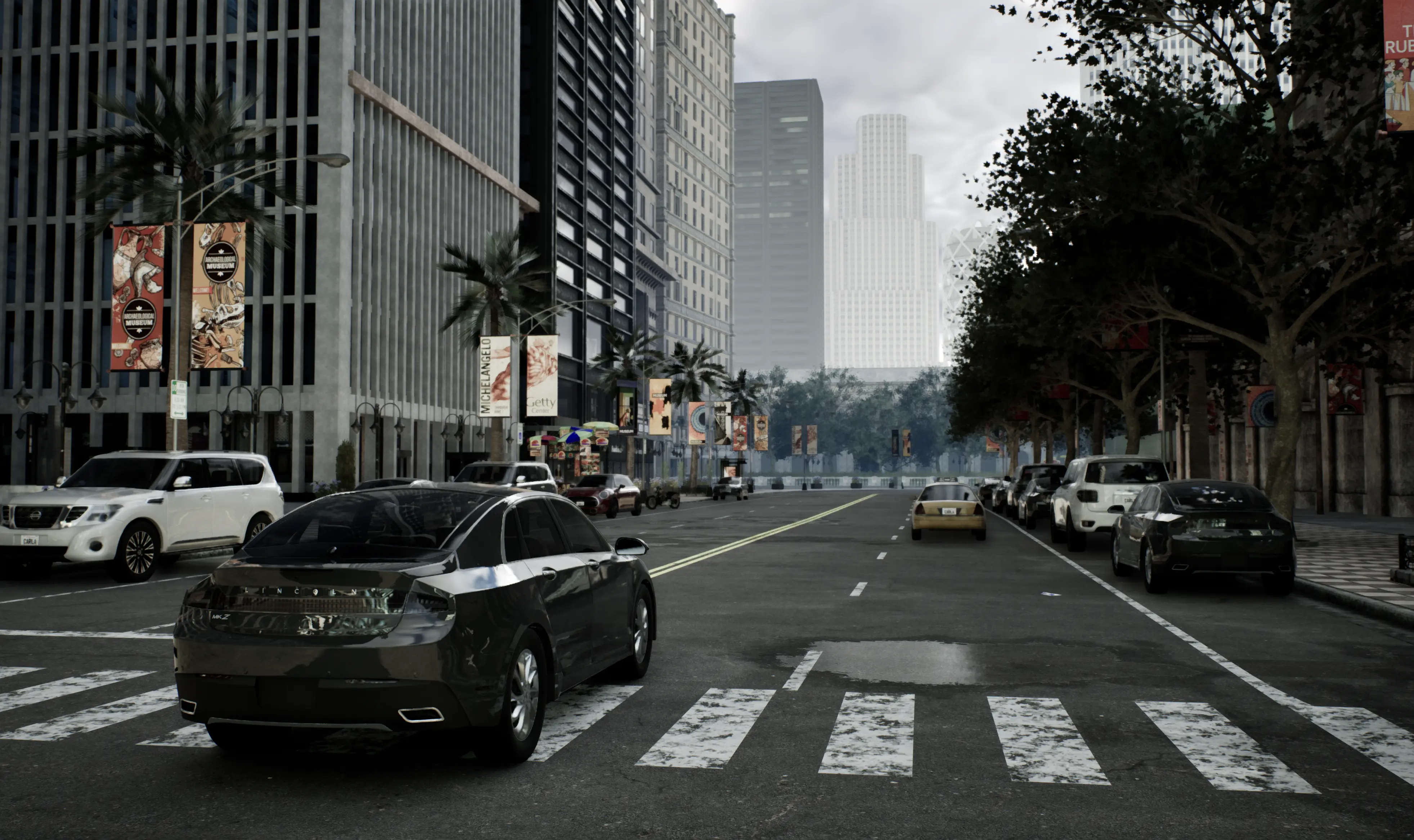](https://www.youtube.com/watch?v=q4V9GYjA1pE)
### 推荐系统
* Intel i7 第 9 代 - 11 代 / Intel i9 第 9 代 - 11 代 / AMD Ryzen 7 / AMD Ryzen 9
* +32 Gb RAM 内存
* NVIDIA RTX 3070/3080/3090 / NVIDIA RTX 4090 或更好
* 16 Gb 或更多 VRAM
* Ubuntu 22.04 或 Windows 11
## 文档
[CARLA 文档](https://carla-ue5.readthedocs.io/en/latest/) 托管在 ReadTheDocs 上。请查看以下关键链接:
- [在 Linux 上构建](https://carla-ue5.readthedocs.io/en/latest/build_linux_ue5/)
- [在 Windows 上构建](https://carla-ue5.readthedocs.io/en/latest/build_windows_ue5/)
- [入门步骤](https://carla-ue5.readthedocs.io/en/latest/tuto_first_steps/)
- [CARLA 资产目录](https://carla-ue5.readthedocs.io/en/latest/catalogue/)
- [Python API 参考](https://carla-ue5.readthedocs.io/en/latest/python_api/)
- [蓝图库](https://carla-ue5.readthedocs.io/en/latest/bp_library/)
## CARLA 生态系统
与 CARLA 仿真平台相关的仓库:
* [**CARLA 自动驾驶排行榜**](https://leaderboard.carla.org/):用于验证自动驾驶堆栈的自动化平台
* [**Scenario_Runner**](https://github.com/carla-simulator/scenario_runner):在 CARLA 0.9.X 中执行交通场景的引擎
* [**ROS-bridge**](https://github.com/carla-simulator/ros-bridge):将 CARLA 0.9.X 连接到 ROS 的接口
* [**Driving-benchmarks**](https://github.com/carla-simulator/driving-benchmarks):用于自动驾驶任务的基准测试工具
* [**Conditional Imitation-Learning**](https://github.com/felipecode/coiltraine):在 CARLA 中训练和测试条件模仿学习模型
* [**AutoWare AV stack**](https://github.com/carla-simulator/carla-autoware):将 AutoWare AV 堆栈连接到 CARLA 的桥接
* [**Reinforcement-Learning**](https://github.com/carla-simulator/reinforcement-learning):在 CARLA 中运行条件强化学习模型的代码
* [**RoadRunner**](https://www.mathworks.com/products/roadrunner.html):基于 MATLAB GUI 的应用程序,用于创建 OpenDrive 格式的路网
* [**Map Editor**](https://github.com/carla-simulator/carla-map-editor):独立的 GUI 应用程序,用于增强 RoadRunner 地图中的交通信号灯和交通标志信息
## 论文
如果您使用 CARLA,请引用我们的 CoRL’17 论文。
_CARLA: An Open Urban Driving Simulator_
Alexey Dosovitskiy, German Ros, Felipe Codevilla, Antonio Lopez, Vladlen Koltun; PMLR 78:1-16 [[PDF](http://proceedings.mlr.press/v78/dosovitskiy17a/dosovitskiy17a.pdf)] [[演讲](https://www.youtube.com/watch?v=xfyK03MEZ9Q&feature=youtu.be&t=2h44m30s)] ``` @inproceedings{Dosovitskiy17, title = {{CARLA}: {An} Open Urban Driving Simulator}, author = {Alexey Dosovitskiy and German Ros and Felipe Codevilla and Antonio Lopez and Vladlen Koltun}, booktitle = {Proceedings of the 1st Annual Conference on Robot Learning}, pages = {1--16}, year = {2017} } ``` ## 使用 Unreal Engine 5.5 构建 CARLA 从 GitHub 克隆此仓库到本地,指定 *ue5-dev* 分支: ``` git clone -b ue5-dev https://github.com/carla-simulator/carla.git CarlaUE5 ``` 为了构建 CARLA,您需要访问 CARLA 的 Unreal Engine 5.5 分支。为了访问此仓库,您必须先按照[此指南](https://www.unrealengine.com/en-US/ue-on-github)将您的 GitHub 账户关联到 Epic Games。然后,您还需要使用您的 git 凭据来授权下载 Unreal Engine 5.5 仓库。 __在 Linux 上构建__: 在 CARLA 根目录中打开终端并运行设置脚本: ``` cd CarlaUE5 ./CarlaSetup.sh --interactive ``` 设置脚本会提示您输入 sudo 密码,以便安装先决条件。然后它会提示您输入 GitHub 凭据,以便授权下载 Unreal Engine 仓库。 设置脚本默认会使用 apt 安装 Python 3。如果您想指向现有的 Python 安装,应使用 `--python-root=PATH_TO_PYTHON` 参数并指定相关的 Python 安装路径。您可以在选定的环境中使用 whereis python3,并从路径中去掉 `/python3` 后缀。 __在 Linux 上无人值守构建__: 如果您想以无人值守模式运行设置脚本,您的 git 凭据需要存储在环境变量中。将您的 github 凭据添加到您的 `.bashrc` 文件中: ``` export GIT_LOCAL_CREDENTIALS=username@github_token ``` 然后使用以下命令运行设置脚本: ``` cd CarlaUE5 sudo -E ./CarlaSetup.sh ``` 这将下载并安装 Unreal Engine 5.5,安装先决条件并构建 CARLA。完成可能需要一些时间,并会占用大量磁盘空间。 如果您更喜欢在终端中输入 git 凭据,请使用以下命令: ``` cd CarlaUE5 sudo -E env GIT_LOCAL_CREDENTIALS=github_username@github_token ./CarlaSetup.sh ``` __在 Windows 上构建__: 要在 Windows 上构建,请运行批处理脚本: ``` cd CarlaUE5 CarlaSetup.bat ``` Windows 目前不支持无人值守模式,您需要在提示时输入 GitHub 凭据或管理员权限。 ## 重新构建 CARLA 设置完成后,您可以在 CARLA 根目录打开终端,使用以下命令执行后续构建。在 Linux 中,在标准终端中运行这些命令。在 Windows 中,打开 Visual Studio 2022 的 x64 Native Tools Command Prompt。 __配置__: Linux: ``` cmake -G Ninja -S . -B Build --toolchain=$PWD/CMake/Toolchain.cmake -DCMAKE_BUILD_TYPE=Release -DENABLE_ROS2=ON ``` Windows: ``` cmake -G Ninja -S . -B Build --toolchain=$PWD/CMake/Toolchain.cmake -DCMAKE_BUILD_TYPE=Release ``` __构建__: Linux 和 Windows: ``` cmake --build Build ``` __构建并安装 Python API__: Linux 和 Windows: ``` cmake --build Build --target carla-python-api-install ``` __启动编辑器__: ``` cmake --build Build --target launch ``` 有关构建 CARLA UE5 的更多说明,请查阅 [Linux](https://carla-ue5.readthedocs.io/en/latest/build_linux_ue5/) 或 [Windows](https://carla-ue5.readthedocs.io/en/latest/build_windows_ue5/) 的构建文档。 ## 贡献 请查看我们的[贡献指南][contriblink]。 ## 许可证 ## CARLA 许可证 CARLA 特定代码根据 MIT License 分发。 CARLA 特定资产根据 CC-BY License 分发。 ## CARLA 依赖和集成许可证 Unreal Engine 5 遵循其[自身的许可条款](https://www.unrealengine.com/en-US/faq)。 CARLA 使用了一些与第三方集成相关的依赖项: - [PROJ](https://proj.org/),一种通用坐标转换软件,使用 [X/MIT open source license](https://proj.org/about.html#license)。 - [SQLite](https://www.sqlite.org),PROJ 依赖项的一部分,属于[公有领域](https://www.sqlite.org/purchase/license)。 - [Xerces-C](https://xerces.apache.org/xerces-c/),一个验证型 XML 解析器,根据 [Apache Software License, Version 2.0](http://www.apache.org/licenses/LICENSE-2.0.html) 提供。 - [Eigen](https://eigen.tuxfamily.org/index.php?title=Main_Page),一个用于线性代数的 C++ 模板库,使用 [MPL2 license](https://www.mozilla.org/en-US/MPL/2.0/)。 CARLA 使用 Autodesk FBX SDK 在地图导入过程中将 FBX 转换为 OBJ。此步骤是可选的,SDK 位于[此处](https://www.autodesk.com/developer-network/platform-technologies/fbx-sdk-2020-0) 本软件包含由 Autodesk, Inc. 开发的 Autodesk® FBX® 代码。版权所有 2020 Autodesk, Inc. 保留所有权利。此类代码按“原样”提供,Autodesk, Inc. 不承担任何明示或暗示的保证,包括但不限于针对特定用途的适销性和适用性的暗示保证或非侵犯第三方权利。在任何情况下,Autodesk, Inc. 均不对任何直接、间接、偶然、特殊、惩罚性或后果性损害(包括但不限于采购替代商品或服务、使用、数据或利润的损失;或业务中断)承担责任,无论其原因如何,也无论基于何种责任理论,无论是合同、严格责任还是侵权(包括疏忽或其他),即使已被告知此类损害的可能性。"
Alexey Dosovitskiy, German Ros, Felipe Codevilla, Antonio Lopez, Vladlen Koltun; PMLR 78:1-16 [[PDF](http://proceedings.mlr.press/v78/dosovitskiy17a/dosovitskiy17a.pdf)] [[演讲](https://www.youtube.com/watch?v=xfyK03MEZ9Q&feature=youtu.be&t=2h44m30s)] ``` @inproceedings{Dosovitskiy17, title = {{CARLA}: {An} Open Urban Driving Simulator}, author = {Alexey Dosovitskiy and German Ros and Felipe Codevilla and Antonio Lopez and Vladlen Koltun}, booktitle = {Proceedings of the 1st Annual Conference on Robot Learning}, pages = {1--16}, year = {2017} } ``` ## 使用 Unreal Engine 5.5 构建 CARLA 从 GitHub 克隆此仓库到本地,指定 *ue5-dev* 分支: ``` git clone -b ue5-dev https://github.com/carla-simulator/carla.git CarlaUE5 ``` 为了构建 CARLA,您需要访问 CARLA 的 Unreal Engine 5.5 分支。为了访问此仓库,您必须先按照[此指南](https://www.unrealengine.com/en-US/ue-on-github)将您的 GitHub 账户关联到 Epic Games。然后,您还需要使用您的 git 凭据来授权下载 Unreal Engine 5.5 仓库。 __在 Linux 上构建__: 在 CARLA 根目录中打开终端并运行设置脚本: ``` cd CarlaUE5 ./CarlaSetup.sh --interactive ``` 设置脚本会提示您输入 sudo 密码,以便安装先决条件。然后它会提示您输入 GitHub 凭据,以便授权下载 Unreal Engine 仓库。 设置脚本默认会使用 apt 安装 Python 3。如果您想指向现有的 Python 安装,应使用 `--python-root=PATH_TO_PYTHON` 参数并指定相关的 Python 安装路径。您可以在选定的环境中使用 whereis python3,并从路径中去掉 `/python3` 后缀。 __在 Linux 上无人值守构建__: 如果您想以无人值守模式运行设置脚本,您的 git 凭据需要存储在环境变量中。将您的 github 凭据添加到您的 `.bashrc` 文件中: ``` export GIT_LOCAL_CREDENTIALS=username@github_token ``` 然后使用以下命令运行设置脚本: ``` cd CarlaUE5 sudo -E ./CarlaSetup.sh ``` 这将下载并安装 Unreal Engine 5.5,安装先决条件并构建 CARLA。完成可能需要一些时间,并会占用大量磁盘空间。 如果您更喜欢在终端中输入 git 凭据,请使用以下命令: ``` cd CarlaUE5 sudo -E env GIT_LOCAL_CREDENTIALS=github_username@github_token ./CarlaSetup.sh ``` __在 Windows 上构建__: 要在 Windows 上构建,请运行批处理脚本: ``` cd CarlaUE5 CarlaSetup.bat ``` Windows 目前不支持无人值守模式,您需要在提示时输入 GitHub 凭据或管理员权限。 ## 重新构建 CARLA 设置完成后,您可以在 CARLA 根目录打开终端,使用以下命令执行后续构建。在 Linux 中,在标准终端中运行这些命令。在 Windows 中,打开 Visual Studio 2022 的 x64 Native Tools Command Prompt。 __配置__: Linux: ``` cmake -G Ninja -S . -B Build --toolchain=$PWD/CMake/Toolchain.cmake -DCMAKE_BUILD_TYPE=Release -DENABLE_ROS2=ON ``` Windows: ``` cmake -G Ninja -S . -B Build --toolchain=$PWD/CMake/Toolchain.cmake -DCMAKE_BUILD_TYPE=Release ``` __构建__: Linux 和 Windows: ``` cmake --build Build ``` __构建并安装 Python API__: Linux 和 Windows: ``` cmake --build Build --target carla-python-api-install ``` __启动编辑器__: ``` cmake --build Build --target launch ``` 有关构建 CARLA UE5 的更多说明,请查阅 [Linux](https://carla-ue5.readthedocs.io/en/latest/build_linux_ue5/) 或 [Windows](https://carla-ue5.readthedocs.io/en/latest/build_windows_ue5/) 的构建文档。 ## 贡献 请查看我们的[贡献指南][contriblink]。 ## 许可证 ## CARLA 许可证 CARLA 特定代码根据 MIT License 分发。 CARLA 特定资产根据 CC-BY License 分发。 ## CARLA 依赖和集成许可证 Unreal Engine 5 遵循其[自身的许可条款](https://www.unrealengine.com/en-US/faq)。 CARLA 使用了一些与第三方集成相关的依赖项: - [PROJ](https://proj.org/),一种通用坐标转换软件,使用 [X/MIT open source license](https://proj.org/about.html#license)。 - [SQLite](https://www.sqlite.org),PROJ 依赖项的一部分,属于[公有领域](https://www.sqlite.org/purchase/license)。 - [Xerces-C](https://xerces.apache.org/xerces-c/),一个验证型 XML 解析器,根据 [Apache Software License, Version 2.0](http://www.apache.org/licenses/LICENSE-2.0.html) 提供。 - [Eigen](https://eigen.tuxfamily.org/index.php?title=Main_Page),一个用于线性代数的 C++ 模板库,使用 [MPL2 license](https://www.mozilla.org/en-US/MPL/2.0/)。 CARLA 使用 Autodesk FBX SDK 在地图导入过程中将 FBX 转换为 OBJ。此步骤是可选的,SDK 位于[此处](https://www.autodesk.com/developer-network/platform-technologies/fbx-sdk-2020-0) 本软件包含由 Autodesk, Inc. 开发的 Autodesk® FBX® 代码。版权所有 2020 Autodesk, Inc. 保留所有权利。此类代码按“原样”提供,Autodesk, Inc. 不承担任何明示或暗示的保证,包括但不限于针对特定用途的适销性和适用性的暗示保证或非侵犯第三方权利。在任何情况下,Autodesk, Inc. 均不对任何直接、间接、偶然、特殊、惩罚性或后果性损害(包括但不限于采购替代商品或服务、使用、数据或利润的损失;或业务中断)承担责任,无论其原因如何,也无论基于何种责任理论,无论是合同、严格责任还是侵权(包括疏忽或其他),即使已被告知此类损害的可能性。"
标签:ADAS, Apex, Bash脚本, CARLA, Python API, UE5, 人工智能, 仿真平台, 传感器仿真, 城市环境模拟, 开源, 强化学习, 数字孪生, 无人车, 智慧交通, 机器人学, 机器学习, 深度学习, 用户模式Hook绕过, 算法验证, 自动驾驶, 自动驾驶系统, 虚幻引擎, 计算机视觉, 训练环境, 软件开发套件, 逆向工具, 高保真渲染