MCP SSH Orchestrator

Zero-Trust SSH Orchestration for AI Assistants
Enforce declarative policy-as-code and audited access for Claude Desktop, Cursor, and any MCP-aware client.
Launch in minutes with Docker + MCP tooling, deny-by-default controls, and hardened SSH key management.
[](LICENSE)
[](https://pypi.org/project/mcp/1.27.0/)
[](https://python.org)
[](https://github.com/samerfarida/mcp-ssh-orchestrator)
[](https://scorecard.dev/viewer/?uri=github.com/samerfarida/mcp-ssh-orchestrator)
[](https://github.com/samerfarida/mcp-ssh-orchestrator/releases)
[](https://github.com/samerfarida/mcp-ssh-orchestrator/stargazers)
[](https://github.com/samerfarida/mcp-ssh-orchestrator/network/members)
[](https://github.com/samerfarida/mcp-ssh-orchestrator/issues)
[](https://github.com/samerfarida/mcp-ssh-orchestrator/pulls)
[](https://github.com/samerfarida/mcp-ssh-orchestrator/graphs/contributors)
[](https://github.com/samerfarida/mcp-ssh-orchestrator/commits/main)
[](https://github.com/samerfarida/mcp-ssh-orchestrator/actions)
[](https://github.com/samerfarida/mcp-ssh-orchestrator/actions/workflows/codeql.yml)
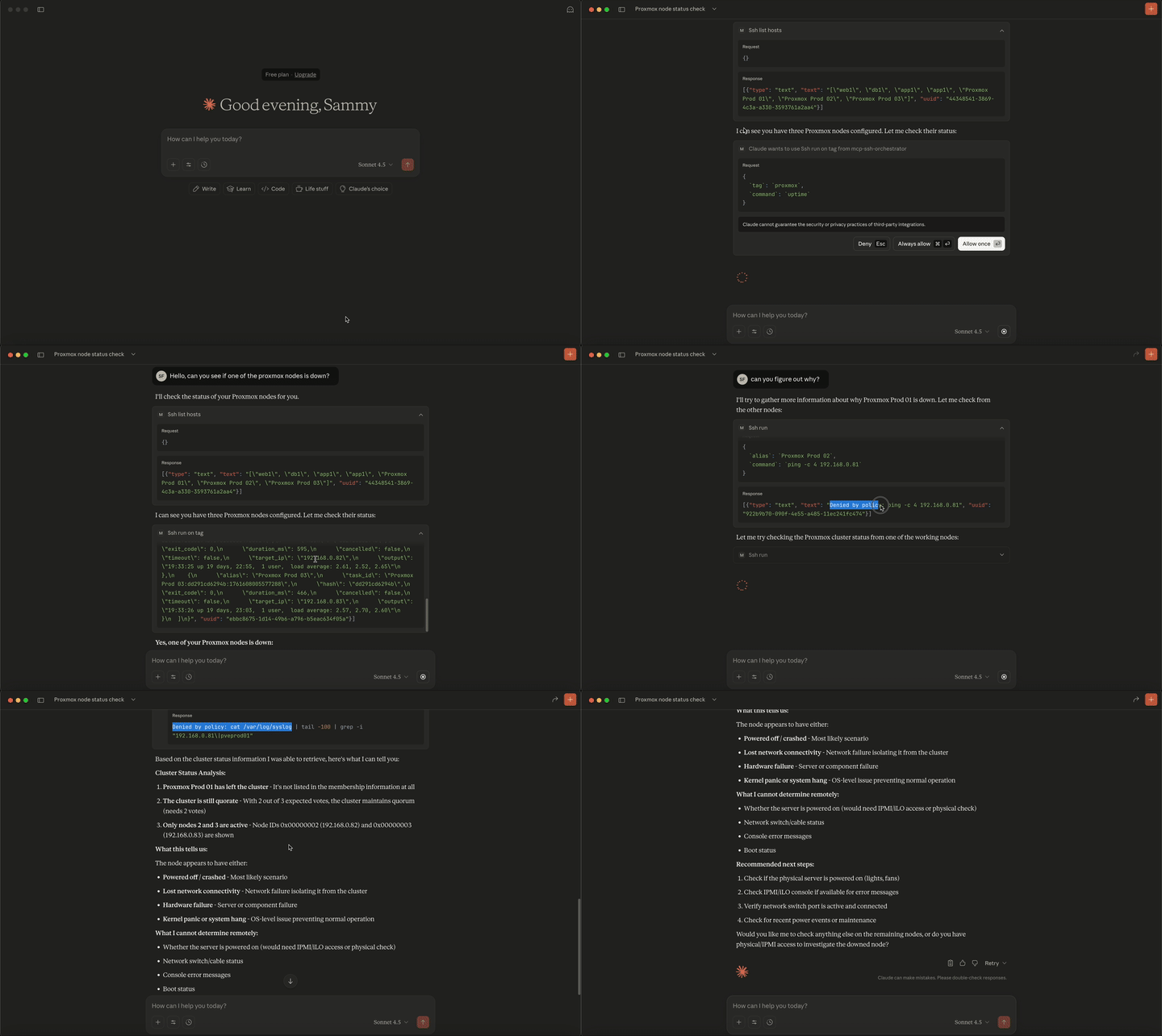
## 解决了什么问题?
**想象一下:** 您的 AI 助手(Claude、ChatGPT 等)可以访问您的服务器,但您很担心它可能会做什么。`rm -rf /`?删除数据库?更改防火墙规则?
**现在想象一下:** 您的 AI 拥有受治理的、可审计的基础设施访问权限。它可以检查日志、重启服务并管理您的服务器集群,**但前提是您的安全策略允许。**
这正是 MCP SSH Orchestrator 所提供的:**AI 驱动的服务器管理能力,配合默认拒绝的访问控制、IP 白名单、主机密钥验证,以及基于声明式 YAML 策略即代码(`config/servers.yml`、`config/credentials.yml`、`config/policy.yml`)的全面审计日志。**
## 为什么这很重要
### 零信任安全模型
- **默认拒绝**:除非明确允许,否则任何操作都不会执行
- **网络控制**:IP 白名单防止横向移动
- **命令白名单**:只有经过批准的命令才能执行
- **声明式策略即代码**:版本化的 YAML 文件定义主机、凭证和允许的命令
- **全面审计跟踪**:每个操作都以 JSON 格式记录
### 阻止常见攻击向量
- **危险命令被阻止**:`rm -rf`、`dd`、文件删除操作
- **网络隔离**:服务器无法访问外部互联网
- **无权限提升**:在容器中以非 root 用户身份运行
- **资源限制**:CPU 和内存上限防止拒绝服务攻击
### 生产就绪的审计与安全
- **OWASP LLM 前 10 名防护**:缓解 LLM07(不安全插件设计)、LLM08(过度授权)、LLM01(提示注入)
- **MITRE ATT&CK 对齐**:防止 T1071(应用层协议)、T1659(内容注入)
- **结构化 JSON 审计日志**:包含时间戳、哈希值和 IP 的完整审计跟踪
- **支持取证**:命令哈希、IP 跟踪、详细元数据
- **实时监控**:长时间运行任务的进度日志
## 目标用户
### 家庭实验室爱好者
- 用 AI 自动化例行服务器维护
- 安全地管理 Proxmox、TrueNAS、Docker 主机
- 在不损失 SSH 安全性的情况下获得故障排除帮助
### 安全工程师
- 审计和控制 AI 对基础设施的访问
- 使用声明式策略即代码配置实现零信任原则
- 通过结构化日志满足合规性要求
### DevOps 团队
- 让 AI 处理常规任务:日志检查、服务重启、更新
- 通过对话界面管理服务器集群
- 在保持安全标准的同时减少手动工作
### 平台工程师
- 实现 AI 驱动的基础设施管理
- 为开发者提供安全的自助访问
- 安全地连接 AI 与基础设施
## 真实用例
### 场景 1:家庭实验室自动化(家庭实验室爱好者)
**您说:** *“Claude,我的 Proxmox 主机运行缓慢。你能检查一下我所有虚拟机的磁盘使用率和内存吗?”*
### 会发生什么
- 策略允许在 Proxmox 主机上执行 `df -h` 和 `free -m`
- 网络检查:私有 IP 白名单允许访问
- 基于标签的执行检查所有标记为 `proxmox` 的主机
- 命令安全执行,无破坏性操作
- 完整的审计跟踪存储在 JSON 日志中
### 场景 2:事件响应(DevOps 团队)
**您说:** *“我们看到 500 错误。检查所有生产 Web 服务器上的 nginx 日志,显示最后 100 行错误信息。”*
### 会发生什么
- 基于标签的执行:在所有 `web-prod` 服务器上运行 `tail -n 100 /var/log/nginx/error.log`
- 执行网络隔离:不允许外部 API 调用或出站流量
- 通过 MCP 上下文事件流式传输实时进度日志
- 结构化输出聚合结果,便于快速分类
- 包含时间戳的完整审计跟踪,用于事后审查
### 场景 3:集群范围维护(平台工程师)
**您说:** *“更新所有暂存服务器的系统包,但在运行升级前先给我看看会有什么变化。”*
### 会发生什么
- 使用 `ssh_plan` 预览所有 `staging` 标记主机上的 `apt list --upgradable`
- 检查模拟运行输出以查看待处理的更新
- 策略验证在暂存环境允许执行 `apt update && apt upgrade -y`
- 基于标签的执行并行升级所有暂存服务器
- 审计日志跟踪哪些服务器在何时被更新
## 快速入门
### 1. 准备本地配置(一次性)
```
# 可选:使用 compose 辅助脚本引导所有内容
# (从仓库根目录或目标配置目录运行)
./compose/setup.sh enduser
# 或者单独下载
curl -fsSLO https://raw.githubusercontent.com/samerfarida/mcp-ssh-orchestrator/main/compose/setup.sh
chmod +x setup.sh
./setup.sh enduser
```
```
# 拉取最新发行版
docker pull ghcr.io/samerfarida/mcp-ssh-orchestrator:latest
# 为配置、密钥和机密创建目录
mkdir -p ~/mcp-ssh/{config,keys,secrets}
# 复制示例配置以快速开始
cp examples/example-servers.yml ~/mcp-ssh/config/servers.yml
cp examples/example-credentials.yml ~/mcp-ssh/config/credentials.yml
cp examples/example-policy.yml ~/mcp-ssh/config/policy.yml
# 添加您的 SSH 密钥(替换为您的私钥文件)
cp ~/.ssh/id_ed25519 ~/mcp-ssh/keys/
chmod 0400 ~/mcp-ssh/keys/id_ed25519
# (可选)固定受信任主机并准备机密文件
cp ~/.ssh/known_hosts ~/mcp-ssh/keys/known_hosts
# 选项 1:单独的机密文件(兼容 Docker 机密)
cat > ~/mcp-ssh/secrets/prod_db_password.txt <<'EOF'
CHANGE-ME
EOF
chmod 600 ~/mcp-ssh/secrets/prod_db_password.txt
# 选项 2:合并的 .env 文件(推荐,更易于管理)
cat > ~/mcp-ssh/secrets/.env <<'EOF'
# SSH 密码
prod_db_password=CHANGE-ME
lab_password=CHANGE-ME-TOO
# SSH 密钥密码
prod_key_passphrase=CHANGE-ME-PASSPHRASE
EOF
chmod 600 ~/mcp-ssh/secrets/.env
# 注意:.env 文件支持 KEY=value 格式、注释和带引号的值
# 详情请参阅 docs/wiki/06.2-credentials.yml.md
```
### 2. 启动编排器容器
```
docker run -d --name mcp-ssh-orchestrator \
-v ~/mcp-ssh/config:/app/config:ro \
-v ~/mcp-ssh/keys:/app/keys:ro \
-v ~/mcp-ssh/secrets:/app/secrets:ro \
ghcr.io/samerfarida/mcp-ssh-orchestrator:latest
```
之后使用 `docker start mcp-ssh-orchestrator` 重启。想用一次性容器?请改用 `docker run -i --rm ...`。
### 3. 连接您的 MCP 客户端
- **Cursor:** 添加到 `~/.cursor/mcp.json`
```
{
"mcpServers": {
"mcp-ssh-orchestrator": {
"command": "docker",
"args": ["start", "-a", "mcp-ssh-orchestrator"],
"env": {"PYTHONUNBUFFERED": "1"}
}
}
}
```
```
{
"mcpServers": {
"ssh-orchestrator": {
"command": "docker",
"args": [
"run", "-i", "--rm",
"-v", "/Users/YOUR_USERNAME/mcp-ssh/config:/app/config:ro",
"-v", "/Users/YOUR_USERNAME/mcp-ssh/keys:/app/keys:ro",
"-v", "/Users/YOUR_USERNAME/mcp-ssh/secrets:/app/secrets:ro",
"ghcr.io/samerfarida/mcp-ssh-orchestrator:latest"
]
}
}
}
```
(Windows 路径: `%APPDATA%\\Claude\\claude_desktop_config.json`.)
更多示例(Docker Desktop、多环境、SDK 使用)请参见[集成指南](docs/wiki/10-Integrations.md)。
### 4. 测试连接
```
# 通过 MCP 服务器列出已配置的主机
echo '{"jsonrpc":"2.0","method":"tools/call","params":{"name":"ssh_list_hosts","arguments":{}},"id":1}' | \
docker run -i --rm \
-v ~/mcp-ssh/config:/app/config:ro \
-v ~/mcp-ssh/keys:/app/keys:ro \
-v ~/mcp-ssh/secrets:/app/secrets:ro \
ghcr.io/samerfarida/mcp-ssh-orchestrator:latest
```
Cursor/Claude 现在应该显示编排器已连接。跳转到[使用手册](https://github.com/samerfarida/mcp-ssh-orchestrator/wiki/08-Usage-Cookbook)了解引导场景。
## 安全工作原理(技术细节)
**策略即代码工作流:** `config/servers.yml`、`config/credentials.yml` 和 `config/policy.yml` 在启动时被解析,在每次 `ssh_*` 工具调用时强制执行,并镜像到结构化审计日志中,因此您在 Git 中审查的相同声明式文件也控制着您的 AI 可以执行的内容。
### 纵深防御架构
```
graph TB
subgraph "Layer 1: Transport Security"
L1A[stdio Communication]
L1B[Container Isolation]
end
subgraph "Layer 2: Network Security"
L2A[IP Allowlists]
L2B[Host Key Verification]
end
subgraph "Layer 3: Policy Security"
L3A[Deny-by-Default]
L3B[Pattern Matching]
end
subgraph "Layer 4: Application Security"
L4A[Non-Root Execution]
L4B[Resource Limits]
end
L1A --> L2A
L1B --> L2B
L2A --> L3A
L2B --> L3B
L3A --> L4A
L3B --> L4B
style L1A fill:#e1f5ff
style L1B fill:#e1f5ff
style L2A fill:#d4edda
style L2B fill:#d4edda
style L3A fill:#fff3cd
style L3B fill:#fff3cd
style L4A fill:#f8d7da
style L4B fill:#f8d7da
```
### 被阻止的内容
```
# 危险命令将自动拒绝
deny_substrings:
# 破坏性操作
- "rm -rf /"
- ":(){ :|:& };:"
- "mkfs "
- "dd if=/dev/zero"
- "shutdown -h"
- "reboot"
- "userdel "
- "passwd "
# 横向移动 / 外联工具
- "ssh "
- "scp "
- "rsync -e ssh"
- "curl "
- "wget "
- "nc "
- "nmap "
- "telnet "
- "kubectl "
- "aws "
- "gcloud "
- "az "
# 强制网络隔离
network:
allow_cidrs:
- "10.0.0.0/8" # Only private IPs
- "192.168.0.0/16"
block_ips: [] # Explicit IP blocks (if needed)
```
### 被允许的内容(示例)
```
# 安全的只读命令(使用 simple_binaries)
rules:
- action: "allow"
aliases:
- "*"
tags:
- "observability"
simple_binaries:
- uptime
- whoami
- hostname
simple_max_args: 6
# 磁盘和内存检查(使用结构化规则)
- action: "allow"
aliases:
- "*"
tags:
- "observability"
binary: "df"
arg_prefix: ["-h"]
allow_extra_args: false
- action: "allow"
aliases:
- "*"
tags:
- "observability"
binary: "free"
arg_prefix: ["-m"]
allow_extra_args: false
# 日志检查(使用带路径限制的结构化规则)
- action: "allow"
aliases:
- "*"
tags:
- "observability"
binary: "tail"
arg_prefix: ["-n", "200"]
allow_extra_args: false
path_args:
indices: [3]
patterns:
- "/var/log/*"
# 服务管理(受控)
- action: "allow"
aliases:
- "web-*"
- "db-*"
tags:
- "production"
- "critical-service"
binary: "systemctl"
arg_prefix: ["restart", "nginx"]
allow_extra_args: false
- action: "allow"
aliases:
- "web-*"
- "db-*"
tags:
- "production"
- "critical-service"
binary: "systemctl"
arg_prefix: ["status"]
allow_extra_args: true
```
### 针对真实威胁的防护
MCP SSH Orchestrator 直接解决了 MCP 生态系统中记录在案的漏洞:
- **CVE-2025-49596**:本地主机暴露的 MCP 服务 → 通过仅限 stdio 的传输方式缓解
- **CVE-2025-6514**:MCP 服务器中的命令注入 → 通过基于策略的验证缓解
- **43% 的 MCP 服务器**存在命令注入漏洞 → 零信任安全模型
**[完整安全模型文档](https://github.com/samerfarida/mcp-ssh-orchestrator/wiki/05-Security-Model)** | **[安全风险分析](https://github.com/samerfarida/mcp-ssh-orchestrator/wiki/02-Risks)**
## 文档
### [完整文档 Wiki](https://github.com/samerfarida/mcp-ssh-orchestrator/wiki)
| 章节 | 您将学到什么 |
|---|---|
| **[快速入门与示例](https://github.com/samerfarida/mcp-ssh-orchestrator/wiki/08-Usage-Cookbook)** | 实用示例和常见工作流 |
| **[架构](https://github.com/samerfarida/mcp-ssh-orchestrator/wiki/04-Architecture)** | 底层工作原理 |
| **[安全模型](https://github.com/samerfarida/mcp-ssh-orchestrator/wiki/05-Security-Model)** | 零信任设计与控制 |
| **[配置](https://github.com/samerfarida/mcp-ssh-orchestrator/wiki/06-Configuration)** | 设置主机、凭证、策略 |
| **[可观测性与审计](https://github.com/samerfarida/mcp-ssh-orchestrator/wiki/11-Observability-Audit)** | 日志记录、监控、合规 |
| **[部署](https://github.com/samerfarida/mcp-ssh-orchestrator/wiki/09-Deployment)** | 生产环境设置指南 |
## 供应链完整性
**签名的发行工件**:GitHub Releases 中的每个 tarball/zip 都附带由维护者密钥(`openpgp4fpr:6775BF3F439A2A8A198DE10D4FC5342A979BD358`)生成的分离 GPG 签名。解压前导入密钥并进行验证:
```
gpg --receive-keys 4FC5342A979BD358
gpg --verify mcp-ssh-orchestrator-v1.3.0.tar.gz.asc mcp-ssh-orchestrator-v1.3.0.tar.gz
```
**Cosign 签名的容器镜像**:`ghcr.io/samerfarida/mcp-ssh-orchestrator` 下的镜像在发布工作流中通过 Sigstore 无密钥签名。部署前请验证签名(及可选的证明):
```
COSIGN_EXPERIMENTAL=1 cosign verify \
--certificate-identity-regexp "https://github.com/samerfarida/mcp-ssh-orchestrator/.github/workflows/release.yml@.*" \
--certificate-oidc-issuer https://token.actions.githubusercontent.com \
ghcr.io/samerfarida/mcp-ssh-orchestrator:latest
```
镜像摘要和签名随每个标签发布在 GitHub Packages 中,以便您在环境间提升构建时可以固定精确引用([包源](https://github.com/samerfarida/mcp-ssh-orchestrator/pkgs/container/mcp-ssh-orchestrator/versions))。
**OpenSSF 记分卡**:仓库维护自动化的记分卡运行,以跟踪依赖项、构建设置、分支保护等的安全态势([记分卡摘要](https://api.scorecard.dev/projects/github.com/samerfarida/mcp-ssh-orchestrator))。
## AI 能用这个做什么?(MCP 工具)
您的 AI 助手获得 13 个强大的内置安全工具:
### 发现与规划
- `ssh_list_hosts` - 查看所有可用服务器
- `ssh_describe_host` - 获取主机详情和标签
- `ssh_plan` - **运行前测试命令**(模拟运行模式)
### 执行
- `ssh_run` - 在单个服务器上执行单个命令
- `ssh_run_on_tag` - 在多个服务器上运行命令(例如所有 "web" 服务器)
- `ssh_run_async` - 在后台启动长时间运行的任务
### 监控与控制
- `ssh_get_task_status` - 检查异步任务的进度
- `ssh_get_task_output` - 实时流式输出
- `ssh_get_task_result` - 完成时获取最终结果
- `ssh_cancel` - 安全停止正在运行的同步任务
- `ssh_cancel_async_task` - 安全停止正在运行的异步任务
### 管理
- `ssh_reload_config` - 无需重启即可更新主机/凭证
- `ssh_ping` - 验证与主机的连接
### MCP 资源 + 上下文
- `ssh://hosts` – 发现清理过的主机清单(别名、标签、描述、凭证存在情况)
- `ssh://host/{alias}` – 检查单个主机而不暴露凭证
- `ssh://host/{alias}/tags` – 仅获取标签视图,用于规划标签执行
- `ssh://host/{alias}/capabilities` – 派生的策略摘要、限制及每个主机的示例命令许可
**对 LLM 友好的提示:** 策略/网络拒绝(以及 `ssh_plan` 预览)包含有帮助的提示,以便助手自动使用 `ssh_plan` 重试、参考编排器提示,**或询问是否应更新策略/网络**,而不是在被阻止的命令上循环。
### [包含示例的完整工具参考](https://github.com/samerfarida/mcp-ssh-orchestrator/wiki/07-Tools-Reference)
## 了解更多
### 关键差异
- **生产就绪的安全性**:OpenSSF 记分卡 7.5+ 分
- **零信任架构**:默认拒绝,按例外允许
- **OWASP LLM 前 10 名防护**:缓解不安全插件设计、过度授权、提示注入
- **MITRE ATT&CK 对齐**:防止内容注入和未经授权的协议使用
- **安全为核心**:基于安全第一原则构建,防御真实 CVE(CVE-2025-49596、CVE-2025-6514)
- **易于集成**:兼容 Claude、ChatGPT 及任何 MCP 客户端
- **开源**:Apache 2.0 许可,社区驱动
### 用户怎么说
## 许可证
Apache 2.0 - 详情请见 [LICENSE](LICENSE)。
## 链接