Claude 通知(插件)
[](https://github.com/777genius/claude-notifications-go/actions)
[](https://github.com/777genius/claude-notifications-go/actions)
[](https://github.com/777genius/claude-notifications-go/actions)
[](https://goreportcard.com/report/github.com/777genius/claude-notifications-go)
[](https://codecov.io/gh/777genius/claude-notifications-go)
Claude Code 的智能通知插件,支持点击聚焦、Git 分支显示和 Webhook 集成。
## 目录
- [功能特性](#features)
- [安装](#installation)
- [前置条件](#prerequisites)
- [快速安装(推荐)](#quick-install-recommended)
- [手动安装](#manual-install)
- [更新](#updating)
- [支持的通知类型](#supported-notification-types)
- [平台支持](#platform-support)
- [点击聚焦(macOS & Linux)](#click-to-focus-macos--linux)
- [配置](#configuration)
- [手动配置](#manual-configuration)
- [声音选项](#sound-options)
- [测试声音播放](#test-sound-playback)
- [手动测试](#manual-testing)
- [贡献](#contributing)
- [故障排除](#troubleshooting)
- [文档](#documentation)
- [许可证](#license)
## 功能特性
- **跨平台**:macOS(Intel 和 Apple Silicon)、Linux(x64 和 ARM64)、Windows 10+(x64)
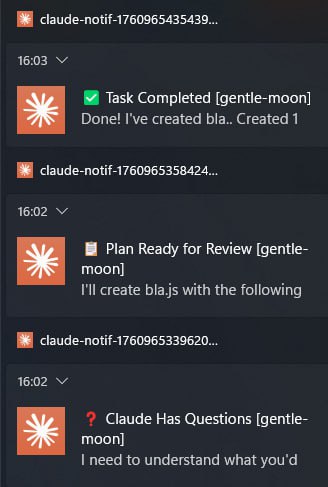
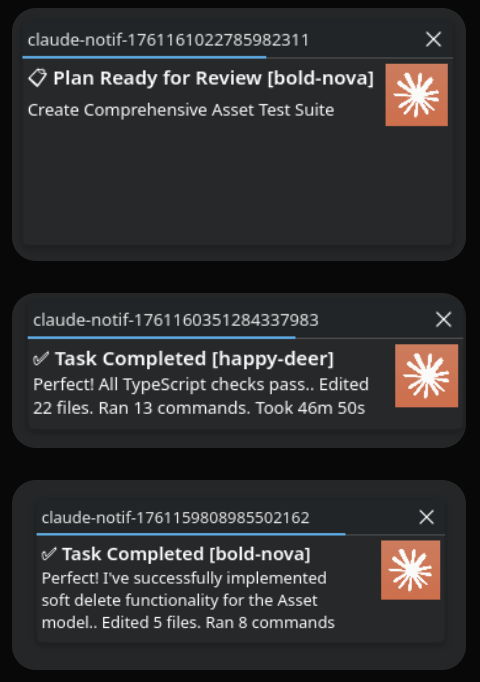
- **6 种通知类型**:任务完成、审查完成、提问、计划就绪、会话限制、API 错误
- **点击聚焦**(macOS、Linux):点击通知以聚焦到精确的项目窗口和标签页 —— Ghostty、VS Code、iTerm2、Warp、kitty、WezTerm、Alacritty、Hyper、Apple Terminal、GNOME Terminal、Konsole、Tilix、Terminator、XFCE4 Terminal、MATE Terminal
- **多路复用器**:tmux(包括 iTerm2 -CC 集成模式)、zellij、WezTerm、kitty —— 点击切换到正确的会话/窗格/标签页
- **标题中显示 Git 分支**:`✅ Completed main [cat]`
- **声音**:MP3/WAV/FLAC/OGG/AIFF,音量控制,音频设备选择
- **Webhook**:Slack、Discord、Telegram、Lark/Feishu、Microsoft Teams、ntfy.sh、PagerDuty、Zapier、n8n、Make、自定义 —— 支持重试、熔断器、速率限制([文档](docs/webhooks/README.md))
- **[插件兼容性](docs/PLUGIN_COMPATIBILITY.md)**:与 [double-shot-latte](https://github.com/obra/double-shot-latte) 及其他生成后台 Claude 实例的插件兼容
## 安装说明
### 前置条件
- Claude Code
- **Windows 用户**:Git Bash(随 [Git for Windows](https://git-scm.com/download/win) 附带)或 WSL
- **macOS/Linux 用户**:无需额外软件
### 快速安装(推荐)
一条命令即可完成所有安装:
```
curl -fsSL https://raw.githubusercontent.com/777genius/claude-notifications-go/main/bin/bootstrap.sh | bash
```
然后重启 Claude Code,并可选择运行 `/claude-notifications-go:settings` 来配置声音。
二进制文件仅下载一次并在本地缓存。您可以随时重新运行 `/claude-notifications-go:settings` 进行重新配置。
### 手动安装
在 Claude Code 中逐步安装(如果引导程序不起作用)
在 Claude Code 聊天中运行这些斜杠命令,而不是在系统终端中:
```
# 添加 marketplace
/plugin marketplace add 777genius/claude-notifications-go
# 安装 plugin
/plugin install claude-notifications-go@claude-notifications-go
# 重启 Claude Code
# 下载 binary
/claude-notifications-go:init
# (可选)配置 sounds 和 settings
/claude-notifications-go:settings
```
### 更新
运行与安装相同的命令 —— 它将同时更新插件和二进制文件:
```
curl -fsSL https://raw.githubusercontent.com/777genius/claude-notifications-go/main/bin/bootstrap.sh | bash
```
然后重启 Claude Code 以应用新版本。您在 `~/.claude/claude-notifications-go/config.json` 中的设置将在更新后保留。
手动更新(如果引导程序不起作用)
Claude Code 也会定期自动检查插件更新。当检测到版本不匹配时,二进制文件会在下次 Hook 调用时更新。
通过 Claude Code UI 手动更新:
1. 运行 `/plugin`,选择 **Marketplaces**,选择 `claude-notifications-go`,然后选择 **Update marketplace**
2. 选择 **Installed**,选择 `claude-notifications-go`,然后选择 **Update now**
如果二进制文件自动更新失败(例如当时无网络),请运行 `/claude-notifications-go:init` 手动下载。如果新版本中的 Hook 定义发生变化,请重启 Claude Code 以应用它们。
## 支持的通知类型
| 状态 | 图标 | 描述 | 触发器 |
|--------|------|-------------|---------|
| Task Complete | ✅ | 主任务已完成 | Stop/SubagentStop hooks(状态机检测到活跃工具如 Write/Edit/Bash,或 ExitPlanMode 后跟工具使用) |
| Review Complete | 🔍 | 代码审查已完成 | Stop/SubagentStop hooks(状态机仅检测到类读取工具:Read/Grep/Glob 且无活跃工具,加上长文本响应 >200 字符) |
| Question | ❓ | Claude 有问题 | PreToolUse hook (AskUserQuestion) 或 Notification hook |
| Plan Ready | 📋 | 计划已准备好审批 | PreToolUse hook (ExitPlanMode) |
| Session Limit Reached | ⏱️ | 已达到会话限制 | Stop/SubagentStop hooks(状态机在最近 3 条助手消息中检测到 "Session limit reached" 文本) |
| API Error | 🔴 | 认证过期、速率限制、服务器错误、连接错误 | Stop/SubagentStop hooks(状态机通过 JSONL 中的 `isApiErrorMessage` 标志 + `error` 字段检测) |
## 平台支持
**支持的平台:**
- macOS(Intel 和 Apple Silicon)
- Linux(x64 和 ARM64)
- Windows 10+(x64)
**无额外依赖:**
- ✅ 二进制文件从 GitHub Releases 自动下载
- ✅ 纯 Go - 无需 C 编译器
- ✅ 所有库已打包
- ✅ 首次设置后可离线工作
**Windows 特定功能:**
- 原生 Toast 通知(Windows 10+)
- 适用于 PowerShell、CMD、Git Bash 或 WSL
- 通过原生 Windows API 播放 MP3/WAV/OGG/FLAC 音频
- 系统声音不可访问 - 使用内置 MP3 或自定义文件
### 点击聚焦(macOS & Linux)
点击通知会激活您的终端窗口。自动检测终端和平台。
**macOS** — 通过 AX API 和 Bundle ID 检测:
| 终端 | 聚焦方法 |
|----------|-------------|
| Ghostty | AXDocument (OSC 7 CWD) |
| VS Code / Insiders / Cursor | AXTitle (focus-window 子命令) |
| iTerm2, Warp, kitty, WezTerm, Alacritty, Hyper, Apple Terminal | AXTitle (focus-window 子命令) |
| 其他(自定义 `terminalBundleId`) | AXTitle (focus-window 子命令) |
**Linux** — 通过 D-Bus 守护进程和自动合成器检测:
| 终端 | 支持的合成器 |
|----------|----------------------|
| VS Code | GNOME, KDE, Sway, X11 |
| GNOME Terminal, Konsole, Alacritty, kitty, WezTerm, Tilix, Terminator, XFCE4 Terminal, MATE Terminal | GNOME, KDE, Sway, X11 |
| 其他 | 按名称回退 |
Linux 聚焦方法(按顺序尝试):GNOME 扩展、GNOME Shell Eval、GNOME FocusApp、wlrctl (Sway/wlroots)、kdotool (KDE)、xdotool (X11)。
**多路复用器**(两个平台):tmux(包括 iTerm2 -CC 集成模式)、zellij、WezTerm、kitty —— 点击切换到正确的窗格/标签页。
**Windows** — 仅通知,不支持点击聚焦。
详情请参阅 **[点击聚焦指南](docs/CLICK_TO_FOCUS.md)**。
## 配置
运行 `/claude-notifications-go:settings` 通过交互式向导配置声音、音量、Webhook 和其他选项。您可以随时重新运行以重新配置。
### 手动配置
配置文件位置:
| 平台 | 路径 |
|----------|------|
| macOS / Linux | `~/.claude/claude-notifications-go/config.json` |
| Windows (Git Bash) | `~/.claude/claude-notifications-go/config.json` |
| Windows (PowerShell) | `$env:USERPROFILE\.claude\claude-notifications-go\config.json` |
直接编辑配置文件:
```
{
"notifications": {
"desktop": {
"enabled": true,
"sound": true,
"volume": 1.0,
"audioDevice": "",
"clickToFocus": true,
"terminalBundleId": "",
"appIcon": "${CLAUDE_PLUGIN_ROOT}/claude_icon.png"
},
"webhook": {
"enabled": false,
"preset": "slack",
"url": "",
"chat_id": "",
"format": "json",
"headers": {}
},
"suppressQuestionAfterTaskCompleteSeconds": 12,
"suppressQuestionAfterAnyNotificationSeconds": 7,
"notifyOnSubagentStop": false,
"notifyOnTextResponse": true,
"respectJudgeMode": true,
"suppressFilters": [
{
"name": "Suppress ClaudeProbe completions (remote-control)",
"status": "task_complete",
"gitBranch": "",
"folder": "ClaudeProbe"
}
]
},
"statuses": {
"task_complete": {
"title": "✅ Completed",
"sound": "${CLAUDE_PLUGIN_ROOT}/sounds/task-complete.mp3"
},
"review_complete": {
"title": "🔍 Review",
"sound": "${CLAUDE_PLUGIN_ROOT}/sounds/review-complete.mp3"
},
"question": {
"title": "❓ Question",
"sound": "${CLAUDE_PLUGIN_ROOT}/sounds/question.mp3"
},
"plan_ready": {
"title": "📋 Plan",
"sound": "${CLAUDE_PLUGIN_ROOT}/sounds/plan-ready.mp3"
},
"session_limit_reached": {
"title": "⏱️ Session Limit Reached",
"sound": "${CLAUDE_PLUGIN_ROOT}/sounds/error.mp3"
},
"api_error": {
"title": "🔴 API Error: 401",
"sound": "${CLAUDE_PLUGIN_ROOT}/sounds/error.mp3"
},
"api_error_overloaded": {
"title": "🔴 API Error",
"sound": "${CLAUDE_PLUGIN_ROOT}/sounds/error.mp3"
}
}
}
```
| 选项 | 默认值 | 描述 |
|--------|---------|-------------|
| `notifyOnSubagentStop` | `false` | 当子代理(Task 工具)完成时发送通知 |
| `notifyOnTextResponse` | `true` | 为纯文本响应(无工具使用)发送通知 |
| `respectJudgeMode` | `true` | 遵守 `CLAUDE_HOOK_JUDGE_MODE=true` 环境变量以抑制通知 |
| `suppressQuestionAfterTaskCompleteSeconds` | `12` | 在任务完成后的 N 秒内抑制提问通知 |
| `suppressQuestionAfterAnyNotificationSeconds` | `7` | 在任何通知后的 N 秒内抑制提问通知 |
| `suppressFilters` | `[]` | 用于根据状态、Git 分支和/或文件夹抑制通知的规则数组。每条规则是其字段的与逻辑;省略的字段匹配任何值。将 `gitBranch` 设置为 `""` 以匹配 Git 仓库之外的会话。 |
每种状态都可以通过添加 `"enabled": false` 单独禁用。
### 声音选项
**内置声音**(包含):
- `${CLAUDE_PLUGIN_ROOT}/sounds/task-complete.mp3`
- `${CLAUDE_PLUGIN_ROOT}/sounds/review-complete.mp3`
- `${CLAUDE_PLUGIN_ROOT}/sounds/question.mp3`
- `${CLAUDE_PLUGIN_ROOT}/sounds/plan-ready.mp3`
- `${CLAUDE_PLUGIN_ROOT}/sounds/error.mp3`
**系统声音:**
- macOS:`/System/Library/Sounds/Glass.aiff`、`/System/Library/Sounds/Hero.aiff` 等。
- Linux:`/usr/share/sounds/**/*.ogg`(因发行版而异)
- Windows:使用内置 MP3(系统声音不易访问)
**支持的格式:** MP3、WAV、FLAC、OGG/Vorbis、AIFF
### 列出可用声音
查看系统上所有可用的通知声音:
```
# 列出所有 sounds(内置 + 系统)
bin/list-sounds
# 输出为 JSON
bin/list-sounds --json
# 预览 sound
bin/list-sounds --play task-complete
# 以特定音量预览
bin/list-sounds --play Glass --volume 0.5
```
或使用 skill 命令:`/claude-notifications-go:sounds`
### 音频设备选择
将通知声音路由到特定的音频输出设备,而不是系统默认设备:
```
# 列出可用 audio devices
bin/list-devices
# 输出:
# 0: MacBook Pro-Lautsprecher
# 1: Babyface (23314790) (default)
# 2: Immersed
```
然后将设备名称添加到您的 `~/.claude/claude-notifications-go/config.json`:
```
{
"notifications": {
"desktop": {
"audioDevice": "MacBook Pro-Lautsprecher"
}
}
}
```
将 `audioDevice` 留空或省略以使用系统默认设备。
### 测试声音播放
预览任何声音文件,并可选地控制音量:
```
# 测试内置 sound(满音量)
bin/sound-preview sounds/task-complete.mp3
# 以降低的音量测试(30% - 推荐用于测试)
bin/sound-preview --volume 0.3 sounds/task-complete.mp3
# 以 30% 音量测试 macOS 系统 sound
bin/sound-preview --volume 0.3 /System/Library/Sounds/Glass.aiff
# 以 50% 音量测试自定义 sound
bin/sound-preview --volume 0.5 /path/to/your/sound.wav
# 显示所有选项
bin/sound-preview --help
```
**音量标志:** 使用 `--volume` 控制播放音量(0.0 到 1.0)。默认为 1.0(全音量)。
## 手动测试
插件由 Claude Code Hooks 自动调用。手动测试请运行:
```
# 测试 PreToolUse hook
echo '{"session_id":"test","transcript_path":"/path/to/transcript.jsonl","tool_name":"ExitPlanMode"}' | \
claude-notifications handle-hook PreToolUse
# 测试 Stop hook
echo '{"session_id":"test","transcript_path":"/path/to/transcript.jsonl"}' | \
claude-notifications handle-hook Stop
```
## 故障排除
有关常见问题,请参阅 **[故障排除指南](docs/troubleshooting.md)**:
- **Ubuntu 24.04**:在 `/plugin install` 期间出现 `EXDEV: cross-device link not permitted`(TMPDIR 解决方法)
- **Windows**:与 `%TEMP%` / `%TMP%` 位置相关的安装问题
- **Windows / Git Bash**:由于代理 / TLS 检查 / 证书吊销导致 GitHub Releases 下载失败
## 文档
- **[架构](docs/ARCHITECTURE.md)** - 插件架构、目录结构、数据流
- **[本地开发与 E2E](docs/LOCAL_DEVELOPMENT.md)** - 本地市场测试、真实 Claude 冒烟测试、手动点击聚焦验证
- **[点击聚焦](docs/CLICK_TO_FOCUS.md)** - 配置、支持的终端、平台详情
- **[音量控制指南](docs/volume-control.md)** - 自定义通知音量
- 配置音量从 0% 到 100%
- 对数缩放以获得自然声音
- 针对特定环境的建议
- **[交互式声音预览](docs/interactive-sound-preview.md)** - 设置期间预览声音
- 交互式声音选择
- 选择前预览
**[插件兼容性](docs/PLUGIN_COMPATIBILITY.md)** - 与其他 Claude Code 插件集成
- **[故障排除](docs/troubleshooting.md)** - 常见安装/运行时问题
- Ubuntu 24.04 在 `/plugin install` 期间的 `EXDEV`(TMPDIR 解决方法)
- **[Webhook 集成指南](docs/webhooks/README.md)** - 完整的 Webhook 设置指南
- **[Slack](docs/webhooks/slack.md)** - 带颜色编码附件的 Slack 集成
- **[Discord](docs/webhooks/discord.md)** - 带丰富嵌入的 Discord 集成
- **[Telegram](docs/webhooks/telegram.md)** - Telegram Bot 集成
- **[Lark/Feishu](docs/webhooks/lark.md)** - 带交互式卡片的 Lark/Feishu 集成
- **[自定义 Webhook](docs/webhooks/custom.md)** - 任何兼容 Webhook 的服务
- **[配置](docs/webhooks/configuration.md)** - 重试、熔断器、速率限制
- **[监控](docs/webhooks/monitoring.md)** - 指标和调试
- **[故障排除](docs/webhooks/troubleshooting.md)** - 常见问题和解决方案
## 许可证
GPL-3.0 - 详情请参阅 [LICENSE](LICENSE) 文件。