max-sixty/worktrunk
GitHub: max-sixty/worktrunk
Worktrunk 是一个用 Rust 编写的 CLI 工具,通过简化 Git worktree 操作来支持多个 AI 编程 agent 并行工作。
Stars: 5462 | Forks: 184
 Worktrunk
[](https://worktrunk.dev)
[](https://crates.io/crates/worktrunk)
[](https://opensource.org/licenses/MIT)
[](https://github.com/max-sixty/worktrunk/actions?query=branch%3Amain+workflow%3Aci)
[](https://codecov.io/gh/max-sixty/worktrunk)
[](https://github.com/max-sixty/worktrunk/stargazers)
Worktrunk 是一个用于管理 git worktree 的 CLI,专为并行运行 AI agent 而设计。
Worktrunk 的三个核心命令让 worktree 操作像分支一样简单。此外,Worktrunk 还提供了许多提升生活质量的功能,以简化处理多个并行变更的工作流程,包括用于自动化本地工作流的 hooks。
扩展 agent 变得轻而易举。这是一个快速演示:

## 背景:git worktrees
像 Claude Code 和 Codex 这样的 AI agent 可以在无人监督的情况下处理更长的任务,因此可以并行管理 5-10+ 个 agent。Git 原生的 worktree 功能为每个 agent 提供了自己的工作目录,因此它们不会互相干扰彼此的更改。
但是 git worktree 的用户体验很笨拙。即使像启动一个新的 worktree 这样的小任务,也需要输入三次分支名称:`git worktree add -b feat ../repo.feat`,然后 `cd ../repo.feat`。
## Worktrunk 让 git worktrees 像分支一样简单
Worktree 通过分支名称来寻址;路径是根据可配置的模板计算得出的。
**核心命令:**
| 任务 |
Worktrunk |
Plain git |
| 切换 worktree |
wt switch feat |
cd ../repo.feat |
| 创建 + 启动 Claude |
wt switch -c -x claude feat |
git worktree add -b feat ../repo.feat && \

cd ../repo.feat && \

claude |
| 清理 |
wt remove |
cd ../repo && \

git worktree remove ../repo.feat && \

git branch -d feat |
| 列出状态 |
wt list |
git worktree list (仅显示路径) |
**工作流自动化:**
- **[Hooks](https://worktrunk.dev/hook/)** — 在创建、pre-merge、post-merge 等时机运行命令
- **[LLM commit messages](https://worktrunk.dev/llm-commits/)** — 根据差异生成 commit message
- **[Merge workflow](https://worktrunk.dev/merge/)** — 在一个命令中完成 squash、rebase、merge 和清理
- **[Interactive picker](https://worktrunk.dev/switch/#interactive-picker)** — 浏览 worktree,支持实时 diff 和 log 预览
- **[Copy build caches](https://worktrunk.dev/step/)** — 通过在 worktree 之间共享 `target/`、`node_modules/` 等来跳过冷启动
- ...以及 **[更多功能](#next-steps)**
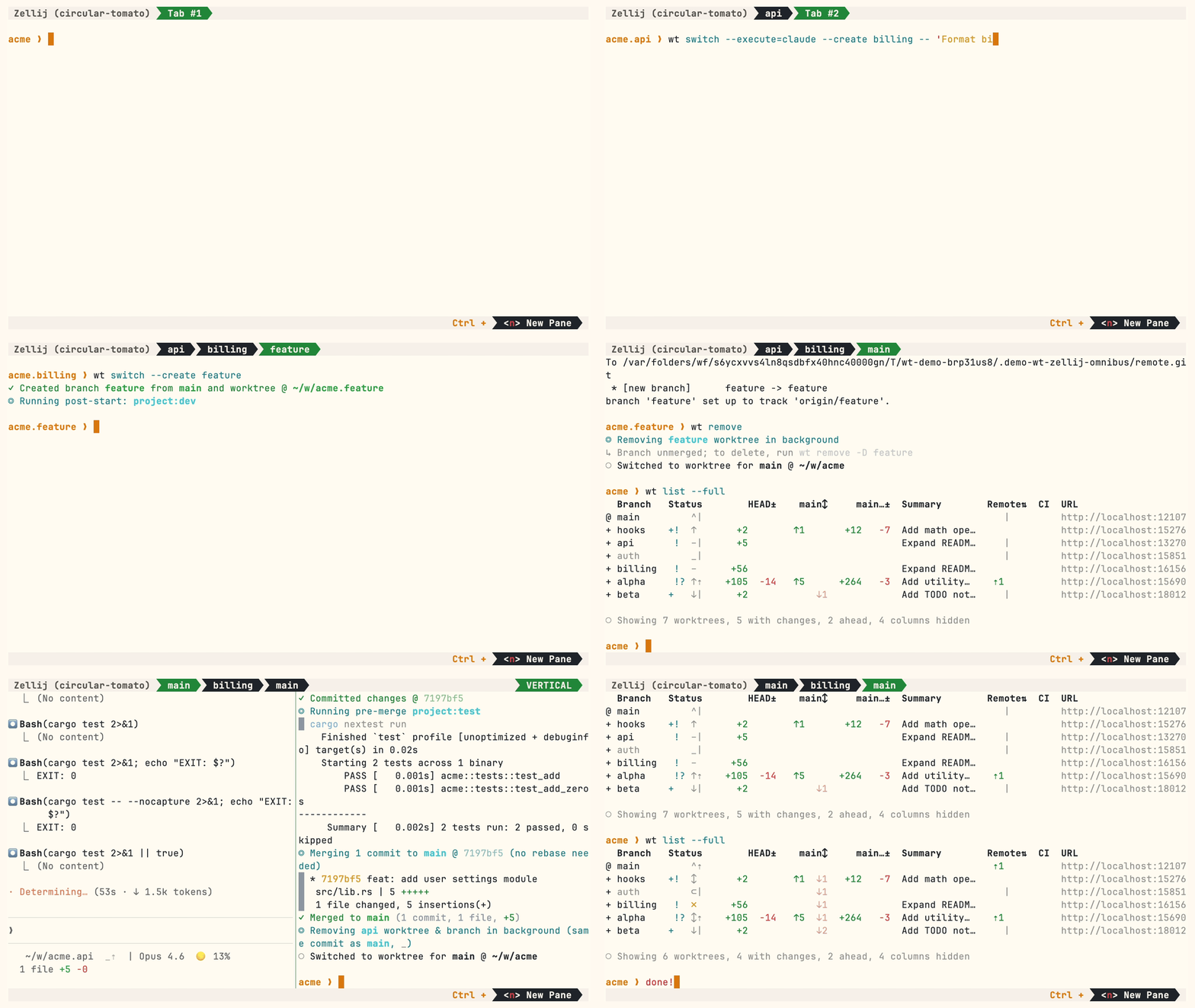
一个展示部分高级功能的演示:
## 安装
**Homebrew (macOS & Linux):**
```
brew install worktrunk && wt config shell install
```
Shell 集成允许命令更改目录。
**Cargo:**
```
cargo install worktrunk && wt config shell install
```
Windows
在 Windows 上,`wt` 默认为 Windows Terminal 的命令。Winget 还会将 Worktrunk 安装为 `git-wt` 以避免冲突:
```
winget install max-sixty.worktrunk
git-wt config shell install
```
或者,禁用 Windows Terminal 的别名(设置 → 隐私和安全性 → 面向开发人员 → 应用执行别名 → 禁用 "Windows Terminal")以直接使用 `wt`。
**Arch Linux:**
```
paru worktrunk-bin && wt config shell install
```
## 快速开始
为一个新功能创建 worktree:
```
$ wt switch --create feature-auth
✓ Created branch feature-auth from main and worktree @ repo.feature-auth
```
这将创建一个新分支和 worktree,然后切换到它。进行你的工作,然后使用 [`wt list`](https://worktrunk.dev/list/) 检查所有 worktree:
```
$ wt list
Branch Status HEAD± main↕ Remote⇅ Commit Age Message
@ feature-auth + – +53 0e631add 1d Initial commit
^ main ^⇡ ⇡1 0e631add 1d Initial commit
○ Showing 2 worktrees, 1 with changes, 1 column hidden
```
`@` 标记当前 worktree。`+` 表示暂存的更改,`⇡` 表示未推送的 commit。
完成后,可以:
**PR 工作流** — commit、push、打开 PR、通过 GitHub/GitLab 合并,然后清理:
```
wt step commit # commit staged changes
gh pr create # or glab mr create
wt remove # after PR is merged
```
**本地合并** — squash、rebase 到 main、fast-forward 合并、清理:
```
$ wt merge main
◎ Generating commit message and committing changes... (2 files, +53, no squashing needed)
Add authentication module
✓ Committed changes @ a1b2c3d
◎ Merging 1 commit to main @ a1b2c3d (no rebase needed)
* a1b2c3d Add authentication module
auth.rs | 51 +++++++++++++++++++++++++++++++++++++++++++++++++++
lib.rs | 2 ++
2 files changed, 53 insertions(+)
✓ Merged to main (1 commit, 2 files, +53)
◎ Removing feature-auth worktree & branch in background (same commit as main, _)
○ Switched to worktree for main @ repo
```
对于并行 agent,创建多个 worktree 并在每个中启动一个 agent:
```
wt switch -x claude -c feature-a -- 'Add user authentication'
wt switch -x claude -c feature-b -- 'Fix the pagination bug'
wt switch -x claude -c feature-c -- 'Write tests for the API'
```
`-x` 标志在切换后运行命令;`--` 之后的参数会传递给它。配置 [post-start hooks](https://worktrunk.dev/hook/) 以自动化设置(安装依赖项、启动开发服务器)。
## 下一步
- 学习核心命令:[`wt switch`](https://worktrunk.dev/switch/)、[`wt list`](https://worktrunk.dev/list/)、[`wt merge`](https://worktrunk.dev/merge/)、[`wt remove`](https://worktrunk.dev/remove/)
- 设置[项目 hooks](https://worktrunk.dev/hook/) 以实现自动化配置
- 探索 [LLM commit messages](https://worktrunk.dev/llm-commits/)、[interactive
picker](https://worktrunk.dev/switch/#interactive-picker)、[Claude Code integration](https://worktrunk.dev/claude-code/)、[CI
status & PR links](https://worktrunk.dev/list/#ci-status)
- 运行 `wt --help` 或 `wt
--help` 获取快速 CLI 参考
## 延伸阅读
- [Claude Code: Best practices for agentic coding](https://www.anthropic.com/engineering/claude-code-best-practices) — Anthropic 官方指南,包含 worktree 模式
- [Shipping faster with Claude Code and Git Worktrees](https://incident.io/blog/shipping-faster-with-claude-code-and-git-worktrees) — incident.io 关于并行 agent 的工作流
- [Git worktree pattern discussion](https://github.com/anthropics/claude-code/issues/1052) — Claude Code 仓库中的社区讨论
- [git-worktree documentation](https://git-scm.com/docs/git-worktree) — 官方 git 参考
## 贡献
- ⭐ Star 本仓库
- 向朋友推荐 Worktrunk
- [提出 issue](https://github.com/max-sixty/worktrunk/issues/new?title=&body=%23%23%20Description%0A%0A%3C!--%20Describe%20the%20bug%20or%20feature%20request%20--%3E%0A%0A%23%23%20Context%0A%0A%3C!--%20Any%20relevant%20context%3A%20your%20workflow%2C%20what%20you%20were%20trying%20to%20do%2C%20etc.%20--%3E) — 反馈、功能请求,即使是一个小的摩擦点或不完美的用户体验,或者[一个尚未解决的 worktree 痛点](https://github.com/max-sixty/worktrunk/issues/new?title=Worktree%20friction%3A%20&body=%23%23%20The%20friction%0A%0A%3C!--%20What%20worktree-related%20task%20is%20still%20painful%3F%20--%3E%0A%0A%23%23%20Current%20workaround%0A%0A%3C!--%20How%20do%20you%20handle%20this%20today%3F%20--%3E%0A%0A%23%23%20Ideal%20solution%0A%0A%3C!--%20What%20would%20make%20this%20easier%3F%20--%3E)
- 分享:[X](https://twitter.com/intent/tweet?text=Worktrunk%20%E2%80%94%20CLI%20for%20git%20worktree%20management&url=https%3A%2F%2Fworktrunk.dev) · [Reddit](https://www.reddit.com/submit?url=https%3A%2F%2Fworktrunk.dev&title=Worktrunk%20%E2%80%94%20CLI%20for%20git%20worktree%20management) · [LinkedIn](https://www.linkedin.com/sharing/share-offsite/?url=https%3A%2F%2Fworktrunk.dev)
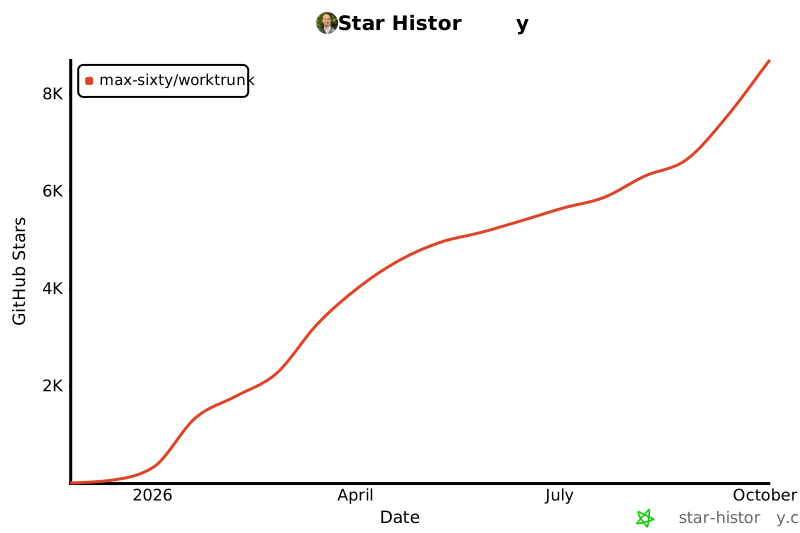
### Star 历史
标签:Claude Code, CLI 工具, Codex, Git Worktree, Git 工作树, Rust, 人工智能代理, 代码管理, 可视化界面, 威胁情报, 安全可观测性, 工作目录管理, 并行工作流, 开发者工具, 效率工具, 文档结构分析, 版本控制, 网络安全研究, 网络流量审计, 网络调试, 自动化, 软件开发, 通知系统, 通知系统