pooyaphoenix/RA3G-Agent
GitHub: pooyaphoenix/RA3G-Agent
一个具备敏感信息过滤治理 Agent 的本地多智能体 RAG 系统,支持私有文档检索与隐私保护。
Stars: 12 | Forks: 4
策略感知 RAG 多智能体 AI 系统



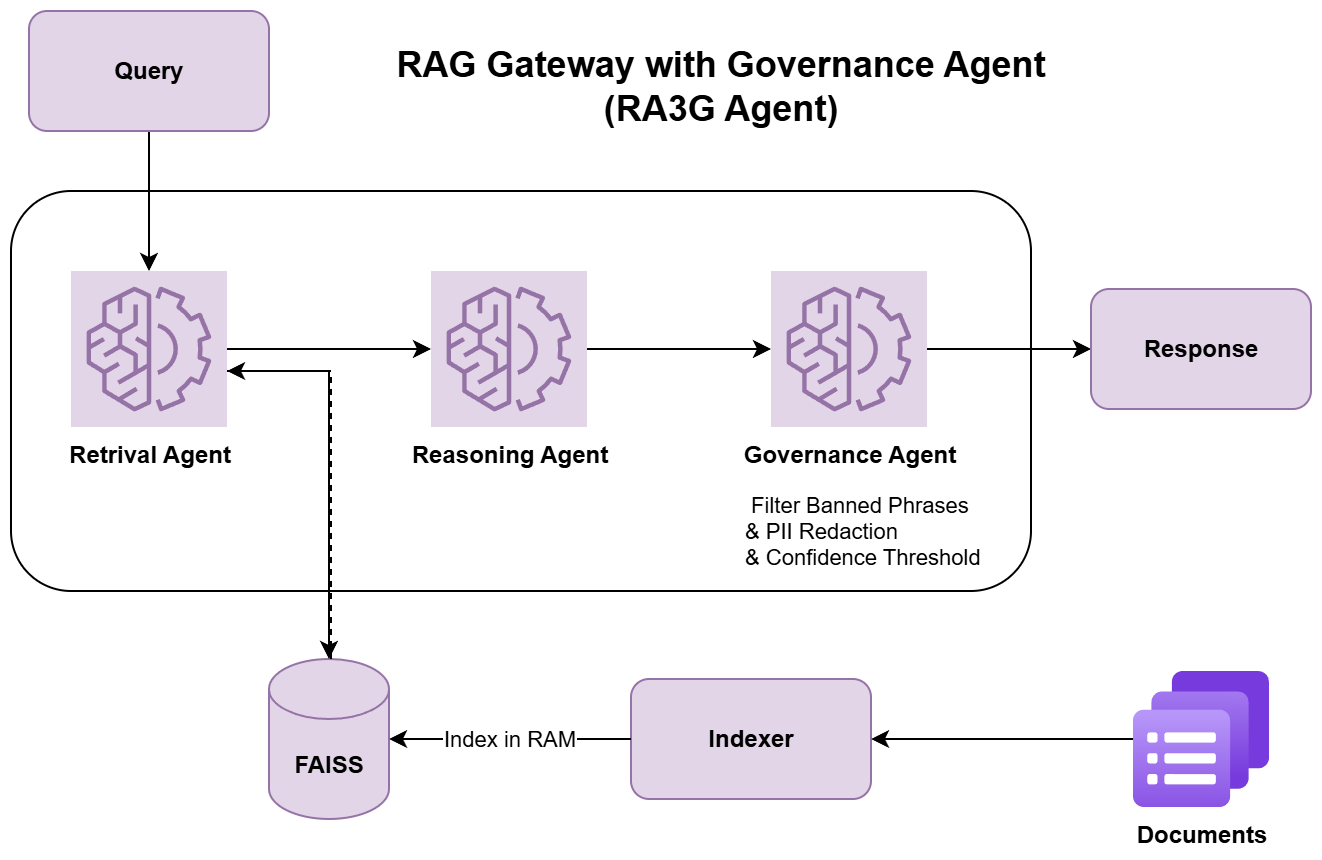 **Agent 流程:**
1. **Retriever Agent** - 从您的语料库中查找相关段落
2. **Reasoning Agent** - 使用 Ollama LLM 生成答案
3. **Governance Agent** - 根据策略验证并过滤响应
## 📖 使用示例
### Web UI
1. 打开 http://localhost:8501
2. 导航至 **Chat** 标签页
3. 输入您的问题并获取即时答案
### API 请求
```
curl -X POST 'http://localhost:8010/query' \
-H 'Content-Type: application/json' \
-H 'session-id: my-session' \
-d '{
"query": "What are the benefits of regular hand washing?",
"top_k": 5
}'
```
### API 响应
```
{
"query": "What are the benefits of regular hand washing?",
"answer": "Preventing the spread of infections is one of the simplest ways.",
"governance": {
"approved": true,
"reason": "approved"
},
"trace": [
{
"index": 0,
"note": "relevant passage about benefits of hand washing"
}
],
"retrieved": [
{
"id": "corpus_medical_general.txt#p0",
"text": "...",
"source": "corpus_medical_general.txt",
"score": 0.51
}
],
"confidence": 0.512,
"session_id": "my-session"
}
```
### Python 客户端示例
```
import requests
response = requests.post(
'http://localhost:8010/query',
headers={'session-id': 'my-session'},
json={'query': 'What is machine learning?', 'top_k': 5}
)
print(response.json()['answer'])
```
## 🔌 API 端点
| 方法 | 端点 | 描述 |
|--------|----------|-------------|
| `POST` | `/query` | 通过 RAG 提问 |
| `GET` | `/health` | 检查所有 agent 的健康状况 |
| `GET` | `/health/{agent}` | 检查特定 agent 的健康状况 |
| `GET` | `/trace` | 获取会话查询历史记录 |
| `DELETE` | `/memory/clear` | 清除会话记忆 |
| `GET` | `/docs` | 交互式 Swagger UI |
| `GET` | `/logs/stream/{log_type}` | 实时流式传输日志 (SSE) |
**在线体验:** http://localhost:8010/docs
## 🛡️ 治理规则
治理 agent 会根据以下内容自动拦截或批准查询:
❌ **拦截:**
- 个人姓名、电话号码、地址
- 医疗记录和患者数据
- 机密企业信息
- 违禁短语(可在 `config.yml` 中配置)
✅ **允许:**
- 一般性的医学和科学问题
- 教育内容
- 公开信息
## 📂 添加文档
1. **将您的文档放入** `data/corpus/` 目录中(支持 `.txt` 或 `.md` 文件)
2. **自动索引** - 系统在启动时会构建 FAISS 索引
3. **手动索引**(可选):
python indexer.py --corpus data/corpus
**配置:** 编辑 `config.yml` 以自定义语料库目录和索引行为。
## ⚙️ 配置
所有设置均位于 `config.yml` 中:
```
# Ollama 配置
OLLAMA_URL: http://localhost:11434/api/generate
OLLAMA_MODEL: qwen2.5:7b-instruct
# Embedding Model
EMBED_MODEL: all-MiniLM-L6-v2
# Confidence 阈值
THRESHOLDS:
retriever: 0.72
reasoner: 0.81
# 启动时自动构建 index
AUTO_BUILD_FAISS: true
CORPUS_DIR: data/corpus
# 治理的违禁短语
BANNED_PHRASES:
- diagnosis
- prescription
- classified
- confidential
```
## 🧪 测试
```
# Health check
curl http://localhost:8010/health
# 测试 query
curl -X POST http://localhost:8010/query \
-H 'Content-Type: application/json' \
-H 'session-id: test' \
-d '{"query": "Hello", "top_k": 3}'
```
## 📝 环境要求
- Python 3.8+
- Ollama(用于 LLM 推理)
- Docker(可选,用于容器化部署)
有关 Python 依赖项,请参阅 `requirements.txt`。
## 📧 联系方式
**pooyachavoshi@gmail.com**
## 📄 许可证
有关详细信息,请参阅 [LICENSE](LICENSE) 文件。
**Agent 流程:**
1. **Retriever Agent** - 从您的语料库中查找相关段落
2. **Reasoning Agent** - 使用 Ollama LLM 生成答案
3. **Governance Agent** - 根据策略验证并过滤响应
## 📖 使用示例
### Web UI
1. 打开 http://localhost:8501
2. 导航至 **Chat** 标签页
3. 输入您的问题并获取即时答案
### API 请求
```
curl -X POST 'http://localhost:8010/query' \
-H 'Content-Type: application/json' \
-H 'session-id: my-session' \
-d '{
"query": "What are the benefits of regular hand washing?",
"top_k": 5
}'
```
### API 响应
```
{
"query": "What are the benefits of regular hand washing?",
"answer": "Preventing the spread of infections is one of the simplest ways.",
"governance": {
"approved": true,
"reason": "approved"
},
"trace": [
{
"index": 0,
"note": "relevant passage about benefits of hand washing"
}
],
"retrieved": [
{
"id": "corpus_medical_general.txt#p0",
"text": "...",
"source": "corpus_medical_general.txt",
"score": 0.51
}
],
"confidence": 0.512,
"session_id": "my-session"
}
```
### Python 客户端示例
```
import requests
response = requests.post(
'http://localhost:8010/query',
headers={'session-id': 'my-session'},
json={'query': 'What is machine learning?', 'top_k': 5}
)
print(response.json()['answer'])
```
## 🔌 API 端点
| 方法 | 端点 | 描述 |
|--------|----------|-------------|
| `POST` | `/query` | 通过 RAG 提问 |
| `GET` | `/health` | 检查所有 agent 的健康状况 |
| `GET` | `/health/{agent}` | 检查特定 agent 的健康状况 |
| `GET` | `/trace` | 获取会话查询历史记录 |
| `DELETE` | `/memory/clear` | 清除会话记忆 |
| `GET` | `/docs` | 交互式 Swagger UI |
| `GET` | `/logs/stream/{log_type}` | 实时流式传输日志 (SSE) |
**在线体验:** http://localhost:8010/docs
## 🛡️ 治理规则
治理 agent 会根据以下内容自动拦截或批准查询:
❌ **拦截:**
- 个人姓名、电话号码、地址
- 医疗记录和患者数据
- 机密企业信息
- 违禁短语(可在 `config.yml` 中配置)
✅ **允许:**
- 一般性的医学和科学问题
- 教育内容
- 公开信息
## 📂 添加文档
1. **将您的文档放入** `data/corpus/` 目录中(支持 `.txt` 或 `.md` 文件)
2. **自动索引** - 系统在启动时会构建 FAISS 索引
3. **手动索引**(可选):
python indexer.py --corpus data/corpus
**配置:** 编辑 `config.yml` 以自定义语料库目录和索引行为。
## ⚙️ 配置
所有设置均位于 `config.yml` 中:
```
# Ollama 配置
OLLAMA_URL: http://localhost:11434/api/generate
OLLAMA_MODEL: qwen2.5:7b-instruct
# Embedding Model
EMBED_MODEL: all-MiniLM-L6-v2
# Confidence 阈值
THRESHOLDS:
retriever: 0.72
reasoner: 0.81
# 启动时自动构建 index
AUTO_BUILD_FAISS: true
CORPUS_DIR: data/corpus
# 治理的违禁短语
BANNED_PHRASES:
- diagnosis
- prescription
- classified
- confidential
```
## 🧪 测试
```
# Health check
curl http://localhost:8010/health
# 测试 query
curl -X POST http://localhost:8010/query \
-H 'Content-Type: application/json' \
-H 'session-id: test' \
-d '{"query": "Hello", "top_k": 3}'
```
## 📝 环境要求
- Python 3.8+
- Ollama(用于 LLM 推理)
- Docker(可选,用于容器化部署)
有关 Python 依赖项,请参阅 `requirements.txt`。
## 📧 联系方式
**pooyachavoshi@gmail.com**
## 📄 许可证
有关详细信息,请参阅 [LICENSE](LICENSE) 文件。标签:AI风险缓解, Docker, Kubernetes, Python, RAG, Streamlit, 人工智能, 多智能体, 安全防御评估, 数据合规, 无后门, 用户模式Hook绕过, 网络安全, 网络测绘, 访问控制, 请求拦截, 逆向工具, 隐私保护