claration/Impactor
GitHub: claration/Impactor
用 Rust 编写的开源跨平台 iOS/tvOS 应用侧载工具,支持 tweak 注入、多种格式插件和完整的签名管理功能。
Stars: 2528 | Forks: 143
#  Impactor
[](https://github.com/claration/Impactor/releases)
[](https://github.com/claration/Impactor/releases)
[](https://github.com/claration/Impactor/blob/main/LICENSE)
[](https://github.com/sponsors/claration)
开源、跨平台且功能丰富的 iOS 侧载应用程序。支持 macOS、Linux[^1] 和 Windows[^2]。
[^1]: 在 Linux 上,您的系统必须安装 usbmuxd。不过别担心,大多数流行的发行版默认已经包含它了!但是,由于某些发行版的 [udev](https://man7.org/linux/man-pages/man7/udev.7.html) 规则,`usbmuxd` 可能在没有设备连接时停止运行,导致 Impactor 在插入设备后无法检测到设备。您可以通过先插入手机然后重启应用来缓解此问题。\
\
自动刷新功能将无法像在 macOS/Windows 等其他平台上那样工作,因为 `usbmuxd` 缺乏 WiFi 连接功能,因此它只会在设备插入时尝试自动刷新,不过我们正在寻找合适的解决方案。\
\
某些发行版(如 Bazzite)可能需要您运行 `sudo update-crypto-policies`,以便 `usbmuxd` 能够再次检测到设备。
[^2]: 在 Windows 上,必须下载 [iTunes](https://support.apple.com/en-us/106372),以便 Impactor 能够使用驱动程序与 Apple 设备进行交互。
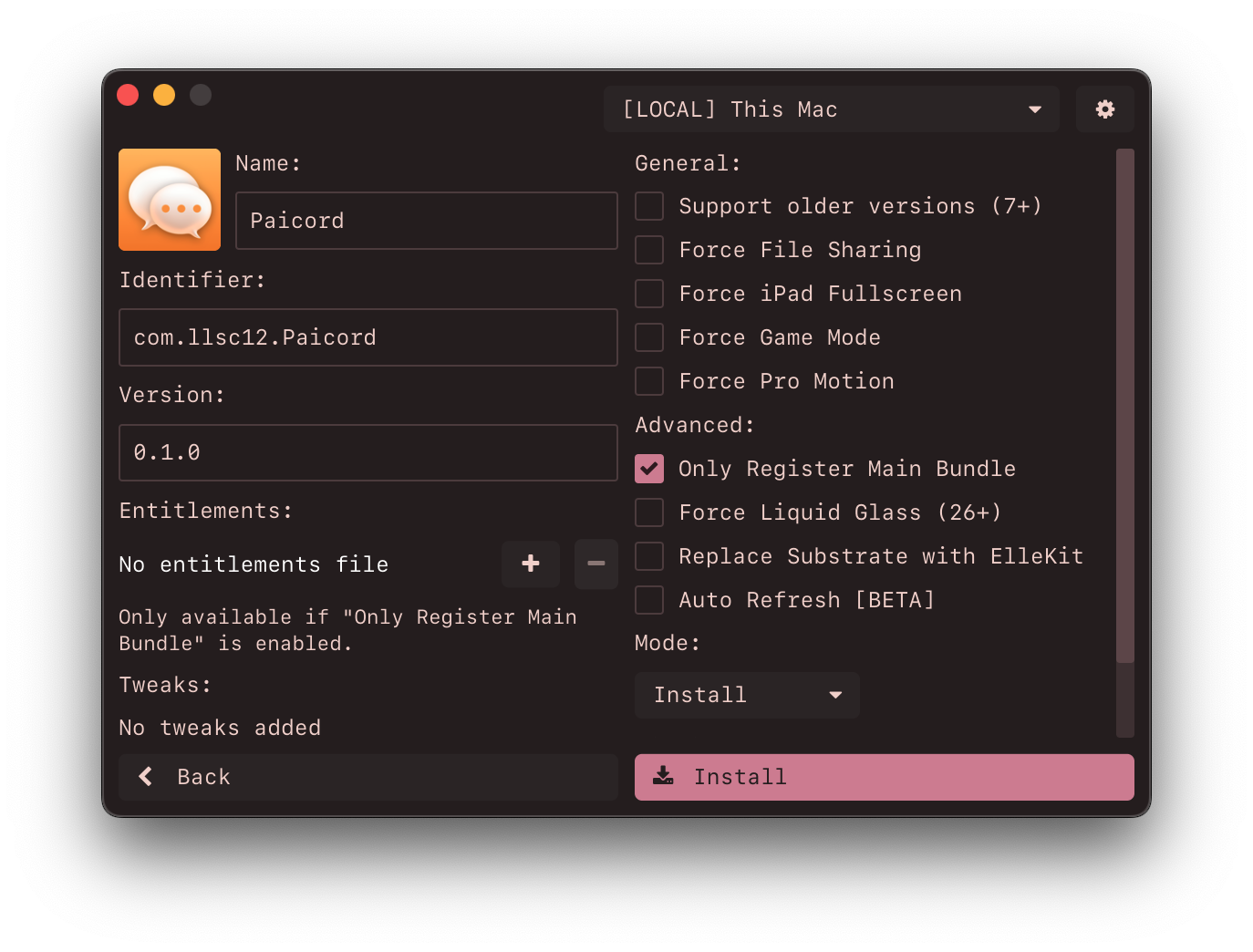
### 功能特性
- 用户友好且简洁的 UI。
- 支持正确安装 [SideStore](https://github.com/SideStore/SideStore) 和 [LiveContainer](https://github.com/LiveContainer/LiveContainer)。
- 支持 Linux。
- 使用您的 Apple ID 在 iOS 9.0+ 和 Mac 上签名并侧载应用程序。
- 支持使用 [AppSync](https://github.com/akemin-dayo/AppSync) 进行安装。
- 支持安装通过 ipatool 获取的 ipa 文件。
- 自动禁用 App Store 的更新。
- 简单的应用自定义选项。
- 为高级用户提供 Tweak 支持,使用 [ElleKit](https://github.com/tealbathingsuit/ellekit) 进行注入。
- 支持注入 `.deb` 和 `.dylib` 文件。
- 支持添加 `.framework`、`.bundle` 和 `.appex` 目录。
- 支持将 Cydia Substrate 替换为 ElleKit 以兼容 26.0 版本。
- 为 SideStore/AltStore 生成 P12,类似于 Altserver。
- 自动为 SideStore、Antrag 和 Protokolle 等应用填充配对文件。
- 内置简单的设备工具,用于重新信任/放置配对文件。
- 导出 P12 以供 LiveContainer 使用。
- 几乎*正确*的 entitlement 处理,并且可以注册应用插件。
- 能够请求诸如 `increased-memory-limit` 之类的 entitlement,适用于 MelonX 或 UTM 等模拟器。
## 下载
访问 [releases](https://github.com/khcrysalis/PlumeImpactor/releases) 并获取适合您计算机的最新版本。
###### *也可通过 flatpak 和 homebrew 获取。*
**Linux:**
Impactor
[](https://github.com/claration/Impactor/releases)
[](https://github.com/claration/Impactor/releases)
[](https://github.com/claration/Impactor/blob/main/LICENSE)
[](https://github.com/sponsors/claration)
开源、跨平台且功能丰富的 iOS 侧载应用程序。支持 macOS、Linux[^1] 和 Windows[^2]。
[^1]: 在 Linux 上,您的系统必须安装 usbmuxd。不过别担心,大多数流行的发行版默认已经包含它了!但是,由于某些发行版的 [udev](https://man7.org/linux/man-pages/man7/udev.7.html) 规则,`usbmuxd` 可能在没有设备连接时停止运行,导致 Impactor 在插入设备后无法检测到设备。您可以通过先插入手机然后重启应用来缓解此问题。\
\
自动刷新功能将无法像在 macOS/Windows 等其他平台上那样工作,因为 `usbmuxd` 缺乏 WiFi 连接功能,因此它只会在设备插入时尝试自动刷新,不过我们正在寻找合适的解决方案。\
\
某些发行版(如 Bazzite)可能需要您运行 `sudo update-crypto-policies`,以便 `usbmuxd` 能够再次检测到设备。
[^2]: 在 Windows 上,必须下载 [iTunes](https://support.apple.com/en-us/106372),以便 Impactor 能够使用驱动程序与 Apple 设备进行交互。

### 功能特性
- 用户友好且简洁的 UI。
- 支持正确安装 [SideStore](https://github.com/SideStore/SideStore) 和 [LiveContainer](https://github.com/LiveContainer/LiveContainer)。
- 支持 Linux。
- 使用您的 Apple ID 在 iOS 9.0+ 和 Mac 上签名并侧载应用程序。
- 支持使用 [AppSync](https://github.com/akemin-dayo/AppSync) 进行安装。
- 支持安装通过 ipatool 获取的 ipa 文件。
- 自动禁用 App Store 的更新。
- 简单的应用自定义选项。
- 为高级用户提供 Tweak 支持,使用 [ElleKit](https://github.com/tealbathingsuit/ellekit) 进行注入。
- 支持注入 `.deb` 和 `.dylib` 文件。
- 支持添加 `.framework`、`.bundle` 和 `.appex` 目录。
- 支持将 Cydia Substrate 替换为 ElleKit 以兼容 26.0 版本。
- 为 SideStore/AltStore 生成 P12,类似于 Altserver。
- 自动为 SideStore、Antrag 和 Protokolle 等应用填充配对文件。
- 内置简单的设备工具,用于重新信任/放置配对文件。
- 导出 P12 以供 LiveContainer 使用。
- 几乎*正确*的 entitlement 处理,并且可以注册应用插件。
- 能够请求诸如 `increased-memory-limit` 之类的 entitlement,适用于 MelonX 或 UTM 等模拟器。
## 下载
访问 [releases](https://github.com/khcrysalis/PlumeImpactor/releases) 并获取适合您计算机的最新版本。
###### *也可通过 flatpak 和 homebrew 获取。*
**Linux:**
 **macOS:**
```
brew install --cask impactor
```
## 工作原理
我们的工作原理是尝试在应用程序中复刻 [Xcode](https://developer.apple.com/xcode/) 的行为,通过使用您的 Apple Account(作为“开发者”)以便我们可以从 Apple 请求证书、provisioning profile 并注册您的设备。
Apple 是这些资源的提供者,也是我们能够将应用安装到您手机上的基础。不幸的是,如果不付费加入他们的开发者计划,您将受到 7 天期限以及可注册应用/组件数量的限制。
在尝试侧载应用时,我们要做的第一件事是将您的 idevice 注册到他们的服务器,然后尝试创建证书。这些证书有效期为 365 天,我们还会将密钥存储在本地,因此如果您不将这些密钥复制到其他机器上,Impactor 将尝试创建一个新的。
之后,我们会尝试注册您要侧载的应用,并尝试使用从二进制文件中收集的适当 entitlement 进行配置。完成后,我们需要在签名时下载必要的文件,即我们刚刚创建的证书和 provisioning profile。
最后,我们对您尝试侧载的应用进行所有必要的修改,范围涵盖 tweaks、名称更改等。不过最重要的是,我们需要使用 [apple-codesign-rs](https://github.com/indygreg/apple-platform-rs) 对应用进行*签名*,以便我们可以使用 [idevice](https://github.com/jkcoxson/idevice) **安装它**!
这就是它如何工作的全部要点!当然这非常简短扼要,不过既然它是开源的,欢迎您随时查看它是如何运行的 :D
### 配对文件
Impactor 还允许用户生成配对文件,以便应用程序可以直接与设备进行远程通信。此配对文件是特定于设备的,如果您重新信任/更新/重置,它将失效。
支持配对文件的应用:
- [`SideStore`](https://github.com/SideStore/SideStore): 使用您的 Apple ID 安装 iOS 应用。
- [`Feather`](https://github.com/khcrysalis/Feather): 使用原始证书安装 iOS 应用。
- [`SparseBox`](https://github.com/khanhduytran0/SparseBox): 设备自定义工具。
- [`LiveContainer + SideStore`](https://github.com/LiveContainer/LiveContainer) 使用您的 Apple ID 安装 iOS 应用。
- [`Antrag`](https://github.com/khcrysalis/Antrag): 列出当前安装的 iOS 应用。
- [`Protokolle`](https://github.com/khcrysalis/Protokolle): 查看系统进程的日志。
- [`StikDebug`](https://github.com/StephenDev0/StikDebug): 为 iOS 应用启用 JIT。
- [`EnsWilde`](https://github.com/YangJiiii/EnsWilde): 设备自定义工具。
- [`ByeTunes`](https://github.com/EduAlexxis/ByeTunes): 将 mp3 文件导入到 Music App。
您可以通过侧载您选择的支持应用来检索此文件,或者在连接设备后转到 `Utilities` 页面并为支持的应用按下安装。前往 [下载](https://github.com/khcrysalis/PlumeImpactor/releases)。
## 致谢
- [SAMSAM](https://github.com/khcrysalis) – 创作者。
- [Paige](https://github.com/paigely) – 图标 & flatpak 发行。
- [SideStore](https://github.com/SideStore/apple-private-apis) – Grandslam auth & Omnisette。
- [gms.py](https://gist.github.com/JJTech0130/049716196f5f1751b8944d93e73d3452) – Grandslam auth API 参考。
- [isideload](https://github.com/nab138/isideload) - 正确获取 Xcode token 的代码。
- [Sideloader](https://github.com/Dadoum/Sideloader) – Apple Developer API 参考。
- [PyDunk](https://github.com/nythepegasus/PyDunk) – `v1` Apple Developer API 参考。
- [idevice](https://github.com/jkcoxson/idevice) – 用于与 `installd` 通信,专门用于将应用侧载到您的设备。
- [apple-codesign-rs](https://github.com/indygreg/apple-platform-rs) – Codesign 替代品,经过修改和扩展以适用于 Impactor。
**macOS:**
```
brew install --cask impactor
```
## 工作原理
我们的工作原理是尝试在应用程序中复刻 [Xcode](https://developer.apple.com/xcode/) 的行为,通过使用您的 Apple Account(作为“开发者”)以便我们可以从 Apple 请求证书、provisioning profile 并注册您的设备。
Apple 是这些资源的提供者,也是我们能够将应用安装到您手机上的基础。不幸的是,如果不付费加入他们的开发者计划,您将受到 7 天期限以及可注册应用/组件数量的限制。
在尝试侧载应用时,我们要做的第一件事是将您的 idevice 注册到他们的服务器,然后尝试创建证书。这些证书有效期为 365 天,我们还会将密钥存储在本地,因此如果您不将这些密钥复制到其他机器上,Impactor 将尝试创建一个新的。
之后,我们会尝试注册您要侧载的应用,并尝试使用从二进制文件中收集的适当 entitlement 进行配置。完成后,我们需要在签名时下载必要的文件,即我们刚刚创建的证书和 provisioning profile。
最后,我们对您尝试侧载的应用进行所有必要的修改,范围涵盖 tweaks、名称更改等。不过最重要的是,我们需要使用 [apple-codesign-rs](https://github.com/indygreg/apple-platform-rs) 对应用进行*签名*,以便我们可以使用 [idevice](https://github.com/jkcoxson/idevice) **安装它**!
这就是它如何工作的全部要点!当然这非常简短扼要,不过既然它是开源的,欢迎您随时查看它是如何运行的 :D
### 配对文件
Impactor 还允许用户生成配对文件,以便应用程序可以直接与设备进行远程通信。此配对文件是特定于设备的,如果您重新信任/更新/重置,它将失效。
支持配对文件的应用:
- [`SideStore`](https://github.com/SideStore/SideStore): 使用您的 Apple ID 安装 iOS 应用。
- [`Feather`](https://github.com/khcrysalis/Feather): 使用原始证书安装 iOS 应用。
- [`SparseBox`](https://github.com/khanhduytran0/SparseBox): 设备自定义工具。
- [`LiveContainer + SideStore`](https://github.com/LiveContainer/LiveContainer) 使用您的 Apple ID 安装 iOS 应用。
- [`Antrag`](https://github.com/khcrysalis/Antrag): 列出当前安装的 iOS 应用。
- [`Protokolle`](https://github.com/khcrysalis/Protokolle): 查看系统进程的日志。
- [`StikDebug`](https://github.com/StephenDev0/StikDebug): 为 iOS 应用启用 JIT。
- [`EnsWilde`](https://github.com/YangJiiii/EnsWilde): 设备自定义工具。
- [`ByeTunes`](https://github.com/EduAlexxis/ByeTunes): 将 mp3 文件导入到 Music App。
您可以通过侧载您选择的支持应用来检索此文件,或者在连接设备后转到 `Utilities` 页面并为支持的应用按下安装。前往 [下载](https://github.com/khcrysalis/PlumeImpactor/releases)。
## 致谢
- [SAMSAM](https://github.com/khcrysalis) – 创作者。
- [Paige](https://github.com/paigely) – 图标 & flatpak 发行。
- [SideStore](https://github.com/SideStore/apple-private-apis) – Grandslam auth & Omnisette。
- [gms.py](https://gist.github.com/JJTech0130/049716196f5f1751b8944d93e73d3452) – Grandslam auth API 参考。
- [isideload](https://github.com/nab138/isideload) - 正确获取 Xcode token 的代码。
- [Sideloader](https://github.com/Dadoum/Sideloader) – Apple Developer API 参考。
- [PyDunk](https://github.com/nythepegasus/PyDunk) – `v1` Apple Developer API 参考。
- [idevice](https://github.com/jkcoxson/idevice) – 用于与 `installd` 通信,专门用于将应用侧载到您的设备。
- [apple-codesign-rs](https://github.com/indygreg/apple-platform-rs) – Codesign 替代品,经过修改和扩展以适用于 Impactor。
 ## 许可证
该项目根据 MIT 许可证授权。您可以在[此处](https://github.com/khcrysalis/PlumeImpactor/blob/main/LICENSE)查看许可证的完整详情。某些组件可能根据不同的许可证授权,详情请参阅其各自的目录。
## 许可证
该项目根据 MIT 许可证授权。您可以在[此处](https://github.com/khcrysalis/PlumeImpactor/blob/main/LICENSE)查看许可证的完整详情。某些组件可能根据不同的许可证授权,详情请参阅其各自的目录。
Impactor
[](https://github.com/claration/Impactor/releases)
[](https://github.com/claration/Impactor/releases)
[](https://github.com/claration/Impactor/blob/main/LICENSE)
[](https://github.com/sponsors/claration)
开源、跨平台且功能丰富的 iOS 侧载应用程序。支持 macOS、Linux[^1] 和 Windows[^2]。
[^1]: 在 Linux 上,您的系统必须安装 usbmuxd。不过别担心,大多数流行的发行版默认已经包含它了!但是,由于某些发行版的 [udev](https://man7.org/linux/man-pages/man7/udev.7.html) 规则,`usbmuxd` 可能在没有设备连接时停止运行,导致 Impactor 在插入设备后无法检测到设备。您可以通过先插入手机然后重启应用来缓解此问题。\
\
自动刷新功能将无法像在 macOS/Windows 等其他平台上那样工作,因为 `usbmuxd` 缺乏 WiFi 连接功能,因此它只会在设备插入时尝试自动刷新,不过我们正在寻找合适的解决方案。\
\
某些发行版(如 Bazzite)可能需要您运行 `sudo update-crypto-policies`,以便 `usbmuxd` 能够再次检测到设备。
[^2]: 在 Windows 上,必须下载 [iTunes](https://support.apple.com/en-us/106372),以便 Impactor 能够使用驱动程序与 Apple 设备进行交互。

### 功能特性
- 用户友好且简洁的 UI。
- 支持正确安装 [SideStore](https://github.com/SideStore/SideStore) 和 [LiveContainer](https://github.com/LiveContainer/LiveContainer)。
- 支持 Linux。
- 使用您的 Apple ID 在 iOS 9.0+ 和 Mac 上签名并侧载应用程序。
- 支持使用 [AppSync](https://github.com/akemin-dayo/AppSync) 进行安装。
- 支持安装通过 ipatool 获取的 ipa 文件。
- 自动禁用 App Store 的更新。
- 简单的应用自定义选项。
- 为高级用户提供 Tweak 支持,使用 [ElleKit](https://github.com/tealbathingsuit/ellekit) 进行注入。
- 支持注入 `.deb` 和 `.dylib` 文件。
- 支持添加 `.framework`、`.bundle` 和 `.appex` 目录。
- 支持将 Cydia Substrate 替换为 ElleKit 以兼容 26.0 版本。
- 为 SideStore/AltStore 生成 P12,类似于 Altserver。
- 自动为 SideStore、Antrag 和 Protokolle 等应用填充配对文件。
- 内置简单的设备工具,用于重新信任/放置配对文件。
- 导出 P12 以供 LiveContainer 使用。
- 几乎*正确*的 entitlement 处理,并且可以注册应用插件。
- 能够请求诸如 `increased-memory-limit` 之类的 entitlement,适用于 MelonX 或 UTM 等模拟器。
## 下载
访问 [releases](https://github.com/khcrysalis/PlumeImpactor/releases) 并获取适合您计算机的最新版本。
###### *也可通过 flatpak 和 homebrew 获取。*
**Linux:**
**macOS:**
```
brew install --cask impactor
```
## 工作原理
我们的工作原理是尝试在应用程序中复刻 [Xcode](https://developer.apple.com/xcode/) 的行为,通过使用您的 Apple Account(作为“开发者”)以便我们可以从 Apple 请求证书、provisioning profile 并注册您的设备。
Apple 是这些资源的提供者,也是我们能够将应用安装到您手机上的基础。不幸的是,如果不付费加入他们的开发者计划,您将受到 7 天期限以及可注册应用/组件数量的限制。
在尝试侧载应用时,我们要做的第一件事是将您的 idevice 注册到他们的服务器,然后尝试创建证书。这些证书有效期为 365 天,我们还会将密钥存储在本地,因此如果您不将这些密钥复制到其他机器上,Impactor 将尝试创建一个新的。
之后,我们会尝试注册您要侧载的应用,并尝试使用从二进制文件中收集的适当 entitlement 进行配置。完成后,我们需要在签名时下载必要的文件,即我们刚刚创建的证书和 provisioning profile。
最后,我们对您尝试侧载的应用进行所有必要的修改,范围涵盖 tweaks、名称更改等。不过最重要的是,我们需要使用 [apple-codesign-rs](https://github.com/indygreg/apple-platform-rs) 对应用进行*签名*,以便我们可以使用 [idevice](https://github.com/jkcoxson/idevice) **安装它**!
这就是它如何工作的全部要点!当然这非常简短扼要,不过既然它是开源的,欢迎您随时查看它是如何运行的 :D
### 配对文件
Impactor 还允许用户生成配对文件,以便应用程序可以直接与设备进行远程通信。此配对文件是特定于设备的,如果您重新信任/更新/重置,它将失效。
支持配对文件的应用:
- [`SideStore`](https://github.com/SideStore/SideStore): 使用您的 Apple ID 安装 iOS 应用。
- [`Feather`](https://github.com/khcrysalis/Feather): 使用原始证书安装 iOS 应用。
- [`SparseBox`](https://github.com/khanhduytran0/SparseBox): 设备自定义工具。
- [`LiveContainer + SideStore`](https://github.com/LiveContainer/LiveContainer) 使用您的 Apple ID 安装 iOS 应用。
- [`Antrag`](https://github.com/khcrysalis/Antrag): 列出当前安装的 iOS 应用。
- [`Protokolle`](https://github.com/khcrysalis/Protokolle): 查看系统进程的日志。
- [`StikDebug`](https://github.com/StephenDev0/StikDebug): 为 iOS 应用启用 JIT。
- [`EnsWilde`](https://github.com/YangJiiii/EnsWilde): 设备自定义工具。
- [`ByeTunes`](https://github.com/EduAlexxis/ByeTunes): 将 mp3 文件导入到 Music App。
您可以通过侧载您选择的支持应用来检索此文件,或者在连接设备后转到 `Utilities` 页面并为支持的应用按下安装。前往 [下载](https://github.com/khcrysalis/PlumeImpactor/releases)。
## 致谢
- [SAMSAM](https://github.com/khcrysalis) – 创作者。
- [Paige](https://github.com/paigely) – 图标 & flatpak 发行。
- [SideStore](https://github.com/SideStore/apple-private-apis) – Grandslam auth & Omnisette。
- [gms.py](https://gist.github.com/JJTech0130/049716196f5f1751b8944d93e73d3452) – Grandslam auth API 参考。
- [isideload](https://github.com/nab138/isideload) - 正确获取 Xcode token 的代码。
- [Sideloader](https://github.com/Dadoum/Sideloader) – Apple Developer API 参考。
- [PyDunk](https://github.com/nythepegasus/PyDunk) – `v1` Apple Developer API 参考。
- [idevice](https://github.com/jkcoxson/idevice) – 用于与 `installd` 通信,专门用于将应用侧载到您的设备。
- [apple-codesign-rs](https://github.com/indygreg/apple-platform-rs) – Codesign 替代品,经过修改和扩展以适用于 Impactor。
## 许可证
该项目根据 MIT 许可证授权。您可以在[此处](https://github.com/khcrysalis/PlumeImpactor/blob/main/LICENSE)查看许可证的完整详情。某些组件可能根据不同的许可证授权,详情请参阅其各自的目录。标签:AltStore 替代, Cydia Impactor 替代, GUI 应用, iOS 侧载, IPA 安装, Rust, tvOS, usbmuxd, 二进制发布, 侧载工具, 可视化界面, 应用部署, 开源工具, 目录枚举, 移动安全, 网络流量审计, 苹果应用签名, 设备管理, 越狱相关, 通知系统, 通知系统