NVIDIA-NeMo/DataDesigner
GitHub: NVIDIA-NeMo/DataDesigner
NVIDIA NeMo DataDesigner 是一个用于生成高质量合成数据的 Python 框架,支持从零构建或基于种子数据创建具备复杂依赖关系及验证机制的数据集。
Stars: 2106 | Forks: 194
# 🎨 NeMo Data Designer
[](https://github.com/NVIDIA-NeMo/DataDesigner/actions/workflows/ci.yml)
[](https://opensource.org/licenses/Apache-2.0)
[](https://www.python.org/downloads/) [](https://docs.nvidia.com/nemo/microservices/latest/index.html) [](https://nvidia-nemo.github.io/DataDesigner/) 
**从头开始或使用您自己的种子数据生成高质量的合成数据集。**
## 欢迎使用!
Data Designer 帮助您创建超越简单 LLM 提示的合成数据集。无论您需要多样化的统计分布、字段之间有意义的关联,还是经过验证的高质量输出,Data Designer 都为构建生产级合成数据提供了灵活的框架。
## 使用 Data Designer 可以做什么?
- **生成多样化的数据**,使用统计采样器、LLM 或现有的种子数据集
- **控制字段之间的关系**,通过具备依赖感知能力的生成方式
- **验证质量**,使用内置的 Python、SQL 和自定义本地及远程验证器
- **对输出进行评分**,使用 LLM-as-a-judge 进行质量评估
- **快速迭代**,在大规模生成之前使用预览模式
### ⚠️ 安全公告:LiteLLM 供应链事件 (2026-03-24)
2026 年 3 月 24 日,PyPI 上发布了恶意版本的 `litellm` ([1.82.7 和 1.82.8](https://github.com/BerriAI/litellm/issues/24518)),其中包含凭据窃取程序。受感染的包在 [大约五小时内](https://www.okta.com/blog/threat-intelligence/litellm-supply-chain-attack--an-explainer-for-identity-pros/)(UTC 时间 10:39 – 16:00)可供下载,随后已被移除。
唯一可能解析到这些版本的 Data Designer 版本是 **v0.2.2**(2025 年 12 月)和 **v0.2.3**(2026 年 1 月),它们对 `litellm<2` 的上限约束较宽松。这两个版本距今已近三个月,并已被随后的八个版本取代——作为预防措施,它们已从 PyPI 下架。所有其他版本(v0.3.0 – v0.5.3)将 `litellm` 固定在 `>=1.73.6,<1.80.12`,从未与 1.82.x 兼容。从 v0.5.4 开始,`litellm` 不再是依赖项。
要通过 Data Designer 受到影响,您需要显式锁定这两个旧版本之一,*并且*在 3 月 24 日的五小时窗口期内运行全新的 `pip install` 或解析 `litellm` 的依赖缓存更新。如果您认为自己可能受到影响,请参阅 [BerriAI 的事件报告](https://github.com/BerriAI/litellm/issues/24518) 了解补救步骤。
## 快速开始
### 1. 安装
```
pip install data-designer
```
或从源代码安装:
```
git clone https://github.com/NVIDIA-NeMo/DataDesigner.git
cd DataDesigner
make install
```
### 2. 设置您的 API 密钥
从以下默认模型提供商中选择一个开始:
- [NVIDIA Build API](https://build.nvidia.com)
- [OpenAI](https://platform.openai.com/api-keys)
- [OpenRouter](https://openrouter.ai)
使用上述链接获取您的 API 密钥,并设置以下一个或多个环境变量:
```
export NVIDIA_API_KEY="your-api-key-here"
export OPENAI_API_KEY="your-openai-api-key-here"
export OPENROUTER_API_KEY="your-openrouter-api-key-here"
```
### 3. 开始生成数据!
```
import data_designer.config as dd
from data_designer.interface import DataDesigner
# 使用默认设置初始化
data_designer = DataDesigner()
config_builder = dd.DataDesignerConfigBuilder()
# 添加产品类别
config_builder.add_column(
dd.SamplerColumnConfig(
name="product_category",
sampler_type=dd.SamplerType.CATEGORY,
params=dd.CategorySamplerParams(
values=["Electronics", "Clothing", "Home & Kitchen", "Books"],
),
)
)
# 生成个性化客户评论
config_builder.add_column(
dd.LLMTextColumnConfig(
name="review",
model_alias="nvidia-text",
prompt="Write a brief product review for a {{ product_category }} item you recently purchased.",
)
)
# 预览数据集
preview = data_designer.preview(config_builder=config_builder)
preview.display_sample_record()
```
## 接下来做什么?
### 📚 了解更多
- **[入门指南](https://nvidia-nemo.github.io/DataDesigner/latest/)** – 安装、配置并生成您的第一个数据集
- **[教程 Notebook](https://nvidia-nemo.github.io/DataDesigner/latest/notebooks/)** – 循序渐进的交互式教程
- **[列类型](https://nvidia-nemo.github.io/DataDesigner/latest/concepts/columns/)** – 探索采样器、LLM 列、验证器等
- **[验证器](https://nvidia-nemo.github.io/DataDesigner/latest/concepts/validators/)** – 了解如何使用 Python、SQL 和远程验证器验证生成的数据
- **[模型配置](https://nvidia-nemo.github.io/DataDesigner/latest/concepts/models/model-configs/)** – 配置自定义模型和提供商
- **[人员采样](https://nvidia-nemo.github.io/DataDesigner/latest/concepts/person_sampling/)** – 了解如何采样具有人口统计属性的真实人员数据
### 🔧 通过 CLI 配置模型
```
data-designer config providers # Configure model providers
data-designer config models # Set up your model configurations
data-designer config list # View current settings
```
### 🤖 Agent Skill
Data Designer 为编码代理提供了一个 [skill](https://nvidia-nemo.github.io/DataDesigner/latest/devnotes/data-designer-got-skills/)。只需描述您想要的数据集,您的代理就会处理模式设计、验证和生成。虽然该技能应该适用于其他支持技能的编码代理,但在现阶段,我们的开发和测试主要集中在 [Claude Code](https://code.claude.com) 上。
**通过 [skills.sh](https://skills.sh) 安装**(请务必选择 Claude Code 作为附加代理):
```
npx skills add NVIDIA-NeMo/DataDesigner
```
安装完成后,输入 `/data-designer` 或描述您想要的数据集,该技能就会启动。
### 🤝 参与其中
本仓库支持辅助开发——请参阅 [CONTRIBUTING.md](CONTRIBUTING.md) 了解推荐的工作流程。
- **[贡献指南](CONTRIBUTING.md)** – 如何贡献,包括辅助开发工作流程
- **[GitHub Issues](https://github.com/NVIDIA-NeMo/DataDesigner/issues)** – 报告错误或提出功能请求
## 遥测
Data Designer 收集遥测数据以帮助我们要为开发者改进该库。我们收集:
* 使用的模型名称
* 输入 token 的数量
* 输出 token 的数量
**不收集用户或设备信息。** 该数据不用于跟踪任何单个用户的行为。它用于查看哪些模型最受 SDG 用户欢迎的汇总情况。我们将与社区分享此使用数据。
具体来说,将收集在 `ModelConfig` 对象中定义的模型名称。在以下示例配置中:
```
ModelConfig(
alias="nv-reasoning",
model="openai/gpt-oss-20b",
provider="nvidia",
inference_parameters=ChatCompletionInferenceParams(
temperature=0.3,
top_p=0.9,
max_tokens=4096,
),
)
```
将收集值 `openai/gpt-oss-20b`。
要禁用遥测捕获,请设置 `NEMO_TELEMETRY_ENABLED=false`。
### 热门模型
此图表展示了 2026/2/23 至 2026/3/23 期间所有合成数据生成任务中用于 Data Designer 的模型细分。
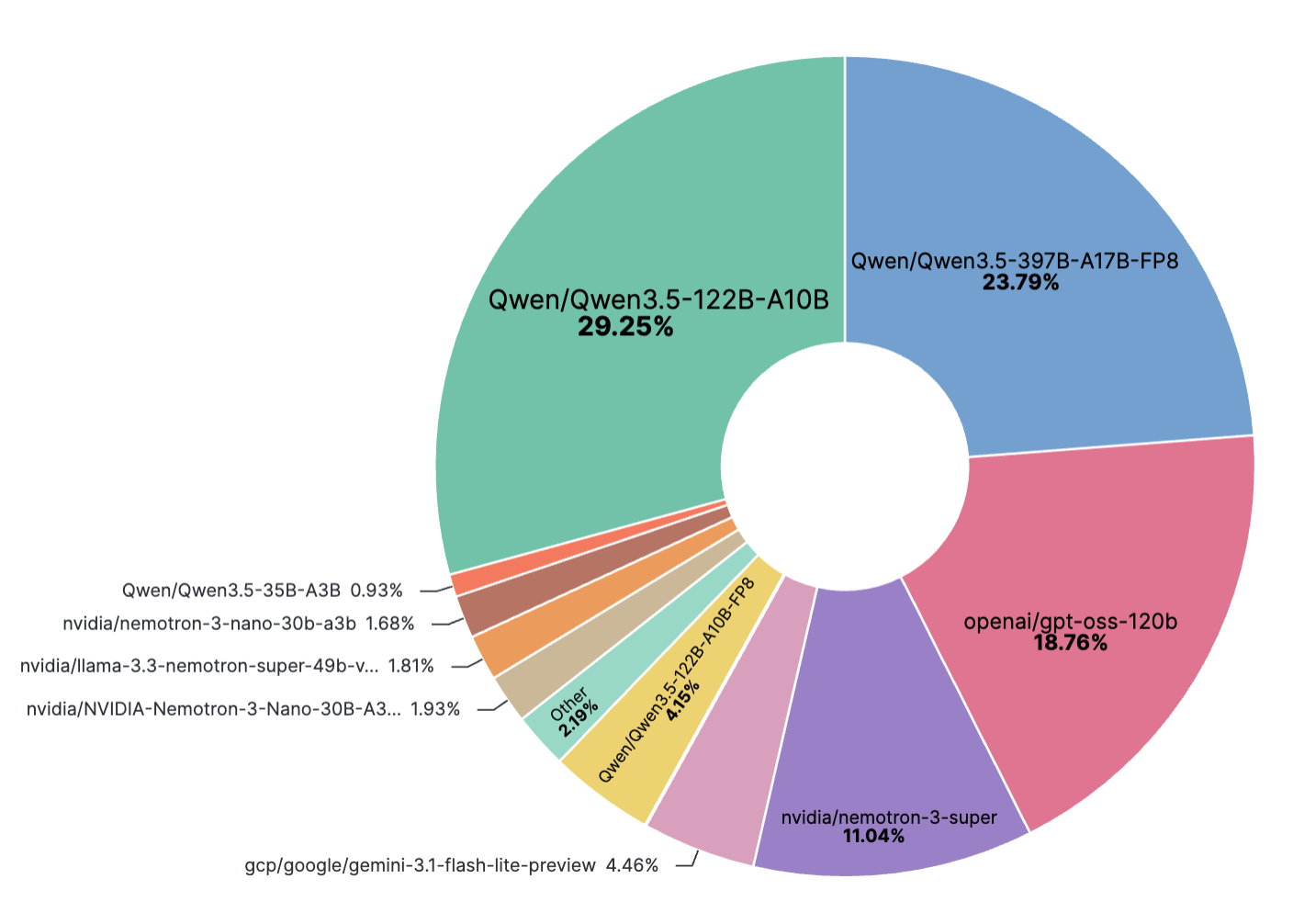
_最后更新于 2026/3/23_
## 许可证
Apache License 2.0 – 详见 [LICENSE](LICENSE)。
## 引用
如果您在研究中使用了 NeMo Data Designer,请使用以下 BibTeX 条目进行引用:
```
@misc{nemo-data-designer,
author = {The NeMo Data Designer Team, NVIDIA},
title = {NeMo Data Designer: A framework for generating synthetic data from scratch or based on your own seed data},
howpublished = {\url{https://github.com/NVIDIA-NeMo/DataDesigner}},
year = {2025},
note = {GitHub Repository},
}
```
标签:Apache 2.0, Apex, API, DLL 劫持, DNS解析, LLM, NeMo, Prompt, Python, Unmanaged PE, 人工智能, 代码示例, 合成数据, 大语言模型, 开源项目, 数据分布, 数据分析, 数据增强, 数据标注, 数据生成, 数据质量, 数据验证, 无后门, 机器学习, 深度学习, 用户模式Hook绕过, 统计采样, 软件开发, 逆向工具