ScriptedSnark/half-life1_win32_722
GitHub: ScriptedSnark/half-life1_win32_722
该项目逆向还原了《半条命1》Net Test 1(build 722)早期预发布版 GoldSrc 引擎的完整源代码,使其可在现代开发环境中编译运行。
Stars: 57 | Forks: 11
# half-life1_win32_722  《半条命 1》Net Test 1(引擎版本号 722)的逆向工程源代码,这是早期预发布版本的 GoldSrc 引擎(当时被称为“The Half-Life Engine”),分发给内部测试人员游玩。
该构建版本于 2024 年 10 月由测试人员 [Chad Jessup](https://x.com/ubahs1337) 发布,随后由我们的团队进行了逆向工程。
《半条命 1》Net Test 1(引擎版本号 722)的逆向工程源代码,这是早期预发布版本的 GoldSrc 引擎(当时被称为“The Half-Life Engine”),分发给内部测试人员游玩。
该构建版本于 2024 年 10 月由测试人员 [Chad Jessup](https://x.com/ubahs1337) 发布,随后由我们的团队进行了逆向工程。
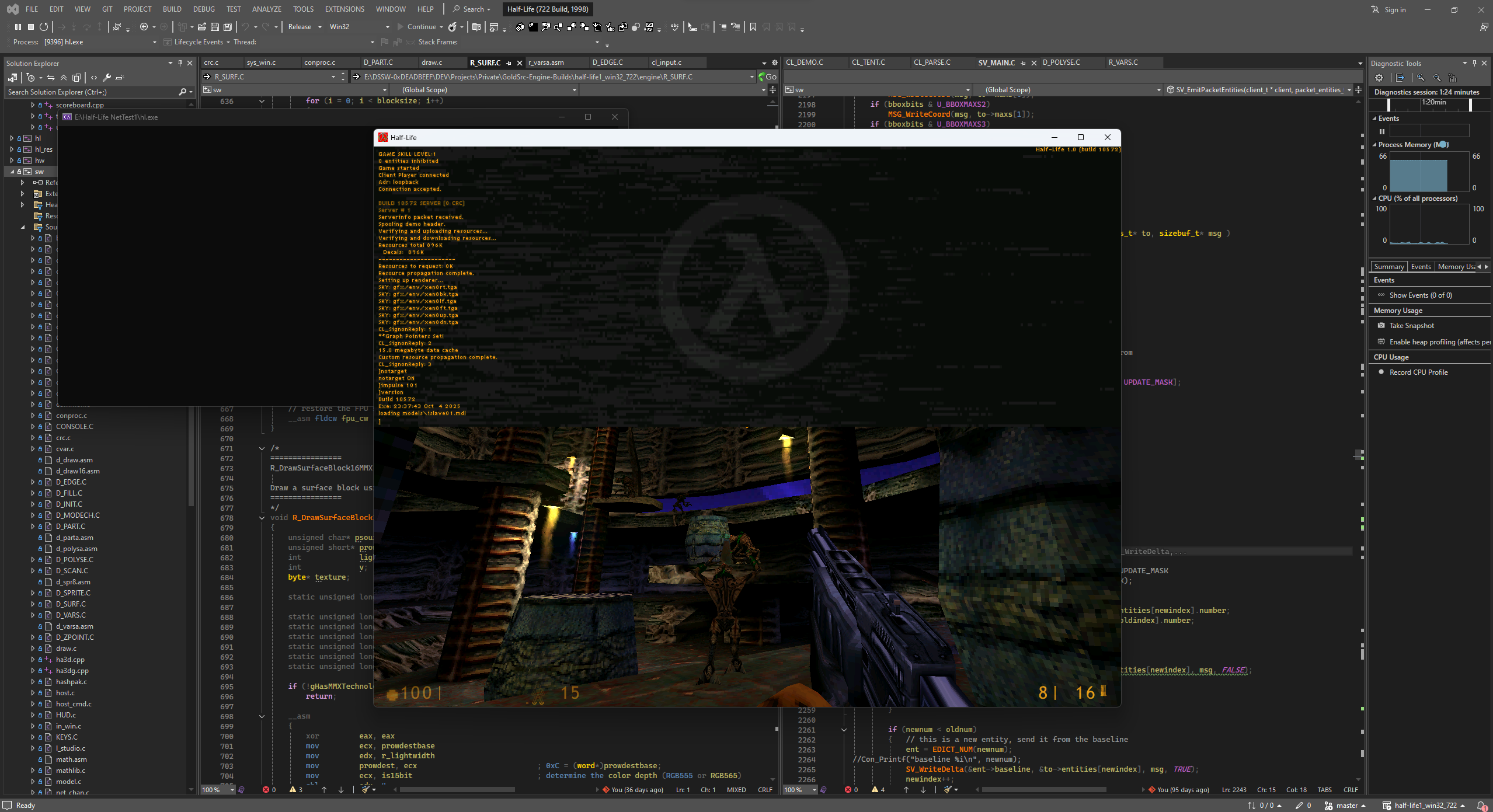 本仓库包含:
- Net Test 1 时代还原的 HL SDK 源代码
- [x] client.dll
- [x] hl.dll
- 还原的引擎源代码(不包含 A3D 实现)
- [x] sw.dll
- [x] hw.dll(支持 Direct3D)
- 还原的本地化模块源代码
- [x] hl_res.dll
- 不含 MFC/SW 代码的轻量级重新实现 launcher 源代码
- [x] hl.exe(参见 [`linux`](https://github.com/ScriptedSnark/half-life1_win32_722/tree/linux) 分支)
## 快速开始
**在构建项目之前,你需要配置部署路径(仅适用于 VS2022)。**
**DeployPath.ini** 文件定义了编译后的二进制文件将自动部署到的位置。
示例:
```
; Working directory
root.path="E:\Half-Life NetTest1"
```
## 构建说明
### Visual Studio 2022
打开位于以下位置的解决方案文件:
```
..\half-life1_win32_722\projects\vs2022\Half-Life (722 Build, 1998).sln
```
现在点击 `Build` -> `Build Solution`(或按 `Ctrl+Shift+B` 快捷键)。
**注意:如果在构建 hl_res.dll 期间遇到 afxres.h 错误,请通过 VS 安装程序安装 Microsoft Foundation Class (MFC) 库。**
### Visual C++ 4.2
打开你想要构建的任意特定项目,例如:
```
..\half-life1_win32_722\engine\Quiver.mak
```
所有的项目文件都位于它们各自的目录中。
现在点击 `Build` -> `Build X.dll`(或按 `Shift+F8` 快捷键)。
**注意:如果遇到 ml.exe 错误,请将 MASM 6.12 或更高版本直接安装到你的 MSVC++ 4.2 中(ml.exe 应该位于 `bin` 目录下或 PATH 环境变量中的某个位置)。**
**警告:不要忘记在项目属性中设置 Working Directory,否则引擎在调试期间可能无法加载 GameDLL。**
## 游玩所需的文件
你需要《半条命 1》Net Test 1 的原始数据文件。
这些文件在网上公开可用,可以在 Internet Archive 等存档源中找到。
**为了获得最佳的 NT1 游玩体验,你还可以使用 [build 738](https://www.betaarchive.com/wiki/index.php/Half-Life/build_738) 或更高版本的 WON dlls/hl_res/launcher,以避免一些窗口错误。**
## 参与项目开发的人员
- [\*(int\*)0 = 0xDEADBEEF](https://github.com/KV-Stepchenko)
- [ScriptedSnark](https://github.com/ScriptedSnark)
- [xWhitey](https://github.com/autisoid)
- [s1lentq](https://github.com/s1lentq)
- [oxiKKK](https://github.com/oxiKKK)
## 参考项目
- [WinQuake / QuakeWorld](https://github.com/id-Software/Quake)
- [QGL Wrapper (Quake II)](https://github.com/id-Software/Quake-2/blob/master/win32/qgl_win.c)
- [Half-Life SDK](https://github.com/ValveSoftware/halflife)
- [Half-Life SDK 1.0](https://github.com/ScriptedSnark/hlsdk-versions/tree/hlsdk_sp_1_0)
- [Half-Life SDK 2.3](https://github.com/ScriptedSnark/hlsdk-versions/tree/hlsdk_sp_2_3)
## 特别感谢
- [Overfloater](https://github.com/TheOverfloater)(参与游玩测试)
- [Barspinoff](https://github.com/barspinoff)(参与游玩测试及协助软件渲染)
- [GoldSrc Underground Discord](https://discord.gg/TwMz3e2sVW)
本仓库包含:
- Net Test 1 时代还原的 HL SDK 源代码
- [x] client.dll
- [x] hl.dll
- 还原的引擎源代码(不包含 A3D 实现)
- [x] sw.dll
- [x] hw.dll(支持 Direct3D)
- 还原的本地化模块源代码
- [x] hl_res.dll
- 不含 MFC/SW 代码的轻量级重新实现 launcher 源代码
- [x] hl.exe(参见 [`linux`](https://github.com/ScriptedSnark/half-life1_win32_722/tree/linux) 分支)
## 快速开始
**在构建项目之前,你需要配置部署路径(仅适用于 VS2022)。**
**DeployPath.ini** 文件定义了编译后的二进制文件将自动部署到的位置。
示例:
```
; Working directory
root.path="E:\Half-Life NetTest1"
```
## 构建说明
### Visual Studio 2022
打开位于以下位置的解决方案文件:
```
..\half-life1_win32_722\projects\vs2022\Half-Life (722 Build, 1998).sln
```
现在点击 `Build` -> `Build Solution`(或按 `Ctrl+Shift+B` 快捷键)。
**注意:如果在构建 hl_res.dll 期间遇到 afxres.h 错误,请通过 VS 安装程序安装 Microsoft Foundation Class (MFC) 库。**
### Visual C++ 4.2
打开你想要构建的任意特定项目,例如:
```
..\half-life1_win32_722\engine\Quiver.mak
```
所有的项目文件都位于它们各自的目录中。
现在点击 `Build` -> `Build X.dll`(或按 `Shift+F8` 快捷键)。
**注意:如果遇到 ml.exe 错误,请将 MASM 6.12 或更高版本直接安装到你的 MSVC++ 4.2 中(ml.exe 应该位于 `bin` 目录下或 PATH 环境变量中的某个位置)。**
**警告:不要忘记在项目属性中设置 Working Directory,否则引擎在调试期间可能无法加载 GameDLL。**
## 游玩所需的文件
你需要《半条命 1》Net Test 1 的原始数据文件。
这些文件在网上公开可用,可以在 Internet Archive 等存档源中找到。
**为了获得最佳的 NT1 游玩体验,你还可以使用 [build 738](https://www.betaarchive.com/wiki/index.php/Half-Life/build_738) 或更高版本的 WON dlls/hl_res/launcher,以避免一些窗口错误。**
## 参与项目开发的人员
- [\*(int\*)0 = 0xDEADBEEF](https://github.com/KV-Stepchenko)
- [ScriptedSnark](https://github.com/ScriptedSnark)
- [xWhitey](https://github.com/autisoid)
- [s1lentq](https://github.com/s1lentq)
- [oxiKKK](https://github.com/oxiKKK)
## 参考项目
- [WinQuake / QuakeWorld](https://github.com/id-Software/Quake)
- [QGL Wrapper (Quake II)](https://github.com/id-Software/Quake-2/blob/master/win32/qgl_win.c)
- [Half-Life SDK](https://github.com/ValveSoftware/halflife)
- [Half-Life SDK 1.0](https://github.com/ScriptedSnark/hlsdk-versions/tree/hlsdk_sp_1_0)
- [Half-Life SDK 2.3](https://github.com/ScriptedSnark/hlsdk-versions/tree/hlsdk_sp_2_3)
## 特别感谢
- [Overfloater](https://github.com/TheOverfloater)(参与游玩测试)
- [Barspinoff](https://github.com/barspinoff)(参与游玩测试及协助软件渲染)
- [GoldSrc Underground Discord](https://discord.gg/TwMz3e2sVW)
《半条命 1》Net Test 1(引擎版本号 722)的逆向工程源代码,这是早期预发布版本的 GoldSrc 引擎(当时被称为“The Half-Life Engine”),分发给内部测试人员游玩。
该构建版本于 2024 年 10 月由测试人员 [Chad Jessup](https://x.com/ubahs1337) 发布,随后由我们的团队进行了逆向工程。
本仓库包含:
- Net Test 1 时代还原的 HL SDK 源代码
- [x] client.dll
- [x] hl.dll
- 还原的引擎源代码(不包含 A3D 实现)
- [x] sw.dll
- [x] hw.dll(支持 Direct3D)
- 还原的本地化模块源代码
- [x] hl_res.dll
- 不含 MFC/SW 代码的轻量级重新实现 launcher 源代码
- [x] hl.exe(参见 [`linux`](https://github.com/ScriptedSnark/half-life1_win32_722/tree/linux) 分支)
## 快速开始
**在构建项目之前,你需要配置部署路径(仅适用于 VS2022)。**
**DeployPath.ini** 文件定义了编译后的二进制文件将自动部署到的位置。
示例:
```
; Working directory
root.path="E:\Half-Life NetTest1"
```
## 构建说明
### Visual Studio 2022
打开位于以下位置的解决方案文件:
```
..\half-life1_win32_722\projects\vs2022\Half-Life (722 Build, 1998).sln
```
现在点击 `Build` -> `Build Solution`(或按 `Ctrl+Shift+B` 快捷键)。
**注意:如果在构建 hl_res.dll 期间遇到 afxres.h 错误,请通过 VS 安装程序安装 Microsoft Foundation Class (MFC) 库。**
### Visual C++ 4.2
打开你想要构建的任意特定项目,例如:
```
..\half-life1_win32_722\engine\Quiver.mak
```
所有的项目文件都位于它们各自的目录中。
现在点击 `Build` -> `Build X.dll`(或按 `Shift+F8` 快捷键)。
**注意:如果遇到 ml.exe 错误,请将 MASM 6.12 或更高版本直接安装到你的 MSVC++ 4.2 中(ml.exe 应该位于 `bin` 目录下或 PATH 环境变量中的某个位置)。**
**警告:不要忘记在项目属性中设置 Working Directory,否则引擎在调试期间可能无法加载 GameDLL。**
## 游玩所需的文件
你需要《半条命 1》Net Test 1 的原始数据文件。
这些文件在网上公开可用,可以在 Internet Archive 等存档源中找到。
**为了获得最佳的 NT1 游玩体验,你还可以使用 [build 738](https://www.betaarchive.com/wiki/index.php/Half-Life/build_738) 或更高版本的 WON dlls/hl_res/launcher,以避免一些窗口错误。**
## 参与项目开发的人员
- [\*(int\*)0 = 0xDEADBEEF](https://github.com/KV-Stepchenko)
- [ScriptedSnark](https://github.com/ScriptedSnark)
- [xWhitey](https://github.com/autisoid)
- [s1lentq](https://github.com/s1lentq)
- [oxiKKK](https://github.com/oxiKKK)
## 参考项目
- [WinQuake / QuakeWorld](https://github.com/id-Software/Quake)
- [QGL Wrapper (Quake II)](https://github.com/id-Software/Quake-2/blob/master/win32/qgl_win.c)
- [Half-Life SDK](https://github.com/ValveSoftware/halflife)
- [Half-Life SDK 1.0](https://github.com/ScriptedSnark/hlsdk-versions/tree/hlsdk_sp_1_0)
- [Half-Life SDK 2.3](https://github.com/ScriptedSnark/hlsdk-versions/tree/hlsdk_sp_2_3)
## 特别感谢
- [Overfloater](https://github.com/TheOverfloater)(参与游玩测试)
- [Barspinoff](https://github.com/barspinoff)(参与游玩测试及协助软件渲染)
- [GoldSrc Underground Discord](https://discord.gg/TwMz3e2sVW)标签:C++, GoldSrc引擎, UML, 云资产清单, 半条命, 客户端加密, 数据擦除, 游戏开发, 逆向工程