chenyme/grok2api
GitHub: chenyme/grok2api
将 xAI Grok 封装为 OpenAI 兼容 API 的服务网关,支持多模态生成与多账号负载均衡。
Stars: 5220 | Forks: 1826
# Grok2API
**中文** | [English](docs/README.en.md) | [文档](https://blog.cheny.me/blog/posts/grok2api)
基于 **FastAPI** 重构的 Grok2API,全面适配最新 Web 调用格式,支持流/非流式对话、工具调用、图像生成/编辑、视频生成/超分(文生视频 / 图生视频)、深度思考,号池并发与自动负载均衡一体化。

## 快速开始 ### 本地开发 ``` uv sync uv run granian --interface asgi --host 0.0.0.0 --port 8000 --workers 1 main:app ``` ### Docker Compose ``` git clone https://github.com/chenyme/grok2api cd grok2api docker compose up -d ``` ### Vercel 部署 [](https://vercel.com/new/clone?repository-url=https://github.com/chenyme/grok2api&env=LOG_LEVEL,LOG_FILE_ENABLED,DATA_DIR,SERVER_STORAGE_TYPE,SERVER_STORAGE_URL&envDefaults=%7B%22DATA_DIR%22%3A%22/tmp/data%22%2C%22LOG_FILE_ENABLED%22%3A%22false%22%2C%22LOG_LEVEL%22%3A%22INFO%22%2C%22SERVER_STORAGE_TYPE%22%3A%22local%22%2C%22SERVER_STORAGE_URL%22%3A%22%22%7D) ### Render 部署 [](https://render.com/deploy?repo=https://github.com/chenyme/grok2api)
## 管理面板 - 访问地址:`http://:/admin`(本地运行使用 `SERVER_PORT`,Docker Compose 使用 `HOST_PORT`,默认均为 `8000`)
- 默认密码:`grok2api`(配置项 `app.app_key`,建议修改)
**功能说明**:
- **Token 管理**:导入/添加/删除 Token,查看状态和配额
- **状态筛选**:按状态(正常/限流/失效)或 NSFW 状态筛选
- **批量操作**:批量刷新、导出、删除、开启 NSFW
- **NSFW 开启**:一键为 Token 开启 Unhinged 模式(需代理或 `cf_clearance`)
- **配置管理**:在线修改系统配置
- **缓存管理**:查看和清理媒体缓存
## 环境变量 | 变量名 | 说明 | 默认值 | 示例 | | :-- | :-- | :-- | :-- | | `LOG_LEVEL` | 日志级别 | `INFO` | `DEBUG` | | `LOG_FILE_ENABLED` | 是否启用文件日志 | `true` | `false` | | `DATA_DIR` | 数据目录(配置/Token/锁) | `./data` | `/data` | | `SERVER_HOST` | 服务监听地址 | `0.0.0.0` | `0.0.0.0` | | `SERVER_PORT` | 服务端口 | `8000` | `8000` | | `HOST_PORT` | Docker Compose 宿主机映射端口 | `8000` | `9000` | | `SERVER_WORKERS` | 服务进程数量 | `1` | `2` | | `SERVER_STORAGE_TYPE` | 存储类型(`local`/`redis`/`mysql`/`pgsql`) | `local` | `pgsql` | | `SERVER_STORAGE_URL` | 存储连接串(local 时可为空) | `""` | `postgresql+asyncpg://user:password@host:5432/db` |
## 可用次数 - Basic 账号:80 次 / 20h - Super 账号:140 次 / 2h
## 可用模型 | 模型名 | 计次 | 可用账号 | 对话功能 | 图像功能 | 视频功能 | | :-- | :--: | :-- | :--: | :--: | :--: | | `grok-3` | 1 | Basic/Super | 支持 | 支持 | - | | `grok-3-mini` | 1 | Basic/Super | 支持 | 支持 | - | | `grok-3-thinking` | 1 | Basic/Super | 支持 | 支持 | - | | `grok-4` | 1 | Basic/Super | 支持 | 支持 | - | | `grok-4-thinking` | 1 | Basic/Super | 支持 | 支持 | - | | `grok-4-heavy` | 4 | Super | 支持 | 支持 | - | | `grok-4.1-mini` | 1 | Basic/Super | 支持 | 支持 | - | | `grok-4.1-fast` | 1 | Basic/Super | 支持 | 支持 | - | | `grok-4.1-expert` | 4 | Basic/Super | 支持 | 支持 | - | | `grok-4.1-thinking` | 4 | Basic/Super | 支持 | 支持 | - | | `grok-4.20-beta` | 1 | Basic/Super | 支持 | 支持 | - | | `grok-imagine-1.0` | - | Basic/Super | - | 支持 | - | | `grok-imagine-1.0-fast` | - | Basic/Super | - | 支持 | - | | `grok-imagine-1.0-edit` | - | Basic/Super | - | 支持 | - | | `grok-imagine-1.0-video` | - | Basic/Super | - | - | 支持 |
## 接口说明 ### `POST /v1/chat/completions` ``` curl http://localhost:8000/v1/chat/completions \ -H "Content-Type: application/json" \ -H "Authorization: Bearer $GROK2API_API_KEY" \ -d '{ "model": "grok-4", "messages": [{"role":"user","content":"你好"}] }' ```
| 字段 | 类型 | 说明 | 可用参数 | | :-- | :-- | :-- | :-- | | `model` | string | 模型名称 | 见上方模型列表 | | `messages` | array | 消息列表 | 见下方消息格式 | | `stream` | boolean | 是否开启流式输出 | `true`, `false` | | `reasoning_effort` | string | 推理强度 | `none`, `minimal`, `low`, `medium`, `high`, `xhigh` | | `temperature` | number | 采样温度 | `0` ~ `2` | | `top_p` | number | nucleus 采样 | `0` ~ `1` | | `tools` | array | 工具定义 | OpenAI function tools | | `tool_choice` | string/object | 工具选择 | `auto`, `required`, `none` 或指定工具 | | `parallel_tool_calls` | boolean | 是否允许并行工具调用 | `true`, `false` | | `video_config` | object | **视频模型专用配置对象** | 支持:`grok-imagine-1.0-video` | | └─`aspect_ratio` | string | 视频宽高比 | `16:9`, `9:16`, `1:1`, `2:3`, `3:2`, `1280x720`, `720x1280`, `1792x1024`, `1024x1792`, `1024x1024` | | └─`video_length` | integer | 视频时长 (秒) | `6` ~ `30` | | └─`resolution_name` | string | 分辨率 | `480p`, `720p` | | └─`preset` | string | 风格预设 | `fun`, `normal`, `spicy`, `custom` | | `image_config` | object | **图片模型专用配置对象** | 支持:`grok-imagine-1.0` / `grok-imagine-1.0-fast` / `grok-imagine-1.0-edit` | | └─`n` | integer | 生成数量 | `1` ~ `10` | | └─`size` | string | 图片尺寸 | `1280x720`, `720x1280`, `1792x1024`, `1024x1792`, `1024x1024` | | └─`response_format` | string | 响应格式 | `url`, `b64_json`, `base64` | **消息格式 (messages)**: | 字段 | 类型 | 说明 | | :-- | :-- | :-- | | `role` | string | 角色:`developer`, `system`, `user`, `assistant` | | `content` | string/array | 消息内容,支持纯文本或多模态数组 | **多模态内容块类型 (content array)**: | type | 说明 | 示例 | | :-- | :-- | :-- | | `text` | 文本内容 | `{"type": "text", "text": "描述这张图片"}` | | `image_url` | 图片 URL | `{"type": "image_url", "image_url": {"url": "https://..."}}` | | `input_audio` | 音频 | `{"type": "input_audio", "input_audio": {"data": "https://..."}}` | | `file` | 文件 | `{"type": "file", "file": {"file_data": "https://..."}}` | **注意事项**: - `image_url/input_audio/file` 仅支持 URL 或 Data URI(`data:;base64,...`),裸 base64 会报错。
- `reasoning_effort`:`none` 表示不输出思考,其他值都会输出思考内容。
- 工具调用为**提示词模拟 + 客户端执行回填**:模型通过 ` 第十九章:结语
Grok2API 项目的开发历程让我深刻体会到技术探索的艰辛与乐趣。从最初的简单想法到功能丰富的 API 代理服务,每一步都充满了挑战与突破。
通过这个项目,我们不仅实现了对 Grok 服务的封装与增强,更重要的是建立了一套完整的技术架构和最佳实践。这些经验将指导我们在未来的项目中继续前进。
感谢所有为这个项目做出贡献的开发者和用户。正是你们的支持和反馈,让 Grok2API 不断成长和完善。让我们期待更多创新和突破的到来!
最后,希望这个项目能够为社区带来价值,帮助更多人便捷地使用 AI 服务。技术的进步源于分享与合作,让我们共同构建更美好的开源生态。
---
*项目地址:https://github.com/chenyme/grok2api*
*文档地址:https://grok2api-docs.example.com*
*作者:Chenyme*
*发布日期:2024年*
---
**附录:常见问题解答**
**Q: Grok2API 是否免费使用?**
A: 是的,本项目完全开源免费,但你需要自行准备有效的 Grok Token。
**Q: 如何获取 Grok Token?**
A: Grok Token 需要通过 X(Twitter) 平台订阅 Grok 服务后获取。
**Q: 支持哪些部署方式?**
A: 支持本地开发、Docker、Docker Compose、Vercel、Render 等多种部署方式。
**Q: 遇到问题如何寻求帮助?**
a: 可以通过 GitHub Issues 提交问题,或查阅项目文档获取帮助。
---
**免责声明**
本项目仅供学习和研究使用,不得用于任何商业或非法用途。使用本项目的任何后果由使用者自行承担。本项目与 xAI 或 Twitter 无任何官方关联。
---
**许可证**
MIT License
Copyright (c) 2024 Chenyme
Permission is hereby granted, free of charge, to any person obtaining a copy
of this software and associated documentation files (the "Software"), to deal
in the Software without restriction, including without limitation the rights
to use, copy, modify, merge, publish, distribute, sublicense, and/or sell
copies of the Software, and to permit persons to whom the Software is
furnished to do so, subject to the following conditions:
The above copyright notice and this permission notice shall be included in all
copies or substantial portions of the Software.
THE SOFTWARE IS PROVIDED "AS IS", WITHOUT WARRANTY OF ANY KIND, EXPRESS OR
IMPLIED, INCLUDING BUT NOT LIMITED TO THE WARRANTIES OF MERCHANTABILITY,
FITNESS FOR A PARTICULAR PURPOSE AND NONINFRINGEMENT. IN NO EVENT SHALL THE
AUTHORS OR COPYRIGHT HOLDERS BE LIABLE FOR ANY CLAIM, DAMAGES OR OTHER
LIABILITY, WHETHER IN AN ACTION OF CONTRACT, TORT OR OTHERWISE, ARISING FROM,
OUT OF OR IN CONNECTION WITH THE SOFTWARE OR THE USE OR OTHER DEALINGS IN THE
SOFTWARE. `{...} afecătorilor` 输出调用请求,服务端解析为 `tool_calls`;不执行工具。
- `grok-imagine-1.0-fast` 与瀑布流 imagine 生成链路一致,可直接通过 `/v1/chat/completions` 调用;其 `n/size/response_format` 由服务端 `[imagine_fast]` 统一控制。
- `grok-imagine-1.0-fast` 在 `/v1/chat/completions` 的流式输出仅返回最终成图,不返回中间预览图。
- `grok-imagine-1.0-fast` 流式 URL 出图会保持原始图片名(不追加 `-final` 后缀)。
- 当图片疑似被审查拦截导致无最终图时,若开启 `image.blocked_parallel_enabled`,服务端会按 `image.blocked_parallel_attempts` 自动并行补偿生成,并优先使用不同 token;若仍无满足image.final_min_bytes` 的最终图则返回失败。
- `grok-imagine-1.0-edit` 必须提供图片,多图默认取**最后 3 张**与最后一个文本。
- `grok-imagine-1.0-video` 支持文生视频与图生视频(通过 `image_url` 传参考图,**仅取第 1 张**)。
- 除上述外的其他参数将自动丢弃并忽略。
### `POST /v1/responses` ``` curl http://localhost:8000/v1/responses \ -H "Content-Type: application/json" \ -H "Authorization: Bearer $GROK2API_API_KEY" \ -d '{ "model": "grok-4", "input": "解释一下量子隧穿", "stream": true }' ```
| 字段 | 类型 | 说明 | | :-- | :-- | :-- | | `model` | string | 模型名称 | | `input` | string/array | 输入内容,支持字符串、消息数组或多模态内容块 | | `instructions` | string | 系统指令 | | `stream` | boolean | 是否流式输出 | | `temperature` | number | 采样温度 | | `top_p` | number | nucleus 采样 | | `tools` | array | 工具定义(支持 function 工具;内置工具类型见下方说明) | | `tool_choice` | string/object | 工具选择(auto/required/none 或指定工具) | | `parallel_tool_calls` | boolean | 是否允许并行工具调用 | | `reasoning` | object | 推理参数 | | └─`effort` | string | 推理强度 | `none`, `minimal`, `low`, `medium`, `high`, `xhigh` | **注意事项**: - 内置工具 `web_search` / `file_search` / `code_interpreter` 目前会映射为 function tool **触发调用**,但**不执行托管工具**,需客户端自行执行并回填。 - 流式输出会包含 `response.output_text.*` 与 `response.function_call_arguments.*` 事件。
### `POST /v1/images/generations` ``` curl http://localhost:8000/v1/images/generations \ -H "Content-Type: application/json" \ -H "Authorization: Bearer $GROK2API_API_KEY" \ -d '{ "model": "grok-imagine-1.0", "prompt": "一只在太空漂浮的猫", "n": 1 }' ```
| 字段 | 类型 | 说明 | 可用参数 | | :-- | :-- | :-- | :-- | | `model` | string | 图像模型名 | `grok-imagine-1.0` | | `prompt` | string | 图像描述提示词 | - | | `n` | integer | 生成数量 | `1` - `10` (流式模式仅限 `1` 或 `2`) | | `stream` | boolean | 是否开启流式输出 | `true`, `false` | | `size` | string | 图片尺寸 | `1280x720`, `720x1280`, `1792x1024`, `1024x1792`, `1024x1024` | | `quality` | string | 图片质量 | - (暂不支持) | | `response_format` | string | 响应格式 | `url`, `b64_json`, `base64` | | `style` | string | 风格 | - (暂不支持) | **注意事项**: - `quality`、`style` 参数为 OpenAI 兼容保留,当前版本暂不支持自定义。 - 多图编辑若传入超过 3 张,仅取**最后 3 张**作为参考。
### `POST /v1/images/edits` ``` curl http://localhost:8000/v1/images/edits \ -H "Authorization: Bearer $GROK2API_API_KEY" \ -F "model=grok-imagine-1.0-edit" \ -F "prompt=把图片变清晰" \ -F "image=@/path/to/image.png" \ -F "n=1" ```
| 字段 | 类型 | 说明 | 可用参数 | | :-- | :-- | :-- | :-- | | `model` | string | 图像模型名 | `grok-imagine-1.0-edit` | | `prompt` | string | 编辑描述 | - | | `image` | file | 待编辑图片 | `png`, `jpg`, `webp` | | `n` | integer | 生成数量 | `1` - `10` (流式模式仅限 `1` 或 `2`) | | `stream` | boolean | 是否开启流式输出 | `true`, `false` | | `size` | string | 图片尺寸 | `1280x720`, `720x1280`, `1792x1024`, `1024x1792`, `1024x1024` | | `quality` | string | 图片质量 | - (暂不支持) | | `response_format` | string | 响应格式 | `url`, `b64_json`, `base64` | | `style` | string | 风格 | - (暂不支持) | **注意事项**: - `quality`、`style` 参数为 OpenAI 兼容保留,当前版本暂不支持自定义。
### `POST /v1/videos` ``` curl http://localhost:8000/v1/videos \ -H "Content-Type: application/json" \ -H "Authorization: Bearer $GROK2API_API_KEY" \ -d '{ "model": "grok-imagine-1.0-video", "prompt": "霓虹雨夜街头,慢镜头追拍", "size": "1792x1024", "seconds": 18, "quality": "standard" }' ```
| 字段 | 类型 | 说明 | 可用参数 | | :-- | :-- | :-- | :-- | | `model` | string | 视频模型名 | `grok-imagine-1.0-video` | | `prompt` | string | 视频提示词 | - | | `size` | string | 画面比例(会映射到 aspect_ratio) | `1280x720`, `720x1280`, `1792x1024`, `1024x1792`, `1024x1024` | | `seconds` | integer | 目标时长(秒) | `6` ~ `30` | | `quality` | string | 视频质量(映射到 resolution) | `standard`, `high` | | `image_reference` | object/string | 参考图(可选) | `{"image_url":"https://..."}` 或 Data URI | | `input_reference` | file | multipart 参考图(可选) | `png`, `jpg`, `webp` | **注意事项**: - 服务端已支持 6~30 秒自动链式扩展,**无需使用 `/v1/video/extend`**。 - `quality=standard` 对应 `480p`;`quality=high` 对应 `720p`。 - 基础号池请求 `720p` 时会先产出 `480p` 再按 `video.upscale_timing` 执行超分。 - `image_reference` 与 `input_reference` 同时传入时,会按顺序作为参考图输入;视频链路只使用第 1 张。
## 参数配置 配置文件:`data/config.toml` | 模块 | 字段 | 配置名 | 说明 | 默认值 | | :-- | :-- | :-- | :-- | :-- | | **app** | `app_url` | 应用地址 | 当前 Grok2API 服务的外部访问 URL,用于文件链接访问。 | `""` | | | `app_key` | 后台密码 | 登录 Grok2API 管理后台的密码(必填)。 | `grok2api` | | | `api_key` | API 密钥 | 调用 Grok2API 服务的 Token(可选,支持逗号分隔或数组)。 | `""` | | | `function_enabled` | Function 开关 | 是否启用 function 功能玩法。 | `false` | | | `function_key` | Function 密钥 | Function 调用密钥(可选)。 | `""` | | | `image_format` | 图片格式 | 生成的图片格式(url 或 base64)。 | `url` | | | `video_format` | 视频格式 | 生成的视频格式(html 或 url,url 为处理后的链接)。 | `html` | | | `temporary` | 临时对话 | 是否启用临时对话模式。 | `true` | | | `disable_memory` | 禁用记忆 | 禁用 Grok 记忆功能,防止响应中出现不相关上下文。 | `true` | | | `stream` | 流式响应 | 是否默认启用流式输出。 | `true` | | | `thinking` | 思维链 | 是否默认启用思维链输出。 | `true` | | | `dynamic_statsig` | 动态指纹 | 是否动态生成 Statsig 指纹。 | `true` | | | `custom_instruction` | 自定义指令 | 多行文本,透传为 Grok `customPersonality`。 | `""` | | | `filter_tags` | 过滤标签 | 自动过滤 Grok 响应中的特殊标签。 | `["xaiartifact","xai:tool_usage_card","grok:render"]` | | **proxy** | `base_proxy_url` | 基础代理 URL | 代理请求到 Grok 官网的基础服务地址。 | `""` | | | `asset_proxy_url` | 资源代理 URL | 代理请求到 Grok 官网的静态资源(图片/视频)地址。 | `""` | | | `cf_cookies` | CF Cookies | FlareSolverr 刷新写入的完整 Cookie 字符串。 | `""` | | | `skip_proxy_ssl_verify` | 跳过代理 SSL 校验 | 代理使用自签名证书时启用(仅放行代理证书,目标站点仍校验)。 | `false` | | | `enabled` | CF 自动刷新 | 是否启用 CF 自动刷新。 | `false` | | | `flaresolverr_url` | FlareSolverr 地址 | FlareSolverr 服务的 HTTP 地址。 | `""` | | | `refresh_interval` | 刷新间隔 | 自动刷新 cf_clearance 间隔(秒)。 | `3600` | | | `timeout` | 挑战超时 | CF 挑战等待超时(秒)。 | `60` | | | `cf_clearance` | CF Clearance | Cloudflare 验证 Cookie。 | `""` | | | `browser` | 浏览器指纹 | curl_cffi 浏览器指纹标识(如 chrome136)。 | `chrome136` | | | `user_agent` | User-Agent | HTTP 请求的 User-Agent 字符串。 | `Mozilla/5.0 (Macintosh; Intel Mac OS X 10_15_7) AppleWebKit/537.36 (KHTML, like Gecko) Chrome/136.0.0.0 Safari/537.36` | | **retry** | `max_retry` | 最大重试 | 请求 Grok 服务失败时的最大重试次数。 | `3` | | | `retry_status_codes` | 重试状态码 | 触发重试的 HTTP 状态码列表。 | `[401, 429, 403]` | | | `reset_session_status_codes` | 重建状态码 | 触发重建 session 的 HTTP 状态码列表(用于轮换代理)。 | `[403]` | | | `retry_backoff_base` | 退避基数 | 重试退避的基础延迟(秒)。 | `0.5` | | | `retry_backoff_factor` | 退避倍率 | 重试退避的指数放大系数。 | `2.0` | | | `retry_backoff_max` | 退避上限 | 单次重试等待的最大延迟(秒)。 | `20.0` | | | `retry_budget` | 退避预算 | 单次请求的最大重试总耗时(秒)。 | `60.0` | | **token** | `auto_refresh` | 自动刷新 | 是否开启 Token 自动刷新机制。 | `true` | | | `refresh_interval_hours` | 刷新间隔 | 普通 Token 刷新的时间间隔(小时)。 | `8` | | | `super_refresh_interval_hours` | Super 刷新间隔 | Super Token 刷新的时间间隔(小时)。 | `2` | | | `fail_threshold` | 失败阈值 | 单个 Token 连续失败多少次后被标记为不可用。 | `5` | | | `save_delay_ms` | 保存延迟 | Token 变更合并写入的延迟(毫秒)。 | `500` | | | `usage_flush_interval_sec` | 用量落库间隔 | 用量类字段写入数据库的最小间隔(秒)。 | `5` | | | `reload_interval_sec` | 同步间隔 | 多 worker 场景下 Token 状态刷新间隔(秒)。 | `30` | | **cache** | `enable_auto_clean` | 自动清理 | 是否启用缓存自动清理,开启后按上限自动回收。 | `true` | | | `limit_mb` | 清理阈值 | 缓存大小阈值(MB),超过阈值会触发清理。 | `512` | | **chat** | `concurrent` | 并发上限 | Reverse 接口并发上限。 | `50` | | | `timeout` | 请求超时 | Reverse 接口超时时间(秒)。 | `60` | | | `stream_timeout` | 流空闲超时 | 流式空闲超时时间(秒)。 | `60` | | **image** | `timeout` | 请求超时 | WebSocket 请求超时时间(秒)。 | `60` | | | `stream_timeout` | 流空闲超时 | WebSocket 流式空闲超时时间(秒)。 | `60` | | | `final_timeout` | 最终图超时 | 收到中等图后等待图的超时秒数。 | `15` | | | `blocked_grace_seconds` | 审查宽限秒数 | 收到中等图后,判定疑似被审查的宽限秒数。 | `10` | | | `nsfw` | NSFW 模式 | WebSocket 请求是否启用 NSFW。 | `true` | | | `medium_min_bytes` | 中等图最小字节 | 判定中等质量图的最小字节数。 | `30000` | | | `final_min_bytes` | 最终图最小字节 | 判定最终图的最小字节数(通常 JPG > 100KB)。 | `100000` | | | `blocked_parallel_attempts` | 并行补偿次数 | 遇到疑似审查/拦截时的并行补偿生成次数。 | `5` | | | `blocked_parallel_enabled` | 并行补偿开关 | 是否启用并行补偿(启用时优先使用不同 token)。 | `true` | | **imagine_fast** | `n` | 生成数量 | 仅对 grok-imagine-1.0-fast 生效。 | `1` | | | `size` | 图片尺寸 | `1280x720` / `720x1280` / `1792x1024` / `1024x1792` / `1024x1024` | `1024x1024` | | | `response_format` | 响应格式 | `url` / `b64_json` / `base64` | `url` | | **video** | `concurrent` | 并发上限 | Reverse 接口并发上限。 | `100` | | | `timeout` | 请求超时 | Reverse 接口超时时间(秒)。 | `60` | | | `stream_timeout` | 流空闲超时 | 流式空闲超时时间(秒)。 | `60` | | | `upscale_timing` | 超分时机 | Basic 号池 720p 超分模式:`single`(每轮扩展后超分)/ `complete`(所有扩展后超分)。 | `complete` | | **voice** | `timeout` | 请求超时 | Voice 请求超时时间(秒)。 | `60` | | **asset** | `upload_concurrent` | 上传并发 | 上传接口的最大并发数。 | `100` | | | `upload_timeout` | 上传超时 | 上传接口超时时间(秒)。 | `60` | | | `download_concurrent` | 下载并发 | 下载接口的最大并发数。 | `100` | | | `download_timeout` | 下载超时 | 下载接口超时时间(秒)。 | `60` | | | `list_concurrent` | 查询并发 | 资产查询接口的最大并发数。 | `100` | | | `list_timeout` | 查询超时 | 资产查询接口超时时间(秒)。 | `60` | | | `list_batch_size` | 查询批次大小 | 单次查询可处理的 Token 数量。 | `50` | | | `delete_concurrent` | 删除并发 | 资产删除接口的最大并发数。 | `100` | | | `delete_timeout` | 删除超时 | 资产删除接口超时时间(秒)。 | `60` | | | `delete_batch_size` | 删除批次大小 | 单次删除可处理的 Token 数量。 | `50` | | **nsfw** | `concurrent` | 并发上限 | 批量开启 NSFW 模式时的并发请求上限。 | `60` | | | `batch_size` | 批次大小 | 批量开启 NSFW 模式的单批处理数量。 | `30` | | | `timeout` | 请求超时 | NSFW 开启相关请求的超时时间(秒)。 | `60` | | **usage** | `concurrent` | 并发上限 | 批量刷新用量时的并发请求上限。 | `100` | | | `batch_size` | 批次大小 | 批量刷新用量的单批处理数量。 | `50` | | | `timeout` | 请求超时 | 用量查询接口的超时时间(秒)。 | `60` |
## Star 历史 [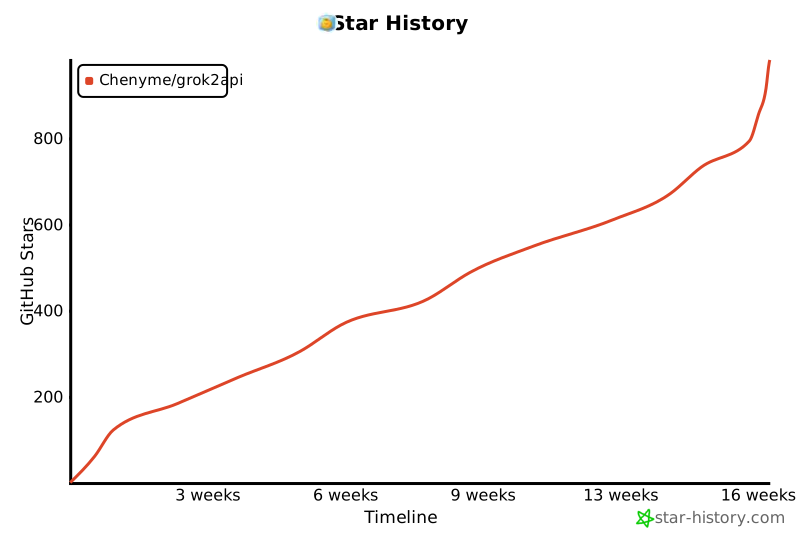](https://star-history.com/#Chenyme/grok2api&Timeline)
## 快速开始 ### 本地开发 ``` uv sync uv run granian --interface asgi --host 0.0.0.0 --port 8000 --workers 1 main:app ``` ### Docker Compose ``` git clone https://github.com/chenyme/grok2api cd grok2api docker compose up -d ``` ### Vercel 部署 [](https://vercel.com/new/clone?repository-url=https://github.com/chenyme/grok2api&env=LOG_LEVEL,LOG_FILE_ENABLED,DATA_DIR,SERVER_STORAGE_TYPE,SERVER_STORAGE_URL&envDefaults=%7B%22DATA_DIR%22%3A%22/tmp/data%22%2C%22LOG_FILE_ENABLED%22%3A%22false%22%2C%22LOG_LEVEL%22%3A%22INFO%22%2C%22SERVER_STORAGE_TYPE%22%3A%22local%22%2C%22SERVER_STORAGE_URL%22%3A%22%22%7D) ### Render 部署 [](https://render.com/deploy?repo=https://github.com/chenyme/grok2api)
## 管理面板 - 访问地址:`http://
## 环境变量 | 变量名 | 说明 | 默认值 | 示例 | | :-- | :-- | :-- | :-- | | `LOG_LEVEL` | 日志级别 | `INFO` | `DEBUG` | | `LOG_FILE_ENABLED` | 是否启用文件日志 | `true` | `false` | | `DATA_DIR` | 数据目录(配置/Token/锁) | `./data` | `/data` | | `SERVER_HOST` | 服务监听地址 | `0.0.0.0` | `0.0.0.0` | | `SERVER_PORT` | 服务端口 | `8000` | `8000` | | `HOST_PORT` | Docker Compose 宿主机映射端口 | `8000` | `9000` | | `SERVER_WORKERS` | 服务进程数量 | `1` | `2` | | `SERVER_STORAGE_TYPE` | 存储类型(`local`/`redis`/`mysql`/`pgsql`) | `local` | `pgsql` | | `SERVER_STORAGE_URL` | 存储连接串(local 时可为空) | `""` | `postgresql+asyncpg://user:password@host:5432/db` |
## 可用次数 - Basic 账号:80 次 / 20h - Super 账号:140 次 / 2h
## 可用模型 | 模型名 | 计次 | 可用账号 | 对话功能 | 图像功能 | 视频功能 | | :-- | :--: | :-- | :--: | :--: | :--: | | `grok-3` | 1 | Basic/Super | 支持 | 支持 | - | | `grok-3-mini` | 1 | Basic/Super | 支持 | 支持 | - | | `grok-3-thinking` | 1 | Basic/Super | 支持 | 支持 | - | | `grok-4` | 1 | Basic/Super | 支持 | 支持 | - | | `grok-4-thinking` | 1 | Basic/Super | 支持 | 支持 | - | | `grok-4-heavy` | 4 | Super | 支持 | 支持 | - | | `grok-4.1-mini` | 1 | Basic/Super | 支持 | 支持 | - | | `grok-4.1-fast` | 1 | Basic/Super | 支持 | 支持 | - | | `grok-4.1-expert` | 4 | Basic/Super | 支持 | 支持 | - | | `grok-4.1-thinking` | 4 | Basic/Super | 支持 | 支持 | - | | `grok-4.20-beta` | 1 | Basic/Super | 支持 | 支持 | - | | `grok-imagine-1.0` | - | Basic/Super | - | 支持 | - | | `grok-imagine-1.0-fast` | - | Basic/Super | - | 支持 | - | | `grok-imagine-1.0-edit` | - | Basic/Super | - | 支持 | - | | `grok-imagine-1.0-video` | - | Basic/Super | - | - | 支持 |
## 接口说明 ### `POST /v1/chat/completions` ``` curl http://localhost:8000/v1/chat/completions \ -H "Content-Type: application/json" \ -H "Authorization: Bearer $GROK2API_API_KEY" \ -d '{ "model": "grok-4", "messages": [{"role":"user","content":"你好"}] }' ```
支持的请求参数
| 字段 | 类型 | 说明 | 可用参数 | | :-- | :-- | :-- | :-- | | `model` | string | 模型名称 | 见上方模型列表 | | `messages` | array | 消息列表 | 见下方消息格式 | | `stream` | boolean | 是否开启流式输出 | `true`, `false` | | `reasoning_effort` | string | 推理强度 | `none`, `minimal`, `low`, `medium`, `high`, `xhigh` | | `temperature` | number | 采样温度 | `0` ~ `2` | | `top_p` | number | nucleus 采样 | `0` ~ `1` | | `tools` | array | 工具定义 | OpenAI function tools | | `tool_choice` | string/object | 工具选择 | `auto`, `required`, `none` 或指定工具 | | `parallel_tool_calls` | boolean | 是否允许并行工具调用 | `true`, `false` | | `video_config` | object | **视频模型专用配置对象** | 支持:`grok-imagine-1.0-video` | | └─`aspect_ratio` | string | 视频宽高比 | `16:9`, `9:16`, `1:1`, `2:3`, `3:2`, `1280x720`, `720x1280`, `1792x1024`, `1024x1792`, `1024x1024` | | └─`video_length` | integer | 视频时长 (秒) | `6` ~ `30` | | └─`resolution_name` | string | 分辨率 | `480p`, `720p` | | └─`preset` | string | 风格预设 | `fun`, `normal`, `spicy`, `custom` | | `image_config` | object | **图片模型专用配置对象** | 支持:`grok-imagine-1.0` / `grok-imagine-1.0-fast` / `grok-imagine-1.0-edit` | | └─`n` | integer | 生成数量 | `1` ~ `10` | | └─`size` | string | 图片尺寸 | `1280x720`, `720x1280`, `1792x1024`, `1024x1792`, `1024x1024` | | └─`response_format` | string | 响应格式 | `url`, `b64_json`, `base64` | **消息格式 (messages)**: | 字段 | 类型 | 说明 | | :-- | :-- | :-- | | `role` | string | 角色:`developer`, `system`, `user`, `assistant` | | `content` | string/array | 消息内容,支持纯文本或多模态数组 | **多模态内容块类型 (content array)**: | type | 说明 | 示例 | | :-- | :-- | :-- | | `text` | 文本内容 | `{"type": "text", "text": "描述这张图片"}` | | `image_url` | 图片 URL | `{"type": "image_url", "image_url": {"url": "https://..."}}` | | `input_audio` | 音频 | `{"type": "input_audio", "input_audio": {"data": "https://..."}}` | | `file` | 文件 | `{"type": "file", "file": {"file_data": "https://..."}}` | **注意事项**: - `image_url/input_audio/file` 仅支持 URL 或 Data URI(`data:
### `POST /v1/responses` ``` curl http://localhost:8000/v1/responses \ -H "Content-Type: application/json" \ -H "Authorization: Bearer $GROK2API_API_KEY" \ -d '{ "model": "grok-4", "input": "解释一下量子隧穿", "stream": true }' ```
支持的请求参数
| 字段 | 类型 | 说明 | | :-- | :-- | :-- | | `model` | string | 模型名称 | | `input` | string/array | 输入内容,支持字符串、消息数组或多模态内容块 | | `instructions` | string | 系统指令 | | `stream` | boolean | 是否流式输出 | | `temperature` | number | 采样温度 | | `top_p` | number | nucleus 采样 | | `tools` | array | 工具定义(支持 function 工具;内置工具类型见下方说明) | | `tool_choice` | string/object | 工具选择(auto/required/none 或指定工具) | | `parallel_tool_calls` | boolean | 是否允许并行工具调用 | | `reasoning` | object | 推理参数 | | └─`effort` | string | 推理强度 | `none`, `minimal`, `low`, `medium`, `high`, `xhigh` | **注意事项**: - 内置工具 `web_search` / `file_search` / `code_interpreter` 目前会映射为 function tool **触发调用**,但**不执行托管工具**,需客户端自行执行并回填。 - 流式输出会包含 `response.output_text.*` 与 `response.function_call_arguments.*` 事件。
### `POST /v1/images/generations` ``` curl http://localhost:8000/v1/images/generations \ -H "Content-Type: application/json" \ -H "Authorization: Bearer $GROK2API_API_KEY" \ -d '{ "model": "grok-imagine-1.0", "prompt": "一只在太空漂浮的猫", "n": 1 }' ```
支持的请求参数
| 字段 | 类型 | 说明 | 可用参数 | | :-- | :-- | :-- | :-- | | `model` | string | 图像模型名 | `grok-imagine-1.0` | | `prompt` | string | 图像描述提示词 | - | | `n` | integer | 生成数量 | `1` - `10` (流式模式仅限 `1` 或 `2`) | | `stream` | boolean | 是否开启流式输出 | `true`, `false` | | `size` | string | 图片尺寸 | `1280x720`, `720x1280`, `1792x1024`, `1024x1792`, `1024x1024` | | `quality` | string | 图片质量 | - (暂不支持) | | `response_format` | string | 响应格式 | `url`, `b64_json`, `base64` | | `style` | string | 风格 | - (暂不支持) | **注意事项**: - `quality`、`style` 参数为 OpenAI 兼容保留,当前版本暂不支持自定义。 - 多图编辑若传入超过 3 张,仅取**最后 3 张**作为参考。
### `POST /v1/images/edits` ``` curl http://localhost:8000/v1/images/edits \ -H "Authorization: Bearer $GROK2API_API_KEY" \ -F "model=grok-imagine-1.0-edit" \ -F "prompt=把图片变清晰" \ -F "image=@/path/to/image.png" \ -F "n=1" ```
支持的请求参数
| 字段 | 类型 | 说明 | 可用参数 | | :-- | :-- | :-- | :-- | | `model` | string | 图像模型名 | `grok-imagine-1.0-edit` | | `prompt` | string | 编辑描述 | - | | `image` | file | 待编辑图片 | `png`, `jpg`, `webp` | | `n` | integer | 生成数量 | `1` - `10` (流式模式仅限 `1` 或 `2`) | | `stream` | boolean | 是否开启流式输出 | `true`, `false` | | `size` | string | 图片尺寸 | `1280x720`, `720x1280`, `1792x1024`, `1024x1792`, `1024x1024` | | `quality` | string | 图片质量 | - (暂不支持) | | `response_format` | string | 响应格式 | `url`, `b64_json`, `base64` | | `style` | string | 风格 | - (暂不支持) | **注意事项**: - `quality`、`style` 参数为 OpenAI 兼容保留,当前版本暂不支持自定义。
### `POST /v1/videos` ``` curl http://localhost:8000/v1/videos \ -H "Content-Type: application/json" \ -H "Authorization: Bearer $GROK2API_API_KEY" \ -d '{ "model": "grok-imagine-1.0-video", "prompt": "霓虹雨夜街头,慢镜头追拍", "size": "1792x1024", "seconds": 18, "quality": "standard" }' ```
支持的请求参数
| 字段 | 类型 | 说明 | 可用参数 | | :-- | :-- | :-- | :-- | | `model` | string | 视频模型名 | `grok-imagine-1.0-video` | | `prompt` | string | 视频提示词 | - | | `size` | string | 画面比例(会映射到 aspect_ratio) | `1280x720`, `720x1280`, `1792x1024`, `1024x1792`, `1024x1024` | | `seconds` | integer | 目标时长(秒) | `6` ~ `30` | | `quality` | string | 视频质量(映射到 resolution) | `standard`, `high` | | `image_reference` | object/string | 参考图(可选) | `{"image_url":"https://..."}` 或 Data URI | | `input_reference` | file | multipart 参考图(可选) | `png`, `jpg`, `webp` | **注意事项**: - 服务端已支持 6~30 秒自动链式扩展,**无需使用 `/v1/video/extend`**。 - `quality=standard` 对应 `480p`;`quality=high` 对应 `720p`。 - 基础号池请求 `720p` 时会先产出 `480p` 再按 `video.upscale_timing` 执行超分。 - `image_reference` 与 `input_reference` 同时传入时,会按顺序作为参考图输入;视频链路只使用第 1 张。
## 参数配置 配置文件:`data/config.toml` | 模块 | 字段 | 配置名 | 说明 | 默认值 | | :-- | :-- | :-- | :-- | :-- | | **app** | `app_url` | 应用地址 | 当前 Grok2API 服务的外部访问 URL,用于文件链接访问。 | `""` | | | `app_key` | 后台密码 | 登录 Grok2API 管理后台的密码(必填)。 | `grok2api` | | | `api_key` | API 密钥 | 调用 Grok2API 服务的 Token(可选,支持逗号分隔或数组)。 | `""` | | | `function_enabled` | Function 开关 | 是否启用 function 功能玩法。 | `false` | | | `function_key` | Function 密钥 | Function 调用密钥(可选)。 | `""` | | | `image_format` | 图片格式 | 生成的图片格式(url 或 base64)。 | `url` | | | `video_format` | 视频格式 | 生成的视频格式(html 或 url,url 为处理后的链接)。 | `html` | | | `temporary` | 临时对话 | 是否启用临时对话模式。 | `true` | | | `disable_memory` | 禁用记忆 | 禁用 Grok 记忆功能,防止响应中出现不相关上下文。 | `true` | | | `stream` | 流式响应 | 是否默认启用流式输出。 | `true` | | | `thinking` | 思维链 | 是否默认启用思维链输出。 | `true` | | | `dynamic_statsig` | 动态指纹 | 是否动态生成 Statsig 指纹。 | `true` | | | `custom_instruction` | 自定义指令 | 多行文本,透传为 Grok `customPersonality`。 | `""` | | | `filter_tags` | 过滤标签 | 自动过滤 Grok 响应中的特殊标签。 | `["xaiartifact","xai:tool_usage_card","grok:render"]` | | **proxy** | `base_proxy_url` | 基础代理 URL | 代理请求到 Grok 官网的基础服务地址。 | `""` | | | `asset_proxy_url` | 资源代理 URL | 代理请求到 Grok 官网的静态资源(图片/视频)地址。 | `""` | | | `cf_cookies` | CF Cookies | FlareSolverr 刷新写入的完整 Cookie 字符串。 | `""` | | | `skip_proxy_ssl_verify` | 跳过代理 SSL 校验 | 代理使用自签名证书时启用(仅放行代理证书,目标站点仍校验)。 | `false` | | | `enabled` | CF 自动刷新 | 是否启用 CF 自动刷新。 | `false` | | | `flaresolverr_url` | FlareSolverr 地址 | FlareSolverr 服务的 HTTP 地址。 | `""` | | | `refresh_interval` | 刷新间隔 | 自动刷新 cf_clearance 间隔(秒)。 | `3600` | | | `timeout` | 挑战超时 | CF 挑战等待超时(秒)。 | `60` | | | `cf_clearance` | CF Clearance | Cloudflare 验证 Cookie。 | `""` | | | `browser` | 浏览器指纹 | curl_cffi 浏览器指纹标识(如 chrome136)。 | `chrome136` | | | `user_agent` | User-Agent | HTTP 请求的 User-Agent 字符串。 | `Mozilla/5.0 (Macintosh; Intel Mac OS X 10_15_7) AppleWebKit/537.36 (KHTML, like Gecko) Chrome/136.0.0.0 Safari/537.36` | | **retry** | `max_retry` | 最大重试 | 请求 Grok 服务失败时的最大重试次数。 | `3` | | | `retry_status_codes` | 重试状态码 | 触发重试的 HTTP 状态码列表。 | `[401, 429, 403]` | | | `reset_session_status_codes` | 重建状态码 | 触发重建 session 的 HTTP 状态码列表(用于轮换代理)。 | `[403]` | | | `retry_backoff_base` | 退避基数 | 重试退避的基础延迟(秒)。 | `0.5` | | | `retry_backoff_factor` | 退避倍率 | 重试退避的指数放大系数。 | `2.0` | | | `retry_backoff_max` | 退避上限 | 单次重试等待的最大延迟(秒)。 | `20.0` | | | `retry_budget` | 退避预算 | 单次请求的最大重试总耗时(秒)。 | `60.0` | | **token** | `auto_refresh` | 自动刷新 | 是否开启 Token 自动刷新机制。 | `true` | | | `refresh_interval_hours` | 刷新间隔 | 普通 Token 刷新的时间间隔(小时)。 | `8` | | | `super_refresh_interval_hours` | Super 刷新间隔 | Super Token 刷新的时间间隔(小时)。 | `2` | | | `fail_threshold` | 失败阈值 | 单个 Token 连续失败多少次后被标记为不可用。 | `5` | | | `save_delay_ms` | 保存延迟 | Token 变更合并写入的延迟(毫秒)。 | `500` | | | `usage_flush_interval_sec` | 用量落库间隔 | 用量类字段写入数据库的最小间隔(秒)。 | `5` | | | `reload_interval_sec` | 同步间隔 | 多 worker 场景下 Token 状态刷新间隔(秒)。 | `30` | | **cache** | `enable_auto_clean` | 自动清理 | 是否启用缓存自动清理,开启后按上限自动回收。 | `true` | | | `limit_mb` | 清理阈值 | 缓存大小阈值(MB),超过阈值会触发清理。 | `512` | | **chat** | `concurrent` | 并发上限 | Reverse 接口并发上限。 | `50` | | | `timeout` | 请求超时 | Reverse 接口超时时间(秒)。 | `60` | | | `stream_timeout` | 流空闲超时 | 流式空闲超时时间(秒)。 | `60` | | **image** | `timeout` | 请求超时 | WebSocket 请求超时时间(秒)。 | `60` | | | `stream_timeout` | 流空闲超时 | WebSocket 流式空闲超时时间(秒)。 | `60` | | | `final_timeout` | 最终图超时 | 收到中等图后等待图的超时秒数。 | `15` | | | `blocked_grace_seconds` | 审查宽限秒数 | 收到中等图后,判定疑似被审查的宽限秒数。 | `10` | | | `nsfw` | NSFW 模式 | WebSocket 请求是否启用 NSFW。 | `true` | | | `medium_min_bytes` | 中等图最小字节 | 判定中等质量图的最小字节数。 | `30000` | | | `final_min_bytes` | 最终图最小字节 | 判定最终图的最小字节数(通常 JPG > 100KB)。 | `100000` | | | `blocked_parallel_attempts` | 并行补偿次数 | 遇到疑似审查/拦截时的并行补偿生成次数。 | `5` | | | `blocked_parallel_enabled` | 并行补偿开关 | 是否启用并行补偿(启用时优先使用不同 token)。 | `true` | | **imagine_fast** | `n` | 生成数量 | 仅对 grok-imagine-1.0-fast 生效。 | `1` | | | `size` | 图片尺寸 | `1280x720` / `720x1280` / `1792x1024` / `1024x1792` / `1024x1024` | `1024x1024` | | | `response_format` | 响应格式 | `url` / `b64_json` / `base64` | `url` | | **video** | `concurrent` | 并发上限 | Reverse 接口并发上限。 | `100` | | | `timeout` | 请求超时 | Reverse 接口超时时间(秒)。 | `60` | | | `stream_timeout` | 流空闲超时 | 流式空闲超时时间(秒)。 | `60` | | | `upscale_timing` | 超分时机 | Basic 号池 720p 超分模式:`single`(每轮扩展后超分)/ `complete`(所有扩展后超分)。 | `complete` | | **voice** | `timeout` | 请求超时 | Voice 请求超时时间(秒)。 | `60` | | **asset** | `upload_concurrent` | 上传并发 | 上传接口的最大并发数。 | `100` | | | `upload_timeout` | 上传超时 | 上传接口超时时间(秒)。 | `60` | | | `download_concurrent` | 下载并发 | 下载接口的最大并发数。 | `100` | | | `download_timeout` | 下载超时 | 下载接口超时时间(秒)。 | `60` | | | `list_concurrent` | 查询并发 | 资产查询接口的最大并发数。 | `100` | | | `list_timeout` | 查询超时 | 资产查询接口超时时间(秒)。 | `60` | | | `list_batch_size` | 查询批次大小 | 单次查询可处理的 Token 数量。 | `50` | | | `delete_concurrent` | 删除并发 | 资产删除接口的最大并发数。 | `100` | | | `delete_timeout` | 删除超时 | 资产删除接口超时时间(秒)。 | `60` | | | `delete_batch_size` | 删除批次大小 | 单次删除可处理的 Token 数量。 | `50` | | **nsfw** | `concurrent` | 并发上限 | 批量开启 NSFW 模式时的并发请求上限。 | `60` | | | `batch_size` | 批次大小 | 批量开启 NSFW 模式的单批处理数量。 | `30` | | | `timeout` | 请求超时 | NSFW 开启相关请求的超时时间(秒)。 | `60` | | **usage** | `concurrent` | 并发上限 | 批量刷新用量时的并发请求上限。 | `100` | | | `batch_size` | 批次大小 | 批量刷新用量的单批处理数量。 | `50` | | | `timeout` | 请求超时 | 用量查询接口的超时时间(秒)。 | `60` |
## Star 历史 [](https://star-history.com/#Chenyme/grok2api&Timeline)
标签:AI, API 网关, AV绕过, Chatbot, Docker, FastAPI, Granian, Grok, LLM, NSFW, OpenAI 兼容, OSV, Python, Spyse API, SSE, Token 管理, Unmanaged PE, Vercel, 反向代理, 号池管理, 图像生成, 图像编辑, 图生视频, 多模态, 大模型, 安全防御评估, 工具调用, 搜索引擎查询, 文生视频, 无后门, 流式传输, 测试用例, 深度思考, 自动化代码审查, 自动负载均衡, 视频生成, 语音聊天, 请求拦截, 负载均衡, 逆向工具