schollz/croc
GitHub: schollz/croc
一款基于端到端加密的跨平台命令行文件传输工具,通过中继服务器让任意两台计算机安全便捷地互传文件。
Stars: 39305 | Forks: 1559




This project’s future depends on community support. Become a sponsor today.
## 关于 `croc` 是一款允许任意两台计算机简单、安全地传输文件和文件夹的工具。据我所知,*croc* 是唯一能做到以下**所有**功能的 CLI 文件传输工具: - 允许**任意两台计算机**传输数据(通过中继) - 提供**端到端加密**(使用 PAKE) - 实现轻松的**跨平台**传输(Windows、Linux、Mac) - 允许传输**多个文件** - 支持**恢复被中断**的传输 - 无需本地服务器或端口转发 - **IPv6 优先**,并支持 IPv4 回退 - 可以**使用代理**,例如 Tor 有关 `croc` 的更多信息,请参阅[我的博客文章](https://schollz.com/tinker/croc6/)或阅读[我最近接受的采访](https://console.substack.com/p/console-91)。 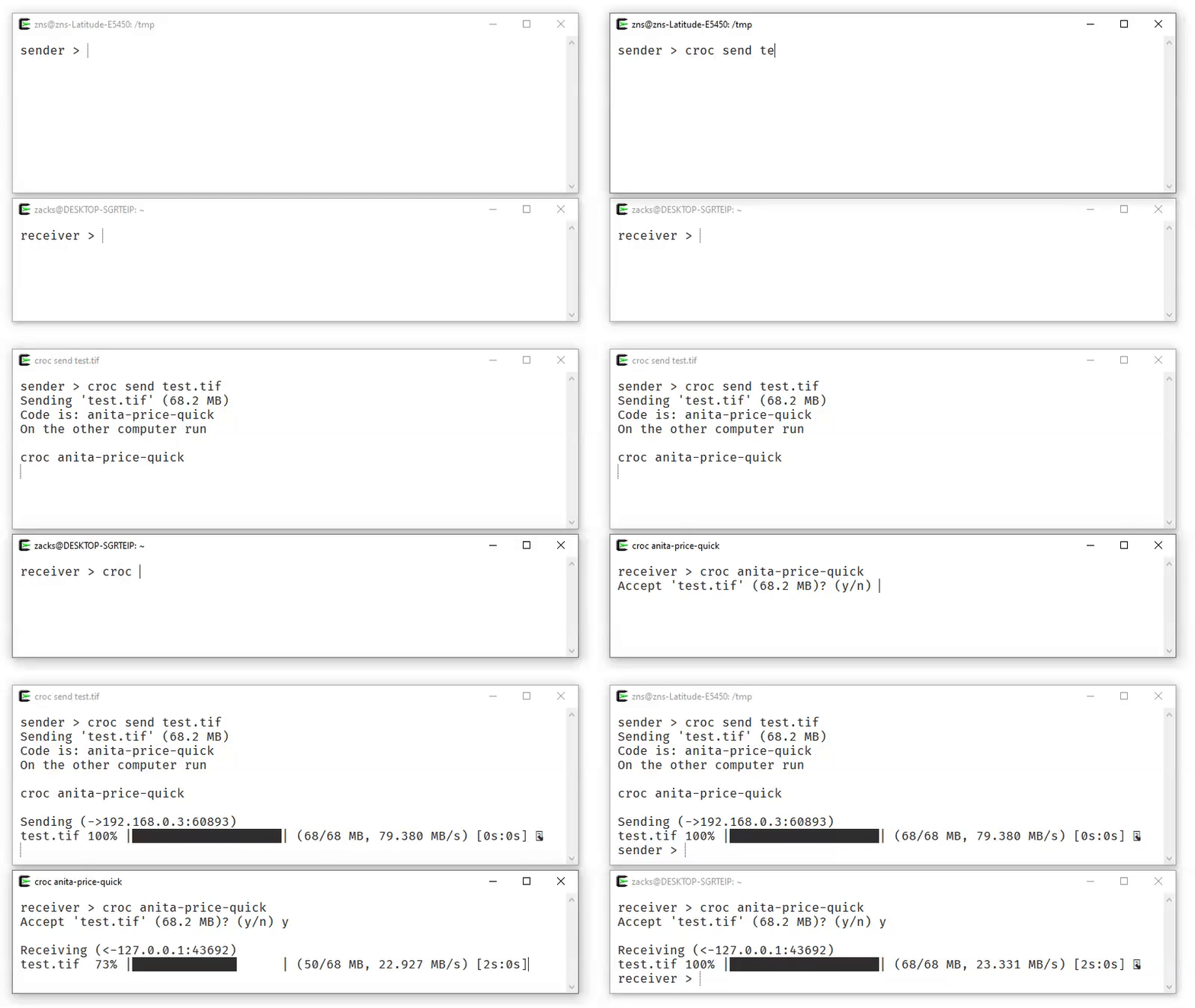 ## 安装 你可以下载[适用于你系统的最新版本](https://github.com/schollz/croc/releases/latest),或者通过命令行安装: ``` curl https://getcroc.schollz.com | bash ``` ### 在 macOS 上 使用 [Homebrew](https://brew.sh/): ``` brew install croc ``` 使用 [MacPorts](https://www.macports.org/): ``` sudo port selfupdate sudo port install croc ``` ### 在 Windows 上 你可以使用 [Scoop](https://scoop.sh/)、[Chocolatey](https://chocolatey.org/) 或 [Winget](https://learn.microsoft.com/windows/package-manager/) 安装最新版本: ``` scoop install croc ``` ``` choco install croc ``` ``` winget install schollz.croc ``` ### 使用 nix-env 你可以使用 [Nix](https://nixos.org/) 安装最新版本: ``` nix-env -i croc ``` ### 在 NixOS 上 你可以将以下内容添加到你的 [configuration.nix](https://nixos.org/manual/nixos/stable/#ch-configuration) 中: ``` environment.systemPackages = [ pkgs.croc ]; ``` ### 在 Alpine Linux 上 首先,安装依赖项: ``` apk add bash coreutils wget -qO- https://getcroc.schollz.com | bash ``` ### 在 Arch Linux 上 使用 `pacman` 安装: ``` pacman -S croc ``` ### 在 Fedora 上 使用 `dnf` 安装: ``` dnf install croc ``` ### 在 Gentoo 上 使用 `portage` 安装: ``` emerge net-misc/croc ``` ### 在 Termux 上 使用 `pkg` 安装: ``` pkg install croc ``` ### 在 FreeBSD 上 使用 `pkg` 安装: ``` pkg install croc ``` ### 在 Linux、macOS 和 Windows 上通过 Conda 安装 你可以使用 [`pixi`](https://pixi.sh/) 从 [conda-forge](https://github.com/conda-forge/croc-feedstock) 全局安装: ``` pixi global install croc ``` 或者使用 [`conda`](https://docs.conda.io/projects/conda/) 安装到特定环境中: ``` conda install --channel conda-forge croc ``` ### 在 Linux 和 macOS 上通过 Docker 安装 将以下单行函数添加到你的 ~/.profile 中(适用于任何兼容 POSIX 的 shell): ``` croc() { [ $# -eq 0 ] && set -- ""; mkdir -p "$HOME/.config/croc"; docker run --rm -it --user "$(id -u):$(id -g)" -v "$(pwd):/c" -v "$HOME/.config/croc:/.config/croc" -w /c -e CROC_SECRET docker.io/schollz/croc "$@"; } ``` 你也可以直接将其粘贴到终端中供当前会话使用。首次运行时 Docker 会拉取镜像。通过 Docker 运行的 `croc` 只能在当前目录及其子目录中工作。 ### 从源码构建 如果你愿意,可以[安装 Go](https://go.dev/dl/) 并从源码构建(需要 Go 1.22+): ``` go install github.com/schollz/croc/v10@latest ``` ### 在 Android 上 有一个第三方的 F-Droid 应用可供[下载](https://f-droid.org/packages/com.github.howeyc.crocgui/)。 ## 使用方法 要发送文件,只需执行: ``` $ croc send [file(s)-or-folder] Sending 'file-or-folder' (X MB) Code is: code-phrase ``` 然后,在另一台计算机上接收文件(或文件夹),运行: ``` croc code-phrase ``` 该密码短语用于建立密码认证密钥协商([PAKE](https://en.wikipedia.org/wiki/Password-authenticated_key_agreement)),它会生成一个供发送方和接收方用于端到端加密的密钥。 ### 自定义与选项 #### 在 Linux 或 macOS 上使用 `croc` 在 Linux 和 macOS 上,发送和接收过程略有不同,以避免[通过进程名泄露密钥](https://nvd.nist.gov/vuln/detail/CVE-2023-43621)。你需要将密钥作为环境变量运行 `croc`。例如,使用密钥 `***` 进行接收: ``` CROC_SECRET=*** croc ``` 对于单用户系统,可以通过运行以下命令来永久启用默认行为: ``` croc --classic ``` #### 自定义密码短语 你可以使用自定义的密码短语进行发送(至少需要 6 个字符): ``` croc send --code [code-phrase] [file(s)-or-folder] ``` #### 允许无提示覆盖 要在无提示的情况下自动覆盖文件,请使用 `--overwrite` 标志: ``` croc --yes --overwrite
```


#### 排除文件夹

要排除发送的文件夹,请使用带有逗号分隔排除项的 `--exclude` 标志:


```
croc send --exclude "node_modules,.venv" [folder]
```


#### 使用管道 - stdin 和 stdout

你可以通过管道将内容传递给 `croc`:


```
cat [filename] | croc send
```


要将文件接收到 `stdout`,你可以使用:


```
croc --yes [code-phrase] > out
```


#### 发送文本

要发送 URL 或短文本,请使用:


```
croc send --text "hello world"
```


#### 发送多个文件

你可以通过列出文件和/或文件夹来直接发送多个文件:


```
croc send [file1] [file2] [file3] [folder1] [folder2]
```


#### 显示二维码

要显示二维码(用于移动设备),请使用:


```
croc send --qr [file(s)-or-folder]
```


#### 使用代理

你可以通过添加 `--socks5` 来通过代理发送文件:


```
croc --socks5 "127.0.0.1:9050" send SOMEFILE
```


#### 更改加密曲线

要选择不同的加密椭圆曲线,请使用 `--curve` 标志:


```
croc --curve p521
```


#### 更改哈希算法

要获得更快的哈希速度,请使用 `imohash` 算法:


```
croc send --hash imohash SOMEFILE
```


#### 剪贴板选项

默认情况下,密码短语会被复制到你的剪贴板。要禁用此功能:


```
croc --disable-clipboard send [filename]
```


要复制带有密钥作为环境变量的完整命令(在 Linux/macOS 上很有用):


```
croc --extended-clipboard send [filename]
```


这会复制完整的命令,如 `CROC_SECRET="code-phrase" croc`(包括任何中继/密码标志)。

#### 安静模式

要抑制所有输出(适用于脚本和自动化):


```
croc --quiet send [filename]
```


#### 自建中继

你可以运行自己的中继:


```
croc relay
```


默认情况下,它使用 TCP 端口 9009-9013。你可以自定义端口(例如,`croc relay --ports 1111,1112`),但至少需要 **2** 个端口。

要使用你的中继发送文件:


```
croc --relay "myrelay.example.com:9009" send [filename]
```


#### 使用 Docker 自建中继

你也可以使用 Docker 运行中继:


```
docker run -d -p 9009-9013:9009-9013 -e CROC_PASS='YOURPASSWORD' docker.io/schollz/croc
```


要使用你的自定义中继发送文件:


```
croc --pass YOURPASSWORD --relay "myreal.example.com:9009" send [filename]
```


## 致谢

`croc` 经历了多次迭代演进,我非常感谢大家的贡献!特别感谢:

- [@warner](https://github.com/warner) 提出的[想法](https://github.com/magic-wormhole/magic-wormhole)
- [@tscholl2](https://github.com/tscholl2) 提供的[加密代码片段](https://gist.github.com/tscholl2/dc7dc15dc132ea70a98e8542fefffa28)
- [@skorokithakis](https://github.com/skorokithakis) 提供的[代理两个连接方案](https://www.stavros.io/posts/proxying-two-connections-go/)

以及更多的贡献者! 标签:CLI, E2EE, EVTX分析, Go语言, IPv6, P2P, PAKE, PowerShell, Tor, WiFi技术, 中继传输, 代理支持, 加密通信, 告警, 安全传输, 安全通信, 开源, 数据同步, 文件传输, 文件夹传输, 断点续传, 无需端口转发, 日志审计, 点对点, 程序破解, 端到端加密, 网络信息收集, 网络工具, 请求拦截