datalab-to/chandra
GitHub: datalab-to/chandra
面向复杂文档的顶级开源 OCR 模型,支持将 PDF 和图像转换为结构化的 Markdown/HTML/JSON,擅长处理表格、公式、手写体和多语言内容。
Stars: 11242 | Forks: 1159

Datalab
State of the Art models for Document Intelligence



# Chandra OCR 2 Chandra OCR 2 是一款最先进的 OCR 模型,能够将图像和 PDF 转换为结构化的 HTML/Markdown/JSON,同时保留布局信息。 ## 新闻 - 3/2026 - Chandra 2 发布,在数学公式、表格、布局和多语言 OCR 方面有显著改进 - 10/2025 - Chandra 1 发布 ## 特性 - 荣登外部 olmocr 基准测试榜首,并在内部多语言基准测试中表现显著提升 - 将文档转换为 markdown、html 或 json,包含详细的布局信息 - 支持 90+ 种语言([见下方基准](#multilingual-benchmark-table)) - 优秀的手写体支持 - 准确重建表单,包括复选框 - 在表格、数学公式和复杂布局方面表现强劲 - 提取图像和图表,并添加标题和结构化数据 - 两种推理模式:本地 和远程 (vLLM server)
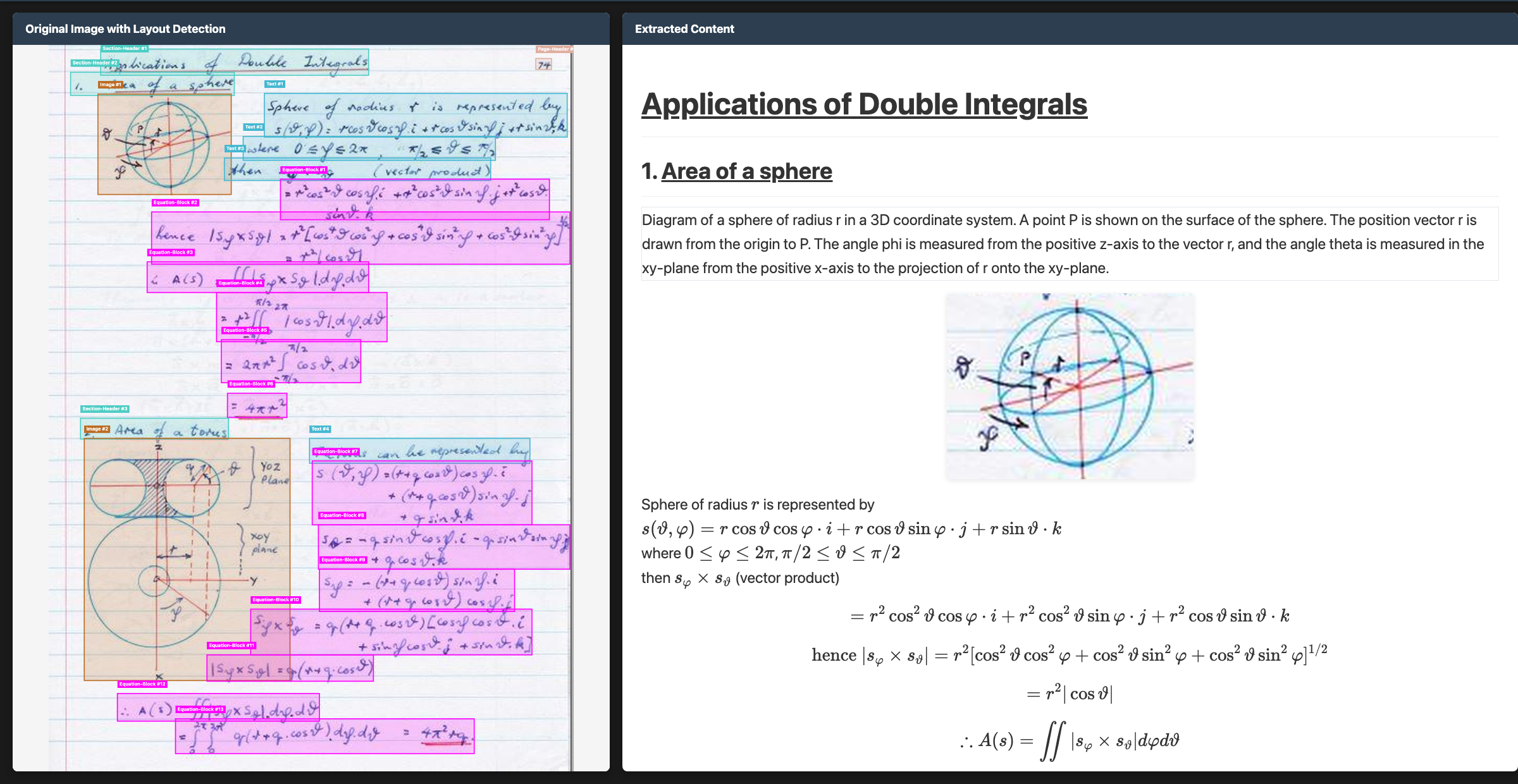 ## 托管 API
- 我们在此处提供 Chandra 的托管 API [点击查看](https://www.datalab.to/),该版本更准确、更快速。
- 如果您想在不安装的情况下试用 Chandra,这里有一个免费的游乐场 [点击试用](https://www.datalab.to/playground)。
## 快速开始
最简单的开始方式是使用 CLI 工具:
```
pip install chandra-ocr
# 使用 vLLM(推荐,轻量级安装)
chandra_vllm
chandra input.pdf ./output
# 使用 HuggingFace(需要 torch)
pip install chandra-ocr[hf]
chandra input.pdf ./output --method hf
# 交互式 streamlit app
pip install chandra-ocr[app]
chandra_app
```
## 基准测试
多语言性能是 Chandra 2 的重点。由于缺乏完善的公共多语言 OCR 基准,我们创建了自己的基准。该测试涵盖表格、数学公式、顺序、布局和文本准确性。
## 托管 API
- 我们在此处提供 Chandra 的托管 API [点击查看](https://www.datalab.to/),该版本更准确、更快速。
- 如果您想在不安装的情况下试用 Chandra,这里有一个免费的游乐场 [点击试用](https://www.datalab.to/playground)。
## 快速开始
最简单的开始方式是使用 CLI 工具:
```
pip install chandra-ocr
# 使用 vLLM(推荐,轻量级安装)
chandra_vllm
chandra input.pdf ./output
# 使用 HuggingFace(需要 torch)
pip install chandra-ocr[hf]
chandra input.pdf ./output --method hf
# 交互式 streamlit app
pip install chandra-ocr[app]
chandra_app
```
## 基准测试
多语言性能是 Chandra 2 的重点。由于缺乏完善的公共多语言 OCR 基准,我们创建了自己的基准。该测试涵盖表格、数学公式、顺序、布局和文本准确性。
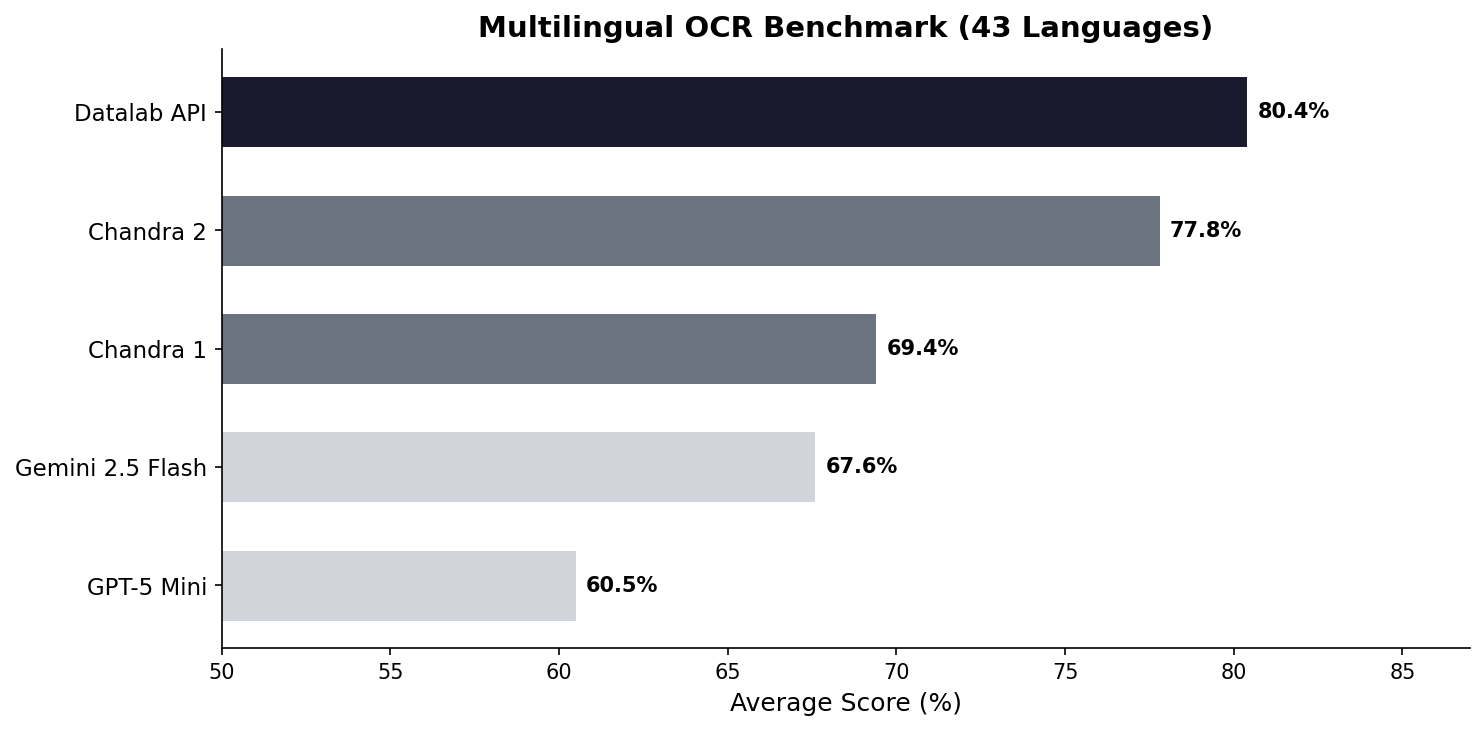 查看[下方](#multilingual-benchmark-table)的完整分数。我们还有一个[完整的 90 种语言基准](FULL_BENCHMARKS.md)。
我们还使用广泛认可的 olmocr 基准对 Chandra 2 进行了测试:
查看[下方](#multilingual-benchmark-table)的完整分数。我们还有一个[完整的 90 种语言基准](FULL_BENCHMARKS.md)。
我们还使用广泛认可的 olmocr 基准对 Chandra 2 进行了测试:
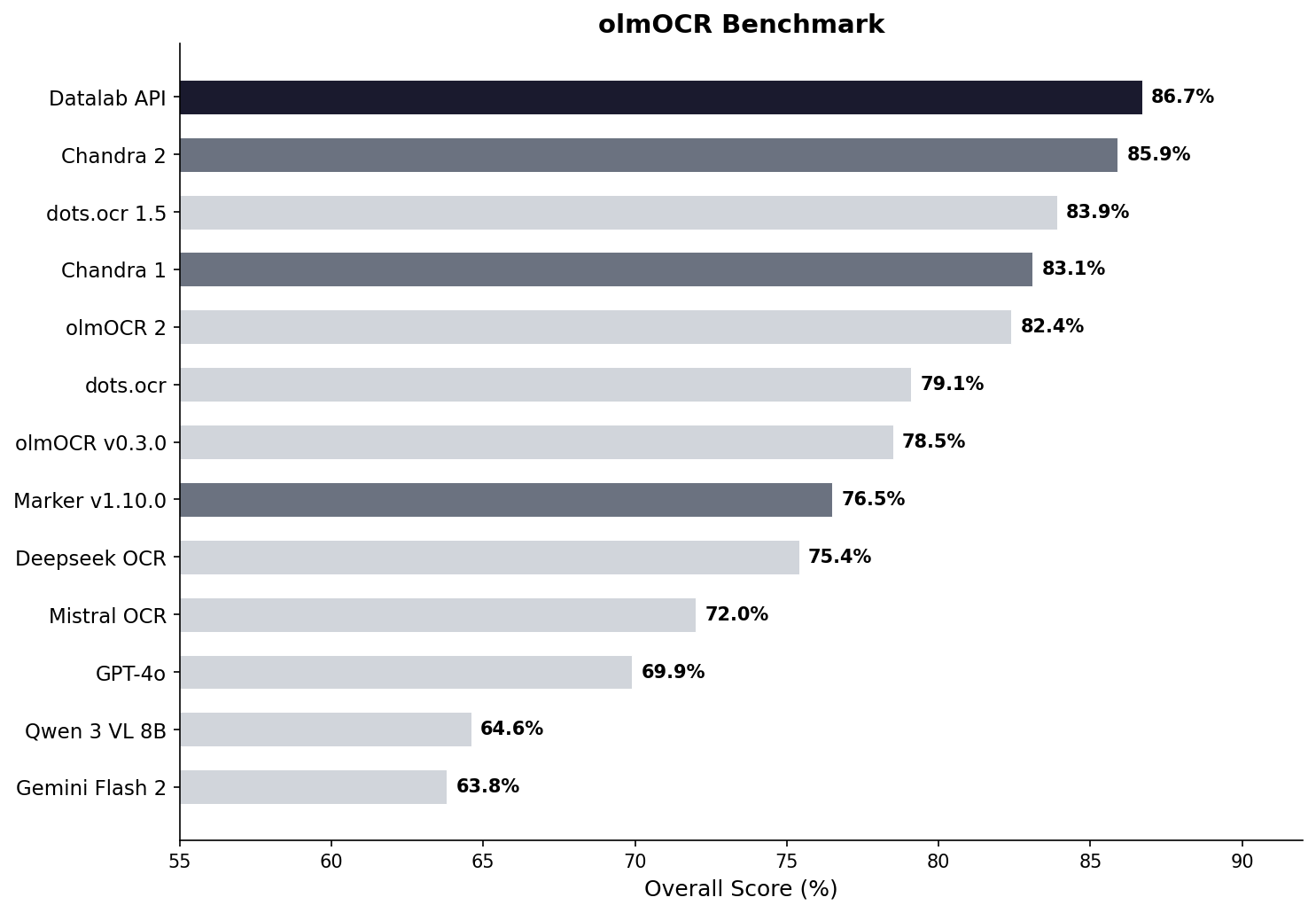 查看[下方](#benchmark-table)的完整分数。
## 示例
| 类型 | 名称 | 链接 |
|------|--------------------------|-------------------------------------------------------------------------------------------------------------|
| 数学 | CS229 教科书 | [查看](https://github.com/datalab-to/chandra/blob/master/assets/examples/math/cs229.png) |
| 数学 | 手写数学 | [查看](https://github.com/datalab-to/chandra/blob/master/assets/examples/math/handwritten_math.png) |
| 数学 | 中文数学 | [查看](https://github.com/datalab-to/chandra/blob/master/assets/examples/math/chinese_math.png) |
| 表格 | 统计分布 | [查看](https://github.com/datalab-to/chandra/blob/master/assets/examples/tables/complex_tables.png) |
| 表格 | 财务表格 | [查看](https://github.com/datalab-to/chandra/blob/master/assets/examples/tables/financial_table.png) |
| 表单 | 注册表单 | [查看](https://github.com/datalab-to/chandra/blob/master/assets/examples/forms/handwritten_form.png) |
| 表单 | 租赁表单 | [查看](https://github.com/datalab-to/chandra/blob/master/assets/examples/forms/lease_filled.png) |
| 手写 | 草书 | [查看](https://github.com/datalab-to/chandra/blob/master/assets/examples/handwriting/cursive_writing.png) |
| 手写 | 手写笔记 | [查看](https://github.com/datalab-to/chandra/blob/master/assets/examples/handwriting/handwritten_notes.png) |
| 语言 | 阿拉伯语 | [查看](https://github.com/datalab-to/chandra/blob/master/assets/examples/languages/arabic.png) |
| 语言 | 日语 | [查看](https://github.com/datalab-to/chandra/blob/master/assets/examples/languages/japanese.png) |
| 语言 | 印地语 | [查看](https://github.com/datalab-to/chandra/blob/master/assets/examples/languages/hindi.png) |
| 语言 | 俄语 | [查看](https://github.com/datalab-to/chandra/blob/master/assets/examples/languages/russian.png) |
| 其他 | 图表 | [查看](https://github.com/datalab-to/chandra/blob/master/assets/examples/other/charts.png) |
| 其他 | 化学 | [查看](https://github.com/datalab-to/chandra/blob/master/assets/examples/other/chemistry.png) |
## 安装
### 包安装
```
# 基础安装(用于 vLLM backend)
pip install chandra-ocr
# 使用 HuggingFace backend(包含 torch, transformers)
pip install chandra-ocr[hf]
# 安装所有扩展
pip install chandra-ocr[all]
```
如果您使用 HuggingFace 方法,我们还建议安装 [flash attention](https://github.com/Dao-AILab/flash-attention) 以获得更好的性能。
### 从源码安装
```
git clone https://github.com/datalab-to/chandra.git
cd chandra
uv sync
source .venv/bin/activate
```
## 用法
### CLI
处理单个文件或整个目录:
```
# 单个文件,使用 vllm server(关于如何启动 vllm 请参阅下文)
chandra input.pdf ./output --method vllm
# 使用本地模型处理目录中的所有文件
chandra ./documents ./output --method hf
```
**CLI 选项:**
- `--method [hf|vllm]`:推理方法(默认值:vllm)
- `--page-range TEXT`:PDF 的页面范围(例如 "1-5,7,9-12")
- `--max-output-tokens INTEGER`:每页最大 token 数
- `--max-workers INTEGER`:vLLM 的并行 worker 数
- `--include-images/--no-images`:提取并保存图像(默认值:include)
- `--include-headers-footers/--no-headers-footers`:包含页面页眉/页脚(默认值:exclude)
- `--batch-size INTEGER`:每批次的页数(默认值:vllm 为 28,hf 为 1)
**输出结构:**
每个处理后的文件都会创建一个子目录,其中包含:
- `
查看[下方](#benchmark-table)的完整分数。
## 示例
| 类型 | 名称 | 链接 |
|------|--------------------------|-------------------------------------------------------------------------------------------------------------|
| 数学 | CS229 教科书 | [查看](https://github.com/datalab-to/chandra/blob/master/assets/examples/math/cs229.png) |
| 数学 | 手写数学 | [查看](https://github.com/datalab-to/chandra/blob/master/assets/examples/math/handwritten_math.png) |
| 数学 | 中文数学 | [查看](https://github.com/datalab-to/chandra/blob/master/assets/examples/math/chinese_math.png) |
| 表格 | 统计分布 | [查看](https://github.com/datalab-to/chandra/blob/master/assets/examples/tables/complex_tables.png) |
| 表格 | 财务表格 | [查看](https://github.com/datalab-to/chandra/blob/master/assets/examples/tables/financial_table.png) |
| 表单 | 注册表单 | [查看](https://github.com/datalab-to/chandra/blob/master/assets/examples/forms/handwritten_form.png) |
| 表单 | 租赁表单 | [查看](https://github.com/datalab-to/chandra/blob/master/assets/examples/forms/lease_filled.png) |
| 手写 | 草书 | [查看](https://github.com/datalab-to/chandra/blob/master/assets/examples/handwriting/cursive_writing.png) |
| 手写 | 手写笔记 | [查看](https://github.com/datalab-to/chandra/blob/master/assets/examples/handwriting/handwritten_notes.png) |
| 语言 | 阿拉伯语 | [查看](https://github.com/datalab-to/chandra/blob/master/assets/examples/languages/arabic.png) |
| 语言 | 日语 | [查看](https://github.com/datalab-to/chandra/blob/master/assets/examples/languages/japanese.png) |
| 语言 | 印地语 | [查看](https://github.com/datalab-to/chandra/blob/master/assets/examples/languages/hindi.png) |
| 语言 | 俄语 | [查看](https://github.com/datalab-to/chandra/blob/master/assets/examples/languages/russian.png) |
| 其他 | 图表 | [查看](https://github.com/datalab-to/chandra/blob/master/assets/examples/other/charts.png) |
| 其他 | 化学 | [查看](https://github.com/datalab-to/chandra/blob/master/assets/examples/other/chemistry.png) |
## 安装
### 包安装
```
# 基础安装(用于 vLLM backend)
pip install chandra-ocr
# 使用 HuggingFace backend(包含 torch, transformers)
pip install chandra-ocr[hf]
# 安装所有扩展
pip install chandra-ocr[all]
```
如果您使用 HuggingFace 方法,我们还建议安装 [flash attention](https://github.com/Dao-AILab/flash-attention) 以获得更好的性能。
### 从源码安装
```
git clone https://github.com/datalab-to/chandra.git
cd chandra
uv sync
source .venv/bin/activate
```
## 用法
### CLI
处理单个文件或整个目录:
```
# 单个文件,使用 vllm server(关于如何启动 vllm 请参阅下文)
chandra input.pdf ./output --method vllm
# 使用本地模型处理目录中的所有文件
chandra ./documents ./output --method hf
```
**CLI 选项:**
- `--method [hf|vllm]`:推理方法(默认值:vllm)
- `--page-range TEXT`:PDF 的页面范围(例如 "1-5,7,9-12")
- `--max-output-tokens INTEGER`:每页最大 token 数
- `--max-workers INTEGER`:vLLM 的并行 worker 数
- `--include-images/--no-images`:提取并保存图像(默认值:include)
- `--include-headers-footers/--no-headers-footers`:包含页面页眉/页脚(默认值:exclude)
- `--batch-size INTEGER`:每批次的页数(默认值:vllm 为 28,hf 为 1)
**输出结构:**
每个处理后的文件都会创建一个子目录,其中包含:
- `标签:HuggingFace, Kubernetes, OCR, PDF转HTML, PDF转Markdown, Python, SOTA模型, vLLM, 光学字符识别, 凭据扫描, 多语言OCR, 布局分析, 开源模型, 手写体识别, 数学公式识别, 文档数字化, 文档智能, 文档解析, 文档转换, 无后门, 智能表单识别, 深度学习, 结构化数据提取, 表格识别, 计算机视觉, 请求拦截, 逆向工具