禁用和启用屏幕 · 强制 HiDPI · EDR 增强亮度 · 暖色调 · 窗口透明度、模糊效果、置顶和画中画 · 保持唤醒。
[](https://github.com/oabdrabo/DisplayDeck/releases/latest)
[](LICENSE)
[](#-requirements)
[](#-requirements)
[](#-how-it-works)
[](https://oabdrabo.github.io/DisplayDeck/)
[**功能**](#-features) · [**截图**](#-screenshots) · [**安装**](#-install) · [**要求**](#-requirements) · [**工作原理**](#-how-it-works) · [**常见问题**](#-faq) · [**支持**](#-support--sponsors) · [**许可证**](#-license)
## ✨ 功能
| | |
|---|---|
| 🖥️ **禁用 / 启用任何显示器** | 在合盖/无头模式(headless)下关闭内置屏幕,使其在打开盖子时保持关闭。可选项:当连接外部显示器时自动禁用内置屏幕——并带有**安全保护机制**,如果断开连接(或失效/幽灵外部显示器条目)会导致您没有可用的屏幕,它会重新启用内置屏幕。 |
| ⤢ **强制 HiDPI** | 通过镜像私有的 `SLVirtualDisplay` 为原生不支持该功能的显示器添加清晰的缩放(retina)分辨率,以及一个“更多空间”的超采样级别。可选写入**持久的“清晰 HiDPI”覆盖配置文件**。 |
| ☀️ **亮度 + 增强** | 内置屏幕通过 `DisplayServices` 调节,外部显示器通过 DDC/CI 调节,内嵌**自动亮度**开关,以及**超过 100% 的 EDR 增强**,限制在显示器真实的、学习到的余量范围内(在内置屏幕上较为温和,在真正的 XDR/HDR 面板上提升明显)——保留原始色彩,并在 Mission Control 中自动暂停。 |
| 🌡️ **暖色调** | 通过 gamma 渐变实现针对单个显示器的色温滑块(f.lux / Night-Shift 风格)—— 6500 K 中性 → ~3400 K 暖色,设置会持久化保存,在 0% 时恢复原生的 ColorSync。 |
| 🪟 **窗口透明度** | 为**任何**应用程序设置单应用或全局窗口透明度,通过注入到 Dock 中的独立脚本组件实现(无需外部工具)。可选的**毛玻璃模糊效果**、单应用的**保持置顶**,以及**画中画**(将窗口缩小为仍可使用的浮动角落)。 |
| ☕ **保持唤醒** | 通过 IOKit 唤醒断言使 Mac 及其显示器不会进入睡眠——可无限期唤醒或设置持续时间。替代 KeepingYouAwake。 |
| 🔤 **文本平滑** | 调整 macOS 的灰度抗锯齿(关闭 → 强效),使文本在外接、非 Retina 或缩放的显示器上不会显得细弱或模糊。全局有效;重新登录后生效。 |
菜单栏图标是一个可交互的**咖啡杯**:左键点击切换保持唤醒状态(满杯 = 唤醒),右键点击打开菜单。
## 📸 截图
菜单栏咖啡杯:

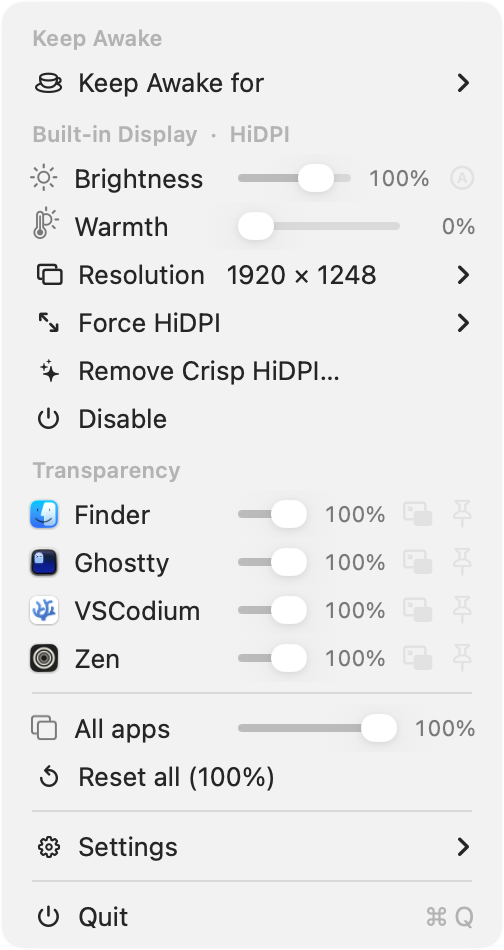
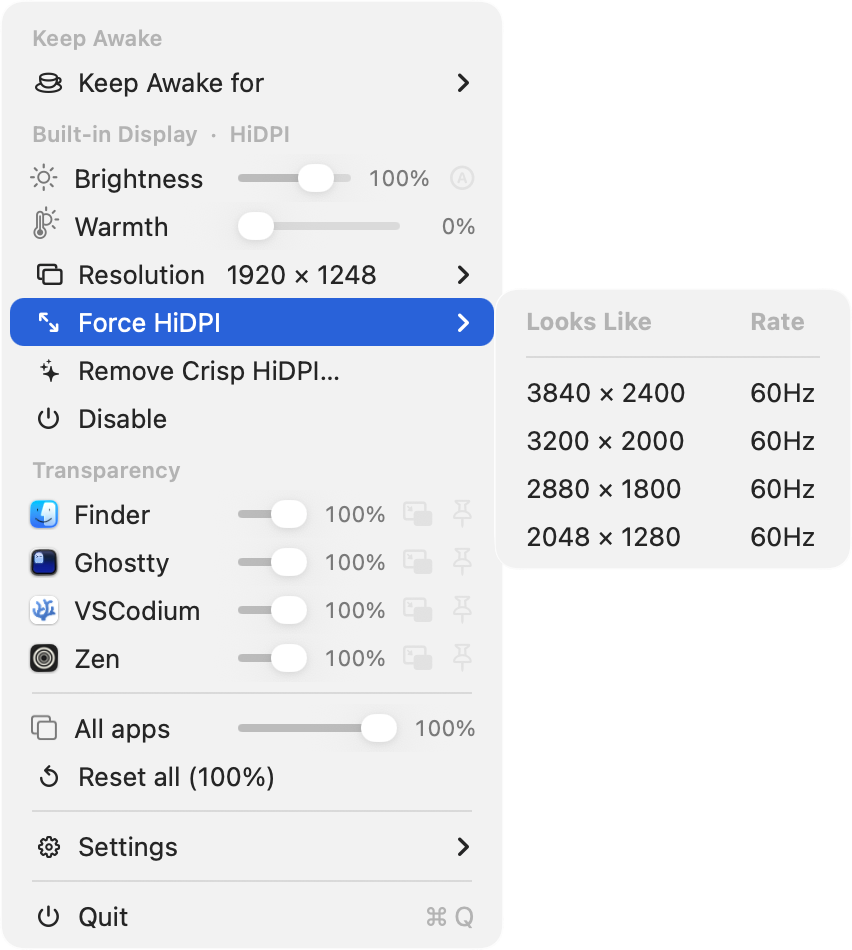
菜单 —— 针对单个显示器的**亮度**(带有内嵌的 **Ⓐ** 自动亮度开关)和**暖色调**滑块,以及针对单个应用的**透明度**行,带有毛玻璃效果、保持置顶和画中画开关:
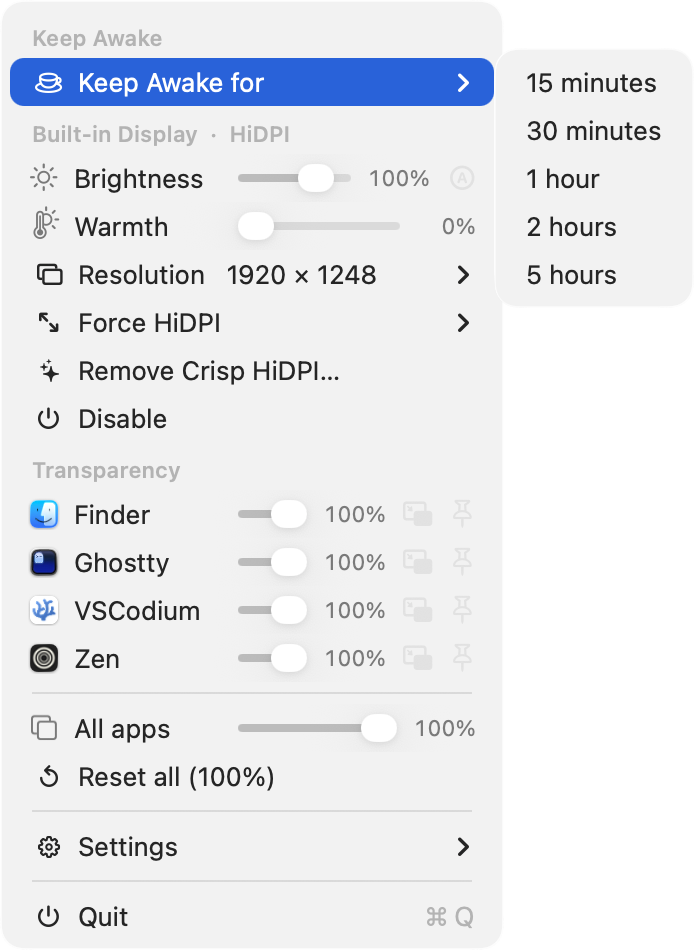
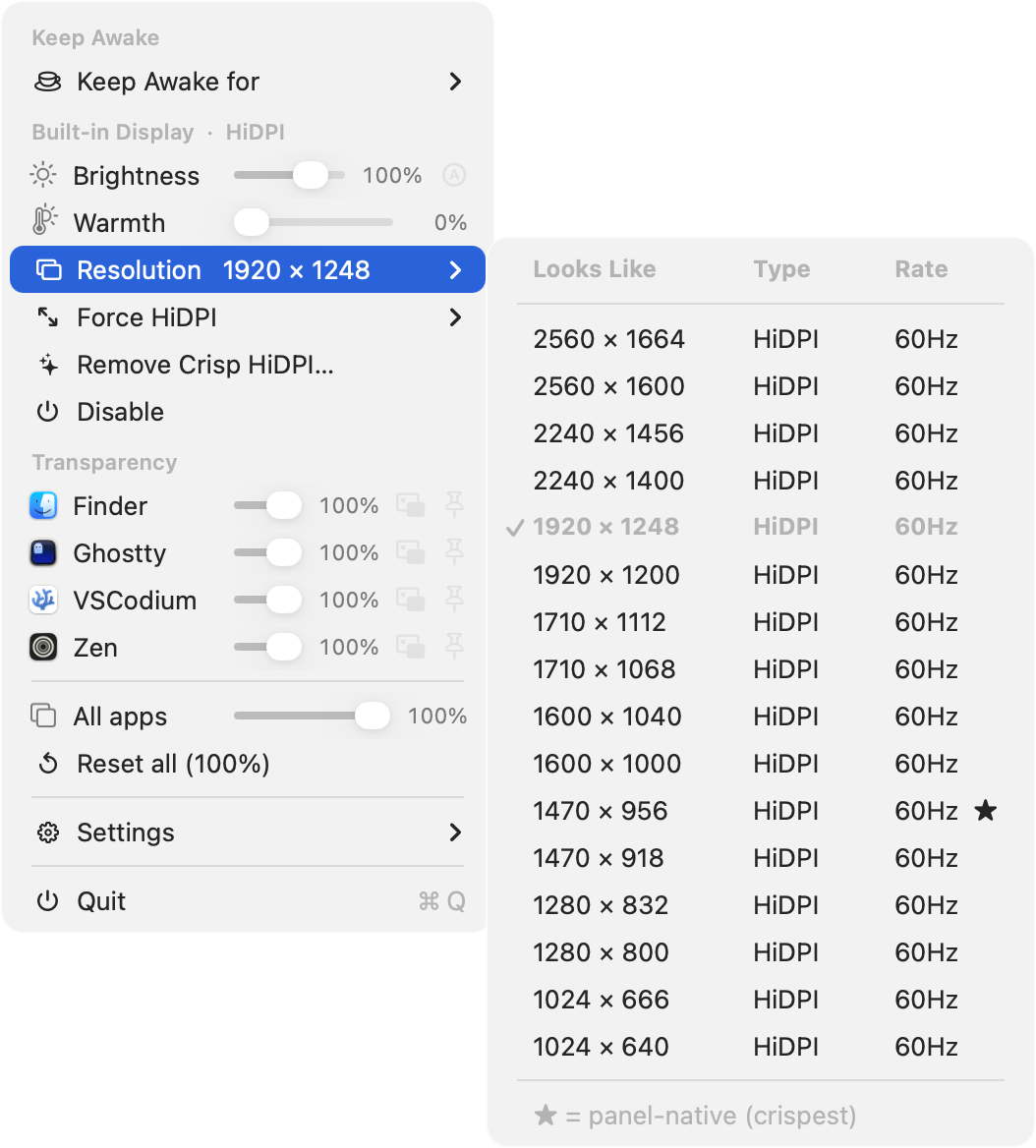
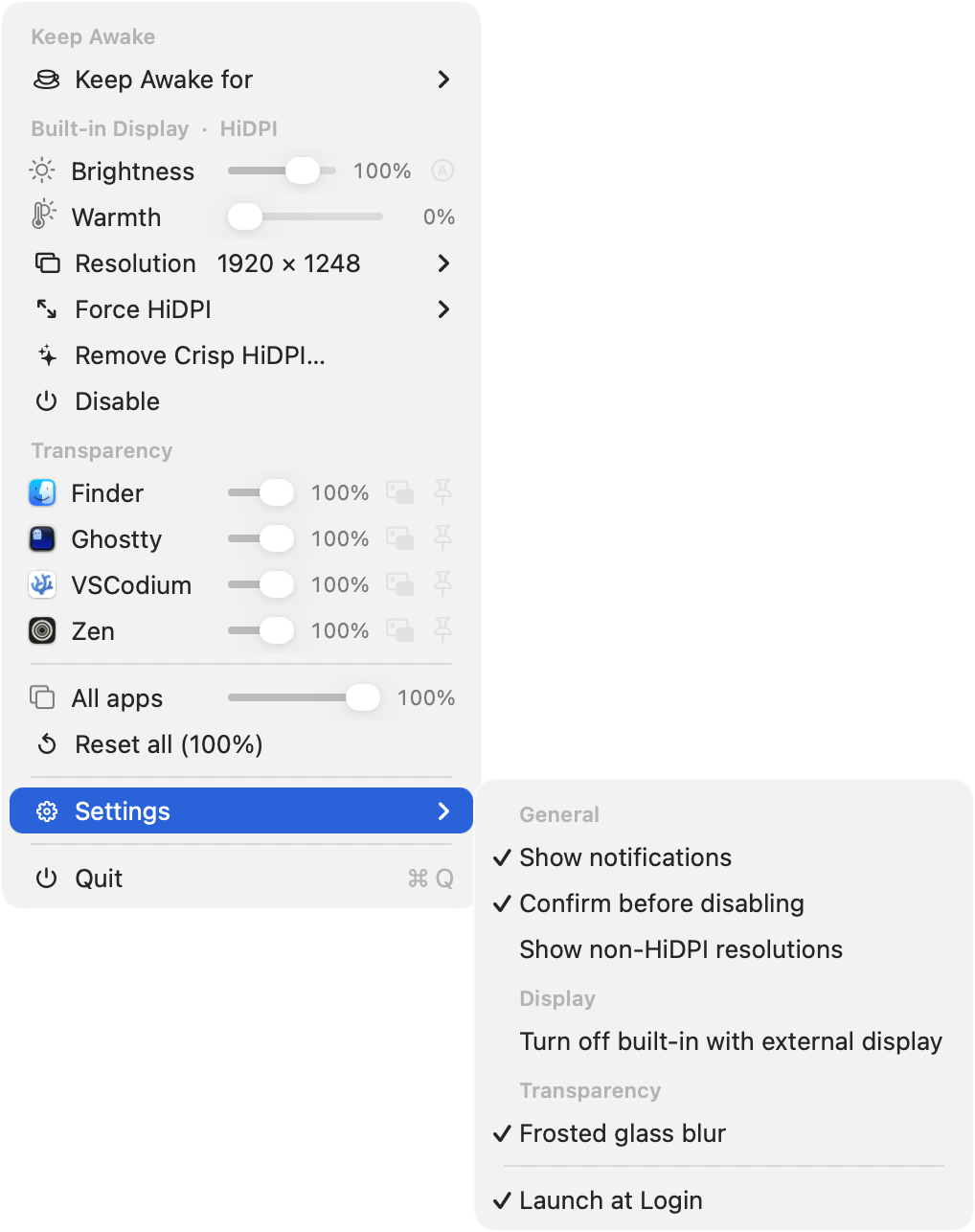
子菜单 —— 保持唤醒持续时间、精选的**分辨率**选择器(★ = 面板原生),**强制 HiDPI**“更多空间”级别,以及分组的**设置**:
## 📦 安装
**Homebrew** (cask):
```
brew install --cask oabdrabo/tap/displaydeck
```
从源码安装
```
git clone https://github.com/oabdrabo/DisplayDeck.git
cd DisplayDeck
make install # builds, ad-hoc signs, copies to /Applications, launches
```
需要 Xcode Command Line Tools (`xcode-select --install`)。其他目标:`make`(仅构建)、`make zip`(发布构件)、`make clean`、`make uninstall`。
默认在登录时启动 —— 在菜单栏图标下切换:**设置 → 登录时启动**。该应用程序为**临时签名**(未公证),因此 Gatekeeper 可能会在首次打开时发出警告;Homebrew cask 会为您移除隔离标志,或者右键点击一次选择 **打开**。
## 🧹 卸载
```
brew uninstall --cask displaydeck # if installed via Homebrew
```
从源码卸载,或移除为实现透明度而安装的 Dock 脚本组件:
```
make uninstall # removes the app + (with admin) the scripting addition & sudoers entry
```
## ⚙️ 要求
- **在 Apple Silicon 上运行 macOS 14+。**
- **窗口透明度 / 模糊 / 保持置顶**需要**禁用 SIP**并添加 `-arm64e_preview_abi` 启动参数 —— 这些设置允许将 payload 注入到 Dock 中。首次使用会提示输入一次管理员密码以安装脚本组件;之后它会静默加载。*(显示器 / HiDPI / 亮度 / 暖色调功能无需这些即可运行。)*
- **画中画**功能需请求一次辅助功能权限。
## 🔧 工作原理
- 禁用显示器使用私有 API `CGSConfigureDisplayEnabled`;强制 HiDPI 将面板镜像到一个固定在所需逻辑尺寸的私有 `SLVirtualDisplay` 上,“清晰 HiDPI”会在 `/Library/Displays/.../Overrides` 下写入显示器覆盖配置文件。
- 透明度注入了一个 payload 到 Dock(`task_for_pid` + 一个 arm64e 引导程序),通过专用的 unix socket 调用 `SLSSetWindowAlpha` / `SLSSetWindowBackgroundBlurRadius` / `SLSSetWindowLevel`。注入技术改编自 [yabai](https://github.com/koekeishiya/yabai)(MIT 许可证);详见 `sa/loader.m`。
- 暖色调使用公开的 `CGSetDisplayTransferByTable` 加载每个通道的 gamma 渐变;亮度增强是一个无边框的 EDR 覆盖层(`CAMetalLayer`,正片叠底混合),每一帧都会根据实时的 `maximumExtendedDynamicRangeColorComponentValue` 进行限制。
- 画中画通过辅助功能 API(`AXUIElement`)调整/移动真实窗口,并复用“保持置顶”功能实现浮动效果。
由于这些是私有 API,其行为可能会在不同的 macOS 版本之间发生变化。
## 🗂️ 项目结构
```
src/
main.m app entry point
app/ AppDelegate — status item, menu, UI
display/ DisplayManager, HiDPIInjector, Brightness,
BrightnessBooster (EDR boost), ColorTemperature (warmth)
transparency/ WindowTransparency — in-app client for the Dock payload
window/ WindowPiP — Accessibility-based picture-in-picture
power/ Caffeine — keep-awake power assertion
common/ DDUtil — shared error/AppleScript helpers
sa/ scripting addition injected into Dock (loader.m, payload.m)
tools/ build_icon.m — generates AppIcon.icns
resources/ Info.plist
```
## ❓ 常见问题
**这会损害我的 Mac 吗?**
不会。它使用的是 Apple 自身的框架(无需内核扩展),并且它执行的所有操作都是可逆的 —— 显示器会重新启用,暖色调和亮度会重置,窗口会恢复,退出应用程序会撤销实时的覆盖层。
**亮度增强是真实的,还是仅仅是一个调暗的把戏?**
真实的。它是一个 EDR(扩展动态范围)覆盖层,可驱动面板超过其正常的 100%,每一帧都被限制在显示器的*实际*余量范围内 —— 在标准面板上提升适中,在 XDR/HDR 面板上提升明显。它会保留色彩,并在 Mission Control 期间自动暂停。
**为什么窗口透明度需要禁用 SIP?**
使其他应用程序的窗口透明意味着需要向 Dock 注入一个小的 payload,macOS 仅允许在关闭 SIP 并加上 `-arm64e_preview_abi` 启动参数的情况下执行此操作。其他所有功能 —— 显示器控制、HiDPI、亮度、暖色调、保持唤醒 —— 在原装机器上即可工作。
**它可以在 Intel Mac 上运行吗?**
不能 —— 仅限 Apple Silicon。增强功能依赖于 EDR,且 Dock 注入路径为 arm64e。
**更新会重置我的设置吗?**
不会。亮度、暖色调和各应用的偏好设置保存在您的用户默认配置中,并在更新后依然有效。
## 💖 支持与赞助
DisplayDeck 是免费的开源软件,没有跟踪或广告。如果它对您有用,您可以通过付费支持持续开发 —— 随意支付,支持一次性或按月支付:


## 📄 许可证
[MIT](LICENSE) © 2026 Omar Abdrabo
