waaraawa/ByteGrid
GitHub: waaraawa/ByteGrid
ByteGrid 是一个 Obsidian 插件,将 YAML 定义的二进制结构和 C 语言内存布局转换为字节级精确的交互式 SVG 图表。
Stars: 1 | Forks: 0
# ByteGrid
**ByteGrid** 是一个 Obsidian 插件,能将 YAML 定义转换为精美的交互式 SVG 图表,用于展示二进制数据结构的内存布局。
非常适合用于逆向工程、协议分析、文件格式文档记录以及理解底层数据结构。
## ✨ 功能
- 🎨 **自动颜色分配** - 字段会自动进行颜色编码,以便于区分
- 📏 **字节级精确布局** - 基于网格精确可视化内存结构
- 🔍 **位域支持** - 可视化字节内的各个位
- 🎯 **多种布局模式** - 字节级或位级布局
- 🌈 **配色方案** - 默认、深色和浅色模式
- 📊 **灵活的图例** - 可自定义位置(左、右、下)并支持多列
- 📐 **行优先排序** - 直观的从左到右字段排列
## 📸 截图
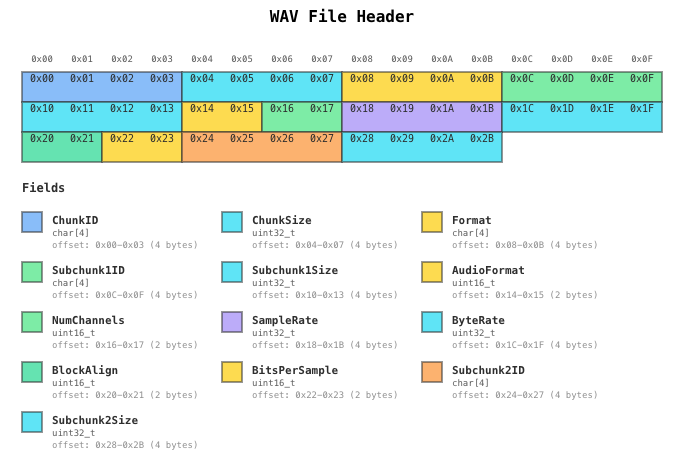
### WAV 文件头
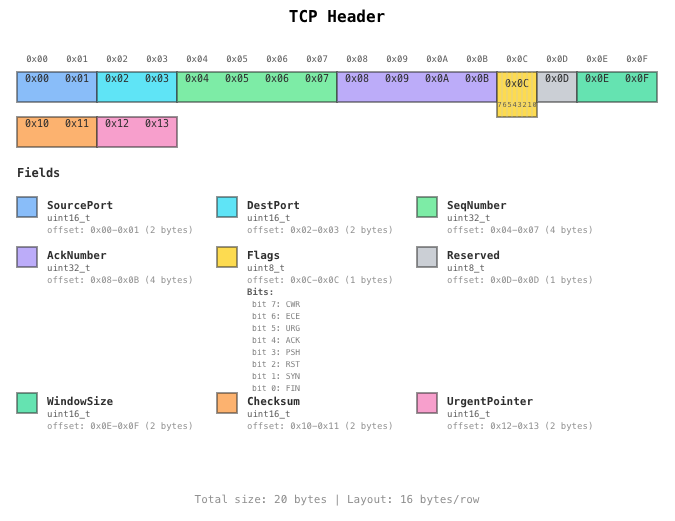
### 带位域的 TCP 文件头
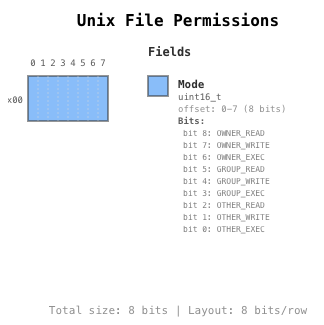
### 带位域的 Unix 文件权限
## 🚀 安装说明
### 手动安装
1. 从 [GitHub Releases](https://github.com/waaraawa/ByteGrid/releases) 下载最新版本
2. 将 `main.js`、`manifest.json` 和 `styles.css` 解压到你的 vault 的 `.obsidian/plugins/bytegrid/` 文件夹中
3. 重新加载 Obsidian
4. 在 设置 → 社区插件 中启用该插件
## 📖 用法
### 基本示例
创建一个带有 `bytegrid` 语言标签的代码块:
```bytegrid
name: Simple Structure
size: 16
layout: 16
fields:
- offset: 0-3
name: ID
type: uint32_t
- offset: 4-7
name: Timestamp
type: uint32_t
- offset: 8-11
name: Value
type: float
- offset: 12-15
name: Checksum
type: uint32_t
```
### 配置选项
```
name: Structure Name # Required: Name of the structure
size: 16 # Required: Total size in bytes
layout: 16 # Optional: Bytes per row (default: 16)
layoutUnit: byte # Optional: 'byte' or 'bit' (default: byte)
# Color 选项
autoColor: true # Optional: Auto-assign colors (default: true)
colorScheme: default # Optional: 'default', 'dark', or 'light'
# Legend 选项
legendPosition: right # Optional: 'right', 'left', 'bottom', 'none'
legendColumns: 1 # Optional: Number of columns in legend (default: 1)
# 其他选项
showFooter: true # Optional: Show footer (default: true)
fields:
- offset: 0-3 # Required: Byte range (SSOT)
name: FieldName # Required: Field name
type: uint32_t # Required: Data type
color: blue # Optional: Explicit color
description: '...' # Optional: Description
endianness: little # Optional: 'little' or 'big'
bitfields: # Optional: Bit-level fields
- name: Flag1
bits: '0-3'
description: '...'
```
### 支持的数据类型
**整数类型:**
- `char`, `int8_t`, `uint8_t`
- `int16_t`, `uint16_t`, `short`
- `int32_t`, `uint32_t`, `int`
- `int64_t`, `uint64_t`, `long`
**浮点数:**
- `float`, `double`
**数组:**
- `char[4]`, `uint8_t[16]` 等
**特殊类型:**
- `reserved`, `padding` (始终为灰色)
### 调色板
当 `autoColor: true`(默认)时,字段将循环使用以下颜色:
- 🔵 blue
- 🔷 cyan
- 🟡 yellow
- 🟢 green
- 🟠 orange
- 🟣 purple
- 🟢 mint
- 🩷 pink
## 📚 示例
查看 [示例](./examples) 文件夹了解更多:
- WAV 音频文件头
- 带位域的 TCP/IP 数据头
- ELF 二进制格式
- Unix 文件权限
- CPU 标志寄存器
## 🛠️ 开发
### 插件开发
```
# 安装 dependencies
npm install
# 构建所有 packages
npm run build
# 运行 tests
npm run test
# Development 模式 (watch)
cd packages/obsidian-plugin
npm run dev
```
### 项目结构
```
bytegrid/
├── packages/
│ ├── core/ # Core rendering engine
│ └── obsidian-plugin/ # Obsidian plugin wrapper
└── examples/ # Example files
```
### 开发指南
### 核心设计原则
- **offset 是唯一事实来源 (SSOT)** - 字段大小根据 offset 范围计算得出
- **拒绝魔术数字** - 使用常量来定义布局值
- **动态尺寸调整** - 根据内容计算尺寸
- **显式填充** - 使用 `reserved` 或 `padding` 类型
## 📝 许可证
MIT 许可证 - 详情请参阅 [LICENSE](./LICENSE)
## 🙏 致谢
基于以下技术开发:
- [Obsidian API](https://github.com/obsidianmd/obsidian-api)
- [js-yaml](https://github.com/nodeca/js-yaml)
- TypeScript & esbuild
标签:Obsidian插件, SVG图表, 云资产清单, 内存布局, 协议分析, 文件格式, 权限提升, 自动化攻击, 逆向工程