onurcangnc/web_app_ai_scanner
GitHub: onurcangnc/web_app_ai_scanner
一款集成多工具的AI辅助Web安全扫描流水线,实现从侦察到漏洞发现的自动化并生成HTML报告。
Stars: 1 | Forks: 0
# 🔎 AI 辅助 Web 安全扫描器
一个基于 Python 构建的模块化、模式驱动的 **Web 应用程序安全扫描流水线**。
- 它集成了知名的侦察和漏洞发现工具,并结合 **AI 辅助** 进行更智能的端点过滤和模板选择。
## 🚀 功能特性
- **设计模式实战**
- **Observer** → 实时控制台、日志和 Telegram 通知
- **Command** → 封装每个工具的执行过程
- **Decorator** → 用于性能测量的计时包装器
- **Strategy** → 根域名与子域名工作流选择
- **Factory Method** → 根据标识符动态创建命令
- **Builder** → 完整的 HTML 安全报告生成器
- **集成工具**
- 🔹 [Subfinder](https://github.com/projectdiscovery/subfinder) – 子域名枚举
- 🔹 [Httpx](https://github.com/projectdiscovery/httpx) – 存活主机探测
- 🔹 [Subzy](https://github.com/PentestPad/subzy) – 子域名接管检测
- 🔹 [FFUF](https://github.com/ffuf/ffuf) – 带有基线过滤的端点暴力破解
- 🔹 [Katana](https://github.com/projectdiscovery/katana) – Web 爬虫
- 🔹 [WhatWeb](https://github.com/urbanadventurer/whatweb) + [Wappalyzer](https://github.com/projectdiscovery/wappalyzer) – 技术栈检测
- 🔹 [Waybackurls](https://github.com/tomnomnom/waybackurls) – 通过历史 URL 进行被动侦察
- 🔹 [Nuclei](https://github.com/projectdiscovery/nuclei) – 配合 AI 辅助模板选择的漏洞扫描
- **AI 驱动模块**
- 提取检测到的技术栈 (WhatWeb + Wappalyzer + 启发式分析)
- 为目标技术栈选择相关的 **Nuclei 模板**
- 识别 **可疑端点** (例如 `/admin`, `/login`, `/upload`, `.git`, `.env`)
- 聚焦于 **高/严重级别扫描**
- **输出**
- 整洁的 HTML 报告,包含:
- 执行摘要
- 技术栈
- 漏洞统计
- 子域名接管结果
- FFUF & Wayback 端点
- Nuclei 发现 (概览 + 可折叠详情)
## 📐 软件设计模式
本项目也是 **经典 OOP 设计模式** 在真实安全流水线中应用的**展示案例**。
它演示了设计模式如何提升**模块化、可扩展性和可维护性**。
| 模式 | 实现示例 | 用途 |
|------------------|-----------------------------------------------------------------------|--------------------------------------------------------------------------|
| **Observer** | `ConsoleObserver`, `LogFileObserver`, `TelegramObserver` | 当命令执行完成时通知多个监听器(控制台、文件、Telegram)。 |
| **Command** | `SubfinderCommand`, `HttpxCommand`, `FfufCommand`, `NucleiCommand` | 将每个安全工具封装为一个可复用、可执行的对象。 |
| **Decorator** | `TimingDecorator` | 在不改变命令逻辑的情况下添加执行时间测量。 |
| **Strategy** | `RootDomainStrategy`, `SubdomainStrategy` | 根据输入类型(根域名 vs 子域名)切换工作流。 |
| **Factory Method**| `CommandFactory` | 从字符串标识符动态创建正确的命令类。 |
| **Builder** | `ReportBuilder` | 将发现的结果和输出组装成最终的 HTML 报告。 |
## 📐 UML 图表
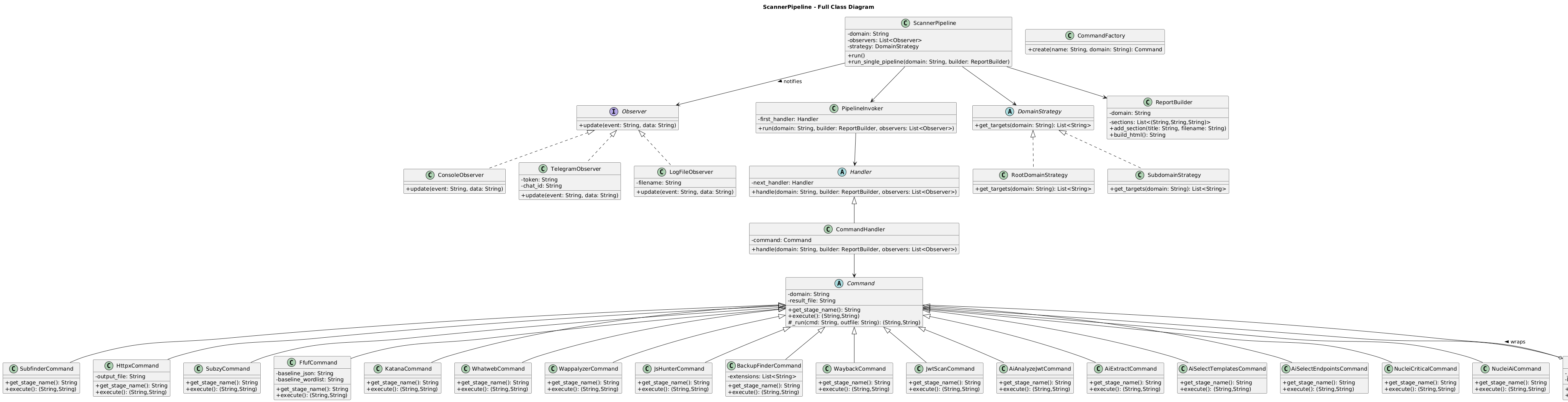
### 类图
展示了**设计模式** (Command, Observer, Builder 等) 在扫描流水线中的结构。
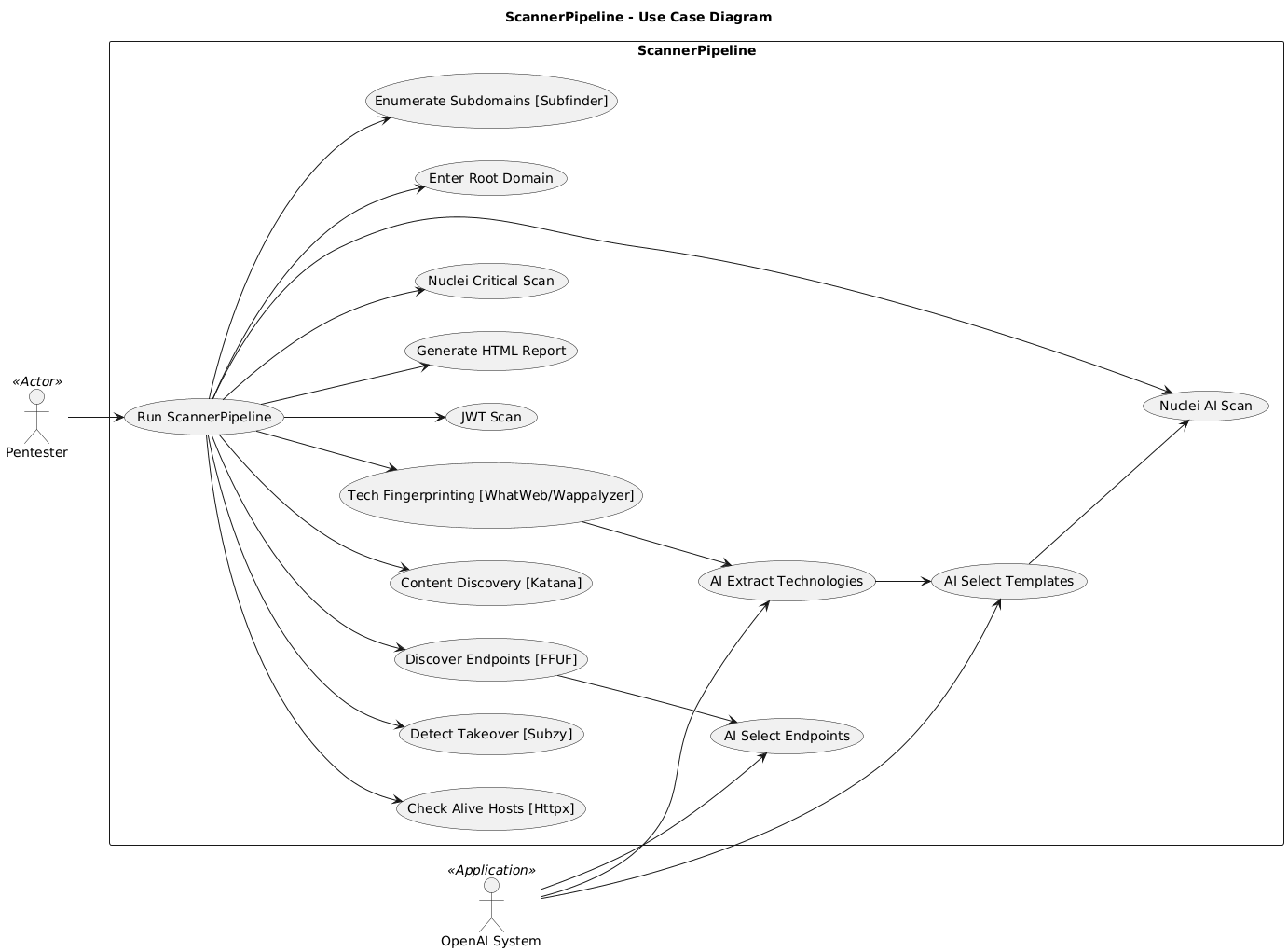
### 用例图
说明了**用户**如何与扫描系统进行**交互**。
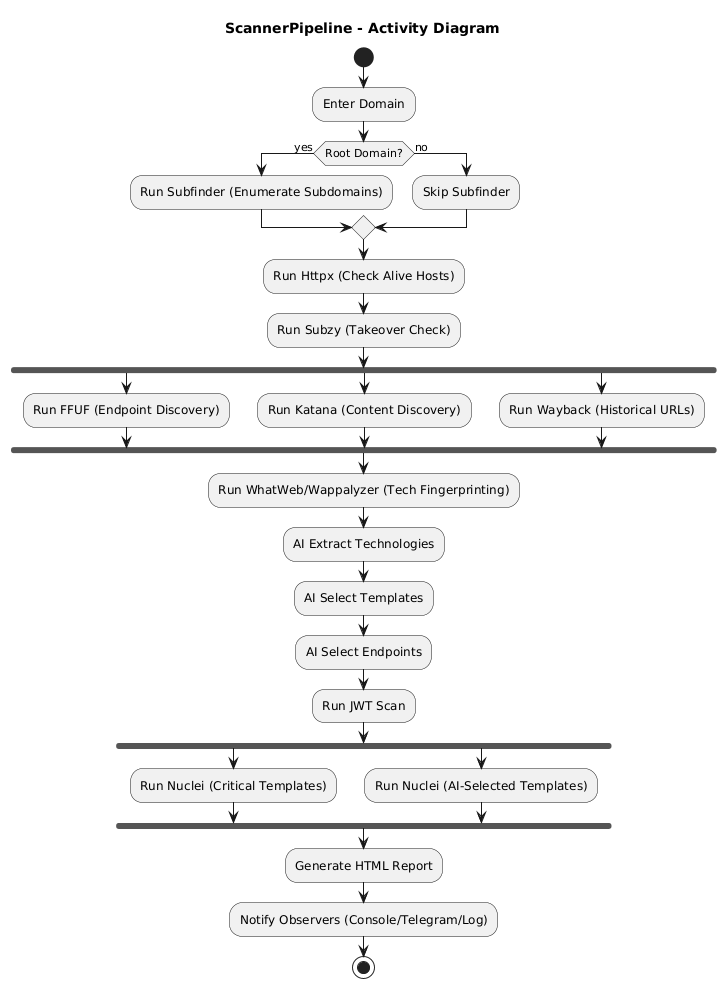
### 活动图
展示了**扫描过程的工作流** (子域名发现 → 探测 → 模糊测试 → 漏洞扫描 → 报告)。
👉 完整尺寸的 UML 图表可在 [uml](./uml_diagrams/) 中查看。
## 📂 项目结构
```
├── scanner.py # Main pipeline orchestrator
├── report-.html # Generated HTML report
├── *.json / *.txt # Intermediate scan outputs
└── pipeline.log # Logs
```
```
python3 scanner.py --domain example.com
```
- 输入:根域名 (例如 example.com) 或单个子域名 (例如 app.example.com)
- 输出:report-example.com.html
## 📊 报告示例
- 包含严重程度统计的执行摘要
- 检测到的技术栈 (经 AI 增强)
- 来自 FFUF & Wayback 的存活端点
- 漏洞详情 (每个发现对应可折叠卡片)
## 🔧 环境要求
- Python 3.10+
- 已安装工具:
`subfinder`, `httpx`, `subzy`, `ffuf`, `katana`, `whatweb`, `wappalyzer`, `waybackurls`, `nuclei`
- [OpenAI](https://platform.openai.com/) 的 API Key
安装 Python 依赖:
```
pip install -r requirements.txt
```
## 📜 许可证
MIT License – 可自由使用和修改。
## 🙌 致谢
由 **Onurcan Genç** 开发
Offensive Security 专家 | Bilkent CTIS
标签:DevSecOps, FFUF, Google, HTML报告, MISP, Nuclei, Petitpotam, Python, Web安全, 上游代理, 人工智能, 子域名挖掘, 密码管理, 数据展示, 无后门, 用户模式Hook绕过, 红队, 网络安全, 蓝队分析, 逆向工具, 配置审计, 隐私保护